UPDATE 10/17:
 www.elevenforum.com
Hello Windows Insiders, today we are releasing Windows 11 Insider Preview Build 26220.6780 (KB5067103) to the Dev Channel.
Changes in Dev Channel builds and updates are documented in two buckets: new features, improvements, and fixes that are being gradually rolled out for Insiders who have turned on the toggle to get the latest updates as they are available (via Settings > Windows Update*) and then new features, improvements, and fixes rolling out to everyone in the Dev Channel. For more information, see the Reminders section at the bottom of this blog post.
 www.elevenforum.com
We’re introducing new experiences to make it easier to modify settings in both search and recommended settings.
Recommend Settings: Now allows for faster changes by showing an inline agent action for recently modified settings.
 www.elevenforum.com
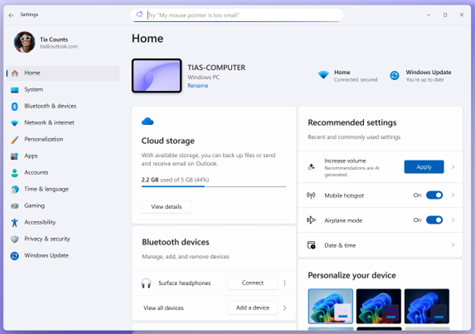
Settings Homepage with options to adjust recently modified settings under “Recommended settings”.
Search: We now show more available results in the search fly out to discover what you’re looking for and to allow you to quickly modify those settings. In cases where the settings can’t be adjusted further, a dialog lets you know why and provides an option to modify the settings as needed.
 www.elevenforum.com
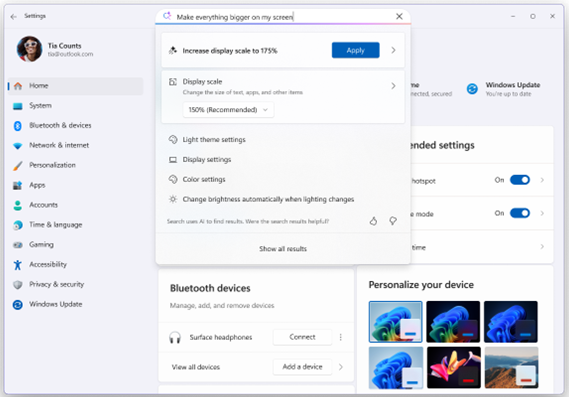
More available results are displayed within search and take action to quickly modify those settings.

When searching for “increase volume” within settings, a dialog is presented indicating that volume is already at the maximum setting and provides a slider to modify the value.
Amanda

 blogs.windows.com
Check Windows Updates
UUP Dump:
64-bit ISO download:

ARM64 ISO download:
 www.elevenforum.com
KB5067106 Windows 11 Insider Dev build 26220.6972 (25H2) - Oct. 17
Windows Insider Blog: Source: https://blogs.windows.com/windows-insider/2025/10/17/announcing-windows-11-insider-preview-build-26220-6972-dev-channel/ Check Windows Updates UUP Dump: 64-bit ISO download: https://uupdump.net/selectlang.php?id=ed620b6f-5caf-41d9-a593-05ddfad5f9fc ARM64...
www.elevenforum.com
Windows Insider Blog:
Hello Windows Insiders, today we are releasing Windows 11 Insider Preview Build 26220.6780 (KB5067103) to the Dev Channel.
Changes in Dev Channel builds and updates are documented in two buckets: new features, improvements, and fixes that are being gradually rolled out for Insiders who have turned on the toggle to get the latest updates as they are available (via Settings > Windows Update*) and then new features, improvements, and fixes rolling out to everyone in the Dev Channel. For more information, see the Reminders section at the bottom of this blog post.
Enable or Disable Get Latest Updates as soon as available in Windows 11
This tutorial will show you how to turn on or off "Get the latest updates as soon as they are available" in Windows 11. Starting with Windows 11 build 22621.1635, Microsoft added a new "Get the latest updates as soon as they are available" toggle under Settings > Windows Update. When you turn...
www.elevenforum.com
New features gradually being rolled out to the Dev Channel with toggle on*
[Agent in Settings]
The following changes and improvements are rolling out for agent in Settings on Copilot+ PCs:We’re introducing new experiences to make it easier to modify settings in both search and recommended settings.
Recommend Settings: Now allows for faster changes by showing an inline agent action for recently modified settings.
Add or Remove Settings Home page in Windows 11
This tutorial will show you how to add or remove the Home page in Settings for all users in Windows 11. Starting with Windows 11 version 22H2 KB5030310 Build 22621.2361, Microsoft is introduced a new homepage in Settings that offers you a dynamic and personalized experience. It provides an...
www.elevenforum.com
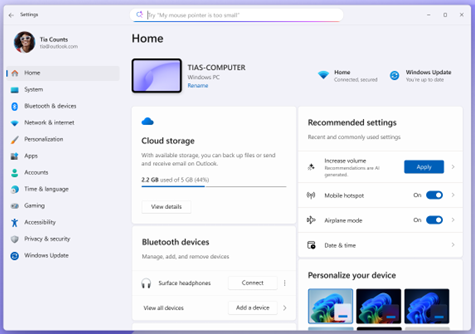
Settings Homepage with options to adjust recently modified settings under “Recommended settings”.
Search: We now show more available results in the search fly out to discover what you’re looking for and to allow you to quickly modify those settings. In cases where the settings can’t be adjusted further, a dialog lets you know why and provides an option to modify the settings as needed.
Find a Setting in Settings app in Windows 11
This tutorial will show you how to search to find a setting within the Settings app in Windows 11. Microsoft designed Settings to be beautiful, easy to use and inclusive of all your Microsoft experiences in Windows 11. Settings has left-handed navigation that persists between pages, and...
www.elevenforum.com

More available results are displayed within search and take action to quickly modify those settings.

When searching for “increase volume” within settings, a dialog is presented indicating that volume is already at the maximum setting and provides a slider to modify the value.
[Drag Tray]
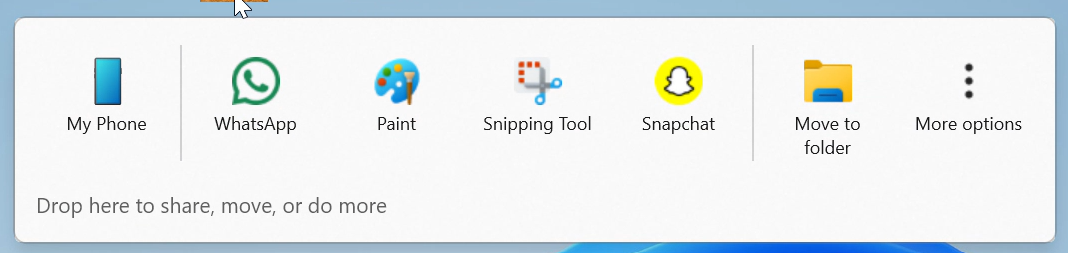
- Drag Tray now supports multi-file sharing, intelligently surfaces more relevant apps, and enables seamless file movement to a chosen folder.

Enable or Disable Drop Tray in Windows 11
This tutorial will show you how to enable or disable the Drag/Drop Tray feature for your account in Windows 11. Starting with Windows 11 build 26100.4202 (24H2) and build 22631.5413 (23H2), sharing files in Windows is getting a lot easier and quicker with the Drag Tray feature. When you start...
www.elevenforum.com
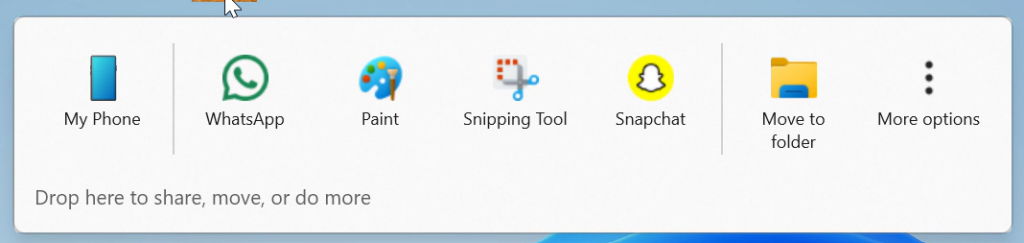
Drag Tray UI shows options to share to apps like WhatsApp, Paint, Snapchat, and movement to other folders.
Changes and Improvements gradually being rolled out to the Beta Channel with toggle on*
[Click to Do (Preview)]
The following changes and improvements are rolling out for Click to Do on Copilot+ PCs:- We’re making it easier to act on what matters. Visual cues now make key entities, such as emails, tables, and more, light up on your screen as you launch Click to Do. Click on these entities to discover powerful actions that help you work faster and smarter.
- The ability to enable Administrator Protection via Windows Security under Account protection is now available again.

Enable or Disable Administrator Protection for Admin Approval Mode in Windows 11
This tutorial will show you how to enable or disable Administrator Protection for admin approval mode elevations in Windows 11. Starting with Windows 11 build 26100.9278 (24H2), build 26200.9278 (25H2), and build 2800.3086 (26H1), Administrator protection aims to protect free-floating admin...
www.elevenforum.com
[OneDrive]
- We are rolling out the new OneDrive icon in Accounts and Homepages in Settings.
[Run]
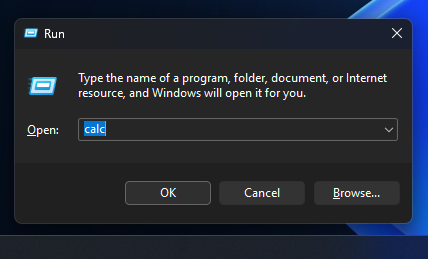
- Dark Mode: We continue to make improvements to the dark more experience in Windows 11. This week we are updating the Run dialog.
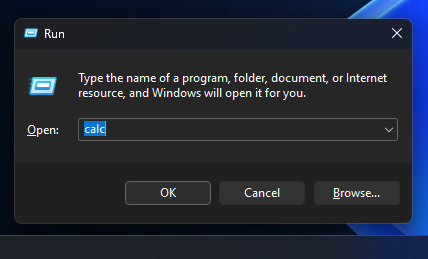
Run dialog in dark mode
Fixes gradually being rolled out to the Dev Channel with toggle on*
[Click to Do (Preview)]
The following fixes are rolling out for Click to Do on Copilot+ PCs:- Fixed an issue where launching Click to Do on your primary display via right-edge gesture would result in the swipe visuals appearing on the incorrect display.
[Taskbar & System Tray]
- Fixed an issue where pressing WIN + repeatedly wasn’t cycling through the windows of an app as expected.
[File Explorer]
- Fixed an issue in the previous flight which was causing File Explorer to crash a lot for some Insiders.
[Start menu]
- Fixed an issue which was causing Start menu to unexpectedly scroll to the top when interacting with it.
- Fixed an issue where the context menu in Start wouldn’t open with touch (just immediately dismissed).
[Search]
- Fixed an issue where searches might show unexpected text instead of the expected results and images.
[Other]
- If you were experiencing a large number of apps (including browsers) crashing in the previous flight, that should no longer repro with this update.
Known issues
[Taskbar & System Tray]
- Our new animations on taskbar previews have been turned off temporarily because they were interfering with the ability to share a window from its preview, we will note when they’re brought back.
[File Explorer]
- Copy progress might flash when clicking more or less details in dark mode version of the copy dialog.
- Scrollbar and footer are missing and showing a white block instead when text is scaled in dark mode version of the copy dialog.
[Search]
- Some Insiders are experiencing an issue where using their Xbox Controller via Bluetooth is causing their PC to bugcheck. Here is how to resolve the issue. Open Device Manager by searching for it via the search box on your taskbar. Once Device Manager is open, click on “View” and then “Devices by Driver”. Find the driver named “oemXXX.inf (XboxGameControllerDriver.inf)” where the “XXX” will be a specific number on your PC. Right-click on that driver and click “Uninstall”.
Reminders for Windows Insiders in the Dev Channel
- Windows Insiders in the Dev Channel receive updates based on Windows 11, version 25H2 via an enablement package (Build 26220.xxxx).
- Many features in the Dev Channel are rolled out using Controlled Feature Rollout technology, starting with a subset of Insiders and ramping up over time as we monitor feedback to see how they land before pushing them out to everyone in this channel.
- For Windows Insiders in the Dev Channel who want to be the first to get features gradually rolled out to you, you can turn ON the toggle to get the latest updates as they are available via Settings > Windows Update*. Over time, we will increase the rollouts of features to everyone with the toggle turned on. Should you keep this toggle off, new features will gradually be rolled out to your PC over time once they are ready.
- Features and experiences included in these builds may never get released as we try out different concepts and get feedback. Features may change over time, be removed, or replaced and never get released beyond Windows Insiders. Some of these features and experiences could show up in future Windows releases when they’re ready.
- Some features in active development we preview with Windows Insiders may not be fully localized and localization will happen over time as features are finalized. As you see issues with localization in your language, please report those issues to us via Feedback Hub.
- Please note that some accessibility features may not work with features like Recall and Click to Do while in preview with Windows Insiders.
- Because the Dev and Beta Channels represent parallel development paths from our engineers, there may be cases where features and experiences show up in the Beta Channel first.
- Check out Flight Hub for a complete look at what build is in which Insider channel.
Amanda
Source:
Announcing Windows 11 Insider Preview Build 26220.6780 (Dev Channel)
Hello Windows Insiders, today we are releasing Windows 11 Insider Preview Build 26220.6780 (KB5067103) to the Dev Channel. Changes in Dev Channel builds and updates are documented in two buckets: new features, impro
blogs.windows.com
Check Windows Updates
UUP Dump:
64-bit ISO download:
Select language for Windows 11 Insider Preview 10.0.26220.6780 (ge_release_upr) amd64
Select language for Windows 11 Insider Preview 10.0.26220.6780 (ge_release_upr) amd64 on UUP dump. UUP dump lets you download Unified Update Platform files, like Windows Insider updates, directly from Windows Update.
uupdump.net
ARM64 ISO download:
Select language for Windows 11 Insider Preview 10.0.26220.6780 (ge_release_upr) arm64
Select language for Windows 11 Insider Preview 10.0.26220.6780 (ge_release_upr) arm64 on UUP dump. UUP dump lets you download Unified Update Platform files, like Windows Insider updates, directly from Windows Update.
uupdump.net
UUP Dump - Download Windows Insider ISO
UUP Dump is the most practical and easy way to get ISO images of any Insider Windows 10 or Windows 11 version, as soon as Microsoft has released a new build. UUP Dump creates a download configuration file according to your choices, downloads necessary files directly from Microsoft servers, and...
www.elevenforum.com
Last edited: