Insider KB5067109 Windows 11 Insider Beta build 26120.6982 (24H2) - Oct. 24


UPDATE 10/31:


 Windows Insider Blog:

Hello Windows Insiders, today we are releasing Windows 11 Insider Preview Build 26120.6982 (KB5067109) to the Beta Channel for Windows Insiders on Windows 11, version 24H2.

Changes in Beta Channel builds and updates are documented in two buckets: new features/improvements, and fixes that are being gradually rolled out for Insiders who have turned on the toggle to get the latest updates as they are available (via Settings > Windows Update*) and then new features, improvements, and fixes rolling out to everyone in the Beta Channel. For more information, see the Reminders section at the bottom of this blog post.


New features gradually being rolled out to the Beta Channel with toggle on*

[Windows Search Box]

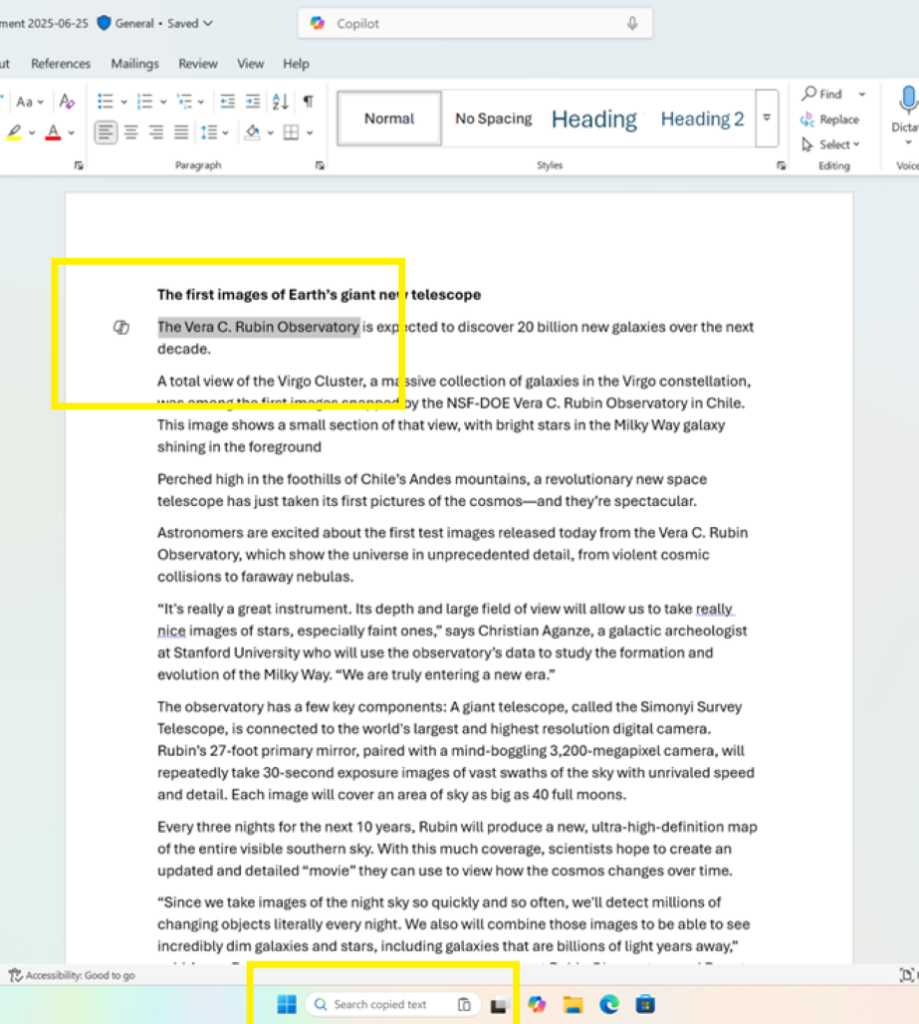
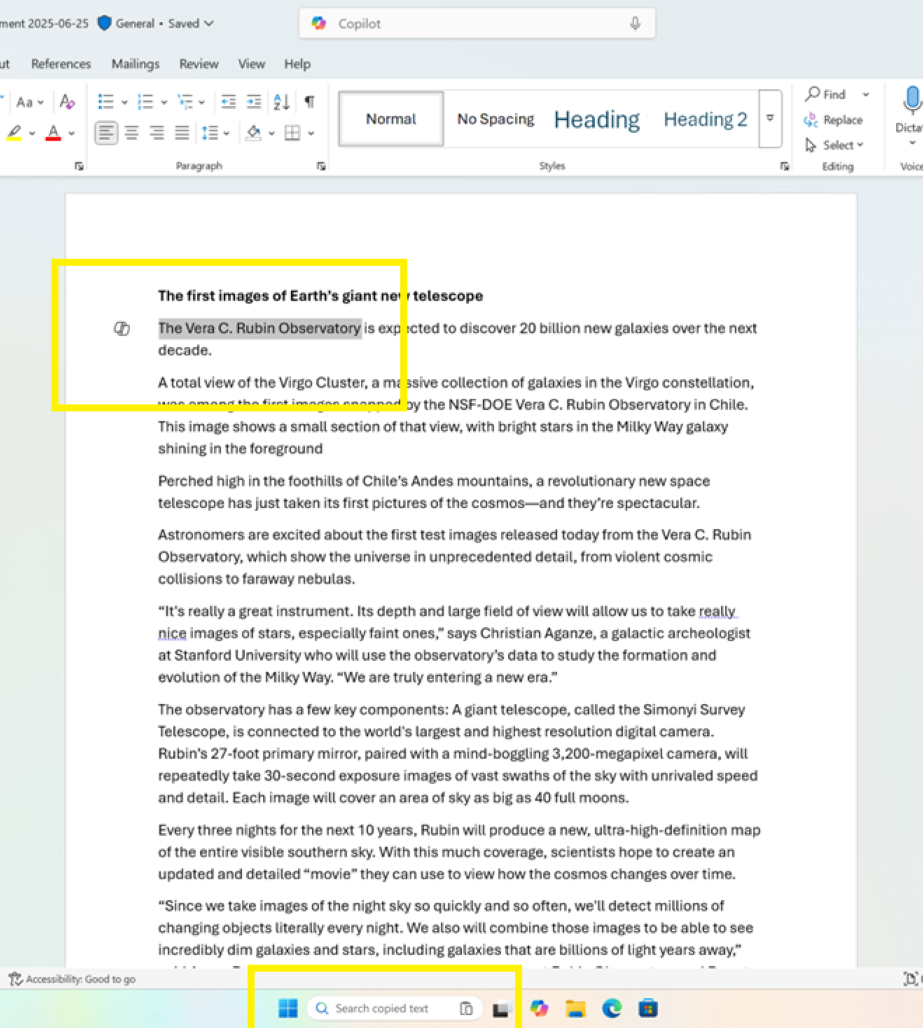
  • In this update, we are introducing Copy & Search, a feature that allows you to search the text in your clipboard with a single click. When you copy text anywhere in Windows, a paste gleam will appear in your search box. Click on this gleam and your copied text will appear in the search field, allowing you to search instantly. To get started:
    • Copy text from a document, webpage, or app.
    • After copying text, the paste gleam will appear in the search box on the taskbar.
    • Click the paste gleam to search for the copied text.

    Copying any text in Windows (in this case Office) adds a paste gleam to in the Search field on Taskbar.
    Copying any text in Windows (in this case Office) adds a paste gleam to in the Search field on Taskbar.

[Voice Typing]

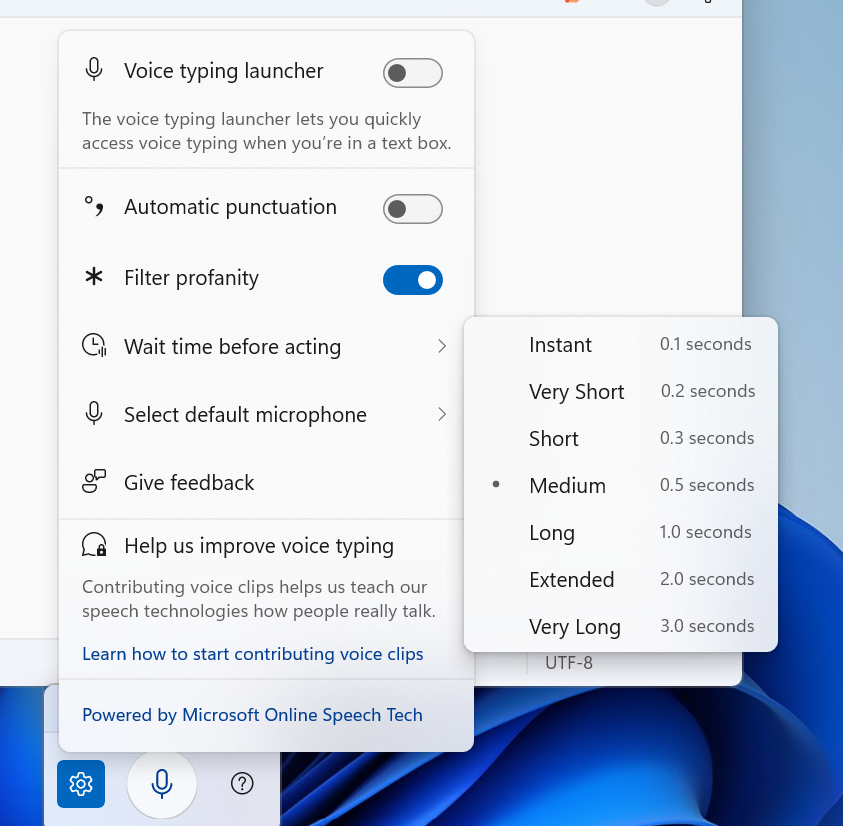
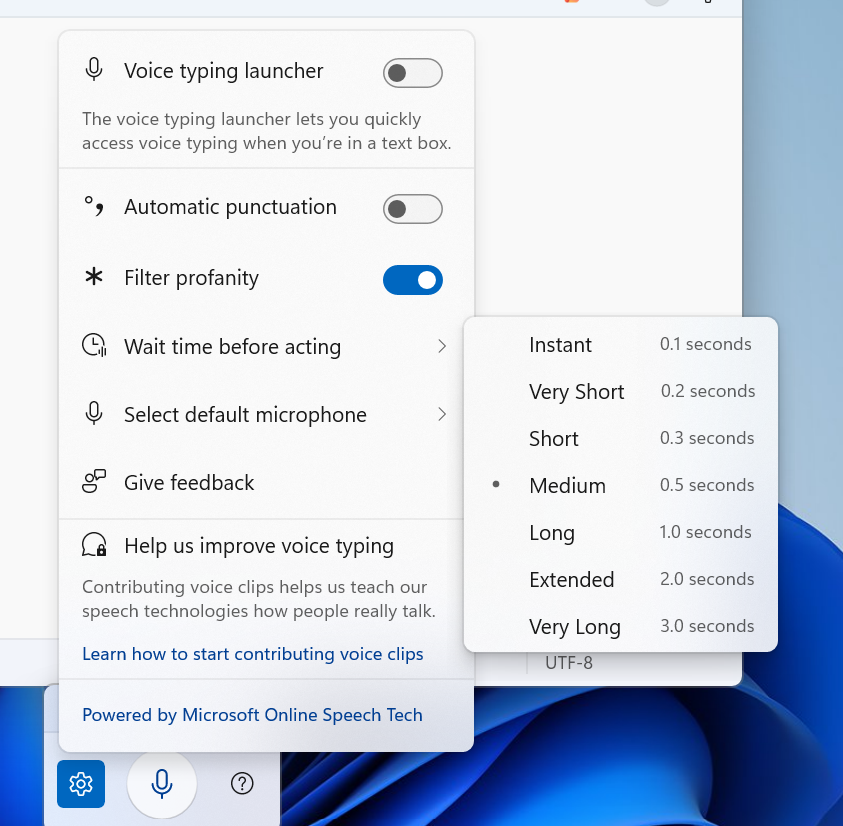
  • For customers on Copilot+ PCs, We are introducing a new ‘Wait time before acting’ setting in Voice Typing, allowing users to configure the delay before a voice command is executed. This provides greater flexibility for users with varying speech patterns, enabling more accurate recognition whether speaking slowly or quickly. (Update: This is rolling out for all desktop types, not just Copilot+ PCs.)


    Voice typing settings supports “Wait time before acting” with timing options like “Instant - 0.1 seconds” to “Very Long - 3.0 seconds”
    Voice typing settings supports “Wait time before acting” with timing options like “Instant – 0.1 seconds” to “Very Long – 3.0 seconds”

[Proactive Memory Diagnostics]

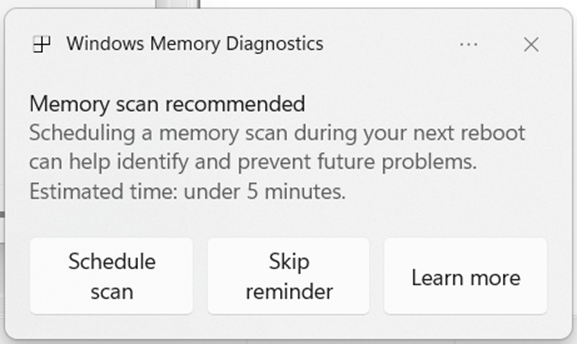
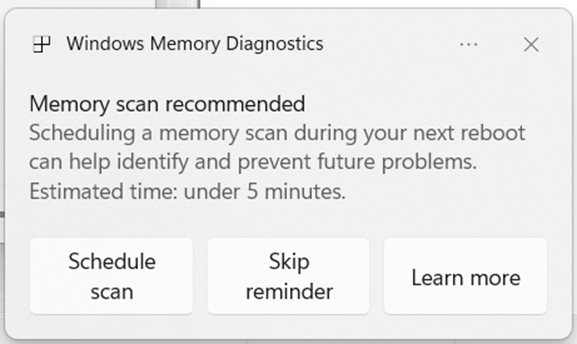
  • We’re introducing a new feature that helps improve system reliability. If your PC experiences a bugcheck (unexpected restart), you may see a notification when signing in suggesting a quick memory scan. If you choose to run it, the system will schedule a Windows Memory Diagnostic scan to run during your next reboot (taking 5 minutes or less on average) and then continue to Windows. If a memory issue is found and mitigated, you will see a notification post-reboot. Please note:
    • This early flight includes all bugcheck codes as triggers while we study the relationship between memory corruption and crashes. Future builds will refine targeting.
    • Currently this is experience not supported on Arm64 devices, systems with Administrator Protection, or BitLocker without Secure Boot.

    Windows Memory Diagnostics dialog recommending a scan during next reboot.
    Windows Memory Diagnostics dialog recommending a scan during next reboot.

Changes and Improvements gradually being rolled out to the Beta Channel with toggle on*

[Settings]

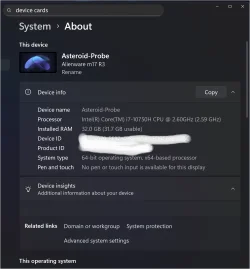
  • Device Cards in Settings has been updated to provide more clarity on information about your device for better readability and streamlined navigation for improved user experience.
  • In Settings About, we’ve enhanced it to deliver a more structured and intuitive experience, empowering users with device insights, and seamless navigation to related device components – including quick access to Storage settings.
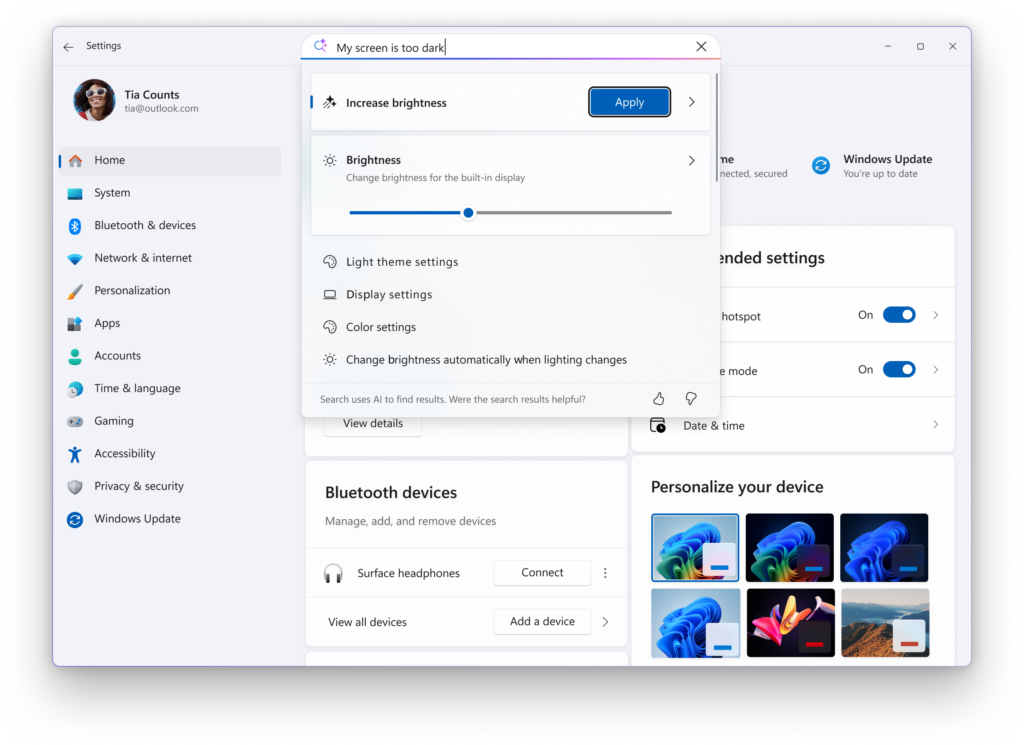
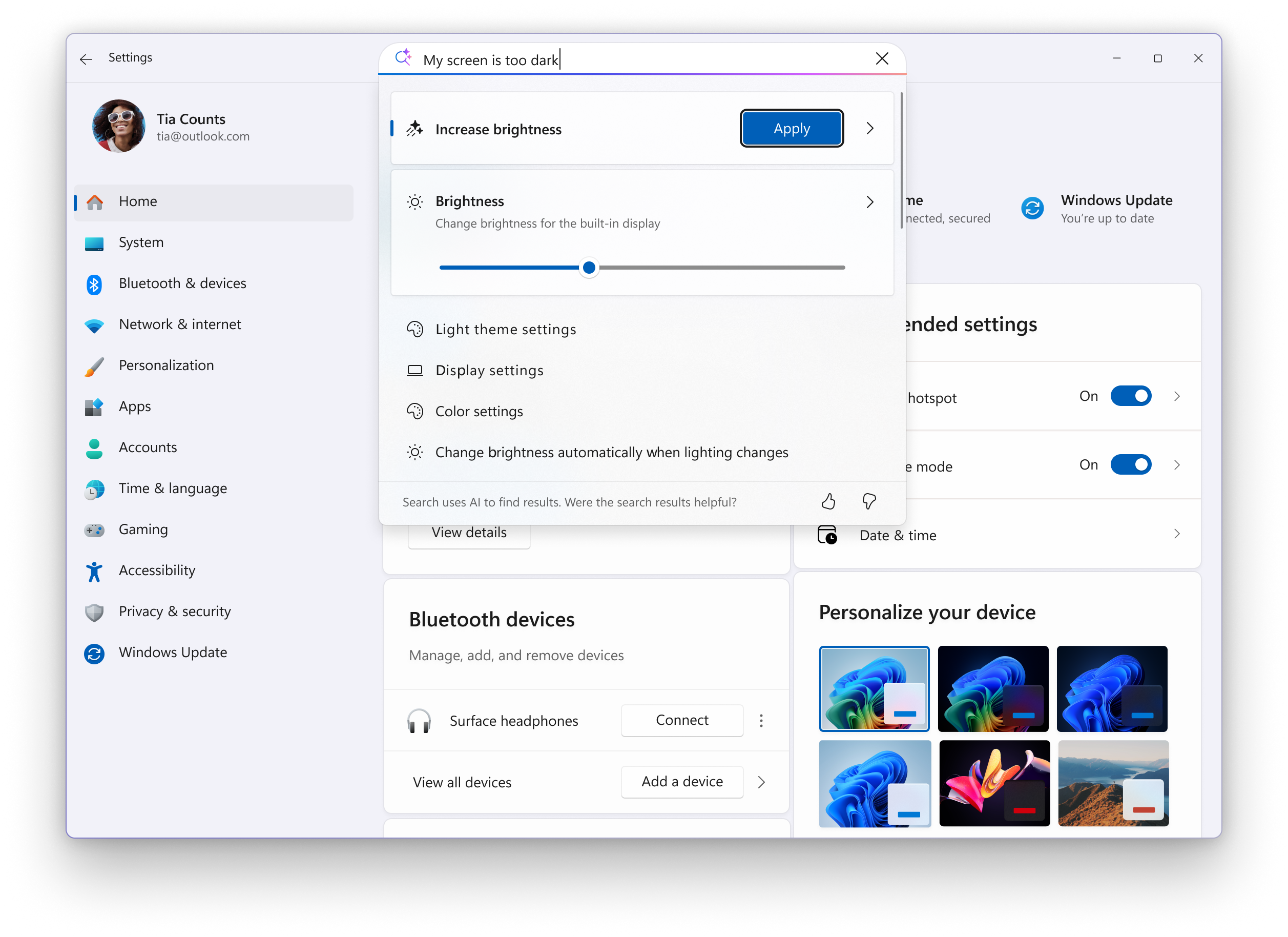
  • Search: You can now scroll through all search results directly in the flyout, without needing to open a separate results page.


    A scrollbar is added to Settings search results flyout to show all results.
    A scrollbar is added to Settings search results flyout to show all results.

[Click to Do]

  • We’re helping users discover more actions in Click to Do!
    • A helpful hint now appears as you launch Click to Do, assisting unfamiliar users in discovering powerful actions that help you work quickly and intuitively.
    • Known issue: When there are multiple monitors, the hint appears on every display, and closing one of them does not dismiss the others.

[Start menu]

  • Windows Insiders with the larger Start menu flyout will now notice that the Windows Search flyout now matches in size. This update aims to create a smoother transition when searching. The feature relies on the updated Start menu rolled out to WIP earlier this year.

[File Explorer]

[Taskbar]

[Windows Studio Effects]

  • Windows Studio Effects now offers support on additional, alternative, cameras as a part of a gradual rollout to Windows Insiders on Snapdragon-powered and AMD Copilot+ PCs, previously only available to Intel®-powered Copilot+ PCs.

Fixes gradually being rolled out to the Beta Channel with toggle on*

[General]

  • Fixed an issue causing text actions that use Phi Silica in Click to Do and Recall to not work correctly on the previous build.

[Taskbar]

  • Fixed an issue where hovering over the taskbar with a pen was making the taskbar prematurely hide for some Insiders recently.
  • Fixed an issue where voice access wasn’t working correctly when attempting to interact with the taskbar (calling out a number wasn’t invoking that item).

[Input]

  • Fixed an issue where if you used the touch keyboard to input your password on the login screen, it might not disappear after logging into your PC.

[File Explorer]

  • Fixed an issue where the search icon in File Explorer might infinitely loop in an animation recently.

[Widgets]

  • If you’ve been experiencing an issue recently with widgets not being able to log in, that should be resolved now.

[Administrator Protection]

  • Fixed an issue when running an app as administrator where the text in the UAC prompt might be truncated.

[Task Manager]

  • Fixed an issue which was causing some apps and their processes to not be grouped correctly.

[Other]

  • Updated the buttons to have rounded corners when you’re shutting down your PC and are prompted if you want to shut down anyway despite running apps.

Known Issues

[General]

  • [NEW] We’re investigating an underlying issue leading to keyboards or other USB devices not working for a small number of Insiders after the latest flights.

[Taskbar & System Tray]

  • We’re investigating an issue which is causing the Start menu to not open for some Insiders on click, although it will open if you press the Windows key. It’s believed this issue may also potentially impact the notification center (which you can open with WIN + N).
  • [NEW] We’re investigating an issue where for some Insiders apps aren’t showing in the system tray when they should be.

[File Explorer]

  • Copy progress might flash when clicking more or less details in dark mode version of the copy dialog.
  • Scrollbar and footer are missing and showing a white block instead when text is scaled in dark mode version of the copy dialog.

Reminders for Windows Insiders in the Beta Channel

  • Windows Insiders in the Beta Channel on Windows 11, version 24H2 will receive updates based on Windows 11, version 24H2 via an enablement package (Build 26120.xxxx).
  • Updates delivered to the Beta Channel are in a format that offers a preview of enhancements to servicing technology on Windows 11, version 24H2. To learn more, see Introducing Windows 11 checkpoint cumulative updates | Windows IT Pro Blog.
  • Many features in the Beta Channel are rolled out using Controlled Feature Rollout technology, starting with a subset of Insiders and ramping up over time as we monitor feedback to see how they land before pushing them out to everyone in this channel.
  • For Windows Insiders in the Beta Channel who want to be the first to get features gradually rolled out to you, you can turn ON the toggle to get the latest updates as they are available via Settings > Windows Update*. Over time, we will increase the rollouts of features to everyone with the toggle turned on. Should you keep this toggle off, new features will gradually be rolled out to your PC over time once they are ready.
  • Features and experiences included in these builds may never get released as we try out different concepts and get feedback. Features may change over time, be removed, or replaced and never get released beyond Windows Insiders. Some of these features and experiences could show up in future Windows releases when they’re ready.
  • Some features in active development we preview with Windows Insiders may not be fully localized and localization will happen over time as features are finalized. As you see issues with localization in your language, please report those issues to us via Feedback Hub.
  • Please note that some accessibility features may not work with features like Recall and Click to Do while in preview with Windows Insiders.
  • Because the Dev and Beta Channels represent parallel development paths from our engineers, there may be cases where features and experiences show up in the Beta Channel first.
  • Check out Flight Hub for a complete look at what build is in which Insider channel.
Thanks,
Amanda


 Source:


Check Windows Updates


UUP Dump:

64-bit ISO download:

ARM64 ISO download:

 
Last edited:

Interesting but probably not necessary, Windows Insiders with the larger Start menu flyout will now notice that the Windows Search flyout now matches in size.
 

My Computers

System One System Two

  • OS
    Windows 11 25H2
    Computer type
    Laptop
    Manufacturer/Model
    Alienware 18 Area-51
    CPU
    Intel Core Ultra 9 275HX (24-Core)
    Motherboard
    Alienware
    Memory
    64GB DDR5 6400MT/s
    Graphics Card(s)
    NVIDIA GeForce RTX 5080 and Intel UHD Graphics
    Sound Card
    Onboard, Realtek high-performance Audio chips (ALC3329 & ALC1708))
    Monitor(s) Displays
    300HZ 18-inch QHD 500 nit Comfort View+
    Screen Resolution
    2560 x 1600
    Hard Drives
    2TB NVMe M.2 PCIe Gen 5 SSD
    Case
    Magnesium Alloy
    Cooling
    Advanced Cryo-Tech Quad-Fan Cooling system & large vapor chamber
    Keyboard
    Cherry MX ultra low profile mechanical keyboard with per key AlienFX RGB lighting
    Mouse
    Logitech MX Master 4
    Browser
    Vivaldi (main), Firefox, Chrome, Edge
    Antivirus
    MS Defender and Malwarebytes Free
  • Operating System
    Windows 11 25H2
    Computer type
    Laptop
    Manufacturer/Model
    Microsoft Surface Laptop 7
    CPU
    Qualcomm Snapdragon X Elite (12 Core) ARM based CPU
    Motherboard
    Microsoft Corp.
    Memory
    16GB LPDDR5
    Graphics card(s)
    Qualcomm Adreno X1-85
    Sound Card
    Omnisonic speakers with Dolby Atmos spatial sound
    Monitor(s) Displays
    120 Hz 13.8-inch 600 nit PixelSense Flow touchscreen
    Screen Resolution
    2304x1536
    Hard Drives
    1TB NVMe Gen 4 SSD
    Case
    Anodized Aluminum
    Cooling
    Traditional active cooling fan system
    Keyboard
    Mechanical QWERTY, backlit when in use
    Mouse
    Logitech MX Master 4 and Surface Arc Mouse
    Browser
    Vivaldi (main), Firefox, Chrome, Edge
    Antivirus
    MS Defender and Malwarebytes Free
Device Cards in Settings has been updated to provide more clarity on information about your device for better readability and streamlined navigation for improved user experience.
Interesting, the device cards have now completely disappeared on this machine for me.
 

Attachments

  • Screenshot 2025-10-24 145359.webp
    Screenshot 2025-10-24 145359.webp
    93.1 KB · Views: 1

My Computers

System One System Two

  • OS
    Windows 11 25H2
    Computer type
    Laptop
    Manufacturer/Model
    Alienware 18 Area-51
    CPU
    Intel Core Ultra 9 275HX (24-Core)
    Motherboard
    Alienware
    Memory
    64GB DDR5 6400MT/s
    Graphics Card(s)
    NVIDIA GeForce RTX 5080 and Intel UHD Graphics
    Sound Card
    Onboard, Realtek high-performance Audio chips (ALC3329 & ALC1708))
    Monitor(s) Displays
    300HZ 18-inch QHD 500 nit Comfort View+
    Screen Resolution
    2560 x 1600
    Hard Drives
    2TB NVMe M.2 PCIe Gen 5 SSD
    Case
    Magnesium Alloy
    Cooling
    Advanced Cryo-Tech Quad-Fan Cooling system & large vapor chamber
    Keyboard
    Cherry MX ultra low profile mechanical keyboard with per key AlienFX RGB lighting
    Mouse
    Logitech MX Master 4
    Browser
    Vivaldi (main), Firefox, Chrome, Edge
    Antivirus
    MS Defender and Malwarebytes Free
  • Operating System
    Windows 11 25H2
    Computer type
    Laptop
    Manufacturer/Model
    Microsoft Surface Laptop 7
    CPU
    Qualcomm Snapdragon X Elite (12 Core) ARM based CPU
    Motherboard
    Microsoft Corp.
    Memory
    16GB LPDDR5
    Graphics card(s)
    Qualcomm Adreno X1-85
    Sound Card
    Omnisonic speakers with Dolby Atmos spatial sound
    Monitor(s) Displays
    120 Hz 13.8-inch 600 nit PixelSense Flow touchscreen
    Screen Resolution
    2304x1536
    Hard Drives
    1TB NVMe Gen 4 SSD
    Case
    Anodized Aluminum
    Cooling
    Traditional active cooling fan system
    Keyboard
    Mechanical QWERTY, backlit when in use
    Mouse
    Logitech MX Master 4 and Surface Arc Mouse
    Browser
    Vivaldi (main), Firefox, Chrome, Edge
    Antivirus
    MS Defender and Malwarebytes Free
More incorrect info in the weekly build blog posts. Voice Typing's "wait time before acting" setting is not a Copilot+ feature, and is available to all devices. If you want to get it in .6982, enable feature ID 58970402.

(C2D HW req check not met dialog used for proof.)


My Computers

System One System Two

  • OS
    Windows 11 Pro for Workstations
    Computer type
    PC/Desktop
    Manufacturer/Model
    Custom self build
    CPU
    Intel i7-8700K 5 GHz
    Motherboard
    ASUS ROG Maximus XI Formula Z390
    Memory
    64 GB (4x16GB) G.SKILL TridentZ RGB DDR4 3600 MHz (F4-3600C18D-32GTZR)
    Graphics Card(s)
    ASUS ROG-STRIX-GTX1080TI-O11G-GAMING (11GB GDDR5X)
    Sound Card
    Integrated Digital Audio (S/PDIF)
    Monitor(s) Displays
    2 x Samsung Odyssey G75 27"
    Screen Resolution
    2560x1440
    Hard Drives
    1TB Samsung 990 PRO M.2,
    4TB Samsung 990 PRO M.2,
    TerraMaster F8 SSD Plus NAS
    PSU
    Seasonic Prime Titanium 850W
    Case
    Thermaltake Core P3 wall mounted
    Cooling
    Corsair Hydro H115i
    Keyboard
    Amazon Basics Wired Full Keyboard MD005
    Mouse
    Logitech MX Master 4
    Internet Speed
    2 Gbps Download and 100 Mbps Upload
    Browser
    Chrome and Edge
    Antivirus
    Microsoft Defender
    Other Info
    Logitech Z625 speaker system,
    Logitech BRIO 4K Pro webcam,
    HP Color LaserJet Pro MFP M477fdn,
    CyberPower CP1500PFCLCD
    Galaxy S23 Plus phone
  • Operating System
    Windows 11 Pro
    Computer type
    Laptop
    Manufacturer/Model
    Surface Laptop 7 Copilot+ PC
    CPU
    Snapdragon X Elite (12 core) 3.42 GHz
    Memory
    16 GB LPDDR5x-7467 MHz
    Monitor(s) Displays
    15" HDR
    Screen Resolution
    2496 x 1664
    Hard Drives
    1 TB SSD
    Internet Speed
    Wi-Fi 7 and Bluetooth 5.4
    Browser
    Chrome and Edge
    Antivirus
    Microsoft Defender
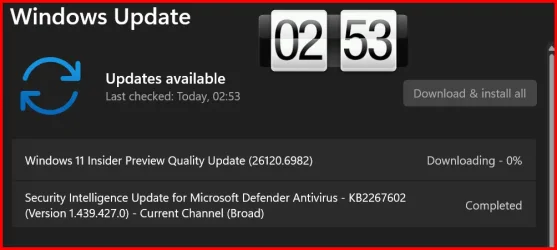
Downloading and installing.

1761347815600.webp

1761348011932.webp


1761348558625.webp

Done:

Edition Windows 11 Pro
Version 24H2
Installed on ‎10/‎6/‎2025
OS build 26120.6982
Experience Windows Feature Experience Pack 1000.26100.266.0
 
Last edited:

My Computer

System One

  • OS
    Windows 11 Pro 25H2
    Computer type
    PC/Desktop
    Manufacturer/Model
    Dell XPS 8930
    CPU
    Intel I9-9900K
    Memory
    64GB
    Graphics Card(s)
    NVIDIA RTX 2060
    Sound Card
    NVIDIA High Definition Audio
    Monitor(s) Displays
    4k Samsung
    Screen Resolution
    3840 x 2160
    Hard Drives
    512GB NVMe, ADATA SU 800, 2TB HDD
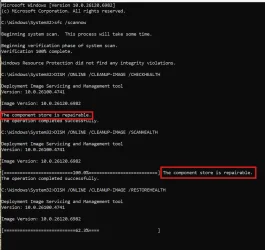
Same issue as Dev.
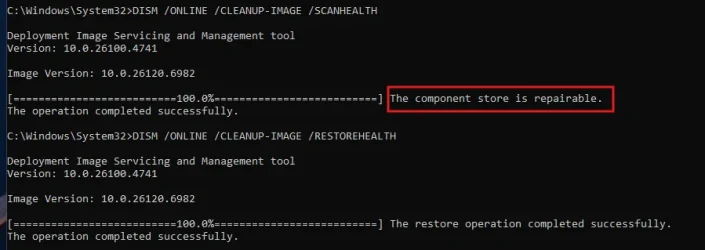
Now waiting for /RESTOREHEALTH to fix the repairable components.

1761349210069.webp

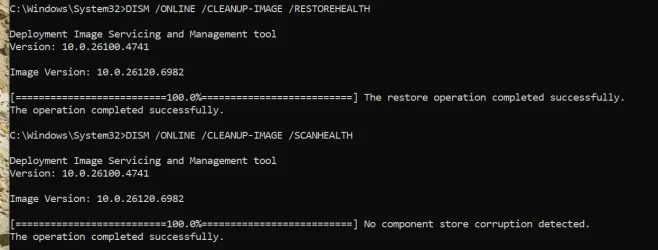
Completed. 👍
1761350160277.webp
 
Last edited:

My Computer

System One

  • OS
    Windows 11 Pro 25H2
    Computer type
    PC/Desktop
    Manufacturer/Model
    Dell XPS 8930
    CPU
    Intel I9-9900K
    Memory
    64GB
    Graphics Card(s)
    NVIDIA RTX 2060
    Sound Card
    NVIDIA High Definition Audio
    Monitor(s) Displays
    4k Samsung
    Screen Resolution
    3840 x 2160
    Hard Drives
    512GB NVMe, ADATA SU 800, 2TB HDD

My Computers

System One System Two

  • OS
    Windows 11 25H2
    Computer type
    Laptop
    Manufacturer/Model
    Alienware 18 Area-51
    CPU
    Intel Core Ultra 9 275HX (24-Core)
    Motherboard
    Alienware
    Memory
    64GB DDR5 6400MT/s
    Graphics Card(s)
    NVIDIA GeForce RTX 5080 and Intel UHD Graphics
    Sound Card
    Onboard, Realtek high-performance Audio chips (ALC3329 & ALC1708))
    Monitor(s) Displays
    300HZ 18-inch QHD 500 nit Comfort View+
    Screen Resolution
    2560 x 1600
    Hard Drives
    2TB NVMe M.2 PCIe Gen 5 SSD
    Case
    Magnesium Alloy
    Cooling
    Advanced Cryo-Tech Quad-Fan Cooling system & large vapor chamber
    Keyboard
    Cherry MX ultra low profile mechanical keyboard with per key AlienFX RGB lighting
    Mouse
    Logitech MX Master 4
    Browser
    Vivaldi (main), Firefox, Chrome, Edge
    Antivirus
    MS Defender and Malwarebytes Free
  • Operating System
    Windows 11 25H2
    Computer type
    Laptop
    Manufacturer/Model
    Microsoft Surface Laptop 7
    CPU
    Qualcomm Snapdragon X Elite (12 Core) ARM based CPU
    Motherboard
    Microsoft Corp.
    Memory
    16GB LPDDR5
    Graphics card(s)
    Qualcomm Adreno X1-85
    Sound Card
    Omnisonic speakers with Dolby Atmos spatial sound
    Monitor(s) Displays
    120 Hz 13.8-inch 600 nit PixelSense Flow touchscreen
    Screen Resolution
    2304x1536
    Hard Drives
    1TB NVMe Gen 4 SSD
    Case
    Anodized Aluminum
    Cooling
    Traditional active cooling fan system
    Keyboard
    Mechanical QWERTY, backlit when in use
    Mouse
    Logitech MX Master 4 and Surface Arc Mouse
    Browser
    Vivaldi (main), Firefox, Chrome, Edge
    Antivirus
    MS Defender and Malwarebytes Free
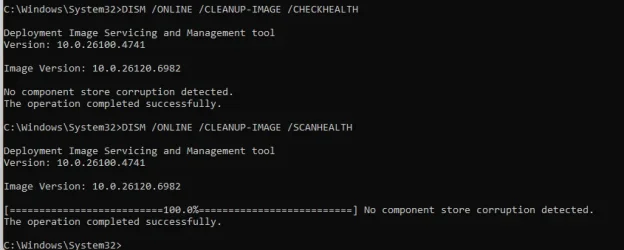
My scans were clean but the supposed new Device Cards vanished.
2 machines so far had the same issues in Dev and Beta and found repairable components that needed to be fixed. 😵‍💫🤷‍♂️
Big waste of time. 🤬
/RESTOREHEALTH takes quite a long time to fix the repairable components, at least it was successful on first 3 cases. 😉
Still waiting for the 4th one to complete. 🤞

Edit:
Completed fine on the 4th case too. 👍

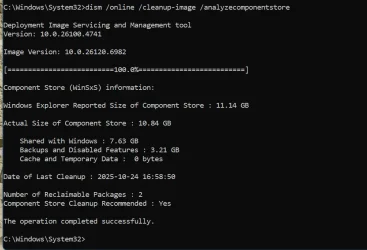
On all these machines I left the 2 Reclaimable to avoid other surprises. 😉
1761350614791.webp
 
Last edited:

My Computer

System One

  • OS
    Windows 11 Pro 25H2
    Computer type
    PC/Desktop
    Manufacturer/Model
    Dell XPS 8930
    CPU
    Intel I9-9900K
    Memory
    64GB
    Graphics Card(s)
    NVIDIA RTX 2060
    Sound Card
    NVIDIA High Definition Audio
    Monitor(s) Displays
    4k Samsung
    Screen Resolution
    3840 x 2160
    Hard Drives
    512GB NVMe, ADATA SU 800, 2TB HDD

My Computer

System One

  • OS
    Windows 11 Pro 25H2
    Computer type
    PC/Desktop
    Manufacturer/Model
    Dell XPS 8930
    CPU
    Intel I9-9900K
    Memory
    64GB
    Graphics Card(s)
    NVIDIA RTX 2060
    Sound Card
    NVIDIA High Definition Audio
    Monitor(s) Displays
    4k Samsung
    Screen Resolution
    3840 x 2160
    Hard Drives
    512GB NVMe, ADATA SU 800, 2TB HDD
1761353670100.webp
 

My Computer

System One

  • OS
    W11 Pro and Insider Dev
    Computer type
    PC/Desktop
    Manufacturer/Model
    Home brewed
    CPU
    AMD Ryzen 9 7900x
    Motherboard
    ASROCK b650 PRO RS
    Memory
    2x16GB Kingston 6000MHz, Cl 32 @ 6200MHz Cl30
    Graphics Card(s)
    Gigabyte Rx 6600XT Gaming OC 8G Pro
    Sound Card
    MB, Realtek Ac1220p
    Monitor(s) Displays
    3 x 27"
    Screen Resolution
    1080p
    Hard Drives
    Kingston KC3000. 1TBSamsung 970 evo Plus 500GB, Crucial P1 NVMe 1TB, Lexar NVMe 2 TB, Silicon Power M.2 SATA 500GB
    PSU
    Seasonic 750W
    Case
    Custom Raidmax
    Cooling
    Arctic Liquid Freezer III 360mm
    Internet Speed
    20/19 mbps
I can't figure out if this is the current build or something else going on with my computer, but on a 5900x with a 3080 XC3 and 64gb of Ram, I'm struggling with some serious "lag" issues in and around windows features, scrolling the task manager is awful for example, and explorer is a whole mess, too, with delays and lags, my latency seems fine with just the usual GPU spikes (thanks Nvidia) but the other stuff is a real PITA, but I haven't seen any reports.

Anyone else in this same boat?
 

My Computer

System One

  • OS
    Windows 11
    Computer type
    PC/Desktop
    Manufacturer/Model
    EliteDesk 800 G3
Last one of my Beta Updates to 26120.6082 is the most painful.
After finding repairable with /SCANHEALTH like the other ones, it is now taking an eternity to complete /RESTOREHEALTH.
Still hoping it completes. 🤞

Finally completed.
1761368797723.webp


1761368913761.webp
 
Last edited:

My Computer

System One

  • OS
    Windows 11 Pro 25H2
    Computer type
    PC/Desktop
    Manufacturer/Model
    Dell XPS 8930
    CPU
    Intel I9-9900K
    Memory
    64GB
    Graphics Card(s)
    NVIDIA RTX 2060
    Sound Card
    NVIDIA High Definition Audio
    Monitor(s) Displays
    4k Samsung
    Screen Resolution
    3840 x 2160
    Hard Drives
    512GB NVMe, ADATA SU 800, 2TB HDD
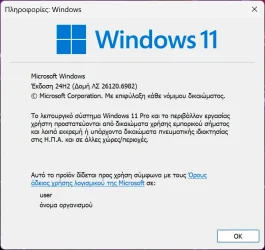
Got it:

2025-10-25 08_11_31-Πληροφορίες_ Windows.webp
 

My Computer

System One

  • OS
    Windows 10
    Computer type
    Laptop
    Manufacturer/Model
    Lenovo Yoga 7 Pro
    CPU
    Ultra Core Ultra 9 185H
    Motherboard
    Lenovo
    Memory
    32GB
    Graphics Card(s)
    Intel Arc

My Computer

System One

  • OS
    Win 11 Pro 25H2 Beta 26220.8680
    Computer type
    PC/Desktop
    Manufacturer/Model
    Asus MiniPC PN51-E1
    CPU
    AMD Ryzen 7 5700U
    Motherboard
    Asus PN51-E1 - Bios Version 0505
    Memory
    Crucial 64GB DDR4 SDRAM PC4-25600
    Graphics Card(s)
    AMD Radeon Vega Graphics 1.80 GHz - Adrenalin Edition 23.9.2
    Sound Card
    USB to Sound Blaster Live (24bit External) to Firestone DAC to Event Studio Monitors
    Monitor(s) Displays
    Gigabyte 27" 165 hertz
    Screen Resolution
    2560 x 1440
    Hard Drives
    Samsung SSD 970 EVO Plus 2TB PCIE NVME
    PSU
    65 Watt
    Case
    Asus Mini
    Cooling
    Air
    Keyboard
    Logitech K810
    Mouse
    Logitech MX Master 2S
    Internet Speed
    Telstra Modem Wifi - NBN 50/18
    Browser
    Firefox
    Antivirus
    Microsoft
    Other Info
    This replaced my Linux Notebook. I've used Windows since V2, tried various Linux distros but Windows continues to win for me.

My Computer

System One

  • OS
    Windows 11 Pro 25H2
    Computer type
    PC/Desktop
    Manufacturer/Model
    Dell XPS 8930
    CPU
    Intel I9-9900K
    Memory
    64GB
    Graphics Card(s)
    NVIDIA RTX 2060
    Sound Card
    NVIDIA High Definition Audio
    Monitor(s) Displays
    4k Samsung
    Screen Resolution
    3840 x 2160
    Hard Drives
    512GB NVMe, ADATA SU 800, 2TB HDD
Downloading beta now!
 

My Computers

System One System Two

  • OS
    windows 10 & 11
    Computer type
    PC/Desktop
    Manufacturer/Model
    iBuyPower (special build)
    CPU
    AMD Ryzen 7X
    Motherboard
    Asus Prime x370 Pro
    Memory
    64Gb
    Graphics Card(s)
    Radeon RX 480 8Gb
    Monitor(s) Displays
    Samsung UHD 27 inch
    Screen Resolution
    UHD
    Hard Drives
    3 Samsung 1 TB SSD each; 1 Samsung PCIe M.2 at 2 TB
  • Operating System
    Windows 11 pro
    Computer type
    PC/Desktop
    Manufacturer/Model
    IBuyPower
    CPU
    AMD 9 5900X
    Motherboard
    Asus x570 ROG Crosshair VIII Dark Hero WI-FI 6E ARGB
    Memory
    32 Gb
    Graphics card(s)
    Nvidia GeForce RTX 3080 Ti 12 GB GDDR6X
    Sound Card
    3D PREMIUM surround sound onboard
    Monitor(s) Displays
    Samsung 32 inch UHD curved monitor
    Screen Resolution
    UHD
    Hard Drives
    Samsung 980 pro 2 tb gen 4 NVMe ssd
    PSU
    850 watt consair RM850X
    Case
    Lian Li LANCOOL ONE tempered glass RGB gaming case
    Cooling
    DEEPCOOL GAMERSTORM RGB 240 mm CASTLE 240EX liquid cooler
    Keyboard
    Ares m.2 gaming keyboard
    Mouse
    Ares m.2 gaming optical mouse
    Internet Speed
    450
    Browser
    Firefox / Edge
    Antivirus
    Windows defender
    Other Info
    With all this gaming rig I am not a gamer!
To enable the updated taskbar autohide animation in recent Dev/Beta builds, run vivetool /enable /id:41356296. If that doesn't work then you know the drill, make sure you have 48433719 enabled.


My Computers

System One System Two

  • OS
    Windows 11 Pro for Workstations
    Computer type
    PC/Desktop
    Manufacturer/Model
    Custom self build
    CPU
    Intel i7-8700K 5 GHz
    Motherboard
    ASUS ROG Maximus XI Formula Z390
    Memory
    64 GB (4x16GB) G.SKILL TridentZ RGB DDR4 3600 MHz (F4-3600C18D-32GTZR)
    Graphics Card(s)
    ASUS ROG-STRIX-GTX1080TI-O11G-GAMING (11GB GDDR5X)
    Sound Card
    Integrated Digital Audio (S/PDIF)
    Monitor(s) Displays
    2 x Samsung Odyssey G75 27"
    Screen Resolution
    2560x1440
    Hard Drives
    1TB Samsung 990 PRO M.2,
    4TB Samsung 990 PRO M.2,
    TerraMaster F8 SSD Plus NAS
    PSU
    Seasonic Prime Titanium 850W
    Case
    Thermaltake Core P3 wall mounted
    Cooling
    Corsair Hydro H115i
    Keyboard
    Amazon Basics Wired Full Keyboard MD005
    Mouse
    Logitech MX Master 4
    Internet Speed
    2 Gbps Download and 100 Mbps Upload
    Browser
    Chrome and Edge
    Antivirus
    Microsoft Defender
    Other Info
    Logitech Z625 speaker system,
    Logitech BRIO 4K Pro webcam,
    HP Color LaserJet Pro MFP M477fdn,
    CyberPower CP1500PFCLCD
    Galaxy S23 Plus phone
  • Operating System
    Windows 11 Pro
    Computer type
    Laptop
    Manufacturer/Model
    Surface Laptop 7 Copilot+ PC
    CPU
    Snapdragon X Elite (12 core) 3.42 GHz
    Memory
    16 GB LPDDR5x-7467 MHz
    Monitor(s) Displays
    15" HDR
    Screen Resolution
    2496 x 1664
    Hard Drives
    1 TB SSD
    Internet Speed
    Wi-Fi 7 and Bluetooth 5.4
    Browser
    Chrome and Edge
    Antivirus
    Microsoft Defender
To enable the updated taskbar autohide animation in recent Dev/Beta builds, run vivetool /enable /id:41356296. If that doesn't work then you know the drill, make sure you have 48433719 enabled.


It's look like not new. I already have animation in 26200.6901.
 

My Computer

System One

  • OS
    26200.8037
    Computer type
    PC/Desktop
    CPU
    i5-11400F
    Motherboard
    Gigabyte
    Memory
    32GB
    Graphics Card(s)
    Geforce GT-1030
    Keyboard
    Logitech K400
    Mouse
    Logitech M720
    Internet Speed
    600 Mb
    Browser
    Edge
Just a heads up, this build has the same Task Manager bug the latest RP, Dev, and public builds do. If you repeatedly open and close Task Manager it will leave multiple open processes running for every instance you opened it.
 

My Computers

System One System Two

  • OS
    Windows 11 25H2
    Computer type
    Laptop
    Manufacturer/Model
    Alienware 18 Area-51
    CPU
    Intel Core Ultra 9 275HX (24-Core)
    Motherboard
    Alienware
    Memory
    64GB DDR5 6400MT/s
    Graphics Card(s)
    NVIDIA GeForce RTX 5080 and Intel UHD Graphics
    Sound Card
    Onboard, Realtek high-performance Audio chips (ALC3329 & ALC1708))
    Monitor(s) Displays
    300HZ 18-inch QHD 500 nit Comfort View+
    Screen Resolution
    2560 x 1600
    Hard Drives
    2TB NVMe M.2 PCIe Gen 5 SSD
    Case
    Magnesium Alloy
    Cooling
    Advanced Cryo-Tech Quad-Fan Cooling system & large vapor chamber
    Keyboard
    Cherry MX ultra low profile mechanical keyboard with per key AlienFX RGB lighting
    Mouse
    Logitech MX Master 4
    Browser
    Vivaldi (main), Firefox, Chrome, Edge
    Antivirus
    MS Defender and Malwarebytes Free
  • Operating System
    Windows 11 25H2
    Computer type
    Laptop
    Manufacturer/Model
    Microsoft Surface Laptop 7
    CPU
    Qualcomm Snapdragon X Elite (12 Core) ARM based CPU
    Motherboard
    Microsoft Corp.
    Memory
    16GB LPDDR5
    Graphics card(s)
    Qualcomm Adreno X1-85
    Sound Card
    Omnisonic speakers with Dolby Atmos spatial sound
    Monitor(s) Displays
    120 Hz 13.8-inch 600 nit PixelSense Flow touchscreen
    Screen Resolution
    2304x1536
    Hard Drives
    1TB NVMe Gen 4 SSD
    Case
    Anodized Aluminum
    Cooling
    Traditional active cooling fan system
    Keyboard
    Mechanical QWERTY, backlit when in use
    Mouse
    Logitech MX Master 4 and Surface Arc Mouse
    Browser
    Vivaldi (main), Firefox, Chrome, Edge
    Antivirus
    MS Defender and Malwarebytes Free
I've noticed some with headaches here over this update....would it be wise if I should hold off on updating to this build? My PC is currently running impressively smooth, so I don't know what to do.... I'm kind of floating the idea to skip this update for the time being. I'm using WAU Manager to manage my updates. Anybody have an opinion? Is it worth it?

EDIT: Forgot to mention I'm on 26120.6972 24H2 build.
 

My Computer

System One

  • OS
    Windows 11 Professional 25H2; Linux Mint
    Computer type
    PC/Desktop
    Manufacturer/Model
    Acer
    CPU
    12th Gen Intel(R) Core(TM) i3-1215U 1.20 GHz
    Motherboard
    Acer Aspire C24-1700
    Memory
    16 GB
    Graphics Card(s)
    Video Card: Intel Arc UHD Graphics (Alder Lake-P 282 GT2) - Integrated Graphics Controller [ACER]

    Sound Card
    Intel Alder Lake-P PCH - cAVS (Audio, Voice, Speech)
    Monitor(s) Displays
    Acer [Unknown Model: ACR40B0]

    Screen Resolution
    1920x1080
    Hard Drives
    SSD: WDC PC SN530 SDBPNPZ-512G-1114
    SSD: TEAM TM8PS7512G
    HDD: WDC WD20JDRW-11C7VS0
    HDD: Seagate ST2000LM007-1R8174 HDD: Seagate ST1000LM035-1RK172
    Case
    Acer AIO
    Keyboard
    Razer Ornata V3 X
    Mouse
    Razer Basilisk V3
    Browser
    Brave, Chrome, Firefox, Edge
    Antivirus
    Microsoft Defender

Latest Support Threads

Back
Top Bottom