UPDATE 11/07:
 www.elevenforum.com
Update: 11/5 – We are rolling out Quality Update 26220.7052. This update does not include anything new, doesn’t require a reboot, and is designed to test our servicing pipeline.
Hello Windows Insiders, today we are releasing Windows 11 Insider Preview Build 26220.7051 (KB5067115) to the Dev & Beta Channels.
Starting today, we are beginning to offer the same Dev Channel updates based on Windows 11, version 25H2 to Windows Insiders in the Beta Channel as a recommended update.
If you are an Insider in the Dev Channel, you now have a window to switch from the Dev Channel to the Beta Channel if you would like. This window will only be open for as long as we’re releasing the same 25H2-based updates across both the Dev and Beta Channels. After we move Dev Channel forward to a higher build number, the opportunity to switch between these channels will close. When the Dev Channel jumps ahead, things might not be as stable as the Dev Channel is today, so we highly encourage you to evaluate which channel you would like to be in during the time in which the window to switch is open.
 www.elevenforum.com
For more information, see the Reminders section at the bottom of this blog post.
 www.elevenforum.com
UPDATE 11/04:
 We have an out‑of‑band feature rolling out gradually to #WindowsInsiders in the Dev & Beta Channels! You can choose your default Widgets dashboard in the new full‑page settings and see numbered badges showing alert counts. More details will be in the next Dev/Beta flight blog.
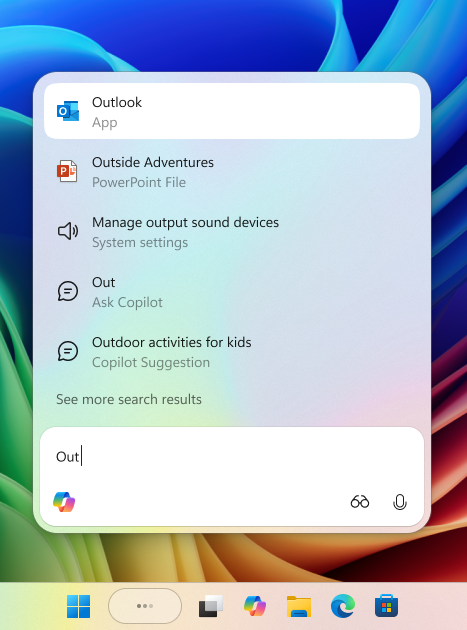
The Ask Copilot experience in the Windows taskbar demonstrating a query for ‘Out’ that shows apps, files, settings, and Copilot chat suggestions.
With the new Ask Copilot in taskbar, Copilot becomes a natural part of how you use your PC, ready to help, guide and collaborate the moment you need it.
This opt-in experience gives you one-click access to Copilot Vision and Voice, enabling more natural interaction in your flow. Whether through text, voice, or guided support with Copilot Vision, you can engage on your terms, in the way that works best for you. You’re always in control. As you type, results appear and update instantly, making it easier than ever to find what you need.
To get started go to Settings > Personalization > Taskbar > Ask Copilot to enable the experience. You can also manage whether the Copilot app launches automatically at sign-in using the “Auto start on log in” toggle in the Copilot app settings.
 www.elevenforum.com
 www.elevenforum.com
Ask Copilot in taskbar complements the familiar Windows Search experience, so you can continue using Search as you always have from Start while trying out this new experience.
Ask Copilot uses existing Windows APIs to return apps, files, and settings—just like Windows Search—and does not grant Copilot access to your personal content. For more details, you can learn about privacy and control options for Microsoft Copilot here.
Feedback: Share your thoughts in Feedback Hub (WIN + F) under Desktop Environment > Ask Copilot in taskbar.
Designed with console-style navigation in mind, the Xbox PC app paired with the full screen experience delivers a clean, distraction-free interface for handheld gaming. You’ll get smooth task switching and optimized performance, with background processes minimized and non-essential tasks deferred—so gameplay stays responsive and uninterrupted.
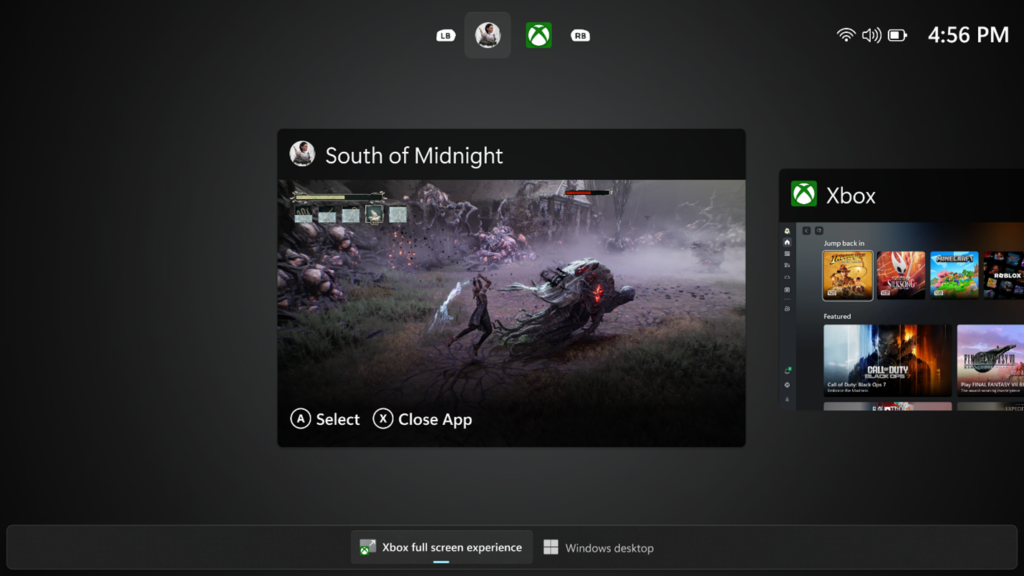
A screenshot of the full screen experience with the Xbox PC app, with game selection shown.
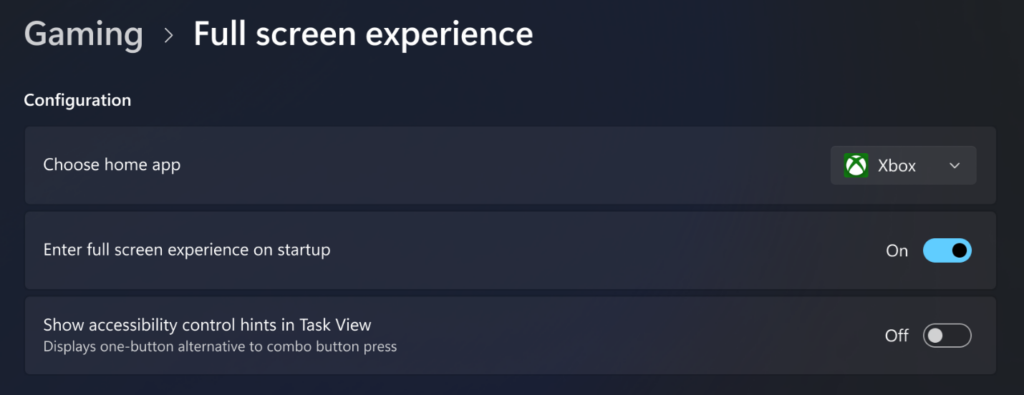
Settings screen shot showing Gaming and full screen experience enablement options for startup.
How to enable FSE:
On supported devices, go to Settings > Gaming > Full screen experience, then select Xbox as your home app. Once enabled, you can access FSE from Task View and Game Bar or configure your handheld the full screen experience on startup.
Availability:
Amanda

 blogs.windows.com
Check Windows Updates
UUP Dump:
64-bit ISO download:

ARM64 ISO download:
 www.elevenforum.com
KB5070300 Windows 11 Insider Dev and Beta build 26220.7070 (25H2) - Nov. 7
UPDATE 11/17: https://www.elevenforum.com/t/kb5070303-windows-11-insider-dev-and-beta-build-26220-7262-25h2-nov-17.42116/ Windows Insider Blog: Hello Windows Insiders, today we are releasing Windows 11 Insider Preview Build 26220.7070 (KB5070300) to the Dev & Beta Channels. As a reminder we...
www.elevenforum.com
Windows Insider Blog:
Update: 11/5 – We are rolling out Quality Update 26220.7052. This update does not include anything new, doesn’t require a reboot, and is designed to test our servicing pipeline.
Hello Windows Insiders, today we are releasing Windows 11 Insider Preview Build 26220.7051 (KB5067115) to the Dev & Beta Channels.
Starting today, we are beginning to offer the same Dev Channel updates based on Windows 11, version 25H2 to Windows Insiders in the Beta Channel as a recommended update.
If you are an Insider in the Dev Channel, you now have a window to switch from the Dev Channel to the Beta Channel if you would like. This window will only be open for as long as we’re releasing the same 25H2-based updates across both the Dev and Beta Channels. After we move Dev Channel forward to a higher build number, the opportunity to switch between these channels will close. When the Dev Channel jumps ahead, things might not be as stable as the Dev Channel is today, so we highly encourage you to evaluate which channel you would like to be in during the time in which the window to switch is open.
Change Windows Insider Program Channel in Windows 11
This tutorial will show you how to change your Windows Insider Program channel to the Beta, Experimental, or Release Preview channel to get Insider preview builds of Windows 11 on your PC. Flighting is the process of running Windows Insider Preview Builds on your device. When you run these...
www.elevenforum.com
For more information, see the Reminders section at the bottom of this blog post.
Enable or Disable Get Latest Updates as soon as available in Windows 11
This tutorial will show you how to turn on or off "Get the latest updates as soon as they are available" in Windows 11. Starting with Windows 11 build 22621.1635, Microsoft added a new "Get the latest updates as soon as they are available" toggle under Settings > Windows Update. When you turn...
www.elevenforum.com
UPDATE 11/04:
We have an out‑of‑band feature rolling out gradually to #WindowsInsiders in the Dev & Beta Channels! You can choose your default Widgets dashboard in the new full‑page settings and see numbered badges showing alert counts. More details will be in the next Dev/Beta flight blog.New features gradually being rolled out with toggle on*
Introducing Ask Copilot in taskbar
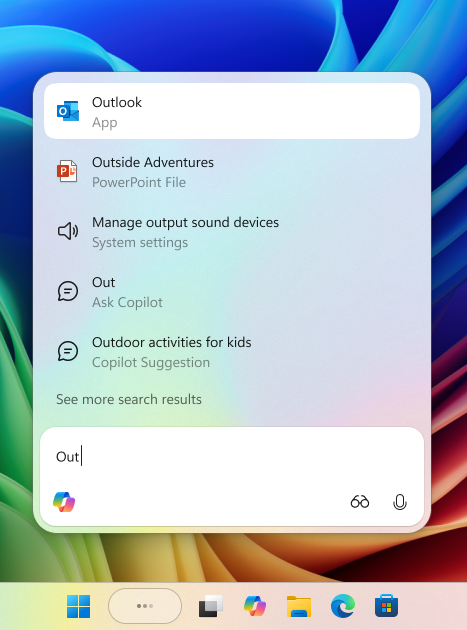
The Ask Copilot experience in the Windows taskbar demonstrating a query for ‘Out’ that shows apps, files, settings, and Copilot chat suggestions.
With the new Ask Copilot in taskbar, Copilot becomes a natural part of how you use your PC, ready to help, guide and collaborate the moment you need it.
This opt-in experience gives you one-click access to Copilot Vision and Voice, enabling more natural interaction in your flow. Whether through text, voice, or guided support with Copilot Vision, you can engage on your terms, in the way that works best for you. You’re always in control. As you type, results appear and update instantly, making it easier than ever to find what you need.
To get started go to Settings > Personalization > Taskbar > Ask Copilot to enable the experience. You can also manage whether the Copilot app launches automatically at sign-in using the “Auto start on log in” toggle in the Copilot app settings.
Add or Remove Ask Copilot on Taskbar in Windows 11
This tutorial will show you how to turn on or off the Ask Copilot experience on the taskbar for your account in Windows 11. Starting with Windows 11 build 26220.7051 (Dev and Beta), Microsoft is introducing Ask Copilot in taskbar. With the new Ask Copilot in taskbar, Copilot becomes a natural...
www.elevenforum.com
Enable or Disable Auto Start Copilot on Login in Windows 11
This tutorial will show you how to enable or disable automatically open the Copilot app at startup for your account in Windows 11. Microsoft Copilot is an AI-powered digital assistant designed to help you with a range of tasks and activities. When you sign in to Copilot with your Microsoft...
www.elevenforum.com
Ask Copilot in taskbar complements the familiar Windows Search experience, so you can continue using Search as you always have from Start while trying out this new experience.
Ask Copilot uses existing Windows APIs to return apps, files, and settings—just like Windows Search—and does not grant Copilot access to your personal content. For more details, you can learn about privacy and control options for Microsoft Copilot here.
Feedback: Share your thoughts in Feedback Hub (WIN + F) under Desktop Environment > Ask Copilot in taskbar.
Full screen experience
Following the initial launch of the full screen experience (FSE) on the ASUS ROG Xbox Ally and ROG Xbox Ally X, today’s preview to Windows Insiders expands availability to additional Windows 11 handheld devices currently in market.Designed with console-style navigation in mind, the Xbox PC app paired with the full screen experience delivers a clean, distraction-free interface for handheld gaming. You’ll get smooth task switching and optimized performance, with background processes minimized and non-essential tasks deferred—so gameplay stays responsive and uninterrupted.
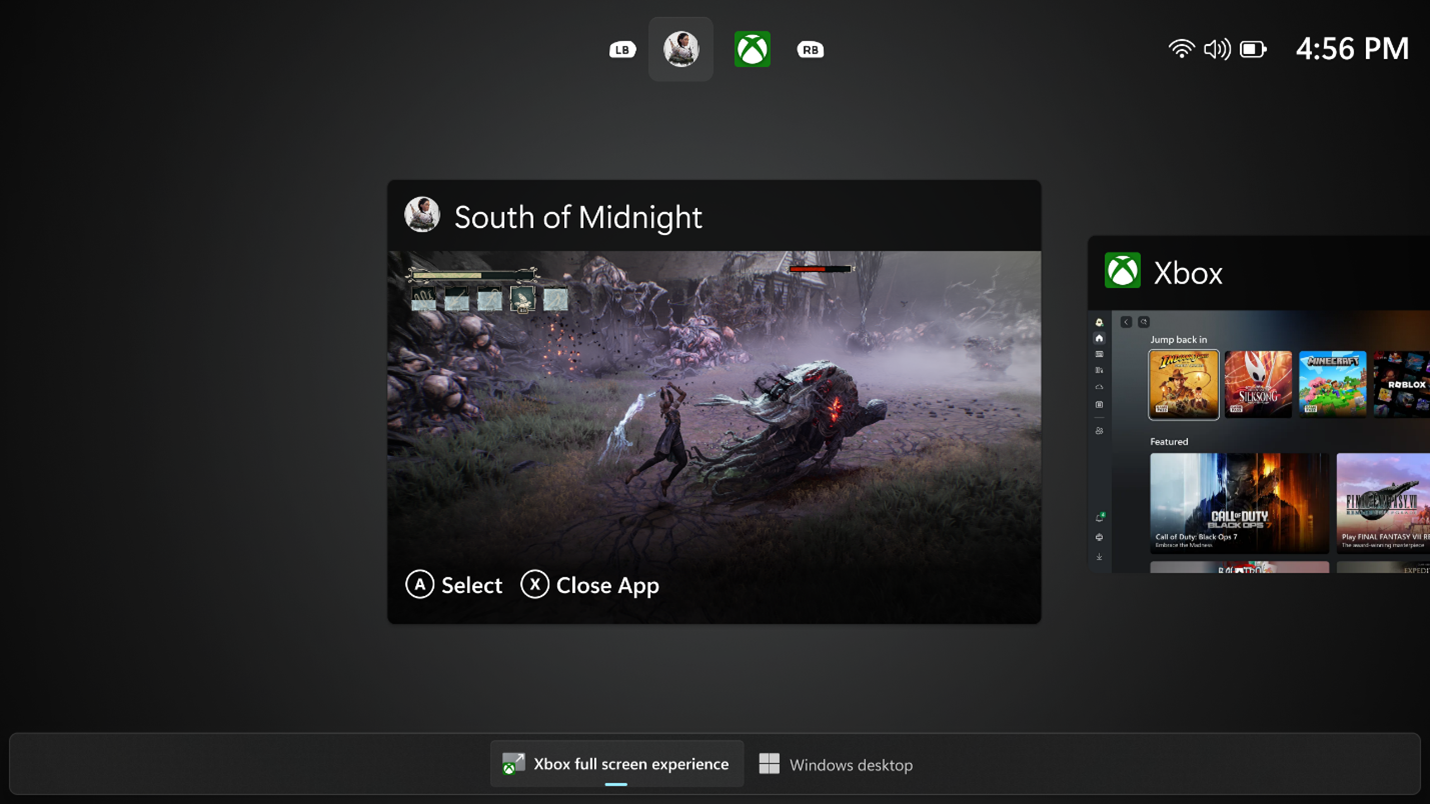
A screenshot of the full screen experience with the Xbox PC app, with game selection shown.
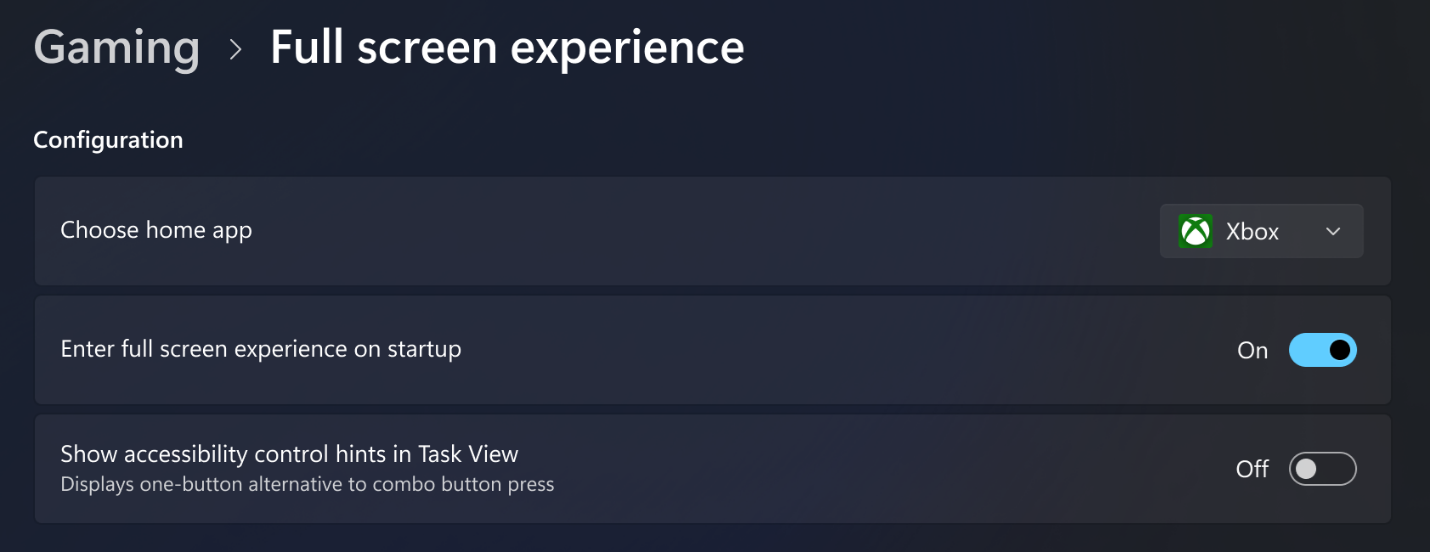
Settings screen shot showing Gaming and full screen experience enablement options for startup.
How to enable FSE:
On supported devices, go to Settings > Gaming > Full screen experience, then select Xbox as your home app. Once enabled, you can access FSE from Task View and Game Bar or configure your handheld the full screen experience on startup.
Availability:
- Currently available on ASUS ROG Xbox Ally and ROG Xbox Ally X
- Preview rolling out to MSI Claw models today
- Additional OEMs enabling their handhelds in the coming months
Shared audio (preview)
- In this update, we are beginning rollout of shared audio (preview), a new experience built on Bluetooth® LE Audio broadcast technology, for Copilot+ PCs. Shared audio allows two family members to watch movies together while traveling, or two students to share music while studying.
- To get started, access the “Shared audio (preview)” tile in quick settings, select two supported paired and connected accessories and click “Share” to begin.
- For more information about shared audio (preview), including details about compatible PCs and accessories, visit Extending Bluetooth® LE Audio on Windows 11 with shared audio (preview).
Microsoft extending Bluetooth LE Audio on Windows 11 with shared audio
Windows Insider Blog: Today’s Windows 11 Insider Preview Build (26220.7051) for Dev & Beta Channels begins gradual rollout of shared audio (preview), a new experience being previewed that allows your audio to be shared between two separate headphones, speakers, earbuds, or hearing aids. Built...
www.elevenforum.com

Use Shared Audio with Two Bluetooth LE Audio Devices in Windows 11
This tutorial will show you how to share and stop sharing output audio with two Bluetooth LE Audio devices on supported Windows 11 Copilot+ PC. Shared audio is an experience built on Bluetooth LE Audio broadcast technology for Copilot+ PCs. Shared audio allows your audio to be shared between...
www.elevenforum.com
Shared audio (preview) settings showing two connected devices and the Share button to get started using the experience.
Changes and Improvements gradually being rolled out with toggle on*
[Prism]
- We are enabling the feature update to Prism, our emulator for Windows on Arm, that makes it possible for more 64-bit x86 (x64) applications to run under emulation by adding support for more CPU features under emulation. This support will be made available to any 64-bit x86 (x64) application under emulation by default, and 32-bit x86 applications can be opted in to the support using the emulation settings in the Properties window.

Change Windows On ARM Emulation Settings for App in Windows 11
This tutorial will show you how to change the Windows on ARM emulation settings of apps for for your account or all users in Windows 10 and Windows 11. PCs powered by ARM provide great application compatibility and allow you to run your existing unmodified x86 win32 applications. ARM apps run...
www.elevenforum.com
- Please submit any feedback on compatibility issues or performance regressions through the Feedback Hub (Win + F) under Apps and the specific app you’re seeing issues with (if you don’t see the app listed, use “All other apps”) to help us to ensure that this updated Prism provides a great experience.
Fixes gradually being rolled out with toggle on*
[General]
- Fixed an underlying issue leading to keyboards or other USB devices not working for a small number of Insiders after the latest flights.
[Start menu]
- Fixed an issue where interacting with a folder or its contents in Start menu could result in the folder becoming invisible.
[File Explorer]
- Made some underlying changes to help responsiveness of File Explorer when navigating in network locations.
- Made some more underlying improvements to help reduce the launch time of File Explorer.
- Fixed an issue where “Open” in File Explorer’s context menu wasn’t showing the right icon for .exe, .cmd & .bat files (was showing a generic executable icon, instead of the default app for that file type).
- Fixed an issue where you might see your desktop icons move when interacting with files, such as opening or renaming them.
- Fixed a couple issues where tooltips were not showing up as expected when using navigating Home with a keyboard.
[Lock and login screens]
- Fixed a memory leak when your lock screen was set to slide show, which could lead to performance or reliability issues over time when unlocking your PC.
- Fixed an issue which could cause logging into be very slow the first time when logging into a new account.
[Settings]
- Fixed an issue where the search box in Settings could become overlapped with the minimum and maximize buttons in the title bar.
[Other]
- Fixed an issue where after the latest updates, screen readers might unexpectedly say “legacy window” without reading out the window contents when interacting with certain apps.
- Fixed an issue where after the latest updates, text might not render correctly when editing content within a multiline text box in certain apps.
- Fixed an issue where protected content playback might fail on some machines after the latest updates.
- Fixed an issue which could cause ethernet upload speeds to be significantly lower on some PCs after the latest updates.
Known issues
[Taskbar & System Tray]
- We’re investigating an issue which is causing the Start menu to not open for some Insiders on click, although it will open if you press the Windows key. It’s believed this issue may also potentially impact the notification center (which you can open with WIN + N).
- We’re investigating an issue where for some Insiders apps aren’t showing in the system tray when they should be.
[File Explorer]
- Copy progress might flash when clicking more or less details in dark mode version of the copy dialog.
- Scrollbar and footer are missing and showing a white block instead when text is scaled in dark mode version of the copy dialog.
Reminders for Windows Insiders in the Dev & Beta Channels
- Updates are based on Windows 11, version 25H2 via an enablement package (Build 26220.xxxx).
- Many features are rolled out using Controlled Feature Rollout technology, starting with a subset of Insiders and ramping up over time as we monitor feedback to see how they land before pushing them out to everyone in this channel.
- For Windows Insiders who want to be the first to get features gradually rolled out to you, you can turn ON the toggle to get the latest updates as they are available via Settings > Windows Update*. Over time, we will increase the rollouts of features to everyone with the toggle turned on. Should you keep this toggle off, new features will gradually be rolled out to your PC over time once they are ready.
- Features and experiences included in these builds may never get released as we try out different concepts and get feedback. Features may change over time, be removed, or replaced and never get released beyond Windows Insiders. Some of these features and experiences could show up in future Windows releases when they’re ready.
- Some features in active development we preview with Windows Insiders may not be fully localized and localization will happen over time as features are finalized. As you see issues with localization in your language, please report those issues to us via Feedback Hub.
- Check out Flight Hub for a complete look at what build is in which Insider channel.
Amanda
Source:
Announcing Windows 11 Insider Preview Build 26220.7051 (Dev & Beta Channels)
Update: 11/5 - We are rolling out Quality Update 26220.7052. This update does not include anything new, doesn't require a reboot, and is designed to test our servicing pipeline. Hello Windows Insiders, today we are
blogs.windows.com
Check Windows Updates
UUP Dump:
64-bit ISO download:
Select language for Windows 11 Insider Preview Feature Update (26220.7051) amd64
Select language for Windows 11 Insider Preview Feature Update (26220.7051) amd64 on UUP dump. UUP dump lets you download Unified Update Platform files, like Windows Insider updates, directly from Windows Update.
uupdump.net
ARM64 ISO download:
Select language for Windows 11 Insider Preview Feature Update (26220.7051) arm64
Select language for Windows 11 Insider Preview Feature Update (26220.7051) arm64 on UUP dump. UUP dump lets you download Unified Update Platform files, like Windows Insider updates, directly from Windows Update.
uupdump.net
UUP Dump - Download Windows Insider ISO
UUP Dump is the most practical and easy way to get ISO images of any Insider Windows 10 or Windows 11 version, as soon as Microsoft has released a new build. UUP Dump creates a download configuration file according to your choices, downloads necessary files directly from Microsoft servers, and...
www.elevenforum.com
Last edited:





 ackage_for_RollupFix~31bf3856ad364e35~arm64~~26100.1742.1.10