Insider KB5067115 Windows 11 Insider Dev and Beta build 26220.7051 (25H2) - Oct. 31


UPDATE 11/07:


 Windows Insider Blog:

Update: 11/5 – We are rolling out Quality Update 26220.7052. This update does not include anything new, doesn’t require a reboot, and is designed to test our servicing pipeline.

Hello Windows Insiders, today we are releasing Windows 11 Insider Preview Build 26220.7051 (KB5067115) to the Dev & Beta Channels.

Starting today, we are beginning to offer the same Dev Channel updates based on Windows 11, version 25H2 to Windows Insiders in the Beta Channel as a recommended update.

If you are an Insider in the Dev Channel, you now have a window to switch from the Dev Channel to the Beta Channel if you would like. This window will only be open for as long as we’re releasing the same 25H2-based updates across both the Dev and Beta Channels. After we move Dev Channel forward to a higher build number, the opportunity to switch between these channels will close. When the Dev Channel jumps ahead, things might not be as stable as the Dev Channel is today, so we highly encourage you to evaluate which channel you would like to be in during the time in which the window to switch is open.


For more information, see the Reminders section at the bottom of this blog post.


UPDATE 11/04:
📢 We have an out‑of‑band feature rolling out gradually to #WindowsInsiders in the Dev & Beta Channels! You can choose your default Widgets dashboard in the new full‑page settings and see numbered badges showing alert counts. More details will be in the next Dev/Beta flight blog.
New features gradually being rolled out with toggle on*

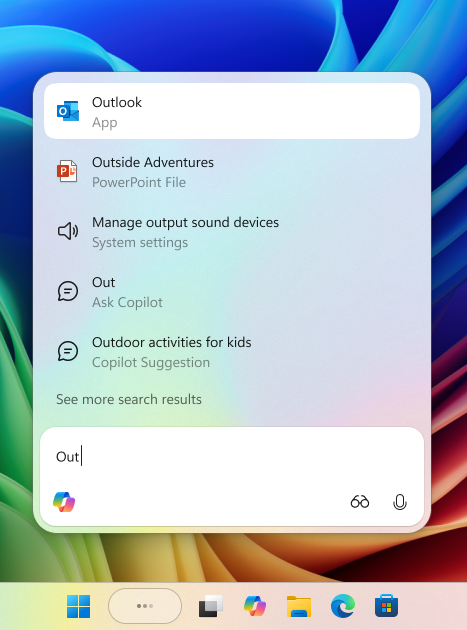
Introducing Ask Copilot in taskbar​

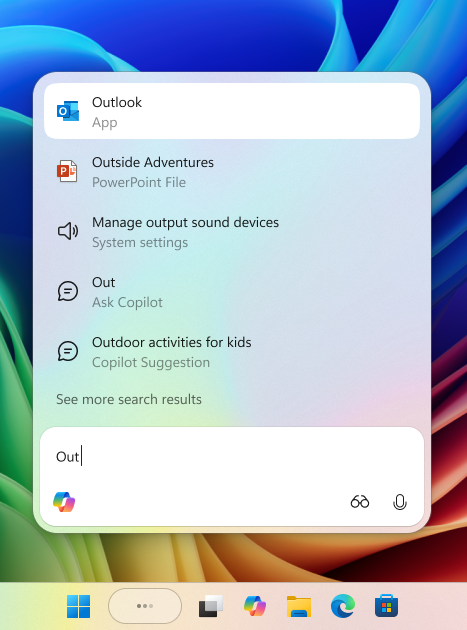
The Ask Copilot experience in the Windows taskbar demonstrating a query for ‘Out’ that shows apps, files, settings, and Copilot chat suggestions.

With the new Ask Copilot in taskbar, Copilot becomes a natural part of how you use your PC, ready to help, guide and collaborate the moment you need it.

This opt-in experience gives you one-click access to Copilot Vision and Voice, enabling more natural interaction in your flow. Whether through text, voice, or guided support with Copilot Vision, you can engage on your terms, in the way that works best for you. You’re always in control. As you type, results appear and update instantly, making it easier than ever to find what you need.

To get started go to Settings > Personalization > Taskbar > Ask Copilot to enable the experience. You can also manage whether the Copilot app launches automatically at sign-in using the “Auto start on log in” toggle in the Copilot app settings.


Ask Copilot in taskbar complements the familiar Windows Search experience, so you can continue using Search as you always have from Start while trying out this new experience.

Ask Copilot uses existing Windows APIs to return apps, files, and settings—just like Windows Search—and does not grant Copilot access to your personal content. For more details, you can learn about privacy and control options for Microsoft Copilot here.

Feedback: Share your thoughts in Feedback Hub (WIN + F) under Desktop Environment > Ask Copilot in taskbar.

Full screen experience​

Following the initial launch of the full screen experience (FSE) on the ASUS ROG Xbox Ally and ROG Xbox Ally X, today’s preview to Windows Insiders expands availability to additional Windows 11 handheld devices currently in market.

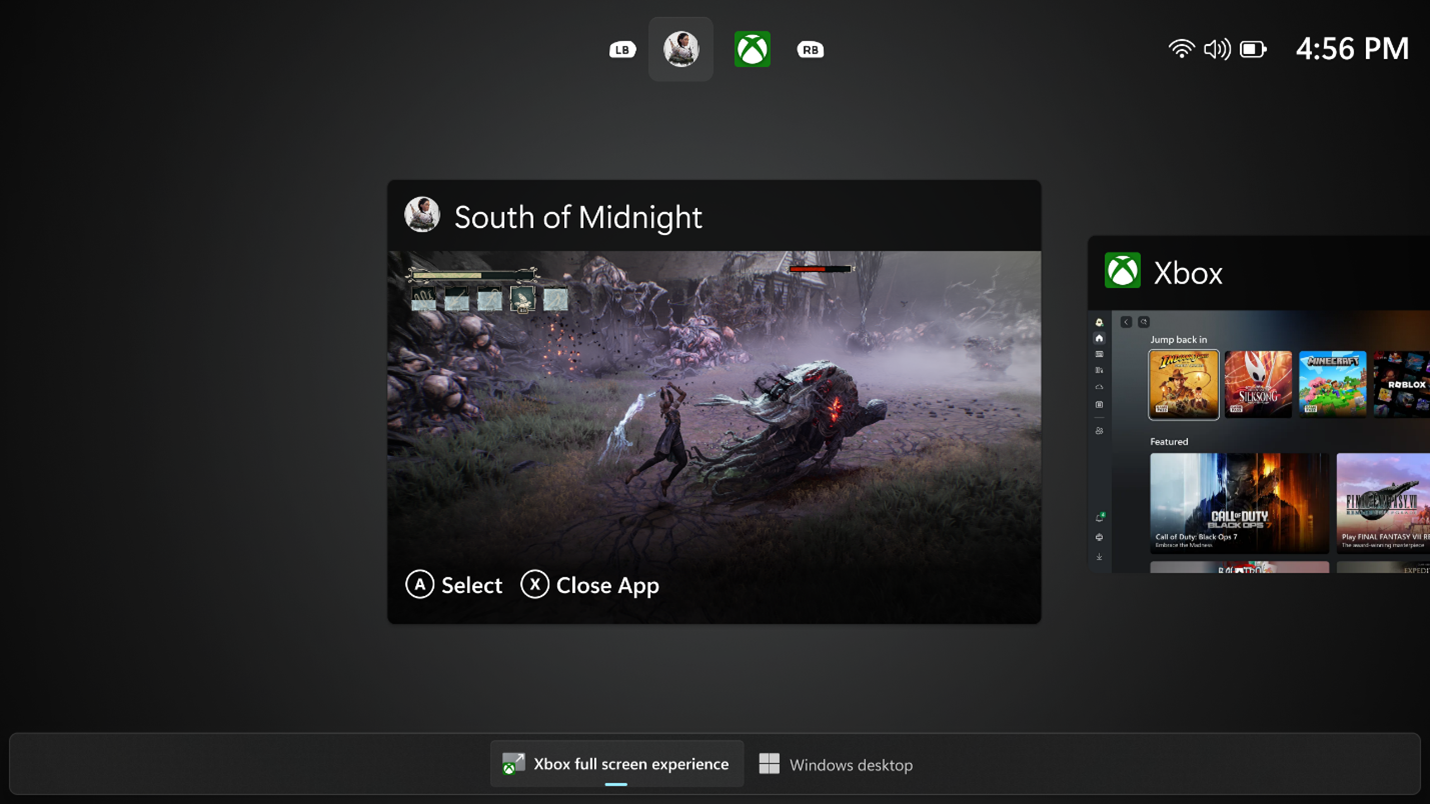
Designed with console-style navigation in mind, the Xbox PC app paired with the full screen experience delivers a clean, distraction-free interface for handheld gaming. You’ll get smooth task switching and optimized performance, with background processes minimized and non-essential tasks deferred—so gameplay stays responsive and uninterrupted.
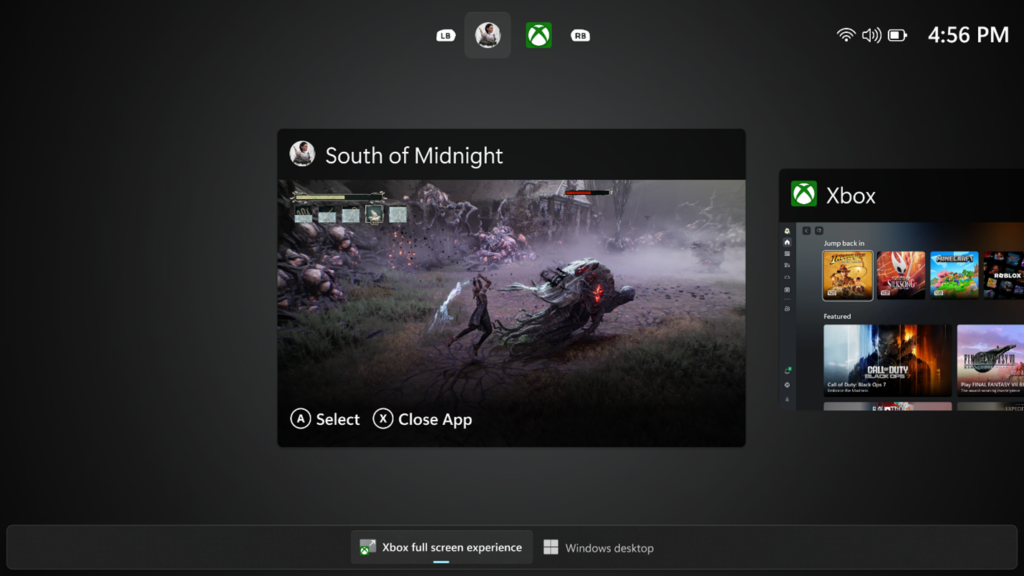
A screenshot of the full screen experience with the Xbox PC app, with game selection shown.
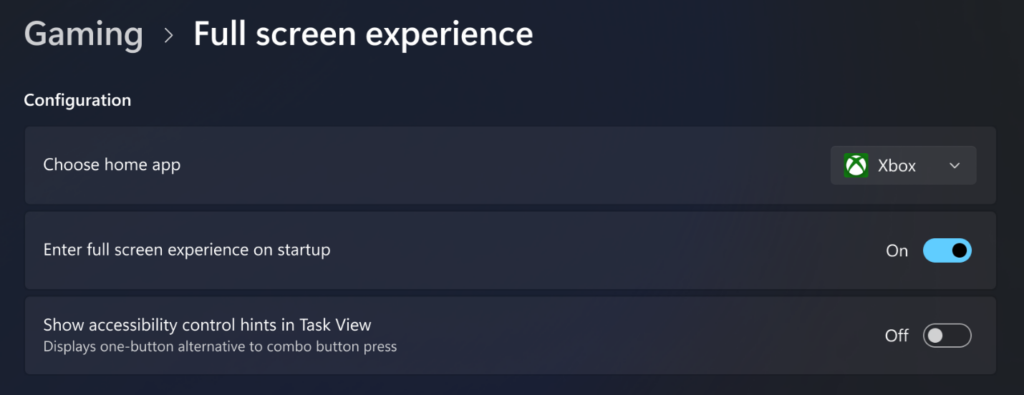

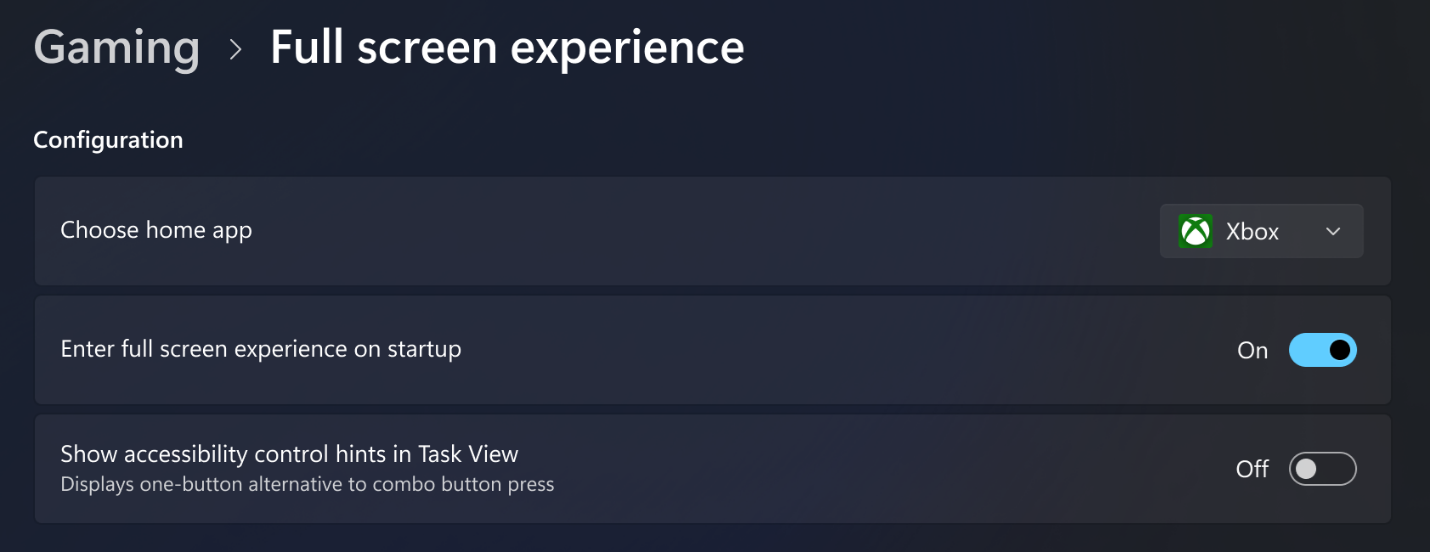
Settings screen shot showing Gaming and full screen experience enablement options for startup.

How to enable FSE:
On supported devices, go to Settings > Gaming > Full screen experience, then select Xbox as your home app. Once enabled, you can access FSE from Task View and Game Bar or configure your handheld the full screen experience on startup.

Availability:
Feedback: Share your thoughts in Feedback Hub (WIN + F) under Gaming and Xbox > Gaming Handhelds.

Shared audio (preview)​

  • In this update, we are beginning rollout of shared audio (preview), a new experience built on Bluetooth® LE Audio broadcast technology, for Copilot+ PCs. Shared audio allows two family members to watch movies together while traveling, or two students to share music while studying.
  • To get started, access the “Shared audio (preview)” tile in quick settings, select two supported paired and connected accessories and click “Share” to begin.
  • For more information about shared audio (preview), including details about compatible PCs and accessories, visit Extending Bluetooth® LE Audio on Windows 11 with shared audio (preview).


    SharedAudio.webp
    Shared audio (preview) settings showing two connected devices and the Share button to get started using the experience.

Changes and Improvements gradually being rolled out with toggle on*

[Prism]

  • We are enabling the feature update to Prism, our emulator for Windows on Arm, that makes it possible for more 64-bit x86 (x64) applications to run under emulation by adding support for more CPU features under emulation. This support will be made available to any 64-bit x86 (x64) application under emulation by default, and 32-bit x86 applications can be opted in to the support using the emulation settings in the Properties window.

  • Please submit any feedback on compatibility issues or performance regressions through the Feedback Hub (Win + F) under Apps and the specific app you’re seeing issues with (if you don’t see the app listed, use “All other apps”) to help us to ensure that this updated Prism provides a great experience.

Fixes gradually being rolled out with toggle on*

[General]

  • Fixed an underlying issue leading to keyboards or other USB devices not working for a small number of Insiders after the latest flights.

[Start menu]

  • Fixed an issue where interacting with a folder or its contents in Start menu could result in the folder becoming invisible.

[File Explorer]

  • Made some underlying changes to help responsiveness of File Explorer when navigating in network locations.
  • Made some more underlying improvements to help reduce the launch time of File Explorer.
  • Fixed an issue where “Open” in File Explorer’s context menu wasn’t showing the right icon for .exe, .cmd & .bat files (was showing a generic executable icon, instead of the default app for that file type).
  • Fixed an issue where you might see your desktop icons move when interacting with files, such as opening or renaming them.
  • Fixed a couple issues where tooltips were not showing up as expected when using navigating Home with a keyboard.

[Lock and login screens]

  • Fixed a memory leak when your lock screen was set to slide show, which could lead to performance or reliability issues over time when unlocking your PC.
  • Fixed an issue which could cause logging into be very slow the first time when logging into a new account.

[Settings]

  • Fixed an issue where the search box in Settings could become overlapped with the minimum and maximize buttons in the title bar.

[Other]

  • Fixed an issue where after the latest updates, screen readers might unexpectedly say “legacy window” without reading out the window contents when interacting with certain apps.
  • Fixed an issue where after the latest updates, text might not render correctly when editing content within a multiline text box in certain apps.
  • Fixed an issue where protected content playback might fail on some machines after the latest updates.
  • Fixed an issue which could cause ethernet upload speeds to be significantly lower on some PCs after the latest updates.

Known issues

[Taskbar & System Tray]

  • We’re investigating an issue which is causing the Start menu to not open for some Insiders on click, although it will open if you press the Windows key. It’s believed this issue may also potentially impact the notification center (which you can open with WIN + N).
  • We’re investigating an issue where for some Insiders apps aren’t showing in the system tray when they should be.

[File Explorer]

  • Copy progress might flash when clicking more or less details in dark mode version of the copy dialog.
  • Scrollbar and footer are missing and showing a white block instead when text is scaled in dark mode version of the copy dialog.

Reminders for Windows Insiders in the Dev & Beta Channels

  • Updates are based on Windows 11, version 25H2 via an enablement package (Build 26220.xxxx).
  • Many features are rolled out using Controlled Feature Rollout technology, starting with a subset of Insiders and ramping up over time as we monitor feedback to see how they land before pushing them out to everyone in this channel.
  • For Windows Insiders who want to be the first to get features gradually rolled out to you, you can turn ON the toggle to get the latest updates as they are available via Settings > Windows Update*. Over time, we will increase the rollouts of features to everyone with the toggle turned on. Should you keep this toggle off, new features will gradually be rolled out to your PC over time once they are ready.
  • Features and experiences included in these builds may never get released as we try out different concepts and get feedback. Features may change over time, be removed, or replaced and never get released beyond Windows Insiders. Some of these features and experiences could show up in future Windows releases when they’re ready.
  • Some features in active development we preview with Windows Insiders may not be fully localized and localization will happen over time as features are finalized. As you see issues with localization in your language, please report those issues to us via Feedback Hub.
  • Check out Flight Hub for a complete look at what build is in which Insider channel.
Thanks,
Amanda


 Source:


Check Windows Updates


UUP Dump:

64-bit ISO download:

ARM64 ISO download:

 
Last edited:
Here's the Ask Copilot taskbar search experience/composer in Dev/Beta build 26220.7051.

To get it, enable feature IDs 57739723 and 57941090, then reboot and toggle Ask Copilot on in taskbar settings (this is an opt-in feature).


My Computers My Computers

  • At a glance

    Windows 11 Pro for WorkstationsIntel i7-8700K 5 GHz64 GB (4x16GB) G.SKILL TridentZ RGB DDR4 3600...ASUS ROG-STRIX-GTX1080TI-O11G-GAMING (11GB GD...
    OS
    Windows 11 Pro for Workstations
    Computer type
    PC/Desktop
    Manufacturer/Model
    Custom self build
    CPU
    Intel i7-8700K 5 GHz
    Motherboard
    ASUS ROG Maximus XI Formula Z390
    Memory
    64 GB (4x16GB) G.SKILL TridentZ RGB DDR4 3600 MHz (F4-3600C18D-32GTZR)
    Graphics Card(s)
    ASUS ROG-STRIX-GTX1080TI-O11G-GAMING (11GB GDDR5X)
    Sound Card
    Integrated Digital Audio (S/PDIF)
    Monitor(s) Displays
    2 x Samsung Odyssey G75 27"
    Screen Resolution
    2560x1440
    Hard Drives
    1TB Samsung 990 PRO M.2,
    4TB Samsung 990 PRO M.2,
    TerraMaster F8 SSD Plus NAS
    PSU
    Seasonic Prime Titanium 850W
    Case
    Thermaltake Core P3 wall mounted
    Cooling
    Corsair Hydro H115i
    Keyboard
    Amazon Basics Wired Full Keyboard MD005
    Mouse
    Logitech MX Master 4
    Internet Speed
    2 Gbps Download and 100 Mbps Upload
    Browser
    Chrome and Edge
    Antivirus
    Microsoft Defender
    Other Info
    Logitech Z625 speaker system,
    Logitech BRIO 4K Pro webcam,
    HP Color LaserJet Pro MFP M477fdn,
    CyberPower CP1500PFCLCD
    Galaxy S23 Plus phone
  • At a glance

    Windows 11 ProSnapdragon X Elite (12 core) 3.42 GHz16 GB LPDDR5x-7467 MHz
    Operating System
    Windows 11 Pro
    Computer type
    Laptop
    Manufacturer/Model
    Surface Laptop 7 Copilot+ PC
    CPU
    Snapdragon X Elite (12 core) 3.42 GHz
    Memory
    16 GB LPDDR5x-7467 MHz
    Monitor(s) Displays
    15" HDR
    Screen Resolution
    2496 x 1664
    Hard Drives
    1 TB SSD
    Internet Speed
    Wi-Fi 7 and Bluetooth 5.4
    Browser
    Chrome and Edge
    Antivirus
    Microsoft Defender
It’s not a link it’s a dism command that was discussed
dism /online /removepackage/
packagenamepackage_for_RollupFix~31bf3856ad364e35~arm64~~26100.1742.1.10
Oh those,
Dism /online /remove-package /packagename:Package_for_RollupFix~31bf3856ad364e35~amd64~~26100.1742.1.10

Dism /online /remove-package /packagename:Package_for_RollupFix~31bf3856ad364e35~arm64~~26100.1742.1.10

They are bad news. Been there and done those force removals on both my intel and ARM64 machines. Major problems ensued with future Windows updates and I had to do repair installs. I don't do that forced removal of Unreclaimable packages anymore.
 
Last edited:

My Computers My Computers

  • At a glance

    Windows 11 25H2Intel Core Ultra 9 275HX (24-Core)64GB DDR5 6400MT/sNVIDIA GeForce RTX 5080 and Intel UHD Graphics
    OS
    Windows 11 25H2
    Computer type
    Laptop
    Manufacturer/Model
    Alienware 18 Area-51
    CPU
    Intel Core Ultra 9 275HX (24-Core)
    Motherboard
    Alienware
    Memory
    64GB DDR5 6400MT/s
    Graphics Card(s)
    NVIDIA GeForce RTX 5080 and Intel UHD Graphics
    Sound Card
    Onboard, Realtek high-performance Audio chips (ALC3329 & ALC1708))
    Monitor(s) Displays
    300HZ 18-inch QHD 500 nit Comfort View+
    Screen Resolution
    2560 x 1600
    Hard Drives
    2TB NVMe M.2 PCIe Gen 5 SSD
    Case
    Magnesium Alloy
    Cooling
    Advanced Cryo-Tech Quad-Fan Cooling system & large vapor chamber
    Keyboard
    Cherry MX ultra low profile mechanical keyboard with per key AlienFX RGB lighting
    Mouse
    Logitech MX Master 4
    Browser
    Vivaldi (main), Firefox, Chrome, Edge
    Antivirus
    MS Defender and Malwarebytes Free
  • At a glance

    Windows 11 25H2Qualcomm Snapdragon X Elite (12 Core) ARM bas...16GB LPDDR5Qualcomm Adreno X1-85
    Operating System
    Windows 11 25H2
    Computer type
    Laptop
    Manufacturer/Model
    Microsoft Surface Laptop 7
    CPU
    Qualcomm Snapdragon X Elite (12 Core) ARM based CPU
    Motherboard
    Microsoft Corp.
    Memory
    16GB LPDDR5
    Graphics card(s)
    Qualcomm Adreno X1-85
    Sound Card
    Omnisonic speakers with Dolby Atmos spatial sound
    Monitor(s) Displays
    120 Hz 13.8-inch 600 nit PixelSense Flow touchscreen
    Screen Resolution
    2304x1536
    Hard Drives
    1TB NVMe Gen 4 SSD
    Case
    Anodized Aluminum
    Cooling
    Traditional active cooling fan system
    Keyboard
    Mechanical QWERTY, backlit when in use
    Mouse
    Logitech MX Master 4 and Surface Arc Mouse
    Browser
    Vivaldi (main), Firefox, Chrome, Edge
    Antivirus
    MS Defender and Malwarebytes Free
I posted this and similar info on a couple threads on that subject:
I've stopped removing those two "(Un) reclaimable Packages" as when I do I often encounter WU errors on future builds. After digging I find info like the following:

Why They Reappear
  • Check-Point Cumulative Updates:
    These are baseline updates that serve as a foundation for subsequent cumulative updates. They are intentionally left in a "staged" or partially installed state to ensure readiness for future updates.

  • Interrupted or Failed Updates:
    If a Windows update fails or is interrupted before completion, it can leave components in a "staged" state where they are prepared but not fully installed or cleaned up.

  • System Complexity:
    The Windows component store (WinSxS) is complex, and some older packages, even after cleanup, can persist due to internal reasons like hard links or deep-seated features that DISM (Deployment Image Servicing and Management) doesn't automatically remove.
Are They Safe to Remove?
  • No, do not remove these specific checkpoint updates .
  • Attempting to force their removal can cause system instability and potential issues with future updates or rollback scenarios.
  • In some cases, the only guaranteed way to fully refresh the component store is to perform a clean install of Windows, which refreshes the entire component storage.
 

My Computers My Computers

  • At a glance

    Windows 11 25H2Intel Core Ultra 9 275HX (24-Core)64GB DDR5 6400MT/sNVIDIA GeForce RTX 5080 and Intel UHD Graphics
    OS
    Windows 11 25H2
    Computer type
    Laptop
    Manufacturer/Model
    Alienware 18 Area-51
    CPU
    Intel Core Ultra 9 275HX (24-Core)
    Motherboard
    Alienware
    Memory
    64GB DDR5 6400MT/s
    Graphics Card(s)
    NVIDIA GeForce RTX 5080 and Intel UHD Graphics
    Sound Card
    Onboard, Realtek high-performance Audio chips (ALC3329 & ALC1708))
    Monitor(s) Displays
    300HZ 18-inch QHD 500 nit Comfort View+
    Screen Resolution
    2560 x 1600
    Hard Drives
    2TB NVMe M.2 PCIe Gen 5 SSD
    Case
    Magnesium Alloy
    Cooling
    Advanced Cryo-Tech Quad-Fan Cooling system & large vapor chamber
    Keyboard
    Cherry MX ultra low profile mechanical keyboard with per key AlienFX RGB lighting
    Mouse
    Logitech MX Master 4
    Browser
    Vivaldi (main), Firefox, Chrome, Edge
    Antivirus
    MS Defender and Malwarebytes Free
  • At a glance

    Windows 11 25H2Qualcomm Snapdragon X Elite (12 Core) ARM bas...16GB LPDDR5Qualcomm Adreno X1-85
    Operating System
    Windows 11 25H2
    Computer type
    Laptop
    Manufacturer/Model
    Microsoft Surface Laptop 7
    CPU
    Qualcomm Snapdragon X Elite (12 Core) ARM based CPU
    Motherboard
    Microsoft Corp.
    Memory
    16GB LPDDR5
    Graphics card(s)
    Qualcomm Adreno X1-85
    Sound Card
    Omnisonic speakers with Dolby Atmos spatial sound
    Monitor(s) Displays
    120 Hz 13.8-inch 600 nit PixelSense Flow touchscreen
    Screen Resolution
    2304x1536
    Hard Drives
    1TB NVMe Gen 4 SSD
    Case
    Anodized Aluminum
    Cooling
    Traditional active cooling fan system
    Keyboard
    Mechanical QWERTY, backlit when in use
    Mouse
    Logitech MX Master 4 and Surface Arc Mouse
    Browser
    Vivaldi (main), Firefox, Chrome, Edge
    Antivirus
    MS Defender and Malwarebytes Free
The ones that will remove using the normal Dism /Online /Cleanup-Image /StartComponentCleanup command are probably safe to remove however those occasional two that won't remove and are "unreclaimable" should not be forcibly removed for the reasons stated in post.

These are baseline updates that serve as a foundation for subsequent cumulative updates. They are intentionally left in a "staged" or partially installed state to ensure readiness for future updates.

Do not remove these specific checkpoint updates
Attempting to force their removal can cause system instability and potential issues with future updates or rollback scenarios.
 

My Computers My Computers

  • At a glance

    Windows 11 25H2Intel Core Ultra 9 275HX (24-Core)64GB DDR5 6400MT/sNVIDIA GeForce RTX 5080 and Intel UHD Graphics
    OS
    Windows 11 25H2
    Computer type
    Laptop
    Manufacturer/Model
    Alienware 18 Area-51
    CPU
    Intel Core Ultra 9 275HX (24-Core)
    Motherboard
    Alienware
    Memory
    64GB DDR5 6400MT/s
    Graphics Card(s)
    NVIDIA GeForce RTX 5080 and Intel UHD Graphics
    Sound Card
    Onboard, Realtek high-performance Audio chips (ALC3329 & ALC1708))
    Monitor(s) Displays
    300HZ 18-inch QHD 500 nit Comfort View+
    Screen Resolution
    2560 x 1600
    Hard Drives
    2TB NVMe M.2 PCIe Gen 5 SSD
    Case
    Magnesium Alloy
    Cooling
    Advanced Cryo-Tech Quad-Fan Cooling system & large vapor chamber
    Keyboard
    Cherry MX ultra low profile mechanical keyboard with per key AlienFX RGB lighting
    Mouse
    Logitech MX Master 4
    Browser
    Vivaldi (main), Firefox, Chrome, Edge
    Antivirus
    MS Defender and Malwarebytes Free
  • At a glance

    Windows 11 25H2Qualcomm Snapdragon X Elite (12 Core) ARM bas...16GB LPDDR5Qualcomm Adreno X1-85
    Operating System
    Windows 11 25H2
    Computer type
    Laptop
    Manufacturer/Model
    Microsoft Surface Laptop 7
    CPU
    Qualcomm Snapdragon X Elite (12 Core) ARM based CPU
    Motherboard
    Microsoft Corp.
    Memory
    16GB LPDDR5
    Graphics card(s)
    Qualcomm Adreno X1-85
    Sound Card
    Omnisonic speakers with Dolby Atmos spatial sound
    Monitor(s) Displays
    120 Hz 13.8-inch 600 nit PixelSense Flow touchscreen
    Screen Resolution
    2304x1536
    Hard Drives
    1TB NVMe Gen 4 SSD
    Case
    Anodized Aluminum
    Cooling
    Traditional active cooling fan system
    Keyboard
    Mechanical QWERTY, backlit when in use
    Mouse
    Logitech MX Master 4 and Surface Arc Mouse
    Browser
    Vivaldi (main), Firefox, Chrome, Edge
    Antivirus
    MS Defender and Malwarebytes Free
It’s not a link it’s a dism command that was discussed
dism /online /removepackage/
packagenamepackage_for_RollupFix~31bf3856ad364e35~arm64~~26100.1742.1.10
That is the one causing the problems, you should leave those 2 packages alone.
 

My Computer My Computer

At a glance

Windows 11 Pro 25H2Intel I9-9900K64GBNVIDIA RTX 2060
OS
Windows 11 Pro 25H2
Computer type
PC/Desktop
Manufacturer/Model
Dell XPS 8930
CPU
Intel I9-9900K
Memory
64GB
Graphics Card(s)
NVIDIA RTX 2060
Sound Card
NVIDIA High Definition Audio
Monitor(s) Displays
4k Samsung
Screen Resolution
3840 x 2160
Hard Drives
512GB NVMe, ADATA SU 800, 2TB HDD
Not completely true - check out the thread discussing
dism /online /remove-package /packagename:Package_for_RollupFix~31bf3856ad364e35~arm64~~26100.1742.1.10

That was my thread. 24H2 - how to remove the two (un)reclaimable that always show in DISM

I have had no issues since removing the two (un)reclaimable packages on all of my General Availability Channel (aka RTM) 24H2/25H2 machines.

However, for the Beta and Dev Channels I hit one CU that would repeatedly fail to install. I had to do an in-place repair install to put them back before the CU would install.

OK, I give up. Let's put the packages back on the one that won't upgrade. Time for a 'Fix problems using Windows Update' repair upgrade.
KB5067103 Windows 11 Insider Dev build 26220.6780 (25H2) - Oct. 10

I have left them in place since then on my Dev and Beta machines, in case of further issues with Dev/Beta updates.
 

My Computers My Computers

  • At a glance

    Windows 11 HomeAMD Athlon Silver 3050U8GBRadeon Graphics
    OS
    Windows 11 Home
    Computer type
    Laptop
    Manufacturer/Model
    Acer Aspire 3 A315-23-R9VY
    CPU
    AMD Athlon Silver 3050U
    Memory
    8GB
    Graphics Card(s)
    Radeon Graphics
    Monitor(s) Displays
    laptop screen
    Screen Resolution
    1366x768 native resolution, up to 2560x1440 with Radeon Virtual Super Resolution
    Hard Drives
    1TB Samsung EVO 870 SSD (from April 2026: 250GB EVO 850)
    Internet Speed
    150 Mbps
    Browser
    Edge, Firefox
    Antivirus
    Defender
    Other Info
    fully 'Windows 11 ready' laptop. Windows 10 C: partition migrated from my old unsupported 'main machine' then upgraded to 11. A test migration ran Insider builds for 2 months. When 11 was released on 5th October 2021 it was re-imaged back to 10 and was offered the upgrade in Windows Update on 20th October. Windows Update offered the 22H2 Feature Update on 20th September 2022. It got the 23H2 Feature Update on 4th November 2023 through Windows Update, 24H2 on 3rd October 2024 through Windows Update by setting the Target Release Version for 24H2, and 25H2 on 30th September 2025 through Windows Update by setting the Target Release Version for 25H2.

    UPDATE - 11 April 2026: due to mechanical deterioration this PC has been retired from active duty. The OS with all software and files has been migrated to my System Seven in 'Other systems' to carry on as my general purpose 'main machine'.

    I've now clean installed 25H2 and used Garlin's scripts to update Secure Boot to CA 2023 and revoke the PCA 2011 certificates. It's new role is to test secure boot issues.
  • At a glance

    Windows 11 ProIntel® Core™ i5-520M8GB(integrated graphics) Intel HD Graphics
    Operating System
    Windows 11 Pro
    Computer type
    Laptop
    Manufacturer/Model
    Dell Latitude E4310
    CPU
    Intel® Core™ i5-520M
    Motherboard
    0T6M8G
    Memory
    8GB
    Graphics card(s)
    (integrated graphics) Intel HD Graphics
    Screen Resolution
    1366x768
    Hard Drives
    500GB Crucial MX500 SSD
    Browser
    Firefox, Edge
    Antivirus
    Defender
    Other Info
    unsupported machine: Legacy bios, MBR, TPM 1.2, upgraded from W10 to W11 using W10/W11 hybrid install media workaround.

    In-place upgrade to 22H2 using ISO and a workaround.
    Feature Update to 23H2 by manually installing the Enablement Package.
    In-place upgrade to 24H2 using hybrid 23H2/24H2 install media.
    Upgraded to 25H2 by Enablement Package.

    Also running Insider Dev, and Canary builds and Windows 10 as native boot .vhdx.
  • My SYSTEM THREE is a Dell Latitude 5410, i7-10610U, 32GB RAM, 512GB NVMe ssd, supported device running Windows 11 Pro.

    My SYSTEM FOUR is a 2-in-1 convertible Lenovo Yoga 11e 20DA, Celeron N2930, 8GB RAM, 256GB ssd. Unsupported device: currently running Win10 Pro, plus Win11 Pro RTM and Insider Dev, Beta, and RP 24H2 as native boot vhdx.

    My SYSTEM FIVE is a Dell Latitude 3190 2-in-1, Pentium Silver N5030, 8GB RAM, 1TB NVMe ssd, supported device running Windows 11 Pro, plus Insider Beta, Dev, and Canary builds (and a few others) as a native boot .vhdx.

    My SYSTEM SIX is a Dell Latitude 5550, Core Ultra 7 165H, 64GB RAM, 1TB NVMe SSD, supported device, Windows 11 Pro 24H2, Hyper-V host machine. Updated to 25H2 on 30th September 2025.

    My SYSTEM SEVEN is a Lenovo Thinkpad T580, Intel Core i7-8650U, 16GB RAM, 512GB NVMe SSD + 2nd 512GB NVMe SSD, a supported device for Windows 11. This is my current general purpose 'main machine'. The installed Windows 11 Home from my System One has been migrated to this machine.
I have removed them on 3 different machines without an issue. Hopefully my luck will continue. Others removed them without issue too…
 

My Computer My Computer

At a glance

Windows 11Apple M1 Max 10 core/4 CPU assigned to Parall...64GB/24GB assigned to Parallels 17 VMApple 32 core GPU
OS
Windows 11
Computer type
Laptop
Manufacturer/Model
Apple MacBook Pro 16" 2021
CPU
Apple M1 Max 10 core/4 CPU assigned to Parallels 17 VM
Motherboard
Apple Silicon M1 Max
Memory
64GB/24GB assigned to Parallels 17 VM
Graphics Card(s)
Apple 32 core GPU
Sound Card
Apple
Monitor(s) Displays
16.2" Liquid Retina XDR
Screen Resolution
3456-by-2234 native resolution at 254 psi
Hard Drives
4TB SSD
PSU
Apple
Case
Apple
Cooling
Apple
Keyboard
Apple
Mouse
N/A; Apple Trackpad
Internet Speed
1.2Gb/42Gb
Browser
Parallels 17 VM: MS Edge
Antivirus
Parallels 17 VM: MS Defender
I have removed them on 3 different machines without an issue. Hopefully my luck will continue. Others removed them without issue too…
Peoples milage will vary depending on the machine, channel, and build number. Every since I learned the two Un-reclaimable packages do indeed have a purpose and function I leave them be from now on.
 

My Computers My Computers

  • At a glance

    Windows 11 25H2Intel Core Ultra 9 275HX (24-Core)64GB DDR5 6400MT/sNVIDIA GeForce RTX 5080 and Intel UHD Graphics
    OS
    Windows 11 25H2
    Computer type
    Laptop
    Manufacturer/Model
    Alienware 18 Area-51
    CPU
    Intel Core Ultra 9 275HX (24-Core)
    Motherboard
    Alienware
    Memory
    64GB DDR5 6400MT/s
    Graphics Card(s)
    NVIDIA GeForce RTX 5080 and Intel UHD Graphics
    Sound Card
    Onboard, Realtek high-performance Audio chips (ALC3329 & ALC1708))
    Monitor(s) Displays
    300HZ 18-inch QHD 500 nit Comfort View+
    Screen Resolution
    2560 x 1600
    Hard Drives
    2TB NVMe M.2 PCIe Gen 5 SSD
    Case
    Magnesium Alloy
    Cooling
    Advanced Cryo-Tech Quad-Fan Cooling system & large vapor chamber
    Keyboard
    Cherry MX ultra low profile mechanical keyboard with per key AlienFX RGB lighting
    Mouse
    Logitech MX Master 4
    Browser
    Vivaldi (main), Firefox, Chrome, Edge
    Antivirus
    MS Defender and Malwarebytes Free
  • At a glance

    Windows 11 25H2Qualcomm Snapdragon X Elite (12 Core) ARM bas...16GB LPDDR5Qualcomm Adreno X1-85
    Operating System
    Windows 11 25H2
    Computer type
    Laptop
    Manufacturer/Model
    Microsoft Surface Laptop 7
    CPU
    Qualcomm Snapdragon X Elite (12 Core) ARM based CPU
    Motherboard
    Microsoft Corp.
    Memory
    16GB LPDDR5
    Graphics card(s)
    Qualcomm Adreno X1-85
    Sound Card
    Omnisonic speakers with Dolby Atmos spatial sound
    Monitor(s) Displays
    120 Hz 13.8-inch 600 nit PixelSense Flow touchscreen
    Screen Resolution
    2304x1536
    Hard Drives
    1TB NVMe Gen 4 SSD
    Case
    Anodized Aluminum
    Cooling
    Traditional active cooling fan system
    Keyboard
    Mechanical QWERTY, backlit when in use
    Mouse
    Logitech MX Master 4 and Surface Arc Mouse
    Browser
    Vivaldi (main), Firefox, Chrome, Edge
    Antivirus
    MS Defender and Malwarebytes Free
Updated ok... eventually.
 

My Computers My Computers

  • At a glance

    Win 11 Pro 25H2 Beta 26220.8925AMD Ryzen 7 5700UCrucial 64GB DDR4 SDRAM PC4-25600AMD Radeon Vega Graphics 1.80 GHz - Adrenalin...
    OS
    Win 11 Pro 25H2 Beta 26220.8925
    Computer type
    PC/Desktop
    Manufacturer/Model
    Asus MiniPC PN51-E1
    CPU
    AMD Ryzen 7 5700U
    Motherboard
    Asus PN51-E1 - Bios Version 0505
    Memory
    Crucial 64GB DDR4 SDRAM PC4-25600
    Graphics Card(s)
    AMD Radeon Vega Graphics 1.80 GHz - Adrenalin Edition 23.9.2
    Sound Card
    USB to Sound Blaster Live (24bit External) to Firestone DAC to Event Studio Monitors
    Monitor(s) Displays
    Gigabyte 27" 165 hertz
    Screen Resolution
    2560 x 1440
    Hard Drives
    Samsung SSD 970 EVO Plus 2TB PCIE NVME
    PSU
    65 Watt
    Case
    Asus Mini
    Cooling
    Air
    Keyboard
    Logitech K810
    Mouse
    Logitech MX Master 2S
    Internet Speed
    Telstra Modem Wifi - NBN 50/18
    Browser
    Firefox
    Antivirus
    Microsoft
    Other Info
    This replaced my Linux Notebook. I've used Windows since V2, tried various Linux distros but Windows continues to win for me.
  • At a glance

    Win 11 Home 26H2 26300.8935Core i7-7700HQ @2.8 Ghz16.0 GBNVIDIA GeForce GTX 1060 (6 GB)
    Operating System
    Win 11 Home 26H2 26300.8935
    Computer type
    Laptop
    Manufacturer/Model
    Resistance
    CPU
    Core i7-7700HQ @2.8 Ghz
    Motherboard
    Resistance
    Memory
    16.0 GB
    Graphics card(s)
    NVIDIA GeForce GTX 1060 (6 GB)
    Screen Resolution
    4k
    Hard Drives
    1.8tb
On 3 different machines in Dev channel, /SCANHEALTH found repairable and had to use /RESOREHEALTH to fix them.
After rebooting the same problem showed up and had to run /RESTOREHEALTH again.
Pretty messy and time consuming. 😵‍💫🤬🤷‍♂️
 

My Computer My Computer

At a glance

Windows 11 Pro 25H2Intel I9-9900K64GBNVIDIA RTX 2060
OS
Windows 11 Pro 25H2
Computer type
PC/Desktop
Manufacturer/Model
Dell XPS 8930
CPU
Intel I9-9900K
Memory
64GB
Graphics Card(s)
NVIDIA RTX 2060
Sound Card
NVIDIA High Definition Audio
Monitor(s) Displays
4k Samsung
Screen Resolution
3840 x 2160
Hard Drives
512GB NVMe, ADATA SU 800, 2TB HDD
1761975266432.webp
 

My Computers My Computers

  • At a glance

    Win 11 Pro 25H2 26200.8894Intel® Core™ i7-14700KG.SKILL Ripjaws S5 Series 64GB (2 x 32GB) DDR5ASUS GeForce RTX 4070 Super 12GB
    OS
    Win 11 Pro 25H2 26200.8894
    Computer type
    PC/Desktop
    Manufacturer/Model
    Self Built
    CPU
    Intel® Core™ i7-14700K
    Motherboard
    ASUS TUF Z690-PLUS WIFI (BIOS 4505)
    Memory
    G.SKILL Ripjaws S5 Series 64GB (2 x 32GB) DDR5
    Graphics Card(s)
    ASUS GeForce RTX 4070 Super 12GB
    Sound Card
    Sound Blaster AE-5 Plus
    Monitor(s) Displays
    ASUS TUF Gaming 27" 2K HDR Gaming
    Screen Resolution
    2560 x 1440
    Hard Drives
    Samsung 990 Pro 1TB NVMe (Win 11 25H2)
    SK hynix P41 500GB NVMe
    SK hynix P41 2TB NVMe (x3)
    Crucial P3 Plus 4TB
    PSU
    Corsair RM850x Shift
    Case
    Antec Dark Phantom DP502 FLUX
    Cooling
    Corsair Nautilus 360 RS AIO
    Keyboard
    Logitech MK 320
    Mouse
    Razer Basilisk V3
    Internet Speed
    750Mbs
    Browser
    Firefox
    Antivirus
    Winows Security
    Other Info
    MR 8.1 Home
  • At a glance

    Win 11 Pro 25H2 26200.8894Intel Core i5-1140064 GB DDR4MSI GeForce RTX 3060 Ventus 2X 12GB
    Operating System
    Win 11 Pro 25H2 26200.8894
    Computer type
    PC/Desktop
    Manufacturer/Model
    Self Built
    CPU
    Intel Core i5-11400
    Motherboard
    Asus TUF Gaming Z590 Plus WiFi (BIOS 2803)
    Memory
    64 GB DDR4
    Graphics card(s)
    MSI GeForce RTX 3060 Ventus 2X 12GB
    Sound Card
    SoundBlaster Audigy Fx V2
    Monitor(s) Displays
    Samsung F27T350
    Screen Resolution
    1920x1080
    Hard Drives
    Samsung 980 Pro 1TB
    Samsung 970 EVO Plus 2TB
    Samsung 870 EVO 500GB SSD
    PSU
    Corsair HX750
    Case
    Cougar MX330-G Window
    Cooling
    Thermalright Frozen Edge 240 Black AIO
    Internet Speed
    350Mbps
    Browser
    Firefox
    Antivirus
    Windows Security
  • System Three
    Win 11 Pro 25H2 26200.8894
    ASUS PRIME Z370-P II BIOS 3004 7/12/21
    Intel Core i7-8700 CPU @ 3.20GHz
    32GB DDR4 RAM (4x8)
    iGPU Intel UHD Graphics 630
    Mid-Tower Desktop
I have had no issues since removing the two (un)reclaimable packages on all of my General Availability Channel (aka RTM) 24H2/25H2 machines.

However, for the Beta and Dev Channels I hit one CU that would repeatedly fail to install. I had to do an in-place repair install to put them back before the CU would install.

Same exact thing for me.
 

My Computers My Computers

  • At a glance

    Win 11 Pro 25H2 26200.8894Intel® Core™ i7-14700KG.SKILL Ripjaws S5 Series 64GB (2 x 32GB) DDR5ASUS GeForce RTX 4070 Super 12GB
    OS
    Win 11 Pro 25H2 26200.8894
    Computer type
    PC/Desktop
    Manufacturer/Model
    Self Built
    CPU
    Intel® Core™ i7-14700K
    Motherboard
    ASUS TUF Z690-PLUS WIFI (BIOS 4505)
    Memory
    G.SKILL Ripjaws S5 Series 64GB (2 x 32GB) DDR5
    Graphics Card(s)
    ASUS GeForce RTX 4070 Super 12GB
    Sound Card
    Sound Blaster AE-5 Plus
    Monitor(s) Displays
    ASUS TUF Gaming 27" 2K HDR Gaming
    Screen Resolution
    2560 x 1440
    Hard Drives
    Samsung 990 Pro 1TB NVMe (Win 11 25H2)
    SK hynix P41 500GB NVMe
    SK hynix P41 2TB NVMe (x3)
    Crucial P3 Plus 4TB
    PSU
    Corsair RM850x Shift
    Case
    Antec Dark Phantom DP502 FLUX
    Cooling
    Corsair Nautilus 360 RS AIO
    Keyboard
    Logitech MK 320
    Mouse
    Razer Basilisk V3
    Internet Speed
    750Mbs
    Browser
    Firefox
    Antivirus
    Winows Security
    Other Info
    MR 8.1 Home
  • At a glance

    Win 11 Pro 25H2 26200.8894Intel Core i5-1140064 GB DDR4MSI GeForce RTX 3060 Ventus 2X 12GB
    Operating System
    Win 11 Pro 25H2 26200.8894
    Computer type
    PC/Desktop
    Manufacturer/Model
    Self Built
    CPU
    Intel Core i5-11400
    Motherboard
    Asus TUF Gaming Z590 Plus WiFi (BIOS 2803)
    Memory
    64 GB DDR4
    Graphics card(s)
    MSI GeForce RTX 3060 Ventus 2X 12GB
    Sound Card
    SoundBlaster Audigy Fx V2
    Monitor(s) Displays
    Samsung F27T350
    Screen Resolution
    1920x1080
    Hard Drives
    Samsung 980 Pro 1TB
    Samsung 970 EVO Plus 2TB
    Samsung 870 EVO 500GB SSD
    PSU
    Corsair HX750
    Case
    Cougar MX330-G Window
    Cooling
    Thermalright Frozen Edge 240 Black AIO
    Internet Speed
    350Mbps
    Browser
    Firefox
    Antivirus
    Windows Security
  • System Three
    Win 11 Pro 25H2 26200.8894
    ASUS PRIME Z370-P II BIOS 3004 7/12/21
    Intel Core i7-8700 CPU @ 3.20GHz
    32GB DDR4 RAM (4x8)
    iGPU Intel UHD Graphics 630
    Mid-Tower Desktop

My Computers My Computers

  • At a glance

    All Branches but ReleaseAMD Ryzen 7 7735HS 3200-4500 Mhz 8 cores x 232 GB DDR5Radeon Graphic / NVIDIA GeForce RTX 4060 8 GB...
    OS
    All Branches but Release
    Computer type
    Laptop
    Manufacturer/Model
    Acer Nitro ANV15-51
    CPU
    AMD Ryzen 7 7735HS 3200-4500 Mhz 8 cores x 2
    Motherboard
    Sportage_RBH
    Memory
    32 GB DDR5
    Graphics Card(s)
    Radeon Graphic / NVIDIA GeForce RTX 4060 8 GB GDDR6
    Sound Card
    AMD/Realtek(R) Audio
    Monitor(s) Displays
    Integrated Monitor (15.3"vis)
    Screen Resolution
    FHD 1920X1080 16:9 144Hz
    Hard Drives
    KINGSTON OM8SEP4512Q-AA 1TB
    Western Digital 256GB
    PSU
    19V DC 6.32 A 120 W
    Cooling
    Dual Fans
    Mouse
    MS Bluetooth
    Internet Speed
    Fiber 1GB Cox -us & 1GB Orange-fr
    Browser
    Edge Canary- Firefox Nightly-Chrome Dev-Chrome Dev
    Antivirus
    Windows Defender
  • At a glance

    Windows 11 BetaAMD A9-94208 GB of DDR4AMD Radeon R5
    Operating System
    Windows 11 Beta
    Computer type
    Laptop
    Manufacturer/Model
    Asus X751BP
    CPU
    AMD A9-9420
    Memory
    8 GB of DDR4
    Graphics card(s)
    AMD Radeon R5
    Screen Resolution
    1600x900
    Hard Drives
    Seagate 1 TB
With the W.U. update on Dev Channel, I had multiple machines finding Repairable on /SCANHEALTH and had to do /RESTOREHEALTH to fix them.
In some cases, the problem returned after a reboot and had to run /RESTOREHEALTH again. 😵‍💫😝🤷‍♂️ This also happened with previous updates in Dev channel.
I did not have the problem in Beta, I think because in Beta they did a full reinstall.
To avoid more of these issues in Dev I used a system built on Beta and switched that to insider Dev and /SCANHEALTH runs clean as expected.
We'll see how it behaves with next updates. 🤞
 

My Computer My Computer

At a glance

Windows 11 Pro 25H2Intel I9-9900K64GBNVIDIA RTX 2060
OS
Windows 11 Pro 25H2
Computer type
PC/Desktop
Manufacturer/Model
Dell XPS 8930
CPU
Intel I9-9900K
Memory
64GB
Graphics Card(s)
NVIDIA RTX 2060
Sound Card
NVIDIA High Definition Audio
Monitor(s) Displays
4k Samsung
Screen Resolution
3840 x 2160
Hard Drives
512GB NVMe, ADATA SU 800, 2TB HDD
I tend to not fret over running sfc and DISM as much as I used to do. If all seems fine I started to leave well alone. I don't know if you agree or not with that approach. In the past when sfc has found errors the log always shows the same files as corrupt but now repaired.

I'm going to post this for 'interest' as I put the question to Copilot as to why so many Dev users see sfc and DISM errors.

### Summary

Dev Build users often see “The component store is repairable” from DISM. Many of these findings are low‑impact artifacts of frequent flights and staged updates rather than immediate system‑breaking corruption, but they can also point to real problems when Windows shows symptoms. Run repairs when you have symptoms or when you intend to ship/benchmark the machine; otherwise treat it as routine maintenance and investigate only if other signs appear.

---

### Why Dev Builds report more “corruption”

- Dev builds receive frequent component, package, and servicing changes; DISM inspects the Component Store (WinSxS) and will flag inconsistencies created by partial/rolled‑back servicing, feature flights, or mismatched package metadata rather than only catastrophic file loss.
- Community reports and Microsoft threads show many users get “repairable” results on otherwise healthy machines, especially on Insider/Dev channels where servicing is frequent and varied.

Sources: .

---

### How to distinguish harmless anomalies from real problems

1. Symptoms-first rule — treat DISM results as evidence, not proof. If the machine is stable, apps work, updates install, and SFC is clean, a repairable Component Store entry is often low consequence.
2. Corroborating signs — repeated Update failures, missing/corrupt built‑in apps, boot issues, or SFC (/scannow) showing integrity violations mean the DISM finding is worth fixing and troubleshooting further.
3. Logs and detail — examine CBS and DISM logs to see which packages or hashes failed; that tells you whether the issue is metadata/manifest level or real binary corruption.

Sources: .

---

### Practical workflow (recommended)

1. Quick check: run sfc /scannow. If it finds nothing, the issue is likely low impact.
2. Run DISM /Online /Cleanup-Image /ScanHealth to detect; if it reports “repairable”, run DISM /Online /Cleanup-Image /RestoreHealth next.
3. If RestoreHealth fails with source errors, mount a matching ISO or point to a known good source image and retry; failure to repair despite valid sources suggests deeper servicing/database issues.
4. If problems persist or system behavior is odd, escalate: review dism.log and CBS.log for offending packages, consider an in-place repair install (repair upgrade), or a clean install for machines used in critical tests.

Sources: .

---

### Short verdict

- For most Dev Build users: many DISM “corruption” reports are benign artifacts of rapid servicing and need action only when the system exhibits other faults.
- For production/benchmark/stable‑release needs: treat any DISM repairable result seriously and repair with a verified source or perform an in‑place repair to ensure a pristine image.

Sources: .
### Recommended order

Run DISM RestoreHealth first, then run sfc /scannow.

---

### Why this order

DISM repairs the Windows component store that SFC relies on to restore protected files, so fixing the component store first ensures SFC has good source files to copy from.

---

### Minimal command sequence

1. Dism.exe /Online /Cleanup-Image /CheckHealth
2. Dism.exe /Online /Cleanup-Image /ScanHealth
3. Dism.exe /Online /Cleanup-Image /RestoreHealth
4. sfc /scannow.

---

### Notes and edge cases

- If RestoreHealth cannot find good sources, supply a matching ISO or a known-good WIM/SXS image with the /Source parameter before retrying RestoreHealth.
- If you only have a quick suspicion of file problems, running sfc /scannow first is harmless, but follow with DISM RestoreHealth and then rerun SFC if SFC reports it repaired files or failed due to source issues.
- For stubborn or repeated failures, examine dism.log and CBS.log and consider an in-place repair upgrade or clean install when repairs fail repeatedly.

---

### Quick practical rule

When in doubt or when repairing a system whose servicing state may be inconsistent, run DISM RestoreHealth first, then sfc /scannow.

The Dism and SFC commands are used to find and repair corrupted files on Windows. You should run these commands when you are receiving error messages, or your computer is slowing down. If you want to run these commands preventively you can do it once a month.

The best order to run these commands are:

sfc /scannow

Dism /Online /Cleanup-Image /ScanHealth

Dism /Online /Cleanup-Image /CheckHealth

Dism /Online /Cleanup-Image /RestoreHealth

You can see this information at this link.


I hope this information helps. If you have any questions, please let me know and I'll be glad to assist you further.
 

My Computer My Computer

At a glance

W11 Pro x64 ongoing Canary 29500 latest buildsIntel i58GbIntel HD Graphics
OS
W11 Pro x64 ongoing Canary 29500 latest builds
Computer type
Laptop
Manufacturer/Model
Dell 7760 Mobile Precision 17"
CPU
Intel i5
Motherboard
Unknown
Memory
8Gb
Graphics Card(s)
Intel HD Graphics
Sound Card
Realtek
Monitor(s) Displays
Internal
Hard Drives
2 x 256Gb SSD
PSU
Dell 240 watt
Mouse
Dell Premier Bluetooth
Internet Speed
50Mbps
Browser
Edge
Antivirus
Default Microsoft Security
If I was going to all that trouble after an update, why not just repair the component store?
 

My Computers My Computers

  • At a glance

    Win 11 Pro 25H2, Build 26200.8894Intel Core i5 1450064GB DDR4GeForce RTX 4060
    OS
    Win 11 Pro 25H2, Build 26200.8894
    Computer type
    PC/Desktop
    Manufacturer/Model
    Home Brew
    CPU
    Intel Core i5 14500
    Motherboard
    Gigabyte B760M G P WIFI
    Memory
    64GB DDR4
    Graphics Card(s)
    GeForce RTX 4060
    Sound Card
    Chipset Realtek
    Monitor(s) Displays
    LG 45" Ultragear, Acer 24" 1080p
    Screen Resolution
    5120x1440, 1920x1080
    Hard Drives
    Crucial P310 2TB 2280 PCIe Gen4 3D NAND NVMe M.2 SSD (O/S)
    Silicon Power 2TB US75 NVMe PCIe Gen4 M.2 2280 SSD (backup)
    Crucial BX500 2TB 3D NAND (2nd backup)
    Seagate 4TB Ironwolf, rotating HDD archive files
    External off-line backup Drives: 2 NVMe 4TB drives in external enclosures
    PSU
    Thermaltake Toughpower GF3 750W
    Case
    LIAN LI LANCOOL 216 E-ATX PC Case
    Cooling
    Lots of fans!
    Keyboard
    Microsoft Comfort Curve 2000
    Mouse
    Logitech G305
    Internet Speed
    Verizon FiOS 1GB
    Browser
    Firefox
    Antivirus
    Malware Bytes & Windows Defender Security
  • At a glance

    Win 11 Pro 25H2, Build 26200.8894Intel Core i5 1440032GB DDR5Intel 700 Embedded GPU
    Operating System
    Win 11 Pro 25H2, Build 26200.8894
    Computer type
    PC/Desktop
    Manufacturer/Model
    Home Brew
    CPU
    Intel Core i5 14400
    Motherboard
    Gigabyte B760M DS3H AX
    Memory
    32GB DDR5
    Graphics card(s)
    Intel 700 Embedded GPU
    Sound Card
    Realtek Embedded
    Monitor(s) Displays
    27" HP 1080p
    Screen Resolution
    1920x1080
    Hard Drives
    Crucial P310 2TB 2280 PCIe Gen4 eD NAND PCIe SSD
    Samsung EVO 990 2TB NVMe Gen4 SSD
    Samsung 2TB SATA SSD
    PSU
    Thermaltake Smart BM3 650W
    Case
    Okinos Micro ATX Case
    Cooling
    Fans
    Keyboard
    Microsoft Comfort Curve 2000
    Mouse
    Logitech G305
    Internet Speed
    Verizon FiOS 1GB
    Browser
    Firefox
    Antivirus
    Malware Bytes & Windows Defender Security
  • Nimo N171 17" Laptop, (Intel i3-1215U, 16GB RAM, 2TB NVMe, Win11 Pro)
    Acemagic Vista Mini PC V1 (Intel N150, 16GB RAM, 1TB NVMe, Win11 Pro)
    HP ENVY h8-1540t, (24GB RAM, 2TB SSD, 2TB HDD, Win11 Pro)
1762155050101.webp
1762155198303.webp
 

My Computer My Computer

At a glance

Windows 11 Pro Insider Preview DevAMD Ryzen™ 5 5600G with Radeon Graphics 3.90 GHz16,0 GBNVIDIA GeForce GT 720, NVIDIA compatible
OS
Windows 11 Pro Insider Preview Dev
Computer type
PC/Desktop
Manufacturer/Model
To be filled by O.E.M.
CPU
AMD Ryzen™ 5 5600G with Radeon Graphics 3.90 GHz
Motherboard
MSI B450 GAMING PLUS MAX
Memory
16,0 GB
Graphics Card(s)
NVIDIA GeForce GT 720, NVIDIA compatible
Sound Card
NVIDIA High Definition Audio
Monitor(s) Displays
BenQ GW2270 Color Profile.D6500
Screen Resolution
1920 x 1080
Hard Drives
Samsung SSD 850 EVO 250GB + CT1000BX500SSD1 + ST2000DM006-2DM164 + WDC WD5000AAKS-07TMA0 +WDC WD10EARX-00N0YB0
PSU
EVGA 600 W2, 80+ WHITE 600W, 3 Year Warranty, Power Supply 100-W2-0600-K2 (EU)
Case
RAIJINTEK Agos - mid tower - ATX
Cooling
Cooler Master Hyper 212 Evo heatsink + Fans: 2 front+1 back+1 up
Keyboard
Logitech Internet 350 Keyboard
Mouse
Logitech MX Revolution
Internet Speed
Download 159.29 Mbps - Upload 80.14 Mbps
Browser
Google Crome Dev
Antivirus
Microsoft Windows Security
I've the new search menu enabled but it will take awhile to populate the next Preview channel update.
 

My Computers My Computers

  • At a glance

    Windows 11 Education For 25H2Intel® Core i7 5500u8 GBIntel HD Family Graphics 5500 AMD Firepro 4150M
    OS
    Windows 11 Education For 25H2
    Computer type
    Laptop
    Manufacturer/Model
    HP ZBook G2
    CPU
    Intel® Core i7 5500u
    Motherboard
    HP
    Memory
    8 GB
    Graphics Card(s)
    Intel HD Family Graphics 5500 AMD Firepro 4150M
    Sound Card
    Realtek High Audio
    Hard Drives
    1 TB SSD
    Mouse
    HP USB Mouse
    Antivirus
    Windows Defender
  • At a glance

    Windows 11 Pro For Workstations 25H2Xeon 1535m v632 GBAMD Quadro Pro 4100
    Operating System
    Windows 11 Pro For Workstations 25H2
    Computer type
    Laptop
    Manufacturer/Model
    HP Zbook G4
    CPU
    Xeon 1535m v6
    Motherboard
    HP
    Memory
    32 GB
    Graphics card(s)
    AMD Quadro Pro 4100
    Sound Card
    Bang and Olufson Audio
    Hard Drives
    1TB SSD
    Mouse
    HP USB Mouse
    Antivirus
    Windows Defender
Here's the Ask Copilot taskbar search experience/composer in Dev/Beta build 26220.7051.

To get it, enable feature IDs 57739723 and 57941090, then reboot and toggle Ask Copilot on in taskbar settings (this is an opt-in feature).


Don't work in France
 

My Computer My Computer

At a glance

Windows 11 Insider Experimental (26H2) ChannelIntel Core i5-13600K32 Go DDR4ASUS Dual GeForce RTX 4060 Ti OC Edition 8GB
OS
Windows 11 Insider Experimental (26H2) Channel
Computer type
PC/Desktop
Manufacturer/Model
Made
CPU
Intel Core i5-13600K
Motherboard
ASUS PRIME B760-PLUS D4
Memory
32 Go DDR4
Graphics Card(s)
ASUS Dual GeForce RTX 4060 Ti OC Edition 8GB
Monitor(s) Displays
ViewSonic 1080p
Screen Resolution
1080p
Hard Drives
2 NVMe + SSD Intern + 1 HHD Interne + 4 HDD extern
Keyboard
Roccat Swamm
Internet Speed
Fibre
Browser
Microsoft Edge
Antivirus
Windows Defender
Back
Top Bottom