Insider KB5070300 Windows 11 Insider Dev and Beta build 26220.7070 (25H2) - Nov. 7


UPDATE 11/17:


 Windows Insider Blog:

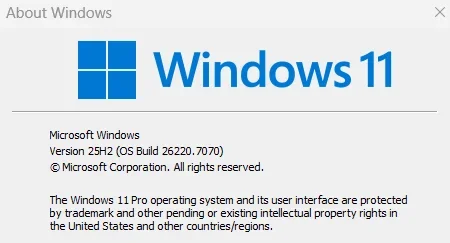
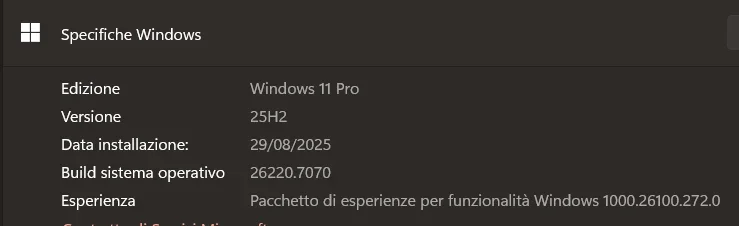
Hello Windows Insiders, today we are releasing Windows 11 Insider Preview Build 26220.7070 (KB5070300) to the Dev & Beta Channels.

As a reminder we are offering the same builds to both the Dev & Beta Channels on Windows 11, version 25H2.

If you are an Insider in the Dev Channel, you now have a window to switch from the Dev Channel to the Beta Channel if you would like. This window will only be open for as long as we’re releasing the same 25H2-based updates across both the Dev and Beta Channels. After we move Dev Channel forward to a higher build number, the opportunity to switch between these channels will close. When the Dev Channel jumps ahead, things might not be as stable as the Dev Channel is today, so we highly encourage you to evaluate which channel you would like to be in during the time in which the window to switch is open.


Changes in Dev & Beta Channel builds and updates are documented in two buckets: new features, improvements, and fixes that are being gradually rolled out for Insiders who have turned on the toggle to get the latest updates as they are available (via Settings > Windows Update*) and then new features, improvements, and fixes rolling out to everyone in the Dev & Beta Channels. For more information, see the Reminders section at the bottom of this blog post.



New features gradually being rolled out with toggle on*

Widgets​

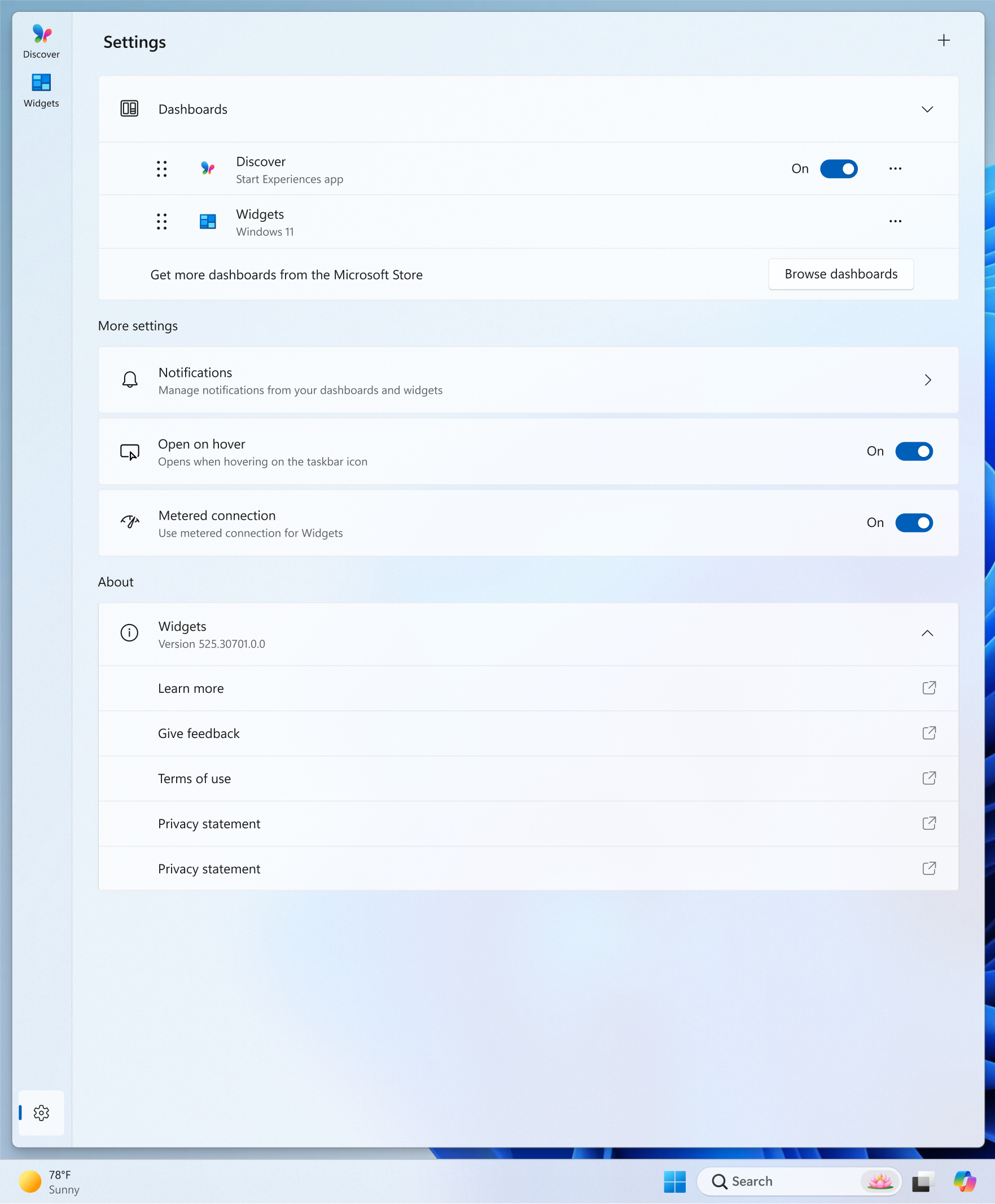
Choose your default dashboard in an updated Widget Board Settings
  • Launching the Widget Board when it’s showing live weather content will now open the first dashboard in your navigation bar instead of your most recently used dashboard for a more predictable Widget Board experience.
  • To modify your default dashboard, navigate to the new full-page Widgets Settings experience by clicking the gear icon at the bottom of your Widget navigation bar and re-arrange your desired default dashboard to the top position.


    Widgets board with a redesigned Widget Settings page that allows dashboard to be re-arranged
    Widgets board with a redesigned Widget Settings page that allows dashboard to be re-arranged

See numbered badges on the Widget Board navigation bar

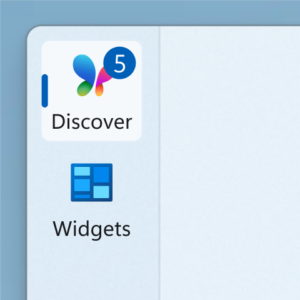
Badges on the dashboard icons in the Widget navigation bar will now show numbers corresponding to the number of alerts from that dashboard. Navigation bar badges clear automatically when you leave a dashboard, making it easy to track what’s new.


Numbered badge on the Discover dashboard icon in the navigation bar.

FEEDBACK: Please file feedback in Feedback Hub (WIN + F) under Desktop Environment > Widgets

Changes and Improvements for everyone

[Recovery]

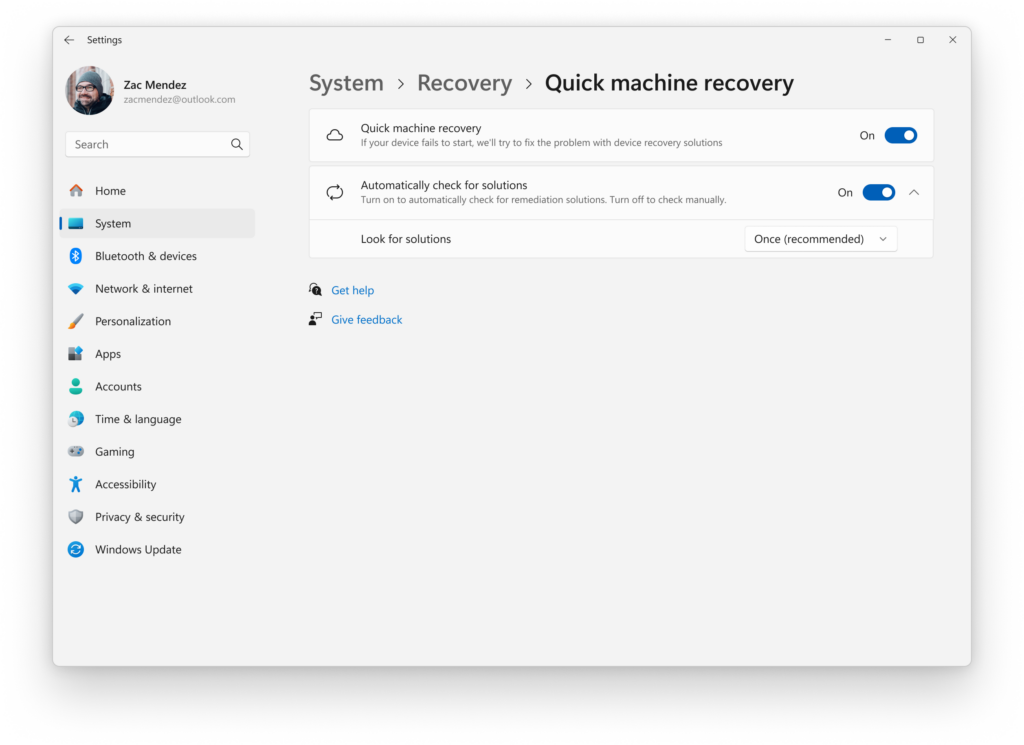
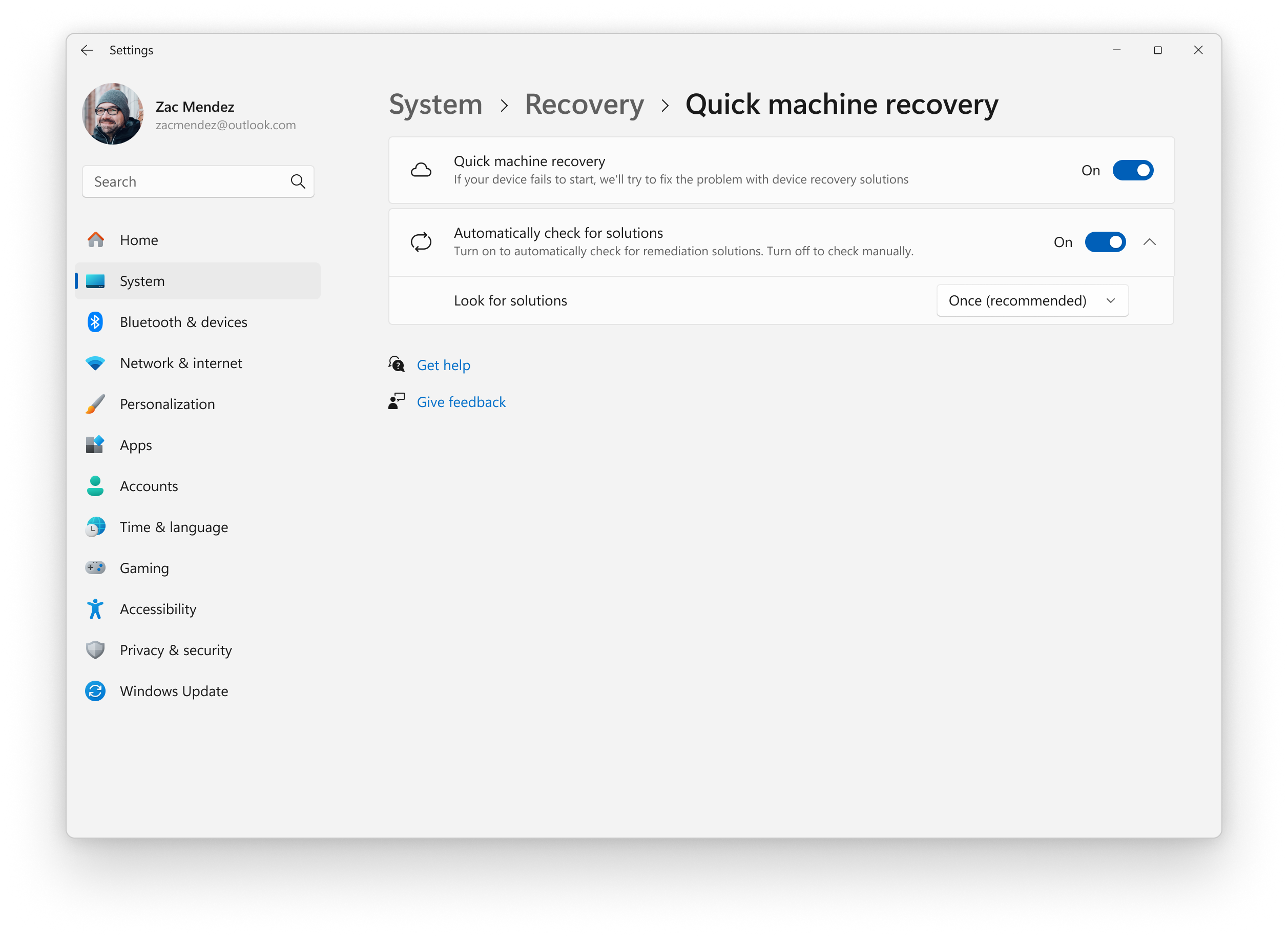
  • We’re updating Quick Machine Recovery in Windows – Microsoft Support make getting back to a working PC clearer and faster. The experience in both Windows Settings and the Windows Recovery Environment (WinRE) has been streamlined so options are easier to find and use. On PCs with the settings “quick machine recovery” and “automatically check for solutions” both enabled, QMR now runs a one‑time scan by default instead of repeating scans in a loop. If a fix isn’t available right away, you won’t be left waiting; QMR will quickly point you to the most appropriate recovery options to get you back up and running.


    In Settings for Systems, Recovery, “Quick machine recovery” and “Automatically check for solutions” are enabled to run a onetime QMR scan by default.
    In Settings for Systems, Recovery, “Quick machine recovery” and “Automatically check for solutions” are enabled to run a onetime QMR scan by default.

Changes and Improvements gradually being rolled out with toggle on*

[Smart App Control]

  • We’re updating Smart App Control (SAC) so you will now be able to switch SAC off or on without any clean install requirement. To make changes, go to Windows Security > App & Browser Control > Smart App Control settings.
  • When it’s on, it helps block untrusted or potentially harmful apps. You can learn more about SAC App & Browser Control in the Windows Security App – Microsoft Support.

[File Explorer]

  • We are re-enabling people icons under the “Activity” column in File Explorer Home detailed here.

[File Explorer]

  • We are temporarily turning off the integration supporting the StorageProvider APIs for cloud providers as detailed here.
  • We are temporarily turning off support for frequently used and recently downloaded recommended files in File Explorer as detailed here.

Fixes gradually being rolled out with toggle on*

[General]

  • Fixed an underlying issue which was causing interacting with the desktop to unexpectedly open Task View recently for some people.

[File Explorer]

  • Fixed an issue where Shift + Click (or middle clicking) on File Explorer in the taskbar wasn’t opening a new File Explorer instance.
  • Fixed an issue where the File Explorer active tab title might not display bolded until you hovered your mouse over it.

[Taskbar]

  • Fixed an issue which could lead to the “Automatically hide the taskbar” setting unexpectedly turning off, after seeing a message saying “a toolbar is already hidden on this side of your screen”.

[Settings]

  • Fixed an issue which could lead to Settings hanging when trying to navigate to the Network & Internet section.

Known issues

[Taskbar & System Tray]

  • We’re investigating an issue which is causing the Start menu to not open for some Insiders on click, although it will open if you press the Windows key. It’s believed this issue may also potentially impact the notification center (which you can open with WIN + N).
  • We’re investigating an issue where for some Insiders apps aren’t showing in the system tray when they should be.

[File Explorer]

  • Copy progress might flash when clicking more or less details in dark mode version of the copy dialog.
  • Scrollbar and footer are missing and showing a white block instead when text is scaled in dark mode version of the copy dialog.

[Recall]

  • [NEW] We’re working on the fix for an issue causing some Insiders to see a message saying they don’t have an eligible camera for Recall when they do.

Reminders for Windows Insiders in the Dev & Beta Channels

  • Updates are based on Windows 11, version 25H2 via an enablement package (Build 26220.xxxx).
  • Many features are rolled out using Controlled Feature Rollout technology, starting with a subset of Insiders and ramping up over time as we monitor feedback to see how they land before pushing them out to everyone in this channel.
  • For Windows Insiders who want to be the first to get features gradually rolled out to you, you can turn ON the toggle to get the latest updates as they are available via Settings > Windows Update*. Over time, we will increase the rollouts of features to everyone with the toggle turned on. Should you keep this toggle off, new features will gradually be rolled out to your PC over time once they are ready.
  • Features and experiences included in these builds may never get released as we try out different concepts and get feedback. Features may change over time, be removed, or replaced and never get released beyond Windows Insiders. Some of these features and experiences could show up in future Windows releases when they’re ready.
  • Some features in active development we preview with Windows Insiders may not be fully localized and localization will happen over time as features are finalized. As you see issues with localization in your language, please report those issues to us via Feedback Hub.
  • Check out Flight Hub for a complete look at what build is in which Insider channel.
Thanks,
Windows Insider Program Team


 Source:


Check Windows Updates


UUP Dump:

64-bit ISO download:

ARM64 ISO download:

 
Last edited:
  • Like
Reactions: OAT

My Computers

System One System Two

  • OS
    Windows 11 25H2
    Computer type
    Laptop
    Manufacturer/Model
    Alienware 18 Area-51
    CPU
    Intel Core Ultra 9 275HX (24-Core)
    Motherboard
    Alienware
    Memory
    64GB DDR5 6400MT/s
    Graphics Card(s)
    NVIDIA GeForce RTX 5080 and Intel UHD Graphics
    Sound Card
    Onboard, Realtek high-performance Audio chips (ALC3329 & ALC1708))
    Monitor(s) Displays
    300HZ 18-inch QHD 500 nit Comfort View+
    Screen Resolution
    2560 x 1600
    Hard Drives
    2TB NVMe M.2 PCIe Gen 5 SSD
    Case
    Magnesium Alloy
    Cooling
    Advanced Cryo-Tech Quad-Fan Cooling system & large vapor chamber
    Keyboard
    Cherry MX ultra low profile mechanical keyboard with per key AlienFX RGB lighting
    Mouse
    Logitech MX Master 4
    Browser
    Vivaldi (main), Firefox, Chrome, Edge
    Antivirus
    MS Defender and Malwarebytes Free
  • Operating System
    Windows 11 25H2
    Computer type
    Laptop
    Manufacturer/Model
    Microsoft Surface Laptop 7
    CPU
    Qualcomm Snapdragon X Elite (12 Core) ARM based CPU
    Motherboard
    Microsoft Corp.
    Memory
    16GB LPDDR5
    Graphics card(s)
    Qualcomm Adreno X1-85
    Sound Card
    Omnisonic speakers with Dolby Atmos spatial sound
    Monitor(s) Displays
    120 Hz 13.8-inch 600 nit PixelSense Flow touchscreen
    Screen Resolution
    2304x1536
    Hard Drives
    1TB NVMe Gen 4 SSD
    Case
    Anodized Aluminum
    Cooling
    Traditional active cooling fan system
    Keyboard
    Mechanical QWERTY, backlit when in use
    Mouse
    Logitech MX Master 4 and Surface Arc Mouse
    Browser
    Vivaldi (main), Firefox, Chrome, Edge
    Antivirus
    MS Defender and Malwarebytes Free

My Computer

System One

  • OS
    Windows 11, version 25H2 (26200)
    Computer type
    PC/Desktop
    CPU
    AMD Ryzen 9 9950X 16-Core Processor
    Motherboard
    ASRock B650M PG Riptide
    Memory
    DDR5-6000 (CL36) 64.0 GB
    Graphics Card(s)
    NVIDIA GeForce RTX 4090
    PSU
    1200W
    Case
    Phanteks Enthoo Pro 2
    Cooling
    Noctua NH-D12L
Figure out that there was an Intel Graphics Card update in the background. Perhaps, that was what caused the the problem!
Trying again...
 

My Computer

System One

  • OS
    Windows 11
    Computer type
    PC/Desktop
    Manufacturer/Model
    Asus/Custom Build
    CPU
    Intel® Xeon® X5690 3.47GHz Six-Core
    Motherboard
    Asus P6T Deluxe v2
    Memory
    G.Skill PC3-12800 1600MHz 24GB
    Graphics Card(s)
    NVIDIA GeForce GTX 1050
    Sound Card
    SoundMAX ADI AD2000B HD Audio
    Monitor(s) Displays
    Acer T232HL Touch Screen
    Screen Resolution
    1920 x 1080 @ 60Hz
    Hard Drives
    6 Crucial MX500 SSD 1TB each.
    PSU
    Thermaltake Toughpower Gold 850W
    Case
    Thermaltake Armor VA8000SWA
    Cooling
    Thermaltake Air Cooling System
    Keyboard
    Illuminated Multimedia LED Keyboard
    Mouse
    M16 Dual Mode Illuminated Mouse - Bluetooth / 2.4 GHz Mode
    Internet Speed
    800 Mbps
    Browser
    Edge / Opera / Vivaldi / Chrome / Firefox / Brave
    Antivirus
    Windows Defender Security
It completed okay:-

1762563806777.webp
 

My Computer

System One

  • OS
    Windows 11
    Computer type
    PC/Desktop
    Manufacturer/Model
    Asus/Custom Build
    CPU
    Intel® Xeon® X5690 3.47GHz Six-Core
    Motherboard
    Asus P6T Deluxe v2
    Memory
    G.Skill PC3-12800 1600MHz 24GB
    Graphics Card(s)
    NVIDIA GeForce GTX 1050
    Sound Card
    SoundMAX ADI AD2000B HD Audio
    Monitor(s) Displays
    Acer T232HL Touch Screen
    Screen Resolution
    1920 x 1080 @ 60Hz
    Hard Drives
    6 Crucial MX500 SSD 1TB each.
    PSU
    Thermaltake Toughpower Gold 850W
    Case
    Thermaltake Armor VA8000SWA
    Cooling
    Thermaltake Air Cooling System
    Keyboard
    Illuminated Multimedia LED Keyboard
    Mouse
    M16 Dual Mode Illuminated Mouse - Bluetooth / 2.4 GHz Mode
    Internet Speed
    800 Mbps
    Browser
    Edge / Opera / Vivaldi / Chrome / Firefox / Brave
    Antivirus
    Windows Defender Security
Updated ok.
 

My Computer

System One

  • OS
    Win 11 Pro 25H2 Beta 26220.8544
    Computer type
    PC/Desktop
    Manufacturer/Model
    Asus MiniPC PN51-E1
    CPU
    AMD Ryzen 7 5700U
    Motherboard
    Asus PN51-E1 - Bios Version 0505
    Memory
    Crucial 64GB DDR4 SDRAM PC4-25600
    Graphics Card(s)
    AMD Radeon Vega Graphics 1.80 GHz - Adrenalin Edition 23.9.2
    Sound Card
    USB to Sound Blaster Live (24bit External) to Firestone DAC to Event Studio Monitors
    Monitor(s) Displays
    Gigabyte 27" 165 hertz
    Screen Resolution
    2560 x 1440
    Hard Drives
    Samsung SSD 970 EVO Plus 2TB PCIE NVME
    PSU
    65 Watt
    Case
    Asus Mini
    Cooling
    Air
    Keyboard
    Logitech K810
    Mouse
    Logitech MX Master 2S
    Internet Speed
    Telstra Modem Wifi - NBN 50/18
    Browser
    Firefox
    Antivirus
    Microsoft
    Other Info
    This replaced my Linux Notebook. I've used Windows since V2, tried various Linux distros but Windows continues to win for me.
Tested. The problem still exists in 28000.1.

Tested 2 updated.

CFR Key 4188347533 is invalid in Canary build 28000.1. It no longer resolve the issue where Task Manager cannot use [X] to terminate the process.

Currently, the [X] button issue can be resolved in version 26220.7070.:-)
 

My Computer

System One

  • OS
    Windows 11, version 25H2 (26200)
    Computer type
    PC/Desktop
    CPU
    AMD Ryzen 9 9950X 16-Core Processor
    Motherboard
    ASRock B650M PG Riptide
    Memory
    DDR5-6000 (CL36) 64.0 GB
    Graphics Card(s)
    NVIDIA GeForce RTX 4090
    PSU
    1200W
    Case
    Phanteks Enthoo Pro 2
    Cooling
    Noctua NH-D12L
Good evening, currently on the dev channel, do you think it would be wiser to migrate to the beta channel? So far on the dev channel, I haven't encountered any problems.
My experience , I find Dev channel tends to love releasing Windows Updates as a full setup while Beta channel rarely that happens and hence Beta tends to get updates that is faster to Install while Dev channel updates tends to install longer due to downloading the whole setup (as if doing an in-place upgrade)

At the end everyone have there own preferences.
 

My Computer

System One

  • OS
    Win11 Insider[Always the latest Dev/Beta releases]
    Computer type
    Laptop
    Manufacturer/Model
    Asus TUF Gaming FA506IU Laptop
    CPU
    AMD Ryzen 7 4800H with Radeon Graphics
    Motherboard
    AMD K17.6 FCH, AMD K17.6 IMC
    Memory
    G.SKILL [Samsung Die] DRR4 - 3200Mhz CL18 (18-19-19-36) - 32GB(16GBx2)
    Graphics Card(s)
    nVidia GTX 1660ti GDDR6 6GB(90W) 2.02Ghz Core & +548Mhz Mem-OC'ed [VBIOS Unlocked]
    Sound Card
    Realtek ALC256 @ AMD K17.6
    Monitor(s) Displays
    LM156LF-2F03 144HZ with Adaptive SYNC
    Screen Resolution
    1920x1080 - 144Hz
    Hard Drives
    WDC PC SN530 SDBPNPZ-256G-1002 + SHGP31-500GM-2 + ST1000LM035-1RK172 + Samsung SSD 870 QVO 1TB 1000.2 GB
    PSU
    ASUS Power Brick 180W
    Case
    Laptop Case with Dual Fan
    Cooling
    Dual Fans Design with Self-Cleaning Cooling
    Keyboard
    Asus Aura RGB with Overstroke technology
    Mouse
    ROG SICA Gaming Mouse
    Internet Speed
    100Mbps FiberOptic [100 Mbps Down - 50 Mbps Up]
    Browser
    Chrome/Firefox/Tor
    Antivirus
    Symantec Endpoint Protection with Windows Defender (Active Mode) + Custom DNS Server
    Other Info
    CPU with -15 Curve Optimizer all cores and -50 Cure optimizer on iGPU
    BCLK OC to 101.6Mhz
    Benchmark Scores:-
    CineBench R23 Single core:- 1290 points
    CineBench R23 Multi core:- 11111 points
Tested 2 updated.

CFR Key 4188347533 is invalid in Canary build 28000.1. It no longer resolve the issue where Task Manager cannot use [X] to terminate the process.

I successfully captured the associated CFR key for resolving the Task Manager issue in Canary build 28000.1. :-)


My Computer

System One

  • OS
    Windows 11, version 25H2 (26200)
    Computer type
    PC/Desktop
    CPU
    AMD Ryzen 9 9950X 16-Core Processor
    Motherboard
    ASRock B650M PG Riptide
    Memory
    DDR5-6000 (CL36) 64.0 GB
    Graphics Card(s)
    NVIDIA GeForce RTX 4090
    PSU
    1200W
    Case
    Phanteks Enthoo Pro 2
    Cooling
    Noctua NH-D12L
1762580245197.webp
 

My Computer

System One

  • OS
    W11 Pro and Insider Dev
    Computer type
    PC/Desktop
    Manufacturer/Model
    Home brewed
    CPU
    AMD Ryzen 9 7900x
    Motherboard
    ASROCK b650 PRO RS
    Memory
    2x16GB Kingston 6000MHz, Cl 32 @ 6200MHz Cl30
    Graphics Card(s)
    Gigabyte Rx 6600XT Gaming OC 8G Pro
    Sound Card
    MB, Realtek Ac1220p
    Monitor(s) Displays
    3 x 27"
    Screen Resolution
    1080p
    Hard Drives
    Kingston KC3000. 1TBSamsung 970 evo Plus 500GB, Crucial P1 NVMe 1TB, Lexar NVMe 2 TB, Silicon Power M.2 SATA 500GB
    PSU
    Seasonic 750W
    Case
    Custom Raidmax
    Cooling
    Arctic Liquid Freezer III 360mm
    Internet Speed
    20/19 mbps
1762580548349.webp
 

My Computers

System One System Two

  • OS
    Win 11 Pro 25H2 26200.8524
    Computer type
    PC/Desktop
    Manufacturer/Model
    Self Built
    CPU
    Intel® Core™ i7-14700K
    Motherboard
    ASUS TUF Z690-PLUS WIFI BIOS 4505 11/29/25
    Memory
    G.SKILL Ripjaws S5 Series 64GB (2 x 32GB) DDR5
    Graphics Card(s)
    ASUS GeForce RTX 4070 Super 12GB
    Sound Card
    Sound Blaster AE-5 Plus
    Monitor(s) Displays
    ASUS TUF Gaming 27" 2K HDR Gaming
    Screen Resolution
    2560 x 1440
    Hard Drives
    Samsung 990 Pro 1TB NVMe (Win 11 25H2)
    SK hynix P41 500GB NVMe 25H2 DEV/Games
    SK hynix P41 2TB NVMe (x3)
    Crucial P3 Plus 4TB
    PSU
    Corsair RM850x Shift
    Case
    Antec Dark Phantom DP502 FLUX
    Cooling
    Corsair Nautilus 360 RS AIO
    Keyboard
    Logitech MK 320
    Mouse
    Razer Basilisk V3
    Internet Speed
    350Mbs
    Browser
    Firefox
    Antivirus
    Winows Security
    Other Info
    MR 8.1 Home

    System 3 Specs
    Win 11 Pro 25H2 26200.8524
    ASUS PRIME Z370-P II BIOS 3004 7/12/21
    Intel Core i7-8700 CPU @ 3.20GHz
    32GB DDR4 RAM (4x8)
    iGPU Intel UHD Graphics 630
  • Operating System
    Win 11 Pro 25H2 26200.8524
    Computer type
    PC/Desktop
    Manufacturer/Model
    Self Built
    CPU
    Intel Core i7-11700F
    Motherboard
    Asus TUF Gaming Z590 Plus WiFi (BIOS 2803)
    Memory
    64 GB DDR4
    Graphics card(s)
    MSI GeForce RTX 3060 Ventus 2X 12GB
    Sound Card
    SoundBlaster Audigy Fx V2
    Monitor(s) Displays
    Samsung F27T350
    Screen Resolution
    1920x1080
    Hard Drives
    Samsung 980 Pro 1TB
    Samsung 970 EVO Plus 2TB
    Samsung 870 EVO 500GB SSD
    PSU
    Corsair HX750
    Case
    Cougar MX330-G Window
    Cooling
    Thermalright Frozen Edge 240 Black AIO
    Internet Speed
    350Mbps
    Browser
    Firefox
    Antivirus
    Windows Security
1762594091109.webp
Found it installed this morning without any problems
 

My Computer

System One

  • OS
    Windows 11 Pro Insider Preview Dev
    Computer type
    PC/Desktop
    Manufacturer/Model
    To be filled by O.E.M.
    CPU
    AMD Ryzen™ 5 5600G with Radeon Graphics 3.90 GHz
    Motherboard
    MSI B450 GAMING PLUS MAX
    Memory
    16,0 GB
    Graphics Card(s)
    NVIDIA GeForce GT 720, NVIDIA compatible
    Sound Card
    NVIDIA High Definition Audio
    Monitor(s) Displays
    BenQ GW2270 Color Profile.D6500
    Screen Resolution
    1920 x 1080
    Hard Drives
    Samsung SSD 850 EVO 250GB + CT1000BX500SSD1 + ST2000DM006-2DM164 + WDC WD5000AAKS-07TMA0 +WDC WD10EARX-00N0YB0
    PSU
    EVGA 600 W2, 80+ WHITE 600W, 3 Year Warranty, Power Supply 100-W2-0600-K2 (EU)
    Case
    RAIJINTEK Agos - mid tower - ATX
    Cooling
    Cooler Master Hyper 212 Evo heatsink + Fans: 2 front+1 back+1 up
    Keyboard
    Logitech Internet 350 Keyboard
    Mouse
    Logitech MX Revolution
    Internet Speed
    Download 159.29 Mbps - Upload 80.14 Mbps
    Browser
    Google Crome Dev
    Antivirus
    Microsoft Windows Security
Updates coming thick and fast at the moment, this latest was quick and painless.
 

My Computers

System One System Two

  • OS
    W11 pro beta
    Computer type
    PC/Desktop
    Manufacturer/Model
    home built
    CPU
    Athlon 3000G
    Motherboard
    Asrock A320M-HDV r4.0
    Memory
    16Gb Crucial DDR4 2400
    Graphics Card(s)
    onboard cpu
    Sound Card
    onboard
    Monitor(s) Displays
    LG 22EA53
    Screen Resolution
    1920 x 1080
    Hard Drives
    WD black SN750 M2 500Gb
    PSU
    500W Seasonic core 80+gold non modular
    Case
    Fractal Design Define R2
    Cooling
    front 2 x 120mm rear 100mm stock psu
    Internet Speed
    135/20
    Browser
    Firefox and edge
    Antivirus
    Windows Security and free Malwarebytes
  • Operating System
    W11 pro 64 beta (from W10 pro system builder pack)
    Computer type
    PC/Desktop
    Manufacturer/Model
    homebuilt
    CPU
    Ryzen 7 5700G
    Motherboard
    MSI B450 tomahawk max II
    Memory
    4 x 8Gb Corsair Vengeance LPX 3000 DDR4
    Graphics card(s)
    onboard cpu
    Sound Card
    motherboard
    Monitor(s) Displays
    AOC 27
    Screen Resolution
    2560 x 1440
    Hard Drives
    WD 1Tb Black M2 SN850X on Asus hyper M2 X16 max V2 card
    PSU
    Be Quiet 400 semi modular 80+gold
    Case
    Coolermaster Silencio 650
    Cooling
    140mm front, 120 rear Akasa Vegas Chroma AM
    Internet Speed
    135/20
    Browser
    edge/Firefox
    Antivirus
    WD plus Malwarebytes free
I wonder if anyone here has an idea. Ever since the update to 25H2 26200.6972, I havent seen new builds in Windows Update. The Insider tab will tell me that a new build is available, but the Update tab says Im up to date and never offers the new build. Any ideas on what I can do? I am enrolled in the dev build flight.
 

My Computer

System One

  • OS
    Windows 11 Pro For Workstations 25H2
    Computer type
    Laptop
    Manufacturer/Model
    Dell Precision 7550
    CPU
    Intel Xeon W-10855M @ 4.9Ghz
    Memory
    32GB OWC ECC DDR4-2666 RAM
    Graphics Card(s)
    iGPU: Intel UHD Graphics P630 | Discrete GPU: NVIDIA Quadro RTX 3000 6GB
    Sound Card
    Realtek Audio
    Monitor(s) Displays
    Integrated Ultrasharp
    Screen Resolution
    1920*1080
    Hard Drives
    OS: Samsung 980 PRO 500GB NVMe
    Data: Western Digital Black SN750 1TB
    PSU
    Dell 180W
    Internet Speed
    1Gbps
    Browser
    Edge Chromium
    Antivirus
    Microsoft Defender
    Other Info
    OpenSUSE Leap 16 VM
    Zorin OS 18 VM
I found out what is causing the change of the Widgets board format and the messy logic for signing in.
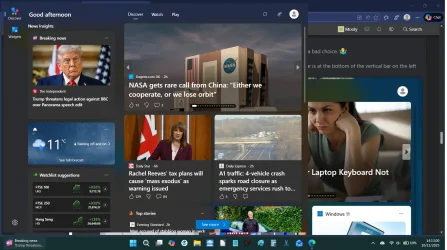
Microsoft is experimenting with feature id:50179255 (LockWidgetCanvas). When this is enabled the Widgets board has the setting gear on a left bar of the Widgets board, when the feature id is disabled, the bar is on the top of the board and the settings gear on the top right corner.

The new format also has a confusing way to sign in, tied to EDGE sign in, while with the original format the sign in to Widgets was separate and independent from EDGE as it should be.
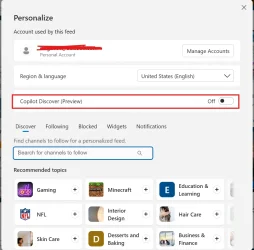
With the new format they also added an option for Copilot Discover (Preview).
I think that the option default should be "Off", but MS is setting it "On" by default, in my opinion that is a bad choice. 🤷‍♂️

This below is the new format when feature id:50179255 (LockWidgetCanvas) is enabled. The settings gear is at the bottom of the vertical bar on the left of the Widgets board. 😂😂
1762759525361.webp


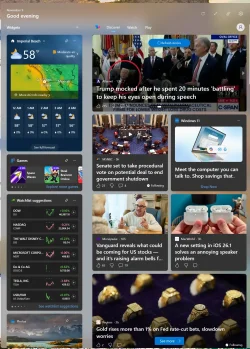
Original Widgets format with the bar on the top
1762759644677.webp


Here is yet another variation, with the option for Copilot Discover (Preview) on the top bar instead of in settings. 😵‍💫🤷‍♂️
1762808669897.webp
 
Last edited:

My Computer

System One

  • OS
    Windows 11 Pro 25H2
    Computer type
    PC/Desktop
    Manufacturer/Model
    Dell XPS 8930
    CPU
    Intel I9-9900K
    Memory
    64GB
    Graphics Card(s)
    NVIDIA RTX 2060
    Sound Card
    NVIDIA High Definition Audio
    Monitor(s) Displays
    4k Samsung
    Screen Resolution
    3840 x 2160
    Hard Drives
    512GB NVMe, ADATA SU 800, 2TB HDD
I found out what is causing the change of the Widgets board format and the messy logic for signing in.
Microsoft is experimenting with feature id:50179255 (LockWidgetCanvas). When this is enabled the Widgets board has the setting gear on a left bar of the Widgets board, when the feature id is disabled, the bar is on the top of the board and the settings gear on the top right corner.

The new format also has a confusing way to sign in, tied to EDGE sign in, while with the original format the sign in to Widgets was separate and independent from EDGE as it should be.
With the new format they also added an option for Copilot Discover (Preview).
I think that the option default should be "Off", but MS is setting it "On" by default, in my opinion that is a bad choice. 🤷‍♂️

This below is the new format when feature id:50179255 (LockWidgetCanvas) is enabled. The settings gear is at the bottom of the vertical bar on the left of the Widgets board. 😂😂


Original Widgets format with the bar on the top
I believe the old layout was much cleaner. I do not understand why there have to be 2 sections now, one for "discover" and one for "widgets". Anyways I have the new layout quite a long time now since I have enabled the removable widgets in lock screen vivetool id.
 

My Computer

System One

  • OS
    Windows 10
    Computer type
    Laptop
    Manufacturer/Model
    Lenovo Yoga 7 Pro
    CPU
    Ultra Core Ultra 9 185H
    Motherboard
    Lenovo
    Memory
    32GB
    Graphics Card(s)
    Intel Arc
I believe the old layout was much cleaner. I do not understand why there have to be 2 sections now, one for "discover" and one for "widgets". Anyways I have the new layout quite a long time now since I have enabled the removable widgets in lock screen vivetool id.
Agree, the original layout works much better. 😉
 

My Computer

System One

  • OS
    Windows 11 Pro 25H2
    Computer type
    PC/Desktop
    Manufacturer/Model
    Dell XPS 8930
    CPU
    Intel I9-9900K
    Memory
    64GB
    Graphics Card(s)
    NVIDIA RTX 2060
    Sound Card
    NVIDIA High Definition Audio
    Monitor(s) Displays
    4k Samsung
    Screen Resolution
    3840 x 2160
    Hard Drives
    512GB NVMe, ADATA SU 800, 2TB HDD
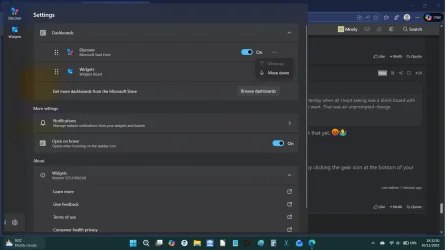
I have the Discover and Widgets buttons as @fg2001gf11F shows but also with the bar on top. Much confusion yesterday when all I kept seeing was a blank board with one Widget (weather). Eventually sussed out you have to move Discover up or down the list to get it to open as you want. That was an unprompted change.

Widgets.webp
 

My Computer

System One

  • OS
    W11 Pro x64 ongoing Canary 29500 latest builds
    Computer type
    Laptop
    Manufacturer/Model
    Dell 7760 Mobile Precision 17"
    CPU
    Intel i5
    Motherboard
    Unknown
    Memory
    8Gb
    Graphics Card(s)
    Intel HD Graphics
    Sound Card
    Realtek
    Monitor(s) Displays
    Internal
    Hard Drives
    2 x 256Gb SSD
    PSU
    Dell 240 watt
    Mouse
    Dell Premier Bluetooth
    Internet Speed
    50Mbps
    Browser
    Edge
    Antivirus
    Default Microsoft Security

My Computers

System One System Two

  • OS
    Windows 11 Pro for Workstations
    Computer type
    PC/Desktop
    Manufacturer/Model
    Custom self build
    CPU
    Intel i7-8700K 5 GHz
    Motherboard
    ASUS ROG Maximus XI Formula Z390
    Memory
    64 GB (4x16GB) G.SKILL TridentZ RGB DDR4 3600 MHz (F4-3600C18D-32GTZR)
    Graphics Card(s)
    ASUS ROG-STRIX-GTX1080TI-O11G-GAMING (11GB GDDR5X)
    Sound Card
    Integrated Digital Audio (S/PDIF)
    Monitor(s) Displays
    2 x Samsung Odyssey G75 27"
    Screen Resolution
    2560x1440
    Hard Drives
    1TB Samsung 990 PRO M.2,
    4TB Samsung 990 PRO M.2,
    TerraMaster F8 SSD Plus NAS
    PSU
    Seasonic Prime Titanium 850W
    Case
    Thermaltake Core P3 wall mounted
    Cooling
    Corsair Hydro H115i
    Keyboard
    Amazon Basics Wired Full Keyboard MD005
    Mouse
    Logitech MX Master 4
    Internet Speed
    2 Gbps Download and 100 Mbps Upload
    Browser
    Chrome and Edge
    Antivirus
    Microsoft Defender
    Other Info
    Logitech Z625 speaker system,
    Logitech BRIO 4K Pro webcam,
    HP Color LaserJet Pro MFP M477fdn,
    CyberPower CP1500PFCLCD
    Galaxy S23 Plus phone
  • Operating System
    Windows 11 Pro
    Computer type
    Laptop
    Manufacturer/Model
    Surface Laptop 7 Copilot+ PC
    CPU
    Snapdragon X Elite (12 core) 3.42 GHz
    Memory
    16 GB LPDDR5x-7467 MHz
    Monitor(s) Displays
    15" HDR
    Screen Resolution
    2496 x 1664
    Hard Drives
    1 TB SSD
    Internet Speed
    Wi-Fi 7 and Bluetooth 5.4
    Browser
    Chrome and Edge
    Antivirus
    Microsoft Defender
I have the Discover and Widgets buttons as @fg2001gf11F shows but also with the bar on top. Much confusion yesterday when all I kept seeing was a blank board with one Widget (weather). Eventually sussed out you have to move Discover up or down the list to get it to open as you want. That was an unprompted change.

View attachment 152314


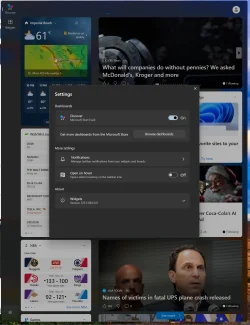
Where is this setting to get the full-page?
  • To modify your default dashboard, navigate to the new full-page Widgets Settings experience by clicking the gear icon at the bottom of your Widget navigation bar and re-arrange your desired default dashboard to the top position.

The settings here is just an overlay not a full-page. 🤷‍♂️

1763012693909.webp


1762799705744.webp
 
Last edited:

My Computer

System One

  • OS
    Windows 11 Pro 25H2
    Computer type
    PC/Desktop
    Manufacturer/Model
    Dell XPS 8930
    CPU
    Intel I9-9900K
    Memory
    64GB
    Graphics Card(s)
    NVIDIA RTX 2060
    Sound Card
    NVIDIA High Definition Audio
    Monitor(s) Displays
    4k Samsung
    Screen Resolution
    3840 x 2160
    Hard Drives
    512GB NVMe, ADATA SU 800, 2TB HDD
by clicking the gear icon at the bottom of your Widget navigation bar and re-arrange your desired default dashboard to the top position.

This was what I found yesterday to move things to the top. I've a feeling you mean something else though.


Widgets3.webp
 

My Computer

System One

  • OS
    W11 Pro x64 ongoing Canary 29500 latest builds
    Computer type
    Laptop
    Manufacturer/Model
    Dell 7760 Mobile Precision 17"
    CPU
    Intel i5
    Motherboard
    Unknown
    Memory
    8Gb
    Graphics Card(s)
    Intel HD Graphics
    Sound Card
    Realtek
    Monitor(s) Displays
    Internal
    Hard Drives
    2 x 256Gb SSD
    PSU
    Dell 240 watt
    Mouse
    Dell Premier Bluetooth
    Internet Speed
    50Mbps
    Browser
    Edge
    Antivirus
    Default Microsoft Security
Back
Top Bottom