UPDATE 11/17:
 www.elevenforum.com
Hello Windows Insiders, today we are releasing Windows 11 Insider Preview Build 26220.7070 (KB5070300) to the Dev & Beta Channels.
As a reminder we are offering the same builds to both the Dev & Beta Channels on Windows 11, version 25H2.
If you are an Insider in the Dev Channel, you now have a window to switch from the Dev Channel to the Beta Channel if you would like. This window will only be open for as long as we’re releasing the same 25H2-based updates across both the Dev and Beta Channels. After we move Dev Channel forward to a higher build number, the opportunity to switch between these channels will close. When the Dev Channel jumps ahead, things might not be as stable as the Dev Channel is today, so we highly encourage you to evaluate which channel you would like to be in during the time in which the window to switch is open.
 www.elevenforum.com
Changes in Dev & Beta Channel builds and updates are documented in two buckets: new features, improvements, and fixes that are being gradually rolled out for Insiders who have turned on the toggle to get the latest updates as they are available (via Settings > Windows Update*) and then new features, improvements, and fixes rolling out to everyone in the Dev & Beta Channels. For more information, see the Reminders section at the bottom of this blog post.
 www.elevenforum.com
 www.elevenforum.com
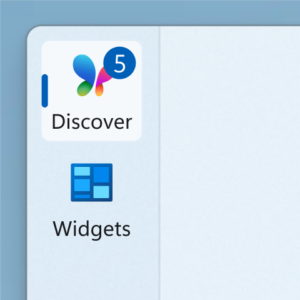
Numbered badge on the Discover dashboard icon in the navigation bar.
FEEDBACK: Please file feedback in Feedback Hub (WIN + F) under Desktop Environment > Widgets
Windows Insider Program Team

 blogs.windows.com
Check Windows Updates
UUP Dump:
64-bit ISO download:

ARM64 ISO download:
 www.elevenforum.com
KB5070303 Windows 11 Insider Dev and Beta build 26220.7262 (25H2) - Nov. 17
Windows Insider Blog: Source: https://blogs.windows.com/windows-insider/2025/11/17/announcing-windows-11-insider-preview-build-26220-7262-dev-beta-channels/ Check Windows Updates UUP Dump: 64-bit ISO download: https://uupdump.net/selectlang.php?id=bb25de9e-7127-43b7-ae9f-a23bd44b17c9...
www.elevenforum.com
Windows Insider Blog:
Hello Windows Insiders, today we are releasing Windows 11 Insider Preview Build 26220.7070 (KB5070300) to the Dev & Beta Channels.
As a reminder we are offering the same builds to both the Dev & Beta Channels on Windows 11, version 25H2.
If you are an Insider in the Dev Channel, you now have a window to switch from the Dev Channel to the Beta Channel if you would like. This window will only be open for as long as we’re releasing the same 25H2-based updates across both the Dev and Beta Channels. After we move Dev Channel forward to a higher build number, the opportunity to switch between these channels will close. When the Dev Channel jumps ahead, things might not be as stable as the Dev Channel is today, so we highly encourage you to evaluate which channel you would like to be in during the time in which the window to switch is open.
Change Windows Insider Program Channel in Windows 11
This tutorial will show you how to change your Windows Insider Program channel to the Beta, Experimental, or Release Preview channel to get Insider preview builds of Windows 11 on your PC. Flighting is the process of running Windows Insider Preview Builds on your device. When you run these...
www.elevenforum.com
Changes in Dev & Beta Channel builds and updates are documented in two buckets: new features, improvements, and fixes that are being gradually rolled out for Insiders who have turned on the toggle to get the latest updates as they are available (via Settings > Windows Update*) and then new features, improvements, and fixes rolling out to everyone in the Dev & Beta Channels. For more information, see the Reminders section at the bottom of this blog post.
Enable or Disable Get Latest Updates as soon as available in Windows 11
This tutorial will show you how to turn on or off "Get the latest updates as soon as they are available" in Windows 11. Starting with Windows 11 build 22621.1635, Microsoft added a new "Get the latest updates as soon as they are available" toggle under Settings > Windows Update. When you turn...
www.elevenforum.com
New features gradually being rolled out with toggle on*
Widgets
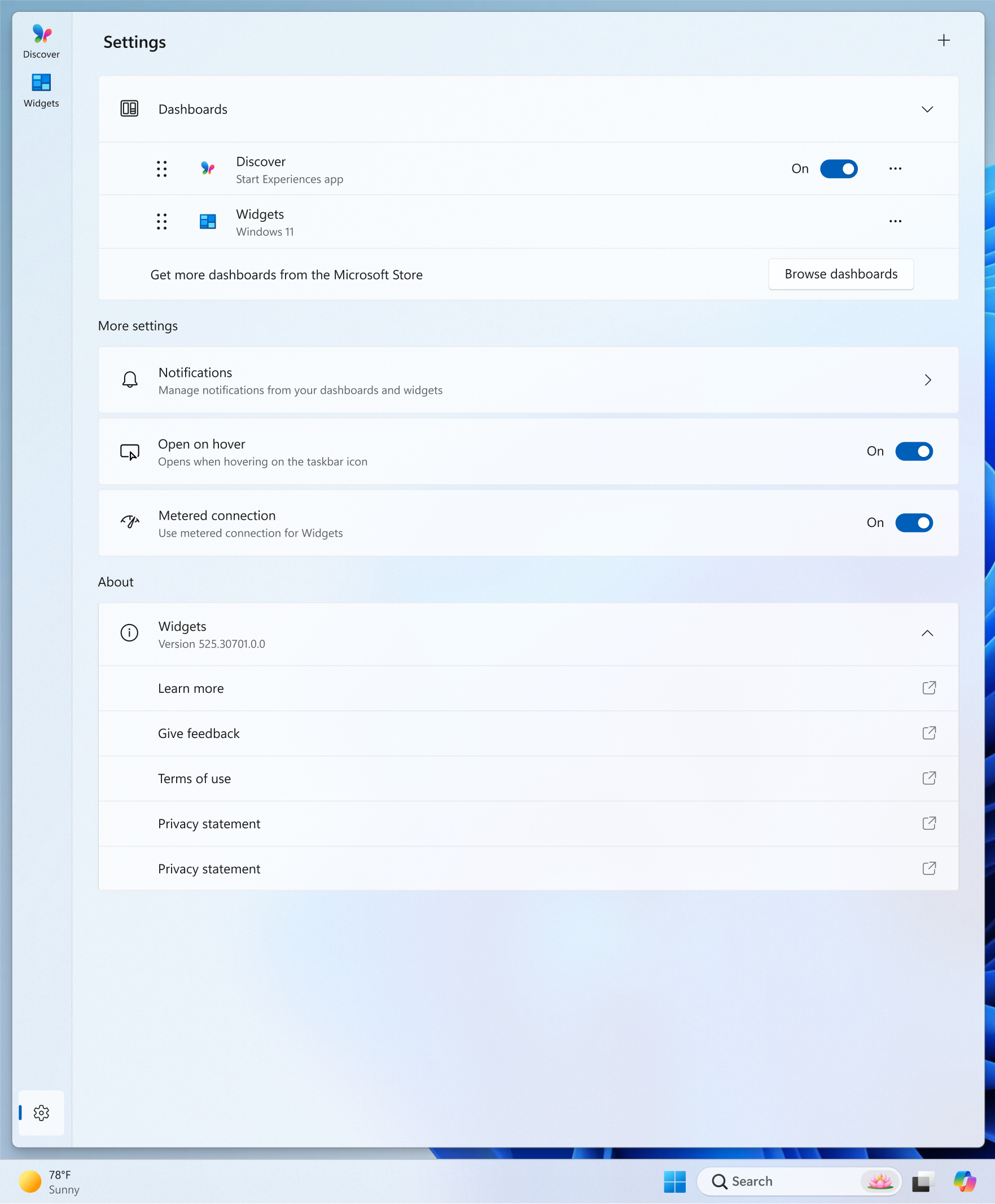
Choose your default dashboard in an updated Widget Board Settings- Launching the Widget Board when it’s showing live weather content will now open the first dashboard in your navigation bar instead of your most recently used dashboard for a more predictable Widget Board experience.
- To modify your default dashboard, navigate to the new full-page Widgets Settings experience by clicking the gear icon at the bottom of your Widget navigation bar and re-arrange your desired default dashboard to the top position.

Change Default Dashboard on Widgets Board in Windows 11
This tutorial will show you how to rearrange the order of dashboards to change the default dashboard on the Widgets board for your account in Windows 11. Widgets in Windows are interactive elements that display dynamic content and provide quick access to various apps and features. You can view...
www.elevenforum.com

Widgets board with a redesigned Widget Settings page that allows dashboard to be re-arranged
See numbered badges on the Widget Board navigation bar
Badges on the dashboard icons in the Widget navigation bar will now show numbers corresponding to the number of alerts from that dashboard. Navigation bar badges clear automatically when you leave a dashboard, making it easy to track what’s new.
Enable or Disable Announcements from Feeds on Widgets Taskbar Icon in Windows 11
This tutorial will show you how to turn on or off showing badges and announcements from specific feeds on the Widgets icon on taskbar for your account in Windows 11. Widgets in Windows are interactive elements that display dynamic content and provide quick access to various apps and features...
www.elevenforum.com

Numbered badge on the Discover dashboard icon in the navigation bar.
FEEDBACK: Please file feedback in Feedback Hub (WIN + F) under Desktop Environment > Widgets
Changes and Improvements for everyone
[Recovery]
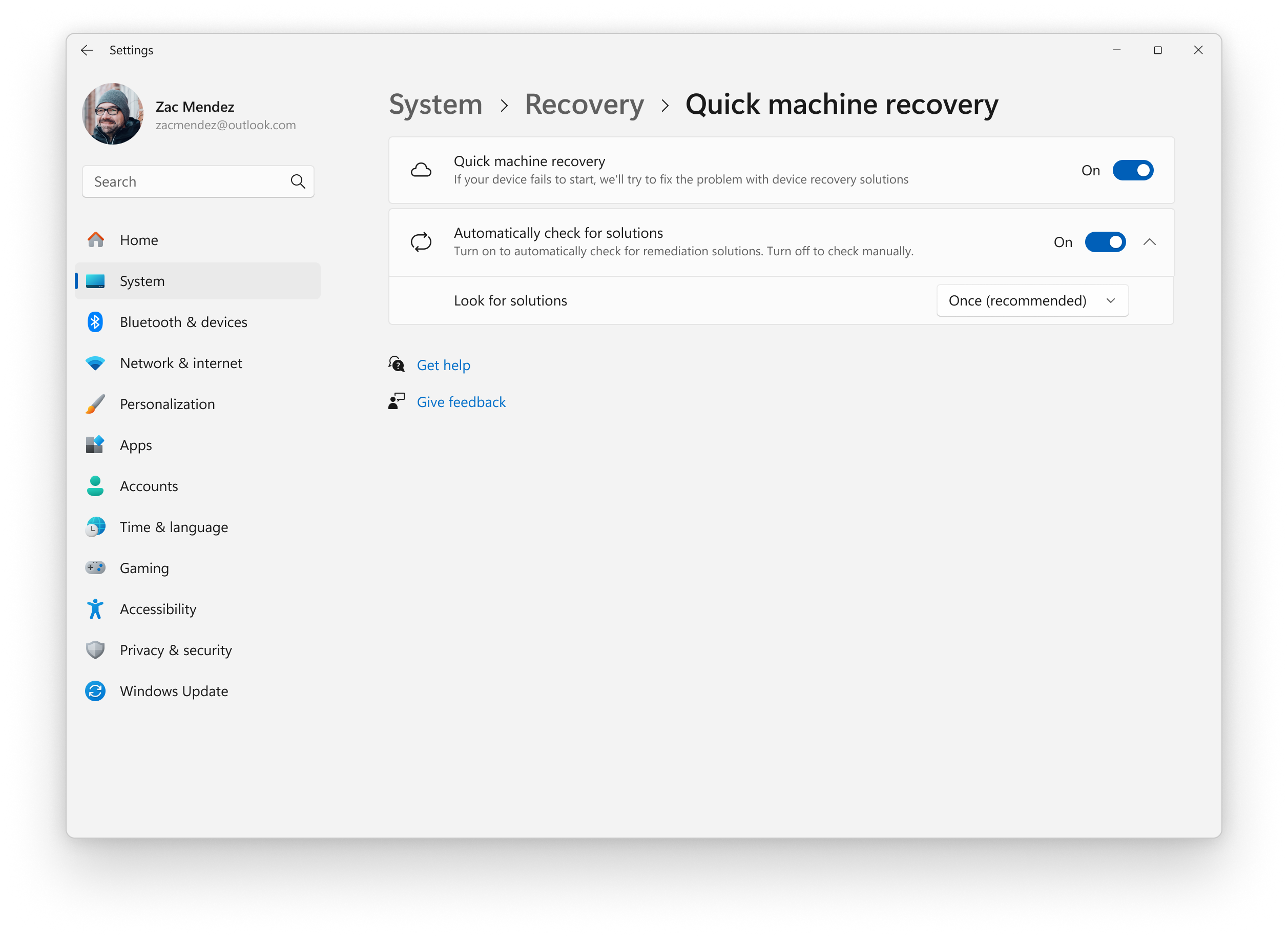
- We’re updating Quick Machine Recovery in Windows – Microsoft Support make getting back to a working PC clearer and faster. The experience in both Windows Settings and the Windows Recovery Environment (WinRE) has been streamlined so options are easier to find and use. On PCs with the settings “quick machine recovery” and “automatically check for solutions” both enabled, QMR now runs a one‑time scan by default instead of repeating scans in a loop. If a fix isn’t available right away, you won’t be left waiting; QMR will quickly point you to the most appropriate recovery options to get you back up and running.

Enable or Disable Quick Machine Recovery in Windows 11
This tutorial will show you how to enable or disable Quick Machine Recovery in Windows 11. Quick machine recovery (QMR) is a feature that enables the recovery of Windows devices when they encounter critical errors that prevent them from booting. QMR automatically detects, diagnoses, and...
www.elevenforum.com
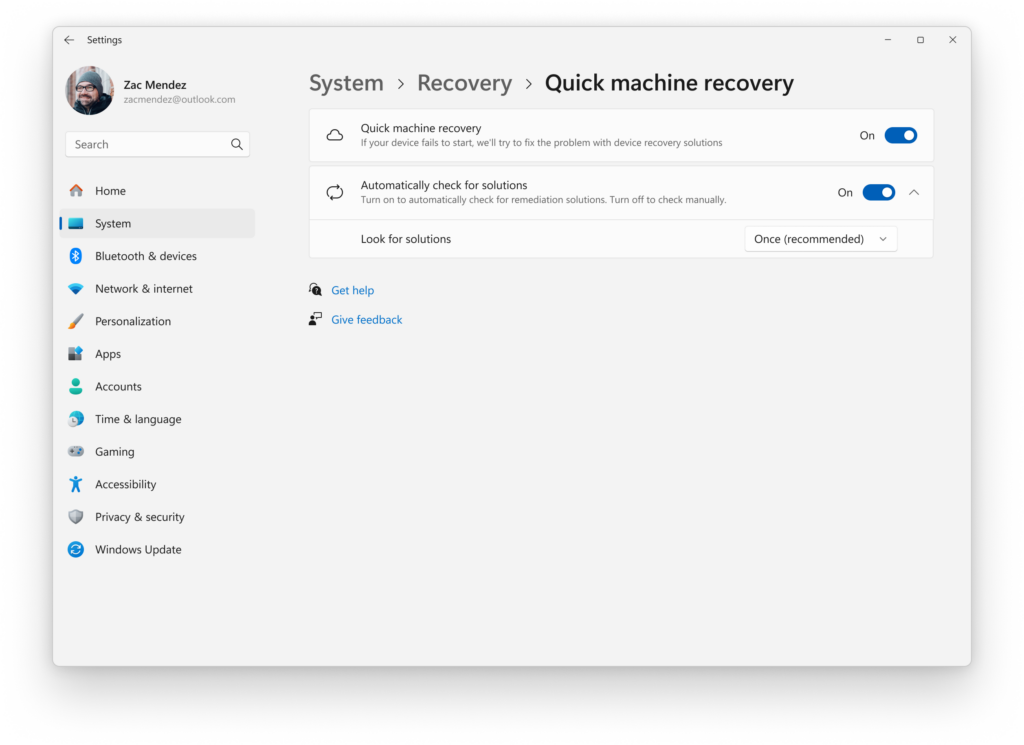
In Settings for Systems, Recovery, “Quick machine recovery” and “Automatically check for solutions” are enabled to run a onetime QMR scan by default.
Changes and Improvements gradually being rolled out with toggle on*
[Smart App Control]
- We’re updating Smart App Control (SAC) so you will now be able to switch SAC off or on without any clean install requirement. To make changes, go to Windows Security > App & Browser Control > Smart App Control settings.
- When it’s on, it helps block untrusted or potentially harmful apps. You can learn more about SAC App & Browser Control in the Windows Security App – Microsoft Support.

Turn On or Off Smart App Control in Windows 11
This tutorial will show you how to manually turn on or off Smart App Control in Windows 11. Smart App Control (SAC) is a new security feature starting with Windows 11 build 22567. Smart App Control can work alongside your other security software, such as Microsoft Defender, for added...
www.elevenforum.com
[File Explorer]
- We are re-enabling people icons under the “Activity” column in File Explorer Home detailed here.

Add or Remove Home in Navigation Pane of File Explorer in Windows 11
This tutorial will show you how to add or remove Home in the navigation pane of File Explorer for your account or all users in Windows 11. Home in the navigation pane is the default homepage of File Explorer (Win+E) that allows you to quickly access and view your pinned/frequent locations...
www.elevenforum.com
[File Explorer]
- We are temporarily turning off the integration supporting the StorageProvider APIs for cloud providers as detailed here.
- We are temporarily turning off support for frequently used and recently downloaded recommended files in File Explorer as detailed here.

Enable or Disable Show Recommended Section in File Explorer Home in Windows 11
This tutorial will show you how to turn on or off showing the Recommended section instead of Quick access in File Explorer Home for your account in Windows 11. Home in the navigation pane of File Explorer allows you to quickly access and view your pinned locations, frequent folders, and recent...
www.elevenforum.com
Fixes gradually being rolled out with toggle on*
[General]
- Fixed an underlying issue which was causing interacting with the desktop to unexpectedly open Task View recently for some people.
[File Explorer]
- Fixed an issue where Shift + Click (or middle clicking) on File Explorer in the taskbar wasn’t opening a new File Explorer instance.
- Fixed an issue where the File Explorer active tab title might not display bolded until you hovered your mouse over it.
[Taskbar]
- Fixed an issue which could lead to the “Automatically hide the taskbar” setting unexpectedly turning off, after seeing a message saying “a toolbar is already hidden on this side of your screen”.
[Settings]
- Fixed an issue which could lead to Settings hanging when trying to navigate to the Network & Internet section.
Known issues
[Taskbar & System Tray]
- We’re investigating an issue which is causing the Start menu to not open for some Insiders on click, although it will open if you press the Windows key. It’s believed this issue may also potentially impact the notification center (which you can open with WIN + N).
- We’re investigating an issue where for some Insiders apps aren’t showing in the system tray when they should be.
[File Explorer]
- Copy progress might flash when clicking more or less details in dark mode version of the copy dialog.
- Scrollbar and footer are missing and showing a white block instead when text is scaled in dark mode version of the copy dialog.
[Recall]
- [NEW] We’re working on the fix for an issue causing some Insiders to see a message saying they don’t have an eligible camera for Recall when they do.
Reminders for Windows Insiders in the Dev & Beta Channels
- Updates are based on Windows 11, version 25H2 via an enablement package (Build 26220.xxxx).
- Many features are rolled out using Controlled Feature Rollout technology, starting with a subset of Insiders and ramping up over time as we monitor feedback to see how they land before pushing them out to everyone in this channel.
- For Windows Insiders who want to be the first to get features gradually rolled out to you, you can turn ON the toggle to get the latest updates as they are available via Settings > Windows Update*. Over time, we will increase the rollouts of features to everyone with the toggle turned on. Should you keep this toggle off, new features will gradually be rolled out to your PC over time once they are ready.
- Features and experiences included in these builds may never get released as we try out different concepts and get feedback. Features may change over time, be removed, or replaced and never get released beyond Windows Insiders. Some of these features and experiences could show up in future Windows releases when they’re ready.
- Some features in active development we preview with Windows Insiders may not be fully localized and localization will happen over time as features are finalized. As you see issues with localization in your language, please report those issues to us via Feedback Hub.
- Check out Flight Hub for a complete look at what build is in which Insider channel.
Windows Insider Program Team
Source:
Announcing Windows 11 Insider Preview Build 26220.7070 (Dev & Beta Channels)
Hello Windows Insiders, today we are releasing Windows 11 Insider Preview Build 26220.7070 (KB5070300) to the Dev & Beta Channels. As a reminder we are offering the same builds to both the Dev & Beta Channel
blogs.windows.com
Check Windows Updates
UUP Dump:
64-bit ISO download:
Select language for Windows 11 Insider Preview Feature Update (26220.7070) amd64
Select language for Windows 11 Insider Preview Feature Update (26220.7070) amd64 on UUP dump. UUP dump lets you download Unified Update Platform files, like Windows Insider updates, directly from Windows Update.
uupdump.net
ARM64 ISO download:
Select language for Windows 11 Insider Preview Feature Update (26220.7070) arm64
Select language for Windows 11 Insider Preview Feature Update (26220.7070) arm64 on UUP dump. UUP dump lets you download Unified Update Platform files, like Windows Insider updates, directly from Windows Update.
uupdump.net
UUP Dump - Download Windows Insider ISO
UUP Dump is the most practical and easy way to get ISO images of any Insider Windows 10 or Windows 11 version, as soon as Microsoft has released a new build. UUP Dump creates a download configuration file according to your choices, downloads necessary files directly from Microsoft servers, and...
www.elevenforum.com
Last edited: