UPDATE 12/19:
 www.elevenforum.com
Hello Windows Insiders, today we are releasing Windows 11 Insider Preview Build 26220.7344 (KB5070316) to the Dev & Beta Channels.
As a reminder, we are offering the same builds to both the Dev & Beta Channels on Windows 11, version 25H2.
If you are an Insider in the Dev Channel, you now have a window to switch from the Dev Channel to the Beta Channel if you would like. This window will only be open for as long as we’re releasing the same 25H2-based updates across both the Dev and Beta Channels. After we move Dev Channel forward to a higher build number, the opportunity to switch between these channels will close. When the Dev Channel jumps ahead, things might not be as stable as the Dev Channel is today, so we highly encourage you to evaluate which channel you would like to be in during the time in which the window to switch is open.
 www.elevenforum.com
Changes in Dev & Beta Channel builds and updates are documented in two buckets: new features, improvements, and fixes that are being gradually rolled out for Insiders who have turned on the toggle to get the latest updates as they are available (via Settings > Windows Update*) and then new features, improvements, and fixes rolling out to everyone in the Dev & Beta Channels. For more information, see the Reminders section at the bottom of this blog post.
 www.elevenforum.com
 www.elevenforum.com

MCP enables secure agent connections to Windows apps and services.
As part of this release, two agent connectors are built into Windows—File Explorer and Windows Settings.
Feedback: Share your thoughts in Feedback Hub (WIN + F) under Recovery and Uninstall > Quick Machine Recovery.
 www.elevenforum.com
 www.elevenforum.com
How it Works
No apps utilize UOP yet because the feature is new, but apps will start using it over time. The feature is partially enabled for Dev and Beta Channel Insiders today and will reach full enablement in these channels soon. API documentation will follow.
Feedback: Share your thoughts in Feedback Hub (WIN + F) under Downloading, installing, and configuring Windows Update.
Thank you to all the Insiders who provided feedback on the February 5, 2025 Canary Channel Windows Midi Services preview: Announcing Windows 11 Insider Preview Build 27788 (Canary Channel) | Windows Insider Blog. Your feedback, bug reports, and testing have been invaluable!
New features in this release include:

Windows MIDI Services Console Monitor
Windows MIDI Services Settings app
We look forward to having Windows Insiders who create music try out the Windows MIDI Services release especially with your current applications and devices. You can also join the discussion on Discord if you have questions or are looking to help or provide feedback! You will find a list of known issues documented here.
Feedback: Share your thoughts on GitHub or Discord.
 www.elevenforum.com
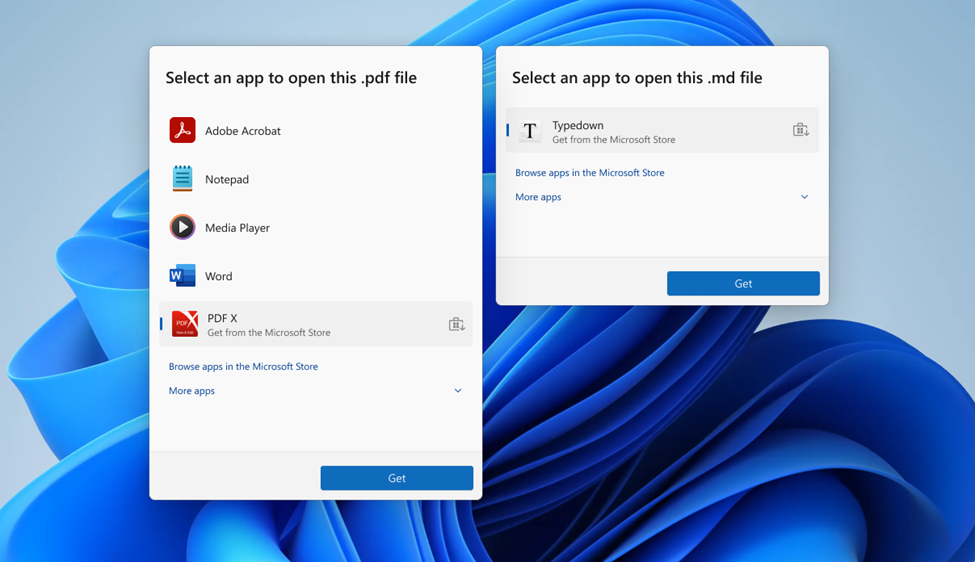
Choose an app to open files—now with direct Microsoft Store integration.
Windows Insider Program Team

 blogs.windows.com
Check Windows Updates
UUP Dump:
64-bit ISO download:

ARM64 ISO download:
 www.elevenforum.com
KB5072043 Windows 11 Insider Dev and Beta build 26220.7523 (25H2) - Dec. 19
UPDATE 1/09: https://www.elevenforum.com/t/kb5072046-windows-11-insider-dev-and-beta-build-26220-7535-25h2-jan-9.43673/ Windows Insider Blog: Hello Windows Insiders, today we are releasing Windows 11 Insider Preview Build 26220.7523 (KB5072043) to the Dev & Beta Channels. As a reminder, we are...
www.elevenforum.com
Windows Insider Blog:
Hello Windows Insiders, today we are releasing Windows 11 Insider Preview Build 26220.7344 (KB5070316) to the Dev & Beta Channels.
As a reminder, we are offering the same builds to both the Dev & Beta Channels on Windows 11, version 25H2.
If you are an Insider in the Dev Channel, you now have a window to switch from the Dev Channel to the Beta Channel if you would like. This window will only be open for as long as we’re releasing the same 25H2-based updates across both the Dev and Beta Channels. After we move Dev Channel forward to a higher build number, the opportunity to switch between these channels will close. When the Dev Channel jumps ahead, things might not be as stable as the Dev Channel is today, so we highly encourage you to evaluate which channel you would like to be in during the time in which the window to switch is open.
Change Windows Insider Program Channel in Windows 11
This tutorial will show you how to change your Windows Insider Program channel to the Beta, Experimental, or Release Preview channel to get Insider preview builds of Windows 11 on your PC. Flighting is the process of running Windows Insider Preview Builds on your device. When you run these...
www.elevenforum.com
Changes in Dev & Beta Channel builds and updates are documented in two buckets: new features, improvements, and fixes that are being gradually rolled out for Insiders who have turned on the toggle to get the latest updates as they are available (via Settings > Windows Update*) and then new features, improvements, and fixes rolling out to everyone in the Dev & Beta Channels. For more information, see the Reminders section at the bottom of this blog post.
Enable or Disable Get Latest Updates as soon as available in Windows 11
This tutorial will show you how to turn on or off "Get the latest updates as soon as they are available" in Windows 11. Starting with Windows 11 build 22621.1635, Microsoft added a new "Get the latest updates as soon as they are available" toggle under Settings > Windows Update. When you turn...
www.elevenforum.com
New features gradually being rolled out with toggle on*
Public preview of native support for MCP on Windows
Windows now offers native support for the Model Context Protocol (MCP), an open standard that gives AI agents a universal way to connect with apps, tools, and services. Agents can discover and connect to these tools and other agents via a secure, manageable Windows on-device registry (ODR). By default, all agent connectors in the Windows on-device registry will be contained in a secure environment with their own identity and audit trail. With OS level integration, MCP on Windows delivers secure discoverability, consistent controls, and enterprise grade manageability—empowering developers, IT professionals, and end users to build and deploy agentic workflows at scale.
Enable or Disable Reducing Protections for Agent Connectors in Windows 11
This tutorial will show you how to turn on or off enable more agent connectors by reducing protections for all users in Windows 11. Starting with Windows 11 build 26220.7344 (Dev and Beta), Windows now offers native support for the Model Context Protocol (MCP), an open standard that gives AI...
www.elevenforum.com
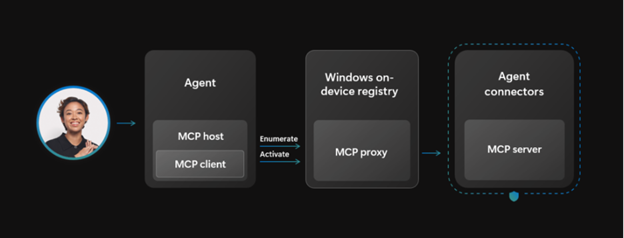
MCP enables secure agent connections to Windows apps and services.
As part of this release, two agent connectors are built into Windows—File Explorer and Windows Settings.
- File Explorer Connector
Agents can use the File Explorer connector to manage, organize and retrieve local files on a user’s device with their consent. On Copilot+ PCs, the connector can also perform natural language search to retrieve the exact file based on descriptions, content, metadata, and, for images, enhanced search based on image classification. - Windows Settings Connector
On Copilot+ PC devices, Windows Settings connector lets users check, change settings, or navigate directly to specific pages such as display, mouse, keyboard, and sound using natural language.
Quick Machine Recovery
Quick machine recovery (QMR) will now be turned on automatically for Windows Professional devices that are not domain joined. These devices will get the same recovery features as Windows Home users. For enterprise computers that are domain joined, nothing changes—QMR will stay off unless your organization turns it on.Feedback: Share your thoughts in Feedback Hub (WIN + F) under Recovery and Uninstall > Quick Machine Recovery.
Enable or Disable Quick Machine Recovery in Windows 11
This tutorial will show you how to enable or disable Quick Machine Recovery in Windows 11. Quick machine recovery (QMR) is a feature that enables the recovery of Windows devices when they encounter critical errors that prevent them from booting. QMR automatically detects, diagnoses, and...
www.elevenforum.com
Update Orchestration Platform (UOP)
The Unified Update Orchestration Platform (UOP) is starting to roll out to Windows Insiders in the Dev and Beta Channels. UOP makes app updates more consistent and predictable, with fewer interruptions. Insiders will see a new page in Settings > Apps > App Updates, where they can check update progress and take action if needed.
Check for App Updates via Windows Update in Windows 11
This tutorial will show you how to check for app updates in Settings via Windows Update in Windows 11. The App Updates page is no longer available in Settings. Starting with Windows 11 build 26220.7344 (Dev & Beta), the Unified Update Orchestration Platform (UOP) is starting to roll out. UOP...
www.elevenforum.com
How it Works
- Apps will register with UOP via APIs.
- UOP triggers a registered app to scan, download and install updates based on user activity and system state.
- Apps continue to utilize their own backend for acquiring updates.
- Apps report update status back to UOP, so users can see it in the App Updates page.
No apps utilize UOP yet because the feature is new, but apps will start using it over time. The feature is partially enabled for Dev and Beta Channel Insiders today and will reach full enablement in these channels soon. API documentation will follow.
Feedback: Share your thoughts in Feedback Hub (WIN + F) under Downloading, installing, and configuring Windows Update.
Windows MIDI Services
We’re excited to announce the highly anticipated production release of Windows MIDI Services, going to the Dev and Beta Windows Insider channels today, and then to retail Windows in the next few months. This is our update of MIDI on Windows with a focus on a great experience for musicians using MIDI 1.0 or MIDI 2.0.Thank you to all the Insiders who provided feedback on the February 5, 2025 Canary Channel Windows Midi Services preview: Announcing Windows 11 Insider Preview Build 27788 (Canary Channel) | Windows Insider Blog. Your feedback, bug reports, and testing have been invaluable!
New features in this release include:
- Full support for WinMM MIDI 1.0 and WinRT MIDI 1.0, complete with in-service translation, enabling any API to use any MIDI 1.0 or MIDI 2.0 device. This means your existing applications will use the new service and gain important new features like the ability for more than one app to open a MIDI port at the same time, custom port names, and more.
- New loopback and app-to-app MIDI support.
- Lots of performance improvements and bug fixes thanks to our vibrant community. Thank you!
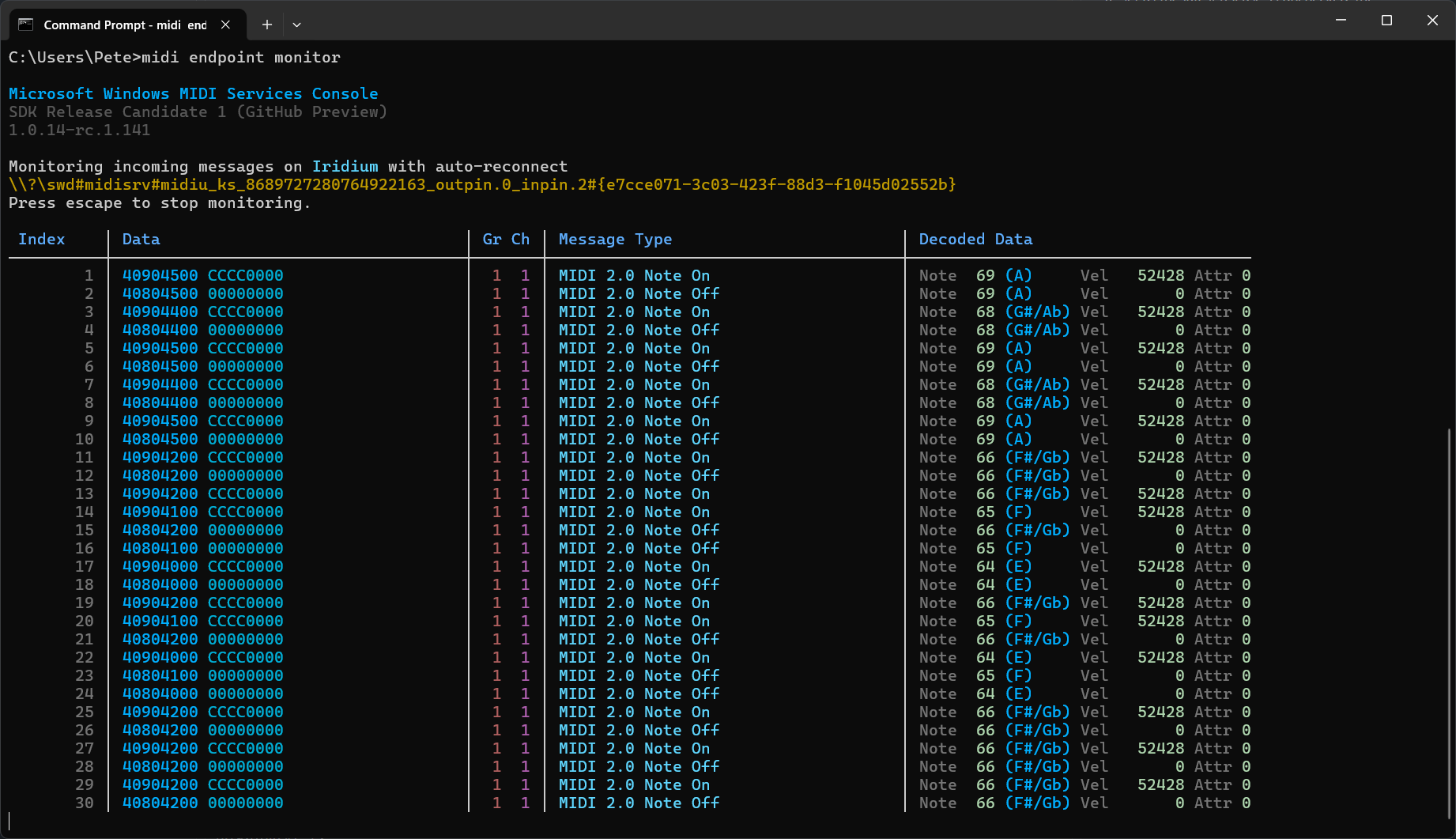
Windows MIDI Services Console Monitor
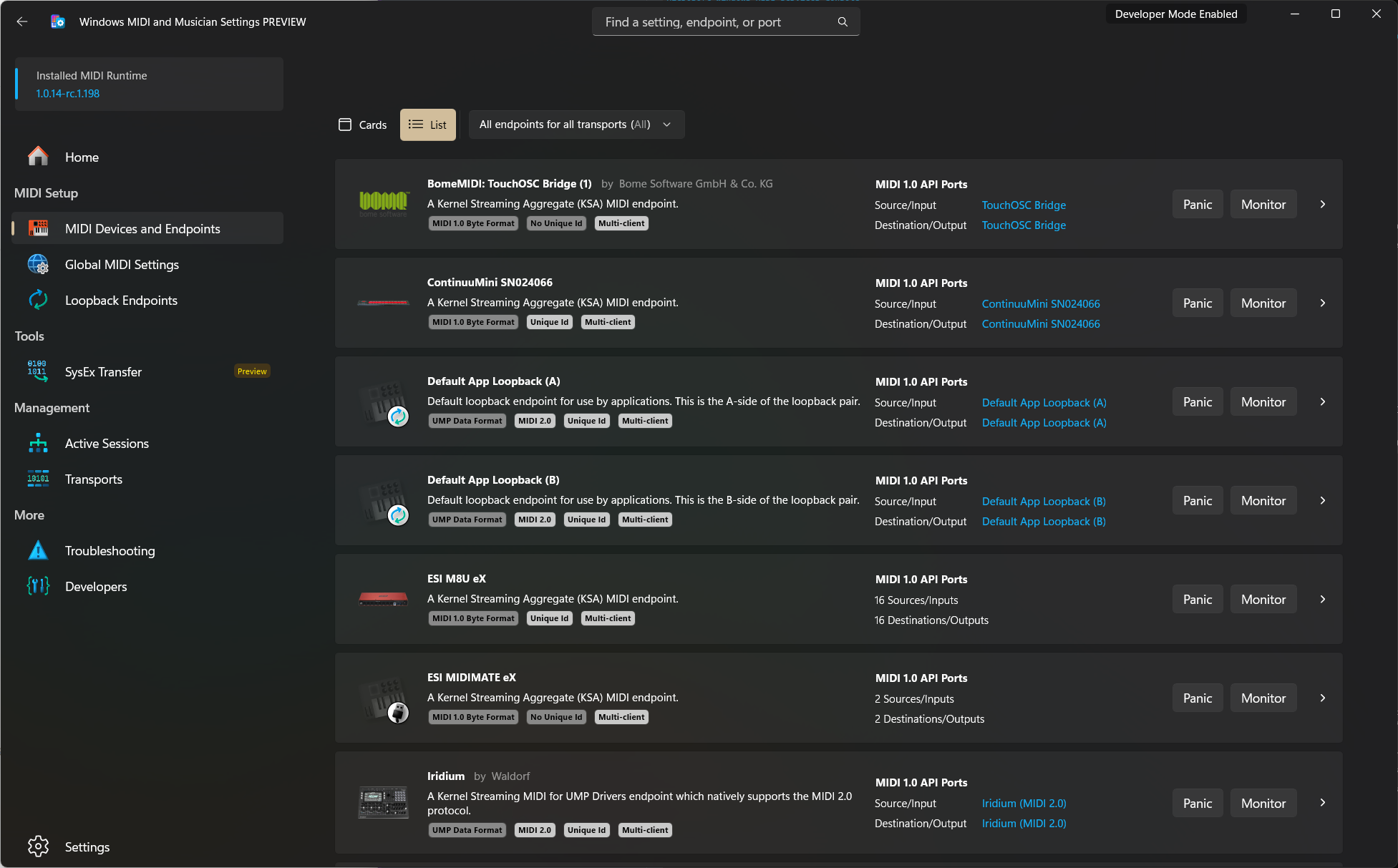
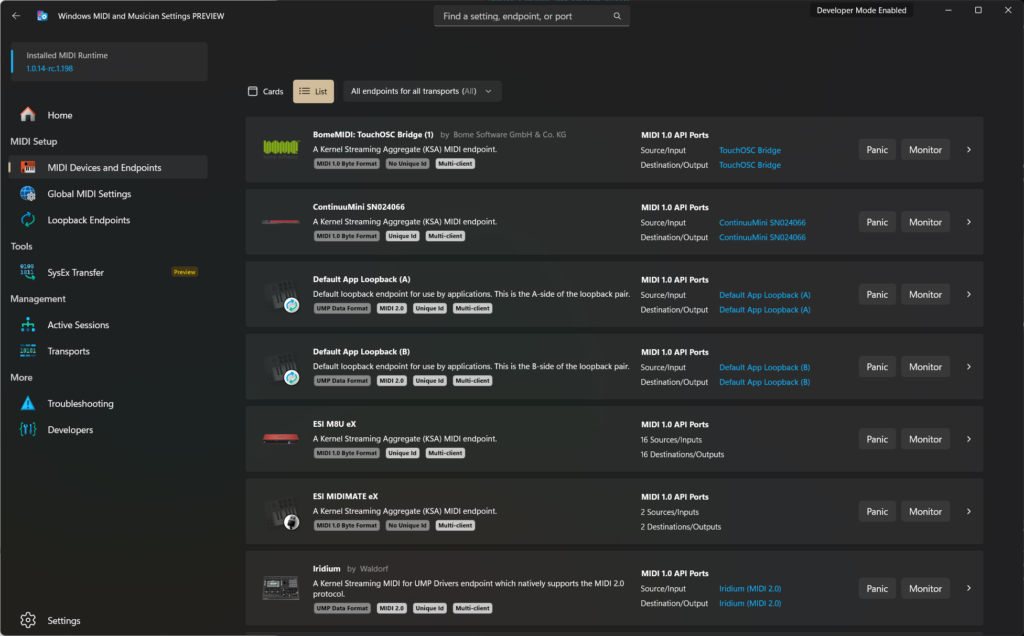
Windows MIDI Services Settings app
We look forward to having Windows Insiders who create music try out the Windows MIDI Services release especially with your current applications and devices. You can also join the discussion on Discord if you have questions or are looking to help or provide feedback! You will find a list of known issues documented here.
Feedback: Share your thoughts on GitHub or Discord.
Changes and Improvements gradually being rolled out with toggle on*
[“Open With” App Integration]
We’re updating Open With so that if you don’t have a relevant app you need installed, instead of having to open Microsoft Store to find it, it will now show directly in this list as available to install. This makes it faster and easier to find and install the app you need. [Update 12/8] This functionality originally rolled out to the Dev Channel and Beta Channel last spring.
Choose Default Apps in Windows 11
This tutorial will show you different ways to set default apps used to open file and link types for your account in Windows 11. A default app is the program that Windows has assigned to open a file or link type with by default when you open it. Default apps you choose will only apply to your...
www.elevenforum.com
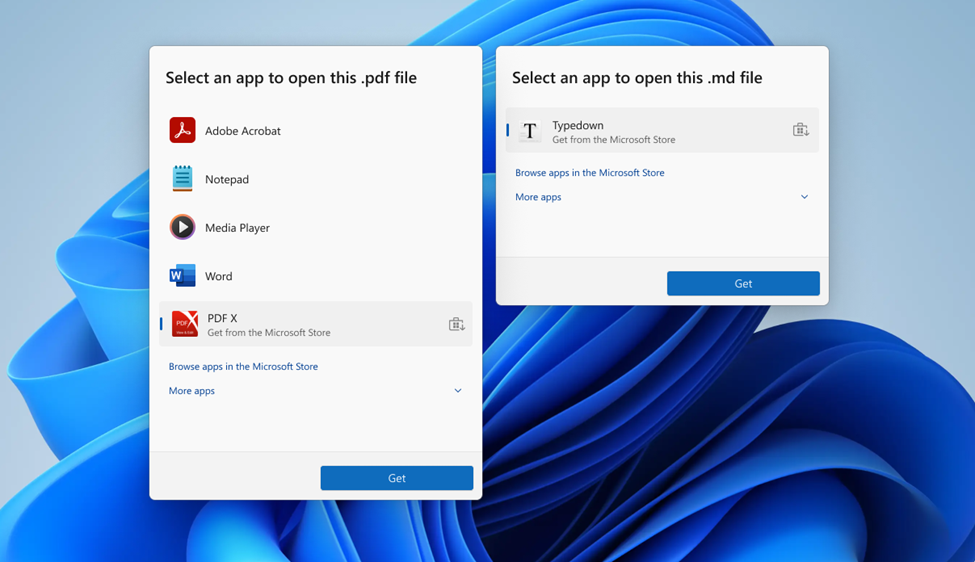
Choose an app to open files—now with direct Microsoft Store integration.
Fixes gradually being rolled out with toggle on*
[Search]
- Fixed a recent issue which could caused the search window to unexpectedly start floating above the taskbar.
[File Explorer]
- If there are no available or enabled AI Actions, this section will no longer show in the context menu.

Add or Remove AI Actions Context Menu in Windows 11
This tutorial will show you how to add or remove the AI Actions context menu for your account in Windows 11. Starting with Windows 11 build 262100.6725 (24H2), Microsoft is introducing AI actions in File Explorer. With AI actions in File Explorer, you can interact more deeply with your files by...
www.elevenforum.com
- Fixed an issue where File Explorer might not search certain SMB shares after the latest updates.
[Windows Hello]
- Fixed an issue resulting in fingerprint recognition not working for some Insiders after the latest flights.
[Display and Graphics]
- Fixed an issue which could cause the Project pane to not appear after pressing WIN + P.
[Xbox full screen experience for PC]
- For Insiders with the new Xbox full screen experience for PC, the virtual keyboard should now show properly when needed for controller users on devices without a touch screen.
[Other]
- Fixed an issue in the previous flight which was leading to some Insiders seeing a bugcheck with error DRIVER_IRQL_NOT_LESS_OR_EQUAL when using a controller.
- Fixed an underlying issue that could lead to your PC freezing where attempting to run Windows Terminal elevated from a non-admin account.
Known issues
[Xbox full screen experience for PC]
- Some apps may behave unexpectedly when using FSE, particularly those that expect to be locked to a given size or launch additional windows.
Enter and Exit Xbox Mode in Windows 11
This tutorial will show you how to enter and exit Xbox mode for full screen gaming for your account on Windows 11. Starting with Windows 11 build 26100.8328 (24H2), build 26200.8328 (25H2), and build 28000.2179 (26H1), Xbox mode is now available on Windows 11 PCs, including laptops, desktops...
www.elevenforum.com
[Taskbar & System Tray]
- We’re working on the fix for an issue which is causing the Start menu to not open for some Insiders on click, although it will open if you press the Windows key. This issue may also potentially impact the notification center (which you can open with WIN + N) and quick settings (WIN + A).
- We’re investigating an issue where for some Insiders apps aren’t showing in the system tray when they should be.
[File Explorer]
- Scrollbar and footer are missing and showing a white block instead when text is scaled in dark mode version of the copy dialog.
- We’re working on the fix for an issue where File Explorer has started showing a white flash when navigating between pages after the latest flights.
- [NEW] We’re working on the fix for an issue where opening the context menu is causing explorer.exe to crash for some Insiders after the previous flight.
[Bluetooth]
- We’re investigating an issue causing Bluetooth device battery level to not show for some Insiders.
Reminders for Windows Insiders in the Dev & Beta Channels
- Updates are based on Windows 11, version 25H2 via an enablement package (Build 26220.xxxx).
- Many features are rolled out using Controlled Feature Rollout technology, starting with a subset of Insiders and ramping up over time as we monitor feedback to see how they land before pushing them out to everyone in this channel.
- For Windows Insiders who want to be the first to get features gradually rolled out to you, you can turn ON the toggle to get the latest updates as they are available via Settings > Windows Update*. Over time, we will increase the rollouts of features to everyone with the toggle turned on. Should you keep this toggle off, new features will gradually be rolled out to your PC over time once they are ready.
- Features and experiences included in these builds may never get released as we try out different concepts and get feedback. Features may change over time, be removed, or replaced and never get released beyond Windows Insiders. Some of these features and experiences could show up in future Windows releases when they’re ready.
- Some features in active development we preview with Windows Insiders may not be fully localized and localization will happen over time as features are finalized. As you see issues with localization in your language, please report those issues to us via Feedback Hub.
- Check out Flight Hub for a complete look at what build is in which Insider channel.
Windows Insider Program Team
Source:
Announcing Windows 11 Insider Preview Build 26220.7344 (Dev & Beta Channels)
Hello Windows Insiders, today we are releasing Windows 11 Insider Preview Build 26220.7344 (KB5070316) to the Dev & Beta Channels. As a reminder, we are offering the same builds to both the Dev & Beta Channels on Windows 11,
blogs.windows.com
Check Windows Updates
UUP Dump:
64-bit ISO download:
Select language for Windows 11 Insider Preview Feature Update (26220.7344) amd64
Select language for Windows 11 Insider Preview Feature Update (26220.7344) amd64 on UUP dump. UUP dump lets you download Unified Update Platform files, like Windows Insider updates, directly from Windows Update.
uupdump.net
ARM64 ISO download:
Select language for Windows 11 Insider Preview Feature Update (26220.7344) arm64
Select language for Windows 11 Insider Preview Feature Update (26220.7344) arm64 on UUP dump. UUP dump lets you download Unified Update Platform files, like Windows Insider updates, directly from Windows Update.
uupdump.net
UUP Dump - Download Windows Insider ISO
UUP Dump is the most practical and easy way to get ISO images of any Insider Windows 10 or Windows 11 version, as soon as Microsoft has released a new build. UUP Dump creates a download configuration file according to your choices, downloads necessary files directly from Microsoft servers, and...
www.elevenforum.com
Last edited: