Win Update KB5070773 Windows 11 Out-of-band Update build 26100.6901 (24H2) and 26200.6901 (25H2) - Oct. 20


UPDATE 10/28:


 Microsoft Support:

October 20, 2025 - KB5070773 (OS Builds 26200.6901 and 26100.6901) Out-of-band​

Windows Secure Boot certificate expiration

Important
: Secure Boot certificates used by most Windows devices are set to expire starting in June 2026. This might affect the ability of certain personal and business devices to boot securely if not updated in time. To avoid disruption, we recommend reviewing the guidance and taking action to update certificates in advance. For details and preparation steps, see Windows Secure Boot certificate expiration and CA updates.


To learn about Windows update terminology, see types of Windows updates and monthly quality update types. For an overview, see the update history page for Windows 11, version24H2 and version 25H2.

Stay informed! Follow @WindowsUpdate for the latest updates from the Windows Release Health Dashboard.

Improvements

This out-of-band (OOB) update includes quality improvements. This update is cumulative and includes security fixes and improvements from the October 14, 2025, security update (KB5066835), in addition to the following:
  • [USB] Fixed: After installing the Windows security update released on October 14, 2025 (KB5066835), USB devices, such as keyboards and mice, do not function in the Windows Recovery Environment (WinRE). This issue prevents navigation of any of the recovery options within WinRE. Note that the USB devices continue to work normally within the Windows operating system.

AI Components

This release updates the following AI components:

AI ComponentVersion
Image Search1.2509.1022.0
Content Extraction1.2509.1022.0
Semantic Analysis1.2509.1022.0
Settings Model1.2509.1022.0

Windows 11 servicing stack update (KB5067360)- 26100.6893​

This update makes quality improvements to the servicing stack, which is the component that installs Windows updates. Servicing stack updates (SSU) ensure that you have a robust and reliable servicing stack so that your devices can receive and install Microsoft updates. To learn more about SSUs, see Simplifying on-premises deployment of servicing stack updates.

Known issues in this update

1 Problems playing protected content in some BluRay/DVD/Digital TV apps

Symptoms
Some Digital TV and Blu-ray/DVD apps might not play protected content as expected after installing the August 29, 2025, Windows non-security preview update (KB5064081), or later updates.

Apps that use Enhanced Video Renderer with HDCP enforcement or Digital Rights Management (DRM) for digital audio might show copyright protection errors, frequent playback interruptions, unexpected stops, or black screens.

Streaming services are not affected.

Workaround
The non-security September 2025 Windows preview update (KB5065789) and later updates address problems affecting certain applications that use the Enhanced Video Renderer (EVR) with HDCP (High-bandwidth Digital Content Protection) enforcement. The non-security October Windows preview update (KB5067036) includes additional improvements to address problems affecting applications using Digital Rights Media (DRM) for digital audio.

2 IIS websites might fail to load

Symptoms
After installing the non-security September update (KB5065789) for Windows 11, version 25H2, or the security October update (KB5066835) for Windows 11, version 24H2, server-side applications that rely on HTTP.sys might experience issues with incoming connections. As a result, Internet Information Services (IIS) websites might fail to load and display an error message such as “Connection reset – error (ERR_CONNECTION_RESET)” or a similar message. This includes websites hosted on http://localhost/ and other IIS connections.

This issue may result from various conditions, including internet connectivity, timing of update installation, and device restarts. It might not occur in all environments, even if the update is installed.

The following steps can help resolve this issue in environments where it's observed:
  1. On the affected device, open Settings and go to Windows Update.
  2. Select Start , type Check for updates, and Check for updates from the results.
  3. If updates are available, install them.
  4. Restart your device.
Note: Make sure to restart your device, even if no updates are installed.

Workaround

This issue is addressed in KB5067036.

How to get this update

Before you install this update

Microsoft combines the latest servicing stack update (SSU) for your operating system with the latest cumulative update (LCU). For general information about SSUs, see Servicing stack updates and Servicing Stack Updates (SSU): Frequently Asked Questions.

Install this update

To install this update, use one of the following Windows and Microsoft release channels.

AvailableNext Step
Included
This update downloads and installs automatically from Windows Update and Microsoft Update.
Yes 1Before you install this update
To get the standalone package(s) for this update, go to the Microsoft Update Catalog website. This KB contains one or more MSU files that require installation in a specific order.

Install this update
Method 1: Install all MSU files together


Download all MSU files for KB5070773 from Microsoft Update Catalog and place them in the same folder (for example, C:/Packages). Use Deployment Image Servicing and Management (DISM.exe) to install the target update. DISM will use the folder specified in PackagePath to discover and install one or more prerequisite MSU files as needed.

Updating Windows PC

To apply this update to a running Windows PC, run the following command from an elevated Command Prompt:

DISM /Online /Add-Package /PackagePath:c:\packages\Windows11.0-KB5070773-x64.msu

Or, run the following command from an elevated Windows PowerShell prompt:

Add-WindowsPackage -Online -PackagePath "c:\packages\Windows11.0-KB5070773-x64.msu"

Updating Windows Installation media

To apply this update to Windows Installation media, see Update Windows installation media with Dynamic Update.

Note: When downloading other Dynamic Update packages, ensure they match the same month as this KB. If the SafeOS Dynamic Update or Setup Dynamic Update is not available for the same month as this KB, use the most recently published version of each.

To add this update to a mounted image, run the following command from an elevated Command Prompt:

DISM /Image:mountdir /Add-Package /PackagePath:Windows11.0-KB5070773-x64.msu

Or, run the following command from an elevated Windows PowerShell prompt:

Add-WindowsPackage -Path "c:\offline" -PackagePath "Windows11.0-KB5070773-x64.msu" -PreventPending

Method 2: Install each MSU file individually in order

Download and install each MSU file individually using DISM or Windows Update Standalone Installer in the following order:
  1. windows11.0-kb5043080-x64_953449672073f8fb99badb4cc6d5d7849b9c83e8.msu
  2. windows11.0-kb5070773-x64_6640d1a7a2a393bd2db6f97b7eb4fe3907806902.msu
1 This latest cumulative update includes updates for AI components. Even though the AI component updates are included in the update, the AI components are only applicable to Windows Copilot+ PCs and will not install on Windows PC or Windows Server.

If you want to remove the LCU

To remove the LCU after installing the combined SSU and LCU package, use the DISM/Remove-Package command line option with the LCU package name as the argument. You can find the package name by using this command: DISM /online /get-packages.

Running Windows Update Standalone Installer (wusa.exe) with the /uninstall switch on the combined package will not work because the combined package contains the SSU. You cannot remove the SSU from the system after installation.

File information

For a list of the files provided in this update, download the file information for cumulative update 5070773.

For a list of the files provided in the servicing stack update, download the file information for the SSU KB5067360 - version 26100.6893.


 Source:


Check Windows Updates


UUP Dump:

64-bit ISO download:

ARM64 ISO download:

 
Last edited:

1760994338678.webp
 

My Computer

System One

  • OS
    Windows 11 Pro 25H2
    Computer type
    PC/Desktop
    CPU
    i7 10700K
    Motherboard
    MSI Z590 Gaming Carbon Wifi
    Memory
    ddr4 16gb
    Graphics Card(s)
    nvidia 1080 8GB
    Screen Resolution
    1920x1080p
Didn't show for me until I toggled on "get the latest updates"

Win-1955.webp
 

My Computers

System One System Two

  • OS
    Windows 11 Pro 25H2 Build 26200.8524
    Computer type
    PC/Desktop
    Manufacturer/Model
    Sin-built 2013
    CPU
    Intel(R) Core(TM) i7-4770K CPU @ 3.50GHz
    Motherboard
    ASUS ROG Maximus VI Formula
    Memory
    32.0 GB of I forget and the box is in storage.
    Graphics Card(s)
    Gigabyte nVidia GeForce GTX 1660 Super OC 6GB
    Sound Card
    Onboard thingy
    Monitor(s) Displays
    5 x LG 25MS500-B - 1 x 24MK430H-B - 1 x Wacom Pro 22" Touch Screen Tablet
    Screen Resolution
    All over the place
    Hard Drives
    Too many to list.
    OS on Samsung 1TB 870 QVO SATA
    PSU
    Silverstone 1500
    Case
    NZXT Phantom 820 Full-Tower Case
    Cooling
    Noctua NH-D15 Elite Class Dual Tower CPU Cooler / 6 x EziDIY 120mm / 2 x Corsair 140mm somethings / 1 x 140mm Thermaltake something / 2 x 200mm Corsair.
    Keyboard
    Corsair K95 / Logitech diNovo Edge Wireless
    Mouse
    Logitech: G402 / G502 / Mx Masters / Mx Air Cordless
    Internet Speed
    2000/500Mbps
    Browser
    All sorts
    Antivirus
    Kaspersky Premium
    Other Info
    ㅤㅤㅤㅤㅤㅤㅤㅤㅤㅤㅤㅤㅤㅤㅤㅤㅤㅤㅤㅤㅤㅤㅤㅤㅤㅤㅤㅤㅤㅤㅤㅤㅤㅤㅤㅤㅤㅤㅤㅤ⠀⠀⠀⠀⠀⠀⠀⠀⠀⠀
    TP-Link BE9300 WiFi 7 Bluetooth 5.4 (Archer TBE550E)
    TP-Link TX201 V1 2.5GB Lan

    Grandstream HT812 - VoIP
    ASUS DSL-AX82U - Mesh
    ASUS RT-AC68U - Mesh
    ASUS RT-BE88U Router

    Brother MFC-L2880DW Printer

    I’m on a horse.
  • Operating System
    Windows 11 Pro 25H2 Build 26200.8524
    Computer type
    Laptop
    Manufacturer/Model
    LENOVO Yoga 7 14IRL8 - 7i EVO OLED 14" Touchscreen i5 12 Core 16GB/512GB
    CPU
    Intel Core 12th Gen i5-1240P Processor (1.7 - 4.4GHz)
    Memory
    16GB LPDDR5 RAM
    Graphics card(s)
    Intel Iris Xe Graphics Processor
    Sound Card
    Optimized with Dolby Atmos®
    Screen Resolution
    QHD 2880 x 1800 OLED
    Hard Drives
    M.2 512GB
    Antivirus
    Defender / Malwarebytes
    Other Info
    …still on a horse.
Downloading and installing now.

1760994708241.webp
1760994992203.webp

Done:

Edition Windows 11 Pro
Version 25H2
Installed on ‎8/‎29/‎2025
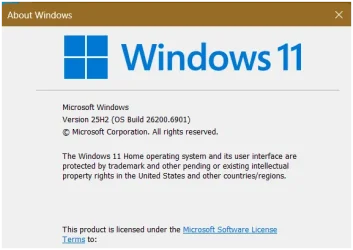
OS build 26200.6901
Experience Windows Feature Experience Pack 1000.26100.253.0
 
Last edited:

My Computer

System One

  • OS
    Windows 11 Pro 25H2
    Computer type
    PC/Desktop
    Manufacturer/Model
    Dell XPS 8930
    CPU
    Intel I9-9900K
    Memory
    64GB
    Graphics Card(s)
    NVIDIA RTX 2060
    Sound Card
    NVIDIA High Definition Audio
    Monitor(s) Displays
    4k Samsung
    Screen Resolution
    3840 x 2160
    Hard Drives
    512GB NVMe, ADATA SU 800, 2TB HDD
I'm downloading that one now on my secondary machine.
 

My Computers

System One System Two

  • OS
    Win 11 Pro 25H2, Build 26200.8524
    Computer type
    PC/Desktop
    Manufacturer/Model
    Home Brew
    CPU
    Intel Core i5 14500
    Motherboard
    Gigabyte B760M G P WIFI
    Memory
    64GB DDR4
    Graphics Card(s)
    GeForce RTX 4060
    Sound Card
    Chipset Realtek
    Monitor(s) Displays
    LG 45" Ultragear, Acer 24" 1080p
    Screen Resolution
    5120x1440, 1920x1080
    Hard Drives
    Crucial P310 2TB 2280 PCIe Gen4 3D NAND NVMe M.2 SSD (O/S)
    Silicon Power 2TB US75 NVMe PCIe Gen4 M.2 2280 SSD (backup)
    Crucial BX500 2TB 3D NAND (2nd backup)
    Seagate 4TB Ironwolf, rotating HDD archive files
    External off-line backup Drives: 2 NVMe 4TB drives in external enclosures
    PSU
    Thermaltake Toughpower GF3 750W
    Case
    LIAN LI LANCOOL 216 E-ATX PC Case
    Cooling
    Lots of fans!
    Keyboard
    Microsoft Comfort Curve 2000
    Mouse
    Logitech G305
    Internet Speed
    Verizon FiOS 1GB
    Browser
    Firefox
    Antivirus
    Malware Bytes & Windows Defender Security
  • Operating System
    Win 11 Pro 25H2, Build 26200.8524
    Computer type
    PC/Desktop
    Manufacturer/Model
    Home Brew
    CPU
    Intel Core i5 14400
    Motherboard
    Gigabyte B760M DS3H AX
    Memory
    32GB DDR5
    Graphics card(s)
    Intel 700 Embedded GPU
    Sound Card
    Realtek Embedded
    Monitor(s) Displays
    27" HP 1080p
    Screen Resolution
    1920x1080
    Hard Drives
    Crucial P310 2TB 2280 PCIe Gen4 eD NAND PCIe SSD
    Samsung EVO 990 2TB NVMe Gen4 SSD
    Samsung 2TB SATA SSD
    PSU
    Thermaltake Smart BM3 650W
    Case
    Okinos Micro ATX Case
    Cooling
    Fans
    Keyboard
    Microsoft Comfort Curve 2000
    Mouse
    Logitech G305
    Internet Speed
    Verizon FiOS 1GB
    Browser
    Firefox
    Antivirus
    Malware Bytes & Windows Defender Security
It's installing on my laptop now 15% on a Monday? KB5070773
 

Attachments

  • Screenshot 2025-10-20 140356.webp
    Screenshot 2025-10-20 140356.webp
    9.4 KB · Views: 1

My Computer

System One

  • OS
    Windows 11 25H2 (OS Build 26200.8524)
    Computer type
    Laptop
    Manufacturer/Model
    Dell
    CPU
    Processor: 11th Gen Intel(R) Core(TM) i5-1135G7 @ 2.40G
    Motherboard
    64-bit operating system Dell 0XMF7W
    Memory
    12GB
    Graphics Card(s)
    Intel R Iris R XE Graphics family
    Sound Card
    Cirrus Speakers High Definition Audio
    Monitor(s) Displays
    Generic PnP monitor
    Screen Resolution
    1920 x 1080
    Hard Drives
    NVMe 670p SSDPEKNU512GZ NVMe I NTEL 512GB
    Case
    cheap
    Mouse
    Logitech wireless mouse
    Internet Speed
    16 Mps download
    Browser
    Google Chrome
    Antivirus
    Security: Microsoft Defender & Malwarebytes Premium (with browser guard)
    Other Info
    Dell model: Inspiron 15 3511
WinRE problem is now fixed. I can see my USB mouse and keyboard again. 👍
Scans ran clean after this update.

1760995969127.webp
 

My Computer

System One

  • OS
    Windows 11 Pro 25H2
    Computer type
    PC/Desktop
    Manufacturer/Model
    Dell XPS 8930
    CPU
    Intel I9-9900K
    Memory
    64GB
    Graphics Card(s)
    NVIDIA RTX 2060
    Sound Card
    NVIDIA High Definition Audio
    Monitor(s) Displays
    4k Samsung
    Screen Resolution
    3840 x 2160
    Hard Drives
    512GB NVMe, ADATA SU 800, 2TB HDD
It's installing on my laptop now 15% on a Monday? KB5070773

KB5070773 Windows 11 Out-of-band Update build 26100.6901 (24H2) and 26200.6901 (25H2) - Oct. 20
 

My Computers

System One System Two

  • OS
    Windows 11 Pro 25H2 Build 26200.8524
    Computer type
    PC/Desktop
    Manufacturer/Model
    Sin-built 2013
    CPU
    Intel(R) Core(TM) i7-4770K CPU @ 3.50GHz
    Motherboard
    ASUS ROG Maximus VI Formula
    Memory
    32.0 GB of I forget and the box is in storage.
    Graphics Card(s)
    Gigabyte nVidia GeForce GTX 1660 Super OC 6GB
    Sound Card
    Onboard thingy
    Monitor(s) Displays
    5 x LG 25MS500-B - 1 x 24MK430H-B - 1 x Wacom Pro 22" Touch Screen Tablet
    Screen Resolution
    All over the place
    Hard Drives
    Too many to list.
    OS on Samsung 1TB 870 QVO SATA
    PSU
    Silverstone 1500
    Case
    NZXT Phantom 820 Full-Tower Case
    Cooling
    Noctua NH-D15 Elite Class Dual Tower CPU Cooler / 6 x EziDIY 120mm / 2 x Corsair 140mm somethings / 1 x 140mm Thermaltake something / 2 x 200mm Corsair.
    Keyboard
    Corsair K95 / Logitech diNovo Edge Wireless
    Mouse
    Logitech: G402 / G502 / Mx Masters / Mx Air Cordless
    Internet Speed
    2000/500Mbps
    Browser
    All sorts
    Antivirus
    Kaspersky Premium
    Other Info
    ㅤㅤㅤㅤㅤㅤㅤㅤㅤㅤㅤㅤㅤㅤㅤㅤㅤㅤㅤㅤㅤㅤㅤㅤㅤㅤㅤㅤㅤㅤㅤㅤㅤㅤㅤㅤㅤㅤㅤㅤ⠀⠀⠀⠀⠀⠀⠀⠀⠀⠀
    TP-Link BE9300 WiFi 7 Bluetooth 5.4 (Archer TBE550E)
    TP-Link TX201 V1 2.5GB Lan

    Grandstream HT812 - VoIP
    ASUS DSL-AX82U - Mesh
    ASUS RT-AC68U - Mesh
    ASUS RT-BE88U Router

    Brother MFC-L2880DW Printer

    I’m on a horse.
  • Operating System
    Windows 11 Pro 25H2 Build 26200.8524
    Computer type
    Laptop
    Manufacturer/Model
    LENOVO Yoga 7 14IRL8 - 7i EVO OLED 14" Touchscreen i5 12 Core 16GB/512GB
    CPU
    Intel Core 12th Gen i5-1240P Processor (1.7 - 4.4GHz)
    Memory
    16GB LPDDR5 RAM
    Graphics card(s)
    Intel Iris Xe Graphics Processor
    Sound Card
    Optimized with Dolby Atmos®
    Screen Resolution
    QHD 2880 x 1800 OLED
    Hard Drives
    M.2 512GB
    Antivirus
    Defender / Malwarebytes
    Other Info
    …still on a horse.
WinRE problem is now fixed. I can see my USB mouse and keyboard again. 👍
That's good, I just applied that to two systems, just have to fire up my laptop and update it and I'll be set.
 

My Computers

System One System Two

  • OS
    Win 11 Pro 25H2, Build 26200.8524
    Computer type
    PC/Desktop
    Manufacturer/Model
    Home Brew
    CPU
    Intel Core i5 14500
    Motherboard
    Gigabyte B760M G P WIFI
    Memory
    64GB DDR4
    Graphics Card(s)
    GeForce RTX 4060
    Sound Card
    Chipset Realtek
    Monitor(s) Displays
    LG 45" Ultragear, Acer 24" 1080p
    Screen Resolution
    5120x1440, 1920x1080
    Hard Drives
    Crucial P310 2TB 2280 PCIe Gen4 3D NAND NVMe M.2 SSD (O/S)
    Silicon Power 2TB US75 NVMe PCIe Gen4 M.2 2280 SSD (backup)
    Crucial BX500 2TB 3D NAND (2nd backup)
    Seagate 4TB Ironwolf, rotating HDD archive files
    External off-line backup Drives: 2 NVMe 4TB drives in external enclosures
    PSU
    Thermaltake Toughpower GF3 750W
    Case
    LIAN LI LANCOOL 216 E-ATX PC Case
    Cooling
    Lots of fans!
    Keyboard
    Microsoft Comfort Curve 2000
    Mouse
    Logitech G305
    Internet Speed
    Verizon FiOS 1GB
    Browser
    Firefox
    Antivirus
    Malware Bytes & Windows Defender Security
  • Operating System
    Win 11 Pro 25H2, Build 26200.8524
    Computer type
    PC/Desktop
    Manufacturer/Model
    Home Brew
    CPU
    Intel Core i5 14400
    Motherboard
    Gigabyte B760M DS3H AX
    Memory
    32GB DDR5
    Graphics card(s)
    Intel 700 Embedded GPU
    Sound Card
    Realtek Embedded
    Monitor(s) Displays
    27" HP 1080p
    Screen Resolution
    1920x1080
    Hard Drives
    Crucial P310 2TB 2280 PCIe Gen4 eD NAND PCIe SSD
    Samsung EVO 990 2TB NVMe Gen4 SSD
    Samsung 2TB SATA SSD
    PSU
    Thermaltake Smart BM3 650W
    Case
    Okinos Micro ATX Case
    Cooling
    Fans
    Keyboard
    Microsoft Comfort Curve 2000
    Mouse
    Logitech G305
    Internet Speed
    Verizon FiOS 1GB
    Browser
    Firefox
    Antivirus
    Malware Bytes & Windows Defender Security
Updated the desktop PC, ran sfc scannow, DISM scanhealth with no issues reported. And completed DISM componentstore cleanup.

Currently completing a full system backup in AOMEI Backupper Pro after deleting the backup of the previous faulty CU 6899
 
Last edited:

My Computers

System One System Two

  • OS
    Windows 11 Pro 25H2
    Computer type
    PC/Desktop
    Manufacturer/Model
    Homebuilt
    CPU
    Intel Core i9 13900K
    Motherboard
    Asus ProArt Z790 Creator WiFi - Bios 3107
    Memory
    Corsair Dominator Platinum 64gb 5600MT/s DDR5 Dual Channel
    Graphics Card(s)
    Sapphire NITRO+ AMD Radeon RX 7900 XTX Vapor-X 24GB
    Sound Card
    External DAC: Cambridge Audio DACMagic200M - Headphone Amp: Topping L50
    Monitor(s) Displays
    Panasonic MX950 Mini LED 55" TV 120hz
    Screen Resolution
    3840 x 2160 120hz
    Hard Drives
    Samsung 980 Pro 2TB (OS)
    Samsung 980 Pro 1TB (Files)
    Lexar NZ790 4TB
    LaCie d2 Professional 6TB external - USB 3.1
    Seagate Expansion 16TB external - USB 3.2
    Seagate One Touch 18TB external HD - USB 3.0
    PSU
    Corsair RM1200x Shift
    Case
    Corsair RGB Smart Case 5000x (white)
    Cooling
    Corsair iCue H150i Elite Capellix XT
    Keyboard
    Incase Ergonomic USB (Microsoft clone)
    Mouse
    Logitech MX Master 3S
    Internet Speed
    Fibre 900/500 Mbps
    Browser
    Microsoft Edge Chromium
    Antivirus
    Bitdefender Total Security
    Other Info
    AMD Radeon Software & Drivers 26.1.1
    Hasleo Backup Suite
    Dashlane password manager
    Kensington Verimark fingerprint reader
    Logitech Brio 4K webcam
    Orico 10-port powered USB 3.0 hub
  • Operating System
    Windows 11 Pro 25H2
    Computer type
    Laptop
    Manufacturer/Model
    Asus Vivobook X1605VA
    CPU
    Intel® Core™ i9-13900H
    Motherboard
    Asus X1605VA bios 309
    Memory
    32GB DDR4-3200 Dual channel
    Graphics card(s)
    *Intel Iris Xᵉ Graphics G7
    Sound Card
    Realtek | Intel SST Bluetooth & USB
    Monitor(s) Displays
    16.0-inch, WUXGA 16:10 aspect ratio, IPS-level Panel
    Screen Resolution
    1920 x 1200 60hz
    Hard Drives
    512GB M.2 NVMe™ PCIe® 3.0 SSD
    Mouse
    Logitech MX Ergo Trackball
    Antivirus
    Bitdefender Total Security
    Other Info
    720p Webcam
    WiFi & USB to ethernet

My Computers

System One System Two

  • OS
    Windows 11 Pro 25H2 Build 26200.8524
    Computer type
    PC/Desktop
    Manufacturer/Model
    Sin-built 2013
    CPU
    Intel(R) Core(TM) i7-4770K CPU @ 3.50GHz
    Motherboard
    ASUS ROG Maximus VI Formula
    Memory
    32.0 GB of I forget and the box is in storage.
    Graphics Card(s)
    Gigabyte nVidia GeForce GTX 1660 Super OC 6GB
    Sound Card
    Onboard thingy
    Monitor(s) Displays
    5 x LG 25MS500-B - 1 x 24MK430H-B - 1 x Wacom Pro 22" Touch Screen Tablet
    Screen Resolution
    All over the place
    Hard Drives
    Too many to list.
    OS on Samsung 1TB 870 QVO SATA
    PSU
    Silverstone 1500
    Case
    NZXT Phantom 820 Full-Tower Case
    Cooling
    Noctua NH-D15 Elite Class Dual Tower CPU Cooler / 6 x EziDIY 120mm / 2 x Corsair 140mm somethings / 1 x 140mm Thermaltake something / 2 x 200mm Corsair.
    Keyboard
    Corsair K95 / Logitech diNovo Edge Wireless
    Mouse
    Logitech: G402 / G502 / Mx Masters / Mx Air Cordless
    Internet Speed
    2000/500Mbps
    Browser
    All sorts
    Antivirus
    Kaspersky Premium
    Other Info
    ㅤㅤㅤㅤㅤㅤㅤㅤㅤㅤㅤㅤㅤㅤㅤㅤㅤㅤㅤㅤㅤㅤㅤㅤㅤㅤㅤㅤㅤㅤㅤㅤㅤㅤㅤㅤㅤㅤㅤㅤ⠀⠀⠀⠀⠀⠀⠀⠀⠀⠀
    TP-Link BE9300 WiFi 7 Bluetooth 5.4 (Archer TBE550E)
    TP-Link TX201 V1 2.5GB Lan

    Grandstream HT812 - VoIP
    ASUS DSL-AX82U - Mesh
    ASUS RT-AC68U - Mesh
    ASUS RT-BE88U Router

    Brother MFC-L2880DW Printer

    I’m on a horse.
  • Operating System
    Windows 11 Pro 25H2 Build 26200.8524
    Computer type
    Laptop
    Manufacturer/Model
    LENOVO Yoga 7 14IRL8 - 7i EVO OLED 14" Touchscreen i5 12 Core 16GB/512GB
    CPU
    Intel Core 12th Gen i5-1240P Processor (1.7 - 4.4GHz)
    Memory
    16GB LPDDR5 RAM
    Graphics card(s)
    Intel Iris Xe Graphics Processor
    Sound Card
    Optimized with Dolby Atmos®
    Screen Resolution
    QHD 2880 x 1800 OLED
    Hard Drives
    M.2 512GB
    Antivirus
    Defender / Malwarebytes
    Other Info
    …still on a horse.
Updated the desktop PC, ran sfc scannow, DISM scanhealth with now issues reparted. And completed DISM componentstore cleanup.

Currently completing a full system backup in AOMEI Backupper Pro after deleting the backup of the previous faulty CU 6899
I suggest not fooling with ComponentStore Cleanup unless there's a reason. You're not saving much space, but you can certainly create new problems.
 

My Computers

System One System Two

  • OS
    Win 11 Pro 25H2, Build 26200.8524
    Computer type
    PC/Desktop
    Manufacturer/Model
    Home Brew
    CPU
    Intel Core i5 14500
    Motherboard
    Gigabyte B760M G P WIFI
    Memory
    64GB DDR4
    Graphics Card(s)
    GeForce RTX 4060
    Sound Card
    Chipset Realtek
    Monitor(s) Displays
    LG 45" Ultragear, Acer 24" 1080p
    Screen Resolution
    5120x1440, 1920x1080
    Hard Drives
    Crucial P310 2TB 2280 PCIe Gen4 3D NAND NVMe M.2 SSD (O/S)
    Silicon Power 2TB US75 NVMe PCIe Gen4 M.2 2280 SSD (backup)
    Crucial BX500 2TB 3D NAND (2nd backup)
    Seagate 4TB Ironwolf, rotating HDD archive files
    External off-line backup Drives: 2 NVMe 4TB drives in external enclosures
    PSU
    Thermaltake Toughpower GF3 750W
    Case
    LIAN LI LANCOOL 216 E-ATX PC Case
    Cooling
    Lots of fans!
    Keyboard
    Microsoft Comfort Curve 2000
    Mouse
    Logitech G305
    Internet Speed
    Verizon FiOS 1GB
    Browser
    Firefox
    Antivirus
    Malware Bytes & Windows Defender Security
  • Operating System
    Win 11 Pro 25H2, Build 26200.8524
    Computer type
    PC/Desktop
    Manufacturer/Model
    Home Brew
    CPU
    Intel Core i5 14400
    Motherboard
    Gigabyte B760M DS3H AX
    Memory
    32GB DDR5
    Graphics card(s)
    Intel 700 Embedded GPU
    Sound Card
    Realtek Embedded
    Monitor(s) Displays
    27" HP 1080p
    Screen Resolution
    1920x1080
    Hard Drives
    Crucial P310 2TB 2280 PCIe Gen4 eD NAND PCIe SSD
    Samsung EVO 990 2TB NVMe Gen4 SSD
    Samsung 2TB SATA SSD
    PSU
    Thermaltake Smart BM3 650W
    Case
    Okinos Micro ATX Case
    Cooling
    Fans
    Keyboard
    Microsoft Comfort Curve 2000
    Mouse
    Logitech G305
    Internet Speed
    Verizon FiOS 1GB
    Browser
    Firefox
    Antivirus
    Malware Bytes & Windows Defender Security
Its' Installed.. SFC clean.
 

Attachments

  • Screenshot 2025-10-20 144355.webp
    Screenshot 2025-10-20 144355.webp
    22.4 KB · Views: 2

My Computer

System One

  • OS
    Windows 11 25H2 (OS Build 26200.8524)
    Computer type
    Laptop
    Manufacturer/Model
    Dell
    CPU
    Processor: 11th Gen Intel(R) Core(TM) i5-1135G7 @ 2.40G
    Motherboard
    64-bit operating system Dell 0XMF7W
    Memory
    12GB
    Graphics Card(s)
    Intel R Iris R XE Graphics family
    Sound Card
    Cirrus Speakers High Definition Audio
    Monitor(s) Displays
    Generic PnP monitor
    Screen Resolution
    1920 x 1080
    Hard Drives
    NVMe 670p SSDPEKNU512GZ NVMe I NTEL 512GB
    Case
    cheap
    Mouse
    Logitech wireless mouse
    Internet Speed
    16 Mps download
    Browser
    Google Chrome
    Antivirus
    Security: Microsoft Defender & Malwarebytes Premium (with browser guard)
    Other Info
    Dell model: Inspiron 15 3511
I've still got no mouse or keyboard with Macrium Rescue with Windows RE. Rebuilt it twice now. PE works OK so I'll stay with that for now. Maybe Macrium needs an update to use the latest version of RE.
 

My Computer

System One

  • OS
    Windows 11 Pro 25H2 26200.7922
    Computer type
    PC/Desktop
    Manufacturer/Model
    Local shop built (KC Computers Ltd)
    CPU
    Intel Core i9 13900F
    Motherboard
    Gigabyte Z690 Gaming X (rev. 1.0/1.1) - (BIOS: F32 09 18 2025)
    Memory
    2 x Kingston Fury 32gb DDR5 5600 Beast
    Graphics Card(s)
    Gigabyte Eagle (Nvidia) RTX 3060
    Sound Card
    Chord Async USB 44.1kHz - 384kHz 2Qute DAC
    Monitor(s) Displays
    Gigabyte AORUS FO32U2 32” OLED Flat Gaming Monitor, 0.03ms, KVM, 250 cd/m2, FreeSync Premium Pro, HDR True Black 400
    Screen Resolution
    3840 x 2160 (UHD), 240Hz
    Hard Drives
    1 x KINGSTON NVMe M.2 SSDSKC3000D2048G 2TB
    1 x Samsung SSD 870 EVO 250GB
    2 x Crucial CT4000MX500SSD1 4TB
    2 x Crucial CT2000MX500SSD1 2TB
    1 x Crucial CT250MX500SSD1 250.0 GB
    PSU
    Gigabyte 750w
    Case
    Fractal Torrent
    Cooling
    Stock Intel CPU, 2 x Fractal 180mm PWM (front), 3 x Fractal 140mm PWM (bottom)
    Keyboard
    Logitech MX Mechanical Wireless Illuminated Performance Keyboard
    Mouse
    Logitech MX Master 3S Wireless Performance Mouse
    Internet Speed
    900 Mbps/900 Mbps Trooli FTTP
    Browser
    Firefox
    Antivirus
    Eset Nod32
Download just started...

1760997384945.webp
 

My Computer

System One

  • OS
    Windows 11
    Computer type
    PC/Desktop
    Manufacturer/Model
    Asus/Custom Build
    CPU
    Intel® Xeon® X5690 3.47GHz Six-Core
    Motherboard
    Asus P6T Deluxe v2
    Memory
    G.Skill PC3-12800 1600MHz 24GB
    Graphics Card(s)
    NVIDIA GeForce GTX 1050
    Sound Card
    SoundMAX ADI AD2000B HD Audio
    Monitor(s) Displays
    Acer T232HL Touch Screen
    Screen Resolution
    1920 x 1080 @ 60Hz
    Hard Drives
    6 Crucial MX500 SSD 1TB each.
    PSU
    Thermaltake Toughpower Gold 850W
    Case
    Thermaltake Armor VA8000SWA
    Cooling
    Thermaltake Air Cooling System
    Keyboard
    Illuminated Multimedia LED Keyboard
    Mouse
    M16 Dual Mode Illuminated Mouse - Bluetooth / 2.4 GHz Mode
    Internet Speed
    800 Mbps
    Browser
    Edge / Opera / Vivaldi / Chrome / Firefox / Brave
    Antivirus
    Windows Defender Security
Out of band update applied. Everything looks normal.
 

My Computers

System One System Two

  • OS
    Windows 11 Education For 25H2
    Computer type
    Laptop
    Manufacturer/Model
    HP ZBook G2
    CPU
    Intel® Core i7 5500u
    Motherboard
    HP
    Memory
    8 GB
    Graphics Card(s)
    Intel HD Family Graphics 5500 AMD Firepro 4150M
    Sound Card
    Realtek High Audio
    Hard Drives
    1 TB SSD
    Mouse
    HP USB Mouse
    Antivirus
    Windows Defender
  • Operating System
    Windows 11 Pro For Workstations 25H2
    Computer type
    Laptop
    Manufacturer/Model
    HP Zbook G4
    CPU
    Xeon 1535m v6
    Motherboard
    HP
    Memory
    32 GB
    Graphics card(s)
    AMD Quadro Pro 4100
    Sound Card
    Bang and Olufson Audio
    Hard Drives
    1TB SSD
    Mouse
    HP USB Mouse
    Antivirus
    Windows Defender
Downloaded and installed - system would not cleanly shut down after install as I had to power it off and back on manually (after waiting 30sec).

System rebooted ok and Tuneup_Plus showed no errors. Since I have my Monday stream coming up I'll test gaming then.
 

My Computer

System One

  • OS
    Windows 11 Pro 25H2 (26200.8457)
    Computer type
    PC/Desktop
    Manufacturer/Model
    Pre-built
    CPU
    AMD Ryzen 7 7800X3D
    Motherboard
    MSI Pro B650-VC WiFi
    Memory
    32gb Team Group (T-Force) DDR5-6000
    Graphics Card(s)
    Zotac nVidia GeForce RTX 4070 SUPER - 12gb
    Sound Card
    Sound BlasterX G6
    Monitor(s) Displays
    Koorui G2421V and ViewSonic VX2453
    Screen Resolution
    P:2560x1440 S:1920x1080
    Hard Drives
    WD Blue SN5000 - 500gb NVME
    WD Blue SN580 - 2TB NVME
    Seagate 4TB HDD - ST4000VN008-2DR166
    Keyboard
    Mountain Everest
    Mouse
    Logitech G502 Hero
    Internet Speed
    T-Mobile Home Internet
    Browser
    Firefox
    Other Info
    QNAP TS-469 Pro NAS
    TP-Link W7200 (2 unit mesh network)
    Elgato Streamdeck
Updated the desktop PC, ran sfc scannow, DISM scanhealth with now issues reparted. And completed DISM componentstore cleanup.

Currently completing a full system backup in AOMEI Backupper Pro after deleting the backup of the previous faulty CU 6899
6899 had issues with my Intel Xeon processor. No issues with my Intel Core i7.
 

My Computers

System One System Two

  • OS
    Windows 11 Education For 25H2
    Computer type
    Laptop
    Manufacturer/Model
    HP ZBook G2
    CPU
    Intel® Core i7 5500u
    Motherboard
    HP
    Memory
    8 GB
    Graphics Card(s)
    Intel HD Family Graphics 5500 AMD Firepro 4150M
    Sound Card
    Realtek High Audio
    Hard Drives
    1 TB SSD
    Mouse
    HP USB Mouse
    Antivirus
    Windows Defender
  • Operating System
    Windows 11 Pro For Workstations 25H2
    Computer type
    Laptop
    Manufacturer/Model
    HP Zbook G4
    CPU
    Xeon 1535m v6
    Motherboard
    HP
    Memory
    32 GB
    Graphics card(s)
    AMD Quadro Pro 4100
    Sound Card
    Bang and Olufson Audio
    Hard Drives
    1TB SSD
    Mouse
    HP USB Mouse
    Antivirus
    Windows Defender
0x800F0983 error again :mad::mad::mad::mad::mad::mad::mad:
 

My Computer

System One

  • OS
    Windows 11 Home - 26200.8246 - 25H2
    Computer type
    Laptop
    Manufacturer/Model
    Huawei Matebook D15 Ryzen 5500U 8GB / 512 SSD, Windows 11 Home Single Language
    CPU
    Ryzen 5500U
    Keyboard
    Logitech K380, G15
    Mouse
    Logi m350, Everest SM-620, Logitech G9, Lecoo WS210
    Browser
    Chrome (Desktop), Vivaldi (Mobile)
    Antivirus
    Windows Security, (Alternative Eset)

My Computers

System One System Two

  • OS
    Win 11 Pro 25H2, Build 26200.8524
    Computer type
    PC/Desktop
    Manufacturer/Model
    Home Brew
    CPU
    Intel Core i5 14500
    Motherboard
    Gigabyte B760M G P WIFI
    Memory
    64GB DDR4
    Graphics Card(s)
    GeForce RTX 4060
    Sound Card
    Chipset Realtek
    Monitor(s) Displays
    LG 45" Ultragear, Acer 24" 1080p
    Screen Resolution
    5120x1440, 1920x1080
    Hard Drives
    Crucial P310 2TB 2280 PCIe Gen4 3D NAND NVMe M.2 SSD (O/S)
    Silicon Power 2TB US75 NVMe PCIe Gen4 M.2 2280 SSD (backup)
    Crucial BX500 2TB 3D NAND (2nd backup)
    Seagate 4TB Ironwolf, rotating HDD archive files
    External off-line backup Drives: 2 NVMe 4TB drives in external enclosures
    PSU
    Thermaltake Toughpower GF3 750W
    Case
    LIAN LI LANCOOL 216 E-ATX PC Case
    Cooling
    Lots of fans!
    Keyboard
    Microsoft Comfort Curve 2000
    Mouse
    Logitech G305
    Internet Speed
    Verizon FiOS 1GB
    Browser
    Firefox
    Antivirus
    Malware Bytes & Windows Defender Security
  • Operating System
    Win 11 Pro 25H2, Build 26200.8524
    Computer type
    PC/Desktop
    Manufacturer/Model
    Home Brew
    CPU
    Intel Core i5 14400
    Motherboard
    Gigabyte B760M DS3H AX
    Memory
    32GB DDR5
    Graphics card(s)
    Intel 700 Embedded GPU
    Sound Card
    Realtek Embedded
    Monitor(s) Displays
    27" HP 1080p
    Screen Resolution
    1920x1080
    Hard Drives
    Crucial P310 2TB 2280 PCIe Gen4 eD NAND PCIe SSD
    Samsung EVO 990 2TB NVMe Gen4 SSD
    Samsung 2TB SATA SSD
    PSU
    Thermaltake Smart BM3 650W
    Case
    Okinos Micro ATX Case
    Cooling
    Fans
    Keyboard
    Microsoft Comfort Curve 2000
    Mouse
    Logitech G305
    Internet Speed
    Verizon FiOS 1GB
    Browser
    Firefox
    Antivirus
    Malware Bytes & Windows Defender Security

Latest Support Threads

Back
Top Bottom