UPDATE 2/10:
 www.elevenforum.com
To view the latest updates about this release, visit the Windows release health dashboard or the update history page for Windows 11, version 24H2 and version 25H2.
 www.elevenforum.com
For more details, see Simplified Windows Update titles or its accompanying blog post.
Gradual rollout
The following summary outlines features from Copilot experiences and AI-powered Windows 11 PC experiences, along with improvements and fixes. The bold text within the brackets indicates the item or area of the change.
For more info on the different AI experiences, see aka.ms/copilotpluspcs.
Normal rollout
This non-security update includes quality improvements. The following summary outlines key issues addressed by the KB update after you install it. Also, included are available new features. The bold text within the brackets indicates the item or area of the change.
Microsoft combines the latest servicing stack update (SSU) for your operating system with the latest cumulative update (LCU). For general information about SSUs, see Servicing stack updates and Servicing Stack Updates (SSU): Frequently Asked Questions.
Install this update
To install this update, use one of the following Windows and Microsoft release channels.
2 This latest cumulative update includes updates for AI components. Even though the AI component updates are included in the update, the AI components are only applicable to Windows Copilot+ PCs and will not install on Windows PC or Windows Server.
If you want to remove the LCU
To remove the LCU after installing the combined SSU and LCU package, use the DISM/Remove-Package command line option with the LCU package name as the argument. You can find the package name by using this command: DISM /online /get-packages.
Running Windows Update Standalone Installer (wusa.exe) with the /uninstall switch on the combined package will not work because the combined package contains the SSU. You cannot remove the SSU from the system after installation.
File information
For a list of the files provided in this update, download the file information for cumulative update 5074105.
For a list of the files provided in the servicing stack update, download the file information for the SSU (KB5074104) - version 26100.7704.
 support.microsoft.com
Check Windows Updates
UUP Dump:
64-bit ISO download:

ARM64 ISO download:
 www.elevenforum.com
KB5077181 Windows 11 Cumulative Update build 26100.7840 (24H2) and 26200.7840 (25H2) - Feb. 10
UPDATE 2/24: https://www.elevenforum.com/t/kb5077241-windows-11-cumulative-update-preview-build-26100-7922-24h2-and-26200-7922-25h2-feb-24.44824/ Microsoft Support: February 10, 2026 - KB5077181 (OS Builds 26200.7840 and 26100.7840) This cumulative update for Windows 11, version 25H2 and 24H2...
www.elevenforum.com
Microsoft Support:
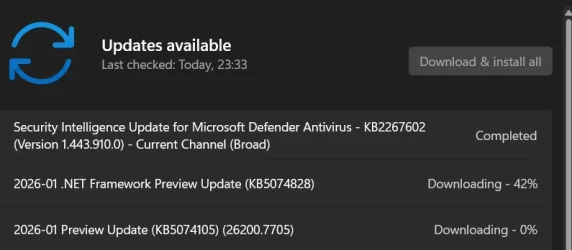
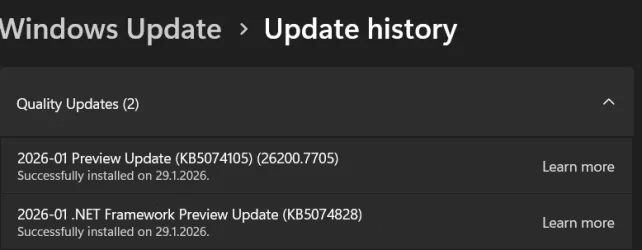
January 29, 2026 - KB5074105 (OS Builds 26200.7705 and 26100.7705) Preview
This non-security update for Windows 11, version 25H2 and 24H2 (KB5074105), improves functionality, performance, and reliability. To learn more about differences between security updates, optional non-security preview updates, Out-of-band (OOB) updates, and continuous innovation, see Windows monthly updates explained. For information on Windows update terminology, see the different types of Windows software updates.To view the latest updates about this release, visit the Windows release health dashboard or the update history page for Windows 11, version 24H2 and version 25H2.
Announcements and messages
This section provides key notifications related to this release, including announcements, change logs, and end-of-support notices.Windows Secure Boot certificate expiration
Important: Secure Boot certificates used by most Windows devices are set to expire starting in June 2026. This might affect the ability of certain personal and business devices to boot securely if not updated in time. To avoid disruption, we recommend reviewing the guidance and taking action to update certificates in advance. For details and preparation steps, see Windows Secure Boot certificate expiration and CA updates.
Updating Microsoft Secure Boot keys before expiration in June 2026
https://support.microsoft.com/en-us/topic/if-you-re-prevented-from-updating-secure-boot-certificates-e01cc486-8721-457f-9bc7-5cb801c1759e UPDATE 4/02: https://support.microsoft.com/en-us/topic/secure-boot-certificate-update-status-in-the-windows-security-app-5ce39986-7dd2-4852-8c21-ef30dd04f046...
www.elevenforum.com
Simplified Windows update titles
A new, standardized title format makes Windows updates easier to read and understand. It improves clarity by removing unnecessary technical elements like platform architecture. Key identifiers such as date prefixes, the KB number, and build or version are retained to help you quickly recognize each update.For more details, see Simplified Windows Update titles or its accompanying blog post.
Change log
| Change date | Change description |
|---|---|
| February 11, 2026 | Update: This feature, originally documented in the January 2026 non‑security update (KB5074105), has been removed from the documentation and is planned for a future release. [Smart App Control] New! You can turn Smart App Control (SAC) on or off without any clean install requirement. To make changes, go to Windows Security > App & Browser Control > Smart App Control settings. When turned on, SAC helps block untrusted or potentially harmful apps. To learn more, see App & Browser Control in the Windows Security App – Microsoft Support. |
| January 30, 2026 | Update: This feature is included in the January 2025 non-security update (KB5074105). [Settings] New! To help ensure that only authorized Windows users can access system files, Windows now displays a User Account Control (UAC) prompt when you open Storage settings (Settings > System > Storage). |
Highlights
This update is available through two release phases: gradual rollout and normal rollout. A gradual rollout delivers an update in phases, so features reach devices over time instead of all at once, meaning availability varies by device. A normal rollout is the broad release to all eligible devices at the same time, usually when it reaches general availability (GA).Gradual rollout
The following summary outlines features from Copilot experiences and AI-powered Windows 11 PC experiences, along with improvements and fixes. The bold text within the brackets indicates the item or area of the change.
For more info on the different AI experiences, see aka.ms/copilotpluspcs.
Copilot+ PCs experiences
This section highlights updates and improvements unique to Copilot+ PCs, focusing on AI-powered features, performance enhancements, and user experience optimizations.- [Agent in Settings] New! The Settings Agent now supports more languages, with expanded support for German, Portuguese, Spanish, Korean, Japanese, Hindi, Italian, and Chinese (Simplified).

Find a Setting in Settings app in Windows 11
This tutorial will show you how to search to find a setting within the Settings app in Windows 11. Microsoft designed Settings to be beautiful, easy to use and inclusive of all your Microsoft experiences in Windows 11. Settings has left-handed navigation that persists between pages, and...
www.elevenforum.com
Windows 11 PC experiences
This section highlights new features and enhancements for Windows 11 PCs, including AI-powered capabilities, continuous innovation, and performance improvements.- [Cross Device Resume] New! This update expands the functionality of Cross‑Device Resume, which Microsoft first introduced in the May 2025 Windows non-security update (KB5058499). You can continue activities from your Android phone on your PC based on the apps and services you use, including resuming Spotify playback, working in Word, Excel, or PowerPoint, or continuing a browsing session.

Resume Apps from Android Phone on Windows 11 PC
This tutorial will show you how to seamlessly resume using your favorite apps from your Android phone on your Windows 11 PC. Microsoft rolled out the ability to seamlessly resume using your favorite apps from your Android phone on your Windows 11 PC to Windows Insiders in the Dev and Beta...
www.elevenforum.com

Enable or Disable Resume App from Device and Continue on Windows 11 PC
This tutorial will show you how to enable or disable cross device Resume (aka: Hand Off) apps for your account or all users in Windows 11. Resume (aka: Hand Off) allows you to start something in an app on one device (ex: Android phone) and continue on your PC. Starting with Windows 11 build...
www.elevenforum.com
- Vivo Android phone users can continue browsing from Vivo Browser on their PC.
- If you use an Android phone from HONOR, OPPO, Samsung, vivo, or Xiaomi, you can resume online files that you opened in the Microsoft Copilot app on your phone and continue working on them on your PC. Files open in the corresponding Microsoft 365 app on your PC if it is installed. If the app is not installed, the files open in your default web browser. This feature does not support offline files stored only on your phone.
- [Windows MIDI Services] New! This update improves MIDI on Windows with enhanced support for MIDI 1.0 and MIDI 2.0, including full WinMM and WinRT MIDI 1.0 support with built-in translation, shared MIDI ports across apps, custom port names, loopback and app-to-app MIDI, plus performance improvements and bug fixes—delivering a better experience for musicians.
The App SDK and Tools package is a separate download that enables inbox MIDI 2.0 features and includes tools like MIDI Console and the MIDI Settings app. Releases are available on the Windows MIDI Services landing page and GitHub and are currently unsigned, which might display a security warning during download or installation. - [Narrator] New! Narrator now gives you more control over how it announces on‑screen controls. You can choose which details are spoken and adjust their order to match how you navigate apps. These settings apply throughout the app to help reduce extra speech and make Narrator easier to follow.

Turn On or Off Narrator in Windows 11
This tutorial will show you how to turn on or off Narrator for your account in Windows 11. Narrator is a screen reader included with Windows 11 that describes what's on your screen. Narrator lets you use your PC without a mouse to complete common tasks if you’re blind or have low vision. It...
www.elevenforum.com
- [Settings] New!1 You can view the Device card on the Settings home page. It shows key specifications and usage details for your PC. From the card, you can go directly to Settings > System > About for more detailed information about your device. This card appears when you sign in with your Microsoft account. This feature rollout has resumed after being paused during the August 2025 release.

Add or Remove Settings Home page in Windows 11
This tutorial will show you how to add or remove the Home page in Settings for all users in Windows 11. Starting with Windows 11 version 22H2 KB5030310 Build 22621.2361, Microsoft is introduced a new homepage in Settings that offers you a dynamic and personalized experience. It provides an...
www.elevenforum.com
[Smart App Control] New!You can turn Smart App Control (SAC) on or off without any clean install requirement. To make changes, go to Windows Security > App & Browser Control > Smart App Control settings. When turned on, SAC helps block untrusted or potentially harmful apps. To learn more, see App & Browser Control in the Windows Security App – Microsoft Support.

Turn On or Off Smart App Control in Windows 11
This tutorial will show you how to manually turn on or off Smart App Control in Windows 11. Smart App Control (SAC) is a new security feature starting with Windows 11 build 22567. Smart App Control can work alongside your other security software, such as Microsoft Defender, for added...
www.elevenforum.com
- [Voice Access] New! A streamlined setup makes it easier to get started with Voice Access. The redesigned experience helps you download a speech model for your chosen language, select your preferred input microphone, and learn what Voice Access can help you do on your Windows PC.

Turn On or Off Voice Access in Windows 11
This tutorial will show you how to turn on or off voice access for your account in Windows 11. Voice access is a new experience starting with Windows 11 build 22518 that enables everyone, including people with mobility disabilities, to control their PC and author text using only their voice and...
www.elevenforum.com
- [Voice Typing] New! The Wait time before acting setting in Voice Typing enables you to adjust the delay before a voice command runs. This setting gives you flexibility for different speech patterns and improves recognition accuracy whether you speak slowly or quickly.

Change Voice Typing "Wait time before acting" in Windows 11
This tutorial will show you how to change the Voice Typing "Wait time before acting" on voice command setting for your account in Windows 11. Voice typing allows you to enter text on your PC by speaking. Starting with Windows 11 build 26100.7705 (24H2) and build 26200.7705 (25H2), and build...
www.elevenforum.com
- [Windows Hello] New! Windows Hello Enhanced Sign-in Security (ESS) now supports peripheral fingerprint sensors. This update extends this more secure sign in option beyond devices with built in fingerprint sensors to include desktops and other Windows 11 PCs, including Copilot+ PCs. To get started, plug in a supported ESS fingerprint reader, go to Settings > Accounts > Sign in options, and follow the prompts to enroll.

Enable or Disable Enhanced Sign-in Security in Windows 11
This tutorial will show you how to enable or disable Enhanced Sign-in Security for all users in Windows 11. Windows Hello enables biometrics or PIN authentication, eliminating the need for a password. Biometric authentication uses facial recognition or fingerprint to prove a user's identity in...
www.elevenforum.com
- [Start Menu]
- Fixed: This update addresses an issue where the warning message that appears when you shut down your computer while other users are signed in might be cut off at the edge of the Start menu.
- Fixed: This update addresses an issue where Start menu might open on the wrong side of the screen when you use Arabic or Hebrew as your display language and the taskbar icons aren't centered.
- [Kiosk mode] Changed: This update removes an error message that might show after you sign in for multi-app kiosk mode. The message said, "This operation has been cancelled due to restrictions in effect on this computer".
- [Windows Update] Fixed: This update addresses an issue where trying to join the Windows Insider Program from Settings > Windows Update might get stuck.
- [Lock screen] Improved: This update includes some underlying changes that help address cases where the lock screen might become unresponsive.
- [File Explorer] Improved: This update includes some underlying changes that help improve responsiveness of File Explorer when navigating in network locations.
- [Logging into your PC] Fixed: This update addresses an issue where Explorer.exe might stop responding (hang) the first time you sign in to your PC, if certain apps were configured as startup apps. This could make the taskbar not appear.
- [Activation] Fixed: This update addresses an issue where, in some cases, valid Windows license migration might fail when upgrading because the device couldn’t register with the Windows Activation server for its digital license, requiring the use of the troubleshooter to fix.
- [Desktop icons] Fixed: This update addresses an issue where desktop icons unexpectedly move when interacting with files, such as opening or renaming them.
- [Input]: Fixed: This update addresses an issue where the keyboard character repeat delay labels in Settings > Bluetooth & Devices > Keyboard were reversed.
- [User Account Control (UAC)] Fixed: This update addresses an issue where your PC might stop responding when attempting to run Windows Terminal elevated from a non-admin account.
- [Windows Sandbox] Fixed: This update addresses an issue that could cause Windows Sandbox to stop responding during start up and display error 0x800705b4.
Normal rollout
This non-security update includes quality improvements. The following summary outlines key issues addressed by the KB update after you install it. Also, included are available new features. The bold text within the brackets indicates the item or area of the change.
- [Secure Boot] This release for Windows 11, version 24H2 will execute updates in the Boot Manager on devices that already have the Windows UEFI CA 2023 certificate in their Secure Boot Signature Database (DB). It replaces the 2011 signed bootmgfw.efi with the 2023 signed bootmgfw.efi. Be advised of the consequences of resetting the DB or turn on Secure Boot, as this can cause a "Secure Boot violation" issue. In those rare cases, the solution is to create the Secure Boot recovery media.
Updating Microsoft Secure Boot keys before expiration in June 2026
https://support.microsoft.com/en-us/topic/if-you-re-prevented-from-updating-secure-boot-certificates-e01cc486-8721-457f-9bc7-5cb801c1759e UPDATE 4/02: https://support.microsoft.com/en-us/topic/secure-boot-certificate-update-status-in-the-windows-security-app-5ce39986-7dd2-4852-8c21-ef30dd04f046...
www.elevenforum.com
- [Security] New! This update adds a feature for Data Protection Application Programming Interface (DPAPI) domain backup key management. Administrators can now set how often keys rotate automatically. This strengthens cryptographic security and reduces reliance on older encryption algorithms.
- [Settings] New! To help ensure that only authorized Windows users can access system files, Windows now displays a User Account Control (UAC) prompt when you open Storage settings (Settings > System > Storage).
- [Authentication (known issue)] Fixed: This update fixes an issue where the Password icon might not appear in Sign-in options on the lock screen after you install KB5064081 or a later update.
- [Display and Graphics] Fixed: This update addresses black screen issues in isolated multiuser environments, typically after a Windows upgrade.
- [File Explorer] Fixed: This update addresses an issue where folder renaming with desktop.ini files in File Explorer isn't work correctly. The LocalizedResourceName setting is ignored, so custom folder names don't appear.
- [Graphics] Fixed: This update addresses an issue where certain GPU configurations might recently have experienced a system error related to dxgmms2.sys, resulting in the KERNEL_SECURITY_CHECK_FAILURE error.
- [Narrator] Fixed: This update addresses an issue where Narrator might not start during Windows installation from an ISO file.
- [Other] Fixed: This update addresses an issue that could cause a system to stop responding during startup when Windows Boot Manager debugging is enabled. This occurs due to kdstub.dll and kdnet.dll components.
- [Other] Fixed: This update addresses an issue that might cause iSCSI boot to fail with an "Inaccessible Boot Device" error.
- [Other] Fixed: This update addresses an issue that affects the C Runtime (CRT) libraries in the Windows Software Development Kit. BinSkim identifies these libraries as non-compliant with the Microsoft SDL.
- [Start Menu] Fixed: This update addresses an issue where, for some users, selecting the "hide this pane" button in the mobile device side panel might not lead to the setting to hide the pane.
AI Components
This release updates the following AI components:| AI Component | Version |
|---|---|
| Image Search | 1.2601.1268.0 |
| Content Extraction | 1.2601.1268.0 |
| Semantic Analysis | 1.2601.1268.0 |
| Settings Model | 1.2601.1268.0 |
Windows 11 servicing stack update (KB5074104)- 26100.7704
This update makes quality improvements to the servicing stack, which is the component that installs Windows updates. Servicing stack updates (SSU) ensure that you have a robust and reliable servicing stack so that your devices can receive and install Microsoft updates. To learn more about SSUs, see Simplifying on-premises deployment of servicing stack updates.Known issues in this update
Microsoft is not currently aware of any issues with this update.How to get this update
Before you install this updateMicrosoft combines the latest servicing stack update (SSU) for your operating system with the latest cumulative update (LCU). For general information about SSUs, see Servicing stack updates and Servicing Stack Updates (SSU): Frequently Asked Questions.
Install this update
To install this update, use one of the following Windows and Microsoft release channels.
| Available | Next Step |
|---|---|

| Open Start > Settings Update & Security > Windows Update. In the Optional updates available area, you will find the link to download and install available updates. Check for optional updates |
| Yes 2 | Before you install this update To get the standalone package(s) for this update, go to the Microsoft Update Catalog website. This KB contains one or more MSU files that require installation in a specific order. Install this update Method 1: Install all MSU files together Download all MSU files for KB5074105 from Microsoft Update Catalog and place them in the same folder (for example, C:/Packages). Use Deployment Image Servicing and Management (DISM.exe) to install the target update. DISM will use the folder specified in PackagePath to discover and install one or more prerequisite MSU files as needed. Updating Windows PC To apply this update to a running Windows PC, run the following command from an elevated Command Prompt: DISM /Online /Add-Package /PackagePath:c:\packages\Windows11.0-KB5074105-x64.msuOr, run the following command from an elevated Windows PowerShell prompt: Add-WindowsPackage -Online -PackagePath "c:\packages\Windows11.0-KB5074105-x64.msu"Or use Windows Update Standalone Installer to install the target update. Updating Windows Installation media To apply this update to Windows Installation media, see Update Windows installation media with Dynamic Update. Note: When downloading other Dynamic Update packages, ensure they match the same month as this KB. If the SafeOS Dynamic Update or Setup Dynamic Update is not available for the same month as this KB, use the most recently published version of each. To add this update to a mounted image, run the following command from an elevated Command Prompt: DISM /Image:mountdir /Add-Package /PackagePath:Windows11.0-KB5074105-x64.msuOr, run the following command from an elevated Windows PowerShell prompt: Add-WindowsPackage -Path "c:\offline" -PackagePath "Windows11.0-KB5074105-x64.msu" -PreventPendingMethod 2: Install each MSU file individually, in order Download and install each MSU file individually either using DISM or Windows Update Standalone Installer in the following order:
|
If you want to remove the LCU
To remove the LCU after installing the combined SSU and LCU package, use the DISM/Remove-Package command line option with the LCU package name as the argument. You can find the package name by using this command: DISM /online /get-packages.
Running Windows Update Standalone Installer (wusa.exe) with the /uninstall switch on the combined package will not work because the combined package contains the SSU. You cannot remove the SSU from the system after installation.
File information
For a list of the files provided in this update, download the file information for cumulative update 5074105.
For a list of the files provided in the servicing stack update, download the file information for the SSU (KB5074104) - version 26100.7704.
Source:
January 29, 2026—KB5074105 (OS Builds 26200.7705 and 26100.7705) Preview | Microsoft Support
January 29, 2026—KB5074105 (OS Builds 26200.7705 and 26100.7705) Preview
support.microsoft.com
Check Windows Updates
UUP Dump:
64-bit ISO download:
Select language for Windows 11, version 24H2 (26100.7705) amd64
Select language for Windows 11, version 24H2 (26100.7705) amd64 on UUP dump. UUP dump lets you download Unified Update Platform files, like Windows Insider updates, directly from Windows Update.
uupdump.net
Select language for Windows 11, version 25H2 (26200.7705) amd64
Select language for Windows 11, version 25H2 (26200.7705) amd64 on UUP dump. UUP dump lets you download Unified Update Platform files, like Windows Insider updates, directly from Windows Update.
uupdump.net
ARM64 ISO download:
Select language for Windows 11, version 24H2 (26100.7705) arm64
Select language for Windows 11, version 24H2 (26100.7705) arm64 on UUP dump. UUP dump lets you download Unified Update Platform files, like Windows Insider updates, directly from Windows Update.
uupdump.net
Select language for Windows 11, version 25H2 (26200.7705) arm64
Select language for Windows 11, version 25H2 (26200.7705) arm64 on UUP dump. UUP dump lets you download Unified Update Platform files, like Windows Insider updates, directly from Windows Update.
uupdump.net
UUP Dump - Download Windows Insider ISO
UUP Dump is the most practical and easy way to get ISO images of any Insider Windows 10 or Windows 11 version, as soon as Microsoft has released a new build. UUP Dump creates a download configuration file according to your choices, downloads necessary files directly from Microsoft servers, and...
www.elevenforum.com
Last edited:


 Sound by Fosi Audio DA-2120C pushing Magnat Series 503 bookshelf speakers and a SVS SB-1000 Pro subwoofer.