Insider KB5074177 Windows 11 Insider Beta build 26220.7752 (25H2) - Feb. 3


UPDATE 2/09:


 Windows Insider Blog:

Hello Windows Insiders, today we are releasing Windows 11 Insider Preview Build 26220.7752 (KB5074177) to the Beta Channel.

Changes in Beta Channel builds and updates are documented in two buckets: new features, improvements, and fixes that are being gradually rolled out for Insiders who have turned on the toggle to get the latest updates as they are available (via Settings > Windows Update*) and then new features, improvements, and fixes rolling out to everyone in the Beta Channel. For more information, see the Reminders section at the bottom of this blog post.


Changes and Improvements gradually being rolled out with toggle on*

[Built-in Sysmon]

Previously announced here, Windows now brings Sysmon functionality natively to Windows. Sysmon functionality allows you to capture system events that can help with threat detection, and you can use custom configuration files to filter the events you want to monitor. The captured events are written on the Windows event log, enabling them to be used with security applications and a wide range of use cases.


Built-in Sysmon is disabled by default and must be explicitly enabled.
  1. Go to Settings > System > Optional features > More Windows features > checking Sysmon or in PowerShell or command prompt:

    Dism /Online /Enable-Feature /FeatureName:Sysmon
  2. To complete the installation, from PowerShell or command prompt run:

    Sysmon -i
Note: If you’ve already installed Sysmon from the website, it must be uninstalled before enabling the built-in Sysmon.

Documentation will be added to Windows soon. The functionality of Sysmon remains unchanged, learn more https://learn.microsoft.com/sysinternals/downloads/sysmon

Share feedback at [email protected].

[Voice Access]

  • Support for the Netherlands locale has been added.

Fixes gradually being rolled out with toggle on*

[File Explorer]

  • We fixed a few issues in File Explorer, including accessibility improvements (keyboard navigation and access keys), folder renaming with custom names, and missing icons/tooltips for “Add to favorites”.

[Other]

  • We fixed an issue that caused apps to freeze when working with files on OneDrive or Dropbox. Some Outlook setups with PSTs on OneDrive could also hang or reload email data.

Reminders for Windows Insiders in the Beta Channel

  • Updates are based on Windows 11, version 25H2 via an enablement package (Build 26220.7752).
  • Many features are rolled out using Controlled Feature Rollout technology, starting with a subset of Insiders and ramping up over time as we monitor feedback to see how they land before pushing them out to everyone in this channel.
  • For Windows Insiders who want to be the first to get features gradually rolled out to you, you can turn ON the toggle to get the latest updates as they are available via Settings > Windows Update*. Over time, we will increase the rollouts of features to everyone with the toggle turned on. Should you keep this toggle off, new features will gradually be rolled out to your PC over time once they are ready.
  • Features and experiences included in these builds may never get released as we try out different concepts and get feedback. Features may change over time, be removed, or replaced and never get released beyond Windows Insiders. Some of these features and experiences could show up in future Windows releases when they’re ready.
  • Some features in active development we preview with Windows Insiders may not be fully localized and localization will happen over time as features are finalized. As you see issues with localization in your language, please report those issues to us via Feedback Hub.
  • Check out Flight Hub for a complete look at what build is in which Insider channel.
Thanks,
Windows Insider Program Team


 Source:


Check Windows Updates


UUP Dump:

64-bit ISO download:

ARM64 ISO download:

 
Last edited:

I downloaded the installer scripts for the ISO - it's a 9GB file, it's 5PM, I have other work to do, and so I'm just gonna punt.

This is SUPER annoying behavior, but I'm going to try to make it through the weekend - and if I'm still not functioning, will try to rollback. I'm not wiping, unless the next push doesn't fix it.

I joined Insider years ago when I was doing work aligned with tech folks and thought it would be fun and cool and worthwhile - and kinda forgot. Now I don't need to be cutting edge, and this is a lesson in why! So once this is fixed, it's Build Vani.11a for me.
 

My Computer

System One

  • OS
    Windows 11
    Computer type
    Laptop
    Manufacturer/Model
    MSFT Surface Pro 8
    CPU
    11th Gen Intel(R) Core(TM) i7-1185G7 @ 3.00GH
    Memory
    16GB
I too have flashing desktop icons—what’s with that?
 

My Computers

System One System Two

  • OS
    windows 10 & 11
    Computer type
    PC/Desktop
    Manufacturer/Model
    iBuyPower (special build)
    CPU
    AMD Ryzen 7X
    Motherboard
    Asus Prime x370 Pro
    Memory
    64Gb
    Graphics Card(s)
    Radeon RX 480 8Gb
    Monitor(s) Displays
    Samsung UHD 27 inch
    Screen Resolution
    UHD
    Hard Drives
    3 Samsung 1 TB SSD each; 1 Samsung PCIe M.2 at 2 TB
  • Operating System
    Windows 11 pro
    Computer type
    PC/Desktop
    Manufacturer/Model
    IBuyPower
    CPU
    AMD 9 5900X
    Motherboard
    Asus x570 ROG Crosshair VIII Dark Hero WI-FI 6E ARGB
    Memory
    32 Gb
    Graphics card(s)
    Nvidia GeForce RTX 3080 Ti 12 GB GDDR6X
    Sound Card
    3D PREMIUM surround sound onboard
    Monitor(s) Displays
    Samsung 32 inch UHD curved monitor
    Screen Resolution
    UHD
    Hard Drives
    Samsung 980 pro 2 tb gen 4 NVMe ssd
    PSU
    850 watt consair RM850X
    Case
    Lian Li LANCOOL ONE tempered glass RGB gaming case
    Cooling
    DEEPCOOL GAMERSTORM RGB 240 mm CASTLE 240EX liquid cooler
    Keyboard
    Ares m.2 gaming keyboard
    Mouse
    Ares m.2 gaming optical mouse
    Internet Speed
    450
    Browser
    Firefox / Edge
    Antivirus
    Windows defender
    Other Info
    With all this gaming rig I am not a gamer!
I too have flashing desktop icons—what’s with that?
Glad I don't use desktop icons in that case cause that sounds like an annoying bug.
 

My Computers

System One System Two

  • OS
    Windows 11 25H2
    Computer type
    Laptop
    Manufacturer/Model
    Alienware 18 Area-51
    CPU
    Intel Core Ultra 9 275HX (24-Core)
    Motherboard
    Alienware
    Memory
    64GB DDR5 6400MT/s
    Graphics Card(s)
    NVIDIA GeForce RTX 5080 and Intel UHD Graphics
    Sound Card
    Onboard, Realtek high-performance Audio chips (ALC3329 & ALC1708))
    Monitor(s) Displays
    300HZ 18-inch QHD 500 nit Comfort View+
    Screen Resolution
    2560 x 1600
    Hard Drives
    2TB NVMe M.2 PCIe Gen 5 SSD
    Case
    Magnesium Alloy
    Cooling
    Advanced Cryo-Tech Quad-Fan Cooling system & large vapor chamber
    Keyboard
    Cherry MX ultra low profile mechanical keyboard with per key AlienFX RGB lighting
    Mouse
    Logitech MX Master 4
    Browser
    Vivaldi (main), Firefox, Chrome, Edge
    Antivirus
    MS Defender and Malwarebytes Free
  • Operating System
    Windows 11 25H2
    Computer type
    Laptop
    Manufacturer/Model
    Microsoft Surface Laptop 7
    CPU
    Qualcomm Snapdragon X Elite (12 Core) ARM based CPU
    Motherboard
    Microsoft Corp.
    Memory
    16GB LPDDR5
    Graphics card(s)
    Qualcomm Adreno X1-85
    Sound Card
    Omnisonic speakers with Dolby Atmos spatial sound
    Monitor(s) Displays
    120 Hz 13.8-inch 600 nit PixelSense Flow touchscreen
    Screen Resolution
    2304x1536
    Hard Drives
    1TB NVMe Gen 4 SSD
    Case
    Anodized Aluminum
    Cooling
    Traditional active cooling fan system
    Keyboard
    Mechanical QWERTY, backlit when in use
    Mouse
    Logitech MX Master 4 and Surface Arc Mouse
    Browser
    Vivaldi (main), Firefox, Chrome, Edge
    Antivirus
    MS Defender and Malwarebytes Free
Desktop icons now blink all the time
I too have flashing desktop icons—what’s with that?
I had that issue on 1 out of my 3 machines. The 'fix' was to change change the display scale. I went from '100% (Recommended)' to 125% then back to 100% again. The icons stopped flashing.
 

My Computers

System One System Two

  • OS
    Windows 11 Home
    Computer type
    Laptop
    Manufacturer/Model
    Acer Aspire 3 A315-23-R9VY
    CPU
    AMD Athlon Silver 3050U
    Memory
    8GB
    Graphics Card(s)
    Radeon Graphics
    Monitor(s) Displays
    laptop screen
    Screen Resolution
    1366x768 native resolution, up to 2560x1440 with Radeon Virtual Super Resolution
    Hard Drives
    1TB Samsung EVO 870 SSD (from April 2026: 250GB EVO 850)
    Internet Speed
    150 Mbps
    Browser
    Edge, Firefox
    Antivirus
    Defender
    Other Info
    fully 'Windows 11 ready' laptop. Windows 10 C: partition migrated from my old unsupported 'main machine' then upgraded to 11. A test migration ran Insider builds for 2 months. When 11 was released on 5th October 2021 it was re-imaged back to 10 and was offered the upgrade in Windows Update on 20th October. Windows Update offered the 22H2 Feature Update on 20th September 2022. It got the 23H2 Feature Update on 4th November 2023 through Windows Update, 24H2 on 3rd October 2024 through Windows Update by setting the Target Release Version for 24H2, and 25H2 on 30th September 2025 through Windows Update by setting the Target Release Version for 25H2.

    UPDATE - 11 April 2026: due to mechanical deterioration this PC has been retired from active duty. The OS with all software and files has been migrated to my System Seven below to carry on as my general purpose 'main machine'.

    My SYSTEM THREE is a Dell Latitude 5410, i7-10610U, 32GB RAM, 512GB NVMe ssd, supported device running Windows 11 Pro.

    My SYSTEM FOUR is a 2-in-1 convertible Lenovo Yoga 11e 20DA, Celeron N2930, 8GB RAM, 256GB ssd. Unsupported device: currently running Win10 Pro, plus Win11 Pro RTM and Insider Dev, Beta, and RP 24H2 as native boot vhdx.

    My SYSTEM FIVE is a Dell Latitude 3190 2-in-1, Pentium Silver N5030, 8GB RAM, 1TB NVMe ssd, supported device running Windows 11 Pro, plus Insider Beta, Dev, and Canary builds (and a few others) as a native boot .vhdx.

    My SYSTEM SIX is a Dell Latitude 5550, Core Ultra 7 165H, 64GB RAM, 1TB NVMe SSD, supported device, Windows 11 Pro 24H2, Hyper-V host machine. Updated to 25H2 on 30th September 2025.

    My SYSTEM SEVEN is a Lenovo Thinkpad T580, Intel Core i7-8650U, 16GB RAM, 512GB NVMe SSD + 2nd 512GB NVMe SSD, a supported device for Windows 11. This is my current general purpose 'main machine'. The installed Windows 11 Home from my System One has been migrated to this machine.
  • Operating System
    Windows 11 Pro
    Computer type
    Laptop
    Manufacturer/Model
    Dell Latitude E4310
    CPU
    Intel® Core™ i5-520M
    Motherboard
    0T6M8G
    Memory
    8GB
    Graphics card(s)
    (integrated graphics) Intel HD Graphics
    Screen Resolution
    1366x768
    Hard Drives
    500GB Crucial MX500 SSD
    Browser
    Firefox, Edge
    Antivirus
    Defender
    Other Info
    unsupported machine: Legacy bios, MBR, TPM 1.2, upgraded from W10 to W11 using W10/W11 hybrid install media workaround. In-place upgrade to 22H2 using ISO and a workaround. Feature Update to 23H2 by manually installing the Enablement Package. In-place upgrade to 24H2 using hybrid 23H2/24H2 install media. Upgraded to 25H2 by Enablement Package. Also running Insider Dev, and Canary builds and Windows 10 as native boot .vhdx.

    My SYSTEM THREE is a Dell Latitude 5410, i7-10610U, 32GB RAM, 512GB NVMe ssd, supported device running Windows 11 Pro.

    My SYSTEM FOUR is a 2-in-1 convertible Lenovo Yoga 11e 20DA, Celeron N2930, 8GB RAM, 256GB ssd. Unsupported device: currently running Win10 Pro, plus Win11 Pro RTM and Insider Dev, Beta, and RP 24H2 as native boot vhdx.

    My SYSTEM FIVE is a Dell Latitude 3190 2-in-1, Pentium Silver N5030, 8GB RAM, 1TB NVMe ssd, supported device running Windows 11 Pro, plus Insider Beta, Dev, and Canary builds (and a few others) as a native boot .vhdx.

    My SYSTEM SIX is a Dell Latitude 5550, Core Ultra 7 165H, 64GB RAM, 1TB NVMe SSD, supported device, Windows 11 Pro 24H2, Hyper-V host machine. Updated to 25H2 on 30th September 2025.

    My SYSTEM SEVEN is a Lenovo Thinkpad T580, Intel Core i7-8650U, 16GB RAM, 512GB NVMe SSD + 2nd 512GB NVMe SSD, a supported device for Windows 11. This is my current general purpose 'main machine'. The installed Windows 11 Home from my System One has been migrated to this machine.
Hey there, I made an account just to jump into the discussion. I have the exact same problem as you: default apps screwed up (especially Firefox), flashing icons, unsuccessful rollbacks and re-installs. I've narrowed something down: take a look at task manager and CPU usage of explorer.exe and service host: state repository service. it appears something is wrong with these files (and their extension variations in C:\ProgramData\Microsoft\Windows\AppRepository\

StateRepository-Machine.*
StateRepository-Deployment.*


Window event viewer also shows a lot of errors related to default apps. "System" is continually writing ~2k events to this log every few seconds:

C:\Windows\System32\winevt\Logs\Microsoft-Windows-Shell-Core%4AppDefaults.evtx

A few examples:

AppDefault Info: SetDefault-Error: process=C:\Windows\explorer.exe
AppDefault Info: SetDefault-Error: OneCore\Internal\Shell\inc\userchoicecore.h(333)\windows.storage.dll!00007FFA1D45530A
AppDefault Info: SetDefault-ProgIdAndHash: UserChoice Association=.bmp, ProgId=AppX43hnxtbyyps62jhe9sqpdzxn1790zetc, U=S-1-5-21-4241332490-2131394795-625187901-1001, T=2026:02:04:05:00:38:28, H=x4O7T0QKF/E=


I only know all this from googling about every step of the way. I've rolled back to a system restore point, uninstalled a .NET preview I that windows updated, a few registry default app deletions for browsers, and nothing has worked.

Currently, I am moving my documents out of C: to wipe and restore to vanilla.

Have you made any progress?

I think I got it fixed with a registry edit. it seems there was an issue with how default browsers are handled and the "user choice" hash. Something in the update must have caused an issue, so all the "default app" junk that goes on in the background was stuck in a logic loop or something.


I will admit I worked with AI to get this regedit done, but I did check with several different providers walking through the logic of what I was trying to do and any potential risks. If this is something you want to try, just make sure you know what you're doing. Place the following text in a *.reg file and run it and restart.

Code:
Windows Registry Editor Version 5.00


[-HKEY_CURRENT_USER\Software\Microsoft\Windows\Shell\Associations\UrlAssociations\http\UserChoice]

[-HKEY_CURRENT_USER\Software\Microsoft\Windows\Shell\Associations\UrlAssociations\https\UserChoice]

[-HKEY_CURRENT_USER\Software\Microsoft\Windows\Shell\CurrentVersion\Explorer\FileExts\.html\UserChoice]

[-HKEY_CURRENT_USER\Software\Microsoft\Windows\Shell\CurrentVersion\Explorer\FileExts\.htm\UserChoice]
 

My Computer

System One

  • OS
    Windows 11
    Computer type
    PC/Desktop
    CPU
    i5-12600k
    Motherboard
    MSI B660 Tomahawk WiFi DDR4
    Memory
    64GB
    Graphics Card(s)
    9070XT
    Monitor(s) Displays
    Alienware AW3423DWF
    Screen Resolution
    3440 x 1440
    Hard Drives
    MSI M470 1TB
    Samsung 970 EVO Plus 1TB
    WB Blue SN580 1TB
too soon.webp

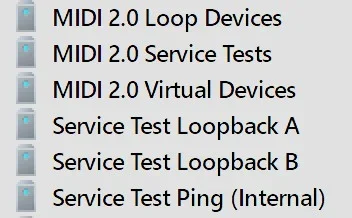
Apparently this might be part of the new MIDI 2.0 that is being rolled out.


My Computer

System One

  • OS
    Windows 11 25H2
    Computer type
    PC/Desktop
    Manufacturer/Model
    EVGA home brew
    CPU
    Broadwell-e 6850K 4.5ghz @1.36v
    Motherboard
    EVGA X99 FTW K
    Memory
    32GB Corsair LPM 3600 C16
    Graphics Card(s)
    EVGA RTX 3080Ti FTW
    Sound Card
    Asus Centurion true 7.1 headset. (5 speakers in each earpeice)
    Monitor(s) Displays
    LG C4 55"
    Screen Resolution
    4K 144hz
    Hard Drives
    Various models of SSDs ~10TB No HDDs installed.
    PSU
    be quiet! BN516 Straight Power 12-1000w 80 Plus Platinum
    Case
    Corsair 780T modified to dual 200mm intake fans
    Cooling
    Corsair H110i
    Keyboard
    Corsair K95 Platinum
    Mouse
    Corsair M65 RGB Elite
    Internet Speed
    50Mbs
As in several recent updates, my default apps were all wiped and reset.

And, for the life of me, it will not let me change my default browser. No matter what I do, it insists on using Edge to open links, PDFs, webps, etc. etc. etc. (If I go at it through Control Panel=>App, Control Panel=>File Type, launch the program and "This is not your default browser [Set]", nothing...)

Suffering the same thing on Dev, which has the same issue (reported here). I'd suggest doing an "Add feedback details" to maybe spur them along on this time-wasting issue. I hate when links don't open in my default browser!
 

My Computer

System One

  • OS
    Windows 11
Aaaaand it broke Admin Protection again. God dang it...
The two previous ViVe ids does not work anymore. I would be happy if someone identifies the new IDs to enable
 

My Computer

System One

  • OS
    Windows 11
    Computer type
    Laptop
    Manufacturer/Model
    Microsoft Surface Book 3
    CPU
    Intel(R) Core(TM) i7-1065G7
    Memory
    32 GB
    Graphics Card(s)
    Intel Iris Plus / NVidia GeForce 1660 Ti Max-Q
I just rebooted - the icons weren't blinking. So I launched Firefox and set it as my default browser - it stuck! And I set Adobe as my default PDF - it stuck!

I'm still on 7752.

The only thing I've done - and I can't imagine it's related, but I'm throwing it out there - I ran the Windows Update Troubleshooter (my sissyphean semiannual battle with HP drivers has recommenced).
 

My Computer

System One

  • OS
    Windows 11
    Computer type
    Laptop
    Manufacturer/Model
    MSFT Surface Pro 8
    CPU
    11th Gen Intel(R) Core(TM) i7-1185G7 @ 3.00GH
    Memory
    16GB
You're the second person I've seen mention a reboot in passing. In that case they thought it was a Defender update that helped, and in yours a WU troubleshooter. Both seem unlikely. What if it's the reboot? As in MS pushed some kind of silent fix late this week and it's only picked up on reboot? I think I'm going to try it myself.
 

My Computer

System One

  • OS
    Windows 11
Yeah, I can't imagine the troubleshooter fixed it. It was a change, just likely irrelevant. I just threw it out there, just in cases, as they say.

You can rest assured I've rebooted many, many times the last few days, though - and this is the first time it's improved!

It would be interesting if MSFT pushed out a completely silent fix - doesn't show up on the "Update" panel, or in the system tray!
 

My Computer

System One

  • OS
    Windows 11
    Computer type
    Laptop
    Manufacturer/Model
    MSFT Surface Pro 8
    CPU
    11th Gen Intel(R) Core(TM) i7-1185G7 @ 3.00GH
    Memory
    16GB
Well, I guess I can add me to this extremely anecdotal list: the problem seems gone with a reboot. And I had no problem at all reproducing it before.

I don't even have the WU "toggle" on, which I think is the only real way of getting something pushed out that wouldn't necessarily appear in WU history. I really wish MS would actually communicate about major problems like this between their weekly pronouncements.

Like you, I did reboot before today, but that was on Wednesday, about 24 hours after the build came out, since I had no idea what else to do. If they did push something, it was either yesterday or today.
 

My Computer

System One

  • OS
    Windows 11
 

My Computers

System One System Two

  • OS
    Windows 11 Pro for Workstations
    Computer type
    PC/Desktop
    Manufacturer/Model
    Custom self build
    CPU
    Intel i7-8700K 5 GHz
    Motherboard
    ASUS ROG Maximus XI Formula Z390
    Memory
    64 GB (4x16GB) G.SKILL TridentZ RGB DDR4 3600 MHz (F4-3600C18D-32GTZR)
    Graphics Card(s)
    ASUS ROG-STRIX-GTX1080TI-O11G-GAMING (11GB GDDR5X)
    Sound Card
    Integrated Digital Audio (S/PDIF)
    Monitor(s) Displays
    2 x Samsung Odyssey G75 27"
    Screen Resolution
    2560x1440
    Hard Drives
    1TB Samsung 990 PRO M.2,
    4TB Samsung 990 PRO M.2,
    TerraMaster F8 SSD Plus NAS
    PSU
    Seasonic Prime Titanium 850W
    Case
    Thermaltake Core P3 wall mounted
    Cooling
    Corsair Hydro H115i
    Keyboard
    Amazon Basics Wired Full Keyboard MD005
    Mouse
    Logitech MX Master 4
    Internet Speed
    2 Gbps Download and 100 Mbps Upload
    Browser
    Chrome and Edge
    Antivirus
    Microsoft Defender
    Other Info
    Logitech Z625 speaker system,
    Logitech BRIO 4K Pro webcam,
    HP Color LaserJet Pro MFP M477fdn,
    CyberPower CP1500PFCLCD
    Galaxy S23 Plus phone
  • Operating System
    Windows 11 Pro
    Computer type
    Laptop
    Manufacturer/Model
    Surface Laptop 7 Copilot+ PC
    CPU
    Snapdragon X Elite (12 core) 3.42 GHz
    Memory
    16 GB LPDDR5x-7467 MHz
    Monitor(s) Displays
    15" HDR
    Screen Resolution
    2496 x 1664
    Hard Drives
    1 TB SSD
    Internet Speed
    Wi-Fi 7 and Bluetooth 5.4
    Browser
    Chrome and Edge
    Antivirus
    Microsoft Defender
Back
Top Bottom