UPDATE 2/27:

 www.elevenforum.com
Hello Windows Insiders, today we are releasing Windows 11 Insider Preview Build 26220.7872 (KB5077231) to the Beta Channel.
Changes in Beta Channel builds and updates are documented in two buckets: new features, and improvements (including notable fixes) that are being gradually rolled out for Insiders who have turned on the toggle to get the latest updates as they are available (via Settings > Windows Update*) and then new features, and improvements (including notable fixes) rolling out to everyone in the Beta Channel. For more information, see the Reminders section at the bottom of this blog post.
 www.elevenforum.com
Windows Insider Program Team

 blogs.windows.com
Check Windows Updates
UUP Dump:
64-bit ISO download:

ARM64 ISO download:
 www.elevenforum.com
KB5077242 Windows 11 Insider Beta build 26220.7934 (25H2) - Feb. 27
Windows Insider Blog: Hello Windows Insiders, today we are releasing Windows 11 Insider Preview Build 26220.7934 (KB5077242) to the Beta Channel. Changes in Beta Channel builds and updates are documented in two buckets: new features, and improvements (including notable fixes) that are being...
www.elevenforum.com
Windows Insider Blog:
Hello Windows Insiders, today we are releasing Windows 11 Insider Preview Build 26220.7872 (KB5077231) to the Beta Channel.
Changes in Beta Channel builds and updates are documented in two buckets: new features, and improvements (including notable fixes) that are being gradually rolled out for Insiders who have turned on the toggle to get the latest updates as they are available (via Settings > Windows Update*) and then new features, and improvements (including notable fixes) rolling out to everyone in the Beta Channel. For more information, see the Reminders section at the bottom of this blog post.
Enable or Disable Get Latest Updates as soon as available in Windows 11
This tutorial will show you how to turn on or off "Get the latest updates as soon as they are available" in Windows 11. Starting with Windows 11 build 22621.1635, Microsoft added a new "Get the latest updates as soon as they are available" toggle under Settings > Windows Update. When you turn...
www.elevenforum.com
Changes and Improvements gradually being rolled out with toggle on*
[Context Menu]
- When right clicking on a .exe, .bat, or .cmd file, the context menu’s “Open” verb will now match the icon associated with the file’s default app.
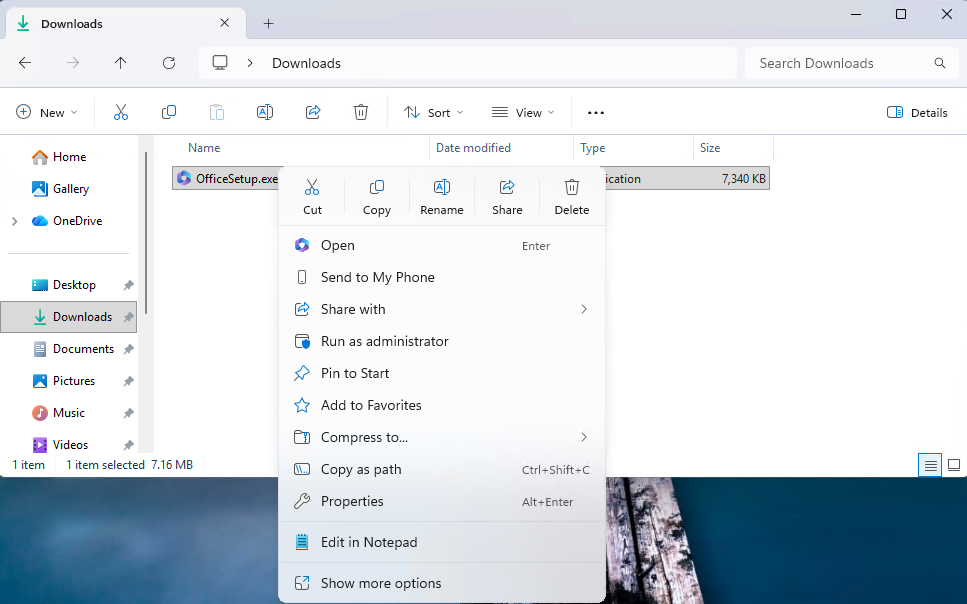
The context menu’s “Open” verb matches the icon in the default app. - Feedback: Share your thoughts in Feedback Hub (WIN + F) under File Folders and Online Storage > File Explorer.
[Settings]
- Device Cards:
- Previously released to WIP channels June 2025, the ‘Device info’ Card on the Settings Home page has been refined based on early learnings. This update simplifies key device specifications and improves consistency across the end to end flow from the Home Card to the Settings > System > About page, making information easier to scan and understand. This consumer experience is currently rolling out to Insiders in the United States.
- A version of the Device info Card intended for enterprise users on IT managed devices continues to be available.
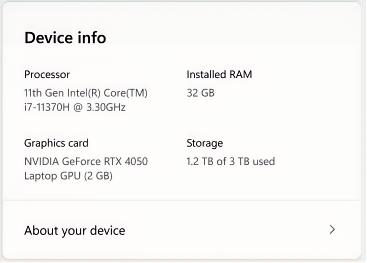
Device card with simplified device specifications.
- In Settings > System > About, based on early customer feedback, key device hardware details are once again prominently displayed at the top of the page, making it easy to understand your device at a glance. The Device information section now brings together additional system details such as graphics and storage information in a single location, with easy copy/paste support to simplify sharing or support scenarios. Device related frequently asked questions are not currently surfaced as we continue iterating the best way to deliver contextual help across Settings.
- Feedback: Share your thoughts in Feedback Hub (WIN + F) under the Settings category.
[Taskbar & System Tray]
- We have improved the animations for mousing over app groups on the taskbar.
Reminders for Windows Insiders in the Beta Channel
- Updates are based on Windows 11, version 25H2 via an enablement package (Build 26220.7872).
- Many features are rolled out using Controlled Feature Rollout technology, starting with a subset of Insiders and ramping up over time as we monitor feedback to see how they land before pushing them out to everyone in this channel.
- For Windows Insiders who want to be the first to get features gradually rolled out to you, you can turn ON the toggle to get the latest updates as they are available via Settings > Windows Update*. Over time, we will increase the rollouts of features to everyone with the toggle turned on. Should you keep this toggle off, new features will gradually be rolled out to your PC over time once they are ready.
- Features and experiences included in these builds may never get released as we try out different concepts and get feedback. Features may change over time, be removed, or replaced and never get released beyond Windows Insiders. Some of these features and experiences could show up in future Windows releases when they’re ready.
- Some features in active development we preview with Windows Insiders may not be fully localized and localization will happen over time as features are finalized. As you see issues with localization in your language, please report those issues to us via Feedback Hub.
- Check out Flight Hub for a complete look at what build is in which Insider channel.
Windows Insider Program Team
Source:
Announcing Windows 11 Insider Preview Build 26220.7872 (Beta Channel)
Hello Windows Insiders, today we are releasing Windows 11 Insider Preview Build 26220.7872 (KB5077231) to the Beta Channel. Changes in Beta Channel builds and updates are documented in two buckets: new features, and improvements (in
blogs.windows.com
Check Windows Updates
UUP Dump:
64-bit ISO download:
Select language for Windows 11 Insider Preview Feature Update (26220.7872) amd64
Select language for Windows 11 Insider Preview Feature Update (26220.7872) amd64 on UUP dump. UUP dump lets you download Unified Update Platform files, like Windows Insider updates, directly from Windows Update.
uupdump.net
ARM64 ISO download:
Select language for Windows 11 Insider Preview Feature Update (26220.7872) arm64
Select language for Windows 11 Insider Preview Feature Update (26220.7872) arm64 on UUP dump. UUP dump lets you download Unified Update Platform files, like Windows Insider updates, directly from Windows Update.
uupdump.net
UUP Dump - Download Windows Insider ISO
UUP Dump is the most practical and easy way to get ISO images of any Insider Windows 10 or Windows 11 version, as soon as Microsoft has released a new build. UUP Dump creates a download configuration file according to your choices, downloads necessary files directly from Microsoft servers, and...
www.elevenforum.com
Last edited:


 It appears as if Microsoft decided to move me to the BETA channel because the Preview channel no longer shows up under Windows Update. Doesn't really bother me, but we shall see if this is temporary or permanent.