Win Update KB5077181 Windows 11 Cumulative Update build 26100.7840 (24H2) and 26200.7840 (25H2) - Feb. 10


UPDATE 2/24:


 Microsoft Support:

February 10, 2026 - KB5077181 (OS Builds 26200.7840 and 26100.7840)​

This cumulative update for Windows 11, version 25H2 and 24H2 (KB5077181), includes the latest security fixes and improvements, along with non-security updates from last month’s optional preview release. To learn more about differences between security updates, optional non-security preview updates, out-of-band (OOB) updates, and continuous innovation, see Windows monthly updates explained. For information on Windows update terminology, see the different types of Windows software updates.

To view the latest updates about this release, visit the Windows release health dashboard or the update history page for Windows 11, version 25H2 and 24H2.


Announcements and messages

This section provides key notifications related to this release, including announcements, change logs, and end-of-support notices.

Windows Secure Boot certificate expiration​

Important: Secure Boot certificates used by most Windows devices are set to expire starting in June 2026. This might affect the ability of certain personal and business devices to boot securely if not updated in time. To avoid disruption, we recommend reviewing the guidance and taking action to update certificates in advance. For details and preparation steps, see Windows Secure Boot certificate expiration and CA updates.


Microsoft Store apps updates​

Windows Updates do not include updates for Microsoft Store apps.

If you're an enterprise user, see Microsoft Store apps - Configuration Manager.

If you're a consumer user, see Get updates for apps and games in Microsoft Store.

Change log​


Change dateChange description
February 24, 2026Update: In the “How to get this update” section, under Catalog, the second MSU file listed in Method 2: Install each MSU file individually has been updated.

Improvements

This security update contains fixes and quality improvements from KB5074109 (released January 13, 2026). KB5077744 (released January 17, 2026), and KB5078127 (released January 24, 2026). The following summary outlines key issues addressed by this update. Also, included are available new features. The bold text within the brackets indicates the item or area of the change.
  • [Gaming] Fixed: This update addresses an issue that determines device eligibility for the full-screen gaming experience.
  • [Networking] Fixed: This update addresses an issue that prevented some devices from connecting to certain WPA3‑Personal Wi‑Fi networks. The issue might occur after you install KB5074105.
  • [Secure Boot] With this update, Windows quality updates include a broad set of targeting data that identifies devices and their ability to receive new Secure Boot certificates. Devices will receive the new certificates only after they show sufficient successful update signals, which helps ensures a safe and phased rollout.
If you've already installed previous updates, your device will download and install only the new updates included in this package.

For more information about security vulnerabilities, see the Security Update Guide and the February 2026 Security Updates.

AI Components

This release updates the following AI components:

AI ComponentVersion
Image Search1.2601.1268.0
Content Extraction1.2601.1268.0
Semantic Analysis1.2601.1268.0
Settings Model1.2601.1268.0

Windows 11 servicing stack update (KB5077869)- 26100.7839

This update makes quality improvements to the servicing stack, which is the component that installs Windows updates. Servicing stack updates (SSU) ensure that you have a robust and reliable servicing stack so that your devices can receive and install Microsoft updates. To learn more about SSUs, see Simplifying on-premises deployment of servicing stack updates.

Known issues in this update

Microsoft is not currently aware of any issues with this update.

How to get this update

Before you install this update

Microsoft combines the latest servicing stack update (SSU) for your operating system with the latest cumulative update (LCU). For general information about SSUs, see Servicing stack updates and Servicing Stack Updates (SSU): Frequently Asked Questions.

Install this update

To install this update, use one of the following Windows and Microsoft release channels.

AvailableNext Step
Included
This update downloads and installs automatically from Windows Update and Microsoft Update.
Yes 1Before you install this update

To get the standalone package(s) for this update, go to the Microsoft Update Catalog website. This KB contains one or more MSU files that require installation in a specific order.

Install this update

Method 1: Install all MSU files together


Download all MSU files for KB5077181 from Microsoft Update Catalog and place them in the same folder (for example, C:/Packages). Use Deployment Image Servicing and Management (DISM.exe) to install the target update. DISM will use the folder specified in PackagePath to discover and install one or more prerequisite MSU files as needed.

Updating Windows PC

To apply this update to a running Windows PC, run the following command from an elevated Command Prompt:

DISM /Online /Add-Package /PackagePath:c:\packages\Windows11.0-KB5077181-x64.msu

Or, run the following command from an elevated Windows PowerShell prompt:

Add-WindowsPackage -Online -PackagePath "c:\packages\Windows11.0-KB5077181-x64.msu"

Or use Windows Update Standalone Installer to install the target update.

Updating Windows Installation media

To apply this update to Windows Installation media, see Update Windows installation media with Dynamic Update.

Note: When downloading other Dynamic Update packages, ensure they match the same month as this KB. If the SafeOS Dynamic Update or Setup Dynamic Update is not available for the same month as this KB, use the most recently published version of each.

To add this update to a mounted image, run the following command from an elevated Command Prompt:

DISM /Image:mountdir /Add-Package /PackagePath:Windows11.0-KB5077181-x64.msu

Or, run the following command from an elevated Windows PowerShell prompt:

Add-WindowsPackage -Path "c:\offline" -PackagePath "Windows11.0-KB5077181-x64.msu" -PreventPending

Method 2: Install each MSU file individually, in order

Download and install each MSU file individually either using DISM or Windows Update Standalone Installer in the following order:
  1. windows11.0-kb5043080-x64_953449672073f8fb99badb4cc6d5d7849b9c83e8.msu
  2. windows11.0-kb5077181-x64_33d38563662e659ceb84fb8b65aa05ce5876f5a4.msu
1 This latest cumulative update includes updates for AI components. Even though the AI component updates are included in the update, the AI components are only applicable to Windows Copilot+ PCs and will not install on Windows PC or Windows Server.

If you want to remove the LCU

To remove the LCU after installing the combined SSU and LCU package, use the DISM/Remove-Package command line option with the LCU package name as the argument. You can find the package name by using this command: DISM /online /get-packages.

Running Windows Update Standalone Installer (wusa.exe) with the /uninstall switch on the combined package will not work because the combined package contains the SSU. You cannot remove the SSU from the system after installation.

File information

For a list of the files provided in this update, download the file information for cumulative update 5077181.

For a list of the files provided in the servicing stack update, download the file information for the SSU (KB5077869) - version 26100.7839.


 Source:


Check Windows Updates


ISO from Microsoft Media Creation Tool (MCT):


UUP Dump:

64-bit ISO download:

ARM64 ISO download:

 
Last edited:

My Computer

System One

  • OS
    Windows 11, version 25H2 (26200)
    Computer type
    PC/Desktop
    CPU
    AMD Ryzen 9 9950X 16-Core Processor
    Motherboard
    ASRock B650M PG Riptide
    Memory
    DDR5-6000 (CL36) 64.0 GB
    Graphics Card(s)
    NVIDIA GeForce RTX 4090
    PSU
    1200W
    Case
    Phanteks Enthoo Pro 2
    Cooling
    Noctua NH-D12L

My Computer

System One

  • OS
    Windows 11 Pro 25H2
    Computer type
    PC/Desktop
    Manufacturer/Model
    Dell XPS 8930
    CPU
    Intel I9-9900K
    Memory
    64GB
    Graphics Card(s)
    NVIDIA RTX 2060
    Sound Card
    NVIDIA High Definition Audio
    Monitor(s) Displays
    4k Samsung
    Screen Resolution
    3840 x 2160
    Hard Drives
    512GB NVMe, ADATA SU 800, 2TB HDD
After each monthly CU, I run
dism /Online /Cleanup-Image >
/RestoreHealth
/AnalyzeComponentStore
/StartComponentCleanup (if required)
sfc /scannow
before running an MR system image.

Until this update (KB5077181 > 26200.7840), sfc /scannow finished within a few minutes, and usually within 10 if repairs were required.
The latest run took c. 35 minutes (with nothing to repair).
I ran the same sequence on my partner's system with the same result, again with nothing to repair.
I don't see anyone else mentioning extended times for running the scan, so I assume it must be something peculiar to our setups, as I know there are others who run this stuff regularly after updates.
 

My Computer

System One

  • OS
    Windows 11 Pro 25H2 26200.8457
    Computer type
    PC/Desktop
    Manufacturer/Model
    Asus Z890 Pro WiFi
    CPU
    Intel Core Ultra 7 265k
    Motherboard
    Asus Z890 Pro WiFI - UEFI AMI 3002
    Memory
    Corsair Vengeance 32GB DDR5 (2 x 16)
    Graphics Card(s)
    NVidia GeForce RTX 3050
    Sound Card
    Onboard/NVidia
    Monitor(s) Displays
    Asus VG2491R Series 23.8" LCD Monitor
    Screen Resolution
    1920 x 1080
    Hard Drives
    Samsung 9100 PRO 1TB PCIe 5.0 M.2 NVMe SSD
    Samsung 990 PRO 1TB PCIe 4.0 M.2 NVMe SSD
    Samsung 860 Pro 512 GB SSD
    Samsung 840 Pro 256 GB SSD
    PSU
    Qpc Power Zone 2 750W 80+ Platinum Semi-fanless
    Case
    Asus TG 502
    Cooling
    4x Noctua NF-A12x25 PWM ch.bk 120mm fans + CPU & PSU fans
    Keyboard
    Std MS USB
    Mouse
    Std MS USB optical
    Internet Speed
    c. 275 down/26 up
    Browser
    Chrome/Firefox + Edge (for PDFs)
    Antivirus
    Windows
    Other Info
    Anker DriveDock 2.5/3.5 for backups/MR images - (8.0.7783.0 - last free version?)
I don't see anyone else mentioning extended times for running the scan, so I assume it must be something peculiar to our setups, as I know there are others who run this stuff regularly after updates.
Both DISM scanhealth and SFC ran in normal times for me. My prime system did show an issue with DISM and I ran a restorehealth, also the normal time and the SFC. I didn't see any unusual delays with any of the processes, just the usual pause at 62.3% during the restorehealth run. The other two systems showed no errors on the checks.
 

My Computers

System One System Two

  • OS
    Win 11 Pro 25H2, Build 26200.8524
    Computer type
    PC/Desktop
    Manufacturer/Model
    Home Brew
    CPU
    Intel Core i5 14500
    Motherboard
    Gigabyte B760M G P WIFI
    Memory
    64GB DDR4
    Graphics Card(s)
    GeForce RTX 4060
    Sound Card
    Chipset Realtek
    Monitor(s) Displays
    LG 45" Ultragear, Acer 24" 1080p
    Screen Resolution
    5120x1440, 1920x1080
    Hard Drives
    Crucial P310 2TB 2280 PCIe Gen4 3D NAND NVMe M.2 SSD (O/S)
    Silicon Power 2TB US75 NVMe PCIe Gen4 M.2 2280 SSD (backup)
    Crucial BX500 2TB 3D NAND (2nd backup)
    Seagate 4TB Ironwolf, rotating HDD archive files
    External off-line backup Drives: 2 NVMe 4TB drives in external enclosures
    PSU
    Thermaltake Toughpower GF3 750W
    Case
    LIAN LI LANCOOL 216 E-ATX PC Case
    Cooling
    Lots of fans!
    Keyboard
    Microsoft Comfort Curve 2000
    Mouse
    Logitech G305
    Internet Speed
    Verizon FiOS 1GB
    Browser
    Firefox
    Antivirus
    Malware Bytes & Windows Defender Security
  • Operating System
    Win 11 Pro 25H2, Build 26200.8524
    Computer type
    PC/Desktop
    Manufacturer/Model
    Home Brew
    CPU
    Intel Core i5 14400
    Motherboard
    Gigabyte B760M DS3H AX
    Memory
    32GB DDR5
    Graphics card(s)
    Intel 700 Embedded GPU
    Sound Card
    Realtek Embedded
    Monitor(s) Displays
    27" HP 1080p
    Screen Resolution
    1920x1080
    Hard Drives
    Crucial P310 2TB 2280 PCIe Gen4 eD NAND PCIe SSD
    Samsung EVO 990 2TB NVMe Gen4 SSD
    Samsung 2TB SATA SSD
    PSU
    Thermaltake Smart BM3 650W
    Case
    Okinos Micro ATX Case
    Cooling
    Fans
    Keyboard
    Microsoft Comfort Curve 2000
    Mouse
    Logitech G305
    Internet Speed
    Verizon FiOS 1GB
    Browser
    Firefox
    Antivirus
    Malware Bytes & Windows Defender Security
After each monthly CU, I run
dism /Online /Cleanup-Image >
/RestoreHealth
/AnalyzeComponentStore
/StartComponentCleanup (if required)
sfc /scannow
before running an MR system image.

Until this update (KB5077181 > 26200.7840), sfc /scannow finished within a few minutes, and usually within 10 if repairs were required.
The latest run took c. 35 minutes (with nothing to repair).
I ran the same sequence on my partner's system with the same result, again with nothing to repair.
I don't see anyone else mentioning extended times for running the scan, so I assume it must be something peculiar to our setups, as I know there are others who run this stuff regularly after updates.

I have seen extended time in previous updates. When it happens, I just stop the scan and reboot my PC. It runs at normal speed then.
 

My Computers

System One System Two

  • OS
    Windows 11 Pro x64
    Computer type
    PC/Desktop
    Manufacturer/Model
    📷🔈🎧 🪛 DIY Photoshop/Audio/Game/tinker
    CPU
    i9 14900K P/E 5.8/4.5 GHz, cache 5.0 GHz
    Motherboard
    Asus ROG Maximus Z790 Dark Hero
    Memory
    🐏 96GB (2x48) G.skill Ripjaws 6800 MT/s
    Graphics Card(s)
    Asus ROG Strix 4070 Ti OC
    Sound Card
    🔊Bowers & Wilkins 606 S3 speakers; Audiolabs 7000a integrated amp; RSL 10S Mk2 sub; Creative Pebble Pro Minimilist
    Monitor(s) Displays
    🖥️🖥️ Eizo CG2730 ColorEdge, ViewSonic VP2768
    Screen Resolution
    🖥️🖥️ 2560 x 1440p x 2
    Hard Drives
    💾 WDC SN850X 4TB nvme, SN850 1TB nvme, SK-Hynix 2 TB P41 nvme,. Sabrent USB-C DS-SC5B 5-bay docking station: 6TB WDC Black, 6TB Ironwolf Pro; 2x 2TB WDC Black HDD
    PSU
    ⚡️ 850W Seasonic Vertex PX-850 ATX 3.0/PCI-E 5.0
    Case
    Fractal Design North XL Mesh, Black Walnut
    Cooling
    ❄️ EK Nucleus black 360 AIO w/Phanteks T30-120 fans, 2 Noctua NF-A14 Chromax case fan, 1 T30-120 fan cooling memory
    Keyboard
    ⌨️ Keychron Q3 Max TKL with custom GMK Redsuns Red Samuri keycaps, TX Stabs
    Mouse
    🖱️ Logitech G305 wireless gaming
    Internet Speed
    ⬇️ 500 Mb/s ⬆️ 12 Mb/s
    Browser
    🔥🦊 Firefox
    Antivirus
    🦺 Defender, Macrium Reflect X 🏆
    Other Info
    Phangkey Amaterasu V2 Desk Mat
  • Computer type
    Laptop
    Manufacturer/Model
    💻 Apple 13" Macbook Pro 2020 (m1)

    CPU
    Apple M1
    Screen Resolution
    2560x1600
    Browser
    Firefox
After each monthly CU, I run
dism /Online /Cleanup-Image >
/RestoreHealth
/AnalyzeComponentStore
/StartComponentCleanup (if required)
sfc /scannow
before running an MR system image.

Until this update (KB5077181 > 26200.7840), sfc /scannow finished within a few minutes, and usually within 10 if repairs were required.
The latest run took c. 35 minutes (with nothing to repair).
I ran the same sequence on my partner's system with the same result, again with nothing to repair.
I don't see anyone else mentioning extended times for running the scan, so I assume it must be something peculiar to our setups, as I know there are others who run this stuff regularly after updates.
I ran Dism online and SFC /scannow after KB5077181 installed in 10 minutes (with WAU) or so, both completed in a few minutes (fast) without any errors on both my 2 laptops.
 

My Computers

System One System Two

  • OS
    Windows 11 Home 25H2 build: 26200.8524
    Computer type
    Laptop
    Manufacturer/Model
    Acer Swift A.I SF14-51T
    CPU
    Intel(R) Core(TM) Ultra 7 258V, 2200 Mhz, 8 Cores
    Motherboard
    Icefish_LNV, Version V1.15
    Memory
    32 GB LPDDR5X (soldered)
    Graphics Card(s)
    Intel(R) Arc(TM) 140V GPU (16GB)
    Sound Card
    RealTek + Intel Smart Sound
    Monitor(s) Displays
    14" IPS WUXGA
    Screen Resolution
    1920x1200x60Hz
    Hard Drives
    Micron_2550_MTFDKBA1T0TGE, NVMe Gen4, 1TB
    PSU
    45W USB-C GaN charger
    Case
    Full aluminum body
    Cooling
    1 fan
    Keyboard
    US with Backlight
    Mouse
    Precision Trackpad
    Internet Speed
    25 Mb/s 5G
    Browser
    Edge
    Antivirus
    Windows Defender
    Other Info
    BIOS Version/Date Insyde Corp. V1.15, 8/28/2025, Windows Hello IR camera with Facial recognition. Secure Boot 2026 KEK key installed
  • Operating System
    Windows 11 Home 25H2 build: 26200.8524
    Computer type
    Laptop
    Manufacturer/Model
    Asus Vivobook K3502Z S15 15" OLED
    CPU
    Intel 12th Gen. i7 12700H, 14 cores, 2.3 GHz (24M Cache, up to 4.7 GHz, 6P+8E cores)
    Motherboard
    Alder Lake-H, 1700-4700 MHz clock rate
    Memory
    8GB LPDDR4 on board + 8GB LPDDR4 3200 MHz in Dual Channel.
    Graphics card(s)
    Intel Iris Xe supports up to 4096 x 2304 @ 120Hz
    Sound Card
    Harman Kardon - DTS
    Monitor(s) Displays
    OLED 15.6inch 2.8K (2880 x 1620)
    Screen Resolution
    16:9 aspect ratio 0.2ms response time 120Hz refresh rate, 550nits
    Hard Drives
    512GB M.2 NVMe Gen4 PCIe 4.0 SSD, Micron_2450_MTFDKBA512TFK
    PSU
    90-Watt USB charger (Thunderbolt4)
    Case
    Metal lid, plastic case
    Cooling
    1 fan
    Keyboard
    With adjustable backlight
    Mouse
    Precision Trackpad
    Internet Speed
    ISP provides 15 mb/s WIFI LTE (4G), laptop WIFI 6 adapter.
    Browser
    Edge
    Antivirus
    Windows Defender
    Other Info
    BIOS American Megatrends International, LLC. 10.1.2.312, 13/03/2024. Network adapter: Intel Wi-Fi 6E AX211 160 MHz, Secure Boot 2026 KEK key installed
Yes, that is true, I don't know why they removed that option from "System > Storage > Temporary files", you can use Disk Cleanup to delete the Previous Build (Windows.old).
Yup. Cleanmgr.exe works properly.
 

My Computer

System One

  • OS
    Windows 11 25H2
    Computer type
    PC/Desktop
    Manufacturer/Model
    MSI
    CPU
    i7 7700k
    Motherboard
    B250 Bazooka (MS-7A70)
    Memory
    16 GB DDR4
    Graphics Card(s)
    nVidia GeForce GTX1070 (Pascal)
    Sound Card
    Realtek HDA (ALC887)
    Monitor(s) Displays
    ASUS VG278QR 1920x1080 165Hz 5ms
    Screen Resolution
    FullHD
    Hard Drives
    SSD NVMe + Hardisk SATA III
    Case
    Aerocool
    Cooling
    Air regular one
    Keyboard
    Logitech G213
    Mouse
    Logitech G203 Prodigy
    Internet Speed
    600Mb/s
    Browser
    Firefox
    Antivirus
    Microsoft Defender
Both DISM scanhealth and SFC ran in normal times for me.

I ran Dism online and SFC /scannow after KB5077181 installed in 10 minutes (with WAU) or so, both completed in a few minutes (fast) without any errors on both my 2 laptops.
Thanks for those confirmations.
I ran sfc again this morning and it took c. 1/2 minute in CP & < 20 seconds in PS - not sure why PS should be quicker, but that's another story (or maybe it isn't :>)
 

My Computer

System One

  • OS
    Windows 11 Pro 25H2 26200.8457
    Computer type
    PC/Desktop
    Manufacturer/Model
    Asus Z890 Pro WiFi
    CPU
    Intel Core Ultra 7 265k
    Motherboard
    Asus Z890 Pro WiFI - UEFI AMI 3002
    Memory
    Corsair Vengeance 32GB DDR5 (2 x 16)
    Graphics Card(s)
    NVidia GeForce RTX 3050
    Sound Card
    Onboard/NVidia
    Monitor(s) Displays
    Asus VG2491R Series 23.8" LCD Monitor
    Screen Resolution
    1920 x 1080
    Hard Drives
    Samsung 9100 PRO 1TB PCIe 5.0 M.2 NVMe SSD
    Samsung 990 PRO 1TB PCIe 4.0 M.2 NVMe SSD
    Samsung 860 Pro 512 GB SSD
    Samsung 840 Pro 256 GB SSD
    PSU
    Qpc Power Zone 2 750W 80+ Platinum Semi-fanless
    Case
    Asus TG 502
    Cooling
    4x Noctua NF-A12x25 PWM ch.bk 120mm fans + CPU & PSU fans
    Keyboard
    Std MS USB
    Mouse
    Std MS USB optical
    Internet Speed
    c. 275 down/26 up
    Browser
    Chrome/Firefox + Edge (for PDFs)
    Antivirus
    Windows
    Other Info
    Anker DriveDock 2.5/3.5 for backups/MR images - (8.0.7783.0 - last free version?)
I have seen extended time in previous updates. When it happens, I just stop the scan and reboot my PC. It runs at normal speed then.
As you suggest, maybe it was the reboot that resolved what ever the issue was. I thought it may have been related to my setup, but more likely it was just a W11 idiosyncracy that decided to come out and play at the time. I didn't notice any unusual activity in task manager that would account for the original sfc crawl.
 

My Computer

System One

  • OS
    Windows 11 Pro 25H2 26200.8457
    Computer type
    PC/Desktop
    Manufacturer/Model
    Asus Z890 Pro WiFi
    CPU
    Intel Core Ultra 7 265k
    Motherboard
    Asus Z890 Pro WiFI - UEFI AMI 3002
    Memory
    Corsair Vengeance 32GB DDR5 (2 x 16)
    Graphics Card(s)
    NVidia GeForce RTX 3050
    Sound Card
    Onboard/NVidia
    Monitor(s) Displays
    Asus VG2491R Series 23.8" LCD Monitor
    Screen Resolution
    1920 x 1080
    Hard Drives
    Samsung 9100 PRO 1TB PCIe 5.0 M.2 NVMe SSD
    Samsung 990 PRO 1TB PCIe 4.0 M.2 NVMe SSD
    Samsung 860 Pro 512 GB SSD
    Samsung 840 Pro 256 GB SSD
    PSU
    Qpc Power Zone 2 750W 80+ Platinum Semi-fanless
    Case
    Asus TG 502
    Cooling
    4x Noctua NF-A12x25 PWM ch.bk 120mm fans + CPU & PSU fans
    Keyboard
    Std MS USB
    Mouse
    Std MS USB optical
    Internet Speed
    c. 275 down/26 up
    Browser
    Chrome/Firefox + Edge (for PDFs)
    Antivirus
    Windows
    Other Info
    Anker DriveDock 2.5/3.5 for backups/MR images - (8.0.7783.0 - last free version?)
Well... MS did it. The worst update ever seen for 25H2.
After the 7840 update; DISM /Scanhealth and SFC /Scannow gave no errors.

- Certificate CA2023? Nope. Nothing to be found in the Intermediate store. Only the old PCA2011.
- Drivers. 7705 replaced some 166 files all pointing to the old PCA2011. 7840 replaced yet again 11 drivers. Also pointing to the old PCA2011.

- Component Store? A total mess!!! From an average of 177 package, with 7840 that went up to 253!!
Counted them all;
Item: 1742 075 x
Item: 26100.1 017 x
Item: 9319 001 x
Item: 9325 001 x
Item: 5503 001 x
Item: 6717 001 x
Item: 7705 078 x
Item: 7824 072 x
Item: 7839 001 x
Item: 7840 006 x
-------------------------
7840 and others : 253\____ Must be equal. DISM package count = Separate List count of each version in total.
Total Packages : 253 /

78 Package left by 7705 and not replaced by 7840. Now 72x 7824 are placed next to them (7824, 7839 are a part off 7840) Windows Engine contains now 3x the normal size (1742, 7705, 7840) instead of the "normal" size (1742, 7840)
- Component Store Analyzed; 4 packages still remain after an Component Store cleanup. Besides the normal 2 packages of 1742 there now 2 added from 7705 that can't be cleaned up. /StartComponentCleanup on the first attempt it tries and "succeeds" but after a second try (And any further tries) ; It goes to 70% and bails out.

Maybe any other person could verify this. This behavior is very unusual. All what I did extra after 7705 was to remove all AI components inside Windows.
 

My Computer

System One

  • OS
    Win 11 Pro "25H2" Build 26200.8524, Zorin OS Pro
    Computer type
    PC/Desktop
    Manufacturer/Model
    Self built
    CPU
    Intel® Core™ i7-12700KF 12th Gen.
    Motherboard
    ASUS Prime Z690-A, BIOS v4505
    Memory
    32GB DDR5 5600-36 Vengeance
    Graphics Card(s)
    PCIe4.0 Asus NVIDIA RTX3060Ti
    Sound Card
    Onboard; Realtek
    Monitor(s) Displays
    34" LG 34UC79G-B Curved 21:9 144Hz
    Screen Resolution
    2560x1080 (No HDR)
    Hard Drives
    250Gb Samsung 870PRO NVMe (Win 11 Pro)
    1Tb Samsung 980PRO NVMe
    1Tb Samsung 970EVO NVMe
    2Tb Samsung 990PRO NVMe with heatsink.
    4Tb WDC WD40EZRZ Blue SATA (Int.)
    4Tb WDC WD40EZRZ Blue SATA (Int.)
    3Tb WDC WD30EFRZ Red SATA (Int.)
    256Gb Samsung 840PRO SSD (RHEL 9,5)
    256Gb Samsung 850PRO SSD (Zorin OS Pro 18)
    PSU
    Coolermaster 850W V2 Gold with internal 12cm exaust fan
    Case
    Be-Quiet Pure Base 600.
    Cooling
    3x Be-Quiet! 12/14cm "Silent Wings 4" casefans, 1x Arctic Freezer i35 CPU towerblock with fan.
    Keyboard
    Steelseries APEX 7 keyboard.
    Mouse
    Logitech G-502 Hero
    Internet Speed
    1Gb
    Browser
    Brave
    Antivirus
    F-Secure
    Other Info
    No Noise system.
    256Gb Kingston Travler USB 3.0 drive.
    64Gb Sandisk USB 3.2 drive. (Ventoy)
    8Gb Philips USB 3.0 drive. (Win. Inst.)
    8Gb Philips USB 3.0 drive. (Rescue disk)
    2Tb WD USB 3.0 Passport drive.
    USB Ext. 500Gb WD SATA drive.
    External USB 3.0 C.A. CD/DVD* burner.
/StartComponentCleanup on the first attempt it tries and "succeeds" but after a second try (And any further tries) ; It goes to 70% and bails out.

Maybe any other person could verify this. This behavior is very unusual. All what I did extra after 7705 was to remove all AI components inside Windows.

Yesterday, I had only the usual two 'unclaimable' packages, but the cleanup process was '100%' completed. I just tried it again and got this:
------------------------------------------------------------------------------------------------------
dism /Online /Cleanup-Image /AnalyzeComponentStore
Deployment Image Servicing and Management tool
Version: 10.0.26100.5074
Image Version: 10.0.26200.7840
[==========================100.0%==========================]
Component Store (WinSxS) information:

Windows Explorer Reported Size of Component Store : 12.82 GB
Actual Size of Component Store : 12.31 GB
Shared with Windows : 7.60 GB
Backups and Disabled Features : 4.70 GB
Cache and Temporary Data : 0 bytes
Date of Last Cleanup : 2026-02-11 19:43:56

Number of Reclaimable Packages : 2
Component Store Cleanup Recommended : Yes
The operation completed successfully.
-------------------------------------------------------------------------------------------------------
and then this:
-------------------------------------------------------------------------------------------------------
dism /Online /Cleanup-Image /StartComponentCleanup
Deployment Image Servicing and Management tool
Version: 10.0.26100.5074
Image Version: 10.0.26200.7840

[===========================70.0%======== ]
The operation completed successfully.
-------------------------------------------------------------------------------------------------------
which seems to confirm your result regarding the baling out.
 

My Computer

System One

  • OS
    Windows 11 Pro 25H2 26200.8457
    Computer type
    PC/Desktop
    Manufacturer/Model
    Asus Z890 Pro WiFi
    CPU
    Intel Core Ultra 7 265k
    Motherboard
    Asus Z890 Pro WiFI - UEFI AMI 3002
    Memory
    Corsair Vengeance 32GB DDR5 (2 x 16)
    Graphics Card(s)
    NVidia GeForce RTX 3050
    Sound Card
    Onboard/NVidia
    Monitor(s) Displays
    Asus VG2491R Series 23.8" LCD Monitor
    Screen Resolution
    1920 x 1080
    Hard Drives
    Samsung 9100 PRO 1TB PCIe 5.0 M.2 NVMe SSD
    Samsung 990 PRO 1TB PCIe 4.0 M.2 NVMe SSD
    Samsung 860 Pro 512 GB SSD
    Samsung 840 Pro 256 GB SSD
    PSU
    Qpc Power Zone 2 750W 80+ Platinum Semi-fanless
    Case
    Asus TG 502
    Cooling
    4x Noctua NF-A12x25 PWM ch.bk 120mm fans + CPU & PSU fans
    Keyboard
    Std MS USB
    Mouse
    Std MS USB optical
    Internet Speed
    c. 275 down/26 up
    Browser
    Chrome/Firefox + Edge (for PDFs)
    Antivirus
    Windows
    Other Info
    Anker DriveDock 2.5/3.5 for backups/MR images - (8.0.7783.0 - last free version?)
New mail notifications in New Outlook not working after updates.
Both my 2 laptops are running fine, no issues after the KB5077181 update was installed with wuauserv but I use Windows "New Outlook" on my Acer Swift and the Office Outlook version on the Asus: Windows New Outlook loses all Notification features after each Windows update, no sound no popup when new mail arrives while everything possible has been enabled including turning off the energy saver. When I repair Outlook in Add or remove programs, it will work till the next Windows update is installed. After the last repair job, offline notification also does not work any more, this option is enabled in New Outlook and worked OK in January when Outlook is closed (both sound and popup) but no more. Notifications with the Office Outlook version on the Asus works fine and is not affected by Windows updates, This is a bug in New Outlook and I sent a Feedback to MS (also the spell checker in New Outlook Feedback is not working the red underlining for misspelled words shows but no context menu with suggestions). Spell checkers in New Outlook mail and Windows Copilot (not the Edge Sidebar Copilot) work OK.
 

My Computers

System One System Two

  • OS
    Windows 11 Home 25H2 build: 26200.8524
    Computer type
    Laptop
    Manufacturer/Model
    Acer Swift A.I SF14-51T
    CPU
    Intel(R) Core(TM) Ultra 7 258V, 2200 Mhz, 8 Cores
    Motherboard
    Icefish_LNV, Version V1.15
    Memory
    32 GB LPDDR5X (soldered)
    Graphics Card(s)
    Intel(R) Arc(TM) 140V GPU (16GB)
    Sound Card
    RealTek + Intel Smart Sound
    Monitor(s) Displays
    14" IPS WUXGA
    Screen Resolution
    1920x1200x60Hz
    Hard Drives
    Micron_2550_MTFDKBA1T0TGE, NVMe Gen4, 1TB
    PSU
    45W USB-C GaN charger
    Case
    Full aluminum body
    Cooling
    1 fan
    Keyboard
    US with Backlight
    Mouse
    Precision Trackpad
    Internet Speed
    25 Mb/s 5G
    Browser
    Edge
    Antivirus
    Windows Defender
    Other Info
    BIOS Version/Date Insyde Corp. V1.15, 8/28/2025, Windows Hello IR camera with Facial recognition. Secure Boot 2026 KEK key installed
  • Operating System
    Windows 11 Home 25H2 build: 26200.8524
    Computer type
    Laptop
    Manufacturer/Model
    Asus Vivobook K3502Z S15 15" OLED
    CPU
    Intel 12th Gen. i7 12700H, 14 cores, 2.3 GHz (24M Cache, up to 4.7 GHz, 6P+8E cores)
    Motherboard
    Alder Lake-H, 1700-4700 MHz clock rate
    Memory
    8GB LPDDR4 on board + 8GB LPDDR4 3200 MHz in Dual Channel.
    Graphics card(s)
    Intel Iris Xe supports up to 4096 x 2304 @ 120Hz
    Sound Card
    Harman Kardon - DTS
    Monitor(s) Displays
    OLED 15.6inch 2.8K (2880 x 1620)
    Screen Resolution
    16:9 aspect ratio 0.2ms response time 120Hz refresh rate, 550nits
    Hard Drives
    512GB M.2 NVMe Gen4 PCIe 4.0 SSD, Micron_2450_MTFDKBA512TFK
    PSU
    90-Watt USB charger (Thunderbolt4)
    Case
    Metal lid, plastic case
    Cooling
    1 fan
    Keyboard
    With adjustable backlight
    Mouse
    Precision Trackpad
    Internet Speed
    ISP provides 15 mb/s WIFI LTE (4G), laptop WIFI 6 adapter.
    Browser
    Edge
    Antivirus
    Windows Defender
    Other Info
    BIOS American Megatrends International, LLC. 10.1.2.312, 13/03/2024. Network adapter: Intel Wi-Fi 6E AX211 160 MHz, Secure Boot 2026 KEK key installed
I updated my W11 yesterday. All seems well, except Storage sense. I read in a couple of posts in this thread about Storage sense not showing Windows.old but no one has mentioned Windows Updates Cleanup Files not appearing when opening Temporary files in Settings. Can someone confirm that this type of files can not be deleted at this time via Settings. Is this a known bug?

My previous Windows update was January, I think I read in a January Preview update thread about this Storage sense issue but I am not sure. I know I read about UAC, I don't use UAC, so, Storage sense opens up normally but I don't see Windows updates cleanup files. Old Disk cleanup tool does show WU files available for cleanup. It only shows about 300MB. Seems little I think. I usually wait for a while before deleting this type of files. If someone can give me some light on this matter, I ll appreciated.

I read this thread a couple of times and no one has mentioned Secure boot, I don't think. My computer has been getting Secure boot updates this month from MS. On Feb 1, I got an update even though Windows updates was paused. And I got another one with this month's WU. If someone wants to know exactly what I got, ask me and I ll post a picture.

Bo
 

My Computer

System One

  • OS
    Windows11
    Computer type
    PC/Desktop
    Manufacturer/Model
    HP
    Memory
    16GB
    Keyboard
    HP 310
    Mouse
    HP
    Browser
    Firefox
I updated my W11 yesterday. All seems well, except Storage sense. I read in a couple of posts in this thread about Storage sense not showing Windows.old but no one has mentioned Windows Updates Cleanup Files not appearing when opening Temporary files in Settings. Can someone confirm that this type of files can not be deleted at this time via Settings. Is this a known bug?

My previous Windows update was January, I think I read in a January Preview update thread about this Storage sense issue but I am not sure. I know I read about UAC, I don't use UAC, so, Storage sense opens up normally but I don't see Windows updates cleanup files. Old Disk cleanup tool does show WU files available for cleanup. It only shows about 300MB. Seems little I think. I usually wait for a while before deleting this type of files. If someone can give me some light on this matter, I ll appreciated.

I read this thread a couple of times and no one has mentioned Secure boot, I don't think. My computer has been getting Secure boot updates this month from MS. On Feb 1, I got an update even though Windows updates was paused. And I got another one with this month's WU. If someone wants to know exactly what I got, ask me and I ll post a picture.

Bo
Normally you would not have the Windows.old directory. This is not caused by any update but by doing an In-Place-Installment or using the Repair My PC function under System Recovery option under Settings. If you haven't done this that Windows.old will be not there.

About secure boot and the needed settings and how to check them; you will not find it here in this thread. This is just all about the latest update. For that subject goto another thread: How to check if your Secure Boot certs are updated. (three methods)
 

My Computer

System One

  • OS
    Win 11 Pro "25H2" Build 26200.8524, Zorin OS Pro
    Computer type
    PC/Desktop
    Manufacturer/Model
    Self built
    CPU
    Intel® Core™ i7-12700KF 12th Gen.
    Motherboard
    ASUS Prime Z690-A, BIOS v4505
    Memory
    32GB DDR5 5600-36 Vengeance
    Graphics Card(s)
    PCIe4.0 Asus NVIDIA RTX3060Ti
    Sound Card
    Onboard; Realtek
    Monitor(s) Displays
    34" LG 34UC79G-B Curved 21:9 144Hz
    Screen Resolution
    2560x1080 (No HDR)
    Hard Drives
    250Gb Samsung 870PRO NVMe (Win 11 Pro)
    1Tb Samsung 980PRO NVMe
    1Tb Samsung 970EVO NVMe
    2Tb Samsung 990PRO NVMe with heatsink.
    4Tb WDC WD40EZRZ Blue SATA (Int.)
    4Tb WDC WD40EZRZ Blue SATA (Int.)
    3Tb WDC WD30EFRZ Red SATA (Int.)
    256Gb Samsung 840PRO SSD (RHEL 9,5)
    256Gb Samsung 850PRO SSD (Zorin OS Pro 18)
    PSU
    Coolermaster 850W V2 Gold with internal 12cm exaust fan
    Case
    Be-Quiet Pure Base 600.
    Cooling
    3x Be-Quiet! 12/14cm "Silent Wings 4" casefans, 1x Arctic Freezer i35 CPU towerblock with fan.
    Keyboard
    Steelseries APEX 7 keyboard.
    Mouse
    Logitech G-502 Hero
    Internet Speed
    1Gb
    Browser
    Brave
    Antivirus
    F-Secure
    Other Info
    No Noise system.
    256Gb Kingston Travler USB 3.0 drive.
    64Gb Sandisk USB 3.2 drive. (Ventoy)
    8Gb Philips USB 3.0 drive. (Win. Inst.)
    8Gb Philips USB 3.0 drive. (Rescue disk)
    2Tb WD USB 3.0 Passport drive.
    USB Ext. 500Gb WD SATA drive.
    External USB 3.0 C.A. CD/DVD* burner.
New mail notifications in New Outlook not working after updates.
Both my 2 laptops are running fine, no issues after the KB5077181 update was installed with wuauserv but I use Windows "New Outlook" on my Acer Swift and the Office Outlook version on the Asus: Windows New Outlook loses all Notification features after each Windows update, no sound no popup when new mail arrives while everything possible has been enabled including turning off the energy saver. When I repair Outlook in Add or remove programs, it will work till the next Windows update is installed. After the last repair job, offline notification also does not work any more, this option is enabled in New Outlook and worked OK in January when Outlook is closed (both sound and popup) but no more. Notifications with the Office Outlook version on the Asus works fine and is not affected by Windows updates, This is a bug in New Outlook and I sent a Feedback to MS (also the spell checker in New Outlook Feedback is not working the red underlining for misspelled words shows but no context menu with suggestions). Spell checkers in New Outlook mail and Windows Copilot (not the Edge Sidebar Copilot) work OK.
I use Outlook also as a part of office 2021 and 2024. There is a "build in" (WebView2) version of outlook inside Windows also. I don't use that version. With the Outlook as a part off Office 2021/24 I have not seen any problems with it. There should not be one after a Windows update. It targets Windows only (could not find any WebView2 update in this update) But not Office products. They come by a separate means. You have actively press onto the update button inside Office to search for any updates. So I can't imagine that a Windows update will break Outlook. If it was; the whole world would start to complain about Outlook.

There must be an other reason for that. So for you to find out what really happend... Maybe looking inside the logbooks of Windows (There is also an office entry inside there; Microsoft Office Alerts where errors are reported) I find it strange that you have problems after each update. There seems to be an other issue playing in the background here. (I assume you already checked your system with the DISM and SFC commands.)

Option: Take one that often fails. Do a In-Place-Instalment (leaves all your data alone also everything that has to do with outlook) Just start setup of 25H2 or 24H2 while windows is running. (The Windows engine goes back to 26200.6584 if you use 25H2. 26100.1742 if you use 24H2) and update Windows again (back at 26200.7840 (25H2) or 26100.7840 (24H2) and wait and see if these problems disappear. Don't forget to delete Windows.old Inside systemfiles after this using cleanmgr.msc
 

My Computer

System One

  • OS
    Win 11 Pro "25H2" Build 26200.8524, Zorin OS Pro
    Computer type
    PC/Desktop
    Manufacturer/Model
    Self built
    CPU
    Intel® Core™ i7-12700KF 12th Gen.
    Motherboard
    ASUS Prime Z690-A, BIOS v4505
    Memory
    32GB DDR5 5600-36 Vengeance
    Graphics Card(s)
    PCIe4.0 Asus NVIDIA RTX3060Ti
    Sound Card
    Onboard; Realtek
    Monitor(s) Displays
    34" LG 34UC79G-B Curved 21:9 144Hz
    Screen Resolution
    2560x1080 (No HDR)
    Hard Drives
    250Gb Samsung 870PRO NVMe (Win 11 Pro)
    1Tb Samsung 980PRO NVMe
    1Tb Samsung 970EVO NVMe
    2Tb Samsung 990PRO NVMe with heatsink.
    4Tb WDC WD40EZRZ Blue SATA (Int.)
    4Tb WDC WD40EZRZ Blue SATA (Int.)
    3Tb WDC WD30EFRZ Red SATA (Int.)
    256Gb Samsung 840PRO SSD (RHEL 9,5)
    256Gb Samsung 850PRO SSD (Zorin OS Pro 18)
    PSU
    Coolermaster 850W V2 Gold with internal 12cm exaust fan
    Case
    Be-Quiet Pure Base 600.
    Cooling
    3x Be-Quiet! 12/14cm "Silent Wings 4" casefans, 1x Arctic Freezer i35 CPU towerblock with fan.
    Keyboard
    Steelseries APEX 7 keyboard.
    Mouse
    Logitech G-502 Hero
    Internet Speed
    1Gb
    Browser
    Brave
    Antivirus
    F-Secure
    Other Info
    No Noise system.
    256Gb Kingston Travler USB 3.0 drive.
    64Gb Sandisk USB 3.2 drive. (Ventoy)
    8Gb Philips USB 3.0 drive. (Win. Inst.)
    8Gb Philips USB 3.0 drive. (Rescue disk)
    2Tb WD USB 3.0 Passport drive.
    USB Ext. 500Gb WD SATA drive.
    External USB 3.0 C.A. CD/DVD* burner.
@hader Hi hader. What I am asking is for someone to confirm whether Storage sense is working properly or not in W11 after installing February's updates. Windows Updates Cleanup files do not appear in my Temporary files in Settings, that is why I am asking. :-)

Bo
 

My Computer

System One

  • OS
    Windows11
    Computer type
    PC/Desktop
    Manufacturer/Model
    HP
    Memory
    16GB
    Keyboard
    HP 310
    Mouse
    HP
    Browser
    Firefox
@hader Hi hader. What I am asking is for someone to confirm whether Storage sense is working properly or not in W11 after installing February's updates. Windows Updates Cleanup files do not appear in my Temporary files in Settings, that is why I am asking. :-)

Bo
No, it is not working properly anymore to delete the previous installation when there is one after a full reinstall.
With latest builds I have to use Disk Cleanup to get rid of the Windows.old when there is one present.
The same problem with the Windows Update Cleanup files.
The problem started after recent updates, but I don't remember exactly when.
I just experienced that case with latest Canary update to 28020.1611 on Feb 12, 2026. 😵‍💫🤷‍♂️
I filed an FBH report.
Edit:
I have the latest MS ISO 26200.7840. I will try and update in place with it and see what happens with this build.
 
Last edited:

My Computer

System One

  • OS
    Windows 11 Pro 25H2
    Computer type
    PC/Desktop
    Manufacturer/Model
    Dell XPS 8930
    CPU
    Intel I9-9900K
    Memory
    64GB
    Graphics Card(s)
    NVIDIA RTX 2060
    Sound Card
    NVIDIA High Definition Audio
    Monitor(s) Displays
    4k Samsung
    Screen Resolution
    3840 x 2160
    Hard Drives
    512GB NVMe, ADATA SU 800, 2TB HDD
I just updated one of my computers to W11 v25H2 (26200) from 24H2 (26100). When I look at the February updates that are ready to apply, the security update (KB5077181) indicates that is for 26100 instead of 26200. Will this cause a problem?

JohnD
 

My Computer

System One

  • OS
    Windows 10
No, it is not working properly anymore ...........The same problem with the Windows Update Cleanup files.
The problem started after recent updates, but I don't remember exactly when.
Thanks @fg2001gf11F That is what I wanted to be confirmed. This issue probably started with one of the preview updates that were released in January. I didn't install any of those updates but I know I read about this issue somewhere. After posting earlier today, I ran the legacy Disk cleanup tool ONLY for Windows Updates Cleanup and worked flawlessly. It gave me back about 1.5GB. Thanks, again. :cool:

Bo
 

My Computer

System One

  • OS
    Windows11
    Computer type
    PC/Desktop
    Manufacturer/Model
    HP
    Memory
    16GB
    Keyboard
    HP 310
    Mouse
    HP
    Browser
    Firefox
Thanks @fg2001gf11F That is what I wanted to be confirmed. This issue probably started with one of the preview updates that were released in January. I didn't install any of those updates but I know I read about this issue somewhere. After posting earlier today, I ran the legacy Disk cleanup tool ONLY for Windows Updates Cleanup and worked flawlessly. It gave me back about 1.5GB. Thanks, again. :cool:

Bo
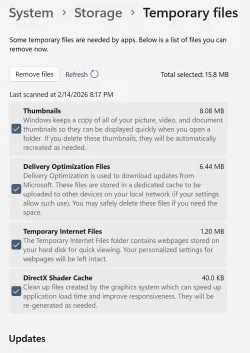
I just tried an update in place with ISO and this is all it shows on System > Storage > Temporary files.
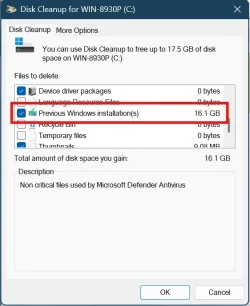
Second screenshot is Disk Cleanup showing 16.1 GB of Previous Windows Installation.
In this case there is no Windows Update Cleanup file but usually you see that after a Cumulative Update on the top of the Disk Cleanup list.
I don't know if this is an intentional change or just a MS mistake. It is common to all latest Builds, insider and non-insider. 😵‍💫🤷‍♂️

1771129608503.webp


1771129814788.webp
1771130234658.webp

Gone after Running Disk Cleanup.
1771130473191.webp


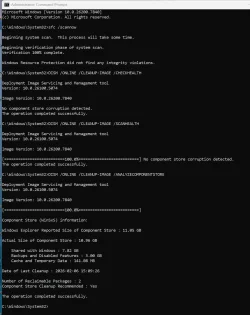
This shows the usual 2 unreclaimable packages.
1771130852908.webp
 

My Computer

System One

  • OS
    Windows 11 Pro 25H2
    Computer type
    PC/Desktop
    Manufacturer/Model
    Dell XPS 8930
    CPU
    Intel I9-9900K
    Memory
    64GB
    Graphics Card(s)
    NVIDIA RTX 2060
    Sound Card
    NVIDIA High Definition Audio
    Monitor(s) Displays
    4k Samsung
    Screen Resolution
    3840 x 2160
    Hard Drives
    512GB NVMe, ADATA SU 800, 2TB HDD

Latest Support Threads

Back
Top Bottom