Win Update KB5083769 Windows 11 Cumulative Update build 26100.8246 (24H2) and 26200.8246 (25H2) - April 14


UPDATE 4/30:


 Microsoft Support:

April 14, 2026 - KB5083769 (OS Builds 26200.8246 and 26100.8246)​

This cumulative update for Windows 11, version 25H2 and 24H2 (KB5083769), includes the latest security fixes and improvements, along with non-security updates from last month’s optional preview release. To learn more about differences between security updates, optional non-security preview updates, out-of-band (OOB) updates, and continuous innovation, see Windows monthly updates explained. For information on Windows update terminology, see the different types of Windows software updates.

To view the latest updates about this release, visit the Windows release health dashboard or the update history page for Windows 11, version 25H2 and 24H2.


Announcements and messages

This section provides key notifications related to this release, including announcements, change logs, and end-of-support notices.

Windows Secure Boot certificate expiration​

Important: Secure Boot certificates used by most Windows devices are set to expire starting in June 2026. This might affect the ability of certain personal and business devices to boot securely if not updated in time. To avoid disruption, we recommend reviewing the guidance and taking action to update certificates in advance. For details and preparation steps, see Windows Secure Boot certificate expiration and CA updates.


Change log​


Improvements

This security update contains fixes and quality improvements from KB5079473 (released March 10, 2026), KB5085516 (released March 21, 2026), KB5079391 (released March 26, 2026 - no longer offered), and KB5086672 (released March 31, 2026). The following summary outlines key issues addressed by this update. Also, included are available new features. The bold text within the brackets indicates the item or area of the change.
  • [Secure Boot]
    • New! The status of Secure Boot certificate updates on your device may be displayed in the Windows Security app (Settings > Privacy & security > Windows Security). Learn more about the status alerts via badges and notifications. These enhancements are disabled by default on commercial devices.
    • With this update, Windows quality updates include additional high confidence device targeting data, increasing coverage of devices eligible to automatically receive new Secure Boot certificates. Devices receive the new certificates only after demonstrating sufficient successful update signals, maintaining a controlled and phased rollout.
    • This update addresses an issue where the device might enter BitLocker Recovery after the Secure Boot updates.
  • [Networking] This update improves reliability when Windows uses SMB compression over QUIC. After you install this update, SMB compression requests over QUIC complete more consistently, reducing the likelihood of timeouts and supporting smoother, more dependable performance.
  • [Remote Desktop] This update improves protection against phishing attacks that use Remote Desktop (.rdp) files. When you open an .rdp file, Remote Desktop shows all requested connection settings before it connects, with each setting turned off by default. A one-time security warning also appears the first time you open an .rdp file on a device. For more information, see Understanding security warnings when opening Remote Desktop (RDP) files.
  • [Reset this PC (known issue)] Fixed: This update addresses an issue that might cause device reset to fail when using the “Keep my files” or “Remove everything” options. This might occur after installing the March 2026 (KB5079420) Hotpatch security update.
  • [Vulnerable driver blocklist] This update introduces a security hardening change that adds known vulnerable kernel drivers to the Microsoft vulnerable driver blocklist. Backup applications that rely on blocked drivers might experience failures when attempting to mount or manage disk images.

    These apps relying on blocked drivers might display error messages, including "The backup has failed because Microsoft VSS has timed out during the snapshot creation" or VSS_E_BAD_STATE. Affected users should update to a newer version of their application that uses newer drivers that include the required protections. For more information, see April 2026 Windows security updates introduce protections to known vulnerable kernel drivers.
If you've already installed previous updates, your device will download and install only the new updates included in this package.

For more information about security vulnerabilities, see the Security Update Guide and the April 2026 Security Updates.

AI Components

This release updates the following AI components:

AI Component​
Version​
Image Search1.2603.377.0
Content Extraction1.2603.377.0
Semantic Analysis1.2603.377.0
Settings Model1.2603.377.0

Windows 11 servicing stack update (KB5088467)- 26100.8247

This update makes quality improvements to the servicing stack, which is the component that installs Windows updates. Servicing stack updates (SSU) ensure that you have a robust and reliable servicing stack so that your devices can receive and install Microsoft updates. To learn more about SSUs, see Simplifying on-premises deployment of servicing stack updates.


Known issues in this update

Symptom

Some devices with an unrecommended BitLocker Group Policy configuration might be required to enter their BitLocker recovery key on the first restart after installing this update.

This issue only affects a limited number of systems in which ALL of the following conditions are true. These conditions are unlikely to be found on personal devices not managed by IT departments.
  1. BitLocker is enabled on the OS drive.
  2. The Group Policy "Configure TPM platform validation profile for native UEFI firmware configurations" is configured, and PCR7 is included in the validation profile (or the equivalent registry key is set manually).
  3. System Information (msinfo32.exe) reports Secure Boot State PCR7 Binding as "Not Possible".
  4. The Windows UEFI CA 2023 certificate is present in the device’s Secure Boot Signature Database (DB), making the device eligible for the 2023‑signed Windows Boot Manager to be made the default.
  5. The device is not already running the 2023-signed Windows Boot Manager.
In this scenario, the BitLocker recovery key only needs to be entered once -- subsequent restarts will not trigger a BitLocker recovery screen, as long as the group policy configuration remains unchanged. For help finding your BitLocker recovery key, see the article, Find your BitLocker recovery key.

Enterprises are recommended to audit their BitLocker group policies for explicit PCR7 inclusion and check msinfo32.exe for their PCR7 binding status before installing this update. (See Option 1 below.)

Workaround

This issue is addressed in KB5089549. After installing KB5089549, devices with this incompatible group policy configuration are prevented from installing the 2023-signed Windows Boot Manager. If your device was impacted, Event ID 1032 will appear in the System event log when installing Windows updates: "The Secure Boot update Boot Manager (2023) was not applied due to a known incompatibility with the current BitLocker configuration."

If you receive Event ID 1032, Microsoft strongly recommends removing the Group Policy configuration before installing updates so that you can install the 2023-signed Windows Boot Manager and continue to receive the latest Secure Boot protections.

Remove the Group Policy configuration before installing the update (Recommended)
  1. Open Group Policy Editor (gpedit.msc) or your Group Policy Management Console.
  2. Navigate to: Computer Configuration > Administrative Templates > Windows Components > BitLocker Drive Encryption > Operating System Drives.
  3. Set "Configure TPM platform validation profile for native UEFI firmware configurations" to "Not Configured".
  4. Run the following command on affected devices to propagate the policy change: gpupdate /force
  5. Run the following command to suspend BitLocker (where BitLocker is enabled on the C: drive): manage-bde -protectors -disable C:
  6. Run the following command to resume BitLocker (where BitLocker is enabled on the C: drive): manage-bde -protectors -enable C:
  7. This updates the BitLocker bindings to use the Windows-selected default PCR profile.
If you do not wish to remove this Group Policy configuration, you can install the new Windows Boot Manager by temporarily suspending BitLocker and installing the Secure Boot update. To do this:
  1. Run the following command to suspend BitLocker (if BitLocker is enabled on the C: drive): manage-bde -protectors -disable C:
  2. Run the following command: Start-ScheduledTask -TaskName "\Microsoft\Windows\PI\Secure-Boot-Update"
  3. Restart the device.
  4. Once the new Windows Boot Manager is successfully installed, enable BitLocker by running the command: manage-bde -protectors -enable C:

Symptoms

After installing this update, the security warning that appears when opening Remote Desktop (RDP) files might not display correctly in some cases.

This issue can occur when you use more than one monitor with different display scaling settings (for example, one display set to 100% and another set to 125%). When this happens, the warning window might show overlapping text or partially hidden buttons, which can make the message difficult to read or interact with.

Workaround

This issue is addressed in KB5083631.

How to get this update

Before you install this update

Microsoft combines the latest servicing stack update (SSU) for your operating system with the latest cumulative update (LCU). For general information about SSUs, see Servicing stack updates.

Install this update

To install this update, use one of the following Windows and Microsoft release channels.

Available​
Next Step​
Included
This update downloads and installs automatically from Windows Update and Microsoft Update.
Included
To install this release from the Microsoft Update Catalog, select the option that matches your device architecture (arm64 or x64), and then follow the instructions.

If you want to remove this update

Caution: Before you decide to remove this update, see Understanding the risks: Why you should not uninstall security updates.
To remove the LCU after installing the combined SSU and LCU package, use the DISM/Remove-Package command line option with the LCU package name as the argument. You can find the package name by using this command: DISM /online /get-packages.

Running Windows Update Standalone Installer (wusa.exe) with the /uninstall switch on the combined package will not work because the combined package contains the SSU. You cannot remove the SSU from the system after installation.

File information

For a list of the files provided in this update, download the file information for cumulative update 5083769.

For a list of the files provided in the servicing stack update, download the file information for the SSU (KB5088467) - version 26100.8247.


 Source:


Check Windows Updates


ISO from Microsoft Media Creation Tool (MCT):


UUP Dump:

64-bit ISO download:

ARM64 ISO download:

 
Last edited:

KB5083769 Screws up copying and pasting from LibreOffice or Excel from host to guest... text get's converted to image or even SQL... very weird

WhatsApp.Root_yTfykjzHq1.webp

also can't copy from rdp guest to host on W11 Notepad wth

Removing KB5083769 brings everything back to normal.
 

My Computer

System One

  • OS
    Windows 11
    Computer type
    PC/Desktop
Had a BIOS update for my system as well.
 

My Computer

System One

  • OS
    Win 11 Pro 25H2 26200.8524
    Computer type
    PC/Desktop
    Manufacturer/Model
    Custom
    CPU
    Intel i5-12400F
    Motherboard
    MSI PRO B760M P
    Memory
    2 x16gb DDR4 Patriot Viper Elite II 4000MHz
    Graphics Card(s)
    ASUS GeForce RTX 3060 Dual OC 12GB
    Sound Card
    onboard Realtek
    Monitor(s) Displays
    KTC 32 inch 180Hz Curved Gaming Monitor
    Screen Resolution
    2560x1440
    Hard Drives
    1x SP 512GB NVME (Windows)
    1x 2TB SSD (Downloads)
    1x 2TB BX500 (Games)
    1x 2TB NVME (Steam)
    1x 1TB NVME (Macrium, Stuff)
    PSU
    CORSAIR RM750e (2025) Platinum Fully Modular
    Case
    CORSAIR Frame 4000D RS White
    Cooling
    Thermalright Assassin X120 SE ARGB White
    Keyboard
    Z-88 RGB Mechanical White
    Mouse
    Red Dragon 612 Predator RGB
    Internet Speed
    750/50
    Browser
    Chrome
    Antivirus
    Windows
Update went well and no issues so far.
 

My Computer

System One

  • OS
    Windows 11 Pro
    Computer type
    PC/Desktop
    Manufacturer/Model
    Microsoft Surface Pro
    CPU
    i5-7300U @ 2.6 GHz
    Motherboard
    Intel
    Memory
    8 GB
    Graphics Card(s)
    Intel HD Graphics
    Hard Drives
    SSD Local Disk (C) - 117 GB
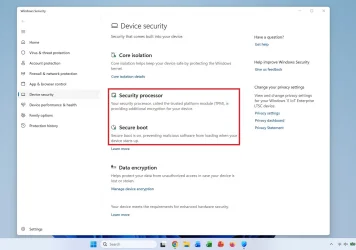
Updated yesterday. No issues found. One strange addition in this build; Settings - Privacy and Security - Windows Security - Device security (Defender) When secure boot is turned on; One extra feature is visible; Secure Boot. Can have 3 statuses. A Green icon, a yellow icon, a red icon. Green is OK but what if it says Yellow or Red? MS does not mentioned what to do next about it..... Waking those dogs up yet again... 😆

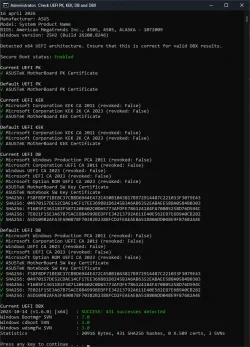
cjee21 released an updated version on GitHub of his program; Check-UEFISecureBootVariables. See attachment. Now it shows some SHA256 checksum of the certificates. (GitHub - cjee21/Check-UEFISecureBootVariables: PowerShell scripts to check the UEFI KEK, DB and DBX Secure Boot variables as well as scripts for other Secure Boot related items.) Can't see the relation of the SHA256 to which certificate. Looked at the PCA2011 intermediate certificate. It does have a Thumbprint (SHA256) but does not match any of the Checksums that this program is showing. Important is the the checksum matches with what was expected.
 

Attachments

  • #5 New UEFI Check OK.webp
    #5 New UEFI Check OK.webp
    120.3 KB · Views: 2

My Computer

System One

  • OS
    Win 11 Pro "25H2" Build 26200.8524, Zorin OS Pro
    Computer type
    PC/Desktop
    Manufacturer/Model
    Self built
    CPU
    Intel® Core™ i7-12700KF 12th Gen.
    Motherboard
    ASUS Prime Z690-A, BIOS v4505
    Memory
    32GB DDR5 5600-36 Vengeance
    Graphics Card(s)
    PCIe4.0 Asus NVIDIA RTX3060Ti
    Sound Card
    Onboard; Realtek
    Monitor(s) Displays
    34" LG 34UC79G-B Curved 21:9 144Hz
    Screen Resolution
    2560x1080 (No HDR)
    Hard Drives
    250Gb Samsung 870PRO NVMe (Win 11 Pro)
    1Tb Samsung 980PRO NVMe
    1Tb Samsung 970EVO NVMe
    2Tb Samsung 990PRO NVMe with heatsink.
    4Tb WDC WD40EZRZ Blue SATA (Int.)
    4Tb WDC WD40EZRZ Blue SATA (Int.)
    3Tb WDC WD30EFRZ Red SATA (Int.)
    256Gb Samsung 840PRO SSD (RHEL 9,5)
    256Gb Samsung 850PRO SSD (Zorin OS Pro 18)
    PSU
    Coolermaster 850W V2 Gold with internal 12cm exaust fan
    Case
    Be-Quiet Pure Base 600.
    Cooling
    3x Be-Quiet! 12/14cm "Silent Wings 4" casefans, 1x Arctic Freezer i35 CPU towerblock with fan.
    Keyboard
    Steelseries APEX 7 keyboard.
    Mouse
    Logitech G-502 Hero
    Internet Speed
    1Gb
    Browser
    Brave
    Antivirus
    F-Secure
    Other Info
    No Noise system.
    256Gb Kingston Travler USB 3.0 drive.
    64Gb Sandisk USB 3.2 drive. (Ventoy)
    8Gb Philips USB 3.0 drive. (Win. Inst.)
    8Gb Philips USB 3.0 drive. (Rescue disk)
    2Tb WD USB 3.0 Passport drive.
    USB Ext. 500Gb WD SATA drive.
    External USB 3.0 C.A. CD/DVD* burner.
Can have 3 statuses. A Green icon, a yellow icon, a red icon. Green is OK but what if it says Yellow or Red? MS does not mentioned what to do next about it..... Waking those dogs up yet again... 😆

  • Green (Checkmark): Secure Boot is on and all required certificates are applied.
  • Yellow (Warning): Secure Boot is on, but an older certificate is in use, requiring a Windows update.
  • Red (Stop/X): Serious issue; Secure Boot is either off or using expired certificates that cannot be updated automatically, potentially requiring a BIOS/firmware update.

 
Last edited:

My Computers

System One System Two

  • OS
    Windows 11 Pro 25H2 26200.8457
    Computer type
    PC/Desktop
    Manufacturer/Model
    Dell Tower Plus EBT2250, DOB: 06/15/2025
    CPU
    Intel® Core™ Ultra 7 265 1.8GHz to 5.3GHz (Arrow Lake)
    Motherboard
    Dell Inc. 02D3NT A00 (U3E1)
    Memory
    SK Hynix 32GB DDR5 5600 Desktop RAM UDIMM Non-ECC PC5-5600B
    Graphics Card(s)
    Dell NVIDIA® GeForce RTX™ 4060 8GB GDDR6 & (iGPU) Integrated Intel® UHD Graphics
    Sound Card
    Chipset Realtek High-Definition Audio with Dolby Atmos
    Monitor(s) Displays
    Dell Ultra Sharp U2515H 25-Inch Screen LED-Lit
    Screen Resolution
    2560 X 1440
    Hard Drives
    Samsung (NVMe PM9C1a 1024GB) M.2 PCIe NVMe Solid State Drive (OS), with Samsung Piccolo (S4LY022) 6-Core 4 Channel Controller.

    Samsung T7 500GB SSD, USB-C External Drive
    PSU
    Dell 460W
    Case
    Dell Tower Plus EBT 2250
    Cooling
    Fan
    Keyboard
    Dell Wired Keyboard - KB216
    Mouse
    Logitech M510
    Internet Speed
    Intel Killer E3100G 2.5 Gigabit Ethernet Controller
    Browser
    Microsoft Edge
    Antivirus
    Microsoft Windows Security
    Other Info
    The Samsung NVMe PM9C1a 1024GB SSD does not use a Phison NAND controller. Instead, it uses Samsung's in-house developed Piccolo (S4LY022) 6-Core 4 Channel Controller. The PM9C1a utilizes a controller built using Samsung's 5-nanometer process and seventh-generation V-NAND technology. 🤔
  • Operating System
    Windows 11 Pro 25H2 26200.8457
    Computer type
    Laptop
    Manufacturer/Model
    Dell Inspiron 15 7000 (7591) 2-in-1, DOB: 11/30/2019
    CPU
    10th Generation Intel Core i7-10510U Processor (8MB Cache, up to 4.9 GHz) Comet Lake
    Motherboard
    Dell 0NNW5N
    Memory
    16GB DDR4 RAM
    Graphics card(s)
    NVIDIA® GeForce® MX250 with 2GB GDDR5 graphics memory
    Sound Card
    Chipset Realtek ALC3254 🤔🤣
    Monitor(s) Displays
    Dell 15.6-inch UHD Truelife Touch Narrow Border WVA Display with Active Pen support
    Screen Resolution
    3840 x 2160
    Hard Drives
    Intel NVME 512GB SSD with 32GB Intel Optane Memory, M.2 80mm PCIe 3.0 RAID

    SanDisk 256GB Extreme microSDXC UHS-I Memory Card
    PSU
    Dell 4-Cell Battery, 68 Whr (Integrated), 90 Watt AC Adapter
    Case
    Dell Inspiron 15 7000 2-in-1 (7591)
    Cooling
    Standard Dell Case Fan & Havit HV-F2056 USB Powered (3 Fans) Laptop Cooling Pad.
    Keyboard
    Dell
    Mouse
    Logitech Wireless Mouse M650L
    Internet Speed
    Wireless/Wired connectivity (WiFi 6 - 802.11 ax)
    Browser
    Microsoft Edge
    Antivirus
    Microsoft Windows Security
    Other Info
    From Dell: 512GB NVME Solid State Drive accelerated by 32GB Intel Optane Memory are the fastest as compared to NAND SSDs. Intel Optane H10 with SSD offers speedy storage and accelerates opening your programs.
  • Green (Checkmark): Secure Boot is on and all required certificates are applied.
  • Yellow (Warning): Secure Boot is on, but an older certificate is in use, requiring a Windows update.
  • Red (Stop/X): Serious issue; Secure Boot is either off or using expired certificates that cannot be updated automatically, potentially requiring a BIOS/firmware update.
Yes I know. I can read. But basically it is saying will be fixed. Not how to solve it. Wait on a update or on a BIOS update. (what if the motherboard is to old and no BIOS updates are available for this change of situation?) Seen many issues to date and they were all fixable without any help of MS. It should only look at the current state not at the default state. MS is not telling us under what conditions a yellow or red mark appears. By doing it this way it raises more questions than answers. People want to solve the situation if there is one. MS is taking it's time with that CA 2023 or CA2024 by now. We are arriving in May and then it must have everything in place in one go otherwise in June "things" will hit the fan..... Seen at their troubles with 8116 & 8117... It's not looking good.....
 

My Computer

System One

  • OS
    Win 11 Pro "25H2" Build 26200.8524, Zorin OS Pro
    Computer type
    PC/Desktop
    Manufacturer/Model
    Self built
    CPU
    Intel® Core™ i7-12700KF 12th Gen.
    Motherboard
    ASUS Prime Z690-A, BIOS v4505
    Memory
    32GB DDR5 5600-36 Vengeance
    Graphics Card(s)
    PCIe4.0 Asus NVIDIA RTX3060Ti
    Sound Card
    Onboard; Realtek
    Monitor(s) Displays
    34" LG 34UC79G-B Curved 21:9 144Hz
    Screen Resolution
    2560x1080 (No HDR)
    Hard Drives
    250Gb Samsung 870PRO NVMe (Win 11 Pro)
    1Tb Samsung 980PRO NVMe
    1Tb Samsung 970EVO NVMe
    2Tb Samsung 990PRO NVMe with heatsink.
    4Tb WDC WD40EZRZ Blue SATA (Int.)
    4Tb WDC WD40EZRZ Blue SATA (Int.)
    3Tb WDC WD30EFRZ Red SATA (Int.)
    256Gb Samsung 840PRO SSD (RHEL 9,5)
    256Gb Samsung 850PRO SSD (Zorin OS Pro 18)
    PSU
    Coolermaster 850W V2 Gold with internal 12cm exaust fan
    Case
    Be-Quiet Pure Base 600.
    Cooling
    3x Be-Quiet! 12/14cm "Silent Wings 4" casefans, 1x Arctic Freezer i35 CPU towerblock with fan.
    Keyboard
    Steelseries APEX 7 keyboard.
    Mouse
    Logitech G-502 Hero
    Internet Speed
    1Gb
    Browser
    Brave
    Antivirus
    F-Secure
    Other Info
    No Noise system.
    256Gb Kingston Travler USB 3.0 drive.
    64Gb Sandisk USB 3.2 drive. (Ventoy)
    8Gb Philips USB 3.0 drive. (Win. Inst.)
    8Gb Philips USB 3.0 drive. (Rescue disk)
    2Tb WD USB 3.0 Passport drive.
    USB Ext. 500Gb WD SATA drive.
    External USB 3.0 C.A. CD/DVD* burner.
Windows update showed the Patch Tuesday updates failed after installing and rebooting but my build number changed
 

My Computer

System One

  • OS
    Windows 11
    Computer type
    Laptop
    Manufacturer/Model
    MSI Raider A18 HX
    CPU
    Ryzen 7945HX
SFC and DISM scans didn't find any corrupt files. All good. :thumbsup:


Screen Shot 04-15-26 at 11.44 AM.webp
 

My Computer

System One

  • OS
    Windows 11 25H2 Pro (RP Build 26200.8524)
    Computer type
    PC/Desktop
    Manufacturer/Model
    Alienware
Okay, I don't know wtf just happened but my 2/@ W and upper center volume keys stopped working all of a sudden. I ran the troubleshooter and it's partially working again
@Senecio @Awesomehorse I had something like that happen in my HP Desktop computer a few days before this update. The 3 keys (f1, f2,f3) that handle volume in my W11 all of the sudden stopped working. I solved the issue by rebooting. Perhaps a reboot would have solved your issue as well.

FWIW, this update seems to have gone very well in my desktop. It fixed an issue that I think affected some computers but not all. A few programs that I use everyday stopped working after March's Windows update. Now, after installing April's updates, they all (and I mean, a few programs) work as they always have. I am happy :-)

Bo
 

My Computer

System One

  • OS
    Windows11
    Computer type
    PC/Desktop
    Manufacturer/Model
    HP
    Memory
    16GB
    Keyboard
    HP 310
    Mouse
    HP
    Browser
    Firefox
KB5083769 (26200.8246) Quality update and 2026-04 .NET Framework Security Update KB5082417 installed very fast on both my 2 systems. DISM and SFC completed successfully on my Acer laptop but SFC found corruption on my Asus laptop that were successfully repaired, when running SFC again no issues were found. KEK (secure Boot key) was not updated on my new Acer SF14-51T laptop but was successfully installed om my 2023 ASUS OLED Vivobook?
Update April 24:
Just received the KEK (Secure Boot key) for my Acer SF14-51T laptop so both my systems have now the new 2016 Secure Boot keys)
1777004137370.webp
 
Last edited:

My Computers

System One System Two

  • OS
    Windows 11 Home 25H2 build: 26200.8524
    Computer type
    Laptop
    Manufacturer/Model
    Acer Swift A.I SF14-51T
    CPU
    Intel(R) Core(TM) Ultra 7 258V, 2200 Mhz, 8 Cores
    Motherboard
    Icefish_LNV, Version V1.15
    Memory
    32 GB LPDDR5X (soldered)
    Graphics Card(s)
    Intel(R) Arc(TM) 140V GPU (16GB)
    Sound Card
    RealTek + Intel Smart Sound
    Monitor(s) Displays
    14" IPS WUXGA
    Screen Resolution
    1920x1200x60Hz
    Hard Drives
    Micron_2550_MTFDKBA1T0TGE, NVMe Gen4, 1TB
    PSU
    45W USB-C GaN charger
    Case
    Full aluminum body
    Cooling
    1 fan
    Keyboard
    US with Backlight
    Mouse
    Precision Trackpad
    Internet Speed
    25 Mb/s 5G
    Browser
    Edge
    Antivirus
    Windows Defender
    Other Info
    BIOS Version/Date Insyde Corp. V1.15, 8/28/2025, Windows Hello IR camera with Facial recognition. Secure Boot 2026 KEK key installed
  • Operating System
    Windows 11 Home 25H2 build: 26200.8524
    Computer type
    Laptop
    Manufacturer/Model
    Asus Vivobook K3502Z S15 15" OLED
    CPU
    Intel 12th Gen. i7 12700H, 14 cores, 2.3 GHz (24M Cache, up to 4.7 GHz, 6P+8E cores)
    Motherboard
    Alder Lake-H, 1700-4700 MHz clock rate
    Memory
    8GB LPDDR4 on board + 8GB LPDDR4 3200 MHz in Dual Channel.
    Graphics card(s)
    Intel Iris Xe supports up to 4096 x 2304 @ 120Hz
    Sound Card
    Harman Kardon - DTS
    Monitor(s) Displays
    OLED 15.6inch 2.8K (2880 x 1620)
    Screen Resolution
    16:9 aspect ratio 0.2ms response time 120Hz refresh rate, 550nits
    Hard Drives
    512GB M.2 NVMe Gen4 PCIe 4.0 SSD, Micron_2450_MTFDKBA512TFK
    PSU
    90-Watt USB charger (Thunderbolt4)
    Case
    Metal lid, plastic case
    Cooling
    1 fan
    Keyboard
    With adjustable backlight
    Mouse
    Precision Trackpad
    Internet Speed
    ISP provides 15 mb/s WIFI LTE (4G), laptop WIFI 6 adapter.
    Browser
    Edge
    Antivirus
    Windows Defender
    Other Info
    BIOS American Megatrends International, LLC. 10.1.2.312, 13/03/2024. Network adapter: Intel Wi-Fi 6E AX211 160 MHz, Secure Boot 2026 KEK key installed
I solved the issue by rebooting. Perhaps a reboot would have solved your issue as well.
Thanks @bo elam - I had stupidly assumed that the three reboots which happened during the update would have taken care of that, but I just did another and lo and behold, the issue is now resolved. :rolleyes:
 

My Computers

System One System Two

  • OS
    Linux Mint (22.3) and Windows 11
    Computer type
    PC/Desktop
    Manufacturer/Model
    Home built
    CPU
    Ryzen 3900x
    Motherboard
    Gigabyte Aorus Master x570 rel 1.0
    Memory
    32GB (2x16) @ 3600 MHz Corsair Vengeance LPX
    Graphics Card(s)
    Asus Geforce RTX 5060 Ti Dual OC 16 GB
    Sound Card
    No separate sound card.
    Monitor(s) Displays
    Dell U2718Q
    Screen Resolution
    3840x2160
    Hard Drives
    1TB WD-Black SN850; 1TB Samsung Sata 850 Evo; 4 TB WD Blue Sata SA510 2.5''; 4TB Samsung Sata SSD 870 EVO 2.5".
    PSU
    Be Quiet Dark Power Pro 11 750W
    Case
    Lian Li PC-8FIB
    Cooling
    CPU: Noctua NH-U12A; Case: BeQuiet + Lian Li fans.
    Keyboard
    Steelseries Apex 7 brown keys.
    Mouse
    Logitech (wired) G403
    Internet Speed
    940 Mb/s down; 105 Mb/s up
    Browser
    Firefox
    Other Info
    Pioneer blu-ray optical drive.
  • Operating System
    Windows 11 Home (ARM version) (latest update)
    Computer type
    Laptop
    Manufacturer/Model
    Samsung Galaxy Book4 Edge 14" Copilot+ PC
    CPU
    Qualcomm Snapdragon X Elite X1E-80-100
    Memory
    16 GB LPDDR5
    Graphics card(s)
    Qualcomm Adreno
    Monitor(s) Displays
    Touch screen 14" AMOLED monitor
    Screen Resolution
    2880x1800
    Hard Drives
    512 GB eUFS
    Internet Speed
    930 Mb/s (Wifi)
    Browser
    Firefox
    Antivirus
    Eset Internet Security
    Other Info
    NPU Qualcomm Hexagon
Windows 11 version 25H2 build 26200.8246 now available to download as ISO or USB with MCT.


26200.8246.webp
 

My Computers

System One System Two

  • OS
    Windows 11 Pro for Workstations
    Computer type
    PC/Desktop
    Manufacturer/Model
    Custom self build
    CPU
    Intel i7-8700K 5 GHz
    Motherboard
    ASUS ROG Maximus XI Formula Z390
    Memory
    64 GB (4x16GB) G.SKILL TridentZ RGB DDR4 3600 MHz (F4-3600C18D-32GTZR)
    Graphics Card(s)
    ASUS ROG-STRIX-GTX1080TI-O11G-GAMING (11GB GDDR5X)
    Sound Card
    Integrated Digital Audio (S/PDIF)
    Monitor(s) Displays
    2 x Samsung Odyssey G75 27"
    Screen Resolution
    2560x1440
    Hard Drives
    1TB Samsung 990 PRO M.2,
    4TB Samsung 990 PRO M.2,
    TerraMaster F8 SSD Plus NAS
    PSU
    Seasonic Prime Titanium 850W
    Case
    Thermaltake Core P3 wall mounted
    Cooling
    Corsair Hydro H115i
    Keyboard
    Amazon Basics Wired Full Keyboard MD005
    Mouse
    Logitech MX Master 4
    Internet Speed
    2 Gbps Download and 100 Mbps Upload
    Browser
    Chrome and Edge
    Antivirus
    Microsoft Defender
    Other Info
    Logitech Z625 speaker system,
    Logitech BRIO 4K Pro webcam,
    HP Color LaserJet Pro MFP M477fdn,
    CyberPower CP1500PFCLCD
    Galaxy S23 Plus phone
  • Operating System
    Windows 11 Pro
    Computer type
    Laptop
    Manufacturer/Model
    Surface Laptop 7 Copilot+ PC
    CPU
    Snapdragon X Elite (12 core) 3.42 GHz
    Memory
    16 GB LPDDR5x-7467 MHz
    Monitor(s) Displays
    15" HDR
    Screen Resolution
    2496 x 1664
    Hard Drives
    1 TB SSD
    Internet Speed
    Wi-Fi 7 and Bluetooth 5.4
    Browser
    Chrome and Edge
    Antivirus
    Microsoft Defender
Release Preview .8313 downloading now....
 

My Computer

System One

  • OS
    Windows 11 Pro 25H2 (RP channel)
    Computer type
    PC/Desktop
    Manufacturer/Model
    MSI
    CPU
    AMD Ryzen 7 9800X3D 8-core
    Motherboard
    MEG X870E Godlike
    Memory
    64GB Corsair Titanium 6000/CL30
    Graphics Card(s)
    MSI Suprim 5080 SOC
    Sound Card
    Soundblaster AE-9
    Monitor(s) Displays
    ASUS TUF Gaming VG289Q
    Screen Resolution
    3840x2160
    Hard Drives
    Samsung 9100 Pro 4TB (gen 5 x4, system drive/games)
    Samsung 990 Pro 2TB
    Samsung 980 Pro 2TB
    Samsung 870 Evo 4TB
    Samsung 870 Evo 2TB
    Samsung T9 4TB
    PSU
    Seasonic PX-2200
    Case
    Bequiet! Dark Base Pro 901
    Cooling
    Noctua NH-D15S Chromax black
    Keyboard
    Logitech G915 X (wired)
    Mouse
    Logitech G903 with PowerPlay charger
    Internet Speed
    900Mb/sec
    Browser
    Microsoft Edge
    Antivirus
    Windows Defender
Windows 11 version 25H2 build 26200.8246 now available to download as ISO or USB with MCT.

I decided to run the last DISM command from my post in this thread, I ran it after the person I was helping to run this command gave up on the laptop that had an error. I just ran it because I had the install.wim file now:

Code:
DISM /Online /Cleanup-Image /RestoreHealth /Source:install.wim

Deployment Image Servicing and Management tool
Version: 10.0.26100.5074

Image Version: 10.0.26200.8246

[==========================100.0%==========================]
The restore operation completed successfully.
The operation completed successfully.
 

My Computer

System One

  • OS
    Windows 11 Pro
    Computer type
    Laptop
    Manufacturer/Model
    Dell 16 Plus DB16255
    CPU
    AMD Ryzen AI 7 350 w/ Radeon 860M 50 TOPS
    Motherboard
    Dell 0PKMHG
    Memory
    32GB LPDDR5X 7500 MT/s
    Graphics Card(s)
    AMD Radeon 860M integrated (shared memory)
    Sound Card
    Stereo speakers (2.5 W x 2 = 5 W total peak)/Realtek SounzReal/Dolby Atmos
    Monitor(s) Displays
    Displays: 16" 1920 x 1200 (Full HD+/WUXGA) 300 nits 60Hz *** Samsung - 27” Odyssey FHD IPS 240Hz G-Sync Gaming Monitor
    Screen Resolution
    1920x1080 @ 60Hz
    Hard Drives
    EG6 KIOXIA 1TB NVME
    Case
    Ice Blue
    Cooling
    "dual-fan" or "enhanced" air-cooling system
    Mouse
    Logitech M650 Wireless/Bluetooth
    Internet Speed
    800/600 Fiber
Does anyone know the ViveTool code to activate the new Security Service feature - Secure Boot - to verify security certificates?
 

Attachments

  • 000.webp
    000.webp
    58 KB · Views: 2

My Computer

System One

  • OS
    Windows 11 25H2 of UPP
    Computer type
    PC/Desktop
    Manufacturer/Model
    Wallapop
    CPU
    Intel Core i5-7600 3.5GHz
    Motherboard
    MSI Z270 GAMING M3
    Memory
    64 Gb Crucial Ballistix 3200MHz
    Graphics Card(s)
    MSI GeForce GTX 1050 Ti
    Monitor(s) Displays
    GL2450HT 24"
    Screen Resolution
    1920 x 1080 pixels
    Hard Drives
    Kingston A250 SSD
Does anyone know the ViveTool code to activate the new Security Service feature - Secure Boot - to verify security certificates?

This does not require ViveTool code. Please update Windows Security platform Update - KB5007651 (Version 10.0.29554.1001).
 

My Computer

System One

  • OS
    Windows 11, version 25H2 (26200)
    Computer type
    PC/Desktop
    CPU
    AMD Ryzen 9 9950X 16-Core Processor
    Motherboard
    ASRock B650M PG Riptide
    Memory
    DDR5-6000 (CL36) 64.0 GB
    Graphics Card(s)
    NVIDIA GeForce RTX 4090
    PSU
    1200W
    Case
    Phanteks Enthoo Pro 2
    Cooling
    Noctua NH-D12L
This does not require ViveTool code. Please update Windows Security platform Update - KB5007651 (Version 10.0.29554.1001).
thank you so much
 

My Computer

System One

  • OS
    Windows 11 25H2 of UPP
    Computer type
    PC/Desktop
    Manufacturer/Model
    Wallapop
    CPU
    Intel Core i5-7600 3.5GHz
    Motherboard
    MSI Z270 GAMING M3
    Memory
    64 Gb Crucial Ballistix 3200MHz
    Graphics Card(s)
    MSI GeForce GTX 1050 Ti
    Monitor(s) Displays
    GL2450HT 24"
    Screen Resolution
    1920 x 1080 pixels
    Hard Drives
    Kingston A250 SSD
KB5083769 (26200.8246) Quality update and 2026-04 .NET Framework Security Update KB5082417 installed very fast on both my 2 systems. DISM and SFC completed successfully on my Acer laptop but SFC found corruption on my Asus laptop that were successfully repaired, when running SFC again no issues were found. KEK (secure Boot key) was not updated on my new Acer SF14-51T laptop but was successfully installed om my 2023 ASUS OLED Vivobook?
KEK CA 2023 updates need to be installed on older PC's.
Your Acer SF14-51T was released in 2024. All PC's from this time are already supported in the factory BIOS.
 

My Computer

System One

  • OS
    Windows 7
Does anyone know the ViveTool code to activate the new Security Service feature - Secure Boot - to verify security certificates?
This is not necessary. When you are on 26200.8246 and secure boot inside your BIOS is turned on; the option will appear under Device security inside Defender. If it's reflecting the BIOS status or does some more checks is unknown.

One note on that ViVetool; those numbers are feature dependent and are active for a certain period. Once the feature has been implemented those numbers will be removed inside the feature-set. (inside the registry) These feature-sets lay dormant. Can be switched on or off. You can list them using vivetool.exe /Query By this method MS can write code for a certain feature and adapting it during time and during multiple updates. Once MS is confident the implementation is complete they can turn this feature on. If there are no issues with it and it's successful implemented they remove that feature from that list to make it permanent. So with every update new numbers can appear and old ones can disappear. If a feature is there or not is depending on the build.
 

My Computer

System One

  • OS
    Win 11 Pro "25H2" Build 26200.8524, Zorin OS Pro
    Computer type
    PC/Desktop
    Manufacturer/Model
    Self built
    CPU
    Intel® Core™ i7-12700KF 12th Gen.
    Motherboard
    ASUS Prime Z690-A, BIOS v4505
    Memory
    32GB DDR5 5600-36 Vengeance
    Graphics Card(s)
    PCIe4.0 Asus NVIDIA RTX3060Ti
    Sound Card
    Onboard; Realtek
    Monitor(s) Displays
    34" LG 34UC79G-B Curved 21:9 144Hz
    Screen Resolution
    2560x1080 (No HDR)
    Hard Drives
    250Gb Samsung 870PRO NVMe (Win 11 Pro)
    1Tb Samsung 980PRO NVMe
    1Tb Samsung 970EVO NVMe
    2Tb Samsung 990PRO NVMe with heatsink.
    4Tb WDC WD40EZRZ Blue SATA (Int.)
    4Tb WDC WD40EZRZ Blue SATA (Int.)
    3Tb WDC WD30EFRZ Red SATA (Int.)
    256Gb Samsung 840PRO SSD (RHEL 9,5)
    256Gb Samsung 850PRO SSD (Zorin OS Pro 18)
    PSU
    Coolermaster 850W V2 Gold with internal 12cm exaust fan
    Case
    Be-Quiet Pure Base 600.
    Cooling
    3x Be-Quiet! 12/14cm "Silent Wings 4" casefans, 1x Arctic Freezer i35 CPU towerblock with fan.
    Keyboard
    Steelseries APEX 7 keyboard.
    Mouse
    Logitech G-502 Hero
    Internet Speed
    1Gb
    Browser
    Brave
    Antivirus
    F-Secure
    Other Info
    No Noise system.
    256Gb Kingston Travler USB 3.0 drive.
    64Gb Sandisk USB 3.2 drive. (Ventoy)
    8Gb Philips USB 3.0 drive. (Win. Inst.)
    8Gb Philips USB 3.0 drive. (Rescue disk)
    2Tb WD USB 3.0 Passport drive.
    USB Ext. 500Gb WD SATA drive.
    External USB 3.0 C.A. CD/DVD* burner.

Latest Support Threads

Back
Top Bottom