Win Update KB5089573 Windows 11 Cumulative Update Preview build 26100.8524 (24H2) and 26200.8524 (25H2) - May 26


 Microsoft Support:

May 26, 2026 - KB5089573 (OS Builds 26200.8524 and 26100.8524) Preview​

This cumulative update for Windows 11, version 25H2 and 24H2 (KB5089573), includes production-quality improvements.
Visit the Windows release health dashboard for the latest status on this release.

Announcements and messages

This section provides key notifications related to this release, including announcements, change logs, and end-of-support notices.

Windows Secure Boot certificate expiration​

Important: Secure Boot certificates used by most Windows devices are set to expire starting in June 2026. This might affect the ability of certain personal and business devices to boot securely if not updated in time. To avoid disruption, we recommend reviewing the guidance and taking action to update certificates in advance. For details and preparation steps, see Windows Secure Boot certificate expiration and CA updates.


Change log​

Change date​
Change description​
May 29, 2026
  • Update: Installation & updates (Known issue) added (normal rollout).
  • Known issue update: The documentation no longer lists the known issue “May 2026 security update fails to install with error 0x800f0922” because this update (KB5089573) addresses the issue.
May 28, 2026Update: Personalization added (gradual rollout).

Highlights

This update is available through two release phases: gradual rollout and normal rollout. A gradual rollout delivers an update in phases, so features reach devices over time instead of all at once, meaning availability varies by device. A normal rollout is the broad release to all eligible devices at the same time, usually when it reaches general availability (GA).

Gradual rollout

The following summary outlines features from AI-powered Windows 11 PC experiences, along with improvements and fixes. The bold text within the brackets indicates the item or area of the change.

Windows 11 PC experiences​

This section highlights some new features and enhancements for Windows 11 PCs, including AI-powered capabilities, continuous innovation, and performance improvements.
  • [Shared Audio] New! Shared Audio enables two people to listen to the same audio from a single Windows 11 PC at the same time. It uses Bluetooth® LE Audio broadcast technology to make sharing easy. For example, you can watch a movie while traveling or listen to music while studying together. To start sharing audio, open Quick settings from the taskbar, select Shared Audio, choose two supported, paired, and connected devices, and then select Start sharing. To learn more about Shared Audio, see Extending Bluetooth® LE Audio on Windows 11 with Shared Audio.

  • [Magnifier in Windows]
    • New! Magnifier now provides clearer and more consistent announcements when working with a screen reader. You’ll hear helpful announcements when you zoom in or out, switch views, turn color inversion on or off, or turn Magnifier on or off. This makes it easy to stay oriented while you work.
    • New! Magnifier now supports magnification of permitted protected content.
    • This update improves smoothness when moving Magnifier in lens mode.

  • [Task Manager]
    • New! Task Manager now offers improved visibility into NPU usage on PCs with an NPU. New optional NPU and NPU Engine columns are available on the Processes, Users, and Details pages, along with NPU Dedicated Memory and NPU Shared Memory optional columns on the Details page. Neural engines that are part of a GPU now appear on the Performance page, providing a more complete view of AI‑related activity.

    • A new optional Isolation column on the Processes and Details pages shows which apps are running in an AppContainer. You can add any of the new columns by right‑clicking a column header in Task Manager and selecting them from the menu.

    • This update improves CPU speed display on the Performance page of Task Manager for VMs, so it doesn’t show higher than unexpected numbers after resuming from hibernate.
  • [Camera] New! Windows 11’s Multi-App Camera feature allows multiple applications to access your camera stream at the same time. Basic Camera mode in Windows 11 enables simplified camera functionality, useful for troubleshooting or improving stability when your camera is not working correctly. Enterprise admin can now set Multi-App Camera mode or Basic Camera mode through Group Policy, under Computer Configuration > Administrative Templates > Windows Components > Camera > Configure Camera Options.

  • [Windows Setup] New! You can now choose a custom name for your user folder on the Device Name page during Windows setup. The updated experience makes it easier to select a custom name during setup only. If this step is skipped, Windows uses the default folder name and continues setup as usual. User folder names must follow standard Windows naming requirements.

  • [General Performance] This update accelerates app launch and core shell experiences such as Start menu, Search, and Action Center.
  • [Personalization] This update improves:
    • Color selection accuracy when adjusting your accent color to match your wallpaper when the automatic accent color selection is enabled in Personalization settings.
    • Wallpaper persistence reliability across restarts and upgrades, including better support for large‑resolution wallpapers and other scenarios to prevent solid color wallpaper fallback.
  • [Windows Hello]
    • This update optimizes the Windows Biometric service (WinBio) to help improve performance when your device resumes from Modern Standby.
    • This update reduces unexpected authentication blocks in Windows Hello Enhanced Sign‑in Security by resolving missing secure enrollment metadata.
    • This update improves sign‑in behavior on the lock screen and sign‑in screen. When Windows Hello face or fingerprint is set up and available, it is now the default sign-in method every time you sign in, even if you used a different method previously. If you need to use your Windows PIN instead and use it three times in a row, Windows will stay with PIN until you switch to another sign-in method.
  • [Windows Search Box] Windows Search will now find and prioritize files with as few as two characters.
  • [Storage]
    • The dialog box for creating a Dev Drive now supports specifying the size in gigabytes (GB) instead of only megabytes (MB). This option is also available when resizing volumes in Settings > System > Storage.
    • In Settings > System > Storage, you now see a User Account Control (UAC) prompt only when you choose to view temporary files, instead of immediately when opening the page.
  • [USB]
    • This update improves reliability for displays attached to USB4 docks and hubs. These displays now light up more consistently, particularly when coming out of standby.
    • The USB3 stack is updated to have additional resiliency and recovery measures in place against certain unexpected hardware faults and conditions. Users will experience higher reliability with USB devices.
  • [Sensors] This update improves resiliency against apps that could keep the sensor hub powered on and drain power, impacting battery life.
  • [Human Interface Device (HID)] This update improves battery life related to the HID and Input stack for failed HID devices. Power hygiene is also improved against applications that might initiate HID transfers during standby.
  • [Input]The update improves:
    • Reliability of the touch keyboard on the sign‑in screen, including when entering or changing a password.
    • Reliability of explorer.exe when closing the input switcher.
    • Performance when opening or navigating to clipboard history.
  • [Fonts] The Times New Roman font family is updated to improve the rendering of combining diacritical marks across Greek and Cyrillic scripts. This update provides more accurate and visually consistent text by addressing mark positioning issues. These changes improve readability, reduce rendering inconsistencies, and better support for global language users working with Greek and Cyrillic content.
  • [Task Scheduler] Task Scheduler now saves column width adjustments in task list view across sessions.
  • [Desktop icons] This update improves reliability of loading desktop app shortcuts.
  • [Microsoft Store]
    • This update includes underlying changes that improve download performance and bandwidth usage.
    • This update improves error reporting when downloads fail due to Windows Update group policy settings being enabled.
  • [Reliability] This update improves Windows reliability on the sign-in and lock screens, in File Explorer, when using touch gestures on touchscreen devices, and when changing themes in Settings.
Normal rollout
This non-security update includes quality improvements. The following summary outlines key issues addressed by the KB update after you install it. Also, included are available new features. The bold text within the brackets indicates the item or area of the change.
  • [Secure Boot]
    • With this update, Windows quality updates include additional high confidence device targeting data, increasing coverage of devices eligible to automatically receive new Secure Boot certificates. Devices receive the new certificates only after demonstrating sufficient successful update signals, maintaining a controlled and phased rollout.
    • This update adds the LimitSecureBootRequiredServiceData Group Policy and mobile device management (MDM) setting under Computer Configuration > Administrative Templates > Windows Components > Secure Boot. When enabled, Windows limits the Secure Boot service data it sends by suppressing the event normally sent to Microsoft. This policy is included in the Windows Restricted Traffic Limited Functionality Baseline. For information about the policy, see Manage connections from Windows 10 and Windows 11 operating system components to Microsoft services.
  • [Installation & updates (Known issue)] Fixed This update addresses an issue where some devices might fail to complete installation with error code 0x800f0922. This can happen when the EFI System Partition (ESP) has limited free space, especially when 10 MB or less is available. This might occur after installing the May 2026 security update KB5089549.
If you installed earlier updates, your device downloads and installs only the new updates contained in this package.

AI Components

This release updates the following AI components:

AI Component​
Version​
Image Search1.2605.856.0
Content Extraction1.2605.856.0
Semantic Analysis1.2605.856.0
Settings Model1.2605.856.0

Windows 11 servicing stack update (KB5092734)- 26100.8519

This update makes quality improvements to the servicing stack, which is the component that installs Windows updates. Servicing stack updates (SSU) ensure that you have a robust and reliable servicing stack so that your devices can receive and install Microsoft updates. To learn more about SSUs, see Simplifying on-premises deployment of servicing stack updates.

Known issues in this update

Microsoft is not currently aware of any issues with this update.

How to get this update

Before you install this update

Microsoft combines the latest servicing stack update (SSU) for your operating system with the latest cumulative update (LCU). For general information about SSUs, see Servicing stack updates.

Install this update

To install this update, use one of the following Windows and Microsoft release channels.

Available​
Next Step​
Included
Open Start > Settings > Windows Update. > Advanced options > Optional updates. In the Optional updates available area, you will find the link to download and install available updates.
Check for optional updates
Included
To install this release from the Microsoft Update Catalog, select the option that matches your device architecture (arm64 or x64), and then follow the instructions.

If you want to remove this update

Caution: Before you decide to remove this update, see Understanding the risks: Why you should not uninstall security updates.

To remove this update after installing the combined SSU and LCU package, use the DISM/Remove-Package command line option with the LCU package name as the argument. You can find the package name by using this command: DISM /online /get-packages.

Running Windows Update Standalone Installer (wusa.exe) with the /uninstall switch on the combined package will not work because the combined package contains the SSU. You cannot remove the SSU from the system after installation.

File information

For a list of the files provided in this update, download the file information for cumulative update 5089573.

For a list of the files provided in the servicing stack update, download the file information for the SSU (KB5092734) - version 26100.8519.


 Source:


Check Windows Updates


UUP Dump:

64-bit ISO download:

ARM64 ISO download:

 
Last edited:
All I can say is that I do not see those problems in 26200.8524 running With AMD hardware and drivers. I can say, however, that I don't own either game you mentioned. (I do own a fairly sizable game library, though). Maybe testing with another game you own will help, but I have noticed a lot of similar things reported by people running nVidia hardware and drivers recently.

I've seen people report that they had less stability with the latest Geforce drivers but I reverted back to the previous one and the issue remained.

I've pretty much tried everything. Uninstalling/Reinstalling every driver for audio, Bluetooth, Wi-Fi, network card, printer, GPU etc. Updating firmware for motherboard, SSDs, mouse. Disabling Wi-Fi, onboard Audio and Ethernet. Disabling HPET, Hypervisor, Virtualiztion, Windows Defender, Game Mode, Xbox mode, even disabling the new boost feature with vivetool. DISM/SFC and a bunch of other troubleshooting/optimization tips and tricks.

The only thing that works is doing a system restore to the previous (KB5083631) update except I then can't establish a connection online. I'm going to do a clean install and hope the Windows ISO file on Microsoft's website doesn't have the latest update. Then I'll have to find a way to download (KB5083631) specifically and disable Windows Update.

Latencymon shows dxgkrnl.sys with the highest ISR and ntoskrnl.exe with the highest DPC which were never a problem previous to this update.
 

My Computer

System One

  • OS
    windows 11
I'm running 25H2, but you should attempt to run SETTINGS/Windows Update/Advanced options/Recovery/Fix problems using Windows Update

...if 24H2 has that option...that *should repair it* if it is possible in your 24H2 build. It takes a while (longer than a Cumulative Update), but after you run the option you will see an info box in blue pop up that explains that it will repair wrong or missing system files when it runs. Hope this will fix it for you...;)
And Now I can see it to my desktop as well. So it's clearly a bug...
 

My Computer

System One

  • OS
    win 11 pro 25 h2
    Computer type
    PC/Desktop
Thanks!! I think that maybe it's a good reason to prefer to format my laptop instead of just repairing with windows updates, because I faced some other problems in the past!!I think it's is the only way to fix them all!
Update..And Now I can see it to my desktop as well. So it's clearly a bug.
 

My Computer

System One

  • OS
    win 11 pro 25 h2
    Computer type
    PC/Desktop
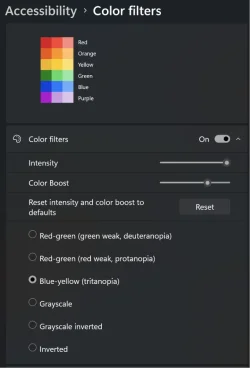
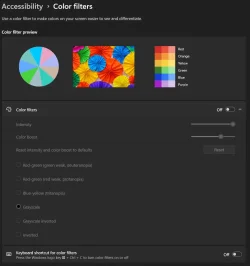
Just discovered this build in addition to the Beta builds has the new color filters.

Screenshot 2026-05-28 091539.webp
 

My Computers

System One System Two

  • OS
    Windows 11 25H2
    Computer type
    Laptop
    Manufacturer/Model
    Alienware 18 Area-51
    CPU
    Intel Core Ultra 9 275HX (24-Core)
    Motherboard
    Alienware
    Memory
    64GB DDR5 6400MT/s
    Graphics Card(s)
    NVIDIA GeForce RTX 5080 and Intel UHD Graphics
    Sound Card
    Onboard, Realtek high-performance Audio chips (ALC3329 & ALC1708))
    Monitor(s) Displays
    300HZ 18-inch QHD 500 nit Comfort View+
    Screen Resolution
    2560 x 1600
    Hard Drives
    2TB NVMe M.2 PCIe Gen 5 SSD
    Case
    Magnesium Alloy
    Cooling
    Advanced Cryo-Tech Quad-Fan Cooling system & large vapor chamber
    Keyboard
    Cherry MX ultra low profile mechanical keyboard with per key AlienFX RGB lighting
    Mouse
    Logitech MX Master 4
    Browser
    Vivaldi (main), Firefox, Chrome, Edge
    Antivirus
    MS Defender and Malwarebytes Free
  • Operating System
    Windows 11 25H2
    Computer type
    Laptop
    Manufacturer/Model
    Microsoft Surface Laptop 7
    CPU
    Qualcomm Snapdragon X Elite (12 Core) ARM based CPU
    Motherboard
    Microsoft Corp.
    Memory
    16GB LPDDR5
    Graphics card(s)
    Qualcomm Adreno X1-85
    Sound Card
    Omnisonic speakers with Dolby Atmos spatial sound
    Monitor(s) Displays
    120 Hz 13.8-inch 600 nit PixelSense Flow touchscreen
    Screen Resolution
    2304x1536
    Hard Drives
    1TB NVMe Gen 4 SSD
    Case
    Anodized Aluminum
    Cooling
    Traditional active cooling fan system
    Keyboard
    Mechanical QWERTY, backlit when in use
    Mouse
    Logitech MX Master 4 and Surface Arc Mouse
    Browser
    Vivaldi (main), Firefox, Chrome, Edge
    Antivirus
    MS Defender and Malwarebytes Free
Explorer crashed in 8124. Rolled back to 8457. Paused Windows Update.
 

My Computers

System One System Two

  • OS
    Windows 11 Education For 25H2
    Computer type
    Laptop
    Manufacturer/Model
    HP ZBook G2
    CPU
    Intel® Core i7 5500u
    Motherboard
    HP
    Memory
    8 GB
    Graphics Card(s)
    Intel HD Family Graphics 5500 AMD Firepro 4150M
    Sound Card
    Realtek High Audio
    Hard Drives
    1 TB SSD
    Mouse
    HP USB Mouse
    Antivirus
    Windows Defender
  • Operating System
    Windows 11 Pro For Workstations 25H2
    Computer type
    Laptop
    Manufacturer/Model
    HP Zbook G4
    CPU
    Xeon 1535m v6
    Motherboard
    HP
    Memory
    32 GB
    Graphics card(s)
    AMD Quadro Pro 4100
    Sound Card
    Bang and Olufson Audio
    Hard Drives
    1TB SSD
    Mouse
    HP USB Mouse
    Antivirus
    Windows Defender

My Computers

System One System Two

  • OS
    Windows 11 Pro x64
    Computer type
    PC/Desktop
    Manufacturer/Model
    📷🔈🎧 🪛 DIY Photoshop/Audio/Game/tinker
    CPU
    i9 14900K P/E 5.8/4.5 GHz, cache 5.0 GHz
    Motherboard
    Asus ROG Maximus Z790 Dark Hero
    Memory
    🐏 96GB (2x48) G.skill Ripjaws 6800 MT/s
    Graphics Card(s)
    Asus ROG Strix 4070 Ti OC
    Sound Card
    🔊Bowers & Wilkins 606 S3 speakers; Audiolabs 7000a integrated amp; RSL 10S Mk2 sub; Creative Pebble Pro Minimilist
    Monitor(s) Displays
    🖥️🖥️ Eizo CG2730 ColorEdge, ViewSonic VP2768
    Screen Resolution
    🖥️🖥️ 2560 x 1440p x 2
    Hard Drives
    💾 WDC SN850X 4TB nvme, SN850 1TB nvme, SK-Hynix 2 TB P41 nvme,. Sabrent USB-C DS-SC5B 5-bay docking station: 6TB WDC Black, 6TB Ironwolf Pro; 2x 2TB WDC Black HDD
    PSU
    ⚡️ 850W Seasonic Vertex PX-850 ATX 3.0/PCI-E 5.0
    Case
    Fractal Design North XL Mesh, Black Walnut
    Cooling
    ❄️ EK Nucleus black 360 AIO w/Phanteks T30-120 fans, 2 Noctua NF-A14 Chromax case fan, 1 T30-120 fan cooling memory
    Keyboard
    ⌨️ Keychron Q3 Max TKL with custom GMK Redsuns Red Samuri keycaps, TX Stabs
    Mouse
    🖱️ Logitech G305 wireless gaming
    Internet Speed
    ⬇️ 500 Mb/s ⬆️ 12 Mb/s
    Browser
    🔥🦊 Firefox
    Antivirus
    🦺 Defender, Macrium Reflect X 🏆
    Other Info
    Phangkey Amaterasu V2 Desk Mat
  • Computer type
    Laptop
    Manufacturer/Model
    💻 Apple 13" Macbook Pro 2020 (m1)
    CPU
    Apple M1
    Screen Resolution
    2560x1600
    Browser
    Firefox
Last edited:

My Computers

System One System Two

  • OS
    Windows 11 25H2
    Computer type
    Laptop
    Manufacturer/Model
    Alienware 18 Area-51
    CPU
    Intel Core Ultra 9 275HX (24-Core)
    Motherboard
    Alienware
    Memory
    64GB DDR5 6400MT/s
    Graphics Card(s)
    NVIDIA GeForce RTX 5080 and Intel UHD Graphics
    Sound Card
    Onboard, Realtek high-performance Audio chips (ALC3329 & ALC1708))
    Monitor(s) Displays
    300HZ 18-inch QHD 500 nit Comfort View+
    Screen Resolution
    2560 x 1600
    Hard Drives
    2TB NVMe M.2 PCIe Gen 5 SSD
    Case
    Magnesium Alloy
    Cooling
    Advanced Cryo-Tech Quad-Fan Cooling system & large vapor chamber
    Keyboard
    Cherry MX ultra low profile mechanical keyboard with per key AlienFX RGB lighting
    Mouse
    Logitech MX Master 4
    Browser
    Vivaldi (main), Firefox, Chrome, Edge
    Antivirus
    MS Defender and Malwarebytes Free
  • Operating System
    Windows 11 25H2
    Computer type
    Laptop
    Manufacturer/Model
    Microsoft Surface Laptop 7
    CPU
    Qualcomm Snapdragon X Elite (12 Core) ARM based CPU
    Motherboard
    Microsoft Corp.
    Memory
    16GB LPDDR5
    Graphics card(s)
    Qualcomm Adreno X1-85
    Sound Card
    Omnisonic speakers with Dolby Atmos spatial sound
    Monitor(s) Displays
    120 Hz 13.8-inch 600 nit PixelSense Flow touchscreen
    Screen Resolution
    2304x1536
    Hard Drives
    1TB NVMe Gen 4 SSD
    Case
    Anodized Aluminum
    Cooling
    Traditional active cooling fan system
    Keyboard
    Mechanical QWERTY, backlit when in use
    Mouse
    Logitech MX Master 4 and Surface Arc Mouse
    Browser
    Vivaldi (main), Firefox, Chrome, Edge
    Antivirus
    MS Defender and Malwarebytes Free
My two computers are new, so I'm on high alert for any problems.
So far all is fast, smooth and error free.
DISM and sfc ran clean.
 

My Computers

System One System Two

  • OS
    Windows 11 Pro
    Computer type
    Laptop
    Manufacturer/Model
    Dell XPS 16 DA16260
    CPU
    Intel Series 3 Core Ultra X9 388H
    Memory
    64GB LPDDR5x 9600 MT/s
    Graphics Card(s)
    Intel Arc graphics B390 Panther Lake
    Monitor(s) Displays
    16" 3.2K Tandem OLED Infinity Edge
    Screen Resolution
    3200 x 2000 16:10 236 PPI
    Hard Drives
    1 Terabyte M.2 PCIe NVMe SSD
    Case
    Black Anodized Aluminum
    Cooling
    Vapor Chamber Cooling
    Mouse
    None
    Internet Speed
    942 Mbps Netgear Mesh + 2 Satellites
    Browser
    Microsoft Edge (Chromium)
    Antivirus
    Windows Security (Defender)
    Other Info
    NPU delivering 67 TOPS
    Microsoft 365 subscription
    Microsoft OneDrive 1TB Cloud
    Microsoft Visual Studio
    Microsoft Visual Studio Code
    Microsoft Sysinternals Suite
    Microsoft BitLocker
    Microsoft Copilot
    Dell Support Assist
    Dell Command | Update
    Macrium Reflect X subscription
    1Password Password Manager
    Amazon Kindle for PC
    Lightroom/Photoshop subscription
    Interactive Brokers Trader Workstation
  • Operating System
    Windows 11 Pro
    Computer type
    Laptop
    Manufacturer/Model
    Microsoft Surface Laptop 7
    CPU
    Snapdragon® X Elite (12 Core) with Hexagon NPU delivering 45 TOPS
    Memory
    32GB LPDDR5x 8448 MT/s
    Graphics card(s)
    Integrated Adreno GPU
    Sound Card
    Omnisonic speakers with Dolby Atmos spatial sound
    Monitor(s) Displays
    13.8″ PixelSense Flow touchscreen 120 Hz 600 NIT
    Screen Resolution
    2304 × 1536 (201 PPI), 3:2 aspect ratio
    Hard Drives
    1 TB PCIe NVMe Gen 4 SSD
    Case
    Black Anodized Aluminum
    Cooling
    Vapor Chamber Cooling
    Mouse
    None
    Internet Speed
    942 Mbps Netgear Mesh + 2 Satellites
    Browser
    Microsoft Edge (Chromium)
    Antivirus
    Windows Security (Defender)
    Other Info
    Microsoft 365 subscription (Office)
    Microsoft OneDrive 1TB Cloud
    Microsoft Visual Studio 2026
    Microsoft Visual Studio Code
    Interactive Brokers Trader Workstation
    Lightroom/Photoshop subscription
    1Password Password Manager
    Microsoft Sysinternals
    Amazon Kindle for PC
    Microsoft BitLocker
    Microsoft Copilot
I've updated four computers so far, one had a DISM error that was repaired easily, the other three were clean. I've seen no oddball issues since the update.
 

My Computers

System One System Two

  • OS
    Win 11 Pro 25H2, Build 26200.8524
    Computer type
    PC/Desktop
    Manufacturer/Model
    Home Brew
    CPU
    Intel Core i5 14500
    Motherboard
    Gigabyte B760M G P WIFI
    Memory
    64GB DDR4
    Graphics Card(s)
    GeForce RTX 4060
    Sound Card
    Chipset Realtek
    Monitor(s) Displays
    LG 45" Ultragear, Acer 24" 1080p
    Screen Resolution
    5120x1440, 1920x1080
    Hard Drives
    Crucial P310 2TB 2280 PCIe Gen4 3D NAND NVMe M.2 SSD (O/S)
    Silicon Power 2TB US75 NVMe PCIe Gen4 M.2 2280 SSD (backup)
    Crucial BX500 2TB 3D NAND (2nd backup)
    Seagate 4TB Ironwolf, rotating HDD archive files
    External off-line backup Drives: 2 NVMe 4TB drives in external enclosures
    PSU
    Thermaltake Toughpower GF3 750W
    Case
    LIAN LI LANCOOL 216 E-ATX PC Case
    Cooling
    Lots of fans!
    Keyboard
    Microsoft Comfort Curve 2000
    Mouse
    Logitech G305
    Internet Speed
    Verizon FiOS 1GB
    Browser
    Firefox
    Antivirus
    Malware Bytes & Windows Defender Security
  • Operating System
    Win 11 Pro 25H2, Build 26200.8524
    Computer type
    PC/Desktop
    Manufacturer/Model
    Home Brew
    CPU
    Intel Core i5 14400
    Motherboard
    Gigabyte B760M DS3H AX
    Memory
    32GB DDR5
    Graphics card(s)
    Intel 700 Embedded GPU
    Sound Card
    Realtek Embedded
    Monitor(s) Displays
    27" HP 1080p
    Screen Resolution
    1920x1080
    Hard Drives
    Crucial P310 2TB 2280 PCIe Gen4 eD NAND PCIe SSD
    Samsung EVO 990 2TB NVMe Gen4 SSD
    Samsung 2TB SATA SSD
    PSU
    Thermaltake Smart BM3 650W
    Case
    Okinos Micro ATX Case
    Cooling
    Fans
    Keyboard
    Microsoft Comfort Curve 2000
    Mouse
    Logitech G305
    Internet Speed
    Verizon FiOS 1GB
    Browser
    Firefox
    Antivirus
    Malware Bytes & Windows Defender Security
All 3 of my machines upgraded however my primary laptop did have errors during the post installation scan.
 

My Computers

System One System Two

  • OS
    Windows 11 Pro
    Computer type
    PC/Desktop
    Manufacturer/Model
    Self Built
    CPU
    Intel Core i9 14900k, Intel UHD 770 integrated
    Motherboard
    Gigabyte Z790 Aorus Master X
    Memory
    32gb G.Skill Trident Z5 7200
    Graphics Card(s)
    Gigabyte RTX 4090 Gaming OC
    Sound Card
    EVGA Nu Audio, Razer Kraken V3 Pro, Realtek Onboard
    Monitor(s) Displays
    Dell U4025QW nano IPS monitor, Samsung Odyssey G75F, Wisecoco 12.6" IPS sensor panel
    Screen Resolution
    5120X2160 x 2 1920x515
    Hard Drives
    WD Black SN8100, Samsung 990 Pro x 3, WD BLACK SN850x, WD Black 8tb HD
    PSU
    FSP Hydro PTM Pro 1350w
    Case
    Thermaltake Level 20 XT
    Cooling
    ARCTIC Liquid Freezer III 420 ARGB in push/pull, Antec Prism X 120mm ARGB Fans x 15
    Keyboard
    Razer Blackwidow V4 Pro
    Mouse
    Razer Basilik V3 Pro on Razer Firefly V2 mouse pad.
    Internet Speed
    950 Mbps cable primary, 6Mbps secondary vdsl
    Browser
    Chrome primary, FF-Edge-IE secondary
    Antivirus
    Norton 360 Premium
    Other Info
    I sit on a Libernovo Omni chair.😍 Sound by Fosi Audio DA-2120C pushing Magnat Series 503 bookshelf speakers and a SVS SB-1000 Pro subwoofer.

  • Operating System
    Windows 11 Pro
    Computer type
    Laptop
    Manufacturer/Model
    2023 Acer Predator Helios 18
    CPU
    Intel 14900HX
    Motherboard
    factory
    Memory
    32gb ddr 5 5600
    Graphics card(s)
    Nvidia RTX 4090 mobile
    Sound Card
    onboard
    Monitor(s) Displays
    18" 250hz IPS
    Screen Resolution
    2560X1600
    Hard Drives
    Samsung 9100 Pro, 990 Pro
    PSU
    factory 330W
    Case
    factory
    Cooling
    factory
    Keyboard
    individual key argb
    Mouse
    touchpad
    Internet Speed
    WiFi 7, 2.5gb ethernet
    Browser
    Chrome primary, FF-IE and Edge secondary
    Antivirus
    Norton 360 Premium
    Other Info
    Acer will not allow WD Black SN8100 to function in m.2 slot 0 and Crucial T710 ssd's to function in either slot.
I've seen people report that they had less stability with the latest Geforce drivers but I reverted back to the previous one and the issue remained.

I've pretty much tried everything. Uninstalling/Reinstalling every driver for audio, Bluetooth, Wi-Fi, network card, printer, GPU etc. Updating firmware for motherboard, SSDs, mouse. Disabling Wi-Fi, onboard Audio and Ethernet. Disabling HPET, Hypervisor, Virtualiztion, Windows Defender, Game Mode, Xbox mode, even disabling the new boost feature with vivetool. DISM/SFC and a bunch of other troubleshooting/optimization tips and tricks.

The only thing that works is doing a system restore to the previous (KB5083631) update except I then can't establish a connection online. I'm going to do a clean install and hope the Windows ISO file on Microsoft's website doesn't have the latest update. Then I'll have to find a way to download (KB5083631) specifically and disable Windows Update.

Latencymon shows dxgkrnl.sys with the highest ISR and ntoskrnl.exe with the highest DPC which were never a problem previous to this update.
Think this might be related to your issues?


My Computers

System One System Two

  • OS
    Windows 11 25H2
    Computer type
    Laptop
    Manufacturer/Model
    Alienware 18 Area-51
    CPU
    Intel Core Ultra 9 275HX (24-Core)
    Motherboard
    Alienware
    Memory
    64GB DDR5 6400MT/s
    Graphics Card(s)
    NVIDIA GeForce RTX 5080 and Intel UHD Graphics
    Sound Card
    Onboard, Realtek high-performance Audio chips (ALC3329 & ALC1708))
    Monitor(s) Displays
    300HZ 18-inch QHD 500 nit Comfort View+
    Screen Resolution
    2560 x 1600
    Hard Drives
    2TB NVMe M.2 PCIe Gen 5 SSD
    Case
    Magnesium Alloy
    Cooling
    Advanced Cryo-Tech Quad-Fan Cooling system & large vapor chamber
    Keyboard
    Cherry MX ultra low profile mechanical keyboard with per key AlienFX RGB lighting
    Mouse
    Logitech MX Master 4
    Browser
    Vivaldi (main), Firefox, Chrome, Edge
    Antivirus
    MS Defender and Malwarebytes Free
  • Operating System
    Windows 11 25H2
    Computer type
    Laptop
    Manufacturer/Model
    Microsoft Surface Laptop 7
    CPU
    Qualcomm Snapdragon X Elite (12 Core) ARM based CPU
    Motherboard
    Microsoft Corp.
    Memory
    16GB LPDDR5
    Graphics card(s)
    Qualcomm Adreno X1-85
    Sound Card
    Omnisonic speakers with Dolby Atmos spatial sound
    Monitor(s) Displays
    120 Hz 13.8-inch 600 nit PixelSense Flow touchscreen
    Screen Resolution
    2304x1536
    Hard Drives
    1TB NVMe Gen 4 SSD
    Case
    Anodized Aluminum
    Cooling
    Traditional active cooling fan system
    Keyboard
    Mechanical QWERTY, backlit when in use
    Mouse
    Logitech MX Master 4 and Surface Arc Mouse
    Browser
    Vivaldi (main), Firefox, Chrome, Edge
    Antivirus
    MS Defender and Malwarebytes Free
Then I'll have to find a way to download (KB5083631) specifically and disable Windows Update.

Ever use UUPdump?


Also,


My Computers

System One System Two

  • OS
    Win 11 Pro 25H2 26200.8524
    Computer type
    PC/Desktop
    Manufacturer/Model
    Self Built
    CPU
    Intel® Core™ i7-14700K
    Motherboard
    ASUS TUF Z690-PLUS WIFI BIOS 4505 11/29/25
    Memory
    G.SKILL Ripjaws S5 Series 64GB (2 x 32GB) DDR5
    Graphics Card(s)
    ASUS GeForce RTX 4070 Super 12GB
    Sound Card
    Sound Blaster AE-5 Plus
    Monitor(s) Displays
    ASUS TUF Gaming 27" 2K HDR Gaming
    Screen Resolution
    2560 x 1440
    Hard Drives
    Samsung 990 Pro 1TB NVMe (Win 11 25H2)
    SK hynix P41 500GB NVMe 25H2 DEV/Games
    SK hynix P41 2TB NVMe (x3)
    Crucial P3 Plus 4TB
    PSU
    Corsair RM850x Shift
    Case
    Antec Dark Phantom DP502 FLUX
    Cooling
    Corsair Nautilus 360 RS AIO
    Keyboard
    Logitech MK 320
    Mouse
    Razer Basilisk V3
    Internet Speed
    350Mbs
    Browser
    Firefox
    Antivirus
    Winows Security
    Other Info
    MR 8.1 Home

    System 3 Specs
    Win 11 Pro 25H2 26200.8524
    ASUS PRIME Z370-P II BIOS 3004 7/12/21
    Intel Core i7-8700 CPU @ 3.20GHz
    32GB DDR4 RAM (4x8)
    iGPU Intel UHD Graphics 630
  • Operating System
    Win 11 Pro 25H2 26200.8524
    Computer type
    PC/Desktop
    Manufacturer/Model
    Self Built
    CPU
    Intel Core i7-11700F
    Motherboard
    Asus TUF Gaming Z590 Plus WiFi (BIOS 2803)
    Memory
    64 GB DDR4
    Graphics card(s)
    MSI GeForce RTX 3060 Ventus 2X 12GB
    Sound Card
    SoundBlaster Audigy Fx V2
    Monitor(s) Displays
    Samsung F27T350
    Screen Resolution
    1920x1080
    Hard Drives
    Samsung 980 Pro 1TB
    Samsung 970 EVO Plus 2TB
    Samsung 870 EVO 500GB SSD
    PSU
    Corsair HX750
    Case
    Cougar MX330-G Window
    Cooling
    Thermalright Frozen Edge 240 Black AIO
    Internet Speed
    350Mbps
    Browser
    Firefox
    Antivirus
    Windows Security
Yeah I was about to say that it also didn't do anything here 😂. Ryzen 5 5600 machine. I guess we'll have to wait anyway.
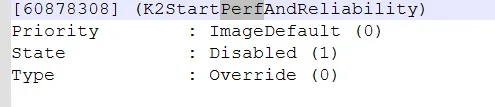
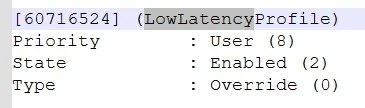
Currently running a mach2/vivetool gui scan just in case.
Quoting myself here...

I found this one, might be worth checking/trying out?
1780003101993.webp

The regular ones are enabled but behavior seems the same.
1780003130724.webp
1780003137773.webp
1780003198100.webp
(Mach2 always returns the first one if I query the id, but a general query returns all of those above??)
 

My Computer

System One

  • OS
    Windows 11 RP 26200
    Computer type
    PC/Desktop
    Manufacturer/Model
    N/A
    CPU
    AMD Ryzen 5 5600
    Motherboard
    ASUS B450M-GAMING/BR
    Memory
    2x16GB DDR4-3200 CL16
    Graphics Card(s)
    MSI RTX 3060 12GB
    Sound Card
    Realtek HDA
    Monitor(s) Displays
    AW2724DM, LG 24MK400
    Screen Resolution
    2560x1440 + 1920x1080
    Hard Drives
    2x Kingston A400 960GB
    SanDisk SSDNow 480GB
    Western Digital SN750 500GB
    PSU
    Corsair CX750M
    Case
    Corsair 4000D
    Cooling
    2x 120mm
    Keyboard
    Sharkoon PureWriter TKL
    Mouse
    Logitech G305
    Internet Speed
    500/500 (FTTH)
    Browser
    Vivaldi
    Antivirus
    Windows Defender
I've updated four computers so far, one had a DISM error that was repaired easily, the other three were clean. I've seen no oddball issues since the update.
I was saying the same thing regarding my desktop pc. That everything was fine! After receiving this update yesterday, I ran sfc scannow, dism scan and check health and dism start component clean up.. All were clean and worked fine!
I also have a dell alienware ac16250 laptop to which I noticed for the first time this error regarding dism restore health described above (repair file couldn't be found)..
Today I decided to run dism scan and check health just out of curiosity to my desktop pc again. The first time there was the message in dism check health that the component store is repairable. I ran dism restore health and worked fine. Then I restarted the pc, ran again dism check and scan health and there was again the same message for the component store.. So I ran dism restore health, but this time I received the same error buggy message like the once appeared to my dell laptop.
So. Yes it's a bug. And the only thing is to wait for the next windows updates to fix it.
Never ever had problems regarding my dism restore health in the last 2,5 years. So it's clearly not my fault. It's a bug that as I can see many people face it right now..
We have to wait for a fix, via next windows updates.
 

My Computer

System One

  • OS
    win 11 pro 25 h2
    Computer type
    PC/Desktop
Quoting myself here...

I found this one, might be worth checking/trying out?
View attachment 172773
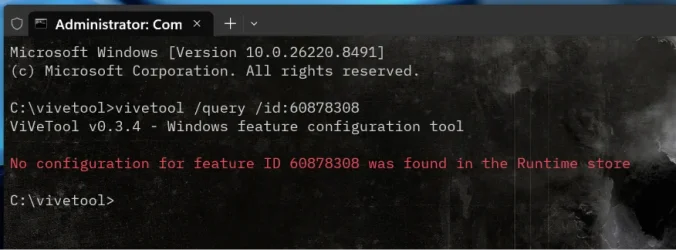
What is that one? I can't find any info on it. Have you tried it?

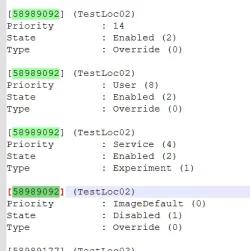
ViVeTool feature ID 60878308 has no documented feature mapping in any publicly indexed Feature Store, Insider leak, or community-maintained FID list as of the latest available sources. None of the major, regularly updated FID databases list it, and no search result returns a feature name, bundle, or component associated with this ID.

Screenshot 2026-05-28 143512.webp
 

My Computers

System One System Two

  • OS
    Windows 11 25H2
    Computer type
    Laptop
    Manufacturer/Model
    Alienware 18 Area-51
    CPU
    Intel Core Ultra 9 275HX (24-Core)
    Motherboard
    Alienware
    Memory
    64GB DDR5 6400MT/s
    Graphics Card(s)
    NVIDIA GeForce RTX 5080 and Intel UHD Graphics
    Sound Card
    Onboard, Realtek high-performance Audio chips (ALC3329 & ALC1708))
    Monitor(s) Displays
    300HZ 18-inch QHD 500 nit Comfort View+
    Screen Resolution
    2560 x 1600
    Hard Drives
    2TB NVMe M.2 PCIe Gen 5 SSD
    Case
    Magnesium Alloy
    Cooling
    Advanced Cryo-Tech Quad-Fan Cooling system & large vapor chamber
    Keyboard
    Cherry MX ultra low profile mechanical keyboard with per key AlienFX RGB lighting
    Mouse
    Logitech MX Master 4
    Browser
    Vivaldi (main), Firefox, Chrome, Edge
    Antivirus
    MS Defender and Malwarebytes Free
  • Operating System
    Windows 11 25H2
    Computer type
    Laptop
    Manufacturer/Model
    Microsoft Surface Laptop 7
    CPU
    Qualcomm Snapdragon X Elite (12 Core) ARM based CPU
    Motherboard
    Microsoft Corp.
    Memory
    16GB LPDDR5
    Graphics card(s)
    Qualcomm Adreno X1-85
    Sound Card
    Omnisonic speakers with Dolby Atmos spatial sound
    Monitor(s) Displays
    120 Hz 13.8-inch 600 nit PixelSense Flow touchscreen
    Screen Resolution
    2304x1536
    Hard Drives
    1TB NVMe Gen 4 SSD
    Case
    Anodized Aluminum
    Cooling
    Traditional active cooling fan system
    Keyboard
    Mechanical QWERTY, backlit when in use
    Mouse
    Logitech MX Master 4 and Surface Arc Mouse
    Browser
    Vivaldi (main), Firefox, Chrome, Edge
    Antivirus
    MS Defender and Malwarebytes Free
What is that one? I can't find any info on it. Have you tried it?

ViVeTool feature ID 60878308 has no documented feature mapping in any publicly indexed Feature Store, Insider leak, or community-maintained FID list as of the latest available sources. None of the major, regularly updated FID databases list it, and no search result returns a feature name, bundle, or component associated with this ID.

View attachment 172780

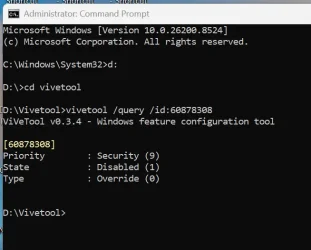
You are showing build 26220.8941 which is the Beta.
That id is disabled by MS with Priority : Security (9) on my machines, with Public build and R.P. 26200.8524. 🤷‍♂️

1780004781047.webp

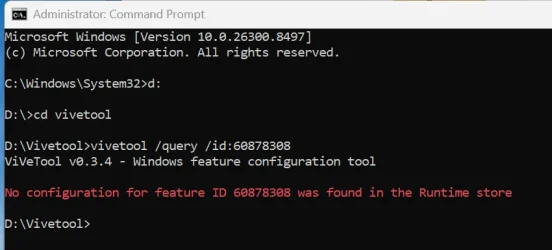
I don't have a Beta currently running, but that id is not present on 26300.8497 either. 😵‍💫🤷‍♂️

1780005216389.webp
 

My Computer

System One

  • OS
    Windows 11 Pro 25H2
    Computer type
    PC/Desktop
    Manufacturer/Model
    Dell XPS 8930
    CPU
    Intel I9-9900K
    Memory
    64GB
    Graphics Card(s)
    NVIDIA RTX 2060
    Sound Card
    NVIDIA High Definition Audio
    Monitor(s) Displays
    4k Samsung
    Screen Resolution
    3840 x 2160
    Hard Drives
    512GB NVMe, ADATA SU 800, 2TB HDD
You are showing build 26220.8941 which is the Beta.
That id is disabled by MS with Priority : Security (9) on my machines, with Public build and R.P. 26200.8524. 🤷‍♂️

View attachment 172782
Oop's your right I'm on the wrong PC, let me check the RP build.
 

My Computers

System One System Two

  • OS
    Windows 11 25H2
    Computer type
    Laptop
    Manufacturer/Model
    Alienware 18 Area-51
    CPU
    Intel Core Ultra 9 275HX (24-Core)
    Motherboard
    Alienware
    Memory
    64GB DDR5 6400MT/s
    Graphics Card(s)
    NVIDIA GeForce RTX 5080 and Intel UHD Graphics
    Sound Card
    Onboard, Realtek high-performance Audio chips (ALC3329 & ALC1708))
    Monitor(s) Displays
    300HZ 18-inch QHD 500 nit Comfort View+
    Screen Resolution
    2560 x 1600
    Hard Drives
    2TB NVMe M.2 PCIe Gen 5 SSD
    Case
    Magnesium Alloy
    Cooling
    Advanced Cryo-Tech Quad-Fan Cooling system & large vapor chamber
    Keyboard
    Cherry MX ultra low profile mechanical keyboard with per key AlienFX RGB lighting
    Mouse
    Logitech MX Master 4
    Browser
    Vivaldi (main), Firefox, Chrome, Edge
    Antivirus
    MS Defender and Malwarebytes Free
  • Operating System
    Windows 11 25H2
    Computer type
    Laptop
    Manufacturer/Model
    Microsoft Surface Laptop 7
    CPU
    Qualcomm Snapdragon X Elite (12 Core) ARM based CPU
    Motherboard
    Microsoft Corp.
    Memory
    16GB LPDDR5
    Graphics card(s)
    Qualcomm Adreno X1-85
    Sound Card
    Omnisonic speakers with Dolby Atmos spatial sound
    Monitor(s) Displays
    120 Hz 13.8-inch 600 nit PixelSense Flow touchscreen
    Screen Resolution
    2304x1536
    Hard Drives
    1TB NVMe Gen 4 SSD
    Case
    Anodized Aluminum
    Cooling
    Traditional active cooling fan system
    Keyboard
    Mechanical QWERTY, backlit when in use
    Mouse
    Logitech MX Master 4 and Surface Arc Mouse
    Browser
    Vivaldi (main), Firefox, Chrome, Edge
    Antivirus
    MS Defender and Malwarebytes Free
What is that one? I can't find any info on it. Have you tried it?

ViVeTool feature ID 60878308 has no documented feature mapping in any publicly indexed Feature Store, Insider leak, or community-maintained FID list as of the latest available sources. None of the major, regularly updated FID databases list it, and no search result returns a feature name, bundle, or component associated with this ID.

-snip-
I haven't tried it yet. I looked for it by using ViveToolGUI (which ran mach2 on all symbols it downloaded).
PS: If you do try it out, there's an issue with a file that goes into C:\Symbols\Microsoft.ui.xaml.pdb\16232D22E812911F17AC5497546227D81
So you may have to remove it, otherwise mach2 will give out a System Error.
EDIT: Here's a pastebin with the custom FeatureDictionary.pfs I made, backup the original first.
 

My Computer

System One

  • OS
    Windows 11 RP 26200
    Computer type
    PC/Desktop
    Manufacturer/Model
    N/A
    CPU
    AMD Ryzen 5 5600
    Motherboard
    ASUS B450M-GAMING/BR
    Memory
    2x16GB DDR4-3200 CL16
    Graphics Card(s)
    MSI RTX 3060 12GB
    Sound Card
    Realtek HDA
    Monitor(s) Displays
    AW2724DM, LG 24MK400
    Screen Resolution
    2560x1440 + 1920x1080
    Hard Drives
    2x Kingston A400 960GB
    SanDisk SSDNow 480GB
    Western Digital SN750 500GB
    PSU
    Corsair CX750M
    Case
    Corsair 4000D
    Cooling
    2x 120mm
    Keyboard
    Sharkoon PureWriter TKL
    Mouse
    Logitech G305
    Internet Speed
    500/500 (FTTH)
    Browser
    Vivaldi
    Antivirus
    Windows Defender
Back
Top Bottom