Insider KB5101682 Windows 11 Insider Experimental (26H2) build 26300.9032 - July 31


 Windows Insider Blog:

Changes and improvements gradually being rolled out

[Certificate renewal for Windows Insiders]​

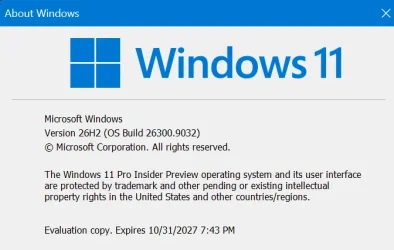
  • This build includes the renewed Windows Insider flight certificate. Windows Insider Preview builds use flight certificates that are renewed periodically to help ensure Insider devices remain on supported builds and continue receiving future Insider Preview updates. The current flight certificate expires on August 11, 2026, so please update your device to this build or a later one containing the renewed flight certificate before that date.
  • For more information, see aka.ms/WIPCertExpiry.

[Search]​

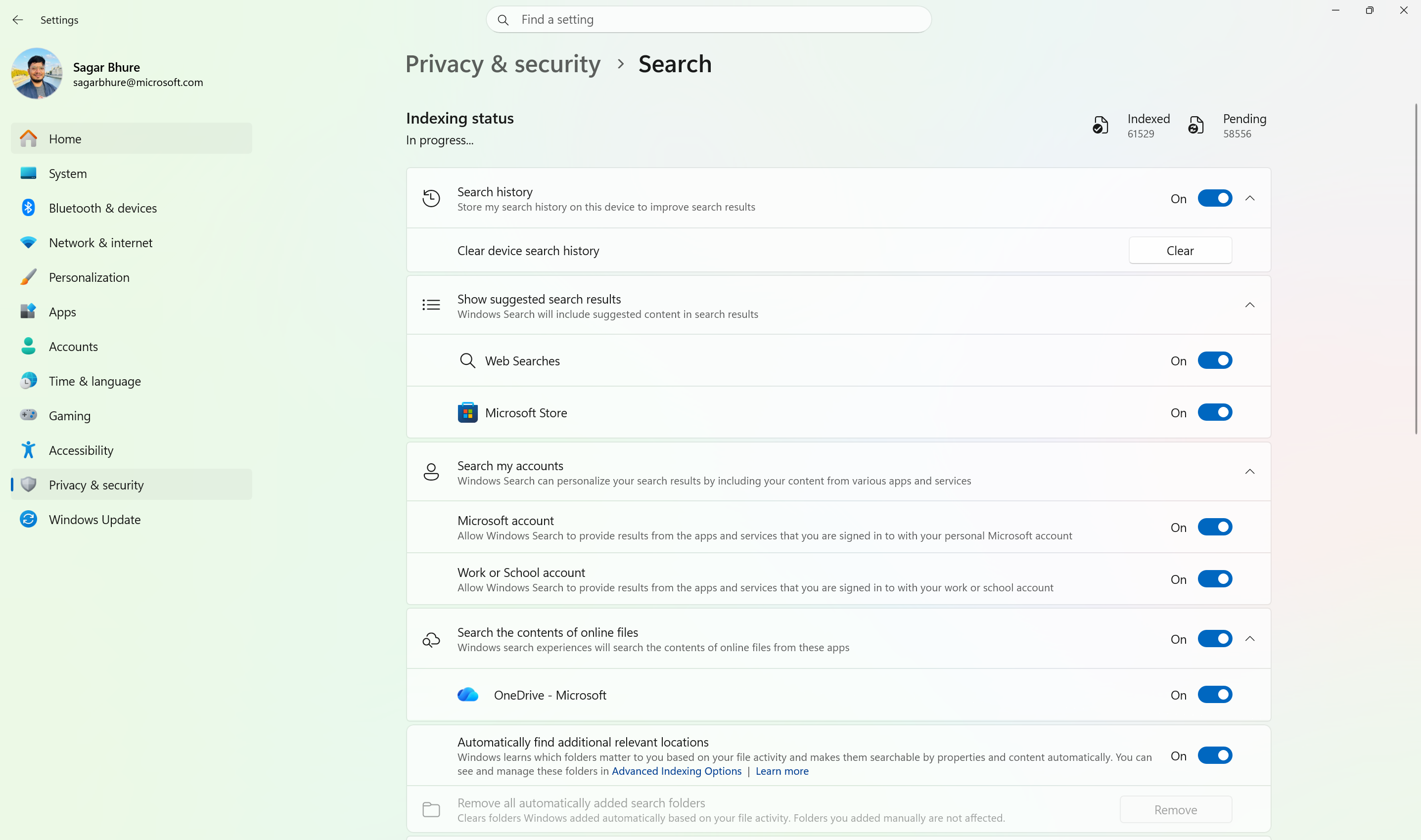
  • Windows Search can now automatically expand its indexing scope based on your activity, using signals like recent files and frequently accessed locations. This helps ensure that relevant files across your device are discoverable without requiring manual indexing configuration.
  • To manage this feature, go to Settings > Privacy & security > Search.


    Screenshot that shows how to automatically expand search to include relevant files based on your activity.
    Automatically expand search to include relevant files based on your activity.

[Phone Link]​

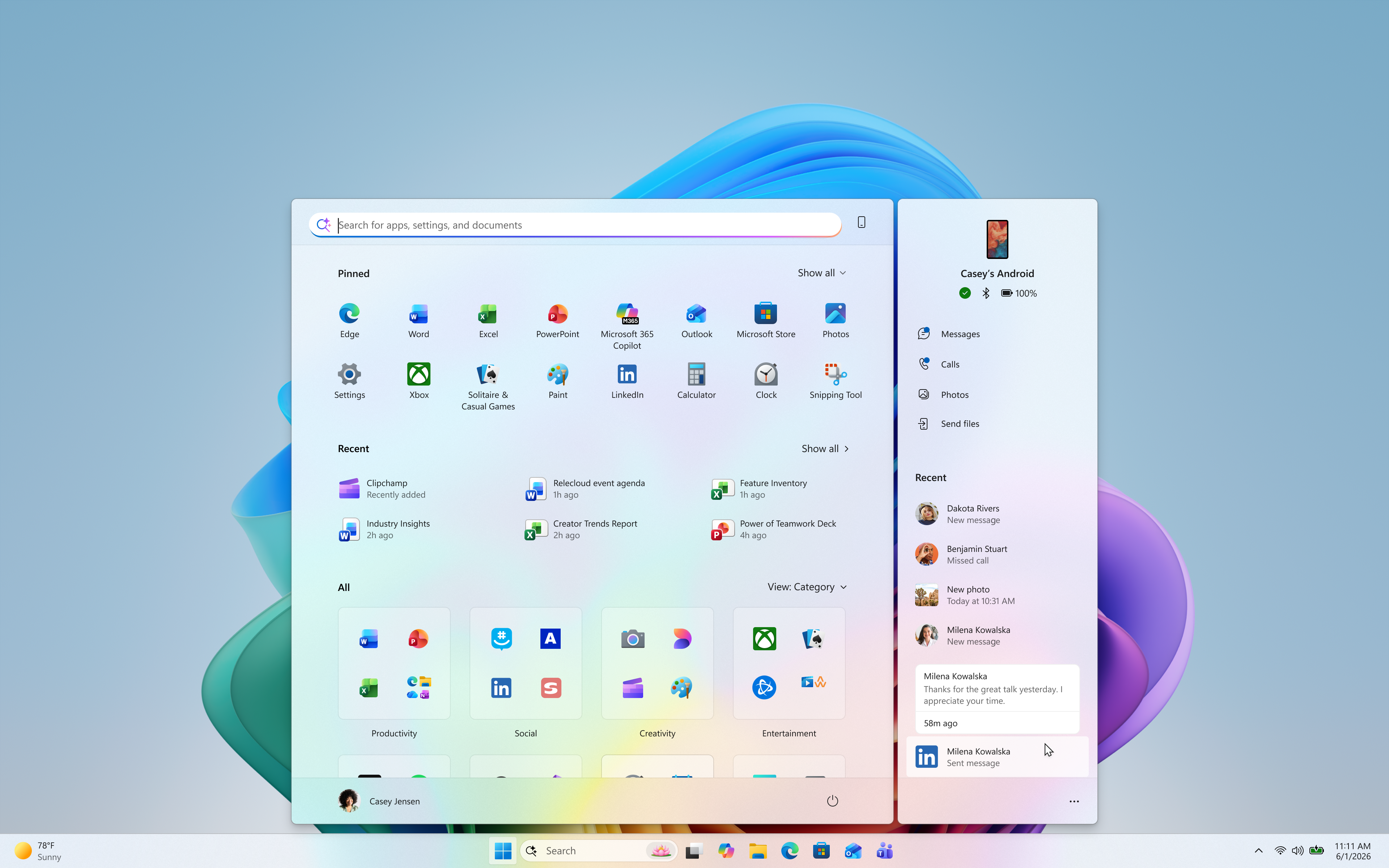
  • The phone companion experience in Start already helps you keep up with activity from your mobile device. With today's update, you can see even more at a glance.
  • Get more from your latest activities: Hover over a recent message or notification in the Recent section to preview its content directly in Start. There's no need to pick up your phone or open the item to see what's new.
  • Whether you're checking a message or deciding if a notification needs attention, these updates make it easier to stay informed and keep your focus.


    Screenshot that shows how to preview messages and notifications from your phone directly in Start by hovering over recent activity.
    Preview messages and notifications from your phone directly in Start by hovering over recent activity.
  • This experience is gradually rolling out to Insiders on the Experimental channel with a minimum Phone Link build of 1.26021.3.0. Go to Phone Link > Settings > Start menu personalization.

[Settings]​

  • We've improved search in the Settings app to help you discover and navigate to settings more quickly. Search now surfaces results from more areas within Settings, with improved ranking to help relevant settings appear higher in results.

[Adaptive hibernate policy]​

  • Updates to the adaptive hibernate policy increase instances of instant-on resumes from Modern Standby and increase battery preservation at the low end of the battery. Noticeable changes include less hibernation while the battery is above 80% and hibernating sooner when the battery is below 10%.

[Start menu]​

  • Fixed an issue causing the Start menu to crash for some Insiders recently when dragging apps.

[Taskbar]​

  • Fixed a recent issue where, when the taskbar was in an overflow state, hovering over the preview thumbnail for an app window in the overflow area would immediately dismiss it.

[File Explorer]​

  • File Explorer Home now preserves the state of sections (expanded or collapsed), so you can pick up where you left off.
  • We've addressed an issue that caused the address bar contents to be cleared when entering edit mode by clicking near the right end of the bar.
  • We've improved the reliability of File Explorer when dragging files to a disconnected network drive.
  • This update addresses an issue where files stored on a DFS mapped drive could be incorrectly treated as originating from the internet after the device started while disconnected from the network and later reconnected. This could cause File Explorer's Preview pane to display the message, "The file you are attempting to preview could harm your computer," or cause files copied from the DFS drive to receive an unexpected Mark of the Web.

[Windows Spotlight]​

  • Made some underlying changes to help improve reliability for Windows Spotlight on the lock screen.

[Storage]​

  • This update fixes an issue that affects File History automatic backups to network shares using Server Message Block (SMB). Backups didn't work because Windows showed a false "invalid credentials" error when connecting to SMB shares.

Reminders for Windows Insiders in the Experimental channel

  • Updates are based on Windows 11, version 26H2 via an enablement package (Build 26300.9032).
  • Many features are rolled out using Controlled Feature Rollout technology, starting with a subset of Insiders and ramping up over time. We monitor feedback to see how they land before pushing them out to everyone in this channel.
  • For Windows Insiders who want to be the first to try new features, see the available list of features to toggle on at the Feature flags page under Settings > Windows Update > Windows Insider Program.
  • The desktop watermark shown at the lower right corner of the desktop is normal for Windows Insider pre-release builds.
  • Features and experiences included in these builds might never get released as we try out different concepts and get feedback. Features might change over time, be removed, or replaced and never get released beyond Windows Insiders. Some of these features and experiences could show up in future Windows releases when they're ready.
  • Some features in active development we preview with Windows Insiders might not be fully localized, and localization will happen over time as features are finalized. As you see issues with localization in your language, please report those issues to us via Feedback Hub.
  • Check out Flight Hub for a complete look at what build is in which Insider channel.


 Source:


Check Windows Updates


UUP Dump:

64-bit ISO download:

ARM64 ISO download:

 
Last edited:
Not even 20 mins , installed first time , few extra beers all good ;-)
 

My Computers My Computers

  • At a glance

    11 Pro5950XCORSAIR Vengeance RGB RT 32GB (4x16GB) DDR4 3...Zotac AMP Extreme Airo 4090/ Lian Li Vertical...
    OS
    11 Pro
    Computer type
    PC/Desktop
    Manufacturer/Model
    Me
    CPU
    5950X
    Motherboard
    ASUS DARK HERO X570
    Memory
    CORSAIR Vengeance RGB RT 32GB (4x16GB) DDR4 3733CL14x16GB
    Graphics Card(s)
    Zotac AMP Extreme Airo 4090/ Lian Li Vertical GPU PCI-E 5.0 v4
    Monitor(s) Displays
    TCL 55"646 Class 6-Series 4K QLED Dolby Vision HDR
    Screen Resolution
    4K
    Hard Drives
    SAMSUNG 980 PRO SSD 1TB/500GB M.2 and 2TB M.2
    PSU
    Seasonic Prime TX-1600 ATX3.1
    Case
    Fractal Meshify 2 XL /3-140X38 Silverstone/3 140x38 BGear
    Cooling
    The Arctic Liquid Freezer III 420 Push/pull x6 Noctua 14 3000rpm
    Mouse
    G502 HERO
    Internet Speed
    Mbps 350.00
    Other Info
    Two CyberPower CP1500PFCLCD PFC Sinewave UPS Battery Backup and Surge Protector, 1500VA/1000W
  • At a glance

    Win 11 pro2700XTRIDENT Z F-43600V15D-16GTZ /G.SKILL DDR4 380...1080Ti
    Operating System
    Win 11 pro
    Computer type
    PC/Desktop
    Manufacturer/Model
    Me
    CPU
    2700X
    Motherboard
    ASUS Prime 450M
    Memory
    TRIDENT Z F-43600V15D-16GTZ /G.SKILL DDR4 3800CL14 FASTEST PRESET 16GB /G-skill16Gb cl16/3600
    Graphics card(s)
    1080Ti
    Monitor(s) Displays
    50'
    Screen Resolution
    4K HDR
    Hard Drives
    M.2 500GB SABRENT / 3TB and 250GB SSD
    PSU
    FSP Hydro PTM PRO 1200W ATX 3.0 PCI-E GEN-5 80 Plus Platinum=EVGA 1300G2 /Corsairs 750w
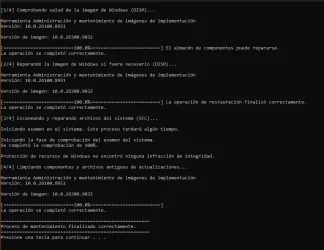
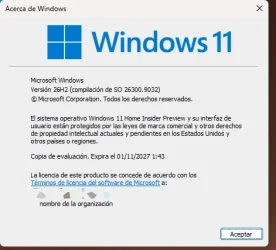
no problems with system installation.
 

Attachments

  • cleanerpostwu.webp
    cleanerpostwu.webp
    73.2 KB · Views: 1
  • versionwin.webp
    versionwin.webp
    25.9 KB · Views: 1

My Computer My Computer

At a glance

windows 10
OS
windows 10
Any word on when the actual 26H2 is scheduled to be released?
 

My Computers My Computers

  • At a glance

    Windows 11 ProIntel Core i9 14900k, Intel UHD 770 integrated32gb G.Skill Trident Z5 7200Gigabyte RTX 4090 Gaming OC
    OS
    Windows 11 Pro
    Computer type
    PC/Desktop
    Manufacturer/Model
    Self Built
    CPU
    Intel Core i9 14900k, Intel UHD 770 integrated
    Motherboard
    Gigabyte Z790 Aorus Master X
    Memory
    32gb G.Skill Trident Z5 7200
    Graphics Card(s)
    Gigabyte RTX 4090 Gaming OC
    Sound Card
    EVGA Nu Audio, Razer Kraken V3 Pro, Realtek Onboard
    Monitor(s) Displays
    Dell U4025QW nano IPS monitor, Samsung Odyssey G75F, Wisecoco 12.6" IPS sensor panel
    Screen Resolution
    5120X2160 x 2 1920x515
    Hard Drives
    WD Black SN8100, Samsung 990 Pro x 3, WD BLACK SN850x, WD Black 8tb HD
    PSU
    FSP Hydro PTM Pro 1350w
    Case
    Thermaltake Level 20 XT
    Cooling
    ARCTIC Liquid Freezer III 420 ARGB in push/pull, Antec Prism X 120mm ARGB Fans x 15
    Keyboard
    Razer Blackwidow V4 Pro
    Mouse
    Razer Basilik V3 Pro on Razer Firefly V2 mouse pad.
    Internet Speed
    950 Mbps cable primary, 6Mbps secondary vdsl
    Browser
    Chrome primary, FF-Edge-IE secondary
    Antivirus
    Norton 360 Premium
    Other Info
    I sit on a Libernovo Omni chair.😍 Sound by Fosi Audio DA-2120C pushing Magnat Series 503 bookshelf speakers and a SVS SB-1000 Pro subwoofer.
  • At a glance

    Windows 11 ProIntel 14900HX32gb ddr 5 5600Nvidia RTX 4090 mobile
    Operating System
    Windows 11 Pro
    Computer type
    Laptop
    Manufacturer/Model
    2023 Acer Predator Helios 18
    CPU
    Intel 14900HX
    Motherboard
    factory
    Memory
    32gb ddr 5 5600
    Graphics card(s)
    Nvidia RTX 4090 mobile
    Sound Card
    onboard
    Monitor(s) Displays
    18" 250hz IPS
    Screen Resolution
    2560X1600
    Hard Drives
    Samsung 9100 Pro, 990 Pro
    PSU
    factory 330W
    Case
    factory
    Cooling
    factory
    Keyboard
    individual key argb
    Mouse
    touchpad
    Internet Speed
    WiFi 7, 2.5gb ethernet
    Browser
    Chrome primary, FF-IE and Edge secondary
    Antivirus
    Norton 360 Premium
    Other Info
    Acer will not allow WD Black SN8100 to function in m.2 slot 0 and Crucial T710 ssd's to function in either slot.

My Computer My Computer

At a glance

Windows 11 Pro 26H2AMD Ryzen 9 9950X3D 16-Core Processor64GB Corsair DDR5 RAM @ 6000 MT/sASUS TUF Gaming GeForce RTX 4090 OC Edition 2...
OS
Windows 11 Pro 26H2
Computer type
PC/Desktop
Manufacturer/Model
Skytech / Central Computers
CPU
AMD Ryzen 9 9950X3D 16-Core Processor
Motherboard
Gigabyte X870E AORUS PRO ICE
Memory
64GB Corsair DDR5 RAM @ 6000 MT/s
Graphics Card(s)
ASUS TUF Gaming GeForce RTX 4090 OC Edition 24GB GDDR6X
Sound Card
Sound Blaster Audigy Fx V2
Monitor(s) Displays
Sony SDMU27M90 (DP HDR), Acer KA272, ASUS VG328QA1A
Screen Resolution
3840x2160 HDR
Hard Drives
Samsung SSD 990 PRO 4TB, Samsung SSD 860 EVO 1TB, Seagate ST8000DM004-2CX88 8TB
Case
Fractal Meshify 2
Cooling
Arctic Freezer III 360mm
installed on unsupported machine
 

My Computer My Computer

At a glance

WINDOWS 11 WINDOWS 10Intel(R) Core(TM) i7 -3770K CPU 3.50 GZ 3501 ...32.0 GB (31.9 GB usable)AMD RADEON TM R5240 INTELL HD GRAPHICS 4600 T...
OS
WINDOWS 11 WINDOWS 10
Computer type
PC/Desktop
Manufacturer/Model
HP H8 1360T
CPU
Intel(R) Core(TM) i7 -3770K CPU 3.50 GZ 3501 4 CORE
Motherboard
PEGATRON 2AD5
Memory
32.0 GB (31.9 GB usable)
Graphics Card(s)
AMD RADEON TM R5240 INTELL HD GRAPHICS 4600 TIGER 1+1 USB
Sound Card
AMD HD . IDT
Monitor(s) Displays
AOC WAL MART SPECIAL . HP 2311 IX IPS LED DELL 1708 FP
Screen Resolution
1920 X 1080 1600X900 1280X940
Hard Drives
1 FAXING S 100 512GB 1 KINGSTON 120 GB SSD 1 X12 SSD 512 GB
PSU
300 WATT HP
Case
FULL
Cooling
ON BOARD FAN
Keyboard
LOGITEC K 520 WIRELESS
Mouse
LOGITEC M 510 WIRELESS
Internet Speed
55 UP 11.2 DOWN
Browser
CHROME EDGE
Antivirus
WINDOWS SECUIRTY
Other Info
NON SUPPORTED HARDWARE FOR WINDOWS 11
Upgraded on my VM install, it did a full in-place upgrade with windows.old folder created
 

My Computer My Computer

At a glance

Windows 11 Pro 25H2 (RP channel)AMD Ryzen 7 9800X3D 8-core64GB Corsair Titanium 6000/CL30MSI Suprim 5080 SOC
OS
Windows 11 Pro 25H2 (RP channel)
Computer type
PC/Desktop
Manufacturer/Model
MSI
CPU
AMD Ryzen 7 9800X3D 8-core
Motherboard
MEG X870E Godlike
Memory
64GB Corsair Titanium 6000/CL30
Graphics Card(s)
MSI Suprim 5080 SOC
Sound Card
Soundblaster AE-9
Monitor(s) Displays
ASUS TUF Gaming VG289Q
Screen Resolution
3840x2160
Hard Drives
Samsung 9100 Pro 4TB (gen 5 x4, system drive/games)
Samsung 990 Pro 2TB
Samsung 980 Pro 2TB
Samsung 870 Evo 4TB
Samsung 870 Evo 2TB
Samsung T9 4TB
PSU
Seasonic PX-2200
Case
Bequiet! Dark Base Pro 901
Cooling
Noctua NH-D15S Chromax black
Keyboard
Logitech G915 X (wired)
Mouse
Logitech G903 with PowerPlay charger
Internet Speed
900Mb/sec
Browser
Microsoft Edge
Antivirus
Windows Defender
Upgraded on my VM install, it did a full in-place upgrade with windows.old folder created
Did the same - then created a Physical Windows2Go from the VM - easy enough !!! Windows update and drivers from previous Windows install saved to a file were installable after initial create !!!

(Windows.old was created on initial install of the VM -- used the disk clean utility in Windows tools to delete)

If you do create a WindowstoGo system you can "poodlefake" windows into thinking it's a fixed disk by changing the portableoperating system reg key !!!

it's to be found at Computer\HKEY_LOCAL_MACHINE\SYSTEM\CurrentControlSet\Control

My nice WindowstoGo 26H2 !!! and I can clone it to internal disk as well . These WindowstoGo things are great for different languages / apps etc - activation always retained since it's on the same hardware.

Screenshot 2026-07-31 112315.webp


Cheers
jimbo
 

Attachments

  • Screenshot 2026-08-01 003434.webp
    Screenshot 2026-08-01 003434.webp
    66 KB · Views: 1

My Computer My Computer

At a glance

Windows XP,11 Linux Fedora Rawhide pre-releas...2 X Intel i7
OS
Windows XP,11 Linux Fedora Rawhide pre-release 45
Computer type
PC/Desktop
CPU
2 X Intel i7
Screen Resolution
4KUHD X 2
Did the same - then created a Physical Windows2Go from the VM - easy enough !!! Windows update and drivers from previous Windows install saved to a file were installable after initial create !!!

(Windows.old was created on initial install of the VM -- used the disk clean utility in Windows tools to delete)

If you do create a WindowstoGo system you can "poodlefake" windows into thinking it's a fixed disk by changing the portableoperating system reg key !!!

it's to be found at Computer\HKEY_LOCAL_MACHINE\SYSTEM\CurrentControlSet\Control

My nice WindowstoGo 26H2 !!! and I can clone it to internal disk as well . These WindowstoGo things are great for different languages / apps etc - activation always retained since it's on the same hardware.

View attachment 178302


Cheers
jimbo
I have no need for any of that! I just use VBox to test the Dev version of Windows 11.
I bet once it hits general release/RP it'll do a full install then too...
 

My Computer My Computer

At a glance

Windows 11 Pro 25H2 (RP channel)AMD Ryzen 7 9800X3D 8-core64GB Corsair Titanium 6000/CL30MSI Suprim 5080 SOC
OS
Windows 11 Pro 25H2 (RP channel)
Computer type
PC/Desktop
Manufacturer/Model
MSI
CPU
AMD Ryzen 7 9800X3D 8-core
Motherboard
MEG X870E Godlike
Memory
64GB Corsair Titanium 6000/CL30
Graphics Card(s)
MSI Suprim 5080 SOC
Sound Card
Soundblaster AE-9
Monitor(s) Displays
ASUS TUF Gaming VG289Q
Screen Resolution
3840x2160
Hard Drives
Samsung 9100 Pro 4TB (gen 5 x4, system drive/games)
Samsung 990 Pro 2TB
Samsung 980 Pro 2TB
Samsung 870 Evo 4TB
Samsung 870 Evo 2TB
Samsung T9 4TB
PSU
Seasonic PX-2200
Case
Bequiet! Dark Base Pro 901
Cooling
Noctua NH-D15S Chromax black
Keyboard
Logitech G915 X (wired)
Mouse
Logitech G903 with PowerPlay charger
Internet Speed
900Mb/sec
Browser
Microsoft Edge
Antivirus
Windows Defender
Hi, I’m currently running build 26300.8772.


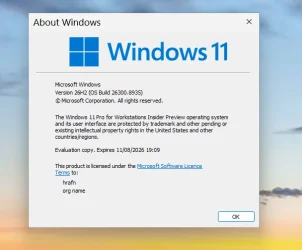
I noticed this topic after the release of the new 26300.9032 build. I have a question regarding the 11/08/2026 expiration shown for this build.


This is a secondary device, and my only concern is: if I don’t install the newer build immediately, will Windows still allow me to sign in and access my files some weeks later?


I’m not asking about receiving Insider updates or upgrading, but only about access to my existing Windows installation.


Thanks!
 

My Computer My Computer

At a glance

Windows 11
OS
Windows 11
I noticed this topic after the release of the new 26300.9032 build. I have a question regarding the 11/08/2026 expiration shown for this build.
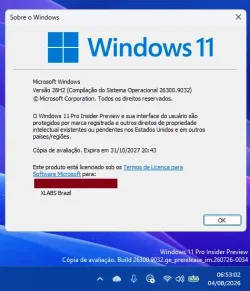
Mine expires October 2027.
1785666218759.webp
 

My Computers My Computers

  • At a glance

    Windows 11 ProIntel Core i9 14900k, Intel UHD 770 integrated32gb G.Skill Trident Z5 7200Gigabyte RTX 4090 Gaming OC
    OS
    Windows 11 Pro
    Computer type
    PC/Desktop
    Manufacturer/Model
    Self Built
    CPU
    Intel Core i9 14900k, Intel UHD 770 integrated
    Motherboard
    Gigabyte Z790 Aorus Master X
    Memory
    32gb G.Skill Trident Z5 7200
    Graphics Card(s)
    Gigabyte RTX 4090 Gaming OC
    Sound Card
    EVGA Nu Audio, Razer Kraken V3 Pro, Realtek Onboard
    Monitor(s) Displays
    Dell U4025QW nano IPS monitor, Samsung Odyssey G75F, Wisecoco 12.6" IPS sensor panel
    Screen Resolution
    5120X2160 x 2 1920x515
    Hard Drives
    WD Black SN8100, Samsung 990 Pro x 3, WD BLACK SN850x, WD Black 8tb HD
    PSU
    FSP Hydro PTM Pro 1350w
    Case
    Thermaltake Level 20 XT
    Cooling
    ARCTIC Liquid Freezer III 420 ARGB in push/pull, Antec Prism X 120mm ARGB Fans x 15
    Keyboard
    Razer Blackwidow V4 Pro
    Mouse
    Razer Basilik V3 Pro on Razer Firefly V2 mouse pad.
    Internet Speed
    950 Mbps cable primary, 6Mbps secondary vdsl
    Browser
    Chrome primary, FF-Edge-IE secondary
    Antivirus
    Norton 360 Premium
    Other Info
    I sit on a Libernovo Omni chair.😍 Sound by Fosi Audio DA-2120C pushing Magnat Series 503 bookshelf speakers and a SVS SB-1000 Pro subwoofer.
  • At a glance

    Windows 11 ProIntel 14900HX32gb ddr 5 5600Nvidia RTX 4090 mobile
    Operating System
    Windows 11 Pro
    Computer type
    Laptop
    Manufacturer/Model
    2023 Acer Predator Helios 18
    CPU
    Intel 14900HX
    Motherboard
    factory
    Memory
    32gb ddr 5 5600
    Graphics card(s)
    Nvidia RTX 4090 mobile
    Sound Card
    onboard
    Monitor(s) Displays
    18" 250hz IPS
    Screen Resolution
    2560X1600
    Hard Drives
    Samsung 9100 Pro, 990 Pro
    PSU
    factory 330W
    Case
    factory
    Cooling
    factory
    Keyboard
    individual key argb
    Mouse
    touchpad
    Internet Speed
    WiFi 7, 2.5gb ethernet
    Browser
    Chrome primary, FF-IE and Edge secondary
    Antivirus
    Norton 360 Premium
    Other Info
    Acer will not allow WD Black SN8100 to function in m.2 slot 0 and Crucial T710 ssd's to function in either slot.
Hi, I’m currently running build 26300.8772.


I noticed this topic after the release of the new 26300.9032 build. I have a question regarding the 11/08/2026 expiration shown for this build.


This is a secondary device, and my only concern is: if I don’t install the newer build immediately, will Windows still allow me to sign in and access my files some weeks later?


I’m not asking about receiving Insider updates or upgrading, but only about access to my existing Windows installation.
Welcome to Eleven Forum.

Good question. Insiders are expected to update to the latest build. What happens if you don't isn't well documented, except that there will be restrictions.

I have updated all my Insider builds now, but fortunately for you I keep backups of my earlier ones. I still have 26300.8935, the last build that expires in August 2026.

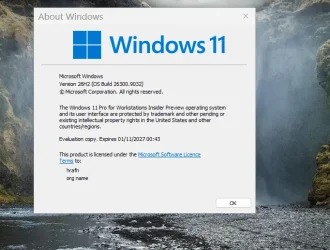
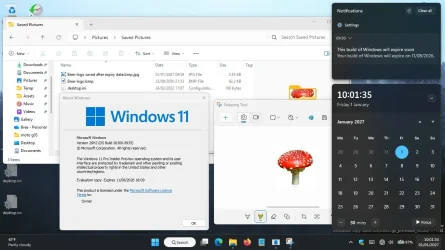
I have restored from the backup and, by turning off auto update for time/date and setting the bios date to 1st Jan. 2027, tested using it beyond the expiry date. So far I have seen no obvious restrictions. I can still open and save files as normal, for now at least. There may be a grace period before any restrictions are applied.

My advice would be to copy all the files you need ASAP after the expiry date, just in case. Should you find restrictions being applied you may be able to use my trick in reverse, go into your bios and set the date back to a time before the expiry date.

Screenshot 2027-01-01 100252.webp


--- edit ---

Even setting the bios date to 2030 didn't prevent access to my files. From the Insider FAQ....
What happens if I miss the deadline?

You'll see expiration notifications and builds on the old certificate stop being offered. Install the latest updates carrying the renewed certificate to recover.
Windows Insider Preview certificate renewal (Expiration: Aug 11, 2026) - Microsoft Q&A
 
Last edited:

My Computers My Computers

  • At a glance

    Windows 11 HomeAMD Athlon Silver 3050U8GBRadeon Graphics
    OS
    Windows 11 Home
    Computer type
    Laptop
    Manufacturer/Model
    Acer Aspire 3 A315-23-R9VY
    CPU
    AMD Athlon Silver 3050U
    Memory
    8GB
    Graphics Card(s)
    Radeon Graphics
    Monitor(s) Displays
    laptop screen
    Screen Resolution
    1366x768 native resolution, up to 2560x1440 with Radeon Virtual Super Resolution
    Hard Drives
    1TB Samsung EVO 870 SSD (from April 2026: 250GB EVO 850)
    Internet Speed
    150 Mbps
    Browser
    Edge, Firefox
    Antivirus
    Defender
    Other Info
    UPDATE - 11 April 2026: due to lid hinges starting to break up this laptop has been retired from active duty. The OS with all software and files has been migrated to my System Seven in 'Other systems' to carry on as my general purpose 'main machine'.

    I've now clean installed 25H2 and used Garlin's scripts to update Secure Boot to CA 2023 and revoke the PCA 2011 certificates. It's new role is to test secure boot issues.

    Info for 2021-2026:
    fully 'Windows 11 ready' laptop. Windows 10 C: partition migrated from my old unsupported 'main machine' then upgraded to 11. A test migration ran Insider builds for 2 months. When 11 was released on 5th October 2021 it was re-imaged back to 10 and was offered the upgrade in Windows Update on 20th October. Windows Update offered the 22H2 Feature Update on 20th September 2022. It got the 23H2 Feature Update on 4th November 2023 through Windows Update, 24H2 on 3rd October 2024 through Windows Update by setting the Target Release Version for 24H2, and 25H2 on 30th September 2025 through Windows Update by setting the Target Release Version for 25H2.
  • At a glance

    Windows 11 ProIntel® Core™ i5-520M8GB(integrated graphics) Intel HD Graphics
    Operating System
    Windows 11 Pro
    Computer type
    Laptop
    Manufacturer/Model
    Dell Latitude E4310
    CPU
    Intel® Core™ i5-520M
    Motherboard
    0T6M8G
    Memory
    8GB
    Graphics card(s)
    (integrated graphics) Intel HD Graphics
    Screen Resolution
    1366x768
    Hard Drives
    500GB Crucial MX500 SSD
    Browser
    Firefox, Edge
    Antivirus
    Defender
    Other Info
    unsupported machine: Legacy bios, MBR, TPM 1.2, upgraded from W10 to W11 using W10/W11 hybrid install media workaround.

    In-place upgrade to 22H2 using ISO and a workaround.
    Feature Update to 23H2 by manually installing the Enablement Package.
    In-place upgrade to 24H2 using hybrid 23H2/24H2 install media.
    Upgraded to 25H2 by Enablement Package.

    Also running Insider Dev, and Canary builds and Windows 10 as native boot .vhdx.
  • My SYSTEM THREE is a Dell Latitude 5410, i7-10610U, 32GB RAM, 512GB NVMe ssd, supported device running Windows 11 Pro.

    My SYSTEM FOUR was a 2-in-1 convertible Lenovo Yoga 11e (1st gen) type 20DA, Celeron N2930, 8GB RAM, 256GB ssd. Unsupported device. This has now been sold. It has been replaced by my System Eight.

    My SYSTEM FIVE is a Dell Latitude 3190 2-in-1, Pentium Silver N5030, 8GB RAM, 1TB NVMe ssd, supported device running Windows 11 Pro, plus Insider Beta, Dev, and Canary builds (and a few others) as a native boot .vhdx.

    My SYSTEM SIX is a Dell Latitude 5550, Core Ultra 7 165H, 64GB RAM, 1TB NVMe SSD, supported device, Windows 11 Pro 24H2, Hyper-V host machine. Updated to 25H2 on 30th September 2025.

    My SYSTEM SEVEN is a Lenovo Thinkpad T580, 1920x1080 touchscreen, Intel Core i7-8650U, 16GB RAM, 512GB NVMe SSD + 2nd 512GB NVMe SSD, a supported device for Windows 11. This is my current general purpose 'main machine'. The installed Windows 11 Home from my System One has been migrated to this machine.

    My SYSTEM EIGHT is a 2-in-1 convertible Lenovo Yoga 11e (5th gen) type 20LN, Celeron N4120, 8GB RAM, 512GB NVMe ssd, a supported device for Windows 11. Currently running Windows 11 Pro, plus Insider Dev, Beta, and Canary builds as native boot vhdx.
I am staying out of this till it is released.
 

My Computers My Computers

  • At a glance

    Windows11 Pro 26200.8973Intel Core i9 14900F (24 -Core, 68 MB Total C...32GB DDR5RTX 4080 Super w/610.74
    OS
    Windows11 Pro 26200.8973
    Computer type
    PC/Desktop
    Manufacturer/Model
    Dell Alienware Aurora R16
    CPU
    Intel Core i9 14900F (24 -Core, 68 MB Total Cache)
    Motherboard
    Dell Alienware
    Memory
    32GB DDR5
    Graphics Card(s)
    RTX 4080 Super w/610.74
    Sound Card
    Realtec
    Monitor(s) Displays
    Corsair XENEON 32QHD165
    Screen Resolution
    2560 X 1440
    Hard Drives
    1-2TB Samsung 990 Pro PCIe NVMe M2 SSD
    1-4TB Samsung 990 Pro PCIe NVMe M2 SSD
    PSU
    1000 Watt Platinum Dell
    Case
    Alienware
    Cooling
    Liquid Closed Loop
    Keyboard
    Corsair Strafe RGB
    Mouse
    Logitech MK270 Wireless
    Internet Speed
    100Gb's Down-20 Up
    Browser
    Firefox 153.0.1
    Antivirus
    Defender
    Other Info
    Very Quiet And Fast
    CyberPower UPS CP1500PFCLCD
  • At a glance

    PClinuxOS Mate (2025.7)13th Gen Inter(R) Core(TM) i3-1315U64 GB DDR4 @3200 MHz.Internal
    Operating System
    PClinuxOS Mate (2025.7)
    Computer type
    PC/Desktop
    Manufacturer/Model
    Intel
    CPU
    13th Gen Inter(R) Core(TM) i3-1315U
    Motherboard
    Intel
    Memory
    64 GB DDR4 @3200 MHz.
    Graphics card(s)
    Internal
    Sound Card
    None
    Monitor(s) Displays
    Dell 2419HGCF
    Screen Resolution
    1920 X 1080
    Hard Drives
    SAMSUNG 980 PRO SSD 2TB, PCIe 4.0 M.2 2280
    PSU
    Chicony 30 Watt
    Case
    Small
    Keyboard
    Dell
    Mouse
    Razor
    Internet Speed
    1GB
    Browser
    Slimjet
Welcome to Eleven Forum.

Good question. Insiders are expected to update to the latest build. What happens if you don't isn't well documented, except that there will be restrictions.

I have updated all my Insider builds now, but fortunately for you I keep backups of my earlier ones. I still have 26300.8935, the last build that expires in August 2026.

I have restored from the backup and, by turning off auto update for time/date and setting the bios date to 1st Jan. 2027, tested using it beyond the expiry date. So far I have seen no obvious restrictions. I can still open and save files as normal, for now at least. There may be a grace period before any restrictions are applied.

My advice would be to copy all the files you need ASAP after the expiry date, just in case. Should you find restrictions being applied you may be able to use my trick in reverse, go into your bios and set the date back to a time before the expiry date.

View attachment 178316


--- edit ---

Even setting the bios date to 2030 didn't prevent access to my files. From the Insider FAQ....

Windows Insider Preview certificate renewal (Expiration: Aug 11, 2026) - Microsoft Q&A
Happy to be here! Yes, I have backups from most important files. I contacted the Microsoft Support as well and (more or less) they told the same things. Anyway. Thanks for your effort, I really appreciate it!:-)
 

My Computer My Computer

At a glance

Windows 11
OS
Windows 11

My Computer My Computer

At a glance

Win11 Insider[Always the latest Dev/Beta rele...AMD Ryzen 7 4800H with Radeon GraphicsG.SKILL [Samsung Die] DRR4 - 3200Mhz CL18 (18...nVidia GTX 1660ti GDDR6 6GB(90W) 2.02Ghz Core...
OS
Win11 Insider[Always the latest Dev/Beta releases]
Computer type
Laptop
Manufacturer/Model
Asus TUF Gaming FA506IU Laptop
CPU
AMD Ryzen 7 4800H with Radeon Graphics
Motherboard
AMD K17.6 FCH, AMD K17.6 IMC
Memory
G.SKILL [Samsung Die] DRR4 - 3200Mhz CL18 (18-19-19-36) - 32GB(16GBx2)
Graphics Card(s)
nVidia GTX 1660ti GDDR6 6GB(90W) 2.02Ghz Core & +548Mhz Mem-OC'ed [VBIOS Unlocked]
Sound Card
Realtek ALC256 @ AMD K17.6
Monitor(s) Displays
LM156LF-2F03 144HZ with Adaptive SYNC
Screen Resolution
1920x1080 - 144Hz
Hard Drives
WDC PC SN530 SDBPNPZ-256G-1002 + SHGP31-500GM-2 + ST1000LM035-1RK172 + Samsung SSD 870 QVO 1TB 1000.2 GB
PSU
ASUS Power Brick 180W
Case
Laptop Case with Dual Fan
Cooling
Dual Fans Design with Self-Cleaning Cooling
Keyboard
Asus Aura RGB with Overstroke technology
Mouse
ROG SICA Gaming Mouse
Internet Speed
100Mbps FiberOptic [100 Mbps Down - 50 Mbps Up]
Browser
Chrome/Firefox/Tor
Antivirus
Symantec Endpoint Protection with Windows Defender (Active Mode) + Custom DNS Server
Other Info
CPU with -15 Curve Optimizer all cores and -50 Cure optimizer on iGPU
BCLK OC to 101.6Mhz
Benchmark Scores:-
CineBench R23 Single core:- 1290 points
CineBench R23 Multi core:- 11111 points
Every time I open Edge, it nags me to turn off Developer Mode. I have to run uBlock in Dev Mode just to keep the insane amount of ads under control. I didn't mind ads before, but it's gotten completely out of hand. How to stop that nag????
 

My Computer My Computer

At a glance

Windows 11I don't knowIDKIntel
OS
Windows 11
Computer type
Laptop
Manufacturer/Model
HP
CPU
I don't know
Motherboard
IDK
Memory
IDK
Graphics Card(s)
Intel
Sound Card
?
Monitor(s) Displays
32 inches
Screen Resolution
IDK
Hard Drives
IDK
PSU
IDK
Case
HP
Cooling
?
Keyboard
Razer
Mouse
Razer
Internet Speed
Office
Browser
Windows 11
Antivirus
?
Every time I open Edge, it nags me to turn off Developer Mode. I have to run uBlock in Dev Mode just to keep the insane amount of ads under control. I didn't mind ads before, but it's gotten completely out of hand. How to stop that nag????
Do Reset Settings.
:-)
 
Last edited:

My Computer My Computer

At a glance

26200.8037i5-11400F32GBGeforce GT-1030
OS
26200.8037
Computer type
PC/Desktop
CPU
i5-11400F
Motherboard
Gigabyte
Memory
32GB
Graphics Card(s)
Geforce GT-1030
Keyboard
Logitech K400
Mouse
Logitech M720
Internet Speed
600 Mb
Browser
Edge
Every time I open Edge, it nags me to turn off Developer Mode. I have to run uBlock in Dev Mode just to keep the insane amount of ads under control. I didn't mind ads before, but it's gotten completely out of hand. How to stop that nag????
I'm very happy with Mozilla Firefox DE x64...you might wish to try that. Edge doesn't do it for me, so thought I'd mention it.
 

My Computer My Computer

At a glance

Win11 Experimental Channel for 26H2 buildsAMD R7 7800X3DGSkill 2x16GB @ 6400MT/sXFX 9070 XT SWIFT tri-fan (PCIe5.0)
OS
Win11 Experimental Channel for 26H2 builds
Computer type
PC/Desktop
Manufacturer/Model
a cherry-picked assembly
CPU
AMD R7 7800X3D
Motherboard
MSI x870 Tomahawk Wi-Fi, 8-layer, 2 oz copper, server PCB
Memory
GSkill 2x16GB @ 6400MT/s
Graphics Card(s)
XFX 9070 XT SWIFT tri-fan (PCIe5.0)
Sound Card
Creative Labs G8 USB External Sound device, Gaming DAC, Sound Card & Earphone AMP.. HIGHLY RECOMMENDED, btw. Totally changed my opinion of external USB sound. I like!...;)
Monitor(s) Displays
Philips 42" OLED @ 4k
Screen Resolution
3840x2160
Hard Drives
*Boot: Samsung 980 Pro 2 TB NVMe (PCIe4x4)
*Samsung 980 EVO NVMe 500GB (PCIe 4x4)
*Kingston SNV3S2000G 2TB NVMe (PCIe4x4)
*Samsung 960 EVO 250GB NVMe(PCIe3x2)
*8TB Toshiba x300 HDD
*ST4000DM004 S3 4TB HDD
PSU
Gigabyte 850W Gold, Rev 2
Case
Lian Li Lancool 217, white, with wood trim, very nice looking--tired of black, 5-fans standard
Cooling
Air coutesy Lian Li
Keyboard
Cherry MX 2.0S RGB
Mouse
Razer Basilisk V3 24k DPI
Internet Speed
~950Mbps down and up!
Browser
Firefox x64 DE
Antivirus
Defender
Other Info
Great New system. Exceeds my expectations by quite a bit, btw. I love the USB G8 SoundBlaster, it's quite an improvement over the G6!
1785837233118.webp
 

My Computers My Computers

  • At a glance

    Windows 11 26H2Intel Core i7 4790 @ 4.00 GHz16 GB DDR3 1866 MHzRadeon RX570 8 GB GDDR5 256-Bit
    OS
    Windows 11 26H2
    Computer type
    PC/Desktop
    Manufacturer/Model
    Alienware
    CPU
    Intel Core i7 4790 @ 4.00 GHz
    Motherboard
    Asus H85-E-BR
    Memory
    16 GB DDR3 1866 MHz
    Graphics Card(s)
    Radeon RX570 8 GB GDDR5 256-Bit
    Sound Card
    Onboard
    Monitor(s) Displays
    LG Flatron W2054HTF 85Hz
    Screen Resolution
    1600 x 900
    Hard Drives
    1x SSD Hynix 240GB (Boot)
    1x NVME SSD ADATA 512GB (Windows)
    1x HDD 4 TB (Data)
    2x HDD 500 GB Mirrored Volume (OS Backup Image)
    PSU
    Corsair 600W
    Case
    Glass Mid-Tower
    Cooling
    120mm Water Cooler
    Keyboard
    Microsoft Gamer
    Mouse
    Microsoft Gamer
    Internet Speed
    1 Gbps
    Browser
    Chrome / Edge / Tor
    Antivirus
    Windows Defender
    Other Info
    OLD RIGS ARE BRAVE
  • At a glance

    Windows 11 26H2Core i7 3520M @ 3.50 GHz16 GB DDR3 1600 MHZRadeon 7570M
    Operating System
    Windows 11 26H2
    Computer type
    Laptop
    Manufacturer/Model
    TOSHIBA Tecra R940
    CPU
    Core i7 3520M @ 3.50 GHz
    Motherboard
    TOSHIBA
    Memory
    16 GB DDR3 1600 MHZ
    Graphics card(s)
    Radeon 7570M
    Sound Card
    Onboard HD Audio
    Monitor(s) Displays
    Stock
    Screen Resolution
    1366 x 768
    Hard Drives
    1x SATA-3 SSD 240GB (Windows)
    1x USB 3.1 SDD 1TB (Storage)
    PSU
    Stock
    Case
    Stock
    Cooling
    Stock
    Keyboard
    Stock
    Mouse
    Stock
    Internet Speed
    1 Gbps
    Browser
    Chrome / Edge / Tor
    Antivirus
    Windows Defender
    Other Info
    OLD RIGS ARE BRAVE
  • Windows Server 2016
    Optiplex 380 Plus
    Core 2 Quad Q9550 @ 2.83 GHz
    8GB DDR3 1333MHz
    Radeon R7 450 4 GB GDDR5 128-Bit
    1x SATA-3 SSD 240GB (Windows)
    1x SATA-3 SSD 120GB (Swap/Temp)
    1x HDD 8TB (Data)
The Windows Insider Experimental Channel will soon get an EKB build number bump to build 26340.xxxx.

Exp build .9032 already comes with "Ge-26340" versioning packages (not the proper KB5122776 EKB) in C:\Windows\servicing\Packages.


My Computers My Computers

  • At a glance

    Windows 11 Pro for WorkstationsIntel i7-8700K 5 GHz64 GB (4x16GB) G.SKILL TridentZ RGB DDR4 3600...ASUS ROG-STRIX-GTX1080TI-O11G-GAMING (11GB GD...
    OS
    Windows 11 Pro for Workstations
    Computer type
    PC/Desktop
    Manufacturer/Model
    Custom self build
    CPU
    Intel i7-8700K 5 GHz
    Motherboard
    ASUS ROG Maximus XI Formula Z390
    Memory
    64 GB (4x16GB) G.SKILL TridentZ RGB DDR4 3600 MHz (F4-3600C18D-32GTZR)
    Graphics Card(s)
    ASUS ROG-STRIX-GTX1080TI-O11G-GAMING (11GB GDDR5X)
    Sound Card
    Integrated Digital Audio (S/PDIF)
    Monitor(s) Displays
    2 x Samsung Odyssey G75 27"
    Screen Resolution
    2560x1440
    Hard Drives
    1TB Samsung 990 PRO M.2,
    4TB Samsung 990 PRO M.2,
    TerraMaster F8 SSD Plus NAS
    PSU
    Seasonic Prime Titanium 850W
    Case
    Thermaltake Core P3 wall mounted
    Cooling
    Corsair Hydro H115i
    Keyboard
    Amazon Basics Wired Full Keyboard MD005
    Mouse
    Logitech MX Master 4
    Internet Speed
    2 Gbps Download and 100 Mbps Upload
    Browser
    Chrome and Edge
    Antivirus
    Microsoft Defender
    Other Info
    Logitech Z625 speaker system,
    Logitech BRIO 4K Pro webcam,
    HP Color LaserJet Pro MFP M477fdn,
    CyberPower CP1500PFCLCD
    Galaxy S23 Plus phone
  • At a glance

    Windows 11 ProSnapdragon X Elite (12 core) 3.42 GHz16 GB LPDDR5x-7467 MHz
    Operating System
    Windows 11 Pro
    Computer type
    Laptop
    Manufacturer/Model
    Surface Laptop 7 Copilot+ PC
    CPU
    Snapdragon X Elite (12 core) 3.42 GHz
    Memory
    16 GB LPDDR5x-7467 MHz
    Monitor(s) Displays
    15" HDR
    Screen Resolution
    2496 x 1664
    Hard Drives
    1 TB SSD
    Internet Speed
    Wi-Fi 7 and Bluetooth 5.4
    Browser
    Chrome and Edge
    Antivirus
    Microsoft Defender
The Windows Insider Experimental Channel will soon get an EKB build number bump to build 26340.xxxx.

Exp build .9032 already comes with "Ge-26340" versioning packages (not the proper KB5122776 EKB) in C:\Windows\servicing\Packages.

Is this because 26300 has been locked in as the 26H2 GA and it will soon enter the Beta track?
 

My Computer My Computer

At a glance

Windows 11 Pro 26H2AMD Ryzen 9 9950X3D 16-Core Processor64GB Corsair DDR5 RAM @ 6000 MT/sASUS TUF Gaming GeForce RTX 4090 OC Edition 2...
OS
Windows 11 Pro 26H2
Computer type
PC/Desktop
Manufacturer/Model
Skytech / Central Computers
CPU
AMD Ryzen 9 9950X3D 16-Core Processor
Motherboard
Gigabyte X870E AORUS PRO ICE
Memory
64GB Corsair DDR5 RAM @ 6000 MT/s
Graphics Card(s)
ASUS TUF Gaming GeForce RTX 4090 OC Edition 24GB GDDR6X
Sound Card
Sound Blaster Audigy Fx V2
Monitor(s) Displays
Sony SDMU27M90 (DP HDR), Acer KA272, ASUS VG328QA1A
Screen Resolution
3840x2160 HDR
Hard Drives
Samsung SSD 990 PRO 4TB, Samsung SSD 860 EVO 1TB, Seagate ST8000DM004-2CX88 8TB
Case
Fractal Meshify 2
Cooling
Arctic Freezer III 360mm
Back
Top Bottom