Microsoft Support:
Changes and improvements gradually being rolled out*
- This update includes a small set of general improvements and fixes that improve the overall experience for Insiders running this build on their PCs.
[Search]
- Search home has been simplified to reduce visual clutter and make it easier to get back to recent searches quickly.
- Search does a better job showing where a result comes from, whether it's an app, setting, file, web result, or Store suggestion, so it's easier to tell what you're looking at and where you'll go before you click.
- A new setting in Settings > Privacy & security > Search lets you choose whether web and Microsoft Store suggestions appear alongside local results.

Enable or Disable Bing Web Suggested Search Results in Windows Search on Windows 11
This tutorial will show you how to turn on or off showing Bing "Web Searches" suggested search results in Windows Search for your account in Windows 11 Windows Search lets you search from your taskbar to find what you’re looking for, whether it’s on your device, in the cloud, or on the web... www.elevenforum.com

Enable or Disable Microsoft Store Suggested Search Results in Windows Search on Windows 11
This tutorial will show you how to turn on or off showing Microsoft Store suggested search results in Windows Search for your account in Windows 11 Windows Search lets you search from your taskbar to find what you’re looking for, whether it’s on your device, in the cloud, or on the web. The...
www.elevenforum.com
[Cloud rebuild]
- We're updating Cloud rebuild, the recovery option that restores a Windows 11 PC to a clean, known-good state by performing a full OS reinstall, with two additions.
- Cloud rebuild can now sanitize the device's drives as part of the rebuild. When you start a rebuild in WinRE, choose Remove files if you're keeping the PC, or Remove & sanitize files before recycling, returning, or reassigning it. The sanitize option uses the storage hardware's erase capability to securely erase data before Windows is reinstalled and is irreversible.
- IT administrators can now configure and start a Cloud rebuild remotely through the Recovery CSP, using either the currently installed build or a target build you specify.

Cloud Rebuild Windows 11
This tutorial will show you how to use Cloud rebuild to perform a full clean reinstall of Windows 11 from Windows Recovery (WinRE). Starting with Windows 11 build 26200.9818 (25H2) and build 26300.9818 (26H2), Microsoft is introducing Cloud rebuild, a new recovery option that restores a Windows...
www.elevenforum.com

UI showing new Cloud rebuild file removal options.

[Modernized AutoPlay experience]
- We've updated the AutoPlay dialog that helps you choose the preferred experience when devices are connected to your PC, such as a phone, camera, or removable drive. Rebuilt with WinUI, the refreshed experience is more consistent with the rest of Windows, supports dark mode, and continues to provide the familiar AutoPlay actions you use today. The experience is also more responsive to text scaling and display settings. Notifications for this dialog are now docked in the notification center for easy access.

Turn On or Off AutoPlay in Windows 11
This tutorial will show you how to turn on or off AutoPlay for all media and devices in your account in Windows 11. AutoPlay lets you choose an action for different kinds of media when you plug in a device or insert media. You can set AutoPlay to open different kinds of content, such as photos...
www.elevenforum.com
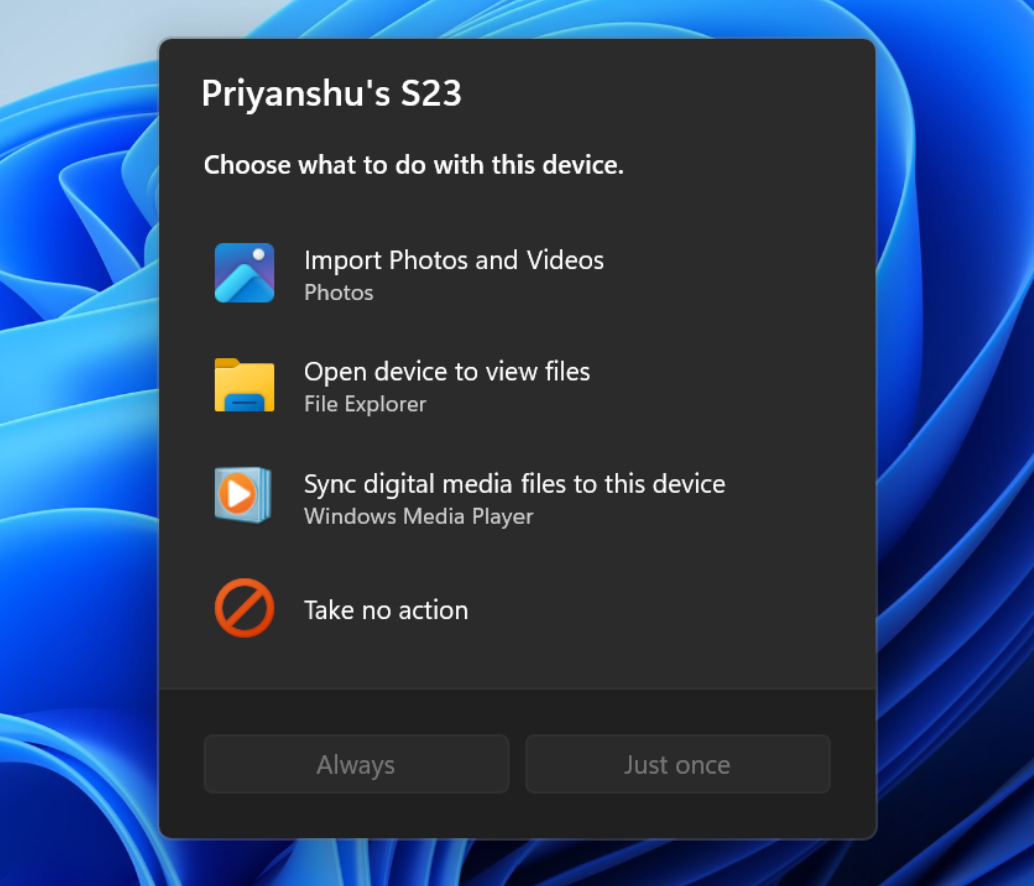
The new AutoPlay experience, shown in dark mode.
[Windows design]
- We are temporarily rolling back the solid (donut) spinners across some of the key Windows scenarios including Boot, Logon, Restart, Shutdown, and Update as we work on a bug. We expect to resume rolling it out soon.
Reminders for Windows Insiders in the Beta (26H1) channel
- The desktop watermark shown at the lower right corner of the desktop is normal for Windows Insider pre-release builds.
- Features and experiences included in these builds might never get released as we try out different concepts and get feedback. Features might change over time, be removed, or replaced and never get released beyond Windows Insiders. Some of these features and experiences could show up in future Windows releases when they're ready.
- Some features in active development we preview with Windows Insiders might not be fully localized, and localization will happen over time as features are finalized. As you see issues with localization in your language, report those issues to us via Feedback Hub.
- Check out Flight Hub for a complete look at what build is in which Insider channel.
Source:

Windows 11 Insider Beta (26H1) Preview Build 28020.3382 - Windows Insider Program
Release notes for Windows 11 Insider Beta (26H1) Preview Build 28020.3382
learn.microsoft.com

Announcing new builds for 30 October 2026
Hello Windows Insiders, Today, we’re releasing new Windows 11 Insider Preview builds to the Beta and Experimental channels, as well as introducing a new commercial Feedback Hub policy for commercial customers. New builds this week
 blogs.windows.com
Check Windows Updates
UUP Dump:
64-bit ISO download:

Select language for Windows 11 Insider Preview Feature Update (28020.3382) amd64
Select language for Windows 11 Insider Preview Feature Update (28020.3382) amd64 on UUP dump. UUP dump lets you download Unified Update Platform files, like Windows Insider updates, directly from Windows Update.
uupdump.net
ARM64 ISO download:
Select language for Windows 11 Insider Preview Feature Update (28020.3382) arm64
Select language for Windows 11 Insider Preview Feature Update (28020.3382) arm64 on UUP dump. UUP dump lets you download Unified Update Platform files, like Windows Insider updates, directly from Windows Update.
uupdump.net

UUP Dump - Download Windows Insider ISO
UUP Dump is the most practical and easy way to get ISO images of any Insider Windows 10 or Windows 11 version, as soon as Microsoft has released a new build. UUP Dump creates a download configuration file according to your choices, downloads necessary files directly from Microsoft servers, and...
www.elevenforum.com
Last edited: