Keep getting messages after uninstalling BlueMail


zooburner

I really don't burn zoos !
Member
Local time
7:11 AM
Posts
102
OS
Windows 11
Hi there

I keep getting these errors (on windows startup) after uninstalling blue mail.
I have tried re-installing and uninstalling again; however these messages still appear, see graphics.

I'm sure it's just a matter of deleting something that the uninstaller missed, I wonder if anyone ca help?

Screenshot 2025-04-13 001549.webp
 

Attachments

  • Screenshot 2025-04-13 002039.webp
    Screenshot 2025-04-13 002039.webp
    10.4 KB · Views: 1

My Computer

System One

  • OS
    Windows 11
    Computer type
    PC/Desktop
    Manufacturer/Model
    Scan
    CPU
    Intel(R) Core(TM) i7-14700F (2.10 to 5.7 GHz) 20 cores
    Motherboard
    ASUS Prime H610M-A WiFi D5
    Memory
    32 GB Corsair Vengeance DDR5
    Graphics Card(s)
    Nvidia 5060Ti 16GB
    Sound Card
    Onboard / Realtek
    Monitor(s) Displays
    BENQ GL2450
    Screen Resolution
    1920x1080
    Hard Drives
    1TB Cricial P310 (Heatsink) M.2
    1 x Crucial SSD 480gb
    1 x Crucial SSD 1TB
    PSU
    Corsair 650 w
    Case
    Coolmaster
    Cooling
    Scan Pro Glacier Liquid Cooling
    Keyboard
    HP keyboard and mouse combo
    Mouse
    HP keyboard and mouse combo
    Internet Speed
    900mbs
    Browser
    Chrome
    Antivirus
    Microsoft
You will need to edit the registry.
Go to Search and type regedit.exe and press Enter.
Backup the Registry.
go to the registry setting.

HKEY_CURRENT_USER\Software\Microsoft\Windows\CurrentVersion\Run BlueMail C:\Windows\explorer.exe me.blueone.win:autolaunch.blue

<- Delete

Restart PC
 

My Computer

System One

  • OS
    Windows 11 Pro Insider 64 bit 25H2 26200.5742
    Computer type
    PC/Desktop
    Manufacturer/Model
    Gigabyte Z390 UD
    CPU
    Intel Core i7 9700K 3.60
    Motherboard
    Gigabyte Z390 UD
    Memory
    16 GB
    Graphics Card(s)
    nVidia GEForce RTX 2060 Super
    Sound Card
    onboard
    Monitor(s) Displays
    Two 27" Dell 4K monitors
    Screen Resolution
    3840 x 2160
    Hard Drives
    M.2 NVME SSD, 500 GB; Two 2TB Mechanical HDD's
    PSU
    850w PSU
    Case
    Cyberpower PC
    Cooling
    Water cooled
    Keyboard
    Backlit Cyberpower gaming keyboard
    Mouse
    Backlit Cyberpower gaming mouse
    Internet Speed
    1 GB mbps
    Browser
    Brave
    Antivirus
    Windows Security
Try this reg fix

Edit. I was too slow. It’s the same reg edit Spunk posted.


My Computers

System One System Two

  • OS
    Windows 11 Pro 25H2 Build 26200.8524
    Computer type
    PC/Desktop
    Manufacturer/Model
    Sin-built 2013
    CPU
    Intel(R) Core(TM) i7-4770K CPU @ 3.50GHz
    Motherboard
    ASUS ROG Maximus VI Formula
    Memory
    32.0 GB of I forget and the box is in storage.
    Graphics Card(s)
    Gigabyte nVidia GeForce GTX 1660 Super OC 6GB
    Sound Card
    Onboard thingy
    Monitor(s) Displays
    5 x LG 25MS500-B - 1 x 24MK430H-B - 1 x Wacom Pro 22" Touch Screen Tablet
    Screen Resolution
    All over the place
    Hard Drives
    Too many to list.
    OS on Samsung 1TB 870 QVO SATA
    PSU
    Silverstone 1500
    Case
    NZXT Phantom 820 Full-Tower Case
    Cooling
    Noctua NH-D15 Elite Class Dual Tower CPU Cooler / 6 x EziDIY 120mm / 2 x Corsair 140mm somethings / 1 x 140mm Thermaltake something / 2 x 200mm Corsair.
    Keyboard
    Corsair K95 / Logitech diNovo Edge Wireless
    Mouse
    Logitech: G402 / G502 / Mx Masters / Mx Air Cordless
    Internet Speed
    2000/500Mbps
    Browser
    All sorts
    Antivirus
    Kaspersky Premium
    Other Info
    ㅤㅤㅤㅤㅤㅤㅤㅤㅤㅤㅤㅤㅤㅤㅤㅤㅤㅤㅤㅤㅤㅤㅤㅤㅤㅤㅤㅤㅤㅤㅤㅤㅤㅤㅤㅤㅤㅤㅤㅤ⠀⠀⠀⠀⠀⠀⠀⠀⠀⠀
    TP-Link BE9300 WiFi 7 Bluetooth 5.4 (Archer TBE550E)
    TP-Link TX201 V1 2.5GB Lan

    Grandstream HT812 - VoIP
    ASUS DSL-AX82U - Mesh
    ASUS RT-AC68U - Mesh
    ASUS RT-BE88U Router

    Brother MFC-L2880DW Printer

    I’m on a horse.
  • Operating System
    Windows 11 Pro 25H2 Build 26200.8524
    Computer type
    Laptop
    Manufacturer/Model
    LENOVO Yoga 7 14IRL8 - 7i EVO OLED 14" Touchscreen i5 12 Core 16GB/512GB
    CPU
    Intel Core 12th Gen i5-1240P Processor (1.7 - 4.4GHz)
    Memory
    16GB LPDDR5 RAM
    Graphics card(s)
    Intel Iris Xe Graphics Processor
    Sound Card
    Optimized with Dolby Atmos®
    Screen Resolution
    QHD 2880 x 1800 OLED
    Hard Drives
    M.2 512GB
    Antivirus
    Defender / Malwarebytes
    Other Info
    …still on a horse.
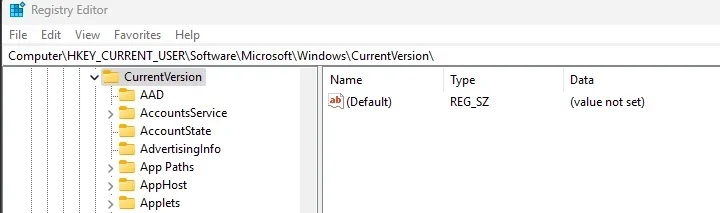
Thanks for the reply, but there does not seem to be any such entry EDIT I did find it by going to the 'Run' folder, thanks to you both, that worked
 

Attachments

  • Screenshot 2025-04-13 020600.webp
    Screenshot 2025-04-13 020600.webp
    15.4 KB · Views: 1

My Computer

System One

  • OS
    Windows 11
    Computer type
    PC/Desktop
    Manufacturer/Model
    Scan
    CPU
    Intel(R) Core(TM) i7-14700F (2.10 to 5.7 GHz) 20 cores
    Motherboard
    ASUS Prime H610M-A WiFi D5
    Memory
    32 GB Corsair Vengeance DDR5
    Graphics Card(s)
    Nvidia 5060Ti 16GB
    Sound Card
    Onboard / Realtek
    Monitor(s) Displays
    BENQ GL2450
    Screen Resolution
    1920x1080
    Hard Drives
    1TB Cricial P310 (Heatsink) M.2
    1 x Crucial SSD 480gb
    1 x Crucial SSD 1TB
    PSU
    Corsair 650 w
    Case
    Coolmaster
    Cooling
    Scan Pro Glacier Liquid Cooling
    Keyboard
    HP keyboard and mouse combo
    Mouse
    HP keyboard and mouse combo
    Internet Speed
    900mbs
    Browser
    Chrome
    Antivirus
    Microsoft
@zooburner You’re in the CurrentVersion key. Go one level deeper to the Run key.
 

My Computer

System One

  • OS
    Windows 11 Pro 25H2
    Computer type
    PC/Desktop
    Manufacturer/Model
    Intel NUC12WSHi7
    CPU
    12th Gen Core i7-1260P
    Motherboard
    NUC12WSBi7
    Memory
    64 GB Micron PC4-25600
    Graphics Card(s)
    Intel Iris Xe Graphics
    Sound Card
    on-board Realtek HD Audio
    Monitor(s) Displays
    Dell U3219Q
    Screen Resolution
    3840 x 2160
    Hard Drives
    Samsung SSD 990 PRO 1TB
    Crucial MX500 2 TB
    Antivirus
    Microsoft Defender
As the guys say

  • HKEY_CURRENT_USER\
    • Software\
      • Microsoft\
        • Windows\
          • CurrentVersion\
            • Run

When you click on the “RUN” folder, look to the right hand side of Regedit and delete the following entry: “Blue Mail”

Sign out or Reboot.


IMG_5383.webp
 

My Computers

System One System Two

  • OS
    Windows 11 Pro 25H2 Build 26200.8524
    Computer type
    PC/Desktop
    Manufacturer/Model
    Sin-built 2013
    CPU
    Intel(R) Core(TM) i7-4770K CPU @ 3.50GHz
    Motherboard
    ASUS ROG Maximus VI Formula
    Memory
    32.0 GB of I forget and the box is in storage.
    Graphics Card(s)
    Gigabyte nVidia GeForce GTX 1660 Super OC 6GB
    Sound Card
    Onboard thingy
    Monitor(s) Displays
    5 x LG 25MS500-B - 1 x 24MK430H-B - 1 x Wacom Pro 22" Touch Screen Tablet
    Screen Resolution
    All over the place
    Hard Drives
    Too many to list.
    OS on Samsung 1TB 870 QVO SATA
    PSU
    Silverstone 1500
    Case
    NZXT Phantom 820 Full-Tower Case
    Cooling
    Noctua NH-D15 Elite Class Dual Tower CPU Cooler / 6 x EziDIY 120mm / 2 x Corsair 140mm somethings / 1 x 140mm Thermaltake something / 2 x 200mm Corsair.
    Keyboard
    Corsair K95 / Logitech diNovo Edge Wireless
    Mouse
    Logitech: G402 / G502 / Mx Masters / Mx Air Cordless
    Internet Speed
    2000/500Mbps
    Browser
    All sorts
    Antivirus
    Kaspersky Premium
    Other Info
    ㅤㅤㅤㅤㅤㅤㅤㅤㅤㅤㅤㅤㅤㅤㅤㅤㅤㅤㅤㅤㅤㅤㅤㅤㅤㅤㅤㅤㅤㅤㅤㅤㅤㅤㅤㅤㅤㅤㅤㅤ⠀⠀⠀⠀⠀⠀⠀⠀⠀⠀
    TP-Link BE9300 WiFi 7 Bluetooth 5.4 (Archer TBE550E)
    TP-Link TX201 V1 2.5GB Lan

    Grandstream HT812 - VoIP
    ASUS DSL-AX82U - Mesh
    ASUS RT-AC68U - Mesh
    ASUS RT-BE88U Router

    Brother MFC-L2880DW Printer

    I’m on a horse.
  • Operating System
    Windows 11 Pro 25H2 Build 26200.8524
    Computer type
    Laptop
    Manufacturer/Model
    LENOVO Yoga 7 14IRL8 - 7i EVO OLED 14" Touchscreen i5 12 Core 16GB/512GB
    CPU
    Intel Core 12th Gen i5-1240P Processor (1.7 - 4.4GHz)
    Memory
    16GB LPDDR5 RAM
    Graphics card(s)
    Intel Iris Xe Graphics Processor
    Sound Card
    Optimized with Dolby Atmos®
    Screen Resolution
    QHD 2880 x 1800 OLED
    Hard Drives
    M.2 512GB
    Antivirus
    Defender / Malwarebytes
    Other Info
    …still on a horse.
Thanks guys all sorted now :)
 

My Computer

System One

  • OS
    Windows 11
    Computer type
    PC/Desktop
    Manufacturer/Model
    Scan
    CPU
    Intel(R) Core(TM) i7-14700F (2.10 to 5.7 GHz) 20 cores
    Motherboard
    ASUS Prime H610M-A WiFi D5
    Memory
    32 GB Corsair Vengeance DDR5
    Graphics Card(s)
    Nvidia 5060Ti 16GB
    Sound Card
    Onboard / Realtek
    Monitor(s) Displays
    BENQ GL2450
    Screen Resolution
    1920x1080
    Hard Drives
    1TB Cricial P310 (Heatsink) M.2
    1 x Crucial SSD 480gb
    1 x Crucial SSD 1TB
    PSU
    Corsair 650 w
    Case
    Coolmaster
    Cooling
    Scan Pro Glacier Liquid Cooling
    Keyboard
    HP keyboard and mouse combo
    Mouse
    HP keyboard and mouse combo
    Internet Speed
    900mbs
    Browser
    Chrome
    Antivirus
    Microsoft
Back
Top Bottom