
Kensington Fingerprint Scanner Not Working Properly on Win11 DT.


TPerk100

Well-known member
Local time
12:47 AM
Posts
36
OS
Win 11 Pro
Kensington Fingerprint Scanner Not Working Properly on Win11 DT.

Posted THE same thread A few months ago but never did get A resolution to THE problem.

Running Virus & Malware free Win 11 Desktop, and Chrome (enabled for Win Hello), with all updates.

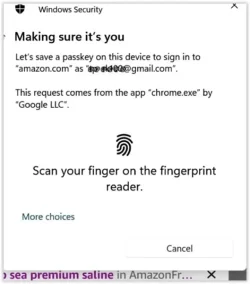
The attached pic shows the window I routinely get at various times / sites. My Kensington Fingerprint Scanner lights up but the system / window is unresponsive to my finger scan. Selecting “More Choices” and using Pin or Password works.

I use Windows Hello (fingerprint scan using same device) to log on and to wake my computer. It works properly.

Have re-started CPU numerous times. Device manager shows “Biometric devices, VeriMark DT Fingerprint Key,” and reports it is working properly. Biometric Services is running. Regardless I have uninstalled device and then re-installed it numerous times with no success. Replaced reader. No help. Swapped USB ports and re-installed drivers. No help.

Behavior is the same using Edge.

Any help with this will be greatly appreciated.
1764787686382.webp
 

My Computer

System One

  • OS
    Win 11 Pro
    Computer type
    PC/Desktop
    Manufacturer/Model
    Self Built
    CPU
    AMD Ryzen 9 5900X
    Motherboard
    ASRock X570S PG Riptide
    Memory
    32 Gig DDR4
    Graphics Card(s)
    NVIDIA T600 by Lenovo
    Sound Card
    MB
    Monitor(s) Displays
    3 27" Samsung 2700s
    Screen Resolution
    1080x1920
Posted THE same thread A few months ago but never did get A resolution to THE problem.

Any help with this will be greatly appreciated.
Nobody has THE same issue you have, that is why you did not get A resolution to THE problem.

I don't know what Windows 11 DT is and I doubt the issue lies with either Windows 11 or your biometric device.
You would not be able to log in to Windows at all if that what the case. The biometrics device would fail flat out.

The issue seems to be with your browser 'Chrome' not recognizing or not reading correctly your fingerprints.
How does it work with Edge?
 

My Computers

System One System Two

  • OS
    All Branches but Release
    Computer type
    Laptop
    Manufacturer/Model
    Acer Nitro ANV15-51
    CPU
    AMD Ryzen 7 7735HS 3200-4500 Mhz 8 cores x 2
    Motherboard
    Sportage_RBH
    Memory
    32 GB DDR5
    Graphics Card(s)
    Radeon Graphic / NVIDIA GeForce RTX 4060 8 GB GDDR6
    Sound Card
    AMD/Realtek(R) Audio
    Monitor(s) Displays
    Integrated Monitor (15.3"vis)
    Screen Resolution
    FHD 1920X1080 16:9 144Hz
    Hard Drives
    KINGSTON OM8SEP4512Q-AA 1TB
    Western Digital 256GB
    PSU
    19V DC 6.32 A 120 W
    Cooling
    Dual Fans
    Mouse
    MS Bluetooth
    Internet Speed
    Fiber 1GB Cox -us & 1GB Orange-fr
    Browser
    Edge Canary- Firefox Nightly-Chrome Dev-Chrome Dev
    Antivirus
    Windows Defender
  • Operating System
    Windows 11 Beta
    Computer type
    Laptop
    Manufacturer/Model
    Asus X751BP
    CPU
    AMD A9-9420
    Memory
    8 GB of DDR4
    Graphics card(s)
    AMD Radeon R5
    Screen Resolution
    1600x900
    Hard Drives
    Seagate 1 TB
Thank you for your response.
As I said, THE behavior is THE same with Edge.
 

My Computer

System One

  • OS
    Win 11 Pro
    Computer type
    PC/Desktop
    Manufacturer/Model
    Self Built
    CPU
    AMD Ryzen 9 5900X
    Motherboard
    ASRock X570S PG Riptide
    Memory
    32 Gig DDR4
    Graphics Card(s)
    NVIDIA T600 by Lenovo
    Sound Card
    MB
    Monitor(s) Displays
    3 27" Samsung 2700s
    Screen Resolution
    1080x1920
11DT is desktop Win 11.
 

My Computer

System One

  • OS
    Win 11 Pro
    Computer type
    PC/Desktop
    Manufacturer/Model
    Self Built
    CPU
    AMD Ryzen 9 5900X
    Motherboard
    ASRock X570S PG Riptide
    Memory
    32 Gig DDR4
    Graphics Card(s)
    NVIDIA T600 by Lenovo
    Sound Card
    MB
    Monitor(s) Displays
    3 27" Samsung 2700s
    Screen Resolution
    1080x1920
Thank you for your response.
As I said, THE behavior is THE same with Edge.
Missed that, must be due to your constant unwarranted capitalization of your articles.
As I stated, I am still convinced the issue has nothing to do with the device or Win 11.
Listen, good luck finding a resolution.
 

My Computers

System One System Two

  • OS
    All Branches but Release
    Computer type
    Laptop
    Manufacturer/Model
    Acer Nitro ANV15-51
    CPU
    AMD Ryzen 7 7735HS 3200-4500 Mhz 8 cores x 2
    Motherboard
    Sportage_RBH
    Memory
    32 GB DDR5
    Graphics Card(s)
    Radeon Graphic / NVIDIA GeForce RTX 4060 8 GB GDDR6
    Sound Card
    AMD/Realtek(R) Audio
    Monitor(s) Displays
    Integrated Monitor (15.3"vis)
    Screen Resolution
    FHD 1920X1080 16:9 144Hz
    Hard Drives
    KINGSTON OM8SEP4512Q-AA 1TB
    Western Digital 256GB
    PSU
    19V DC 6.32 A 120 W
    Cooling
    Dual Fans
    Mouse
    MS Bluetooth
    Internet Speed
    Fiber 1GB Cox -us & 1GB Orange-fr
    Browser
    Edge Canary- Firefox Nightly-Chrome Dev-Chrome Dev
    Antivirus
    Windows Defender
  • Operating System
    Windows 11 Beta
    Computer type
    Laptop
    Manufacturer/Model
    Asus X751BP
    CPU
    AMD A9-9420
    Memory
    8 GB of DDR4
    Graphics card(s)
    AMD Radeon R5
    Screen Resolution
    1600x900
    Hard Drives
    Seagate 1 TB
Random Capitalization is because I'm learning how to use my computer by voice. And many times THE voice gets THE grammar incorrect, just like the THE in this sentence.
So if my problem is Not with 11 or my device then what does that leave? Remember THE scanner reads my fingerprint every time when I'm logging in. THE behavior is THE same in Chrome and in Edge. Where Do you suggest that I look?
thanks again for your Reply
 

My Computer

System One

  • OS
    Win 11 Pro
    Computer type
    PC/Desktop
    Manufacturer/Model
    Self Built
    CPU
    AMD Ryzen 9 5900X
    Motherboard
    ASRock X570S PG Riptide
    Memory
    32 Gig DDR4
    Graphics Card(s)
    NVIDIA T600 by Lenovo
    Sound Card
    MB
    Monitor(s) Displays
    3 27" Samsung 2700s
    Screen Resolution
    1080x1920
Random Capitalization is because I'm learning how to use my computer by voice. And many times THE voice gets THE grammar incorrect, just like the THE in this sentence.
So if my problem is Not with 11 or my device then what does that leave? Remember THE scanner reads my fingerprint every time when I'm logging in. THE behavior is THE same in Chrome and in Edge. Where Do you suggest that I look?
thanks again for your Reply
That is my point, the device is fine.
I would look into recreating the accounts that fail.
Do you have any other accounts besides Google accounts that make use of the biometrics?
Sadly Welcome to Kensington Support | Support offers very little.
 

My Computers

System One System Two

  • OS
    All Branches but Release
    Computer type
    Laptop
    Manufacturer/Model
    Acer Nitro ANV15-51
    CPU
    AMD Ryzen 7 7735HS 3200-4500 Mhz 8 cores x 2
    Motherboard
    Sportage_RBH
    Memory
    32 GB DDR5
    Graphics Card(s)
    Radeon Graphic / NVIDIA GeForce RTX 4060 8 GB GDDR6
    Sound Card
    AMD/Realtek(R) Audio
    Monitor(s) Displays
    Integrated Monitor (15.3"vis)
    Screen Resolution
    FHD 1920X1080 16:9 144Hz
    Hard Drives
    KINGSTON OM8SEP4512Q-AA 1TB
    Western Digital 256GB
    PSU
    19V DC 6.32 A 120 W
    Cooling
    Dual Fans
    Mouse
    MS Bluetooth
    Internet Speed
    Fiber 1GB Cox -us & 1GB Orange-fr
    Browser
    Edge Canary- Firefox Nightly-Chrome Dev-Chrome Dev
    Antivirus
    Windows Defender
  • Operating System
    Windows 11 Beta
    Computer type
    Laptop
    Manufacturer/Model
    Asus X751BP
    CPU
    AMD A9-9420
    Memory
    8 GB of DDR4
    Graphics card(s)
    AMD Radeon R5
    Screen Resolution
    1600x900
    Hard Drives
    Seagate 1 TB
Oat,
This happens on many accounts. Some accounts that ask me to create A pas key ask for THE fingerprint verification, and it does Not work. N
I have stumbled on another fellow on another forum that seems to be very knowledgeable on this subject and he has Given me many things to check out and try, so I'm going to put this thread on hold for now. I will either come back later for more Help or I will come back to report what THE fix was.
thanks for your assistance
Bye for now
 

My Computer

System One

  • OS
    Win 11 Pro
    Computer type
    PC/Desktop
    Manufacturer/Model
    Self Built
    CPU
    AMD Ryzen 9 5900X
    Motherboard
    ASRock X570S PG Riptide
    Memory
    32 Gig DDR4
    Graphics Card(s)
    NVIDIA T600 by Lenovo
    Sound Card
    MB
    Monitor(s) Displays
    3 27" Samsung 2700s
    Screen Resolution
    1080x1920
Back
Top Bottom




