Kernel-Mode Hardware-enforced Stack Protection suddenly off?


Ok.. so should this setting be enabled or should i just leave it disabled?
 

My Computer My Computer

At a glance

Windows 11Ryzen 7 5700X32GB 3600MHZ CL16RTX3070TI
OS
Windows 11
Computer type
PC/Desktop
CPU
Ryzen 7 5700X
Motherboard
ASUS Crosshair VII Hero
Memory
32GB 3600MHZ CL16
Graphics Card(s)
RTX3070TI
Monitor(s) Displays
LG27GP850-B
Screen Resolution
2560x1440
PSU
Corsair RM750x
Case
Fractal Design Meshify 2
Cooling
Noctua NH-D15s
Keyboard
ASUS Strix Flare
Mouse
Glorious Model D- Wireless
Browser
MS Edge
Ok.. so should this setting be enabled or should i just leave it disabled?
What does this even mean? I've got a line in the water for someone who is both (1) smart at this rubbish, and (2) not so arrogant about their tech knowledge that they can only hint at general ideas that don't enable victory, and now I've got you in here derailing this badboy like a train blowing through Lebanon. Sigh! PLZ
 

My Computer My Computer

At a glance

Windows 11
OS
Windows 11
Computer type
Laptop
Manufacturer/Model
X17 R2
Ok.. so should this setting be enabled or should i just leave it disabled?
I'm convinced it should be enabled. Trick is, how to do it. The widespread issue people are having seems to point to a bug or something. I wonder if anyone can figure out how to fix it.
 

My Computer My Computer

At a glance

Windows 11 Pro 22H2 - OS Build 22621.155513900 KS128 GB Kingston 5200MhzGigabyte RTX 4090 Gaming 24 OC
OS
Windows 11 Pro 22H2 - OS Build 22621.1555
Computer type
PC/Desktop
CPU
13900 KS
Motherboard
MSI Z790 Godlike
Memory
128 GB Kingston 5200Mhz
Graphics Card(s)
Gigabyte RTX 4090 Gaming 24 OC
Sound Card
Motherboard integrated
Monitor(s) Displays
34" LG 34GP950G-B 144hz / 27" Asus 144hz / 22" AOC
Screen Resolution
3440 x 1440 / 2560 x 1440 / 1920 x 1080
Hard Drives
2 TB Samsung 980 PRO MZ-V8P2T0BW
4 TB Kingston SFYRD/4000G
8 TB Samsung MZ-77Q8T0BW
18TB Seagate IronWolf Pro
PSU
Corsair AX 1600i
Case
Corsair 7000 D
Cooling
Arctic Liquid Freezer II 420mm
Keyboard
Steelseries ApexPro
Mouse
Logitech G-Pro Superlight
Internet Speed
500Mbit / 150Mbit
Browser
Chrome (with plugins uBlock Origin, Poper Blocker, ScriptSafe)
Antivirus
Kaspersky Total Security
Ok.. so should this setting be enabled or should i just leave it disabled?
I'm wondering the same thing...
I was able to enable it after setting SVM to enabled in my bios as other AMD users pointed out but then I was like.. do I even need this kernal mode stock protection??
I just never like seeing ! in defender...
 

My Computer My Computer

At a glance

Windows 11
OS
Windows 11
This is what I got this morning. Worse, it says that the Kernel-mode Hardware-enforced stack protection is managed by my administrator and I can't turn it on - but I'm the administrator. My specs and OS are below.

The only thing Windows updated last night was the Intel driver, namely 11.7.1007 (see image below).

Does anyone know how to resolve this?

View attachment 58162

View attachment 58163
What processor do you have? I know it's 11th gen and up for intel, not sure for AMD. If the processor isnt compatible I would assume that's just microsoft locking you out.
 

My Computer My Computer

At a glance

Windows 11
OS
Windows 11
What processor do you have? I know it's 11th gen and up for intel, not sure for AMD. If the processor isnt compatible I would assume that's just microsoft locking you out.
I'm on 13900 KS. Got an intel update 11.7.1007 last night and today when I turned on the PC I got the Kernel thing turned off.

EDIT: Oh you're saying this is happening with 11th gen and newer?
 

My Computer My Computer

At a glance

Windows 11 Pro 22H2 - OS Build 22621.155513900 KS128 GB Kingston 5200MhzGigabyte RTX 4090 Gaming 24 OC
OS
Windows 11 Pro 22H2 - OS Build 22621.1555
Computer type
PC/Desktop
CPU
13900 KS
Motherboard
MSI Z790 Godlike
Memory
128 GB Kingston 5200Mhz
Graphics Card(s)
Gigabyte RTX 4090 Gaming 24 OC
Sound Card
Motherboard integrated
Monitor(s) Displays
34" LG 34GP950G-B 144hz / 27" Asus 144hz / 22" AOC
Screen Resolution
3440 x 1440 / 2560 x 1440 / 1920 x 1080
Hard Drives
2 TB Samsung 980 PRO MZ-V8P2T0BW
4 TB Kingston SFYRD/4000G
8 TB Samsung MZ-77Q8T0BW
18TB Seagate IronWolf Pro
PSU
Corsair AX 1600i
Case
Corsair 7000 D
Cooling
Arctic Liquid Freezer II 420mm
Keyboard
Steelseries ApexPro
Mouse
Logitech G-Pro Superlight
Internet Speed
500Mbit / 150Mbit
Browser
Chrome (with plugins uBlock Origin, Poper Blocker, ScriptSafe)
Antivirus
Kaspersky Total Security
I had same problem, now, the problem is, it crashes the hell out of my pc when trying to run certain apps/games after i turn it on i get blue screened with Kernel security check failure, ironically if i turn it off i don't have that problem anymore, sadly it's not the first time microsoft pushes updates that literally breaks the system
I was fine turning it on, rebooting - all looked normal. Then when I tried to launch the game I normally play I get BSOD. Rebooted, tried again and same. Turned it back off and have the Warning symbol On Defender but now I can launch the game fine.......
 

My Computer My Computer

At a glance

Windows 11 Home 22H2i5-1135G7 @ 2.40GHz 2.42 GHz8.00GBGeneric PnP Monitor (1600x900@60Hz) / Intel I...
OS
Windows 11 Home 22H2
Computer type
Laptop
Manufacturer/Model
HP
CPU
i5-1135G7 @ 2.40GHz 2.42 GHz
Motherboard
HP 881B (U3E1)
Memory
8.00GB
Graphics Card(s)
Generic PnP Monitor (1600x900@60Hz) / Intel Iris Xe Graphics (HP)
Sound Card
Intel Smart Sound Technology for USB Audio
Monitor(s) Displays
17' Laptop Screen
Screen Resolution
1600x900
Hard Drives
NVMe WDC PC SN530 SDBPNPZ-256G-1006 (SSD)
PSU
What you call me??????
Case
Flat but not ugly
Cooling
A Fan
Keyboard
Laptop Full keyboard
Mouse
Logitech Thumball
Internet Speed
Best I can afford
Browser
Opera / Chrome / Firefox
Antivirus
Something that is okay for cheap (free)
Other Info
Old and dumb.....But not senile, yet....
For now, the official workaround is to dismiss the 2 warnings, reboot, and check to see that lsass.exe is running in the BG. What a crock. Guess we wait for someone smart to figure out the real workaround, or for MS to get their act together.
 

My Computer My Computer

At a glance

Windows 11
OS
Windows 11
Computer type
Laptop
Manufacturer/Model
X17 R2
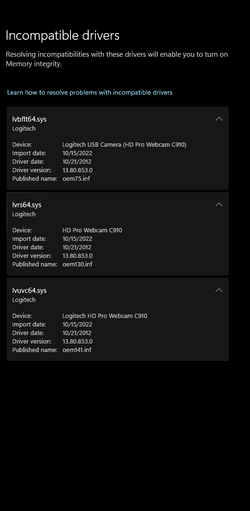
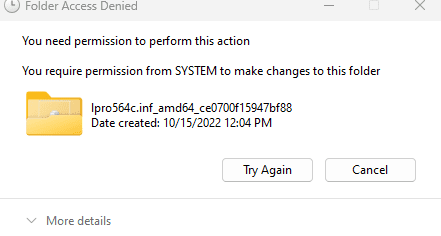
Having the similar problem being caused by Logitech C910 webcam. Deleted all logitech files and folders using Revo Uninstaller. Need to delete the 3 files in FileRepository. Been so long sense I fiddled with all this I can't remember how to get permission from the SYSTEM. All help is appreciated. Had the same problem about a year ago. Did this and problem solved.
 

Attachments

  • Driver Store.png
    Driver Store.png
    34.5 KB · Views: 2
  • Drivers.png
    Drivers.png
    14.9 KB · Views: 2
  • Folder Access.png
    Folder Access.png
    4.6 KB · Views: 3

My Computer My Computer

At a glance

11 Pro12th Gen Intel Core i5-12400 6-Core 2.4 GHz-4...32 GB DDR4Intel UHD Graphics 730
OS
11 Pro
Computer type
PC/Desktop
Manufacturer/Model
Acer Aspire TC-1760-UA92
CPU
12th Gen Intel Core i5-12400 6-Core 2.4 GHz-4.40 GHz
Motherboard
Southbridge
Memory
32 GB DDR4
Graphics Card(s)
Intel UHD Graphics 730
Monitor(s) Displays
2 X LG Ultragear HDR
Screen Resolution
1920 x 1080
Hard Drives
512GB Solid State Drive + 1TB HDD *Dual Drive*
PSU
300W
Keyboard
Logitech K350
Mouse
Logitech MX Ergo Wireless Trackball M-R0065
Browser
Chrome
Other Info
Logitech HD Webcam C910
Having the similar problem being caused by Logitech C910 webcam. Deleted all logitech files and folders using Revo Uninstaller. Need to delete the 3 files in FileRepository. Been so long sense I fiddled with all this I can't remember how to get permission from the SYSTEM. All help is appreciated. Had the same problem about a year ago. Did this and problem solved.
I have the Logitech C920 webcam, I can enable Memory Integrity although I don't use it. My webcam has generic MS drivers, I never installed any from Logitech.
 

My Computer My Computer

At a glance

Windows 11 Pro 25H2 (RP channel)AMD Ryzen 7 9800X3D 8-core64GB Corsair Titanium 6000/CL30MSI Suprim 5080 SOC
OS
Windows 11 Pro 25H2 (RP channel)
Computer type
PC/Desktop
Manufacturer/Model
MSI
CPU
AMD Ryzen 7 9800X3D 8-core
Motherboard
MEG X870E Godlike
Memory
64GB Corsair Titanium 6000/CL30
Graphics Card(s)
MSI Suprim 5080 SOC
Sound Card
Soundblaster AE-9
Monitor(s) Displays
ASUS TUF Gaming VG289Q
Screen Resolution
3840x2160
Hard Drives
Samsung 9100 Pro 4TB (gen 5 x4, system drive/games)
Samsung 990 Pro 2TB
Samsung 980 Pro 2TB
Samsung 870 Evo 4TB
Samsung 870 Evo 2TB
Samsung T9 4TB
PSU
Seasonic PX-2200
Case
Bequiet! Dark Base Pro 901
Cooling
Noctua NH-D15S Chromax black
Keyboard
Logitech G915 X (wired)
Mouse
Logitech G903 with PowerPlay charger
Internet Speed
900Mb/sec
Browser
Microsoft Edge
Antivirus
Windows Defender
Since the Malware platform update 1.0.2303.27001 yesterday I've found that the Security app will only crash if I click on the 'Security Processor details' link on the UI, it otherwise seems to be running ok. With the previous version I couldn't even open the Security UI at all.

An improvement - at least now I can actually have the update installed...
 

My Computer My Computer

At a glance

Windows 11 Pro 25H2 (RP channel)AMD Ryzen 7 9800X3D 8-core64GB Corsair Titanium 6000/CL30MSI Suprim 5080 SOC
OS
Windows 11 Pro 25H2 (RP channel)
Computer type
PC/Desktop
Manufacturer/Model
MSI
CPU
AMD Ryzen 7 9800X3D 8-core
Motherboard
MEG X870E Godlike
Memory
64GB Corsair Titanium 6000/CL30
Graphics Card(s)
MSI Suprim 5080 SOC
Sound Card
Soundblaster AE-9
Monitor(s) Displays
ASUS TUF Gaming VG289Q
Screen Resolution
3840x2160
Hard Drives
Samsung 9100 Pro 4TB (gen 5 x4, system drive/games)
Samsung 990 Pro 2TB
Samsung 980 Pro 2TB
Samsung 870 Evo 4TB
Samsung 870 Evo 2TB
Samsung T9 4TB
PSU
Seasonic PX-2200
Case
Bequiet! Dark Base Pro 901
Cooling
Noctua NH-D15S Chromax black
Keyboard
Logitech G915 X (wired)
Mouse
Logitech G903 with PowerPlay charger
Internet Speed
900Mb/sec
Browser
Microsoft Edge
Antivirus
Windows Defender
Having the similar problem being caused by Logitech C910 webcam. Deleted all logitech files and folders using Revo Uninstaller. Need to delete the 3 files in FileRepository. Been so long sense I fiddled with all this I can't remember how to get permission from the SYSTEM. All help is appreciated. Had the same problem about a year ago. Did this and problem solved.
Try RAPR-Driver Store Explorer it allows you to view, install & uninstall drivers from the Driverstore folder. It can show drivers organised by provider, pick older drivers if more than one version exists and force uninstall if needed.
The app is very powerful, use with caution, strongly suggest making image of current system before making changes, if possible.
GitHub - lostindark/DriverStoreExplorer: Driver Store Explorer [RAPR]

Another potentially useful app for taking control of drivers/ services is Autoruns from Sysinternals (can be downloaded through the MS Store), it can show all drivers, services and tasks in use, plus more. The app allows for temporary disabling of items and removal of items with a simple check box, again use with caution.
Both these apps are free.
 

My Computer My Computer

At a glance

Windows 11 Pro 22H2, build: 22621.521Intel i7-12700K 3.6GHz Base (5.0GHz Turbo)64GB DDR 3600MhzAsus Tuff RTX 3080 10GB OC
OS
Windows 11 Pro 22H2, build: 22621.521
Computer type
PC/Desktop
Manufacturer/Model
Scan 3XS Custom 1700
CPU
Intel i7-12700K 3.6GHz Base (5.0GHz Turbo)
Motherboard
Asus ProArt Creator B660 D4
Memory
64GB DDR 3600Mhz
Graphics Card(s)
Asus Tuff RTX 3080 10GB OC
Sound Card
Onboard Realtek
Monitor(s) Displays
Gigabyte G32QC 32inch 16:9 curved @2560 x 1440p 165Hz Freesync Premium Pro/ Dell SE2422H 24inch 16:9 1920 x 1080p 75Hz Freesync
Screen Resolution
2560 x 1440p & 1920 x 1080p
Hard Drives
WD SN570 1TB NVME (Boot), Samsung 870QVO 1TB (SSD), SanDisk 3D Ultra 500Gb (SSD) x2, Seagate 3Tb Expansion Desk (Ext HDD), 2x Toshiba 1Tb P300 (Ext HDD)
PSU
Corsair RM1000X Modular
Case
Corsair 4000D Airflow Desktop
Cooling
Corsair Hydro H150i RGB Pro XT 360mm Liquid Cooler, 3 x 120mm fans, 1x Exhaust
Keyboard
Microsoft Ergonomic
Mouse
Logitech G402
Internet Speed
800Mbs
Browser
Edge Chromium
Antivirus
Defender, Malwarebytes
At the end of October 2022 Microsoft published a workaround to gain a little more performance on gaming, those steps included disabling memory integrity check and virtualization.

Since I did those steps, I've had the stack protection disabled warning, I just dismised, but this week the warning reappeared, I dismissed it again, so may be some of you guys want to check the steps in reverse mode to see if that solves your warnings.

Options to Optimize Gaming Performance in Windows 11
 

My Computer My Computer

At a glance

Windows 11Ryzen 7950X3D64GB TForce DDR5 5600Radeon RX 6800XT
OS
Windows 11
Computer type
PC/Desktop
Manufacturer/Model
Assembled
CPU
Ryzen 7950X3D
Motherboard
Biostar Valkyrie X670e
Memory
64GB TForce DDR5 5600
Graphics Card(s)
Radeon RX 6800XT
I'm on 13900 KS. Got an intel update 11.7.1007 last night and today when I turned on the PC I got the Kernel thing turned off.

EDIT: Oh you're saying this is happening with 11th gen and newer?
Think it's Zen 3 in AMD. My other (AMD) system had the same 'issue', the Update Stack Service package wasn't listed as installed, so I'm still thinking it's a Defender update that's triggered it. Both systems had that. KB5007651, listed as a Definition Update.

My Windows 10 system 7th Gen and a couple of Windows 11 systems 8th and 10th Gen don't have the issue. It's definitely a W11 11th Gen/Zen 3 up thing.
 

My Computers My Computers

  • At a glance

    Windows 11 26200 latest publicIntel(R)Core(TM) i5-1135G716GB DDR4-3200Intel Iris Xe Graphics
    OS
    Windows 11 26200 latest public
    Computer type
    Laptop
    Manufacturer/Model
    ASUS Vivobook S513EA
    CPU
    Intel(R)Core(TM) i5-1135G7
    Motherboard
    ASUS
    Memory
    16GB DDR4-3200
    Graphics Card(s)
    Intel Iris Xe Graphics
    Sound Card
    o/b Realtek
    Monitor(s) Displays
    IPS Panel
    Screen Resolution
    1920x1080
    Hard Drives
    512GB Intel NVMe
    PSU
    Yep 45W charger
    Case
    The lid is aluminium
    Cooling
    There is a fan
    Keyboard
    Illuminated (woo!)
    Mouse
    I do have a compact Microsoft BT mouse.
    Internet Speed
    Fibre (30Mbps U/L, 150Mbps D/L)
    Browser
    MS Edge
    Antivirus
    Windows Defender, Malwarebytes Free
    Other Info
    External USB-C LAN Adapter
    External USB-C SD Card Adapter
    External USB 3.0 Liteon DVD-RW
  • At a glance

    Windows 11 26200 latest publicAMD Ryzen 5 5600X32GB DDR4-3200 (XMP) Corsair Vengeance (4x 8GB)ASUS TUF Gaming Radeon RX6800 16GB
    Operating System
    Windows 11 26200 latest public
    Computer type
    PC/Desktop
    Manufacturer/Model
    Custom
    CPU
    AMD Ryzen 5 5600X
    Motherboard
    Gigabyte B550 Gaming X v2
    Memory
    32GB DDR4-3200 (XMP) Corsair Vengeance (4x 8GB)
    Graphics card(s)
    ASUS TUF Gaming Radeon RX6800 16GB
    Sound Card
    o/b Realtek ALC887
    Monitor(s) Displays
    32" LG QHD 144Hz Freesync
    Screen Resolution
    2560x1440
    Hard Drives
    2TB Samsung 970 Evo Plus NVMe (PCI-E 3.0 x4)
    512GB Corsair Force MP600 NVMe (PCI-E 4.0 x4)
    2TB Seagate Barracuda SATA-III
    PSU
    Corsair RM750x 80Plus GOLD
    Case
    CiT Dark Soul Mid Tower (no RGB)
    Cooling
    Arctic Freezer 34 eSports Duo
    Keyboard
    Jelly Comb RF Compact Keyboard
    Mouse
    Jelly Comb RF Mouse
    Internet Speed
    Fibre (30Mbps U/L, 150Mbps D/L)
    Browser
    MS Edge
    Antivirus
    Windows Defender and Malwarebytes Free
    Other Info
    ASUS 16x BD-RW
At the end of October 2022 Microsoft published a workaround to gain a little more performance on gaming, those steps included disabling memory integrity check and virtualization.

Since I did those steps, I've had the stack protection disabled warning, I just dismised, but this week the warning reappeared, I dismissed it again, so may be some of you guys want to check the steps in reverse mode to see if that solves your warnings.

Options to Optimize Gaming Performance in Windows 11
I did benchmarks before and after with HVCI/uCode basically any kind of security enhancements and found all benchmarks within margins of error. YMMV based on actual CPU and particular / specific games. But I went Intel (4th Gen i7) to AMD (Zen+/2/3). I don't have a huge range of games either.
 

My Computers My Computers

  • At a glance

    Windows 11 26200 latest publicIntel(R)Core(TM) i5-1135G716GB DDR4-3200Intel Iris Xe Graphics
    OS
    Windows 11 26200 latest public
    Computer type
    Laptop
    Manufacturer/Model
    ASUS Vivobook S513EA
    CPU
    Intel(R)Core(TM) i5-1135G7
    Motherboard
    ASUS
    Memory
    16GB DDR4-3200
    Graphics Card(s)
    Intel Iris Xe Graphics
    Sound Card
    o/b Realtek
    Monitor(s) Displays
    IPS Panel
    Screen Resolution
    1920x1080
    Hard Drives
    512GB Intel NVMe
    PSU
    Yep 45W charger
    Case
    The lid is aluminium
    Cooling
    There is a fan
    Keyboard
    Illuminated (woo!)
    Mouse
    I do have a compact Microsoft BT mouse.
    Internet Speed
    Fibre (30Mbps U/L, 150Mbps D/L)
    Browser
    MS Edge
    Antivirus
    Windows Defender, Malwarebytes Free
    Other Info
    External USB-C LAN Adapter
    External USB-C SD Card Adapter
    External USB 3.0 Liteon DVD-RW
  • At a glance

    Windows 11 26200 latest publicAMD Ryzen 5 5600X32GB DDR4-3200 (XMP) Corsair Vengeance (4x 8GB)ASUS TUF Gaming Radeon RX6800 16GB
    Operating System
    Windows 11 26200 latest public
    Computer type
    PC/Desktop
    Manufacturer/Model
    Custom
    CPU
    AMD Ryzen 5 5600X
    Motherboard
    Gigabyte B550 Gaming X v2
    Memory
    32GB DDR4-3200 (XMP) Corsair Vengeance (4x 8GB)
    Graphics card(s)
    ASUS TUF Gaming Radeon RX6800 16GB
    Sound Card
    o/b Realtek ALC887
    Monitor(s) Displays
    32" LG QHD 144Hz Freesync
    Screen Resolution
    2560x1440
    Hard Drives
    2TB Samsung 970 Evo Plus NVMe (PCI-E 3.0 x4)
    512GB Corsair Force MP600 NVMe (PCI-E 4.0 x4)
    2TB Seagate Barracuda SATA-III
    PSU
    Corsair RM750x 80Plus GOLD
    Case
    CiT Dark Soul Mid Tower (no RGB)
    Cooling
    Arctic Freezer 34 eSports Duo
    Keyboard
    Jelly Comb RF Compact Keyboard
    Mouse
    Jelly Comb RF Mouse
    Internet Speed
    Fibre (30Mbps U/L, 150Mbps D/L)
    Browser
    MS Edge
    Antivirus
    Windows Defender and Malwarebytes Free
    Other Info
    ASUS 16x BD-RW
This warning appeared after the latest update. Yesterday I did Dismiss, but I was surprised today that the warning came back again
Microsoft claims that the device may be in danger if it is not activated, and given that it depends on activating memory integrity, which causes some problems in programs and games, this may be a problem and requires an urgent fix from Microsoft to stop these warnings

Screenshot_47.png
 

My Computer My Computer

At a glance

windows 11 23H2Intel Core i5-12400DDR4 Ram,16GB (2 x 8GB) 3200MHz CL16
OS
windows 11 23H2
Computer type
PC/Desktop
CPU
Intel Core i5-12400
Motherboard
GIGABYTE B660
Memory
DDR4 Ram,16GB (2 x 8GB) 3200MHz CL16
Hard Drives
Samsung 980 500GB M.2 NVME

My Computer My Computer

At a glance

11 Pro12th Gen Intel Core i5-12400 6-Core 2.4 GHz-4...32 GB DDR4Intel UHD Graphics 730
OS
11 Pro
Computer type
PC/Desktop
Manufacturer/Model
Acer Aspire TC-1760-UA92
CPU
12th Gen Intel Core i5-12400 6-Core 2.4 GHz-4.40 GHz
Motherboard
Southbridge
Memory
32 GB DDR4
Graphics Card(s)
Intel UHD Graphics 730
Monitor(s) Displays
2 X LG Ultragear HDR
Screen Resolution
1920 x 1080
Hard Drives
512GB Solid State Drive + 1TB HDD *Dual Drive*
PSU
300W
Keyboard
Logitech K350
Mouse
Logitech MX Ergo Wireless Trackball M-R0065
Browser
Chrome
Other Info
Logitech HD Webcam C910
I have a Logitech C920, on Windows 10 it had it's own drivers and a capture program.
When I change to Windows 11 there is literally nothing on the Logitech website any more and it only installs generic Microsoft driver (but names it Logi C920) However.... I do have several optional update drivers that will destroy Defender if I so much as download them! I know this from experience and wish I could hide them.
 

My Computer My Computer

At a glance

11 ProI7 14700k2 X Corsair Vengeance DDR4 @ 3600 32 gb totalMSI RTX 5070ti Ventus 3x OC
OS
11 Pro
Computer type
PC/Desktop
CPU
I7 14700k
Motherboard
Gigabyte Z690 Aorus Elite
Memory
2 X Corsair Vengeance DDR4 @ 3600 32 gb total
Graphics Card(s)
MSI RTX 5070ti Ventus 3x OC
Sound Card
onboard
Monitor(s) Displays
Iiyama 27"
Screen Resolution
2560 x 1440
Hard Drives
4 TB Crucial M.2
PSU
Corsair 850 watt modular
Case
Fractal Meshify 2
Cooling
AIO on CPU trinity on GPU
Keyboard
Redragon K75 wireless
Mouse
Steelseries Rival 3 Gen 2 wireless
Internet Speed
52gb
Browser
Edge Chrome
Antivirus
Defender
I found somewhere that disabling "Memory integrity" and re-enabling it could help with getting Kernel-mode Hardware-enforcement Stack Protection enabled, but I was only able to enable memory integrity again by manually enabling it in the registry. I would recommend against disabling this setting until the problems with kernel enforcement are resolved as they appear to be linked

Additionally, I'm guessing the "Review Incompatible Drivers" is supposed to give a list of incompatible drivers. I have no list and only a link where Microsoft recommends against uninstalling drivers to resolve the issue

I have updated every driver I could find from Dell, but the issue still persists. (Dell Latitude 3420)
1682700354441.png
 
Last edited:

My Computer My Computer

At a glance

Windows 11i7-1165G716gb
OS
Windows 11
Computer type
Laptop
Manufacturer/Model
Dell Latitude 3420
CPU
i7-1165G7
Memory
16gb
@linuxfish I have the same issue on a Dell XPS 8950, but (so far) have not resorted to modifying the Registry. If I discover anything, I'll let you know.
 

My Computers My Computers

  • At a glance

    Windows 11 23H2, 24H2i7-12700K16GB (2 x 8)Intel(R) UHD Graphics 770 with shared graphic...
    OS
    Windows 11 23H2, 24H2
    Computer type
    PC/Desktop
    Manufacturer/Model
    Dell XPS8950, Vostro5620
    CPU
    i7-12700K
    Motherboard
    Z690 : 9D2HH Foxconn, R6PCT Foxconn 2nd (XPS)
    Memory
    16GB (2 x 8)
    Graphics Card(s)
    Intel(R) UHD Graphics 770 with shared graphics memory
    Sound Card
    Integrated
    Monitor(s) Displays
    Acer CBL282K Smiiprx
    Screen Resolution
    4K UHD (3840 x 2160) @ 60 Hz
    Hard Drives
    Western Digital PC SN810 512 GB M.2 NVMe SSD, PCIe
    PSU
    750W
    Cooling
    2G44F Asetek 125W CPU liquid cooler
    Keyboard
    Arteck Wireless
    Mouse
    Victsing-mm057 wireless
    Internet Speed
    Wi-Fi 6
    Browser
    Vivaldi
    Antivirus
    Windows Defender (native)
  • At a glance

    Win 23H212th Gen Intel Core i7-1260P2 x 8 GBIntel Iris Xe Graphics
    Operating System
    Win 23H2
    Computer type
    Laptop
    Manufacturer/Model
    Dell Vostro 5620
    CPU
    12th Gen Intel Core i7-1260P
    Memory
    2 x 8 GB
    Graphics card(s)
    Intel Iris Xe Graphics
    Screen Resolution
    1920 x 1200 @ 60 Hz
    Hard Drives
    NVMe 512 GB
    Case
    Aluminum
    Mouse
    Touchpad
    Browser
    Vivaldi
    Antivirus
    Windows Defender (native)
Back
Top Bottom