
Longtime Webroot user and I had some keyboard issues as well.Yes. Webroot are aware and sent me a link to another version which does not affect the keyboard. Webroot plans to remote in to my laptop and do some tests. I'll post when they have done that. Did you raise a support ticket? I find their technical support to be excellent over many years. I'll ask if I can share the link. Oddly. The version number is lower than the one that stopped my keyboard working. But I am on a beta.
If you want to keep using awWebroot. Reinstall it and sleep or hibernate you computer. If the keyboard stops, just uninstall it in Device Manager using the mouse and reboot. The keyboard will work untill the next time you need to log in. Another fix is to boot into safe mode and then boot normally.
I am using an Apple Magic Keyboard with Touch ID and Numeric Keypad connected via a Lightning to USB Cable on an AMD Desktop System.
The Keyboard worked perfectly until recently.
My Issue was the Keyboard not being detected on Boot. The Keyboard has a Power Switch and I would have to Switch the Keyboard Off and On then it would be detected and I could enter my password to log in.
After much seaching I found two settings in Windows fixed my issue.
Go to Control Panel, Open Power Options, Top Left Side Menu Click Chose what the power buttons do and uncheck turn on fast start-up (recommended}

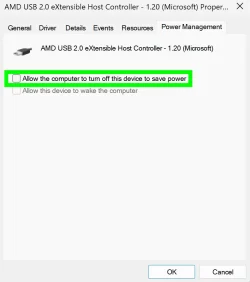
Back to Control Panel Select Device Manager and expand Universal Serial Bus Controllers.
Right Click on each device and where you have Power Management if you have the option of Allow the Computer to turn off this device uncheck it as per below.
My Computer
At a glance
Windows 11AMD Ryzen 8700G64 GBOnboard
- OS
- Windows 11
- Computer type
- PC/Desktop
- Manufacturer/Model
- Generic
- CPU
- AMD Ryzen 8700G
- Motherboard
- Gigabyte B650 UD AC
- Memory
- 64 GB
- Graphics Card(s)
- Onboard
- Sound Card
- Onboard
- Monitor(s) Displays
- Del U2723QE
- Screen Resolution
- 3840 x 2160
- Hard Drives
- Corsiar MP600 1TB
- PSU
- Silverstone 750 GOLD
- Case
- Silverstone FARA 513






