Laptop cooling


ICIT2LOL

Well-known member
Member
VIP
Local time
5:51 PM
Posts
2,187
Location
Central West NSW Australia
OS
Windows 11 Pro 23H2 (OS Build 22631.4169) Desktop (OS Build 22621.4317)
I have a two year old Asus Vivo with 17" screen and a decent i7 CPU in it. Just lately I noticed the internal cooling fans are running really quite fast an the machine gets quite overly warm to the touch, plus the machine is showing signs of slowing down despite me playing around to delete certain programs from the laptop. However I have checked the temps of the hardware and all are within acceptable limits.
So I got to thinking whether or not to get one of those cooling pads to increase the removable of the heat as is hopefully making the internal fan to slow down and so less annoying noise from it.
Any thoughts on this really appreciated.
 

My Computers My Computers

  • At a glance

    Windows 11 Pro 23H2 (OS Build 22631.4169) Des...i7 -10510U / Intel i5 3750KSamsung 16GB DDR4 2666 MHz & G-Skill 16GB DDR...On board Intel CPU graphics & Nvidia GeForce ...
    OS
    Windows 11 Pro 23H2 (OS Build 22631.4169) Desktop (OS Build 22621.4317)
    Computer type
    Laptop
    Manufacturer/Model
    Asus Vivo notebook X712FA or Desktop Ivy Bridge build
    CPU
    i7 -10510U / Intel i5 3750K
    Motherboard
    Asus generic & Asus P8Z77-V
    Memory
    Samsung 16GB DDR4 2666 MHz & G-Skill 16GB DDR3 2134MHz
    Graphics Card(s)
    On board Intel CPU graphics & Nvidia GeForce GTX 1050Ti
    Sound Card
    Laptop onboard & Xonar DSX Card
    Monitor(s) Displays
    Generic & Samsung 27" SAM0C4C
    Hard Drives
    Samsung 970 Pro NMe & Samsung 870 EVO 500GB
    PSU
    N/A
    Case
    N/A
    Cooling
    Asus in built
    Keyboard
    Generic
    Mouse
    Logitec Wireless
    Internet Speed
    50Mbs max allowance - occasionally up to 75Mbs
    Browser
    Brave
    Antivirus
    ESET Ultimate Security on both
    Other Info
    Desktop running Windows11 Pro with unsupported hardware fix
  • At a glance

    Windows 11 Pro OS build 22000.376i53750K16GB DDR3 @ 2133MHzAsus GTX 650TI
    Operating System
    Windows 11 Pro OS build 22000.376
    Computer type
    PC/Desktop
    Manufacturer/Model
    Home build
    CPU
    i53750K
    Motherboard
    Asus P8Z77-V
    Memory
    16GB DDR3 @ 2133MHz
    Graphics card(s)
    Asus GTX 650TI
    Sound Card
    Asus Xonar DSX
    Monitor(s) Displays
    Samsung 4K
    Screen Resolution
    3840x2160
    Hard Drives
    Samsung EVO 970
    PSU
    Corsair HX1100
    Case
    Coolermaster HAF -M
    Cooling
    Liquid
    Keyboard
    Microsoft Sidewinder 6
    Mouse
    Logitec
    Internet Speed
    50Mbs
    Browser
    Edge
    Antivirus
    Only Windows at the moment
I have a two year old Asus Vivo with 17" screen and a decent i7 CPU in it. Just lately I noticed the internal cooling fans are running really quite fast an the machine gets quite overly warm to the touch, plus the machine is showing signs of slowing down despite me playing around to delete certain programs from the laptop. However I have checked the temps of the hardware and all are within acceptable limits.
So I got to thinking whether or not to get one of those cooling pads to increase the removable of the heat as is hopefully making the internal fan to slow down and so less annoying noise from it.
Any thoughts on this really appreciated.


Cooling pads help. So do cans of compressed air for dust removal.
Always use the laptop on a hard surface. Never on your lap or on things like bed spreads.
 

My Computers My Computers

  • At a glance

    Win 11 Home ♦♦♦26200.8737 ♦♦♦♦♦♦♦25H2AMD Ryzen 7 3700XG.Skill (F4-3200C14D-16GTZKW)EVGA RTX 2070 (08G-P4-2171-KR)
    OS
    Win 11 Home ♦♦♦26200.8737 ♦♦♦♦♦♦♦25H2
    Computer type
    PC/Desktop
    Manufacturer/Model
    Built by Ghot® [May 2020]
    CPU
    AMD Ryzen 7 3700X
    Motherboard
    Asus Pro WS X570-ACE (BIOS 5302)
    Memory
    G.Skill (F4-3200C14D-16GTZKW)
    Graphics Card(s)
    EVGA RTX 2070 (08G-P4-2171-KR)
    Sound Card
    Realtek ALC1220P / ALC S1220A
    Monitor(s) Displays
    Dell U3011 30"
    Screen Resolution
    2560 x 1600
    Hard Drives
    2x Samsung 860 EVO 500GB,
    WD 4TB Black FZBX - SATA III,
    WD 8TB Black FZBX - SATA III,
    DRW-24B1ST CD/DVD Burner
    PSU
    PC Power & Cooling 750W Quad EPS12V
    Case
    Cooler Master ATCS 840 Tower
    Cooling
    CM Hyper 212 EVO (push/pull)
    Keyboard
    Ducky DK9008 Shine II Blue LED
    Mouse
    Logitech Optical M-100
    Internet Speed
    300/300
    Browser
    Firefox (latest)
    Antivirus
    Bitdefender Total Security
    Other Info
    Speakers: Klipsch Pro Media 2.1
  • At a glance

    Windows XP Pro 32bit w/SP3AMD Athlon 64 X2 5000+ (OC'd @ 3.2Ghz)TWIN2X2048-6400C4DHX (2 x 1GB, DDR2 800)EVGA 256-P2-N758-TR GeForce 8600GT SSC
    Operating System
    Windows XP Pro 32bit w/SP3
    Computer type
    PC/Desktop
    Manufacturer/Model
    Built by Ghot® (not in use)
    CPU
    AMD Athlon 64 X2 5000+ (OC'd @ 3.2Ghz)
    Motherboard
    ASUS M2N32-SLI Deluxe Wireless Edition
    Memory
    TWIN2X2048-6400C4DHX (2 x 1GB, DDR2 800)
    Graphics card(s)
    EVGA 256-P2-N758-TR GeForce 8600GT SSC
    Sound Card
    Onboard
    Monitor(s) Displays
    ViewSonic G90FB Black 19" Professional (CRT)
    Screen Resolution
    up to 2048 x 1536
    Hard Drives
    WD 36GB 10,000rpm Raptor SATA
    Seagate 80GB 7200rpm SATA
    Lite-On LTR-52246S CD/RW
    Lite-On LH-18A1P CD/DVD Burner
    PSU
    PC Power & Cooling Silencer 750 Quad EPS12V
    Case
    Generic Beige case, 80mm fans
    Cooling
    ZALMAN 9500A 92mm CPU Cooler
    Keyboard
    Logitech Classic Keybooard 200
    Mouse
    Logitech Optical M-BT96a
    Internet Speed
    300/300
    Browser
    Firefox 3.x ??
    Antivirus
    Symantec (Norton)
    Other Info
    Still assembled, still runs. Haven't turned it on for 15 years?
Might be good.

It's also possible that the machine is full of crud. Cleaning it could help. You may have to partially disassembled it to do that. Then, blow it out with compressed air. If you use "canned" air, avoid spraying any of the liquid propellant into the machine. (Mainly because it might locally condense moisture.)
 

My Computers My Computers

  • At a glance

    Windows 11 26200.8728Amd Threadripper 7970X128GB (4 X 32) G.Skill DDR5 6400 (RDIMM)Gigabyte RTX 4090 OC
    OS
    Windows 11 26200.8728
    Computer type
    PC/Desktop
    Manufacturer/Model
    homebuilt
    CPU
    Amd Threadripper 7970X
    Motherboard
    Gigabyte TRX50 Aero D Rev. 1.0
    Memory
    128GB (4 X 32) G.Skill DDR5 6400 (RDIMM)
    Graphics Card(s)
    Gigabyte RTX 4090 OC
    Sound Card
    none (USB to speakers), Realtek
    Monitor(s) Displays
    Innocn 32" OLED
    Screen Resolution
    3840 X 2160 @ 60Hz
    Hard Drives
    Crucial T700 2TB M.2 NVME SSD
    WD 4TB Blue SATA SSD
    Seagate 18TB IronWolf Pro
    PSU
    BeQuiet! Straight Power 12 1500W
    Case
    Lian Li 011 Dynamic Evo XL
    Cooling
    SilverStone Technology XE360-TR5, with 3 Phanteks T30 fans
    Keyboard
    Cherry KC 500 MX LP (mechanical)
    Mouse
    Logitech M500s (wired)
    Internet Speed
    2000/250 Mbps (down/up)
    Other Info
    xFinity gateway
  • At a glance

    windows 11 26200.8728Intel I9-13900K64GB G.Skill DDR5-6000Gigabyte RTX 3090 ti
    Operating System
    windows 11 26200.8728
    Computer type
    PC/Desktop
    Manufacturer/Model
    homebuilt
    CPU
    Intel I9-13900K
    Motherboard
    Asus RoG Strix Z690-E
    Memory
    64GB G.Skill DDR5-6000
    Graphics card(s)
    Gigabyte RTX 3090 ti
    Sound Card
    built in Realtek
    Monitor(s) Displays
    Philips 27E1N8900 27" OLED
    Screen Resolution
    3840 X 2160 @60Hz
    Hard Drives
    WDC SN850 1TB
    8TB Seagate Ironwolf
    4TB Seagate Ironwolf
    PSU
    eVGA SuperNOVA 1300 GT
    Case
    Lian Li 011 Dynamic Evo
    Cooling
    Corsair iCUE H150i ELITE CAPELLIX Liquid CPU Cooler
    Keyboard
    Cherry Streaming (wired)
    Mouse
    Logitech M500s (wired)
Cooling pads help. So do cans of compressed air for dust removal.
Always use the laptop on a hard surface. Never on your lap or on things like bed spreads.
It's also possible that the machine is full of crud. Cleaning it could help. You may have to partially disassembled it to do that. Then, blow it out with compressed air. If you use "canned" air, avoid spraying any of the liquid propellant into the machine. (Mainly because it might locally condense moisture.)
Thanks for that I will try out a pad before I delve into taking the back off and even possibly having to dissemble the machine which honestly I would prefer not to do. As for the compressed air option I do have really decent battery operated air blower/gun although accessing the innards is restricted due to the laptop having only a small grill underneath the machine directly over the fan intake which makes only being to blow through those slits. I don't have a very dusty spot where I use the machine and always on a flat table top surface.
 

My Computers My Computers

  • At a glance

    Windows 11 Pro 23H2 (OS Build 22631.4169) Des...i7 -10510U / Intel i5 3750KSamsung 16GB DDR4 2666 MHz & G-Skill 16GB DDR...On board Intel CPU graphics & Nvidia GeForce ...
    OS
    Windows 11 Pro 23H2 (OS Build 22631.4169) Desktop (OS Build 22621.4317)
    Computer type
    Laptop
    Manufacturer/Model
    Asus Vivo notebook X712FA or Desktop Ivy Bridge build
    CPU
    i7 -10510U / Intel i5 3750K
    Motherboard
    Asus generic & Asus P8Z77-V
    Memory
    Samsung 16GB DDR4 2666 MHz & G-Skill 16GB DDR3 2134MHz
    Graphics Card(s)
    On board Intel CPU graphics & Nvidia GeForce GTX 1050Ti
    Sound Card
    Laptop onboard & Xonar DSX Card
    Monitor(s) Displays
    Generic & Samsung 27" SAM0C4C
    Hard Drives
    Samsung 970 Pro NMe & Samsung 870 EVO 500GB
    PSU
    N/A
    Case
    N/A
    Cooling
    Asus in built
    Keyboard
    Generic
    Mouse
    Logitec Wireless
    Internet Speed
    50Mbs max allowance - occasionally up to 75Mbs
    Browser
    Brave
    Antivirus
    ESET Ultimate Security on both
    Other Info
    Desktop running Windows11 Pro with unsupported hardware fix
  • At a glance

    Windows 11 Pro OS build 22000.376i53750K16GB DDR3 @ 2133MHzAsus GTX 650TI
    Operating System
    Windows 11 Pro OS build 22000.376
    Computer type
    PC/Desktop
    Manufacturer/Model
    Home build
    CPU
    i53750K
    Motherboard
    Asus P8Z77-V
    Memory
    16GB DDR3 @ 2133MHz
    Graphics card(s)
    Asus GTX 650TI
    Sound Card
    Asus Xonar DSX
    Monitor(s) Displays
    Samsung 4K
    Screen Resolution
    3840x2160
    Hard Drives
    Samsung EVO 970
    PSU
    Corsair HX1100
    Case
    Coolermaster HAF -M
    Cooling
    Liquid
    Keyboard
    Microsoft Sidewinder 6
    Mouse
    Logitec
    Internet Speed
    50Mbs
    Browser
    Edge
    Antivirus
    Only Windows at the moment
I bought one of these
1.jpg

you can experiment by raising the front first.
What is the noise level of these cooling pads ?

The only way to deal with laptop heat is to turn off turbo boost and limit fps in games.
It's good that laptops have a small screen and you can use medium-type presets in games.
Don't buy a laptop if you don't need portability.
 
Last edited:

My Computer My Computer

At a glance

Microsoft Windows 11 HomeIntel Core i5-13490F2 x 16 Patriot Memory (PDP Systems) PSD516G56...GIGABYTE GeForce RTX 4070 WINDFORCE OC 12G (G...
OS
Microsoft Windows 11 Home
Computer type
PC/Desktop
Manufacturer/Model
MSI MS-7D98
CPU
Intel Core i5-13490F
Motherboard
MSI B760 GAMING PLUS WIFI
Memory
2 x 16 Patriot Memory (PDP Systems) PSD516G560081 6400MT (32-37-37-74); 1.35V)
Graphics Card(s)
GIGABYTE GeForce RTX 4070 WINDFORCE OC 12G (GV-N4070WF3OC-12GD)
Sound Card
Bluetooth Аудио
Monitor(s) Displays
INNOCN 15K1F
Screen Resolution
1920 x 1080
Hard Drives
WD_BLACK SN770 250GB
KINGSTON SNV2S1000G (ELFK0S.6)
PSU
Thermaltake Toughpower GF3 1000W
Case
CG560 - DeepCool
Cooling
ID-COOLING SE-224-XTS / 2 x 140Mm Fan - rear and top; 3 x 120Mm - front
Keyboard
Corsair K70 RGB TKL
Mouse
Corsair KATAR PRO XT
Internet Speed
100 Mbps
Browser
Firefox
Antivirus
Microsoft Defender Antivirus
Other Info
https://www.userbenchmark.com/UserRun/66553205
The only way to deal with laptop heat is to turn off turbo boost and limit fps in games.
Ok mate thanks for your reply now I will just have to go into the BIOS to see if I can do something about the problem. MY main concern is - is this core being so hot some sort of indication that the CPU is failing and maybe is the cause of the machine going slower the last few months?
 

My Computers My Computers

  • At a glance

    Windows 11 Pro 23H2 (OS Build 22631.4169) Des...i7 -10510U / Intel i5 3750KSamsung 16GB DDR4 2666 MHz & G-Skill 16GB DDR...On board Intel CPU graphics & Nvidia GeForce ...
    OS
    Windows 11 Pro 23H2 (OS Build 22631.4169) Desktop (OS Build 22621.4317)
    Computer type
    Laptop
    Manufacturer/Model
    Asus Vivo notebook X712FA or Desktop Ivy Bridge build
    CPU
    i7 -10510U / Intel i5 3750K
    Motherboard
    Asus generic & Asus P8Z77-V
    Memory
    Samsung 16GB DDR4 2666 MHz & G-Skill 16GB DDR3 2134MHz
    Graphics Card(s)
    On board Intel CPU graphics & Nvidia GeForce GTX 1050Ti
    Sound Card
    Laptop onboard & Xonar DSX Card
    Monitor(s) Displays
    Generic & Samsung 27" SAM0C4C
    Hard Drives
    Samsung 970 Pro NMe & Samsung 870 EVO 500GB
    PSU
    N/A
    Case
    N/A
    Cooling
    Asus in built
    Keyboard
    Generic
    Mouse
    Logitec Wireless
    Internet Speed
    50Mbs max allowance - occasionally up to 75Mbs
    Browser
    Brave
    Antivirus
    ESET Ultimate Security on both
    Other Info
    Desktop running Windows11 Pro with unsupported hardware fix
  • At a glance

    Windows 11 Pro OS build 22000.376i53750K16GB DDR3 @ 2133MHzAsus GTX 650TI
    Operating System
    Windows 11 Pro OS build 22000.376
    Computer type
    PC/Desktop
    Manufacturer/Model
    Home build
    CPU
    i53750K
    Motherboard
    Asus P8Z77-V
    Memory
    16GB DDR3 @ 2133MHz
    Graphics card(s)
    Asus GTX 650TI
    Sound Card
    Asus Xonar DSX
    Monitor(s) Displays
    Samsung 4K
    Screen Resolution
    3840x2160
    Hard Drives
    Samsung EVO 970
    PSU
    Corsair HX1100
    Case
    Coolermaster HAF -M
    Cooling
    Liquid
    Keyboard
    Microsoft Sidewinder 6
    Mouse
    Logitec
    Internet Speed
    50Mbs
    Browser
    Edge
    Antivirus
    Only Windows at the moment

John,

I urge you to act on the advice to look inside and clear out the cobwebs before considering any other action.
I imagine Asus provide a downloadable Service manual that will guide you in taking off the bottom cover.


Best of luck,
Denis
 

My Computer My Computer

At a glance

Windows 11 Home x64 Version 25H2 Build 26200....
OS
Windows 11 Home x64 Version 25H2 Build 26200.8037
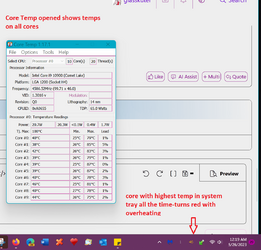
Going forward, I suggest you download a little app named Core Temp. It runs in your system tray showing you the core with the highest temp. You can hover on the temp in the system tray to see a reading of all cores or you can right click on the temp in the system tray to open the app. See screenshot Core Temp
 

Attachments

  • Screenshot 2023-05-26 001958.png
    Screenshot 2023-05-26 001958.png
    70.9 KB · Views: 2

My Computers My Computers

  • At a glance

    Windows 11 Pro 25H2 26200.8655i9-10900 10 core 20 threads32 gbnone-Intel UHD Graphics 630
    OS
    Windows 11 Pro 25H2 26200.8655
    Computer type
    PC/Desktop
    Manufacturer/Model
    Dell Optiplex 7080
    CPU
    i9-10900 10 core 20 threads
    Motherboard
    DELL 0J37VM
    Memory
    32 gb
    Graphics Card(s)
    none-Intel UHD Graphics 630
    Sound Card
    Integrated Realtek
    Monitor(s) Displays
    Benq 27
    Screen Resolution
    2560x1440
    Hard Drives
    2x1tb Solidigm m.2 nvme /External drives 512gb Samsung m.2 sata+2tb Kingston m2.nvme
    PSU
    500w
    Case
    MT
    Cooling
    Dell Premium
    Keyboard
    Logitech wired
    Mouse
    Logitech wireless
    Internet Speed
    so slow I'm too embarrassed to tell
    Browser
    #1 Edge #2 Firefox
    Antivirus
    Defender+MWB Premium
  • At a glance

    Windows 11 Pro 24H2 26200.8457AMD Ryzen 7 6800U32 gbintegrated
    Operating System
    Windows 11 Pro 24H2 26200.8457
    Computer type
    PC/Desktop
    Manufacturer/Model
    Beelink Mini PC SER5
    CPU
    AMD Ryzen 7 6800U
    Memory
    32 gb
    Graphics card(s)
    integrated
    Sound Card
    integrated
    Monitor(s) Displays
    Benq 27
    Screen Resolution
    2560x1440
    Hard Drives
    1TB Crucial nvme
    Keyboard
    Logitech wired
    Mouse
    Logitech wireless
    Internet Speed
    still too embarrassed to tell
    Browser
    Firefox
    Antivirus
    Defender
    Other Info
    System 3 is non compliant Dell 9020 i7-4770/24gb ram Win11 PRO 26200.8457
Going forward, I suggest you download a little app named Core Temp. It runs in your system tray showing you the core with the highest temp. You can hover on the temp in the system tray to see a reading of all cores or you can right click on the temp in the system tray to open the app. See screenshot Core Temp
I've been using Core Temp for years.

When I first started using it, Options > Settings > Notification Area was set to All Cores by default. I always changed it to Highest Temperature as it cluttered up the tray too much.
 

My Computers My Computers

  • At a glance

    Windows 11 ProIntel Core i9-10900XCorsair 64 GB (4 x 16 GB) CMW64GX4M4C3000C15 ...GIGABYTE GeForce GTX 1660 Super Mini ITX 6 GB OC
    OS
    Windows 11 Pro
    Computer type
    PC/Desktop
    Manufacturer/Model
    Stigg's Build
    CPU
    Intel Core i9-10900X
    Motherboard
    GIGABYTE X299X DESIGNARE 10G
    Memory
    Corsair 64 GB (4 x 16 GB) CMW64GX4M4C3000C15 Vengeance RGB Pro 3000Mhz DDR4
    Graphics Card(s)
    GIGABYTE GeForce GTX 1660 Super Mini ITX 6 GB OC
    Sound Card
    Realtek ALC1220
    Monitor(s) Displays
    Samsung 27" FHD LED FreeSync Gaming Monitor (LS27F350FHEXXY)
    Screen Resolution
    1920 x 1080
    Hard Drives
    Samsung 970 Pro Series 1TB M.2 2280 NVMe SSD
    Western Digital Red Pro WD8003FFBX-68B9AN0 8 TB, 7200 RPM, SATA-III
    Western Digital Red Pro WD8003FFBX-68B9AN0 8 TB, 7200 RPM, SATA-III
    PSU
    Corsair HX1200 1200W 80 Plus Platinum
    Case
    Fractal Design Define 7 Black Solid Case
    Cooling
    Noctua NH-D15 Chromax Black
    Keyboard
    Razer Ornata V2
    Mouse
    Razer DeathAdder Essential
    Internet Speed
    FTTN 100Mbps / 40Mbps
    Browser
    Mozilla Firefox
    Antivirus
    N/A
    Other Info
    Logitech BRIO 4k Ultra HD USB-C Webcam
  • At a glance

    Windows 10 ProCore i7-8750HSK Hynix 32 GB (2 x 16 GB) HMA82GS6CJR8N-VK 1...NVIDIA GeForce GTX 1070
    Operating System
    Windows 10 Pro
    Computer type
    Laptop
    Manufacturer/Model
    ASUS ROG Zephyrus M GM501GS
    CPU
    Core i7-8750H
    Motherboard
    Zephyrus M GM501GS
    Memory
    SK Hynix 32 GB (2 x 16 GB) HMA82GS6CJR8N-VK 16 GB DDR4-2666 DDR4 SDRAM
    Graphics card(s)
    NVIDIA GeForce GTX 1070
    Sound Card
    Realtek ALC294
    Monitor(s) Displays
    AU Optronics B156HAN07.1 [15.6" LCD]
    Screen Resolution
    1920 x 1080
    Hard Drives
    Samsung MZVKW512HMJP-00000 512 GB, PCI-E 3.0 x4
    Samsung SSD 860 QVO 4TB 4 TB, SATA-III
    PSU
    N/A
    Case
    N/A
    Cooling
    N/A
    Keyboard
    PC/AT Enhanced PS2 Keyboard (101/102-Key)
    Mouse
    Razer DeathAdder Essential
    Internet Speed
    FTTN 100Mbps / 40Mbps
    Browser
    Mozilla Firefox
    Antivirus
    N/A
    Other Info
    USB2.0 HD UVC Webcam
Ok I might just give it a go as I have been using HWInfo for years and have relied on what it is telling me.
What I don't get is why my CPU chip is so "out of order" with the core temps and voltages being out of whack as I have no way of controlling the core voltages via the very basic BIOS in the machine . se pic
CPUOVER2.jpg
 

My Computers My Computers

  • At a glance

    Windows 11 Pro 23H2 (OS Build 22631.4169) Des...i7 -10510U / Intel i5 3750KSamsung 16GB DDR4 2666 MHz & G-Skill 16GB DDR...On board Intel CPU graphics & Nvidia GeForce ...
    OS
    Windows 11 Pro 23H2 (OS Build 22631.4169) Desktop (OS Build 22621.4317)
    Computer type
    Laptop
    Manufacturer/Model
    Asus Vivo notebook X712FA or Desktop Ivy Bridge build
    CPU
    i7 -10510U / Intel i5 3750K
    Motherboard
    Asus generic & Asus P8Z77-V
    Memory
    Samsung 16GB DDR4 2666 MHz & G-Skill 16GB DDR3 2134MHz
    Graphics Card(s)
    On board Intel CPU graphics & Nvidia GeForce GTX 1050Ti
    Sound Card
    Laptop onboard & Xonar DSX Card
    Monitor(s) Displays
    Generic & Samsung 27" SAM0C4C
    Hard Drives
    Samsung 970 Pro NMe & Samsung 870 EVO 500GB
    PSU
    N/A
    Case
    N/A
    Cooling
    Asus in built
    Keyboard
    Generic
    Mouse
    Logitec Wireless
    Internet Speed
    50Mbs max allowance - occasionally up to 75Mbs
    Browser
    Brave
    Antivirus
    ESET Ultimate Security on both
    Other Info
    Desktop running Windows11 Pro with unsupported hardware fix
  • At a glance

    Windows 11 Pro OS build 22000.376i53750K16GB DDR3 @ 2133MHzAsus GTX 650TI
    Operating System
    Windows 11 Pro OS build 22000.376
    Computer type
    PC/Desktop
    Manufacturer/Model
    Home build
    CPU
    i53750K
    Motherboard
    Asus P8Z77-V
    Memory
    16GB DDR3 @ 2133MHz
    Graphics card(s)
    Asus GTX 650TI
    Sound Card
    Asus Xonar DSX
    Monitor(s) Displays
    Samsung 4K
    Screen Resolution
    3840x2160
    Hard Drives
    Samsung EVO 970
    PSU
    Corsair HX1100
    Case
    Coolermaster HAF -M
    Cooling
    Liquid
    Keyboard
    Microsoft Sidewinder 6
    Mouse
    Logitec
    Internet Speed
    50Mbs
    Browser
    Edge
    Antivirus
    Only Windows at the moment
Do you clean around the house - or just open the windows once in awhile, have a weekly shower and just hope (or pray) - you'll be fine - as the dust accumulates enough that you can write on everything? What about the car, do you cleaned that like - ever? Well, if that's the case your health is probably problematic. Same goes for your laptop. Some clean it every 6 months (2x a year). Tho, at least once a year - should be fine (if used in usual home - cause some work environments are dusty asf - so even 6 months would be to long). Point being - you have fans that pull air in a small enclosure and after enough time - they get clogged.

For example:


Not to mention some laptops - have a really bad cooling design - thus, they get messy quite fast. Even the paste can dry out and needs to be replaced (this alone could increase the temperatures considerably). If you're afraid to clean your laptop - to open it up, check some services in the surroundings - the majority tend to offer a cleaning maintenance (cleaning the fans + repaste). And only then (after handling the maintenance) - would be worth to take into account a cooling pad.

PS. Try searching your exact laptop model on YouTube - you might find a step by step guide how to safely disassemble & reassemble it.
 

My Computer My Computer

At a glance

WinDOS 25H2Intel & AMDSO-DIMM SK Hynix 15.8 GB Dual-Channel DDR4-26...nVidia RTX 2060 6GB Mobile GPU (TU106M)
OS
WinDOS 25H2
Computer type
Laptop
CPU
Intel & AMD
Memory
SO-DIMM SK Hynix 15.8 GB Dual-Channel DDR4-2666 (2 x 8 GB) 1329MHz (19-19-19-43)
Graphics Card(s)
nVidia RTX 2060 6GB Mobile GPU (TU106M)
Sound Card
Onbord Realtek ALC1220
Screen Resolution
1920 x 1080
Hard Drives
1x Samsung PM981 NVMe PCIe M.2 512GB / 1x Seagate Expansion ST1000LM035 1TB
I have been using HWInfo for years and have relied on what it is telling me.
HwInfo is an excellent program and I use it as well if I'm troubleshooting an inssue. As I stated, AFTER you get your issue resolved Coretemp is good to have so you can see your temp at a glance at any time.

I would be concerned that along with dirt that the thermal paste has hardened. I've seen some computers, (laptops and PCs) that the factory did a really crappy job of applying paste. I know it's not that old but it's always possible.
 

My Computers My Computers

  • At a glance

    Windows 11 Pro 25H2 26200.8655i9-10900 10 core 20 threads32 gbnone-Intel UHD Graphics 630
    OS
    Windows 11 Pro 25H2 26200.8655
    Computer type
    PC/Desktop
    Manufacturer/Model
    Dell Optiplex 7080
    CPU
    i9-10900 10 core 20 threads
    Motherboard
    DELL 0J37VM
    Memory
    32 gb
    Graphics Card(s)
    none-Intel UHD Graphics 630
    Sound Card
    Integrated Realtek
    Monitor(s) Displays
    Benq 27
    Screen Resolution
    2560x1440
    Hard Drives
    2x1tb Solidigm m.2 nvme /External drives 512gb Samsung m.2 sata+2tb Kingston m2.nvme
    PSU
    500w
    Case
    MT
    Cooling
    Dell Premium
    Keyboard
    Logitech wired
    Mouse
    Logitech wireless
    Internet Speed
    so slow I'm too embarrassed to tell
    Browser
    #1 Edge #2 Firefox
    Antivirus
    Defender+MWB Premium
  • At a glance

    Windows 11 Pro 24H2 26200.8457AMD Ryzen 7 6800U32 gbintegrated
    Operating System
    Windows 11 Pro 24H2 26200.8457
    Computer type
    PC/Desktop
    Manufacturer/Model
    Beelink Mini PC SER5
    CPU
    AMD Ryzen 7 6800U
    Memory
    32 gb
    Graphics card(s)
    integrated
    Sound Card
    integrated
    Monitor(s) Displays
    Benq 27
    Screen Resolution
    2560x1440
    Hard Drives
    1TB Crucial nvme
    Keyboard
    Logitech wired
    Mouse
    Logitech wireless
    Internet Speed
    still too embarrassed to tell
    Browser
    Firefox
    Antivirus
    Defender
    Other Info
    System 3 is non compliant Dell 9020 i7-4770/24gb ram Win11 PRO 26200.8457
A lot of modern systems, especially laptops which tend to have less efficient dust removal systems, are fitted with temperature monitors that are linked to the processor and reduce the speed it runs at to reduce potential overheating issues .
I would suspect dust contamination in any laptop that starts to slow in it's operation
 

My Computers My Computers

  • At a glance

    Windows 11 Pro x64 [Latest Release Preview] [...AMD RYZEN 9 7950X OEM64GB [2x32GB Corsair Vengeance 560 AMD DDR5]3XS* ASUS DUAL RTX 4060 OC 8G
    OS
    Windows 11 Pro x64 [Latest Release Preview] [Win11 PRO HighEnd MUP-00005 DD]
    Computer type
    PC/Desktop
    Manufacturer/Model
    Scan 3XS to my design
    CPU
    AMD RYZEN 9 7950X OEM
    Motherboard
    *3XS*ASUS TUF B650 PLUS WIFI
    Memory
    64GB [2x32GB Corsair Vengeance 560 AMD DDR5]
    Graphics Card(s)
    3XS* ASUS DUAL RTX 4060 OC 8G
    Sound Card
    On motherboard Feeding SPDiF 5.1 system [plus local sound to each monitor]
    Monitor(s) Displays
    32" UHD 32 Bit HDR Monitor + 43" UHD 4K 32Bit HDR TV
    Screen Resolution
    2 x 3840 x 2160
    Hard Drives
    3XS Samsung 980Pro 2TB M.2 PCIe4 4 x 8TB Data + Various Externals from 1TB to 8TB, 10TB NAS
    PSU
    3XS Corsair RM850x 850w Fully Modular
    Case
    FDesign Define 7 XL BK TGL Case - Black
    Cooling
    3XS iCUE H150i ELITE Liquid Cool, Quiet Case fans
    Keyboard
    Wireless Logitec MX Keys + K830 [Depending on where I'm Sat]
    Mouse
    Wireless Logitec - MX Master 3S +
    Internet Speed
    950 MB Down 55 MB Up
    Browser
    Latest Chrome
    Antivirus
    BitDefender Total Security [Latest]
    Other Info
    Also run...
    Dell XPS 17 Laptop
    HP Laptop 8GB - Windows 10 Pro x64 HP 15.2"
    Nexus 7 Android tablet [x2]
    Samsung 10.2" tablet
    Blackview 10.2 Tablet
    Sony Z3 Android Smartphone
    Samsung S9 Plus Smartphone
    Wacom Pro Medium Pen Pad
    Wacom Pro Small Pen Pad
    Wacom ExpressKey Remote
    Loopdeck+ Graphics Controller
    Shuttle Pro v2 Control Pad
  • At a glance

    Windows 11 Pro x64 [Latest release]i7 10750H32 GBStock Intel + GTX 1650 Ti
    Operating System
    Windows 11 Pro x64 [Latest release]
    Computer type
    Laptop
    Manufacturer/Model
    Dell XPS 17 9700
    CPU
    i7 10750H
    Motherboard
    Stock
    Memory
    32 GB
    Graphics card(s)
    Stock Intel + GTX 1650 Ti
    Sound Card
    Stock 4 speaker
    Monitor(s) Displays
    Stock 17" + 32" 4K 3840 x 2160 HDR-10
    Screen Resolution
    3840 x 2400 HDR touchscreen
    Hard Drives
    2TB M2 NVMe
    PSU
    Stock
    Case
    Stock Aluminium / Carbon Fibre
    Cooling
    Stock + 2 fan cooling pad
    Keyboard
    Stock Illuminated + Logi - MX Keys
    Mouse
    Stock Trackpad +Logi Mx Master 3 or MX Ergo Trackball
    Internet Speed
    950 MB Down 55 MB Up
    Browser
    Latest Chrome
    Antivirus
    BitDefender Total Security 2021
    Other Info
    Also use an Adjustable Support for Laptop and Adjustable stand for monitor
PS. Try searching your exact laptop model on YouTube - you might find a step by step guide how to safely disassemble & reassemble it
Yes neves mate I know how to disassemble the machine as I cleaned out the dust from the fan yesterday.
I would be concerned that along with dirt that the thermal paste has hardened. I've seen some computers, (laptops and PCs) that the factory did a really crappy job of applying paste. I know it's not that old but it's always possible.
Yes Glasscutter I should have replaced the compound with one that I like while in the machine yesterday:rolleyes:
A lot of modern systems, especially laptops which tend to have less efficient dust removal systems
Yep barman mate the air venting on this laptop is pretty ordinary and like I said to the others I should have done the other stuff as well as just blowing the dust out of the fan which luckily was the only spot where it had accumulated in any amount. I should have taken a pic of the board while in there and you could see it is very basic opposed to some I have worked on.

But it will all have to wait until I have set up a spare laptop for my granddaughter;-)
 

My Computers My Computers

  • At a glance

    Windows 11 Pro 23H2 (OS Build 22631.4169) Des...i7 -10510U / Intel i5 3750KSamsung 16GB DDR4 2666 MHz & G-Skill 16GB DDR...On board Intel CPU graphics & Nvidia GeForce ...
    OS
    Windows 11 Pro 23H2 (OS Build 22631.4169) Desktop (OS Build 22621.4317)
    Computer type
    Laptop
    Manufacturer/Model
    Asus Vivo notebook X712FA or Desktop Ivy Bridge build
    CPU
    i7 -10510U / Intel i5 3750K
    Motherboard
    Asus generic & Asus P8Z77-V
    Memory
    Samsung 16GB DDR4 2666 MHz & G-Skill 16GB DDR3 2134MHz
    Graphics Card(s)
    On board Intel CPU graphics & Nvidia GeForce GTX 1050Ti
    Sound Card
    Laptop onboard & Xonar DSX Card
    Monitor(s) Displays
    Generic & Samsung 27" SAM0C4C
    Hard Drives
    Samsung 970 Pro NMe & Samsung 870 EVO 500GB
    PSU
    N/A
    Case
    N/A
    Cooling
    Asus in built
    Keyboard
    Generic
    Mouse
    Logitec Wireless
    Internet Speed
    50Mbs max allowance - occasionally up to 75Mbs
    Browser
    Brave
    Antivirus
    ESET Ultimate Security on both
    Other Info
    Desktop running Windows11 Pro with unsupported hardware fix
  • At a glance

    Windows 11 Pro OS build 22000.376i53750K16GB DDR3 @ 2133MHzAsus GTX 650TI
    Operating System
    Windows 11 Pro OS build 22000.376
    Computer type
    PC/Desktop
    Manufacturer/Model
    Home build
    CPU
    i53750K
    Motherboard
    Asus P8Z77-V
    Memory
    16GB DDR3 @ 2133MHz
    Graphics card(s)
    Asus GTX 650TI
    Sound Card
    Asus Xonar DSX
    Monitor(s) Displays
    Samsung 4K
    Screen Resolution
    3840x2160
    Hard Drives
    Samsung EVO 970
    PSU
    Corsair HX1100
    Case
    Coolermaster HAF -M
    Cooling
    Liquid
    Keyboard
    Microsoft Sidewinder 6
    Mouse
    Logitec
    Internet Speed
    50Mbs
    Browser
    Edge
    Antivirus
    Only Windows at the moment

Well have installed Coretemp and am getting some rather surprising temps now see pic
CORETEMP.jpg
 

My Computers My Computers

  • At a glance

    Windows 11 Pro 23H2 (OS Build 22631.4169) Des...i7 -10510U / Intel i5 3750KSamsung 16GB DDR4 2666 MHz & G-Skill 16GB DDR...On board Intel CPU graphics & Nvidia GeForce ...
    OS
    Windows 11 Pro 23H2 (OS Build 22631.4169) Desktop (OS Build 22621.4317)
    Computer type
    Laptop
    Manufacturer/Model
    Asus Vivo notebook X712FA or Desktop Ivy Bridge build
    CPU
    i7 -10510U / Intel i5 3750K
    Motherboard
    Asus generic & Asus P8Z77-V
    Memory
    Samsung 16GB DDR4 2666 MHz & G-Skill 16GB DDR3 2134MHz
    Graphics Card(s)
    On board Intel CPU graphics & Nvidia GeForce GTX 1050Ti
    Sound Card
    Laptop onboard & Xonar DSX Card
    Monitor(s) Displays
    Generic & Samsung 27" SAM0C4C
    Hard Drives
    Samsung 970 Pro NMe & Samsung 870 EVO 500GB
    PSU
    N/A
    Case
    N/A
    Cooling
    Asus in built
    Keyboard
    Generic
    Mouse
    Logitec Wireless
    Internet Speed
    50Mbs max allowance - occasionally up to 75Mbs
    Browser
    Brave
    Antivirus
    ESET Ultimate Security on both
    Other Info
    Desktop running Windows11 Pro with unsupported hardware fix
  • At a glance

    Windows 11 Pro OS build 22000.376i53750K16GB DDR3 @ 2133MHzAsus GTX 650TI
    Operating System
    Windows 11 Pro OS build 22000.376
    Computer type
    PC/Desktop
    Manufacturer/Model
    Home build
    CPU
    i53750K
    Motherboard
    Asus P8Z77-V
    Memory
    16GB DDR3 @ 2133MHz
    Graphics card(s)
    Asus GTX 650TI
    Sound Card
    Asus Xonar DSX
    Monitor(s) Displays
    Samsung 4K
    Screen Resolution
    3840x2160
    Hard Drives
    Samsung EVO 970
    PSU
    Corsair HX1100
    Case
    Coolermaster HAF -M
    Cooling
    Liquid
    Keyboard
    Microsoft Sidewinder 6
    Mouse
    Logitec
    Internet Speed
    50Mbs
    Browser
    Edge
    Antivirus
    Only Windows at the moment
Looks normal to me. That's with basically no load. Monitor it is as you put a normal load on it. Open up several browser tabs. Play a youtube video, etc. If you are a gamer play a game. Do what you normally do and watch the temps.
I would still use a cooling pad if it's stationary on a desk.
 

My Computers My Computers

  • At a glance

    Windows 11 Pro 25H2 26200.8655i9-10900 10 core 20 threads32 gbnone-Intel UHD Graphics 630
    OS
    Windows 11 Pro 25H2 26200.8655
    Computer type
    PC/Desktop
    Manufacturer/Model
    Dell Optiplex 7080
    CPU
    i9-10900 10 core 20 threads
    Motherboard
    DELL 0J37VM
    Memory
    32 gb
    Graphics Card(s)
    none-Intel UHD Graphics 630
    Sound Card
    Integrated Realtek
    Monitor(s) Displays
    Benq 27
    Screen Resolution
    2560x1440
    Hard Drives
    2x1tb Solidigm m.2 nvme /External drives 512gb Samsung m.2 sata+2tb Kingston m2.nvme
    PSU
    500w
    Case
    MT
    Cooling
    Dell Premium
    Keyboard
    Logitech wired
    Mouse
    Logitech wireless
    Internet Speed
    so slow I'm too embarrassed to tell
    Browser
    #1 Edge #2 Firefox
    Antivirus
    Defender+MWB Premium
  • At a glance

    Windows 11 Pro 24H2 26200.8457AMD Ryzen 7 6800U32 gbintegrated
    Operating System
    Windows 11 Pro 24H2 26200.8457
    Computer type
    PC/Desktop
    Manufacturer/Model
    Beelink Mini PC SER5
    CPU
    AMD Ryzen 7 6800U
    Memory
    32 gb
    Graphics card(s)
    integrated
    Sound Card
    integrated
    Monitor(s) Displays
    Benq 27
    Screen Resolution
    2560x1440
    Hard Drives
    1TB Crucial nvme
    Keyboard
    Logitech wired
    Mouse
    Logitech wireless
    Internet Speed
    still too embarrassed to tell
    Browser
    Firefox
    Antivirus
    Defender
    Other Info
    System 3 is non compliant Dell 9020 i7-4770/24gb ram Win11 PRO 26200.8457
Ok Glasscutter I will give what you say a whirl and see what eventuates.
 

My Computers My Computers

  • At a glance

    Windows 11 Pro 23H2 (OS Build 22631.4169) Des...i7 -10510U / Intel i5 3750KSamsung 16GB DDR4 2666 MHz & G-Skill 16GB DDR...On board Intel CPU graphics & Nvidia GeForce ...
    OS
    Windows 11 Pro 23H2 (OS Build 22631.4169) Desktop (OS Build 22621.4317)
    Computer type
    Laptop
    Manufacturer/Model
    Asus Vivo notebook X712FA or Desktop Ivy Bridge build
    CPU
    i7 -10510U / Intel i5 3750K
    Motherboard
    Asus generic & Asus P8Z77-V
    Memory
    Samsung 16GB DDR4 2666 MHz & G-Skill 16GB DDR3 2134MHz
    Graphics Card(s)
    On board Intel CPU graphics & Nvidia GeForce GTX 1050Ti
    Sound Card
    Laptop onboard & Xonar DSX Card
    Monitor(s) Displays
    Generic & Samsung 27" SAM0C4C
    Hard Drives
    Samsung 970 Pro NMe & Samsung 870 EVO 500GB
    PSU
    N/A
    Case
    N/A
    Cooling
    Asus in built
    Keyboard
    Generic
    Mouse
    Logitec Wireless
    Internet Speed
    50Mbs max allowance - occasionally up to 75Mbs
    Browser
    Brave
    Antivirus
    ESET Ultimate Security on both
    Other Info
    Desktop running Windows11 Pro with unsupported hardware fix
  • At a glance

    Windows 11 Pro OS build 22000.376i53750K16GB DDR3 @ 2133MHzAsus GTX 650TI
    Operating System
    Windows 11 Pro OS build 22000.376
    Computer type
    PC/Desktop
    Manufacturer/Model
    Home build
    CPU
    i53750K
    Motherboard
    Asus P8Z77-V
    Memory
    16GB DDR3 @ 2133MHz
    Graphics card(s)
    Asus GTX 650TI
    Sound Card
    Asus Xonar DSX
    Monitor(s) Displays
    Samsung 4K
    Screen Resolution
    3840x2160
    Hard Drives
    Samsung EVO 970
    PSU
    Corsair HX1100
    Case
    Coolermaster HAF -M
    Cooling
    Liquid
    Keyboard
    Microsoft Sidewinder 6
    Mouse
    Logitec
    Internet Speed
    50Mbs
    Browser
    Edge
    Antivirus
    Only Windows at the moment
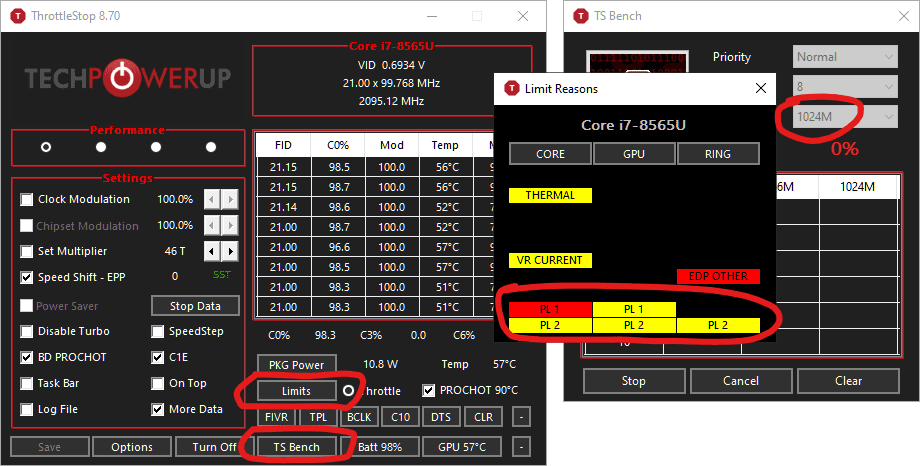
Seeing that it climbs up to 85*C (not necessarily a big deal) - it's probably power/frequency throttling to reduce heat. Undervolting could help - but you don't need over 4 Ghz (achievable with turbo boost). The base frequency is only 1.8 GHz - so even the middle ground could suffice - like limiting the max frequency to 3 Ghz. When it comes to laptops (due to having a limited cooling design) - the max potential of a CPU is far from ideal. Yes, it can go that high - but the slowdowns you're experiencing are usually tied to throttling - to safety features which get triggered and lower the wattage and frequency to cool the CPU down. Thus, the slowdowns - from using a CPU at 4.7 GHz that all of a sudden runs at 900 Hz and as the CPU cools - climbs back again - only to do it all over again (rinse and repeated). Which is why - limiting the max frequency - looking for a sweet spot which doesn't trigger any trigger any Throttling - actually translated to a better experience (since the frequencies run stable - not scaling up and down to extremes as it happens when throttling is triggered all the time).

The thing is - modern CPUs (it's still a10th generation i7 CPU - despite of being a limited model to fit its Power Efficient naming) = really potent even at lower frequencies - but the majority don't realize that. Have mine set to 2.6 Ghz - and i can't complain performance wise, yet at this frequency - the fans are silent and the CPU never goes above 62 *C. Do have a cooling pad as well.

You can limit the max frequency using the Windows Power Plan, tho this setting is hidden by default - so here's how to activate it:


After adding it - you just go to your custom power plan and will find it at Processor Power Management - add a value of 3000 Ghz then test it out. See if it still throttles. Easiest way to check that - is by using:

Click on Limits like so...
Limits.png


And the Tab should be completely Black (no Yellow or Red warnings) if not Throttling in any way (since above system is throttling in multiple ways).
 

My Computer My Computer

At a glance

WinDOS 25H2Intel & AMDSO-DIMM SK Hynix 15.8 GB Dual-Channel DDR4-26...nVidia RTX 2060 6GB Mobile GPU (TU106M)
OS
WinDOS 25H2
Computer type
Laptop
CPU
Intel & AMD
Memory
SO-DIMM SK Hynix 15.8 GB Dual-Channel DDR4-2666 (2 x 8 GB) 1329MHz (19-19-19-43)
Graphics Card(s)
nVidia RTX 2060 6GB Mobile GPU (TU106M)
Sound Card
Onbord Realtek ALC1220
Screen Resolution
1920 x 1080
Hard Drives
1x Samsung PM981 NVMe PCIe M.2 512GB / 1x Seagate Expansion ST1000LM035 1TB
Going forward, I suggest you download a little app named Core Temp. It runs in your system tray showing you the core with the highest temp. You can hover on the temp in the system tray to see a reading of all cores or you can right click on the temp in the system tray to open the app. See screenshot Core Temp
I have Core Temp in the tray but I also use it with its Core Temp Gadget. Note I use 8GadgetPack to use gadgets in Windows 10 and 11.

CoreTempGadget.jpg
 

My Computers My Computers

  • At a glance

    Windows 11 Pro 25H2 (26200.6901)AMD Ryzen 7 6800H with Radeon 680M GPU (486MB...Crucial DDR5-4800 (2400MHz) 32GB (2 x 16GB)NVIDIA RTX 3060 Laptop (6GB RAM)
    OS
    Windows 11 Pro 25H2 (26200.6901)
    Computer type
    Laptop
    Manufacturer/Model
    ASUS TUF Gaming A15 (2022)
    CPU
    AMD Ryzen 7 6800H with Radeon 680M GPU (486MB RAM)
    Memory
    Crucial DDR5-4800 (2400MHz) 32GB (2 x 16GB)
    Graphics Card(s)
    NVIDIA RTX 3060 Laptop (6GB RAM)
    Sound Card
    n/a
    Monitor(s) Displays
    15.6-inch
    Screen Resolution
    1920x1080 300Hz
    Hard Drives
    2 x Samsung 990 Evo Plus (2TB M.2 NVME SSD)
    PSU
    n/a
    Mouse
    Wireless Mouse M510
    Internet Speed
    2100Mbps/300Mbps
    Browser
    Firefox
    Antivirus
    Malwarebytes
  • At a glance

    Windows 11 Pro 25H2 (26200.8246)AMD Ryzen 7 5700X3DG.SKILL Flare X 32GB (2x16GB) DDR4ASUS ROG-STRIX-RTX3060TI-08G-V2-GAMING (RTX 3...
    Operating System
    Windows 11 Pro 25H2 (26200.8246)
    Computer type
    PC/Desktop
    Manufacturer/Model
    Custom build
    CPU
    AMD Ryzen 7 5700X3D
    Motherboard
    ASUS ROG Strix B550-F Gaming WiFi II
    Memory
    G.SKILL Flare X 32GB (2x16GB) DDR4
    Graphics card(s)
    ASUS ROG-STRIX-RTX3060TI-08G-V2-GAMING (RTX 3060-Ti, 8GB RAM)
    Monitor(s) Displays
    Samsung G50D IPS 27"
    Screen Resolution
    1440p/180Hz
    Hard Drives
    SAMSUNG 990 EVO Plus (2TB] M.2 NVME SSD
    SAMSUNG 990 EVO Plus (4TB) M.2 NVME SSD
    PSU
    Corsair RM750x (750 watts)
    Case
    Cooler Master MasterCase 5
    Cooling
    Scythe Mugen 6
    Keyboard
    Logitech K520 (MK540 keyboard/mouse combo)
    Mouse
    Logitech M310 (MK540 keyboard/mouse combo)
    Internet Speed
    2100 Mbps down / 300 Mbps up
    Browser
    Firefox, Edge, Chrome
    Antivirus
    Malwarebytes (Premium)
    Other Info
    ASUS Blu-ray Burner BW-16D1HT (SATA) || Western Digital Easystore 20TB USB 3.0 external hard drive used with Acronis True Image 2025 backup software || HP OfficeJet Pro 6975 Printer/Scanner
Thanks neves I will have a look at doing that but I have found that using the default power plan rather than the high-power setting keeps the temps within a sensible range averaging around 60C.
 

My Computers My Computers

  • At a glance

    Windows 11 Pro 23H2 (OS Build 22631.4169) Des...i7 -10510U / Intel i5 3750KSamsung 16GB DDR4 2666 MHz & G-Skill 16GB DDR...On board Intel CPU graphics & Nvidia GeForce ...
    OS
    Windows 11 Pro 23H2 (OS Build 22631.4169) Desktop (OS Build 22621.4317)
    Computer type
    Laptop
    Manufacturer/Model
    Asus Vivo notebook X712FA or Desktop Ivy Bridge build
    CPU
    i7 -10510U / Intel i5 3750K
    Motherboard
    Asus generic & Asus P8Z77-V
    Memory
    Samsung 16GB DDR4 2666 MHz & G-Skill 16GB DDR3 2134MHz
    Graphics Card(s)
    On board Intel CPU graphics & Nvidia GeForce GTX 1050Ti
    Sound Card
    Laptop onboard & Xonar DSX Card
    Monitor(s) Displays
    Generic & Samsung 27" SAM0C4C
    Hard Drives
    Samsung 970 Pro NMe & Samsung 870 EVO 500GB
    PSU
    N/A
    Case
    N/A
    Cooling
    Asus in built
    Keyboard
    Generic
    Mouse
    Logitec Wireless
    Internet Speed
    50Mbs max allowance - occasionally up to 75Mbs
    Browser
    Brave
    Antivirus
    ESET Ultimate Security on both
    Other Info
    Desktop running Windows11 Pro with unsupported hardware fix
  • At a glance

    Windows 11 Pro OS build 22000.376i53750K16GB DDR3 @ 2133MHzAsus GTX 650TI
    Operating System
    Windows 11 Pro OS build 22000.376
    Computer type
    PC/Desktop
    Manufacturer/Model
    Home build
    CPU
    i53750K
    Motherboard
    Asus P8Z77-V
    Memory
    16GB DDR3 @ 2133MHz
    Graphics card(s)
    Asus GTX 650TI
    Sound Card
    Asus Xonar DSX
    Monitor(s) Displays
    Samsung 4K
    Screen Resolution
    3840x2160
    Hard Drives
    Samsung EVO 970
    PSU
    Corsair HX1100
    Case
    Coolermaster HAF -M
    Cooling
    Liquid
    Keyboard
    Microsoft Sidewinder 6
    Mouse
    Logitec
    Internet Speed
    50Mbs
    Browser
    Edge
    Antivirus
    Only Windows at the moment
Back
Top Bottom