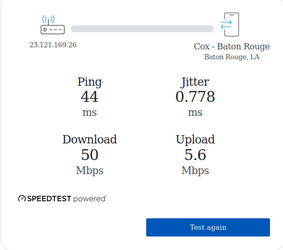
Last one to post wins


Status
Not open for further replies.

My Computers

System One System Two

  • OS
    Windows 11 Pro (x64) 25H2 26200.6901
    Computer type
    PC/Desktop
    Manufacturer/Model
    Custom Made
    CPU
    Intel Core i9-14900KS @5.9MHz
    Motherboard
    ASUS ROG Maximus Apex Z790
    Memory
    G.Skill DDR5 - 8200 - F5-8200J4052F24GX2-TZ5RK 24GBx2
    Graphics Card(s)
    ASUS ROG Strix GeForce RTX 4090 OC Edition
    Sound Card
    Integrated ROG SupremeFX
    Monitor(s) Displays
    ASUS ROG Swift PG279Q 27 inch
    Screen Resolution
    1920x1080@165Hz
    Hard Drives
    Samsung 980 PRO 500GB - M.2 NVMe,
    Samsung 970 EVO SSD 1TB - M.2 NVMe,
    Samsung SSD 860 EVO 1TB,
    WD Black 1TB Performance Hard Drive
    PSU
    EVGA SuperNOVA 1200 P2 80+ PLATINUM
    Case
    Phanteks Enthoo Primo Special Edition
    Cooling
    ASUS ROG Ryujin II 360 RGB all-in-one liquid CPU cooler 360mm Radiator
    Keyboard
    Razer Huntsman Elite
    Mouse
    Logitech MX Master 3 Wireless
    Internet Speed
    950 / 40
    Browser
    FireFox, and Chrome
    Antivirus
    MalwareBytes Pro / Windows Defender
  • Operating System
    Windows 11 Pro (x64) 23H2 22631.2792
    Computer type
    PC/Desktop
    Manufacturer/Model
    Custom Made
    CPU
    Intel Core i9-9900K @5.0GHz
    Motherboard
    ASUS ROG Apex X (Z370)
    Memory
    G.Skill DDR4 F4-3200C14D - 32GBGTZSW
    Graphics card(s)
    EVGA Geforce GTX 2080 Ti FTW3
    Sound Card
    Realtek High Definition Audio
    Monitor(s) Displays
    55" LG 4K Ultra HD TV
    Screen Resolution
    1920x1080@60Hz
    Hard Drives
    Samsung 960 PRO M.2 512GB, Samsung SSD 850 EVO 1TB, WD Black 1TB Performance Desktop Hard Drive
    PSU
    EVGA SuperNOVA 850 G2, 80+ GOLD 850W
    Case
    Phanteks Enthoo Pro Full Tower Chassis
    Cooling
    Corsair H150i PRO RGB AIO Liquid CPU Cooler,360mm
    Keyboard
    Logitech K350 Wireless
    Mouse
    Logitech Wireless Mouse
    Internet Speed
    400 / 20
    Browser
    FireFox / Chrome
    Antivirus
    MalwareBytes Pro / Windows Defender / SAS Pro
Think everything cost more here in the USA right now. :(
 

My Computers

System One System Two

  • OS
    Windows 11 Pro (x64) 25H2 26200.6901
    Computer type
    PC/Desktop
    Manufacturer/Model
    Custom Made
    CPU
    Intel Core i9-14900KS @5.9MHz
    Motherboard
    ASUS ROG Maximus Apex Z790
    Memory
    G.Skill DDR5 - 8200 - F5-8200J4052F24GX2-TZ5RK 24GBx2
    Graphics Card(s)
    ASUS ROG Strix GeForce RTX 4090 OC Edition
    Sound Card
    Integrated ROG SupremeFX
    Monitor(s) Displays
    ASUS ROG Swift PG279Q 27 inch
    Screen Resolution
    1920x1080@165Hz
    Hard Drives
    Samsung 980 PRO 500GB - M.2 NVMe,
    Samsung 970 EVO SSD 1TB - M.2 NVMe,
    Samsung SSD 860 EVO 1TB,
    WD Black 1TB Performance Hard Drive
    PSU
    EVGA SuperNOVA 1200 P2 80+ PLATINUM
    Case
    Phanteks Enthoo Primo Special Edition
    Cooling
    ASUS ROG Ryujin II 360 RGB all-in-one liquid CPU cooler 360mm Radiator
    Keyboard
    Razer Huntsman Elite
    Mouse
    Logitech MX Master 3 Wireless
    Internet Speed
    950 / 40
    Browser
    FireFox, and Chrome
    Antivirus
    MalwareBytes Pro / Windows Defender
  • Operating System
    Windows 11 Pro (x64) 23H2 22631.2792
    Computer type
    PC/Desktop
    Manufacturer/Model
    Custom Made
    CPU
    Intel Core i9-9900K @5.0GHz
    Motherboard
    ASUS ROG Apex X (Z370)
    Memory
    G.Skill DDR4 F4-3200C14D - 32GBGTZSW
    Graphics card(s)
    EVGA Geforce GTX 2080 Ti FTW3
    Sound Card
    Realtek High Definition Audio
    Monitor(s) Displays
    55" LG 4K Ultra HD TV
    Screen Resolution
    1920x1080@60Hz
    Hard Drives
    Samsung 960 PRO M.2 512GB, Samsung SSD 850 EVO 1TB, WD Black 1TB Performance Desktop Hard Drive
    PSU
    EVGA SuperNOVA 850 G2, 80+ GOLD 850W
    Case
    Phanteks Enthoo Pro Full Tower Chassis
    Cooling
    Corsair H150i PRO RGB AIO Liquid CPU Cooler,360mm
    Keyboard
    Logitech K350 Wireless
    Mouse
    Logitech Wireless Mouse
    Internet Speed
    400 / 20
    Browser
    FireFox / Chrome
    Antivirus
    MalwareBytes Pro / Windows Defender / SAS Pro

My Computers

System One System Two

  • OS
    Windows 11 Home
    Computer type
    Laptop
    Manufacturer/Model
    Acer Aspire 3 A315-23-R9VY
    CPU
    AMD Athlon Silver 3050U
    Memory
    8GB
    Graphics Card(s)
    Radeon Graphics
    Monitor(s) Displays
    laptop screen
    Screen Resolution
    1366x768 native resolution, up to 2560x1440 with Radeon Virtual Super Resolution
    Hard Drives
    1TB Samsung EVO 870 SSD (from April 2026: 250GB EVO 850)
    Internet Speed
    150 Mbps
    Browser
    Edge, Firefox
    Antivirus
    Defender
    Other Info
    fully 'Windows 11 ready' laptop. Windows 10 C: partition migrated from my old unsupported 'main machine' then upgraded to 11. A test migration ran Insider builds for 2 months. When 11 was released on 5th October 2021 it was re-imaged back to 10 and was offered the upgrade in Windows Update on 20th October. Windows Update offered the 22H2 Feature Update on 20th September 2022. It got the 23H2 Feature Update on 4th November 2023 through Windows Update, 24H2 on 3rd October 2024 through Windows Update by setting the Target Release Version for 24H2, and 25H2 on 30th September 2025 through Windows Update by setting the Target Release Version for 25H2.

    UPDATE - 11 April 2026: due to mechanical deterioration this PC has been retired from active duty. The OS with all software and files has been migrated to my System Seven below to carry on as my general purpose 'main machine'.

    My SYSTEM THREE is a Dell Latitude 5410, i7-10610U, 32GB RAM, 512GB NVMe ssd, supported device running Windows 11 Pro.

    My SYSTEM FOUR is a 2-in-1 convertible Lenovo Yoga 11e 20DA, Celeron N2930, 8GB RAM, 256GB ssd. Unsupported device: currently running Win10 Pro, plus Win11 Pro RTM and Insider Dev, Beta, and RP 24H2 as native boot vhdx.

    My SYSTEM FIVE is a Dell Latitude 3190 2-in-1, Pentium Silver N5030, 8GB RAM, 1TB NVMe ssd, supported device running Windows 11 Pro, plus Insider Beta, Dev, and Canary builds (and a few others) as a native boot .vhdx.

    My SYSTEM SIX is a Dell Latitude 5550, Core Ultra 7 165H, 64GB RAM, 1TB NVMe SSD, supported device, Windows 11 Pro 24H2, Hyper-V host machine. Updated to 25H2 on 30th September 2025.

    My SYSTEM SEVEN is a Lenovo Thinkpad T580, Intel Core i7-8650U, 16GB RAM, 512GB NVMe SSD + 2nd 512GB NVMe SSD, a supported device for Windows 11. This is my current general purpose 'main machine'. The installed Windows 11 Home from my System One has been migrated to this machine.
  • Operating System
    Windows 11 Pro
    Computer type
    Laptop
    Manufacturer/Model
    Dell Latitude E4310
    CPU
    Intel® Core™ i5-520M
    Motherboard
    0T6M8G
    Memory
    8GB
    Graphics card(s)
    (integrated graphics) Intel HD Graphics
    Screen Resolution
    1366x768
    Hard Drives
    500GB Crucial MX500 SSD
    Browser
    Firefox, Edge
    Antivirus
    Defender
    Other Info
    unsupported machine: Legacy bios, MBR, TPM 1.2, upgraded from W10 to W11 using W10/W11 hybrid install media workaround. In-place upgrade to 22H2 using ISO and a workaround. Feature Update to 23H2 by manually installing the Enablement Package. In-place upgrade to 24H2 using hybrid 23H2/24H2 install media. Upgraded to 25H2 by Enablement Package. Also running Insider Dev, and Canary builds and Windows 10 as native boot .vhdx.

    My SYSTEM THREE is a Dell Latitude 5410, i7-10610U, 32GB RAM, 512GB NVMe ssd, supported device running Windows 11 Pro.

    My SYSTEM FOUR is a 2-in-1 convertible Lenovo Yoga 11e 20DA, Celeron N2930, 8GB RAM, 256GB ssd. Unsupported device: currently running Win10 Pro, plus Win11 Pro RTM and Insider Dev, Beta, and RP 24H2 as native boot vhdx.

    My SYSTEM FIVE is a Dell Latitude 3190 2-in-1, Pentium Silver N5030, 8GB RAM, 1TB NVMe ssd, supported device running Windows 11 Pro, plus Insider Beta, Dev, and Canary builds (and a few others) as a native boot .vhdx.

    My SYSTEM SIX is a Dell Latitude 5550, Core Ultra 7 165H, 64GB RAM, 1TB NVMe SSD, supported device, Windows 11 Pro 24H2, Hyper-V host machine. Updated to 25H2 on 30th September 2025.

    My SYSTEM SEVEN is a Lenovo Thinkpad T580, Intel Core i7-8650U, 16GB RAM, 512GB NVMe SSD + 2nd 512GB NVMe SSD, a supported device for Windows 11. This is my current general purpose 'main machine'. The installed Windows 11 Home from my System One has been migrated to this machine.
Shame, I was hoping you had something to feel better about there :(
My upload speed is faster than both of you. :-)
 

My Computers

System One System Two

  • OS
    Windows 11 Pro (x64) 25H2 26200.6901
    Computer type
    PC/Desktop
    Manufacturer/Model
    Custom Made
    CPU
    Intel Core i9-14900KS @5.9MHz
    Motherboard
    ASUS ROG Maximus Apex Z790
    Memory
    G.Skill DDR5 - 8200 - F5-8200J4052F24GX2-TZ5RK 24GBx2
    Graphics Card(s)
    ASUS ROG Strix GeForce RTX 4090 OC Edition
    Sound Card
    Integrated ROG SupremeFX
    Monitor(s) Displays
    ASUS ROG Swift PG279Q 27 inch
    Screen Resolution
    1920x1080@165Hz
    Hard Drives
    Samsung 980 PRO 500GB - M.2 NVMe,
    Samsung 970 EVO SSD 1TB - M.2 NVMe,
    Samsung SSD 860 EVO 1TB,
    WD Black 1TB Performance Hard Drive
    PSU
    EVGA SuperNOVA 1200 P2 80+ PLATINUM
    Case
    Phanteks Enthoo Primo Special Edition
    Cooling
    ASUS ROG Ryujin II 360 RGB all-in-one liquid CPU cooler 360mm Radiator
    Keyboard
    Razer Huntsman Elite
    Mouse
    Logitech MX Master 3 Wireless
    Internet Speed
    950 / 40
    Browser
    FireFox, and Chrome
    Antivirus
    MalwareBytes Pro / Windows Defender
  • Operating System
    Windows 11 Pro (x64) 23H2 22631.2792
    Computer type
    PC/Desktop
    Manufacturer/Model
    Custom Made
    CPU
    Intel Core i9-9900K @5.0GHz
    Motherboard
    ASUS ROG Apex X (Z370)
    Memory
    G.Skill DDR4 F4-3200C14D - 32GBGTZSW
    Graphics card(s)
    EVGA Geforce GTX 2080 Ti FTW3
    Sound Card
    Realtek High Definition Audio
    Monitor(s) Displays
    55" LG 4K Ultra HD TV
    Screen Resolution
    1920x1080@60Hz
    Hard Drives
    Samsung 960 PRO M.2 512GB, Samsung SSD 850 EVO 1TB, WD Black 1TB Performance Desktop Hard Drive
    PSU
    EVGA SuperNOVA 850 G2, 80+ GOLD 850W
    Case
    Phanteks Enthoo Pro Full Tower Chassis
    Cooling
    Corsair H150i PRO RGB AIO Liquid CPU Cooler,360mm
    Keyboard
    Logitech K350 Wireless
    Mouse
    Logitech Wireless Mouse
    Internet Speed
    400 / 20
    Browser
    FireFox / Chrome
    Antivirus
    MalwareBytes Pro / Windows Defender / SAS Pro

My Computers

System One System Two

  • OS
    Windows 11 Home
    Computer type
    Laptop
    Manufacturer/Model
    Acer Aspire 3 A315-23-R9VY
    CPU
    AMD Athlon Silver 3050U
    Memory
    8GB
    Graphics Card(s)
    Radeon Graphics
    Monitor(s) Displays
    laptop screen
    Screen Resolution
    1366x768 native resolution, up to 2560x1440 with Radeon Virtual Super Resolution
    Hard Drives
    1TB Samsung EVO 870 SSD (from April 2026: 250GB EVO 850)
    Internet Speed
    150 Mbps
    Browser
    Edge, Firefox
    Antivirus
    Defender
    Other Info
    fully 'Windows 11 ready' laptop. Windows 10 C: partition migrated from my old unsupported 'main machine' then upgraded to 11. A test migration ran Insider builds for 2 months. When 11 was released on 5th October 2021 it was re-imaged back to 10 and was offered the upgrade in Windows Update on 20th October. Windows Update offered the 22H2 Feature Update on 20th September 2022. It got the 23H2 Feature Update on 4th November 2023 through Windows Update, 24H2 on 3rd October 2024 through Windows Update by setting the Target Release Version for 24H2, and 25H2 on 30th September 2025 through Windows Update by setting the Target Release Version for 25H2.

    UPDATE - 11 April 2026: due to mechanical deterioration this PC has been retired from active duty. The OS with all software and files has been migrated to my System Seven below to carry on as my general purpose 'main machine'.

    My SYSTEM THREE is a Dell Latitude 5410, i7-10610U, 32GB RAM, 512GB NVMe ssd, supported device running Windows 11 Pro.

    My SYSTEM FOUR is a 2-in-1 convertible Lenovo Yoga 11e 20DA, Celeron N2930, 8GB RAM, 256GB ssd. Unsupported device: currently running Win10 Pro, plus Win11 Pro RTM and Insider Dev, Beta, and RP 24H2 as native boot vhdx.

    My SYSTEM FIVE is a Dell Latitude 3190 2-in-1, Pentium Silver N5030, 8GB RAM, 1TB NVMe ssd, supported device running Windows 11 Pro, plus Insider Beta, Dev, and Canary builds (and a few others) as a native boot .vhdx.

    My SYSTEM SIX is a Dell Latitude 5550, Core Ultra 7 165H, 64GB RAM, 1TB NVMe SSD, supported device, Windows 11 Pro 24H2, Hyper-V host machine. Updated to 25H2 on 30th September 2025.

    My SYSTEM SEVEN is a Lenovo Thinkpad T580, Intel Core i7-8650U, 16GB RAM, 512GB NVMe SSD + 2nd 512GB NVMe SSD, a supported device for Windows 11. This is my current general purpose 'main machine'. The installed Windows 11 Home from my System One has been migrated to this machine.
  • Operating System
    Windows 11 Pro
    Computer type
    Laptop
    Manufacturer/Model
    Dell Latitude E4310
    CPU
    Intel® Core™ i5-520M
    Motherboard
    0T6M8G
    Memory
    8GB
    Graphics card(s)
    (integrated graphics) Intel HD Graphics
    Screen Resolution
    1366x768
    Hard Drives
    500GB Crucial MX500 SSD
    Browser
    Firefox, Edge
    Antivirus
    Defender
    Other Info
    unsupported machine: Legacy bios, MBR, TPM 1.2, upgraded from W10 to W11 using W10/W11 hybrid install media workaround. In-place upgrade to 22H2 using ISO and a workaround. Feature Update to 23H2 by manually installing the Enablement Package. In-place upgrade to 24H2 using hybrid 23H2/24H2 install media. Upgraded to 25H2 by Enablement Package. Also running Insider Dev, and Canary builds and Windows 10 as native boot .vhdx.

    My SYSTEM THREE is a Dell Latitude 5410, i7-10610U, 32GB RAM, 512GB NVMe ssd, supported device running Windows 11 Pro.

    My SYSTEM FOUR is a 2-in-1 convertible Lenovo Yoga 11e 20DA, Celeron N2930, 8GB RAM, 256GB ssd. Unsupported device: currently running Win10 Pro, plus Win11 Pro RTM and Insider Dev, Beta, and RP 24H2 as native boot vhdx.

    My SYSTEM FIVE is a Dell Latitude 3190 2-in-1, Pentium Silver N5030, 8GB RAM, 1TB NVMe ssd, supported device running Windows 11 Pro, plus Insider Beta, Dev, and Canary builds (and a few others) as a native boot .vhdx.

    My SYSTEM SIX is a Dell Latitude 5550, Core Ultra 7 165H, 64GB RAM, 1TB NVMe SSD, supported device, Windows 11 Pro 24H2, Hyper-V host machine. Updated to 25H2 on 30th September 2025.

    My SYSTEM SEVEN is a Lenovo Thinkpad T580, Intel Core i7-8650U, 16GB RAM, 512GB NVMe SSD + 2nd 512GB NVMe SSD, a supported device for Windows 11. This is my current general purpose 'main machine'. The installed Windows 11 Home from my System One has been migrated to this machine.
My upload speed is faster than both of you. :-)
Well there you are then - something to feel good about.....

....hmmm, how often exactly do you upload stuff? :ROFLMAO:
 

My Computers

System One System Two

  • OS
    Windows 11 Home
    Computer type
    Laptop
    Manufacturer/Model
    Acer Aspire 3 A315-23-R9VY
    CPU
    AMD Athlon Silver 3050U
    Memory
    8GB
    Graphics Card(s)
    Radeon Graphics
    Monitor(s) Displays
    laptop screen
    Screen Resolution
    1366x768 native resolution, up to 2560x1440 with Radeon Virtual Super Resolution
    Hard Drives
    1TB Samsung EVO 870 SSD (from April 2026: 250GB EVO 850)
    Internet Speed
    150 Mbps
    Browser
    Edge, Firefox
    Antivirus
    Defender
    Other Info
    fully 'Windows 11 ready' laptop. Windows 10 C: partition migrated from my old unsupported 'main machine' then upgraded to 11. A test migration ran Insider builds for 2 months. When 11 was released on 5th October 2021 it was re-imaged back to 10 and was offered the upgrade in Windows Update on 20th October. Windows Update offered the 22H2 Feature Update on 20th September 2022. It got the 23H2 Feature Update on 4th November 2023 through Windows Update, 24H2 on 3rd October 2024 through Windows Update by setting the Target Release Version for 24H2, and 25H2 on 30th September 2025 through Windows Update by setting the Target Release Version for 25H2.

    UPDATE - 11 April 2026: due to mechanical deterioration this PC has been retired from active duty. The OS with all software and files has been migrated to my System Seven below to carry on as my general purpose 'main machine'.

    My SYSTEM THREE is a Dell Latitude 5410, i7-10610U, 32GB RAM, 512GB NVMe ssd, supported device running Windows 11 Pro.

    My SYSTEM FOUR is a 2-in-1 convertible Lenovo Yoga 11e 20DA, Celeron N2930, 8GB RAM, 256GB ssd. Unsupported device: currently running Win10 Pro, plus Win11 Pro RTM and Insider Dev, Beta, and RP 24H2 as native boot vhdx.

    My SYSTEM FIVE is a Dell Latitude 3190 2-in-1, Pentium Silver N5030, 8GB RAM, 1TB NVMe ssd, supported device running Windows 11 Pro, plus Insider Beta, Dev, and Canary builds (and a few others) as a native boot .vhdx.

    My SYSTEM SIX is a Dell Latitude 5550, Core Ultra 7 165H, 64GB RAM, 1TB NVMe SSD, supported device, Windows 11 Pro 24H2, Hyper-V host machine. Updated to 25H2 on 30th September 2025.

    My SYSTEM SEVEN is a Lenovo Thinkpad T580, Intel Core i7-8650U, 16GB RAM, 512GB NVMe SSD + 2nd 512GB NVMe SSD, a supported device for Windows 11. This is my current general purpose 'main machine'. The installed Windows 11 Home from my System One has been migrated to this machine.
  • Operating System
    Windows 11 Pro
    Computer type
    Laptop
    Manufacturer/Model
    Dell Latitude E4310
    CPU
    Intel® Core™ i5-520M
    Motherboard
    0T6M8G
    Memory
    8GB
    Graphics card(s)
    (integrated graphics) Intel HD Graphics
    Screen Resolution
    1366x768
    Hard Drives
    500GB Crucial MX500 SSD
    Browser
    Firefox, Edge
    Antivirus
    Defender
    Other Info
    unsupported machine: Legacy bios, MBR, TPM 1.2, upgraded from W10 to W11 using W10/W11 hybrid install media workaround. In-place upgrade to 22H2 using ISO and a workaround. Feature Update to 23H2 by manually installing the Enablement Package. In-place upgrade to 24H2 using hybrid 23H2/24H2 install media. Upgraded to 25H2 by Enablement Package. Also running Insider Dev, and Canary builds and Windows 10 as native boot .vhdx.

    My SYSTEM THREE is a Dell Latitude 5410, i7-10610U, 32GB RAM, 512GB NVMe ssd, supported device running Windows 11 Pro.

    My SYSTEM FOUR is a 2-in-1 convertible Lenovo Yoga 11e 20DA, Celeron N2930, 8GB RAM, 256GB ssd. Unsupported device: currently running Win10 Pro, plus Win11 Pro RTM and Insider Dev, Beta, and RP 24H2 as native boot vhdx.

    My SYSTEM FIVE is a Dell Latitude 3190 2-in-1, Pentium Silver N5030, 8GB RAM, 1TB NVMe ssd, supported device running Windows 11 Pro, plus Insider Beta, Dev, and Canary builds (and a few others) as a native boot .vhdx.

    My SYSTEM SIX is a Dell Latitude 5550, Core Ultra 7 165H, 64GB RAM, 1TB NVMe SSD, supported device, Windows 11 Pro 24H2, Hyper-V host machine. Updated to 25H2 on 30th September 2025.

    My SYSTEM SEVEN is a Lenovo Thinkpad T580, Intel Core i7-8650U, 16GB RAM, 512GB NVMe SSD + 2nd 512GB NVMe SSD, a supported device for Windows 11. This is my current general purpose 'main machine'. The installed Windows 11 Home from my System One has been migrated to this machine.
Well there you are then - something to feel good about.....

....hmmm, how often exactly do you upload stuff? :ROFLMAO:
Ahhh ....not very often .... Brat. :ROFLMAO:
 

My Computers

System One System Two

  • OS
    Windows 11 Pro (x64) 25H2 26200.6901
    Computer type
    PC/Desktop
    Manufacturer/Model
    Custom Made
    CPU
    Intel Core i9-14900KS @5.9MHz
    Motherboard
    ASUS ROG Maximus Apex Z790
    Memory
    G.Skill DDR5 - 8200 - F5-8200J4052F24GX2-TZ5RK 24GBx2
    Graphics Card(s)
    ASUS ROG Strix GeForce RTX 4090 OC Edition
    Sound Card
    Integrated ROG SupremeFX
    Monitor(s) Displays
    ASUS ROG Swift PG279Q 27 inch
    Screen Resolution
    1920x1080@165Hz
    Hard Drives
    Samsung 980 PRO 500GB - M.2 NVMe,
    Samsung 970 EVO SSD 1TB - M.2 NVMe,
    Samsung SSD 860 EVO 1TB,
    WD Black 1TB Performance Hard Drive
    PSU
    EVGA SuperNOVA 1200 P2 80+ PLATINUM
    Case
    Phanteks Enthoo Primo Special Edition
    Cooling
    ASUS ROG Ryujin II 360 RGB all-in-one liquid CPU cooler 360mm Radiator
    Keyboard
    Razer Huntsman Elite
    Mouse
    Logitech MX Master 3 Wireless
    Internet Speed
    950 / 40
    Browser
    FireFox, and Chrome
    Antivirus
    MalwareBytes Pro / Windows Defender
  • Operating System
    Windows 11 Pro (x64) 23H2 22631.2792
    Computer type
    PC/Desktop
    Manufacturer/Model
    Custom Made
    CPU
    Intel Core i9-9900K @5.0GHz
    Motherboard
    ASUS ROG Apex X (Z370)
    Memory
    G.Skill DDR4 F4-3200C14D - 32GBGTZSW
    Graphics card(s)
    EVGA Geforce GTX 2080 Ti FTW3
    Sound Card
    Realtek High Definition Audio
    Monitor(s) Displays
    55" LG 4K Ultra HD TV
    Screen Resolution
    1920x1080@60Hz
    Hard Drives
    Samsung 960 PRO M.2 512GB, Samsung SSD 850 EVO 1TB, WD Black 1TB Performance Desktop Hard Drive
    PSU
    EVGA SuperNOVA 850 G2, 80+ GOLD 850W
    Case
    Phanteks Enthoo Pro Full Tower Chassis
    Cooling
    Corsair H150i PRO RGB AIO Liquid CPU Cooler,360mm
    Keyboard
    Logitech K350 Wireless
    Mouse
    Logitech Wireless Mouse
    Internet Speed
    400 / 20
    Browser
    FireFox / Chrome
    Antivirus
    MalwareBytes Pro / Windows Defender / SAS Pro
looks like everybody has me beat on speed.LOL

Screenshot from 2022-08-18 18-30-49.png
But for $ 38 a month I am not complaining.
 

My Computer

System One

  • OS
    Mint 22.1
    Computer type
    PC/Desktop
    Manufacturer/Model
    home built
    CPU
    AMD Ryzen 7 2700X
    Motherboard
    ASUS tuf b450m mATX
    Memory
    32 GB DDR4 3000Mhz
    Graphics Card(s)
    ASUS geforce gtx 1050 4gb mem
    Monitor(s) Displays
    LG ultra wide
    Screen Resolution
    2560-1080
Well, I've just had a very productive evening while we've been chatting, debloating my Hyper-V host machine. :thumbsup:

I ran up all 7 of my Windows 10/11/insider VMs cleaning up each one. Then I deleted no longer needed checkpoints and defragged/compacted each of their .vhdx files in turn.

Worked better than I had dared dream it would. Without loosing or uninstalling anything I have just freed up more than 50GB 🥳

With that I can go to bed happy and get a really good night's sleep :sleepy:

Good night all.
 

My Computers

System One System Two

  • OS
    Windows 11 Home
    Computer type
    Laptop
    Manufacturer/Model
    Acer Aspire 3 A315-23-R9VY
    CPU
    AMD Athlon Silver 3050U
    Memory
    8GB
    Graphics Card(s)
    Radeon Graphics
    Monitor(s) Displays
    laptop screen
    Screen Resolution
    1366x768 native resolution, up to 2560x1440 with Radeon Virtual Super Resolution
    Hard Drives
    1TB Samsung EVO 870 SSD (from April 2026: 250GB EVO 850)
    Internet Speed
    150 Mbps
    Browser
    Edge, Firefox
    Antivirus
    Defender
    Other Info
    fully 'Windows 11 ready' laptop. Windows 10 C: partition migrated from my old unsupported 'main machine' then upgraded to 11. A test migration ran Insider builds for 2 months. When 11 was released on 5th October 2021 it was re-imaged back to 10 and was offered the upgrade in Windows Update on 20th October. Windows Update offered the 22H2 Feature Update on 20th September 2022. It got the 23H2 Feature Update on 4th November 2023 through Windows Update, 24H2 on 3rd October 2024 through Windows Update by setting the Target Release Version for 24H2, and 25H2 on 30th September 2025 through Windows Update by setting the Target Release Version for 25H2.

    UPDATE - 11 April 2026: due to mechanical deterioration this PC has been retired from active duty. The OS with all software and files has been migrated to my System Seven below to carry on as my general purpose 'main machine'.

    My SYSTEM THREE is a Dell Latitude 5410, i7-10610U, 32GB RAM, 512GB NVMe ssd, supported device running Windows 11 Pro.

    My SYSTEM FOUR is a 2-in-1 convertible Lenovo Yoga 11e 20DA, Celeron N2930, 8GB RAM, 256GB ssd. Unsupported device: currently running Win10 Pro, plus Win11 Pro RTM and Insider Dev, Beta, and RP 24H2 as native boot vhdx.

    My SYSTEM FIVE is a Dell Latitude 3190 2-in-1, Pentium Silver N5030, 8GB RAM, 1TB NVMe ssd, supported device running Windows 11 Pro, plus Insider Beta, Dev, and Canary builds (and a few others) as a native boot .vhdx.

    My SYSTEM SIX is a Dell Latitude 5550, Core Ultra 7 165H, 64GB RAM, 1TB NVMe SSD, supported device, Windows 11 Pro 24H2, Hyper-V host machine. Updated to 25H2 on 30th September 2025.

    My SYSTEM SEVEN is a Lenovo Thinkpad T580, Intel Core i7-8650U, 16GB RAM, 512GB NVMe SSD + 2nd 512GB NVMe SSD, a supported device for Windows 11. This is my current general purpose 'main machine'. The installed Windows 11 Home from my System One has been migrated to this machine.
  • Operating System
    Windows 11 Pro
    Computer type
    Laptop
    Manufacturer/Model
    Dell Latitude E4310
    CPU
    Intel® Core™ i5-520M
    Motherboard
    0T6M8G
    Memory
    8GB
    Graphics card(s)
    (integrated graphics) Intel HD Graphics
    Screen Resolution
    1366x768
    Hard Drives
    500GB Crucial MX500 SSD
    Browser
    Firefox, Edge
    Antivirus
    Defender
    Other Info
    unsupported machine: Legacy bios, MBR, TPM 1.2, upgraded from W10 to W11 using W10/W11 hybrid install media workaround. In-place upgrade to 22H2 using ISO and a workaround. Feature Update to 23H2 by manually installing the Enablement Package. In-place upgrade to 24H2 using hybrid 23H2/24H2 install media. Upgraded to 25H2 by Enablement Package. Also running Insider Dev, and Canary builds and Windows 10 as native boot .vhdx.

    My SYSTEM THREE is a Dell Latitude 5410, i7-10610U, 32GB RAM, 512GB NVMe ssd, supported device running Windows 11 Pro.

    My SYSTEM FOUR is a 2-in-1 convertible Lenovo Yoga 11e 20DA, Celeron N2930, 8GB RAM, 256GB ssd. Unsupported device: currently running Win10 Pro, plus Win11 Pro RTM and Insider Dev, Beta, and RP 24H2 as native boot vhdx.

    My SYSTEM FIVE is a Dell Latitude 3190 2-in-1, Pentium Silver N5030, 8GB RAM, 1TB NVMe ssd, supported device running Windows 11 Pro, plus Insider Beta, Dev, and Canary builds (and a few others) as a native boot .vhdx.

    My SYSTEM SIX is a Dell Latitude 5550, Core Ultra 7 165H, 64GB RAM, 1TB NVMe SSD, supported device, Windows 11 Pro 24H2, Hyper-V host machine. Updated to 25H2 on 30th September 2025.

    My SYSTEM SEVEN is a Lenovo Thinkpad T580, Intel Core i7-8650U, 16GB RAM, 512GB NVMe SSD + 2nd 512GB NVMe SSD, a supported device for Windows 11. This is my current general purpose 'main machine'. The installed Windows 11 Home from my System One has been migrated to this machine.
Well, I've just had a very productive evening while we've been chatting, debloating my Hyper-V host machine. :thumbsup:

I ran up all 7 of my Windows 10/11/insider VMs cleaning up each one. Then I deleted no longer needed checkpoints and defragged/compacted each of their .vhdx files in turn.

Worked better than I had dared dream it would. Without loosing or uninstalling anything I have just freed up more than 50GB 🥳

With that I can go to bed happy and get a really good night's sleep :sleepy:

Good night all.
It's the same with VBox they can bloat very quickly and checkpoints are the worst culprits.
 

My Computer

System One

  • OS
    Windows 10 version 22H2 and W11 Dev.
    Computer type
    Laptop
    Manufacturer/Model
    HP
    CPU
    i7 7500U
    Motherboard
    HP
    Memory
    8GB
    Graphics Card(s)
    NVIDIA Geforce 940MX
    Screen Resolution
    1920x1080
    Hard Drives
    Internal 256GB Samsung SSD plus UB3/2 attached 500GB Samsung SSD, 256GB WD SSD, 3TB WD HDD, 2TB WD HDD. 1.5TB Samsung HDD, and 7GB Network storage
    Mouse
    Logitech M705
    Internet Speed
    200Mb/sec
    Browser
    Chrome, FF, Opera, Edgium.
    Antivirus
    MS Defender, Malwarebytes
It's the same with VBox they can bloat very quickly and checkpoints are the worst culprits.
Morning Keith

It's not so much the checkpoints, they can come in handy to 'freeze' a freshly slimmed down .vhdx and confine any growth to the associated .vhdxa differencing disk. If there is nothing much I need to keep I can slim down the VM just by applying the checkpoint.

No, the real hog is when I do need to keep the changes, like after a Wndows VM has had a CU, or an Insider build has had a feature update. An expanding .vhdx is very good at expanding, but it doesn't shrink after the VM has had its post-update clean up. for that I have to defrag the VM's virtual drive, then compact its vhdx.

The Insider Dev/Beta/Release VM's in particular had accumulated multiple checkpoints for their previous builds, all those could go now that I'm happy their current build is stable enough.

I generally don't worry about them growing until just before the host's montlhy system image, then I have a clean up. But I had recently had a major upgrade in my Linux Mint VM to bring it up to 21 'Vanessa' that had really eaten up a lot of space. A really thorough clean up was necessary. By the time I was done the host machine was actually some 5GB smaller than it was at last months system image!
 

My Computers

System One System Two

  • OS
    Windows 11 Home
    Computer type
    Laptop
    Manufacturer/Model
    Acer Aspire 3 A315-23-R9VY
    CPU
    AMD Athlon Silver 3050U
    Memory
    8GB
    Graphics Card(s)
    Radeon Graphics
    Monitor(s) Displays
    laptop screen
    Screen Resolution
    1366x768 native resolution, up to 2560x1440 with Radeon Virtual Super Resolution
    Hard Drives
    1TB Samsung EVO 870 SSD (from April 2026: 250GB EVO 850)
    Internet Speed
    150 Mbps
    Browser
    Edge, Firefox
    Antivirus
    Defender
    Other Info
    fully 'Windows 11 ready' laptop. Windows 10 C: partition migrated from my old unsupported 'main machine' then upgraded to 11. A test migration ran Insider builds for 2 months. When 11 was released on 5th October 2021 it was re-imaged back to 10 and was offered the upgrade in Windows Update on 20th October. Windows Update offered the 22H2 Feature Update on 20th September 2022. It got the 23H2 Feature Update on 4th November 2023 through Windows Update, 24H2 on 3rd October 2024 through Windows Update by setting the Target Release Version for 24H2, and 25H2 on 30th September 2025 through Windows Update by setting the Target Release Version for 25H2.

    UPDATE - 11 April 2026: due to mechanical deterioration this PC has been retired from active duty. The OS with all software and files has been migrated to my System Seven below to carry on as my general purpose 'main machine'.

    My SYSTEM THREE is a Dell Latitude 5410, i7-10610U, 32GB RAM, 512GB NVMe ssd, supported device running Windows 11 Pro.

    My SYSTEM FOUR is a 2-in-1 convertible Lenovo Yoga 11e 20DA, Celeron N2930, 8GB RAM, 256GB ssd. Unsupported device: currently running Win10 Pro, plus Win11 Pro RTM and Insider Dev, Beta, and RP 24H2 as native boot vhdx.

    My SYSTEM FIVE is a Dell Latitude 3190 2-in-1, Pentium Silver N5030, 8GB RAM, 1TB NVMe ssd, supported device running Windows 11 Pro, plus Insider Beta, Dev, and Canary builds (and a few others) as a native boot .vhdx.

    My SYSTEM SIX is a Dell Latitude 5550, Core Ultra 7 165H, 64GB RAM, 1TB NVMe SSD, supported device, Windows 11 Pro 24H2, Hyper-V host machine. Updated to 25H2 on 30th September 2025.

    My SYSTEM SEVEN is a Lenovo Thinkpad T580, Intel Core i7-8650U, 16GB RAM, 512GB NVMe SSD + 2nd 512GB NVMe SSD, a supported device for Windows 11. This is my current general purpose 'main machine'. The installed Windows 11 Home from my System One has been migrated to this machine.
  • Operating System
    Windows 11 Pro
    Computer type
    Laptop
    Manufacturer/Model
    Dell Latitude E4310
    CPU
    Intel® Core™ i5-520M
    Motherboard
    0T6M8G
    Memory
    8GB
    Graphics card(s)
    (integrated graphics) Intel HD Graphics
    Screen Resolution
    1366x768
    Hard Drives
    500GB Crucial MX500 SSD
    Browser
    Firefox, Edge
    Antivirus
    Defender
    Other Info
    unsupported machine: Legacy bios, MBR, TPM 1.2, upgraded from W10 to W11 using W10/W11 hybrid install media workaround. In-place upgrade to 22H2 using ISO and a workaround. Feature Update to 23H2 by manually installing the Enablement Package. In-place upgrade to 24H2 using hybrid 23H2/24H2 install media. Upgraded to 25H2 by Enablement Package. Also running Insider Dev, and Canary builds and Windows 10 as native boot .vhdx.

    My SYSTEM THREE is a Dell Latitude 5410, i7-10610U, 32GB RAM, 512GB NVMe ssd, supported device running Windows 11 Pro.

    My SYSTEM FOUR is a 2-in-1 convertible Lenovo Yoga 11e 20DA, Celeron N2930, 8GB RAM, 256GB ssd. Unsupported device: currently running Win10 Pro, plus Win11 Pro RTM and Insider Dev, Beta, and RP 24H2 as native boot vhdx.

    My SYSTEM FIVE is a Dell Latitude 3190 2-in-1, Pentium Silver N5030, 8GB RAM, 1TB NVMe ssd, supported device running Windows 11 Pro, plus Insider Beta, Dev, and Canary builds (and a few others) as a native boot .vhdx.

    My SYSTEM SIX is a Dell Latitude 5550, Core Ultra 7 165H, 64GB RAM, 1TB NVMe SSD, supported device, Windows 11 Pro 24H2, Hyper-V host machine. Updated to 25H2 on 30th September 2025.

    My SYSTEM SEVEN is a Lenovo Thinkpad T580, Intel Core i7-8650U, 16GB RAM, 512GB NVMe SSD + 2nd 512GB NVMe SSD, a supported device for Windows 11. This is my current general purpose 'main machine'. The installed Windows 11 Home from my System One has been migrated to this machine.
Morning Keith

It's not so much the checkpoints, they can come in handy to 'freeze' a freshly slimmed down .vhdx and confine any growth to the associated .vhdxa differencing disk. If there is nothing much I need to keep I can slim down the VM just by applying the checkpoint.

No, the real hog is when I do need to keep the changes, like after a Wndows VM has had a CU, or an Insider build has had a feature update. An expanding .vhdx is very good at expanding, but it doesn't shrink after the VM has had its post-update clean up. for that I have to defrag the VM's virtual drive, then compact its vhdx.

The Insider Dev/Beta/Release VM's in particular had accumulated multiple checkpoints for their previous builds, all those could go now that I'm happy their current build is stable enough.

I generally don't worry about them growing until just before the host's montlhy system image, then I have a clean up. But I had recently had a major upgrade in my Linux Mint to bring it up to 21 'Vanessa' that had really eaten up a lot of space. A really thorough clean up was necessary. By the time I was done the host machine was actually some 5GB smaller than it was at last months system image!
Morning Bree. I don't use checkpoints any more. I take a copy of the virtual disk with a utility that compresses the disk. From time to time I just swap in the compressed copy to debloat it.
 

My Computer

System One

  • OS
    Windows 10 version 22H2 and W11 Dev.
    Computer type
    Laptop
    Manufacturer/Model
    HP
    CPU
    i7 7500U
    Motherboard
    HP
    Memory
    8GB
    Graphics Card(s)
    NVIDIA Geforce 940MX
    Screen Resolution
    1920x1080
    Hard Drives
    Internal 256GB Samsung SSD plus UB3/2 attached 500GB Samsung SSD, 256GB WD SSD, 3TB WD HDD, 2TB WD HDD. 1.5TB Samsung HDD, and 7GB Network storage
    Mouse
    Logitech M705
    Internet Speed
    200Mb/sec
    Browser
    Chrome, FF, Opera, Edgium.
    Antivirus
    MS Defender, Malwarebytes

My Computers

System One System Two

  • OS
    Windows 11 Home
    Computer type
    Laptop
    Manufacturer/Model
    Acer Aspire 3 A315-23-R9VY
    CPU
    AMD Athlon Silver 3050U
    Memory
    8GB
    Graphics Card(s)
    Radeon Graphics
    Monitor(s) Displays
    laptop screen
    Screen Resolution
    1366x768 native resolution, up to 2560x1440 with Radeon Virtual Super Resolution
    Hard Drives
    1TB Samsung EVO 870 SSD (from April 2026: 250GB EVO 850)
    Internet Speed
    150 Mbps
    Browser
    Edge, Firefox
    Antivirus
    Defender
    Other Info
    fully 'Windows 11 ready' laptop. Windows 10 C: partition migrated from my old unsupported 'main machine' then upgraded to 11. A test migration ran Insider builds for 2 months. When 11 was released on 5th October 2021 it was re-imaged back to 10 and was offered the upgrade in Windows Update on 20th October. Windows Update offered the 22H2 Feature Update on 20th September 2022. It got the 23H2 Feature Update on 4th November 2023 through Windows Update, 24H2 on 3rd October 2024 through Windows Update by setting the Target Release Version for 24H2, and 25H2 on 30th September 2025 through Windows Update by setting the Target Release Version for 25H2.

    UPDATE - 11 April 2026: due to mechanical deterioration this PC has been retired from active duty. The OS with all software and files has been migrated to my System Seven below to carry on as my general purpose 'main machine'.

    My SYSTEM THREE is a Dell Latitude 5410, i7-10610U, 32GB RAM, 512GB NVMe ssd, supported device running Windows 11 Pro.

    My SYSTEM FOUR is a 2-in-1 convertible Lenovo Yoga 11e 20DA, Celeron N2930, 8GB RAM, 256GB ssd. Unsupported device: currently running Win10 Pro, plus Win11 Pro RTM and Insider Dev, Beta, and RP 24H2 as native boot vhdx.

    My SYSTEM FIVE is a Dell Latitude 3190 2-in-1, Pentium Silver N5030, 8GB RAM, 1TB NVMe ssd, supported device running Windows 11 Pro, plus Insider Beta, Dev, and Canary builds (and a few others) as a native boot .vhdx.

    My SYSTEM SIX is a Dell Latitude 5550, Core Ultra 7 165H, 64GB RAM, 1TB NVMe SSD, supported device, Windows 11 Pro 24H2, Hyper-V host machine. Updated to 25H2 on 30th September 2025.

    My SYSTEM SEVEN is a Lenovo Thinkpad T580, Intel Core i7-8650U, 16GB RAM, 512GB NVMe SSD + 2nd 512GB NVMe SSD, a supported device for Windows 11. This is my current general purpose 'main machine'. The installed Windows 11 Home from my System One has been migrated to this machine.
  • Operating System
    Windows 11 Pro
    Computer type
    Laptop
    Manufacturer/Model
    Dell Latitude E4310
    CPU
    Intel® Core™ i5-520M
    Motherboard
    0T6M8G
    Memory
    8GB
    Graphics card(s)
    (integrated graphics) Intel HD Graphics
    Screen Resolution
    1366x768
    Hard Drives
    500GB Crucial MX500 SSD
    Browser
    Firefox, Edge
    Antivirus
    Defender
    Other Info
    unsupported machine: Legacy bios, MBR, TPM 1.2, upgraded from W10 to W11 using W10/W11 hybrid install media workaround. In-place upgrade to 22H2 using ISO and a workaround. Feature Update to 23H2 by manually installing the Enablement Package. In-place upgrade to 24H2 using hybrid 23H2/24H2 install media. Upgraded to 25H2 by Enablement Package. Also running Insider Dev, and Canary builds and Windows 10 as native boot .vhdx.

    My SYSTEM THREE is a Dell Latitude 5410, i7-10610U, 32GB RAM, 512GB NVMe ssd, supported device running Windows 11 Pro.

    My SYSTEM FOUR is a 2-in-1 convertible Lenovo Yoga 11e 20DA, Celeron N2930, 8GB RAM, 256GB ssd. Unsupported device: currently running Win10 Pro, plus Win11 Pro RTM and Insider Dev, Beta, and RP 24H2 as native boot vhdx.

    My SYSTEM FIVE is a Dell Latitude 3190 2-in-1, Pentium Silver N5030, 8GB RAM, 1TB NVMe ssd, supported device running Windows 11 Pro, plus Insider Beta, Dev, and Canary builds (and a few others) as a native boot .vhdx.

    My SYSTEM SIX is a Dell Latitude 5550, Core Ultra 7 165H, 64GB RAM, 1TB NVMe SSD, supported device, Windows 11 Pro 24H2, Hyper-V host machine. Updated to 25H2 on 30th September 2025.

    My SYSTEM SEVEN is a Lenovo Thinkpad T580, Intel Core i7-8650U, 16GB RAM, 512GB NVMe SSD + 2nd 512GB NVMe SSD, a supported device for Windows 11. This is my current general purpose 'main machine'. The installed Windows 11 Home from my System One has been migrated to this machine.

My Computer

System One

  • OS
    Windows 10 version 22H2 and W11 Dev.
    Computer type
    Laptop
    Manufacturer/Model
    HP
    CPU
    i7 7500U
    Motherboard
    HP
    Memory
    8GB
    Graphics Card(s)
    NVIDIA Geforce 940MX
    Screen Resolution
    1920x1080
    Hard Drives
    Internal 256GB Samsung SSD plus UB3/2 attached 500GB Samsung SSD, 256GB WD SSD, 3TB WD HDD, 2TB WD HDD. 1.5TB Samsung HDD, and 7GB Network storage
    Mouse
    Logitech M705
    Internet Speed
    200Mb/sec
    Browser
    Chrome, FF, Opera, Edgium.
    Antivirus
    MS Defender, Malwarebytes

My Computers

System One System Two

  • OS
    Windows 11 Home
    Computer type
    Laptop
    Manufacturer/Model
    Acer Aspire 3 A315-23-R9VY
    CPU
    AMD Athlon Silver 3050U
    Memory
    8GB
    Graphics Card(s)
    Radeon Graphics
    Monitor(s) Displays
    laptop screen
    Screen Resolution
    1366x768 native resolution, up to 2560x1440 with Radeon Virtual Super Resolution
    Hard Drives
    1TB Samsung EVO 870 SSD (from April 2026: 250GB EVO 850)
    Internet Speed
    150 Mbps
    Browser
    Edge, Firefox
    Antivirus
    Defender
    Other Info
    fully 'Windows 11 ready' laptop. Windows 10 C: partition migrated from my old unsupported 'main machine' then upgraded to 11. A test migration ran Insider builds for 2 months. When 11 was released on 5th October 2021 it was re-imaged back to 10 and was offered the upgrade in Windows Update on 20th October. Windows Update offered the 22H2 Feature Update on 20th September 2022. It got the 23H2 Feature Update on 4th November 2023 through Windows Update, 24H2 on 3rd October 2024 through Windows Update by setting the Target Release Version for 24H2, and 25H2 on 30th September 2025 through Windows Update by setting the Target Release Version for 25H2.

    UPDATE - 11 April 2026: due to mechanical deterioration this PC has been retired from active duty. The OS with all software and files has been migrated to my System Seven below to carry on as my general purpose 'main machine'.

    My SYSTEM THREE is a Dell Latitude 5410, i7-10610U, 32GB RAM, 512GB NVMe ssd, supported device running Windows 11 Pro.

    My SYSTEM FOUR is a 2-in-1 convertible Lenovo Yoga 11e 20DA, Celeron N2930, 8GB RAM, 256GB ssd. Unsupported device: currently running Win10 Pro, plus Win11 Pro RTM and Insider Dev, Beta, and RP 24H2 as native boot vhdx.

    My SYSTEM FIVE is a Dell Latitude 3190 2-in-1, Pentium Silver N5030, 8GB RAM, 1TB NVMe ssd, supported device running Windows 11 Pro, plus Insider Beta, Dev, and Canary builds (and a few others) as a native boot .vhdx.

    My SYSTEM SIX is a Dell Latitude 5550, Core Ultra 7 165H, 64GB RAM, 1TB NVMe SSD, supported device, Windows 11 Pro 24H2, Hyper-V host machine. Updated to 25H2 on 30th September 2025.

    My SYSTEM SEVEN is a Lenovo Thinkpad T580, Intel Core i7-8650U, 16GB RAM, 512GB NVMe SSD + 2nd 512GB NVMe SSD, a supported device for Windows 11. This is my current general purpose 'main machine'. The installed Windows 11 Home from my System One has been migrated to this machine.
  • Operating System
    Windows 11 Pro
    Computer type
    Laptop
    Manufacturer/Model
    Dell Latitude E4310
    CPU
    Intel® Core™ i5-520M
    Motherboard
    0T6M8G
    Memory
    8GB
    Graphics card(s)
    (integrated graphics) Intel HD Graphics
    Screen Resolution
    1366x768
    Hard Drives
    500GB Crucial MX500 SSD
    Browser
    Firefox, Edge
    Antivirus
    Defender
    Other Info
    unsupported machine: Legacy bios, MBR, TPM 1.2, upgraded from W10 to W11 using W10/W11 hybrid install media workaround. In-place upgrade to 22H2 using ISO and a workaround. Feature Update to 23H2 by manually installing the Enablement Package. In-place upgrade to 24H2 using hybrid 23H2/24H2 install media. Upgraded to 25H2 by Enablement Package. Also running Insider Dev, and Canary builds and Windows 10 as native boot .vhdx.

    My SYSTEM THREE is a Dell Latitude 5410, i7-10610U, 32GB RAM, 512GB NVMe ssd, supported device running Windows 11 Pro.

    My SYSTEM FOUR is a 2-in-1 convertible Lenovo Yoga 11e 20DA, Celeron N2930, 8GB RAM, 256GB ssd. Unsupported device: currently running Win10 Pro, plus Win11 Pro RTM and Insider Dev, Beta, and RP 24H2 as native boot vhdx.

    My SYSTEM FIVE is a Dell Latitude 3190 2-in-1, Pentium Silver N5030, 8GB RAM, 1TB NVMe ssd, supported device running Windows 11 Pro, plus Insider Beta, Dev, and Canary builds (and a few others) as a native boot .vhdx.

    My SYSTEM SIX is a Dell Latitude 5550, Core Ultra 7 165H, 64GB RAM, 1TB NVMe SSD, supported device, Windows 11 Pro 24H2, Hyper-V host machine. Updated to 25H2 on 30th September 2025.

    My SYSTEM SEVEN is a Lenovo Thinkpad T580, Intel Core i7-8650U, 16GB RAM, 512GB NVMe SSD + 2nd 512GB NVMe SSD, a supported device for Windows 11. This is my current general purpose 'main machine'. The installed Windows 11 Home from my System One has been migrated to this machine.
I'd like to believe the Met Office, who have some night time rain in their forecast for us from about 2:30am to 6:00am.
Well, just checked outside and it appears I did have a little rain overnight as predicted. No more than a couple of mm though - nowhere near enough. Nothing more in the forecast now until Sunday night/Monday morning....
:(
 

My Computers

System One System Two

  • OS
    Windows 11 Home
    Computer type
    Laptop
    Manufacturer/Model
    Acer Aspire 3 A315-23-R9VY
    CPU
    AMD Athlon Silver 3050U
    Memory
    8GB
    Graphics Card(s)
    Radeon Graphics
    Monitor(s) Displays
    laptop screen
    Screen Resolution
    1366x768 native resolution, up to 2560x1440 with Radeon Virtual Super Resolution
    Hard Drives
    1TB Samsung EVO 870 SSD (from April 2026: 250GB EVO 850)
    Internet Speed
    150 Mbps
    Browser
    Edge, Firefox
    Antivirus
    Defender
    Other Info
    fully 'Windows 11 ready' laptop. Windows 10 C: partition migrated from my old unsupported 'main machine' then upgraded to 11. A test migration ran Insider builds for 2 months. When 11 was released on 5th October 2021 it was re-imaged back to 10 and was offered the upgrade in Windows Update on 20th October. Windows Update offered the 22H2 Feature Update on 20th September 2022. It got the 23H2 Feature Update on 4th November 2023 through Windows Update, 24H2 on 3rd October 2024 through Windows Update by setting the Target Release Version for 24H2, and 25H2 on 30th September 2025 through Windows Update by setting the Target Release Version for 25H2.

    UPDATE - 11 April 2026: due to mechanical deterioration this PC has been retired from active duty. The OS with all software and files has been migrated to my System Seven below to carry on as my general purpose 'main machine'.

    My SYSTEM THREE is a Dell Latitude 5410, i7-10610U, 32GB RAM, 512GB NVMe ssd, supported device running Windows 11 Pro.

    My SYSTEM FOUR is a 2-in-1 convertible Lenovo Yoga 11e 20DA, Celeron N2930, 8GB RAM, 256GB ssd. Unsupported device: currently running Win10 Pro, plus Win11 Pro RTM and Insider Dev, Beta, and RP 24H2 as native boot vhdx.

    My SYSTEM FIVE is a Dell Latitude 3190 2-in-1, Pentium Silver N5030, 8GB RAM, 1TB NVMe ssd, supported device running Windows 11 Pro, plus Insider Beta, Dev, and Canary builds (and a few others) as a native boot .vhdx.

    My SYSTEM SIX is a Dell Latitude 5550, Core Ultra 7 165H, 64GB RAM, 1TB NVMe SSD, supported device, Windows 11 Pro 24H2, Hyper-V host machine. Updated to 25H2 on 30th September 2025.

    My SYSTEM SEVEN is a Lenovo Thinkpad T580, Intel Core i7-8650U, 16GB RAM, 512GB NVMe SSD + 2nd 512GB NVMe SSD, a supported device for Windows 11. This is my current general purpose 'main machine'. The installed Windows 11 Home from my System One has been migrated to this machine.
  • Operating System
    Windows 11 Pro
    Computer type
    Laptop
    Manufacturer/Model
    Dell Latitude E4310
    CPU
    Intel® Core™ i5-520M
    Motherboard
    0T6M8G
    Memory
    8GB
    Graphics card(s)
    (integrated graphics) Intel HD Graphics
    Screen Resolution
    1366x768
    Hard Drives
    500GB Crucial MX500 SSD
    Browser
    Firefox, Edge
    Antivirus
    Defender
    Other Info
    unsupported machine: Legacy bios, MBR, TPM 1.2, upgraded from W10 to W11 using W10/W11 hybrid install media workaround. In-place upgrade to 22H2 using ISO and a workaround. Feature Update to 23H2 by manually installing the Enablement Package. In-place upgrade to 24H2 using hybrid 23H2/24H2 install media. Upgraded to 25H2 by Enablement Package. Also running Insider Dev, and Canary builds and Windows 10 as native boot .vhdx.

    My SYSTEM THREE is a Dell Latitude 5410, i7-10610U, 32GB RAM, 512GB NVMe ssd, supported device running Windows 11 Pro.

    My SYSTEM FOUR is a 2-in-1 convertible Lenovo Yoga 11e 20DA, Celeron N2930, 8GB RAM, 256GB ssd. Unsupported device: currently running Win10 Pro, plus Win11 Pro RTM and Insider Dev, Beta, and RP 24H2 as native boot vhdx.

    My SYSTEM FIVE is a Dell Latitude 3190 2-in-1, Pentium Silver N5030, 8GB RAM, 1TB NVMe ssd, supported device running Windows 11 Pro, plus Insider Beta, Dev, and Canary builds (and a few others) as a native boot .vhdx.

    My SYSTEM SIX is a Dell Latitude 5550, Core Ultra 7 165H, 64GB RAM, 1TB NVMe SSD, supported device, Windows 11 Pro 24H2, Hyper-V host machine. Updated to 25H2 on 30th September 2025.

    My SYSTEM SEVEN is a Lenovo Thinkpad T580, Intel Core i7-8650U, 16GB RAM, 512GB NVMe SSD + 2nd 512GB NVMe SSD, a supported device for Windows 11. This is my current general purpose 'main machine'. The installed Windows 11 Home from my System One has been migrated to this machine.
Thanks.
That will help my VBox host machine, not my Hyper-V one though. I wonder if there's an equivalent for Hyper-V?
Never really been into Hyper-V as my host machines have always been Home.
 

My Computer

System One

  • OS
    Windows 10 version 22H2 and W11 Dev.
    Computer type
    Laptop
    Manufacturer/Model
    HP
    CPU
    i7 7500U
    Motherboard
    HP
    Memory
    8GB
    Graphics Card(s)
    NVIDIA Geforce 940MX
    Screen Resolution
    1920x1080
    Hard Drives
    Internal 256GB Samsung SSD plus UB3/2 attached 500GB Samsung SSD, 256GB WD SSD, 3TB WD HDD, 2TB WD HDD. 1.5TB Samsung HDD, and 7GB Network storage
    Mouse
    Logitech M705
    Internet Speed
    200Mb/sec
    Browser
    Chrome, FF, Opera, Edgium.
    Antivirus
    MS Defender, Malwarebytes
Well, just checked outside and it appears I did have a little rain overnight as predicted. No more than a couple of mm though - nowhere near enough. Nothing more in the forecast now until Sunday night/Monday morning....
:(
Yeah, when I poked my head out at 6:00 this morning the pavements were wet.
 

My Computer

System One

  • OS
    Windows 10 version 22H2 and W11 Dev.
    Computer type
    Laptop
    Manufacturer/Model
    HP
    CPU
    i7 7500U
    Motherboard
    HP
    Memory
    8GB
    Graphics Card(s)
    NVIDIA Geforce 940MX
    Screen Resolution
    1920x1080
    Hard Drives
    Internal 256GB Samsung SSD plus UB3/2 attached 500GB Samsung SSD, 256GB WD SSD, 3TB WD HDD, 2TB WD HDD. 1.5TB Samsung HDD, and 7GB Network storage
    Mouse
    Logitech M705
    Internet Speed
    200Mb/sec
    Browser
    Chrome, FF, Opera, Edgium.
    Antivirus
    MS Defender, Malwarebytes
Never really been into Hyper-V as my host machines have always been Home.
I have both, but almost all my VMs are Hyper-V. I first installed VirtualBox on my other host machine in order to test using it with Reflect v8's new support for VBox in viBoot - and it worked well. I have since used it for just one more VM. It's running Windows 95 and Hyper-V refuses to contemplate supporting anything that old :lmao:
 

My Computers

System One System Two

  • OS
    Windows 11 Home
    Computer type
    Laptop
    Manufacturer/Model
    Acer Aspire 3 A315-23-R9VY
    CPU
    AMD Athlon Silver 3050U
    Memory
    8GB
    Graphics Card(s)
    Radeon Graphics
    Monitor(s) Displays
    laptop screen
    Screen Resolution
    1366x768 native resolution, up to 2560x1440 with Radeon Virtual Super Resolution
    Hard Drives
    1TB Samsung EVO 870 SSD (from April 2026: 250GB EVO 850)
    Internet Speed
    150 Mbps
    Browser
    Edge, Firefox
    Antivirus
    Defender
    Other Info
    fully 'Windows 11 ready' laptop. Windows 10 C: partition migrated from my old unsupported 'main machine' then upgraded to 11. A test migration ran Insider builds for 2 months. When 11 was released on 5th October 2021 it was re-imaged back to 10 and was offered the upgrade in Windows Update on 20th October. Windows Update offered the 22H2 Feature Update on 20th September 2022. It got the 23H2 Feature Update on 4th November 2023 through Windows Update, 24H2 on 3rd October 2024 through Windows Update by setting the Target Release Version for 24H2, and 25H2 on 30th September 2025 through Windows Update by setting the Target Release Version for 25H2.

    UPDATE - 11 April 2026: due to mechanical deterioration this PC has been retired from active duty. The OS with all software and files has been migrated to my System Seven below to carry on as my general purpose 'main machine'.

    My SYSTEM THREE is a Dell Latitude 5410, i7-10610U, 32GB RAM, 512GB NVMe ssd, supported device running Windows 11 Pro.

    My SYSTEM FOUR is a 2-in-1 convertible Lenovo Yoga 11e 20DA, Celeron N2930, 8GB RAM, 256GB ssd. Unsupported device: currently running Win10 Pro, plus Win11 Pro RTM and Insider Dev, Beta, and RP 24H2 as native boot vhdx.

    My SYSTEM FIVE is a Dell Latitude 3190 2-in-1, Pentium Silver N5030, 8GB RAM, 1TB NVMe ssd, supported device running Windows 11 Pro, plus Insider Beta, Dev, and Canary builds (and a few others) as a native boot .vhdx.

    My SYSTEM SIX is a Dell Latitude 5550, Core Ultra 7 165H, 64GB RAM, 1TB NVMe SSD, supported device, Windows 11 Pro 24H2, Hyper-V host machine. Updated to 25H2 on 30th September 2025.

    My SYSTEM SEVEN is a Lenovo Thinkpad T580, Intel Core i7-8650U, 16GB RAM, 512GB NVMe SSD + 2nd 512GB NVMe SSD, a supported device for Windows 11. This is my current general purpose 'main machine'. The installed Windows 11 Home from my System One has been migrated to this machine.
  • Operating System
    Windows 11 Pro
    Computer type
    Laptop
    Manufacturer/Model
    Dell Latitude E4310
    CPU
    Intel® Core™ i5-520M
    Motherboard
    0T6M8G
    Memory
    8GB
    Graphics card(s)
    (integrated graphics) Intel HD Graphics
    Screen Resolution
    1366x768
    Hard Drives
    500GB Crucial MX500 SSD
    Browser
    Firefox, Edge
    Antivirus
    Defender
    Other Info
    unsupported machine: Legacy bios, MBR, TPM 1.2, upgraded from W10 to W11 using W10/W11 hybrid install media workaround. In-place upgrade to 22H2 using ISO and a workaround. Feature Update to 23H2 by manually installing the Enablement Package. In-place upgrade to 24H2 using hybrid 23H2/24H2 install media. Upgraded to 25H2 by Enablement Package. Also running Insider Dev, and Canary builds and Windows 10 as native boot .vhdx.

    My SYSTEM THREE is a Dell Latitude 5410, i7-10610U, 32GB RAM, 512GB NVMe ssd, supported device running Windows 11 Pro.

    My SYSTEM FOUR is a 2-in-1 convertible Lenovo Yoga 11e 20DA, Celeron N2930, 8GB RAM, 256GB ssd. Unsupported device: currently running Win10 Pro, plus Win11 Pro RTM and Insider Dev, Beta, and RP 24H2 as native boot vhdx.

    My SYSTEM FIVE is a Dell Latitude 3190 2-in-1, Pentium Silver N5030, 8GB RAM, 1TB NVMe ssd, supported device running Windows 11 Pro, plus Insider Beta, Dev, and Canary builds (and a few others) as a native boot .vhdx.

    My SYSTEM SIX is a Dell Latitude 5550, Core Ultra 7 165H, 64GB RAM, 1TB NVMe SSD, supported device, Windows 11 Pro 24H2, Hyper-V host machine. Updated to 25H2 on 30th September 2025.

    My SYSTEM SEVEN is a Lenovo Thinkpad T580, Intel Core i7-8650U, 16GB RAM, 512GB NVMe SSD + 2nd 512GB NVMe SSD, a supported device for Windows 11. This is my current general purpose 'main machine'. The installed Windows 11 Home from my System One has been migrated to this machine.
I have both, but almost all my VMs are Hyper-V. I first installed VirtualBox on my other host machine in order to test using it with Reflect v8's new support for VBox in viBoot - and it worked well. I have since used it for just one more VM. It's runnig Windows 95 and Hyper-V refuses to contemplate supporting anything that old :lmao:
I tried ViBoot on VBox and it boots ok as far as the login screen then complains that it can't process my Pin so I have to log in with a password. Not very convenient with the extremely complex pw I use for my MS account.
 

My Computer

System One

  • OS
    Windows 10 version 22H2 and W11 Dev.
    Computer type
    Laptop
    Manufacturer/Model
    HP
    CPU
    i7 7500U
    Motherboard
    HP
    Memory
    8GB
    Graphics Card(s)
    NVIDIA Geforce 940MX
    Screen Resolution
    1920x1080
    Hard Drives
    Internal 256GB Samsung SSD plus UB3/2 attached 500GB Samsung SSD, 256GB WD SSD, 3TB WD HDD, 2TB WD HDD. 1.5TB Samsung HDD, and 7GB Network storage
    Mouse
    Logitech M705
    Internet Speed
    200Mb/sec
    Browser
    Chrome, FF, Opera, Edgium.
    Antivirus
    MS Defender, Malwarebytes
Status
Not open for further replies.
Back
Top Bottom