Latest Update(s)
v8.1.8853 - 13th April 2026

This update contains no new fixes.
Release notes: Macrium Reflect Patch Details
v8.1.8631 - 7th August 2025

Release notes: Macrium Reflect Patch Details
Update: The end date for Extended Support has now been revised to 22 Jan 2026, meaning that we may yet see another update for v8.
Update 22 Jan 2026: extended support has been revised again. It now ends on 27 Feb 2026.
Previous Update
v8.1.8595 - 25th June 2025

Release notes: Macrium Reflect Patch Details
1st January 2024. Reflect Free has been retired now, it did not get the update to v8.1. It did however still get security and bug fixes. Now that is has reached end of support it is very unlikely that there will be any more patches, so v8.0.7783 looks like being the final version.
Latest Reflect Free update:
Currently at 1st December attempting to download this update produces an HTTP 403 error.
Update: 2nd December. The server issues have been resolved, the update is now available to download.
v8.0.7783 - 1st December 2023
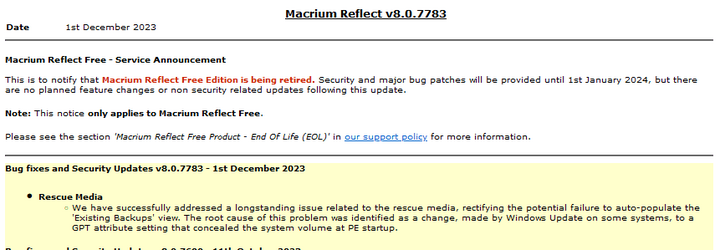
Release notes: Macrium Reflect Patch Details
Previous Reflect Free update:
v8.0.7690 - 11th October 2023
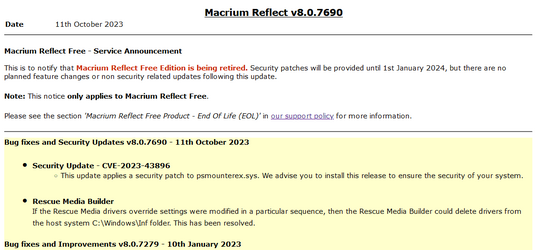
Release notes: Macrium Reflect Patch Details
 www.macrium.com
Reflect v8.1 for purchase or 30-day free trial: Macrium Reflect Free Trial
As of 8th October 2024 this link is now for Reflect X.
Update: at 29th November 2024 v8 is still available as a one time purchase at: https://liveweb2.macrium.com/products/home/
January 2025: this link no longer works.
Update 10 Nov 2023: To download the Trial from their webpage you now need to register with an email address. You can can get the Reflect Home Trial download agent direct from Macrium here:
You can get the Reflect Download Agent (Reflectdlfull.exe) from the link here and use it to download the installer for Reflect Home. If you have purchased Reflect Home then you can install it using your key, otherwise it will install as a 30 day trial.
https://knowledgebase.macrium.com/d...Reflect-DownloadingtheMacriumReflectInstaller
Sept. 2025: The link in the web version of the v8 Knowledge Base now goes to the Reflect X installer. The original link to the v8 installer can still be found in the PDF version (page 68).

Reflect Free v8.0 Download Agent:
Update 08 March 2024: ReflectDLHF.exe was temporarily unavailable from the Macrium's servers. If this happens again you can use the Reflect v8 30-day trial download agent, or the Reflectdlfull.exe. Just rename it to ReflectDLHF.exe to turn it into the the Reflect Free download agent. They are all the same .exe, the name is the only thing that determines its behaviour.
v8.1.8853 - 13th April 2026
This update contains no new fixes.
Release notes: Macrium Reflect Patch Details
v8.1.8631 - 7th August 2025
Release notes: Macrium Reflect Patch Details
Reflect v8 reached the end of Extended Support on 8th October 2025. No further updates are expected after v8.1.8631.
Update: The end date for Extended Support has now been revised to 22 Jan 2026, meaning that we may yet see another update for v8.
Update 22 Jan 2026: extended support has been revised again. It now ends on 27 Feb 2026.
Macrium Product Support PolicyMacrium said:Self-Service Support remains available indefinitely after the Extended Support stage ends. This includes the Knowledge Base, technical documentation, version-specific forum, and other resources to help customers resolve common issues for themselves.
Product Released Extended Support
Start DateExtended Support
End DateReflect X 8 Oct 2024 TBC TBC Reflect 8 18 May 2021 08 Oct 2024 27 Feb 2026
Previous Update
v8.1.8595 - 25th June 2025
Release notes: Macrium Reflect Patch Details
1st January 2024. Reflect Free has been retired now, it did not get the update to v8.1. It did however still get security and bug fixes. Now that is has reached end of support it is very unlikely that there will be any more patches, so v8.0.7783 looks like being the final version.
Latest Reflect Free update:
Update: 2nd December. The server issues have been resolved, the update is now available to download.
v8.0.7783 - 1st December 2023
Release notes: Macrium Reflect Patch Details
Previous Reflect Free update:
v8.0.7690 - 11th October 2023
Release notes: Macrium Reflect Patch Details
Macrium Reflect Free to reach End Of Life.
Macrium Reflect Free Product - End Of Life (EOL)
Macrium Reflect Free v8.0 is the last version to receive feature, compatibility or bug fix updates.
Will future security vulnerabilities be fixed?
Yes, security patches will still be provided until 1st January 2024. After that date we will no longer provide any changes to the v8 Free code base.
Can I continue to use Macrium Reflect Free?
Yes, you can continue to use the software in perpetuity, your license to use the software is unaffected.
Will Macrium Reflect Free have any new features or updates for future Windows versions?
Macrium Reflect Free v8.0 supports Windows XP SP 3.0 up to, and including, Windows 10 & 11 version 22H2. There will be no new features or support for later Windows operating system updates.
Note: This notice only applies to Macrium Reflect Free.
Macrium Product Support Policy
Macrium is pleased to offer three stages of product support. Stage 1: Current Support Stage 2: Extended Support Stage 3: Self-Service Support
www.macrium.com
Downloads:
As of 8th October 2024 this link is now for Reflect X.
January 2025: this link no longer works.
Update 10 Nov 2023: To download the Trial from their webpage you now need to register with an email address. You can can get the Reflect Home Trial download agent direct from Macrium here:
https://updates.macrium.com/reflect/v8/ReflectDLHT.exeYou can get the Reflect Download Agent (Reflectdlfull.exe) from the link here and use it to download the installer for Reflect Home. If you have purchased Reflect Home then you can install it using your key, otherwise it will install as a 30 day trial.
Sept. 2025: The link in the web version of the v8 Knowledge Base now goes to the Reflect X installer. The original link to the v8 installer can still be found in the PDF version (page 68).
At the end of the 30-day trial Reflect Home Trial v8.1 reverts to a RESTORE ONLY version if you decide not to purchase it. You can restore your existing images but not make new ones. If you let a v8 subscription lapse then it also will revert to RESTORE ONLY.
Reflect Free v8.0 Download Agent:
https://updates.macrium.com/reflect/v8/ReflectDLHF.exeUpdate 08 March 2024: ReflectDLHF.exe was temporarily unavailable from the Macrium's servers. If this happens again you can use the Reflect v8 30-day trial download agent, or the Reflectdlfull.exe. Just rename it to ReflectDLHF.exe to turn it into the the Reflect Free download agent. They are all the same .exe, the name is the only thing that determines its behaviour.
Last edited:
My Computers
-
At a glance
Windows 11 HomeAMD Athlon Silver 3050U8GBRadeon Graphics- OS
- Windows 11 Home
- Computer type
- Laptop
- Manufacturer/Model
- Acer Aspire 3 A315-23-R9VY
- CPU
- AMD Athlon Silver 3050U
- Memory
- 8GB
- Graphics Card(s)
- Radeon Graphics
- Monitor(s) Displays
- laptop screen
- Screen Resolution
- 1366x768 native resolution, up to 2560x1440 with Radeon Virtual Super Resolution
- Hard Drives
- 1TB Samsung EVO 870 SSD (from April 2026: 250GB EVO 850)
- Internet Speed
- 150 Mbps
- Browser
- Edge, Firefox
- Antivirus
- Defender
- Other Info
- UPDATE - 11 April 2026: due to lid hinges starting to break up this laptop has been retired from active duty. The OS with all software and files has been migrated to my System Seven in 'Other systems' to carry on as my general purpose 'main machine'.
I've now clean installed 25H2 and used Garlin's scripts to update Secure Boot to CA 2023 and revoke the PCA 2011 certificates. It's new role is to test secure boot issues.
Info for 2021-2026:
fully 'Windows 11 ready' laptop. Windows 10 C: partition migrated from my old unsupported 'main machine' then upgraded to 11. A test migration ran Insider builds for 2 months. When 11 was released on 5th October 2021 it was re-imaged back to 10 and was offered the upgrade in Windows Update on 20th October. Windows Update offered the 22H2 Feature Update on 20th September 2022. It got the 23H2 Feature Update on 4th November 2023 through Windows Update, 24H2 on 3rd October 2024 through Windows Update by setting the Target Release Version for 24H2, and 25H2 on 30th September 2025 through Windows Update by setting the Target Release Version for 25H2.
-
At a glance
Windows 11 ProIntel® Core™ i5-520M8GB(integrated graphics) Intel HD Graphics- Operating System
- Windows 11 Pro
- Computer type
- Laptop
- Manufacturer/Model
- Dell Latitude E4310
- CPU
- Intel® Core™ i5-520M
- Motherboard
- 0T6M8G
- Memory
- 8GB
- Graphics card(s)
- (integrated graphics) Intel HD Graphics
- Screen Resolution
- 1366x768
- Hard Drives
- 500GB Crucial MX500 SSD
- Browser
- Firefox, Edge
- Antivirus
- Defender
- Other Info
- unsupported machine: Legacy bios, MBR, TPM 1.2, upgraded from W10 to W11 using W10/W11 hybrid install media workaround.
In-place upgrade to 22H2 using ISO and a workaround.
Feature Update to 23H2 by manually installing the Enablement Package.
In-place upgrade to 24H2 using hybrid 23H2/24H2 install media.
Upgraded to 25H2 by Enablement Package.
Also running Insider Experimental 263xx and 29xxx builds and Windows 10 as native boot .vhdx.
-
My SYSTEM THREE is a Dell Latitude 5410, i7-10610U, 32GB RAM, 512GB NVMe ssd, supported device running Windows 11 Pro.
My SYSTEM FOUR was a 2-in-1 convertible Lenovo Yoga 11e (1st gen) type 20DA, Celeron N2930, 8GB RAM, 256GB ssd. Unsupported device. This has now been sold. It has been replaced by my System Eight.
My SYSTEM FIVE is a Dell Latitude 3190 2-in-1, Pentium Silver N5030, 8GB RAM, 1TB NVMe ssd, supported device running Windows 11 Pro, plus Insider Beta, Experimental 263xx and 29xxx builds (and a few others) as a native boot .vhdx.
My SYSTEM SIX is a Dell Latitude 5550, Core Ultra 7 165H, 64GB RAM, 1TB NVMe SSD, supported device, Windows 11 Pro, Hyper-V host machine. Updated to 25H2 on 30th September 2025.
My SYSTEM SEVEN is a Lenovo Thinkpad T580, 1920x1080 touchscreen, Intel Core i7-8650U, 16GB RAM, 512GB NVMe SSD + 2nd 512GB NVMe SSD, a supported device for Windows 11. This is my current general purpose 'main machine'. The installed Windows 11 Home from my System One has been migrated to this machine. As its new home has an existing digital licence for Pro I've been able to upgrade the migrated OS from Home to Pro.
My SYSTEM EIGHT is a 2-in-1 convertible Lenovo Yoga 11e (5th gen) type 20LN, Celeron N4120, 8GB RAM, 512GB NVMe ssd, a supported device for Windows 11. Currently running Windows 11 Pro, plus Insider Beta, Experimental 263xx and 29xxx builds as native boot vhdx.