- Local time
- 5:15 PM
- Posts
- 326
- OS
- Windows 11
Why is it that MS always changes things without consulting users first? I mean, there's nothing inherently wrong with the new sounds, but did anyone ask for them?
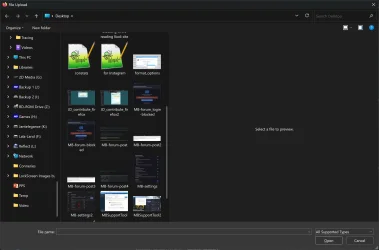
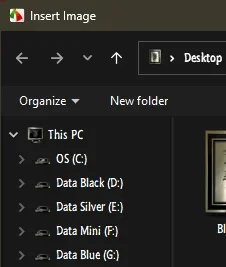
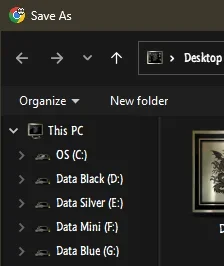
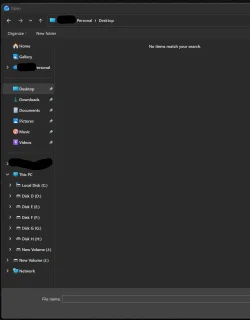
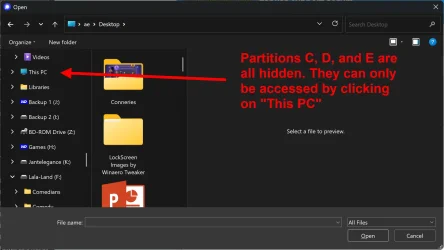
Anyway, this thread is to ask whether there's any workaround for the Explorer tree change when browsing for a file to upload or a destination for download? For example, it used to be that when I wanted to add an attachment to a mail, or to a message, an Explorer window would open and the tree would show my user directories followed by a list of all my partitions and external drives. Since the last August update, all my drives are hidden and I have to search for "This PC" for them to be displayed. That is bloody annoying and a totally unnecessary waste of my time! Lord knows why they thought it would be an improvement?
Anyway, this thread is to ask whether there's any workaround for the Explorer tree change when browsing for a file to upload or a destination for download? For example, it used to be that when I wanted to add an attachment to a mail, or to a message, an Explorer window would open and the tree would show my user directories followed by a list of all my partitions and external drives. Since the last August update, all my drives are hidden and I have to search for "This PC" for them to be displayed. That is bloody annoying and a totally unnecessary waste of my time! Lord knows why they thought it would be an improvement?
Attachments
Last edited:
My Computer
At a glance
Windows 11Intel(R) Core(TM) i9-10900K CPU @ 3.70GHz32,0 GBNvidia GeForce RTX2080 Super
- OS
- Windows 11
- Computer type
- Laptop
- Manufacturer/Model
- Alienware A51M R2
- CPU
- Intel(R) Core(TM) i9-10900K CPU @ 3.70GHz
- Memory
- 32,0 GB
- Graphics Card(s)
- Nvidia GeForce RTX2080 Super
- Sound Card
- Realtek
- Screen Resolution
- 4K
- Hard Drives
- 2TB (2x 1TB PCle M.2 SSD) RAID 0 [Boot] + 2TB (2x 1TB
PCle M.2 SSD) Non-Raid [Storage]