Latest update altered Explorer functionality for the worse


QuicktellPro

Well-known member
Member
Local time
5:59 PM
Posts
326
OS
Windows 11
Why is it that MS always changes things without consulting users first? I mean, there's nothing inherently wrong with the new sounds, but did anyone ask for them?

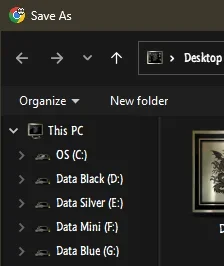
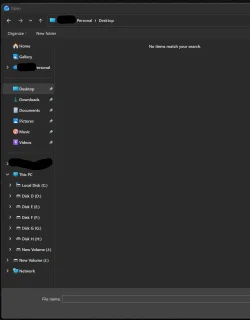
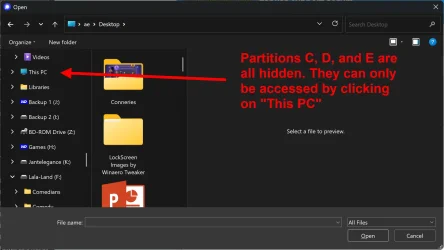
Anyway, this thread is to ask whether there's any workaround for the Explorer tree change when browsing for a file to upload or a destination for download? For example, it used to be that when I wanted to add an attachment to a mail, or to a message, an Explorer window would open and the tree would show my user directories followed by a list of all my partitions and external drives. Since the last August update, all my drives are hidden and I have to search for "This PC" for them to be displayed. That is bloody annoying and a totally unnecessary waste of my time! Lord knows why they thought it would be an improvement?
 

Attachments
  • partitions.webp
    partitions.webp
    73.4 KB · Views: 2
Last edited:

My Computer My Computer

At a glance

Windows 11Intel(R) Core(TM) i9-10900K CPU @ 3.70GHz32,0 GBNvidia GeForce RTX2080 Super
OS
Windows 11
Computer type
Laptop
Manufacturer/Model
Alienware A51M R2
CPU
Intel(R) Core(TM) i9-10900K CPU @ 3.70GHz
Memory
32,0 GB
Graphics Card(s)
Nvidia GeForce RTX2080 Super
Sound Card
Realtek
Screen Resolution
4K
Hard Drives
2TB (2x 1TB PCle M.2 SSD) RAID 0 [Boot] + 2TB (2x 1TB
PCle M.2 SSD) Non-Raid [Storage]
You can change the Open File Explorer To: from File explorer Options.

To change the default startup folder in Windows so that File Explorer opens directly to "This PC" instead of "Home" or "Quick Access," open File Explorer (press Windows Key + E), click the three dots (...) on the top menu bar, select Options, and change the "Open File Explorer to" dropdown menu to "This PC", then click Apply and OK.
 

My Computer My Computer

At a glance

Windows 11AMD Ryzen 7 5700GMicron Technology DDR4-3200 16GBNVIDIA GeForce RTX 3060
OS
Windows 11
Computer type
PC/Desktop
Manufacturer/Model
HP Pavilion
CPU
AMD Ryzen 7 5700G
Motherboard
Erica6
Memory
Micron Technology DDR4-3200 16GB
Graphics Card(s)
NVIDIA GeForce RTX 3060
Sound Card
Realtek ALC671
Monitor(s) Displays
Samsung SyncMaster U28E590
Screen Resolution
3840 x 2160
Hard Drives
SAMSUNG MZVLQ1T0HALB-000H1
Thanks. That works well when opening File Explorer, but it has no effect when you want to open a file or attach a file, and that's where I need it to open showing all my partitions. I feel pretty sure that was how it worked prior to the August 8 update.
 

My Computer My Computer

At a glance

Windows 11Intel(R) Core(TM) i9-10900K CPU @ 3.70GHz32,0 GBNvidia GeForce RTX2080 Super
OS
Windows 11
Computer type
Laptop
Manufacturer/Model
Alienware A51M R2
CPU
Intel(R) Core(TM) i9-10900K CPU @ 3.70GHz
Memory
32,0 GB
Graphics Card(s)
Nvidia GeForce RTX2080 Super
Sound Card
Realtek
Screen Resolution
4K
Hard Drives
2TB (2x 1TB PCle M.2 SSD) RAID 0 [Boot] + 2TB (2x 1TB
PCle M.2 SSD) Non-Raid [Storage]
To make the left sidebar in Windows 11 File Explorer automatically open and show your active folder, turn on the "Expand to current folder" feature. Open File Explorer, right-click any empty space in the left navigation pane, and click Expand to current folder.
 

My Computer My Computer

At a glance

Windows 11AMD Ryzen 7 5700GMicron Technology DDR4-3200 16GBNVIDIA GeForce RTX 3060
OS
Windows 11
Computer type
PC/Desktop
Manufacturer/Model
HP Pavilion
CPU
AMD Ryzen 7 5700G
Motherboard
Erica6
Memory
Micron Technology DDR4-3200 16GB
Graphics Card(s)
NVIDIA GeForce RTX 3060
Sound Card
Realtek ALC671
Monitor(s) Displays
Samsung SyncMaster U28E590
Screen Resolution
3840 x 2160
Hard Drives
SAMSUNG MZVLQ1T0HALB-000H1
Open File Explorer, right-click any empty space in the left navigation pane, and click Expand to current folder.
I just tried that and all it did was to create a shortcut to "This PC". The goal is to have the open dialog display the partitions currently hidden behind "This PC".
 

My Computer My Computer

At a glance

Windows 11Intel(R) Core(TM) i9-10900K CPU @ 3.70GHz32,0 GBNvidia GeForce RTX2080 Super
OS
Windows 11
Computer type
Laptop
Manufacturer/Model
Alienware A51M R2
CPU
Intel(R) Core(TM) i9-10900K CPU @ 3.70GHz
Memory
32,0 GB
Graphics Card(s)
Nvidia GeForce RTX2080 Super
Sound Card
Realtek
Screen Resolution
4K
Hard Drives
2TB (2x 1TB PCle M.2 SSD) RAID 0 [Boot] + 2TB (2x 1TB
PCle M.2 SSD) Non-Raid [Storage]
Why is it that MS always changes things without consulting users first? I mean, there's nothing inherently wrong with the new sounds, but did anyone ask for them?

Anyway, this thread is to ask whether there's any workaround for the Explorer tree change when browsing for a file to upload or a destination for download? For example, it used to be that when I wanted to add an attachment to a mail, or to a message, an Explorer window would open and the tree would show my user directories followed by a list of all my partitions and external drives. Since the last August update, all my drives are hidden and I have to search for "This PC" for them to be displayed. That is bloody annoying and a totally unnecessary waste of my time! Lord knows why they thought it would be an improvement?
That's pretty odd. I am not sure why your drive letters do not show up. As a test when I go to attach a file in outlook, I see all my drives from C: to H:.
 

My Computer My Computer

At a glance

Windows 11 25H2Broadwell-e 6850K 4.5ghz @1.36v32GB Corsair LPM 3600 C16EVGA RTX 3080Ti FTW
OS
Windows 11 25H2
Computer type
PC/Desktop
Manufacturer/Model
EVGA home brew
CPU
Broadwell-e 6850K 4.5ghz @1.36v
Motherboard
EVGA X99 FTW K
Memory
32GB Corsair LPM 3600 C16
Graphics Card(s)
EVGA RTX 3080Ti FTW
Sound Card
Asus Centurion true 7.1 headset. (5 speakers in each earpeice)
Monitor(s) Displays
LG C4 55"
Screen Resolution
4K 144hz
Hard Drives
Various models of SSDs ~10TB No HDDs installed.
PSU
be quiet! BN516 Straight Power 12-1000w 80 Plus Platinum
Case
Corsair 780T modified to dual 200mm intake fans
Cooling
Corsair H110i
Keyboard
Corsair K95 Platinum
Mouse
Corsair M65 RGB Elite
Internet Speed
50Mbs
That's pretty odd. I am not sure why your drive letters do not show up. As a test when I go to attach a file in outlook, I see all my drives from C: to H:.
So do I, but only in Outlook. If I do the same with my Orange webmail, my partitions are hidden behind "This PC".
Do you see them when using the Attach files option in this forum?
 

My Computer My Computer

At a glance

Windows 11Intel(R) Core(TM) i9-10900K CPU @ 3.70GHz32,0 GBNvidia GeForce RTX2080 Super
OS
Windows 11
Computer type
Laptop
Manufacturer/Model
Alienware A51M R2
CPU
Intel(R) Core(TM) i9-10900K CPU @ 3.70GHz
Memory
32,0 GB
Graphics Card(s)
Nvidia GeForce RTX2080 Super
Sound Card
Realtek
Screen Resolution
4K
Hard Drives
2TB (2x 1TB PCle M.2 SSD) RAID 0 [Boot] + 2TB (2x 1TB
PCle M.2 SSD) Non-Raid [Storage]
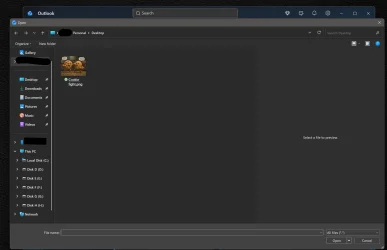
So do I, but only in Outlook. If I do the same with my Orange webmail, my partitions are hidden behind "This PC".
Do you see them when using the Attach files option in this forum?
When I use 'insert image' for example, it shows me the last location I used. In my case, my Pictures folder. The folder tree on the left still shows me all of my drives however.
 

My Computer My Computer

At a glance

Windows 11 25H2Broadwell-e 6850K 4.5ghz @1.36v32GB Corsair LPM 3600 C16EVGA RTX 3080Ti FTW
OS
Windows 11 25H2
Computer type
PC/Desktop
Manufacturer/Model
EVGA home brew
CPU
Broadwell-e 6850K 4.5ghz @1.36v
Motherboard
EVGA X99 FTW K
Memory
32GB Corsair LPM 3600 C16
Graphics Card(s)
EVGA RTX 3080Ti FTW
Sound Card
Asus Centurion true 7.1 headset. (5 speakers in each earpeice)
Monitor(s) Displays
LG C4 55"
Screen Resolution
4K 144hz
Hard Drives
Various models of SSDs ~10TB No HDDs installed.
PSU
be quiet! BN516 Straight Power 12-1000w 80 Plus Platinum
Case
Corsair 780T modified to dual 200mm intake fans
Cooling
Corsair H110i
Keyboard
Corsair K95 Platinum
Mouse
Corsair M65 RGB Elite
Internet Speed
50Mbs
Anyway, this thread is to ask whether there's any workaround for the Explorer tree change when browsing for a file to upload or a destination for download? For example, it used to be that when I wanted to add an attachment to a mail, or to a message, an Explorer window would open and the tree would show my user directories followed by a list of all my partitions and external drives. Since the last August update, all my drives are hidden and I have to search for "This PC" for them to be displayed. That is bloody annoying and a totally unnecessary waste of my time! Lord knows why they thought it would be an improvement?
It was only supposed to show your removable drives. If it ever showed your local disk partitions, something was malfunctioning. Power users hate the arbitrary duplication and clutter of the directory tree and have disabled that stupid function altogether for over a decade now using the following tweak, leaving ALL the drives accessible only under This PC:

Code:
reg delete HKLM\SOFTWARE\Microsoft\Windows\CurrentVersion\Explorer\Desktop\NameSpace\DelegateFolders\{F5FB2C77-0E2F-4A16-A381-3E560C68BC83} /f /reg:64
reg delete HKLM\SOFTWARE\Microsoft\Windows\CurrentVersion\Explorer\Desktop\NameSpace\DelegateFolders\{F5FB2C77-0E2F-4A16-A381-3E560C68BC83} /f /reg:32

That's pretty odd. I am not sure why your drive letters do not show up. As a test when I go to attach a file in outlook, I see all my drives from C: to H:.
Outside of (as a sibling of) This PC? If so, I'd be curious to see the (Default) value of the registry key below (copy the text in the box below, open Registry Editor, paste into its address bar, press [Enter]):
Code:
HKLM\SOFTWARE\Microsoft\Windows\CurrentVersion\Explorer\Desktop\NameSpace\DelegateFolders\{F5FB2C77-0E2F-4A16-A381-3E560C68BC83}
Normally, the default value would be "Removable Drives". I have not seen documentation for any other value, but would be curious if more was supported and if this could potentially explain the behavior you and the OP are observing.
 

My Computer My Computer

At a glance

Windows 11
OS
Windows 11
Computer type
PC/Desktop
Manufacturer/Model
Intel i9-14900K
It was only supposed to show your removable drives. If it ever showed your local disk partitions, something was malfunctioning. Power users hate the arbitrary duplication and clutter of the directory tree and have disabled that stupid function altogether for over a decade now using the following tweak, leaving ALL the drives accessible only under This PC:

Code:
reg delete HKLM\SOFTWARE\Microsoft\Windows\CurrentVersion\Explorer\Desktop\NameSpace\DelegateFolders\{F5FB2C77-0E2F-4A16-A381-3E560C68BC83} /f /reg:64
reg delete HKLM\SOFTWARE\Microsoft\Windows\CurrentVersion\Explorer\Desktop\NameSpace\DelegateFolders\{F5FB2C77-0E2F-4A16-A381-3E560C68BC83} /f /reg:32


Outside of (as a sibling of) This PC? If so, I'd be curious to see the (Default) value of the registry key below (copy the text in the box below, open Registry Editor, paste into its address bar, press [Enter]):
Code:
HKLM\SOFTWARE\Microsoft\Windows\CurrentVersion\Explorer\Desktop\NameSpace\DelegateFolders\{F5FB2C77-0E2F-4A16-A381-3E560C68BC83}
Normally, the default value would be "Removable Drives". I have not seen documentation for any other value, but would be curious if more was supported and if this could potentially explain the behavior you and the OP are observing.
My default value for that key is 'Removable Drives'.

This is what I see when I go to attach a file in Outlook

Screenshot 2026-08-18 094131.webp
 

My Computer My Computer

At a glance

Windows 11 25H2Broadwell-e 6850K 4.5ghz @1.36v32GB Corsair LPM 3600 C16EVGA RTX 3080Ti FTW
OS
Windows 11 25H2
Computer type
PC/Desktop
Manufacturer/Model
EVGA home brew
CPU
Broadwell-e 6850K 4.5ghz @1.36v
Motherboard
EVGA X99 FTW K
Memory
32GB Corsair LPM 3600 C16
Graphics Card(s)
EVGA RTX 3080Ti FTW
Sound Card
Asus Centurion true 7.1 headset. (5 speakers in each earpeice)
Monitor(s) Displays
LG C4 55"
Screen Resolution
4K 144hz
Hard Drives
Various models of SSDs ~10TB No HDDs installed.
PSU
be quiet! BN516 Straight Power 12-1000w 80 Plus Platinum
Case
Corsair 780T modified to dual 200mm intake fans
Cooling
Corsair H110i
Keyboard
Corsair K95 Platinum
Mouse
Corsair M65 RGB Elite
Internet Speed
50Mbs
@HeavyHemi Ah, you don't have any removable drives currently connected, and all the drives are showing up normally under This PC. Plug in a USB thumb drive and you'll see how a second (duplicate) entry for just that drive shows up outside of/beside This PC. This is what the OP was referring to, except he's saying it used to do that for all his drives. What you're showing above is what it would look like even with removable drives connected after applying the tweak in my previous post.
 

My Computer My Computer

At a glance

Windows 11
OS
Windows 11
Computer type
PC/Desktop
Manufacturer/Model
Intel i9-14900K
If I do the same with my Orange webmail,
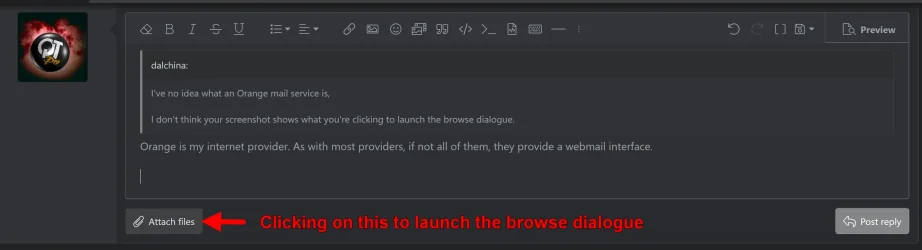
I've no idea what an Orange mail service is, but it sounds as if you're referring to a dialogue launched by clicking when you use your browser.
Such dialogues are usually NOT file explorer per se, but something that looks similar to file explorer.

If so, that could be browser dependent rather than file explorer.

I don't think your screenshot shows what you're clicking to launch the browse dialogue.

Is that a possibility?
 

My Computer My Computer

At a glance

Windows 11 Proi7-8650U16GBIntel UHD 620
OS
Windows 11 Pro
Computer type
Laptop
Manufacturer/Model
Lenovo t480s
CPU
i7-8650U
Memory
16GB
Graphics Card(s)
Intel UHD 620
Screen Resolution
1920x1080
Hard Drives
C SN810 SDCPNRY-512G-1006
Browser
Edge, Firefox
Antivirus
Defender
I've no idea what an Orange mail service is,

I don't think your screenshot shows what you're clicking to launch the browse dialogue.
Orange is my internet provider. As with most providers, if not all of them, they provide a webmail interface.
 

Attachments

  • browse-firefox.webp
    browse-firefox.webp
    51.4 KB · Views: 1
  • browse-firefox2.webp
    browse-firefox2.webp
    118.2 KB · Views: 1

My Computer My Computer

At a glance

Windows 11Intel(R) Core(TM) i9-10900K CPU @ 3.70GHz32,0 GBNvidia GeForce RTX2080 Super
OS
Windows 11
Computer type
Laptop
Manufacturer/Model
Alienware A51M R2
CPU
Intel(R) Core(TM) i9-10900K CPU @ 3.70GHz
Memory
32,0 GB
Graphics Card(s)
Nvidia GeForce RTX2080 Super
Sound Card
Realtek
Screen Resolution
4K
Hard Drives
2TB (2x 1TB PCle M.2 SSD) RAID 0 [Boot] + 2TB (2x 1TB
PCle M.2 SSD) Non-Raid [Storage]
and all the drives are showing up normally under This PC.
HeavyHemi's screenshot shows precisely what I want to see, even if you consider it to be stupid. The "This PC" tree is open, displaying all local partitions/drives. When I launch an open dialog, This PC is always closed. It may not sound like much hassle to just click on it, but for reasons I do not understand, my tree is extremely long and seems to be duplicated at least 3 times. This means I have to hunt for "This PC" which is a waste of time when I have over 50 directories to sift through.

I'm guessing YOU may have a reg tweak to solve this issue?
 

My Computer My Computer

At a glance

Windows 11Intel(R) Core(TM) i9-10900K CPU @ 3.70GHz32,0 GBNvidia GeForce RTX2080 Super
OS
Windows 11
Computer type
Laptop
Manufacturer/Model
Alienware A51M R2
CPU
Intel(R) Core(TM) i9-10900K CPU @ 3.70GHz
Memory
32,0 GB
Graphics Card(s)
Nvidia GeForce RTX2080 Super
Sound Card
Realtek
Screen Resolution
4K
Hard Drives
2TB (2x 1TB PCle M.2 SSD) RAID 0 [Boot] + 2TB (2x 1TB
PCle M.2 SSD) Non-Raid [Storage]
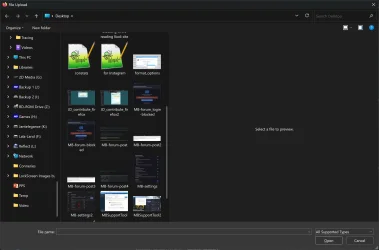
In an Open or Save dialog, the left hand tree should show the state you last left it in...

13810.webp 13809.webp
 

My Computers My Computers

  • At a glance

    Windows 11 Pro
    OS
    Windows 11 Pro
    Computer type
    PC/Desktop
    Manufacturer/Model
    ASUS ROG Strix
  • At a glance

    Windows 11 Pro
    Operating System
    Windows 11 Pro
    Computer type
    Laptop
    Manufacturer/Model
    ASUS VivoBook
  • ASUS VivoBook 'Lite' ~ Windows 11 Home
In an Open or Save dialog, the left hand tree should show the state you last left it in...
It would be nice if it did that, but it isn't.
Perhaps I should make a video to show precisely what is happening?
 

My Computer My Computer

At a glance

Windows 11Intel(R) Core(TM) i9-10900K CPU @ 3.70GHz32,0 GBNvidia GeForce RTX2080 Super
OS
Windows 11
Computer type
Laptop
Manufacturer/Model
Alienware A51M R2
CPU
Intel(R) Core(TM) i9-10900K CPU @ 3.70GHz
Memory
32,0 GB
Graphics Card(s)
Nvidia GeForce RTX2080 Super
Sound Card
Realtek
Screen Resolution
4K
Hard Drives
2TB (2x 1TB PCle M.2 SSD) RAID 0 [Boot] + 2TB (2x 1TB
PCle M.2 SSD) Non-Raid [Storage]
Suggest you ask your internet provider.

Depends exactly what they are lauching by way of a browse dialogue, following the rest of my post above (as is so common, you only responded to the first part.

Clearly no one can reproduce what you see without using the same service.

Good luck.
 

My Computer My Computer

At a glance

Windows 11 Proi7-8650U16GBIntel UHD 620
OS
Windows 11 Pro
Computer type
Laptop
Manufacturer/Model
Lenovo t480s
CPU
i7-8650U
Memory
16GB
Graphics Card(s)
Intel UHD 620
Screen Resolution
1920x1080
Hard Drives
C SN810 SDCPNRY-512G-1006
Browser
Edge, Firefox
Antivirus
Defender
Clearly no one can reproduce what you see without using the same service.
I am using the Attach files button when replying to these messages. I'm also using Firefox, if that makes any difference.
It doesn't have anything to do with my service provider, because the exact same thing happens here on this forum.
I'm beginning to think it may have something to do with the quick access function, because "This PC" is linked there but it never shows its content without being clicked on. Maybe I should just remove all quick access links?
 

My Computer My Computer

At a glance

Windows 11Intel(R) Core(TM) i9-10900K CPU @ 3.70GHz32,0 GBNvidia GeForce RTX2080 Super
OS
Windows 11
Computer type
Laptop
Manufacturer/Model
Alienware A51M R2
CPU
Intel(R) Core(TM) i9-10900K CPU @ 3.70GHz
Memory
32,0 GB
Graphics Card(s)
Nvidia GeForce RTX2080 Super
Sound Card
Realtek
Screen Resolution
4K
Hard Drives
2TB (2x 1TB PCle M.2 SSD) RAID 0 [Boot] + 2TB (2x 1TB
PCle M.2 SSD) Non-Raid [Storage]
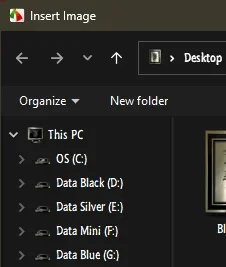
I am using the Attach files button when replying to these messages. I'm also using Firefox, if that makes any difference.
It doesn't have anything to do with my service provider, because the exact same thing happens here on this forum.
I'm beginning to think it may have something to do with the quick access function, because "This PC" is linked there but it never shows its content without being clicked on. Maybe I should just remove all quick access links?
Just for giggles, I attached a USB flash drive. It does not change what I see. It just adds the drive. Though somewhat oddly it does show it twice.Screenshot 2026-08-19 190500.webp
 

My Computer My Computer

At a glance

Windows 11 25H2Broadwell-e 6850K 4.5ghz @1.36v32GB Corsair LPM 3600 C16EVGA RTX 3080Ti FTW
OS
Windows 11 25H2
Computer type
PC/Desktop
Manufacturer/Model
EVGA home brew
CPU
Broadwell-e 6850K 4.5ghz @1.36v
Motherboard
EVGA X99 FTW K
Memory
32GB Corsair LPM 3600 C16
Graphics Card(s)
EVGA RTX 3080Ti FTW
Sound Card
Asus Centurion true 7.1 headset. (5 speakers in each earpeice)
Monitor(s) Displays
LG C4 55"
Screen Resolution
4K 144hz
Hard Drives
Various models of SSDs ~10TB No HDDs installed.
PSU
be quiet! BN516 Straight Power 12-1000w 80 Plus Platinum
Case
Corsair 780T modified to dual 200mm intake fans
Cooling
Corsair H110i
Keyboard
Corsair K95 Platinum
Mouse
Corsair M65 RGB Elite
Internet Speed
50Mbs
Why is it that MS always changes things without consulting users first? I mean, there's nothing inherently wrong with the new sounds, but did anyone ask for them?

Because they're not legally obliged to. The Windows 11 EULA which all users agree to when installing the operating system says this.

6. Updates
The software periodically checks for system and app updates, and downloads and installs them for you. You may obtain updates only from Microsoft or authorized sources, and Microsoft may need to update your system to provide you with those updates. By accepting this agreement or using the software, you agree to receive these types of automatic updates without any additional notice.
 

My Computers My Computers

  • At a glance

    Windows 11 Pro 26H2Intel Core i9 13900KCorsair Dominator Platinum 64gb 5600MT/s DDR5...Sapphire NITRO+ AMD Radeon RX 7900 XTX Vapor-...
    OS
    Windows 11 Pro 26H2
    Computer type
    PC/Desktop
    Manufacturer/Model
    Homebuilt
    CPU
    Intel Core i9 13900K
    Motherboard
    Asus ProArt Z790 Creator WiFi - Bios 3202
    Memory
    Corsair Dominator Platinum 64gb 5600MT/s DDR5 Dual Channel
    Graphics Card(s)
    Sapphire NITRO+ AMD Radeon RX 7900 XTX Vapor-X 24GB
    Sound Card
    External DAC: Cambridge Audio DACMagic200M - Headphone Amps: Topping L70 & SMSL H400
    Monitor(s) Displays
    Samsung S95F OLED 55" TV
    Screen Resolution
    3840 x 2160 120hz
    Hard Drives
    Samsung 980 Pro 2TB (OS)
    Samsung 980 Pro 1TB (Files)
    Lexar NZ790 4TB
    LaCie d2 Professional 6TB external - USB 3.1
    Seagate Expansion 16TB external - USB 3.2
    Seagate One Touch 18TB external HD - USB 3.0
    PSU
    Corsair RM1200x Shift
    Case
    Corsair RGB Smart Case 5000x (white)
    Cooling
    NAUTILUS 360 RS Liquid CPU Cooler
    Keyboard
    Incase Ergonomic USB (Microsoft clone)
    Mouse
    Logitech MX Master 3S
    Internet Speed
    Fibre 900/500 Mbps
    Browser
    Microsoft Edge Chromium
    Antivirus
    Bitdefender Total Security
    Other Info
    AMD Radeon Software & Drivers
    Hasleo Backup Suite
    Dashlane password manager
    Kensington Verimark fingerprint reader
    Logitech Brio 4K webcam
    Orico 10-port powered USB 3.0 hub
  • At a glance

    Windows 11 Pro 25H2Intel® Core™ i9-13900H32GB DDR4-3200 Dual channel*Intel Iris Xᵉ Graphics G7
    Operating System
    Windows 11 Pro 25H2
    Computer type
    Laptop
    Manufacturer/Model
    Asus Vivobook X1605VA
    CPU
    Intel® Core™ i9-13900H
    Motherboard
    Asus X1605VA bios 309
    Memory
    32GB DDR4-3200 Dual channel
    Graphics card(s)
    *Intel Iris Xᵉ Graphics G7
    Sound Card
    Realtek | Intel SST Bluetooth & USB
    Monitor(s) Displays
    16.0-inch, WUXGA 16:10 aspect ratio, IPS-level Panel
    Screen Resolution
    1920 x 1200 60hz
    Hard Drives
    512GB M.2 NVMe™ PCIe® 3.0 SSD
    Mouse
    Logitech MX Ergo Trackball
    Antivirus
    Bitdefender Total Security
    Other Info
    720p Webcam
    WiFi & USB to ethernet

Latest Support Threads

Back
Top Bottom