Solved Local account login options


@Brink will do but looking back at the image you posted in #14 it is the same as I get i.e. username/PIN not password. Your Sign In Options though show 3, I have never seen the middle of the three options on my screen.
 

My Computer

System One

  • OS
    Windows 11 Pro 25H2
    Computer type
    PC/Desktop
    Manufacturer/Model
    Dell Optiplex
    CPU
    Intel(R) Core(TM) i7-10700
    Memory
    16GB
    Monitor(s) Displays
    Dell U2722DE
    Screen Resolution
    2560x1440
    Hard Drives
    NVMe Kioxia 512GB
    Keyboard
    Logi MX Keys
    Mouse
    Logi MX Vertical
    Internet Speed
    76
    Browser
    Edge/Chrome/Firefox
    Antivirus
    Bitdefender
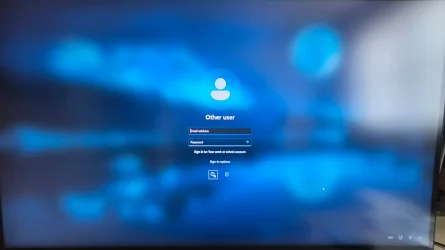
@Brink These are the screens I see. At the 'On Boot' screen if I present a fingerprint,I'm logged in to my Microsoft Account. Alternatively if I hit return I get the second screen with email/password login option. Clicking the 'sign-in options' link gives me the third image, with the two icons beneath the email/password login input boxes. Clicking the 'keypad' icon changes the input prompts to username/PIN i.e no way of entering username/password.
 

Attachments

  • On-Boot.webp
    On-Boot.webp
    668.6 KB · Views: 1
  • after-hitting-return.webp
    after-hitting-return.webp
    395.8 KB · Views: 1
  • Sign-in-Options.webp
    Sign-in-Options.webp
    162.5 KB · Views: 1

My Computer

System One

  • OS
    Windows 11 Pro 25H2
    Computer type
    PC/Desktop
    Manufacturer/Model
    Dell Optiplex
    CPU
    Intel(R) Core(TM) i7-10700
    Memory
    16GB
    Monitor(s) Displays
    Dell U2722DE
    Screen Resolution
    2560x1440
    Hard Drives
    NVMe Kioxia 512GB
    Keyboard
    Logi MX Keys
    Mouse
    Logi MX Vertical
    Internet Speed
    76
    Browser
    Edge/Chrome/Firefox
    Antivirus
    Bitdefender
@Brink These are the screens I see. At the 'On Boot' screen if I present a fingerprint,I'm logged in to my Microsoft Account. Alternatively if I hit return I get the second screen with email/password login option. Clicking the 'sign-in options' link gives me the third image, with the two icons beneath the email/password login input boxes. Clicking the 'keypad' icon changes the input prompts to username/PIN i.e no way of entering username/password.

The main difference I notice is you have "Sign in to: Your work or school account" on the sign-in screen. This usually indicates you are joined to a work/school domain, and why it's wanting an email address instead of a user name.
 

My Computers

System One System Two

  • OS
    Windows 11 Pro for Workstations
    Computer type
    PC/Desktop
    Manufacturer/Model
    Custom self build
    CPU
    Intel i7-8700K 5 GHz
    Motherboard
    ASUS ROG Maximus XI Formula Z390
    Memory
    64 GB (4x16GB) G.SKILL TridentZ RGB DDR4 3600 MHz (F4-3600C18D-32GTZR)
    Graphics Card(s)
    ASUS ROG-STRIX-GTX1080TI-O11G-GAMING (11GB GDDR5X)
    Sound Card
    Integrated Digital Audio (S/PDIF)
    Monitor(s) Displays
    2 x Samsung Odyssey G75 27"
    Screen Resolution
    2560x1440
    Hard Drives
    1TB Samsung 990 PRO M.2,
    4TB Samsung 990 PRO M.2,
    TerraMaster F8 SSD Plus NAS
    PSU
    Seasonic Prime Titanium 850W
    Case
    Thermaltake Core P3 wall mounted
    Cooling
    Corsair Hydro H115i
    Keyboard
    Amazon Basics Wired Full Keyboard MD005
    Mouse
    Logitech MX Master 4
    Internet Speed
    2 Gbps Download and 100 Mbps Upload
    Browser
    Chrome and Edge
    Antivirus
    Microsoft Defender
    Other Info
    Logitech Z625 speaker system,
    Logitech BRIO 4K Pro webcam,
    HP Color LaserJet Pro MFP M477fdn,
    CyberPower CP1500PFCLCD
    Galaxy S23 Plus phone
  • Operating System
    Windows 11 Pro
    Computer type
    Laptop
    Manufacturer/Model
    Surface Laptop 7 Copilot+ PC
    CPU
    Snapdragon X Elite (12 core) 3.42 GHz
    Memory
    16 GB LPDDR5x-7467 MHz
    Monitor(s) Displays
    15" HDR
    Screen Resolution
    2496 x 1664
    Hard Drives
    1 TB SSD
    Internet Speed
    Wi-Fi 7 and Bluetooth 5.4
    Browser
    Chrome and Edge
    Antivirus
    Microsoft Defender
In earlier post I mistakenly it seems said that the machine was not domain joined (on the strength of the outpout from System Properties which shows a Workgroup name, neither was the full computer name appended to by any domain name). HOWEVER - when I look in Accounts > Access Work or School I see the PC is connected to ***** Ltd's Entra ID. So I will remove the connection and check again.
 

My Computer

System One

  • OS
    Windows 11 Pro 25H2
    Computer type
    PC/Desktop
    Manufacturer/Model
    Dell Optiplex
    CPU
    Intel(R) Core(TM) i7-10700
    Memory
    16GB
    Monitor(s) Displays
    Dell U2722DE
    Screen Resolution
    2560x1440
    Hard Drives
    NVMe Kioxia 512GB
    Keyboard
    Logi MX Keys
    Mouse
    Logi MX Vertical
    Internet Speed
    76
    Browser
    Edge/Chrome/Firefox
    Antivirus
    Bitdefender
I am now able to sign in to a local account - thank you for all your time and help. However I am now unable to log in using my MS account with my enail address and password ' this sign in method is not available for your account' (this is a personal account and nothing to do with the work connection)
 

My Computer

System One

  • OS
    Windows 11 Pro 25H2
    Computer type
    PC/Desktop
    Manufacturer/Model
    Dell Optiplex
    CPU
    Intel(R) Core(TM) i7-10700
    Memory
    16GB
    Monitor(s) Displays
    Dell U2722DE
    Screen Resolution
    2560x1440
    Hard Drives
    NVMe Kioxia 512GB
    Keyboard
    Logi MX Keys
    Mouse
    Logi MX Vertical
    Internet Speed
    76
    Browser
    Edge/Chrome/Firefox
    Antivirus
    Bitdefender
I am now able to sign in to a local account - thank you for all your time and help. However I am now unable to log in using my MS account with my enail address and password ' this sign in method is not available for your account' (this is a personal account and nothing to do with the work connection)

Normally with "Other User" on the sign-in screen, you would need to enter the user name (not email address) and password of your Microsoft account instead.
 

My Computers

System One System Two

  • OS
    Windows 11 Pro for Workstations
    Computer type
    PC/Desktop
    Manufacturer/Model
    Custom self build
    CPU
    Intel i7-8700K 5 GHz
    Motherboard
    ASUS ROG Maximus XI Formula Z390
    Memory
    64 GB (4x16GB) G.SKILL TridentZ RGB DDR4 3600 MHz (F4-3600C18D-32GTZR)
    Graphics Card(s)
    ASUS ROG-STRIX-GTX1080TI-O11G-GAMING (11GB GDDR5X)
    Sound Card
    Integrated Digital Audio (S/PDIF)
    Monitor(s) Displays
    2 x Samsung Odyssey G75 27"
    Screen Resolution
    2560x1440
    Hard Drives
    1TB Samsung 990 PRO M.2,
    4TB Samsung 990 PRO M.2,
    TerraMaster F8 SSD Plus NAS
    PSU
    Seasonic Prime Titanium 850W
    Case
    Thermaltake Core P3 wall mounted
    Cooling
    Corsair Hydro H115i
    Keyboard
    Amazon Basics Wired Full Keyboard MD005
    Mouse
    Logitech MX Master 4
    Internet Speed
    2 Gbps Download and 100 Mbps Upload
    Browser
    Chrome and Edge
    Antivirus
    Microsoft Defender
    Other Info
    Logitech Z625 speaker system,
    Logitech BRIO 4K Pro webcam,
    HP Color LaserJet Pro MFP M477fdn,
    CyberPower CP1500PFCLCD
    Galaxy S23 Plus phone
  • Operating System
    Windows 11 Pro
    Computer type
    Laptop
    Manufacturer/Model
    Surface Laptop 7 Copilot+ PC
    CPU
    Snapdragon X Elite (12 core) 3.42 GHz
    Memory
    16 GB LPDDR5x-7467 MHz
    Monitor(s) Displays
    15" HDR
    Screen Resolution
    2496 x 1664
    Hard Drives
    1 TB SSD
    Internet Speed
    Wi-Fi 7 and Bluetooth 5.4
    Browser
    Chrome and Edge
    Antivirus
    Microsoft Defender
All sorted thanks, it was because my MS account is set as passwordless, so I just had to login to the web portal and change it temporarily to accept the password. Once again thank you for all your help.
 

My Computer

System One

  • OS
    Windows 11 Pro 25H2
    Computer type
    PC/Desktop
    Manufacturer/Model
    Dell Optiplex
    CPU
    Intel(R) Core(TM) i7-10700
    Memory
    16GB
    Monitor(s) Displays
    Dell U2722DE
    Screen Resolution
    2560x1440
    Hard Drives
    NVMe Kioxia 512GB
    Keyboard
    Logi MX Keys
    Mouse
    Logi MX Vertical
    Internet Speed
    76
    Browser
    Edge/Chrome/Firefox
    Antivirus
    Bitdefender
Great news. Glad you got it sorted out now. :shawn:
 

My Computers

System One System Two

  • OS
    Windows 11 Pro for Workstations
    Computer type
    PC/Desktop
    Manufacturer/Model
    Custom self build
    CPU
    Intel i7-8700K 5 GHz
    Motherboard
    ASUS ROG Maximus XI Formula Z390
    Memory
    64 GB (4x16GB) G.SKILL TridentZ RGB DDR4 3600 MHz (F4-3600C18D-32GTZR)
    Graphics Card(s)
    ASUS ROG-STRIX-GTX1080TI-O11G-GAMING (11GB GDDR5X)
    Sound Card
    Integrated Digital Audio (S/PDIF)
    Monitor(s) Displays
    2 x Samsung Odyssey G75 27"
    Screen Resolution
    2560x1440
    Hard Drives
    1TB Samsung 990 PRO M.2,
    4TB Samsung 990 PRO M.2,
    TerraMaster F8 SSD Plus NAS
    PSU
    Seasonic Prime Titanium 850W
    Case
    Thermaltake Core P3 wall mounted
    Cooling
    Corsair Hydro H115i
    Keyboard
    Amazon Basics Wired Full Keyboard MD005
    Mouse
    Logitech MX Master 4
    Internet Speed
    2 Gbps Download and 100 Mbps Upload
    Browser
    Chrome and Edge
    Antivirus
    Microsoft Defender
    Other Info
    Logitech Z625 speaker system,
    Logitech BRIO 4K Pro webcam,
    HP Color LaserJet Pro MFP M477fdn,
    CyberPower CP1500PFCLCD
    Galaxy S23 Plus phone
  • Operating System
    Windows 11 Pro
    Computer type
    Laptop
    Manufacturer/Model
    Surface Laptop 7 Copilot+ PC
    CPU
    Snapdragon X Elite (12 core) 3.42 GHz
    Memory
    16 GB LPDDR5x-7467 MHz
    Monitor(s) Displays
    15" HDR
    Screen Resolution
    2496 x 1664
    Hard Drives
    1 TB SSD
    Internet Speed
    Wi-Fi 7 and Bluetooth 5.4
    Browser
    Chrome and Edge
    Antivirus
    Microsoft Defender

Latest Support Threads

Back
Top Bottom