Local drive vs OneDrive


JimCricket

New member
Local time
12:46 AM
Posts
3
OS
Windows 11
I'm new to Windows 11, but old to Windows. I'm sure this question has been asked in different ways. But it helps me to ask it according to my needs.

I just don't understand what One Drive is doing, especially when I have it disabled.

I am sole owner/user of a brand new Lenovo laptop that I just received on Thursday 9/17. Since then I've done two factory resets and spent countless hours trying to set it up and understand what it's doing. I disabled One Drive within hours of owning the computer, and right after I did that Firefox stopped working and a Pictures folder I thought was local (and wasn't) disappeared. Other things too, but I'll skip all that.

Right now One Drive is diabled.
I see in my folders I have what is called <my name> - Personal. That sounds like a local folder to me. But when on the properties, I see c:\users\googl (using the first five letters of a gmail address that I use to log into the required Microsoft account). THe Pictures folder is c:\users\googl\Pictures. I'm not even clear why it is calling the folder "<my name> - Personal" other than <my first name, last name> is an administrator.

I don't need One Drive, but if it disabled then what is that path it has left?

I've been reading up on how to make the whole computer local but there is conflicting information as to whether or not that is still even possible.
 
Windows Build/Version
25H2

My Computer My Computer

At a glance

Windows 11
OS
Windows 11
Here is The proper method to remove one drive posted by @glasskuter some time ago.

How to Properly Remove OneDrive from Windows 11

When you sign in with a Microsoft account, Windows automatically sets Documents, Desktop, Pictures, and Videos folders to use OneDrive as their default storage location. If you don’t want to use OneDrive, you’ll need to carefully follow the steps below. Skipping or rearranging them can cause issues with your files and folders.

Important:
These instructions assume that OneDrive is still installed on your PC.
If you’ve already uninstalled it, for this procedure to work, you will need to first reinstall OneDrive by downloading it from Microsoft’s official site.

Restart your PC, sign in to OneDrive, and then continue with the tutorial.

Step 1: Turn Off OneDrive Folder Backup Syncing
First, you need to stop OneDrive from automatically syncing your Desktop, Documents, Pictures, and Videos folders. This guide will also help you get your files back on to your local drive.
Turn On or Off OneDrive Folder Backup Syncing in Windows 11

Only If the folders don’t automatically return to their default local location under C:\Users|YourUserName in step 1:

Use the tutorials below (Option Three) to manually restore the default location of each folder and move your files from Onedrive into it.
Move or Restore Default Location of Desktop Folder in Windows 11
Move or Restore Default Location of Documents Folder in Windows 11
Move or Restore Default Location of Pictures Folder in Windows 11
Move or Restore Default Location of Videos Folder in Windows 11 |
-----------------------------------------------------------------
Step 2: Unlink Account & PC from OneDrive

After syncing is turned off, disconnect your account and computer from OneDrive:
Unlink account & PC from Onedrive.

Once you do this the files you have in onedrive will remain there until you login to Onedrive on the Web and delete them.
Microsoft OneDrive
----------------------------------------------------------------------

Step 3: Prevent OneDrive from Starting Automatically or Uninstall Onedrive

At this point, you can either disable OneDrive from autostart or uninstall it.

NOTE: Office 365 and Ofc 2019-2024 DEFAULT save location is Onedrive. You will have to go into each Office app and change its default save location to a folder on your computer.
ALSO NOTE: : Autosave will no longer works unless files are saved to Onedrive by default.

To disable Onedrive from auto-starting(recommended):

Open Task Manager (Ctrl+Shift+Esc).

Go to the Startup Apps tab.

Find OneDrive, right-click it, and select Disable.

This prevents OneDrive from launching at startup and survives Windows and Office updates.

To Uninstall OneDrive (Optional)
Note: An Office update may reinstall Onedrive at some point.
If you prefer to completely remove OneDrive, use one of these methods:

Method 1 – Using Revo Uninstaller (recommended):
Download Revo Uninstaller Freeware Portable.

Open Revo and look under Windows Apps to find OneDrive.
Uninstall it using Revo, then run its scan feature. Check all the leftover files and registry entries Revo finds and remove.

Method 2 – Built-in Windows option:
You can also uninstall OneDrive through Windows settings, but this may leave some registry entries behind. Uninstall and Reinstall OneDrive in Windows 11
--------------------------------------------------------------
Following this sequence ensures your files are safe and your folders return to their proper locations, while OneDrive is disabled or completely removed from your system. Note: Whether this will work as written for you depends on what steps were taken in your prior attempts to get rid of Onedrive. Sometimes a user’s incorrect actions can have unwanted results. Nevertheless, your files should still be in Onedrive so they are not lost.
 

My Computers My Computers

  • At a glance

    Windows11 Pro 26300.9539Intel Core i9 14900F (24 -Core, 68 MB Total C...32GB DDR5RTX 4080 Super w/610.74
    OS
    Windows11 Pro 26300.9539
    Computer type
    PC/Desktop
    Manufacturer/Model
    Dell Alienware Aurora R16
    CPU
    Intel Core i9 14900F (24 -Core, 68 MB Total Cache)
    Motherboard
    Dell Alienware
    Memory
    32GB DDR5
    Graphics Card(s)
    RTX 4080 Super w/610.74
    Sound Card
    Realtec
    Monitor(s) Displays
    Corsair XENEON 32QHD165
    Screen Resolution
    2560 X 1440
    Hard Drives
    1-2TB Samsung 990 Pro PCIe NVMe M2 SSD
    1-4TB Samsung 990 Pro PCIe NVMe M2 SSD
    PSU
    1000 Watt Platinum Dell
    Case
    Alienware
    Cooling
    Liquid Closed Loop
    Keyboard
    Corsair Strafe RGB
    Mouse
    Logitech MK270 Wireless
    Internet Speed
    100Gb's Down-20 Up
    Browser
    Firefox 156.0
    Antivirus
    Defender
    Other Info
    Very Quiet And Fast
    CyberPower UPS CP1500PFCLCD
  • At a glance

    MX-Linux13th Gen Inter(R) Core(TM) i3-1315U64 GB DDR4 @3200 MHz.Internal
    Operating System
    MX-Linux
    Computer type
    PC/Desktop
    Manufacturer/Model
    Intel
    CPU
    13th Gen Inter(R) Core(TM) i3-1315U
    Motherboard
    Intel
    Memory
    64 GB DDR4 @3200 MHz.
    Graphics card(s)
    Internal
    Sound Card
    None
    Monitor(s) Displays
    Dell 2419HGCF
    Screen Resolution
    1920 X 1080
    Hard Drives
    SAMSUNG 980 PRO SSD 2TB, PCIe 4.0 M.2 2280
    PSU
    Chicony 30 Watt
    Case
    Small
    Keyboard
    Dell
    Mouse
    Razor
    Internet Speed
    1GB
    Browser
    Slimjet
I don't know how you"disabled" it but you can not just disable Onedrive without first taking the pre-requisite steps. You get into trouble when you do.

@Josey Wales The links in my original post are not included when you copied and pasted it above.
While that thread is correct, I re-wrote it several months ago. The steps are the same, but I have expanded it for better clarification for newbies.
Here it is with the links included..

How To PROPERLY Remove OneDrive from Windows 11
(written by me and run through Brink for approval)
When you sign in with a Microsoft account, Windows automatically sets Documents, Desktop, Pictures, and Videos folders to use OneDrive as their default storage location. These folders are NOT on your system drive in the normal location of C:\Users\yourusername, but have a default location of C:\Users\yourusername\OneDrive\

If you don’t want to use OneDrive, carefully follow the steps below. Skipping or rearranging them can cause issues with your files and folders.

Note 1 - Whether this will work as written depends on what actions (if any) you took in your prior attempts to get rid of Onedrive. A user’s incorrect actions can have unwanted results so other steps may be required. That be the case, just ask. Nevertheless, your files should still be in OD until you manually delete them. Ask questions if you are unsure.
-----------------
Note 2: If you use Office 365, Office 2019, 2021, or 2024, you need to change options in each Office app such as Word and Excel to save to your computer by default. Currently, files created in these apps default to Onedrive. Open any document or a blank document, select File>Options> SAVE.

Check “save to computer by default” and choose a save folder location. Do the same for each Office app.

Please be aware that this disables the autosave/auto-recover feature in these apps as autosave works only for files in Onedrive.

---------------------
Important:
These instructions assume that OneDrive is still installed on your PC.
If you’ve already uninstalled it, for this procedure to work, you will need to first reinstall OneDrive by downloading it from Microsoft’s official site.
  • Sign in to OneDrive if not already signed in, and then continue.
STEP 1: Turn Off OneDrive Folder Backup Syncing

First, you need to stop OneDrive from automatically syncing your Desktop, Documents, Pictures, and Videos folders. This guide will also help you get your files back onto your local drive. You know this was successful by right clicking on a user folder>select Properties>General tab. The folder location should now be C:\users\yourusername\foldername
Turn On or Off OneDrive Folder Backup Syncing in Windows 11

Only If the folders don’t automatically return to their default local location under C:\Users\YourUserName in step 1:

Use the tutorials below (Option Three) to manually restore the default location of each folder and move your files from Onedrive into it.
Move or Restore Default Location of Desktop Folder in Windows 11
Move or Restore Default Location of Documents Folder in Windows 11
Move or Restore Default Location of Pictures Folder in Windows 11
Move or Restore Default Location of Videos Folder in Windows 11 |
---------------------------------------------------------
STEP 2: Unlink Account & PC from OneDrive

After syncing is turned off, disconnect your account and computer from OneDrive:
Unlink account & PC from Onedrive.

Once you do this, the files you have in Onedrive will remain there until you login to Onedrive on the Web and delete them. Microsoft OneDrive
-------------------------------------------------------
STEP 3: Prevent OneDrive from Starting Automatically or Completely Uninstall Onedrive

At this point, choose whether you want to disable OneDrive from autostart or uninstall it.

Option 1 - disable Onedrive from auto-starting.
  1. Open Task Manager (Ctrl+Shift+Esc).
  2. Go to the Startup Apps list in left pane.
  3. Find OneDrive.exe, right-click it, and select Disable.
  4. If you want to remove it from file explorer navigation pane Add or Remove OneDrive in Navigation Pane of File Explorer in Windows 11
If you want to hide it in the task tray, Settings > Personalization > Taskbar "Other system tray icons". Find Onedrive and toggle it off. Alternatively, you can quickly hide an icon by dragging it from the taskbar onto the upward-pointing arrow that opens the hidden icons menu.

Once you re-start, OneDrive will no longer launch at startup and the only place you will see it is in your start menu.

Option 2 - Uninstall OneDrive

Method 1 – Using Revo Uninstaller (recommended):

Download Revo Uninstaller Freeware Portable.
  • Open Revo and look under Windows Apps to find OneDrive. Right click on it and select Uninstall. Once the uninstall is complete, on Revo’s “SCAN” page, select “advanced scan” option. Check all the leftover files and registry entries Revo finds and delete them.
Method 2 – Built-in Windows option:
You can also uninstall OneDrive through Windows settings, but this will leave some registry entries behind. Uninstall and Reinstall OneDrive in Windows 11
--------------------------------------------------------------
Following this sequence ensures your files are safe and your folders return to their proper locations on your system drive, while OneDrive is disabled or completely removed from your system. Remember that the files will remain in Onedrive on the web until you delete them there.
 

My Computers My Computers

  • At a glance

    Windows 11 Pro 25H2 26200.9457i9-10900 10 core 20 threads32 gbnone-Intel UHD Graphics 630
    OS
    Windows 11 Pro 25H2 26200.9457
    Computer type
    PC/Desktop
    Manufacturer/Model
    Dell Optiplex 7080
    CPU
    i9-10900 10 core 20 threads
    Motherboard
    DELL 0J37VM
    Memory
    32 gb
    Graphics Card(s)
    none-Intel UHD Graphics 630
    Sound Card
    Integrated Realtek
    Monitor(s) Displays
    Benq 27
    Screen Resolution
    2560x1440
    Hard Drives
    2x1tb Solidigm m.2 nvme /External drives 512gb Samsung m.2 sata+2tb Kingston m2.nvme
    PSU
    500w
    Case
    MT
    Cooling
    Dell Premium
    Keyboard
    Logitech wired
    Mouse
    Logitech wireless
    Internet Speed
    so slow I'm too embarrassed to tell
    Browser
    #1 Edge #2 Firefox
    Antivirus
    Defender+MWB Premium
  • At a glance

    Windows 11 Pro 24H2 26200.9457AMD Ryzen 7 6800U32 gbintegrated
    Operating System
    Windows 11 Pro 24H2 26200.9457
    Computer type
    PC/Desktop
    Manufacturer/Model
    Beelink Mini PC SER5
    CPU
    AMD Ryzen 7 6800U
    Memory
    32 gb
    Graphics card(s)
    integrated
    Sound Card
    integrated
    Monitor(s) Displays
    Benq 27
    Screen Resolution
    2560x1440
    Hard Drives
    1TB Crucial nvme
    Keyboard
    Logitech wired
    Mouse
    Logitech wireless
    Internet Speed
    still too embarrassed to tell
    Browser
    Firefox
    Antivirus
    Defender
  • System 3 is non compliant Dell 9020 i7-4770/24gb ram Win11 PRO 26200.9457
A much simpler post from me.

All OneDrive is in essence is 5 GB of free storage space on your Microsoft Account, or indeed a Google(Gmail) Account with 15 GB on Google Drive.
The complication with OneDrive is MS trying to persuade people to backup/store their files and settings in that free 5 GB of OneDrive space.

In the simplest terms to stop that you stop that back up/syncing and uninstall the OneDrive App.

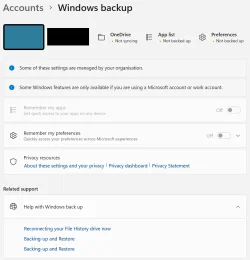
Settings > Accounts > Windows back up.

I use a Local Account so some Windows features are not available. On the top of that page I see "Onedrive not syncing, App list Not backed up, Preferences Not backed up. Those are with orange blobs.

You can still use that OneDrive space manually, upload/download no problem.

OD 01.webp
 

My Computer My Computer

At a glance

Windows 11
OS
Windows 11
Hello @JimCricket and welcome to ElevenForum. :-)


Just uninstall OneDrive, but note the warning in RED at top of this tutorial...


Here's some other things that you may find useful...


My Computers My Computers

  • At a glance

    Win 11 Home ♦♦♦26300.9457 ♦♦♦♦♦♦♦26H2AMD Ryzen 7 3700XG.Skill (F4-3200C14D-16GTZKW)EVGA RTX 2070 (08G-P4-2171-KR)
    OS
    Win 11 Home ♦♦♦26300.9457 ♦♦♦♦♦♦♦26H2
    Computer type
    PC/Desktop
    Manufacturer/Model
    Built by Ghot® [May 2020]
    CPU
    AMD Ryzen 7 3700X
    Motherboard
    Asus Pro WS X570-ACE (BIOS 5302)
    Memory
    G.Skill (F4-3200C14D-16GTZKW)
    Graphics Card(s)
    EVGA RTX 2070 (08G-P4-2171-KR)
    Sound Card
    Realtek ALC1220P / ALC S1220A
    Monitor(s) Displays
    Dell U3011 30"
    Screen Resolution
    2560 x 1600
    Hard Drives
    2x Samsung 860 EVO 500GB,
    WD 4TB Black FZBX - SATA III,
    WD 8TB Black FZBX - SATA III,
    DRW-24B1ST CD/DVD Burner
    PSU
    PC Power & Cooling 750W Quad EPS12V
    Case
    Cooler Master ATCS 840 Tower
    Cooling
    CM Hyper 212 EVO (push/pull)
    Keyboard
    Ducky DK9008 Shine II Blue LED
    Mouse
    Logitech Optical M-100
    Internet Speed
    300/300
    Browser
    Firefox (latest)
    Antivirus
    Bitdefender Total Security
    Other Info
    Speakers: Klipsch Pro Media 2.1
  • At a glance

    Windows XP Pro 32bit w/SP3AMD Athlon 64 X2 5000+ (OC'd @ 3.2Ghz)TWIN2X2048-6400C4DHX (2 x 1GB, DDR2 800)EVGA 256-P2-N758-TR GeForce 8600GT SSC
    Operating System
    Windows XP Pro 32bit w/SP3
    Computer type
    PC/Desktop
    Manufacturer/Model
    Built by Ghot® (not in use)
    CPU
    AMD Athlon 64 X2 5000+ (OC'd @ 3.2Ghz)
    Motherboard
    ASUS M2N32-SLI Deluxe Wireless Edition
    Memory
    TWIN2X2048-6400C4DHX (2 x 1GB, DDR2 800)
    Graphics card(s)
    EVGA 256-P2-N758-TR GeForce 8600GT SSC
    Sound Card
    Onboard
    Monitor(s) Displays
    ViewSonic G90FB Black 19" Professional (CRT)
    Screen Resolution
    up to 2048 x 1536
    Hard Drives
    WD 36GB 10,000rpm Raptor SATA
    Seagate 80GB 7200rpm SATA
    Lite-On LTR-52246S CD/RW
    Lite-On LH-18A1P CD/DVD Burner
    PSU
    PC Power & Cooling Silencer 750 Quad EPS12V
    Case
    Generic Beige case, 80mm fans
    Cooling
    ZALMAN 9500A 92mm CPU Cooler
    Keyboard
    Logitech Classic Keybooard 200
    Mouse
    Logitech Optical M-BT96a
    Internet Speed
    300/300
    Browser
    Firefox 3.x ??
    Antivirus
    Symantec (Norton)
    Other Info
    Still assembled, still runs. Haven't turned it on for 15 years?
I appreciate this, but it all almost makes me sorry I asked! TMI, but obviously good TMI.
I've already seen some of these documents before and my eyes glazed over.
I think I'll focus on glasskutter's post. Long but seems the clearest.

Ghot - my problems started the other day when I did just uninstall OneDrive (a couple of hours after receiving the computer). I obviously didn't heed any warnings. I'll read those instructions too.

Then I need to take a deep breath.

THe good news is that my drive is still essentially empty. I did transfer over 3500 image files from my camera's SD card, but the SD card still has them so I don't care if they end up disappearing if i make a mistake on this.
Thank you everyone.

----

BUT one other thing I must ask. Is the uninstalling One Drive the best approach? I've been reading about how you can set up a local drive during a frest setup of windows. Pressing shift+f10 during the set up and typing oobe\bypassnro at the command prompt and a few other steps. Does either way create the same local account computer?
 

My Computer My Computer

At a glance

Windows 11
OS
Windows 11
I obviously didn't heed any warnings. I'll read those instructions too.


Yeah, once it's been hooked to the internet, you have to follow that warning
I just uninstalled OneDrive before I ever hooked the comp to the internet.


Does either way create the same local account computer?


I just follow step #15 in the Clean Install tutorial... to get the local account.


BUT one other thing I must ask. Is the uninstalling One Drive the best approach?


I'm probably not the right person to ask about that... I hate OneDrive.

OneDrive - bullets.webp
 

My Computers My Computers

  • At a glance

    Win 11 Home ♦♦♦26300.9457 ♦♦♦♦♦♦♦26H2AMD Ryzen 7 3700XG.Skill (F4-3200C14D-16GTZKW)EVGA RTX 2070 (08G-P4-2171-KR)
    OS
    Win 11 Home ♦♦♦26300.9457 ♦♦♦♦♦♦♦26H2
    Computer type
    PC/Desktop
    Manufacturer/Model
    Built by Ghot® [May 2020]
    CPU
    AMD Ryzen 7 3700X
    Motherboard
    Asus Pro WS X570-ACE (BIOS 5302)
    Memory
    G.Skill (F4-3200C14D-16GTZKW)
    Graphics Card(s)
    EVGA RTX 2070 (08G-P4-2171-KR)
    Sound Card
    Realtek ALC1220P / ALC S1220A
    Monitor(s) Displays
    Dell U3011 30"
    Screen Resolution
    2560 x 1600
    Hard Drives
    2x Samsung 860 EVO 500GB,
    WD 4TB Black FZBX - SATA III,
    WD 8TB Black FZBX - SATA III,
    DRW-24B1ST CD/DVD Burner
    PSU
    PC Power & Cooling 750W Quad EPS12V
    Case
    Cooler Master ATCS 840 Tower
    Cooling
    CM Hyper 212 EVO (push/pull)
    Keyboard
    Ducky DK9008 Shine II Blue LED
    Mouse
    Logitech Optical M-100
    Internet Speed
    300/300
    Browser
    Firefox (latest)
    Antivirus
    Bitdefender Total Security
    Other Info
    Speakers: Klipsch Pro Media 2.1
  • At a glance

    Windows XP Pro 32bit w/SP3AMD Athlon 64 X2 5000+ (OC'd @ 3.2Ghz)TWIN2X2048-6400C4DHX (2 x 1GB, DDR2 800)EVGA 256-P2-N758-TR GeForce 8600GT SSC
    Operating System
    Windows XP Pro 32bit w/SP3
    Computer type
    PC/Desktop
    Manufacturer/Model
    Built by Ghot® (not in use)
    CPU
    AMD Athlon 64 X2 5000+ (OC'd @ 3.2Ghz)
    Motherboard
    ASUS M2N32-SLI Deluxe Wireless Edition
    Memory
    TWIN2X2048-6400C4DHX (2 x 1GB, DDR2 800)
    Graphics card(s)
    EVGA 256-P2-N758-TR GeForce 8600GT SSC
    Sound Card
    Onboard
    Monitor(s) Displays
    ViewSonic G90FB Black 19" Professional (CRT)
    Screen Resolution
    up to 2048 x 1536
    Hard Drives
    WD 36GB 10,000rpm Raptor SATA
    Seagate 80GB 7200rpm SATA
    Lite-On LTR-52246S CD/RW
    Lite-On LH-18A1P CD/DVD Burner
    PSU
    PC Power & Cooling Silencer 750 Quad EPS12V
    Case
    Generic Beige case, 80mm fans
    Cooling
    ZALMAN 9500A 92mm CPU Cooler
    Keyboard
    Logitech Classic Keybooard 200
    Mouse
    Logitech Optical M-BT96a
    Internet Speed
    300/300
    Browser
    Firefox 3.x ??
    Antivirus
    Symantec (Norton)
    Other Info
    Still assembled, still runs. Haven't turned it on for 15 years?
Of course you can do a reset and remove everything which puts your device back to factory default. You could set it up again using a local account.

Most people are concerned about saving their data, settingss, and tweaks. If your system is new with nothing on it that you want to save, there is another way without resetting the device.. Create a local user account which is not tied to Onedrive at all. Then delete the MS account. However, even then there are certain steps you should take.

1.Login to the device using MS account

2. (HOME) Turn off device encryption if it is currently on. Turn On or Off Device Encryption in Windows 11 Tutorial
The Encryption key is stored in your MS Account online if you do not know it..
Sign in - Microsoft OneDrive
OR
(PRO) turn off standard Bitlocker. Turn Off BitLocker for Drive in Windows 11 Tutorial
------------------------------
3. Create a new local account
Settings>Accounts>Scroll down and click on Other Users.
Select add account>select I don't have this person's signin information

In user name box name the account and assign a password. Answer password recovery questions.
Very Important- Make the new user an administrator. Once account is created, to the right of the new user name click down arrow. Select Change account type.
Click arrow to right of standard user and select Administrator.

4. Unlink account and PC from Onedrive. Unlink Account and PC from OneDrive in Windows 11 Tutorial
You don’t have any files yet so don’t wory about that/

5. Restart computer.

LOGIN TO NEW LOCAL ACCOUNT

Go to setting>accounts>other users. You will see the MS account there. Click REMOVE.

Even using a local account you will get nags from Onerive
To stop Onedrive nags, Disable Onedrive from auto-starting. This is my preference.
 

My Computers My Computers

  • At a glance

    Windows 11 Pro 25H2 26200.9457i9-10900 10 core 20 threads32 gbnone-Intel UHD Graphics 630
    OS
    Windows 11 Pro 25H2 26200.9457
    Computer type
    PC/Desktop
    Manufacturer/Model
    Dell Optiplex 7080
    CPU
    i9-10900 10 core 20 threads
    Motherboard
    DELL 0J37VM
    Memory
    32 gb
    Graphics Card(s)
    none-Intel UHD Graphics 630
    Sound Card
    Integrated Realtek
    Monitor(s) Displays
    Benq 27
    Screen Resolution
    2560x1440
    Hard Drives
    2x1tb Solidigm m.2 nvme /External drives 512gb Samsung m.2 sata+2tb Kingston m2.nvme
    PSU
    500w
    Case
    MT
    Cooling
    Dell Premium
    Keyboard
    Logitech wired
    Mouse
    Logitech wireless
    Internet Speed
    so slow I'm too embarrassed to tell
    Browser
    #1 Edge #2 Firefox
    Antivirus
    Defender+MWB Premium
  • At a glance

    Windows 11 Pro 24H2 26200.9457AMD Ryzen 7 6800U32 gbintegrated
    Operating System
    Windows 11 Pro 24H2 26200.9457
    Computer type
    PC/Desktop
    Manufacturer/Model
    Beelink Mini PC SER5
    CPU
    AMD Ryzen 7 6800U
    Memory
    32 gb
    Graphics card(s)
    integrated
    Sound Card
    integrated
    Monitor(s) Displays
    Benq 27
    Screen Resolution
    2560x1440
    Hard Drives
    1TB Crucial nvme
    Keyboard
    Logitech wired
    Mouse
    Logitech wireless
    Internet Speed
    still too embarrassed to tell
    Browser
    Firefox
    Antivirus
    Defender
  • System 3 is non compliant Dell 9020 i7-4770/24gb ram Win11 PRO 26200.9457
I might be one step ahead already by accident. Just today I changed my administrator account to a local account.
 

My Computer My Computer

At a glance

Windows 11
OS
Windows 11
I might be one step ahead already by accident. Just today I changed my administrator account to a local account
Like I said in what I wrote, it is assumed that Onedrive is installed and syncing with a MS account. Onedrive can get one in a real mess going forward if not done correctly.We have seen lost data, folks not knowing where there data was, and email stopping. Since you do not have much on your computer, I would go the "create a new local account with administrative priviledges route", restart and log into it, then delete the old account" You then have a clean local account going forward. If you go that route be sure to follow the instructions to first disable drive encryption and unlink the computer as was written.

3500 images is way more data than what Onedrive allows a user(5gb). Be sure to login to Onedrive on the web and delete those files that are already there because Onedrive is where one's MS account email is stored..If Onedrive is full of customer data, eventually your email will stop working.
 

My Computers My Computers

  • At a glance

    Windows 11 Pro 25H2 26200.9457i9-10900 10 core 20 threads32 gbnone-Intel UHD Graphics 630
    OS
    Windows 11 Pro 25H2 26200.9457
    Computer type
    PC/Desktop
    Manufacturer/Model
    Dell Optiplex 7080
    CPU
    i9-10900 10 core 20 threads
    Motherboard
    DELL 0J37VM
    Memory
    32 gb
    Graphics Card(s)
    none-Intel UHD Graphics 630
    Sound Card
    Integrated Realtek
    Monitor(s) Displays
    Benq 27
    Screen Resolution
    2560x1440
    Hard Drives
    2x1tb Solidigm m.2 nvme /External drives 512gb Samsung m.2 sata+2tb Kingston m2.nvme
    PSU
    500w
    Case
    MT
    Cooling
    Dell Premium
    Keyboard
    Logitech wired
    Mouse
    Logitech wireless
    Internet Speed
    so slow I'm too embarrassed to tell
    Browser
    #1 Edge #2 Firefox
    Antivirus
    Defender+MWB Premium
  • At a glance

    Windows 11 Pro 24H2 26200.9457AMD Ryzen 7 6800U32 gbintegrated
    Operating System
    Windows 11 Pro 24H2 26200.9457
    Computer type
    PC/Desktop
    Manufacturer/Model
    Beelink Mini PC SER5
    CPU
    AMD Ryzen 7 6800U
    Memory
    32 gb
    Graphics card(s)
    integrated
    Sound Card
    integrated
    Monitor(s) Displays
    Benq 27
    Screen Resolution
    2560x1440
    Hard Drives
    1TB Crucial nvme
    Keyboard
    Logitech wired
    Mouse
    Logitech wireless
    Internet Speed
    still too embarrassed to tell
    Browser
    Firefox
    Antivirus
    Defender
  • System 3 is non compliant Dell 9020 i7-4770/24gb ram Win11 PRO 26200.9457

Latest Support Threads

Back
Top Bottom