Solved Local Security Authority protection warning - legitimate, or false-positive?


safron

Well-known member
Member
VIP
Local time
8:56 AM
Posts
177
OS
Windows 11 23H2, 24H2
Hi - I'd posted this in the antivirus board, but it doesn't seem very active so I'm posting again here (I didn't see any way of deleting the old post).

I'm getting conflicting information from Windows Security regarding Local Security Authority protection (LSAp).

After installing WUS February updates
> 2023-02 .Net 6.0.14 Security Update KB5023288, and
> 2023-02 Cum Update for Windows KB5022845
I noticed "Windows security - Actions recommended" in the system tray.

In Windows Security > Device security:
> Memory integrity was Off. I toggled it to On.
> LSAp was Off. I toggled it to On.

I believe (?) both these settings were On prior to applying February updates.

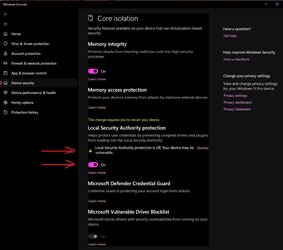
After rebooting again, the toggle for LSAp now shows it's switched On, but there's still a warning saying it's off (see pic). The system tray icon also continues to show Actions recommended.

I researched a bit, and see on reddit ( Link ) others are having the same issue. They say something about a missing Registry entry, and creating a new DWORD32, but I didn't want to blindly mess with the Registry. Likewise, I have a restore point, but am not sure that's the best course, as I don't know if LSAp is truly Off, or On, and Windows is just displaying an erroneous message.

For now, I've elected not to do anything (except post here) and hope Microsoft applies a fix.

Has anyone here encountered this? Any suggestions will be appreciated.

Windows Build/Version22H2, Build 22621.1265

Attachments​

  • LSAP.jpg
    LSAP.jpg
    96.4 KB · Views: 1
 
Windows Build/Version
22H2, Build 22621.1265

My Computers My Computers

  • At a glance

    Windows 11 23H2, 24H2i7-12700K16GB (2 x 8)Intel(R) UHD Graphics 770 with shared graphic...
    OS
    Windows 11 23H2, 24H2
    Computer type
    PC/Desktop
    Manufacturer/Model
    Dell XPS8950, Vostro5620
    CPU
    i7-12700K
    Motherboard
    Z690 : 9D2HH Foxconn, R6PCT Foxconn 2nd (XPS)
    Memory
    16GB (2 x 8)
    Graphics Card(s)
    Intel(R) UHD Graphics 770 with shared graphics memory
    Sound Card
    Integrated
    Monitor(s) Displays
    Acer CBL282K Smiiprx
    Screen Resolution
    4K UHD (3840 x 2160) @ 60 Hz
    Hard Drives
    Western Digital PC SN810 512 GB M.2 NVMe SSD, PCIe
    PSU
    750W
    Cooling
    2G44F Asetek 125W CPU liquid cooler
    Keyboard
    Arteck Wireless
    Mouse
    Victsing-mm057 wireless
    Internet Speed
    Wi-Fi 6
    Browser
    Vivaldi
    Antivirus
    Windows Defender (native)
  • At a glance

    Win 23H212th Gen Intel Core i7-1260P2 x 8 GBIntel Iris Xe Graphics
    Operating System
    Win 23H2
    Computer type
    Laptop
    Manufacturer/Model
    Dell Vostro 5620
    CPU
    12th Gen Intel Core i7-1260P
    Memory
    2 x 8 GB
    Graphics card(s)
    Intel Iris Xe Graphics
    Screen Resolution
    1920 x 1200 @ 60 Hz
    Hard Drives
    NVMe 512 GB
    Case
    Aluminum
    Mouse
    Touchpad
    Browser
    Vivaldi
    Antivirus
    Windows Defender (native)

My Computers My Computers

  • At a glance

    Windows 11 Pro 25H2 26200.8655i9-10900 10 core 20 threads32 gbnone-Intel UHD Graphics 630
    OS
    Windows 11 Pro 25H2 26200.8655
    Computer type
    PC/Desktop
    Manufacturer/Model
    Dell Optiplex 7080
    CPU
    i9-10900 10 core 20 threads
    Motherboard
    DELL 0J37VM
    Memory
    32 gb
    Graphics Card(s)
    none-Intel UHD Graphics 630
    Sound Card
    Integrated Realtek
    Monitor(s) Displays
    Benq 27
    Screen Resolution
    2560x1440
    Hard Drives
    2x1tb Solidigm m.2 nvme /External drives 512gb Samsung m.2 sata+2tb Kingston m2.nvme
    PSU
    500w
    Case
    MT
    Cooling
    Dell Premium
    Keyboard
    Logitech wired
    Mouse
    Logitech wireless
    Internet Speed
    so slow I'm too embarrassed to tell
    Browser
    #1 Edge #2 Firefox
    Antivirus
    Defender+MWB Premium
  • At a glance

    Windows 11 Pro 24H2 26200.8457AMD Ryzen 7 6800U32 gbintegrated
    Operating System
    Windows 11 Pro 24H2 26200.8457
    Computer type
    PC/Desktop
    Manufacturer/Model
    Beelink Mini PC SER5
    CPU
    AMD Ryzen 7 6800U
    Memory
    32 gb
    Graphics card(s)
    integrated
    Sound Card
    integrated
    Monitor(s) Displays
    Benq 27
    Screen Resolution
    2560x1440
    Hard Drives
    1TB Crucial nvme
    Keyboard
    Logitech wired
    Mouse
    Logitech wireless
    Internet Speed
    still too embarrassed to tell
    Browser
    Firefox
    Antivirus
    Defender
    Other Info
    System 3 is non compliant Dell 9020 i7-4770/24gb ram Win11 PRO 26200.8457
Thanks @glasskuter. The reg file in Brink's tutorial is consistent with what others were suggesting on Reddit.

I implemented changes in the Group Policy Editor, and set to Enable Local Security Authority (LSA) Protection without UEFI Lock, which is apparently the Win 11 default, but the issue persists (see pic).

SFC and DISM are all clear. This is looking more and more like a Windows bug.
 

Attachments

  • LSAp2.jpg
    LSAp2.jpg
    20.7 KB · Views: 5
Last edited:

My Computers My Computers

  • At a glance

    Windows 11 23H2, 24H2i7-12700K16GB (2 x 8)Intel(R) UHD Graphics 770 with shared graphic...
    OS
    Windows 11 23H2, 24H2
    Computer type
    PC/Desktop
    Manufacturer/Model
    Dell XPS8950, Vostro5620
    CPU
    i7-12700K
    Motherboard
    Z690 : 9D2HH Foxconn, R6PCT Foxconn 2nd (XPS)
    Memory
    16GB (2 x 8)
    Graphics Card(s)
    Intel(R) UHD Graphics 770 with shared graphics memory
    Sound Card
    Integrated
    Monitor(s) Displays
    Acer CBL282K Smiiprx
    Screen Resolution
    4K UHD (3840 x 2160) @ 60 Hz
    Hard Drives
    Western Digital PC SN810 512 GB M.2 NVMe SSD, PCIe
    PSU
    750W
    Cooling
    2G44F Asetek 125W CPU liquid cooler
    Keyboard
    Arteck Wireless
    Mouse
    Victsing-mm057 wireless
    Internet Speed
    Wi-Fi 6
    Browser
    Vivaldi
    Antivirus
    Windows Defender (native)
  • At a glance

    Win 23H212th Gen Intel Core i7-1260P2 x 8 GBIntel Iris Xe Graphics
    Operating System
    Win 23H2
    Computer type
    Laptop
    Manufacturer/Model
    Dell Vostro 5620
    CPU
    12th Gen Intel Core i7-1260P
    Memory
    2 x 8 GB
    Graphics card(s)
    Intel Iris Xe Graphics
    Screen Resolution
    1920 x 1200 @ 60 Hz
    Hard Drives
    NVMe 512 GB
    Case
    Aluminum
    Mouse
    Touchpad
    Browser
    Vivaldi
    Antivirus
    Windows Defender (native)
Per this link, (page 4) and Brink's reg file, it seems a missing Registry entry was the culprit.

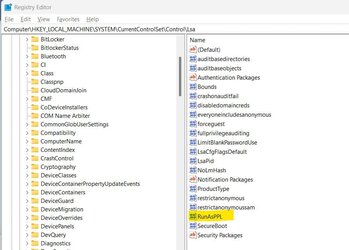
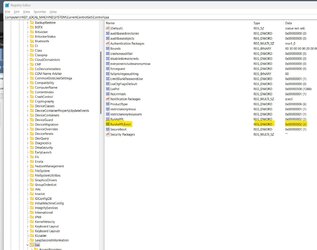
In the Registry, we were in fact missing the RunAsPPLBoot key (which of course the Group Policy mod didn't address).

I reversed the Group Policy change, just to keep things clean.

I then implemented changes specified in Brink's reg file
a) adding the RunAsPPLBoot key, and
b) assigning dword = 2.

That did the trick. Notification in the system tray is gone, and Windows Security is no longer flagging LSAp as Off (even though the toggle was On).

Thanks again for your help @glasskuter (and of course Brink).
 

Attachments

  • Registry change.jpg
    Registry change.jpg
    11 KB · Views: 13
  • Registry Before.jpg
    Registry Before.jpg
    66 KB · Views: 11
  • Registry After.jpg
    Registry After.jpg
    138.6 KB · Views: 12

My Computers My Computers

  • At a glance

    Windows 11 23H2, 24H2i7-12700K16GB (2 x 8)Intel(R) UHD Graphics 770 with shared graphic...
    OS
    Windows 11 23H2, 24H2
    Computer type
    PC/Desktop
    Manufacturer/Model
    Dell XPS8950, Vostro5620
    CPU
    i7-12700K
    Motherboard
    Z690 : 9D2HH Foxconn, R6PCT Foxconn 2nd (XPS)
    Memory
    16GB (2 x 8)
    Graphics Card(s)
    Intel(R) UHD Graphics 770 with shared graphics memory
    Sound Card
    Integrated
    Monitor(s) Displays
    Acer CBL282K Smiiprx
    Screen Resolution
    4K UHD (3840 x 2160) @ 60 Hz
    Hard Drives
    Western Digital PC SN810 512 GB M.2 NVMe SSD, PCIe
    PSU
    750W
    Cooling
    2G44F Asetek 125W CPU liquid cooler
    Keyboard
    Arteck Wireless
    Mouse
    Victsing-mm057 wireless
    Internet Speed
    Wi-Fi 6
    Browser
    Vivaldi
    Antivirus
    Windows Defender (native)

  • At a glance

    Win 23H212th Gen Intel Core i7-1260P2 x 8 GBIntel Iris Xe Graphics
    Operating System
    Win 23H2
    Computer type
    Laptop
    Manufacturer/Model
    Dell Vostro 5620
    CPU
    12th Gen Intel Core i7-1260P
    Memory
    2 x 8 GB
    Graphics card(s)
    Intel Iris Xe Graphics
    Screen Resolution
    1920 x 1200 @ 60 Hz
    Hard Drives
    NVMe 512 GB
    Case
    Aluminum
    Mouse
    Touchpad
    Browser
    Vivaldi
    Antivirus
    Windows Defender (native)

You're welcome. I donate my share of thanks to @Brink. He's the brains behind it. He does the work, we just provide the links.
 

My Computers My Computers

  • At a glance

    Windows 11 Pro 25H2 26200.8655i9-10900 10 core 20 threads32 gbnone-Intel UHD Graphics 630
    OS
    Windows 11 Pro 25H2 26200.8655
    Computer type
    PC/Desktop
    Manufacturer/Model
    Dell Optiplex 7080
    CPU
    i9-10900 10 core 20 threads
    Motherboard
    DELL 0J37VM
    Memory
    32 gb
    Graphics Card(s)
    none-Intel UHD Graphics 630
    Sound Card
    Integrated Realtek
    Monitor(s) Displays
    Benq 27
    Screen Resolution
    2560x1440
    Hard Drives
    2x1tb Solidigm m.2 nvme /External drives 512gb Samsung m.2 sata+2tb Kingston m2.nvme
    PSU
    500w
    Case
    MT
    Cooling
    Dell Premium
    Keyboard
    Logitech wired
    Mouse
    Logitech wireless
    Internet Speed
    so slow I'm too embarrassed to tell
    Browser
    #1 Edge #2 Firefox
    Antivirus
    Defender+MWB Premium
  • At a glance

    Windows 11 Pro 24H2 26200.8457AMD Ryzen 7 6800U32 gbintegrated
    Operating System
    Windows 11 Pro 24H2 26200.8457
    Computer type
    PC/Desktop
    Manufacturer/Model
    Beelink Mini PC SER5
    CPU
    AMD Ryzen 7 6800U
    Memory
    32 gb
    Graphics card(s)
    integrated
    Sound Card
    integrated
    Monitor(s) Displays
    Benq 27
    Screen Resolution
    2560x1440
    Hard Drives
    1TB Crucial nvme
    Keyboard
    Logitech wired
    Mouse
    Logitech wireless
    Internet Speed
    still too embarrassed to tell
    Browser
    Firefox
    Antivirus
    Defender
    Other Info
    System 3 is non compliant Dell 9020 i7-4770/24gb ram Win11 PRO 26200.8457
Per this link, (page 4) and Brink's reg file, it seems a missing Registry entry was the culprit.

In the Registry, we were in fact missing the RunAsPPLBoot key (which of course the Group Policy mod didn't address).

I reversed the Group Policy change, just to keep things clean.

I then implemented changes specified in Brink's reg file
a) adding the RunAsPPLBoot key, and
b) assigning dword = 2.

That did the trick. Notification in the system tray is gone, and Windows Security is no longer flagging LSAp as Off (even though the toggle was On).

Thanks again for your help @glasskuter (and of course Brink).
Sorry - a and b in my post # 4 above should read:

a) adding the RunAsPPLBoot dword, and
b) assigning value= 2.
 

My Computers My Computers

  • At a glance

    Windows 11 23H2, 24H2i7-12700K16GB (2 x 8)Intel(R) UHD Graphics 770 with shared graphic...
    OS
    Windows 11 23H2, 24H2
    Computer type
    PC/Desktop
    Manufacturer/Model
    Dell XPS8950, Vostro5620
    CPU
    i7-12700K
    Motherboard
    Z690 : 9D2HH Foxconn, R6PCT Foxconn 2nd (XPS)
    Memory
    16GB (2 x 8)
    Graphics Card(s)
    Intel(R) UHD Graphics 770 with shared graphics memory
    Sound Card
    Integrated
    Monitor(s) Displays
    Acer CBL282K Smiiprx
    Screen Resolution
    4K UHD (3840 x 2160) @ 60 Hz
    Hard Drives
    Western Digital PC SN810 512 GB M.2 NVMe SSD, PCIe
    PSU
    750W
    Cooling
    2G44F Asetek 125W CPU liquid cooler
    Keyboard
    Arteck Wireless
    Mouse
    Victsing-mm057 wireless
    Internet Speed
    Wi-Fi 6
    Browser
    Vivaldi
    Antivirus
    Windows Defender (native)

  • At a glance

    Win 23H212th Gen Intel Core i7-1260P2 x 8 GBIntel Iris Xe Graphics
    Operating System
    Win 23H2
    Computer type
    Laptop
    Manufacturer/Model
    Dell Vostro 5620
    CPU
    12th Gen Intel Core i7-1260P
    Memory
    2 x 8 GB
    Graphics card(s)
    Intel Iris Xe Graphics
    Screen Resolution
    1920 x 1200 @ 60 Hz
    Hard Drives
    NVMe 512 GB
    Case
    Aluminum
    Mouse
    Touchpad
    Browser
    Vivaldi
    Antivirus
    Windows Defender (native)

Toggling LSAP to ON should have been all that was needed. An optional way of turning it on is using a reg file that does the same thing. Here is Brink's tutorial that includes the reg file. Try that method to see if the warning is removed. Enable or Disable Local Security Authority (LSA) Protection in Windows 11 Tutorial
Hi Glasskuter
After the March 14 update I got a yellow warning on my Windows Security notification icon. I turned on LSA but the yellow warning remains, I checked the registry (Brink's tutorial) and the first RunAsPPL is set to 00000002 but I don't have the "RunAsPPLBoot"=dword:00000002 entry (Windows11 22H2 Home) should I run Brink's script to include the second key? I checked my UEFI and Secure Boot is enabled.
Alternatively I dismiss the warning?
Frank
 

Attachments

  • Local Security is on with yellow icon.jpg
    Local Security is on with yellow icon.jpg
    56.4 KB · Views: 6

My Computers My Computers

  • At a glance

    Windows 11 Home 25H2 build: 26200.8655Intel(R) Core(TM) Ultra 7 258V, 2200 Mhz, 8 C...32 GB LPDDR5X (soldered)Intel(R) Arc(TM) 140V GPU (16GB)
    OS
    Windows 11 Home 25H2 build: 26200.8655
    Computer type
    Laptop
    Manufacturer/Model
    Acer Swift A.I SF14-51T
    CPU
    Intel(R) Core(TM) Ultra 7 258V, 2200 Mhz, 8 Cores
    Motherboard
    Icefish_LNV, Version V1.15
    Memory
    32 GB LPDDR5X (soldered)
    Graphics Card(s)
    Intel(R) Arc(TM) 140V GPU (16GB)
    Sound Card
    RealTek + Intel Smart Sound
    Monitor(s) Displays
    14" IPS WUXGA
    Screen Resolution
    1920x1200x60Hz
    Hard Drives
    Micron_2550_MTFDKBA1T0TGE, NVMe Gen4, 1TB
    PSU
    45W USB-C GaN charger
    Case
    Full aluminum body
    Cooling
    1 fan
    Keyboard
    US with Backlight
    Mouse
    Precision Trackpad
    Internet Speed
    25 Mb/s 5G
    Browser
    Edge
    Antivirus
    Windows Defender
    Other Info
    BIOS Version/Date Insyde Corp. V1.15, 8/28/2025, Windows Hello IR camera with Facial recognition. Secure Boot 2026 KEK key installed
  • At a glance

    Windows 11 Home 25H2 build: 26200.8655Intel 12th Gen. i7 12700H, 14 cores, 2.3 GHz ...8GB LPDDR4 on board + 8GB LPDDR4 3200 MHz in ...Intel Iris Xe supports up to 4096 x 2304 @ 120Hz
    Operating System
    Windows 11 Home 25H2 build: 26200.8655
    Computer type
    Laptop
    Manufacturer/Model
    Asus Vivobook K3502Z S15 15" OLED
    CPU
    Intel 12th Gen. i7 12700H, 14 cores, 2.3 GHz (24M Cache, up to 4.7 GHz, 6P+8E cores)
    Motherboard
    Alder Lake-H, 1700-4700 MHz clock rate
    Memory
    8GB LPDDR4 on board + 8GB LPDDR4 3200 MHz in Dual Channel.
    Graphics card(s)
    Intel Iris Xe supports up to 4096 x 2304 @ 120Hz
    Sound Card
    Harman Kardon - DTS
    Monitor(s) Displays
    OLED 15.6inch 2.8K (2880 x 1620)
    Screen Resolution
    16:9 aspect ratio 0.2ms response time 120Hz refresh rate, 550nits
    Hard Drives
    512GB M.2 NVMe Gen4 PCIe 4.0 SSD, Micron_2450_MTFDKBA512TFK
    PSU
    90-Watt USB charger (Thunderbolt4)
    Case
    Metal lid, plastic case
    Cooling
    1 fan
    Keyboard
    With adjustable backlight
    Mouse
    Precision Trackpad
    Internet Speed
    ISP provides 15 mb/s WIFI LTE (4G), laptop WIFI 6 adapter.
    Browser
    Edge
    Antivirus
    Windows Defender
    Other Info
    BIOS American Megatrends International, LLC. 10.1.2.312, 13/03/2024. Network adapter: Intel Wi-Fi 6E AX211 160 MHz, Secure Boot 2026 KEK key installed
Yes, Frank. The reg file will create the key.
 

My Computers My Computers

  • At a glance

    Windows 11 Pro 25H2 26200.8655i9-10900 10 core 20 threads32 gbnone-Intel UHD Graphics 630
    OS
    Windows 11 Pro 25H2 26200.8655
    Computer type
    PC/Desktop
    Manufacturer/Model
    Dell Optiplex 7080
    CPU
    i9-10900 10 core 20 threads
    Motherboard
    DELL 0J37VM
    Memory
    32 gb
    Graphics Card(s)
    none-Intel UHD Graphics 630
    Sound Card
    Integrated Realtek
    Monitor(s) Displays
    Benq 27
    Screen Resolution
    2560x1440
    Hard Drives
    2x1tb Solidigm m.2 nvme /External drives 512gb Samsung m.2 sata+2tb Kingston m2.nvme
    PSU
    500w
    Case
    MT
    Cooling
    Dell Premium
    Keyboard
    Logitech wired
    Mouse
    Logitech wireless
    Internet Speed
    so slow I'm too embarrassed to tell
    Browser
    #1 Edge #2 Firefox
    Antivirus
    Defender+MWB Premium
  • At a glance

    Windows 11 Pro 24H2 26200.8457AMD Ryzen 7 6800U32 gbintegrated
    Operating System
    Windows 11 Pro 24H2 26200.8457
    Computer type
    PC/Desktop
    Manufacturer/Model
    Beelink Mini PC SER5
    CPU
    AMD Ryzen 7 6800U
    Memory
    32 gb
    Graphics card(s)
    integrated
    Sound Card
    integrated
    Monitor(s) Displays
    Benq 27
    Screen Resolution
    2560x1440
    Hard Drives
    1TB Crucial nvme
    Keyboard
    Logitech wired
    Mouse
    Logitech wireless
    Internet Speed
    still too embarrassed to tell
    Browser
    Firefox
    Antivirus
    Defender
    Other Info
    System 3 is non compliant Dell 9020 i7-4770/24gb ram Win11 PRO 26200.8457
It looks like 2023-03 Cumulative Update for Windows 11 Version 22H2 for x64-based Systems (KB5023706) turns LSAP to off. Only noticed it yesterday and had the same issue.
 

My Computers My Computers

  • At a glance

    Win 11 ProAMD Ryzen™ 7 7730U24GB Dual-Channel DDR4 @ 1596MHz (22-22-22-52)512MB ATI AMD Radeon Graphics (ASUStek Comput...
    OS
    Win 11 Pro
    Computer type
    Laptop
    Manufacturer/Model
    ASUS Vivobook
    CPU
    AMD Ryzen™ 7 7730U
    Motherboard
    M1605YA
    Memory
    24GB Dual-Channel DDR4 @ 1596MHz (22-22-22-52)
    Graphics Card(s)
    512MB ATI AMD Radeon Graphics (ASUStek Computer Inc)
    Monitor(s) Displays
    Generic PnP Monitor (1920x1200@60Hz) - P1 PLUS (1920x1080@59Hz)
    Screen Resolution
    1920 X 1200
    Hard Drives
    953GB Western Digital WD
    PSU
    45 Watts
    Mouse
    Lenovo Bluetooth.
    Internet Speed
    500 Mbps
    Browser
    Edge
    Antivirus
    Defender
  • At a glance

    Windows 11AMD Ryzen 7 5800H / 3.2 GHz32 GB DDR4 SDRAM 3200 MHzNVIDIA GeForce RTX 3060 6 GB GDDR6 SDRAM
    Operating System
    Windows 11
    Computer type
    Laptop
    Manufacturer/Model
    ACER NITRO
    CPU
    AMD Ryzen 7 5800H / 3.2 GHz
    Motherboard
    CZ Scala_CAS (FP6)
    Memory
    32 GB DDR4 SDRAM 3200 MHz
    Graphics card(s)
    NVIDIA GeForce RTX 3060 6 GB GDDR6 SDRAM
    Sound Card
    Realtek Audio. NVIDIA High Definition Audio
    Monitor(s) Displays
    15.6" LED backlight 1920 x 1080 (Full HD) 144 Hz
    Screen Resolution
    1920 x 1080 (Full HD)
    Hard Drives
    Samsung 970 Evo Plus 2TB NVMe M.2
    PSU
    180 Watt, 19.5 V
    Mouse
    Lenovo Bluetooth
    Internet Speed
    500 Mbps
    Browser
    Edge
    Antivirus
    Defender
Not to take anything away from Brink, but if you click the 'learn more' link under the Defender item it will take you to the Microsoft page :
Configuring Additional LSA Protection

There are instructions and explanations there on how to correctly configure LSAp, including the registry settings and how to use Event Viewer to check the status of relevent files that might cause issues.
 

My Computer My Computer

At a glance

Windows 11 Pro 22H2, build: 22621.521Intel i7-12700K 3.6GHz Base (5.0GHz Turbo)64GB DDR 3600MhzAsus Tuff RTX 3080 10GB OC
OS
Windows 11 Pro 22H2, build: 22621.521
Computer type
PC/Desktop
Manufacturer/Model
Scan 3XS Custom 1700
CPU
Intel i7-12700K 3.6GHz Base (5.0GHz Turbo)
Motherboard
Asus ProArt Creator B660 D4
Memory
64GB DDR 3600Mhz
Graphics Card(s)
Asus Tuff RTX 3080 10GB OC
Sound Card
Onboard Realtek
Monitor(s) Displays
Gigabyte G32QC 32inch 16:9 curved @2560 x 1440p 165Hz Freesync Premium Pro/ Dell SE2422H 24inch 16:9 1920 x 1080p 75Hz Freesync
Screen Resolution
2560 x 1440p & 1920 x 1080p
Hard Drives
WD SN570 1TB NVME (Boot), Samsung 870QVO 1TB (SSD), SanDisk 3D Ultra 500Gb (SSD) x2, Seagate 3Tb Expansion Desk (Ext HDD), 2x Toshiba 1Tb P300 (Ext HDD)
PSU
Corsair RM1000X Modular
Case
Corsair 4000D Airflow Desktop
Cooling
Corsair Hydro H150i RGB Pro XT 360mm Liquid Cooler, 3 x 120mm fans, 1x Exhaust
Keyboard
Microsoft Ergonomic
Mouse
Logitech G402
Internet Speed
800Mbs
Browser
Edge Chromium
Antivirus
Defender, Malwarebytes

My Computers My Computers

  • At a glance

    Windows 11 Home 25H2 build: 26200.8655Intel(R) Core(TM) Ultra 7 258V, 2200 Mhz, 8 C...32 GB LPDDR5X (soldered)Intel(R) Arc(TM) 140V GPU (16GB)
    OS
    Windows 11 Home 25H2 build: 26200.8655
    Computer type
    Laptop
    Manufacturer/Model
    Acer Swift A.I SF14-51T
    CPU
    Intel(R) Core(TM) Ultra 7 258V, 2200 Mhz, 8 Cores
    Motherboard
    Icefish_LNV, Version V1.15
    Memory
    32 GB LPDDR5X (soldered)
    Graphics Card(s)
    Intel(R) Arc(TM) 140V GPU (16GB)
    Sound Card
    RealTek + Intel Smart Sound
    Monitor(s) Displays
    14" IPS WUXGA
    Screen Resolution
    1920x1200x60Hz
    Hard Drives
    Micron_2550_MTFDKBA1T0TGE, NVMe Gen4, 1TB
    PSU
    45W USB-C GaN charger
    Case
    Full aluminum body
    Cooling
    1 fan
    Keyboard
    US with Backlight
    Mouse
    Precision Trackpad
    Internet Speed
    25 Mb/s 5G
    Browser
    Edge
    Antivirus
    Windows Defender
    Other Info
    BIOS Version/Date Insyde Corp. V1.15, 8/28/2025, Windows Hello IR camera with Facial recognition. Secure Boot 2026 KEK key installed
  • At a glance

    Windows 11 Home 25H2 build: 26200.8655Intel 12th Gen. i7 12700H, 14 cores, 2.3 GHz ...8GB LPDDR4 on board + 8GB LPDDR4 3200 MHz in ...Intel Iris Xe supports up to 4096 x 2304 @ 120Hz
    Operating System
    Windows 11 Home 25H2 build: 26200.8655
    Computer type
    Laptop
    Manufacturer/Model
    Asus Vivobook K3502Z S15 15" OLED
    CPU
    Intel 12th Gen. i7 12700H, 14 cores, 2.3 GHz (24M Cache, up to 4.7 GHz, 6P+8E cores)
    Motherboard
    Alder Lake-H, 1700-4700 MHz clock rate
    Memory
    8GB LPDDR4 on board + 8GB LPDDR4 3200 MHz in Dual Channel.
    Graphics card(s)
    Intel Iris Xe supports up to 4096 x 2304 @ 120Hz
    Sound Card
    Harman Kardon - DTS
    Monitor(s) Displays
    OLED 15.6inch 2.8K (2880 x 1620)
    Screen Resolution
    16:9 aspect ratio 0.2ms response time 120Hz refresh rate, 550nits
    Hard Drives
    512GB M.2 NVMe Gen4 PCIe 4.0 SSD, Micron_2450_MTFDKBA512TFK
    PSU
    90-Watt USB charger (Thunderbolt4)
    Case
    Metal lid, plastic case
    Cooling
    1 fan
    Keyboard
    With adjustable backlight
    Mouse
    Precision Trackpad
    Internet Speed
    ISP provides 15 mb/s WIFI LTE (4G), laptop WIFI 6 adapter.
    Browser
    Edge
    Antivirus
    Windows Defender
    Other Info
    BIOS American Megatrends International, LLC. 10.1.2.312, 13/03/2024. Network adapter: Intel Wi-Fi 6E AX211 160 MHz, Secure Boot 2026 KEK key installed
I've also had the same issue following the March 14th update - LSAP was set to off and toggling it on just keeps the yellow warning and tells me I need to restart to activate even after a reboot.

I'm not one to particularly enjoy fiddling with registry entries for no reason (not a super techy person!), so I'm inclined to just leave it off and tag the notification as Dismissed. Is this a particularly useful security setting for an average home user? If it's viewed as vital I'll deal with the registry entry issue but if the update itself is mass turning this setting off for people I'm inclined to leave it disabled!
 

My Computer My Computer

At a glance

Windows 11
OS
Windows 11
I've also had the same issue following the March 14th update - LSAP was set to off and toggling it on just keeps the yellow warning and tells me I need to restart to activate even after a reboot.

I'm not one to particularly enjoy fiddling with registry entries for no reason (not a super techy person!), so I'm inclined to just leave it off and tag the notification as Dismissed. Is this a particularly useful security setting for an average home user? If it's viewed as vital I'll deal with the registry entry issue but if the update itself is mass turning this setting off for people I'm inclined to leave it disabled!
If you read the MS page I linked you can decide for yourself if you need to resolve the issue or not, only you really know if your setup needs it on or off.
 

My Computer My Computer

At a glance

Windows 11 Pro 22H2, build: 22621.521Intel i7-12700K 3.6GHz Base (5.0GHz Turbo)64GB DDR 3600MhzAsus Tuff RTX 3080 10GB OC
OS
Windows 11 Pro 22H2, build: 22621.521
Computer type
PC/Desktop
Manufacturer/Model
Scan 3XS Custom 1700
CPU
Intel i7-12700K 3.6GHz Base (5.0GHz Turbo)
Motherboard
Asus ProArt Creator B660 D4
Memory
64GB DDR 3600Mhz
Graphics Card(s)
Asus Tuff RTX 3080 10GB OC
Sound Card
Onboard Realtek
Monitor(s) Displays
Gigabyte G32QC 32inch 16:9 curved @2560 x 1440p 165Hz Freesync Premium Pro/ Dell SE2422H 24inch 16:9 1920 x 1080p 75Hz Freesync
Screen Resolution
2560 x 1440p & 1920 x 1080p
Hard Drives
WD SN570 1TB NVME (Boot), Samsung 870QVO 1TB (SSD), SanDisk 3D Ultra 500Gb (SSD) x2, Seagate 3Tb Expansion Desk (Ext HDD), 2x Toshiba 1Tb P300 (Ext HDD)
PSU
Corsair RM1000X Modular
Case
Corsair 4000D Airflow Desktop
Cooling
Corsair Hydro H150i RGB Pro XT 360mm Liquid Cooler, 3 x 120mm fans, 1x Exhaust
Keyboard
Microsoft Ergonomic
Mouse
Logitech G402
Internet Speed
800Mbs
Browser
Edge Chromium
Antivirus
Defender, Malwarebytes
Not to take anything away from Brink, but if you click the 'learn more' link under the Defender item it will take you to the Microsoft page :
Configuring Additional LSA Protection

There are instructions and explanations there on how to correctly configure LSAp, including the registry settings and how to use Event Viewer to check the status of relevent files that might cause issues.
Read thru that, and its over my head... however, how does this apply to Windows 'Home', ? There is stuff there that I'm sure is not part of Home.
 

My Computer My Computer

At a glance

Windows 11 Intel i5 10400 HD630 graphics chipi5-1040012 gbHD630 chipset
OS
Windows 11 Intel i5 10400 HD630 graphics chip
Computer type
PC/Desktop
Manufacturer/Model
HP
CPU
i5-10400
Memory
12 gb
Graphics Card(s)
HD630 chipset
Monitor(s) Displays
LG 24inch
Hard Drives
SSD, external usb drive 1tb for files/backups
Keyboard
wireless Logi
Mouse
ms 4000 wireless mouse
Internet Speed
10meg
Browser
Firefox
Antivirus
Defender
Other Info
Win11 Home 25h2 26200.8655 06/09/2026
I was getting the same (Pro) since, there was a Defender platform update this morning, and now every other time I open Windows security I get "Windows security health service stopped working"
Tried repair and reset on Windows security.
SFC scannow (found and resolved)
DISM restore.

the Dword reg egit entries are indeed missing , however I didn't realise I was beta testing.

KB 5007651 was the little gem I received today
 

My Computer My Computer

At a glance

11 ProI7 14700k2 X Corsair Vengeance DDR4 @ 3600 32 gb totalMSI RTX 5070ti Ventus 3x OC
OS
11 Pro
Computer type
PC/Desktop
CPU
I7 14700k
Motherboard
Gigabyte Z690 Aorus Elite
Memory
2 X Corsair Vengeance DDR4 @ 3600 32 gb total
Graphics Card(s)
MSI RTX 5070ti Ventus 3x OC
Sound Card
onboard
Monitor(s) Displays
Iiyama 27"
Screen Resolution
2560 x 1440
Hard Drives
4 TB OEM M.2
PSU
Corsair 850 watt modular
Case
Fractal Meshify 2
Cooling
AIO on CPU trinity on GPU
Keyboard
Logitech K780 wireless
Mouse
Steelseries Rival 3 wireless
Internet Speed
52gb
Browser
Edge Chrome
Antivirus
Kaspersky
Not to take anything away from Brink, but if you click the 'learn more' link under the Defender item it will take you to the Microsoft page :
Configuring Additional LSA Protection

There are instructions and explanations there on how to correctly configure LSAp, including the registry settings and how to use Event Viewer to check the status of relevent files that might cause issues.
There's no mention of RunAsPPLBoot in that article though.

I encountered this issue today at work and also here at home.
 

My Computers My Computers

  • At a glance

    Windows 11 ProIntel Core i5-10600K32 GB (G.Skill Ripjaws V F4-3600C16D-32GVKC)MSI GeForce RTX 3070 Gaming Z Trio
    OS
    Windows 11 Pro
    Computer type
    PC/Desktop
    CPU
    Intel Core i5-10600K
    Motherboard
    Gigabyte Aorus Z490 Elite AC
    Memory
    32 GB (G.Skill Ripjaws V F4-3600C16D-32GVKC)
    Graphics Card(s)
    MSI GeForce RTX 3070 Gaming Z Trio
    Monitor(s) Displays
    LG UltraGear 32GR93U
    Screen Resolution
    4K
    Hard Drives
    Lexar NM790 2TB; Lexar NM790 2TB; Seagate Barracuda Compute 8TB
    PSU
    be quiet! Straight Power 11 750W
    Case
    be quiet! Silent Base 801
  • At a glance

    Windows 11 ProIntel Core i5-1155G78 GBIntel Iris Xᵉ
    Operating System
    Windows 11 Pro
    Computer type
    Laptop
    CPU
    Intel Core i5-1155G7
    Memory
    8 GB
    Graphics card(s)
    Intel Iris Xᵉ
    Screen Resolution
    1920 x 1080
I got this after the update also.
I can't recall if I ever had this enabled when I clean installed Windows. Now I have questions:

If this a "silent" security feature - it runs in the background and never bothers me?
The description of it :
"is a process in Microsoft Windows that verifies logon attempts, password changes, creates access tokens, and other important tasks relating to Windows authentication and authorization protocols"
I have a Local Account - I don't log in, use passwords, access tokens, or a MS Account. It's not going to start nagging for any of those is it?

In Brink's tutorial Enable or Disable Local Security Authority (LSA) Protection in Windows 11 Tutorial :
What is the UEFI Lock option? Why would I or wouldn't I want to enable this?
 

My Computers My Computers

  • At a glance

    Windows 11 Pro 23H2Intel i7-13700KCorsair Vengence 5600 - 32GBMSI RTX3060 Ventus 2x 12GB
    OS
    Windows 11 Pro 23H2
    Computer type
    PC/Desktop
    Manufacturer/Model
    Self Built
    CPU
    Intel i7-13700K
    Motherboard
    MSI PRO Z790-A WiFi
    Memory
    Corsair Vengence 5600 - 32GB
    Graphics Card(s)
    MSI RTX3060 Ventus 2x 12GB
    Sound Card
    On board - Realtek ALC4080
    Monitor(s) Displays
    LG 27GL850
    Screen Resolution
    2560 x 1440
    Hard Drives
    WD Black SN850X Nvme - 1TB
    WD Black 6TB HDD 256MB cache CMR
    WD Black 6TB HDD 128MB cache CMR
    PSU
    Corsair RM850x
    Case
    Fractal Design - Define 7
    Cooling
    Deepcool AK400
    Keyboard
    MS KC0405
    Mouse
    MS Model 1113 / MS Wireless Mobile Mouse 3500
    Internet Speed
    940 Mbps
    Browser
    Firefox
    Antivirus
    Windows Security
    Other Info
    I have a Case Speaker!
    I have a Blueray Disk drive!
  • At a glance

    Windows 10 Pro 22H2i7-9700KCorsair Vengence 32GBEVGA GTX1060
    Operating System
    Windows 10 Pro 22H2
    Computer type
    PC/Desktop
    Manufacturer/Model
    Self Built
    CPU
    i7-9700K
    Motherboard
    Asus Prime Z390-A
    Memory
    Corsair Vengence 32GB
    Graphics card(s)
    EVGA GTX1060
    Sound Card
    On Board
    Monitor(s) Displays
    Acer 27"
    Screen Resolution
    1920 x 1080
    Hard Drives
    WD Black Nvme 500GB
    Toshiba X300 5TB
    PSU
    Corsair RM850x
    Case
    Antec P101 Silent
    Cooling
    CoolerMaster Hyper T4
    Keyboard
    MS KC0405
    Mouse
    Logitec M-U0007
    Internet Speed
    940 Mbps
    Browser
    Firefox
    Antivirus
    Avast!
    Other Info
    I have a Case Speaker!
I just saw This post where Microsoft finally acknowledges this issue, which has apparently been going on since Jan 15, 2023. In the post, they say that LSA is ON, and that the warning is a false positive. They also include the registry mod to remove the warning, if desired.
 

My Computers My Computers

  • At a glance

    Windows 11 23H2, 24H2i7-12700K16GB (2 x 8)Intel(R) UHD Graphics 770 with shared graphic...
    OS
    Windows 11 23H2, 24H2
    Computer type
    PC/Desktop
    Manufacturer/Model
    Dell XPS8950, Vostro5620
    CPU
    i7-12700K
    Motherboard
    Z690 : 9D2HH Foxconn, R6PCT Foxconn 2nd (XPS)
    Memory
    16GB (2 x 8)
    Graphics Card(s)
    Intel(R) UHD Graphics 770 with shared graphics memory
    Sound Card
    Integrated
    Monitor(s) Displays
    Acer CBL282K Smiiprx
    Screen Resolution
    4K UHD (3840 x 2160) @ 60 Hz
    Hard Drives
    Western Digital PC SN810 512 GB M.2 NVMe SSD, PCIe
    PSU
    750W
    Cooling
    2G44F Asetek 125W CPU liquid cooler
    Keyboard
    Arteck Wireless
    Mouse
    Victsing-mm057 wireless
    Internet Speed
    Wi-Fi 6
    Browser
    Vivaldi
    Antivirus
    Windows Defender (native)

  • At a glance

    Win 23H212th Gen Intel Core i7-1260P2 x 8 GBIntel Iris Xe Graphics
    Operating System
    Win 23H2
    Computer type
    Laptop
    Manufacturer/Model
    Dell Vostro 5620
    CPU
    12th Gen Intel Core i7-1260P
    Memory
    2 x 8 GB
    Graphics card(s)
    Intel Iris Xe Graphics
    Screen Resolution
    1920 x 1200 @ 60 Hz
    Hard Drives
    NVMe 512 GB
    Case
    Aluminum
    Mouse
    Touchpad
    Browser
    Vivaldi
    Antivirus
    Windows Defender (native)
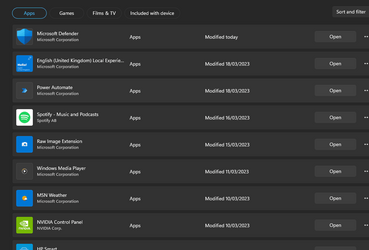
I just noticed Windows Defender had a *new* next to it? Checked updates, nothing there, but on the store it says updated today, don't think I've seen this before
 

Attachments

  • Screenshot 2023-03-21 115715.png
    Screenshot 2023-03-21 115715.png
    23.9 KB · Views: 5

My Computer My Computer

At a glance

11 ProI7 14700k2 X Corsair Vengeance DDR4 @ 3600 32 gb totalMSI RTX 5070ti Ventus 3x OC
OS
11 Pro
Computer type
PC/Desktop
CPU
I7 14700k
Motherboard
Gigabyte Z690 Aorus Elite
Memory
2 X Corsair Vengeance DDR4 @ 3600 32 gb total
Graphics Card(s)
MSI RTX 5070ti Ventus 3x OC
Sound Card
onboard
Monitor(s) Displays
Iiyama 27"
Screen Resolution
2560 x 1440
Hard Drives
4 TB OEM M.2
PSU
Corsair 850 watt modular
Case
Fractal Meshify 2
Cooling
AIO on CPU trinity on GPU
Keyboard
Logitech K780 wireless
Mouse
Steelseries Rival 3 wireless
Internet Speed
52gb
Browser
Edge Chrome
Antivirus
Kaspersky
Follow-up question: Is cleanup recommended?

Background
To resolve the issue, I added the RunAsPPLBoot DWord with a value of 2 in the Registry under the [HKEY_LOCAL_MACHINE\SYSTEM\CurrentControlSet\Control\Lsa] key.

Status
Microsoft has now acknowledged this issue as a bug (i.e., a false-positive) and said:
  • The erroneous notification can just be dismissed. After toggling LSA on, and rebooting LSA is on regardless of the notification.
  • Remedial action is NOT recommended. The erroneous notification should disappear with upcoming updates.
Question
Should I now remove the DWord I added, thereby "restoring" the Registry to a pre-modified state? Is there any downside to keeping this DWord under the LSA key if we want LSA enabled?
 

My Computers My Computers

  • At a glance

    Windows 11 23H2, 24H2i7-12700K16GB (2 x 8)Intel(R) UHD Graphics 770 with shared graphic...
    OS
    Windows 11 23H2, 24H2
    Computer type
    PC/Desktop
    Manufacturer/Model
    Dell XPS8950, Vostro5620
    CPU
    i7-12700K
    Motherboard
    Z690 : 9D2HH Foxconn, R6PCT Foxconn 2nd (XPS)
    Memory
    16GB (2 x 8)
    Graphics Card(s)
    Intel(R) UHD Graphics 770 with shared graphics memory
    Sound Card
    Integrated
    Monitor(s) Displays
    Acer CBL282K Smiiprx
    Screen Resolution
    4K UHD (3840 x 2160) @ 60 Hz
    Hard Drives
    Western Digital PC SN810 512 GB M.2 NVMe SSD, PCIe
    PSU
    750W
    Cooling
    2G44F Asetek 125W CPU liquid cooler
    Keyboard
    Arteck Wireless
    Mouse
    Victsing-mm057 wireless
    Internet Speed
    Wi-Fi 6
    Browser
    Vivaldi
    Antivirus
    Windows Defender (native)
  • At a glance

    Win 23H212th Gen Intel Core i7-1260P2 x 8 GBIntel Iris Xe Graphics
    Operating System
    Win 23H2
    Computer type
    Laptop
    Manufacturer/Model
    Dell Vostro 5620
    CPU
    12th Gen Intel Core i7-1260P
    Memory
    2 x 8 GB
    Graphics card(s)
    Intel Iris Xe Graphics
    Screen Resolution
    1920 x 1200 @ 60 Hz
    Hard Drives
    NVMe 512 GB
    Case
    Aluminum
    Mouse
    Touchpad
    Browser
    Vivaldi
    Antivirus
    Windows Defender (native)

Latest Support Threads

Back
Top Bottom