Logging into Microsoft on new Windows 11 PC


mccoady

Member
Local time
6:16 AM
Posts
10
OS
Windows 11
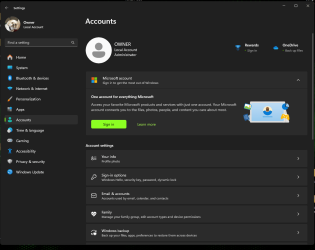
I just got a new Windows 11 PC and I'm unable to sign in to Microsoft Account in Account Settings, it just lists me as the 'Owner Local Account Administrator'. However I am able to login to my online Microsoft Account. I still have my old PC going so I can copy things to my new computer and it does have me logged in with my name.

Probably a simple thing but I can't figure it out. Any suggestions?
 
Windows Build/Version
Windows 11

My Computer My Computer

At a glance

Windows 11Intel Core i5-12400Crucial RAM 16GB KitIntegrated
OS
Windows 11
Computer type
PC/Desktop
Manufacturer/Model
Custom Build
CPU
Intel Core i5-12400
Motherboard
MSI Pro Z790-S
Memory
Crucial RAM 16GB Kit
Graphics Card(s)
Integrated
Sound Card
Integrated
Monitor(s) Displays
ASUS
Hard Drives
Western Digital WD_Black 2TB SN770 SSD
PSU
EVGA 100-N1-0650-L1 650W
Case
Fractal Design Focus G
Keyboard
Logitech G
Mouse
Logitech Performace MX
Internet Speed
100
Browser
Firefox
Antivirus
Avast
In the Account settings there should be an option to log into your Microsoft account. Have you tried that?

Is there is a reason you want to log into your Microsoft account? I haven't found a good reason to. Note I do log into my Microsoft account for other Windows functions like Microsoft Office, Sticky Notes, and the Microsoft Store. However, this is totally separate from the Windows login.

2024-09-29 12_10_10-Settings.jpg
 

My Computers My Computers

  • At a glance

    Windows 11 Pro 25H2 (26200.6901)AMD Ryzen 7 6800H with Radeon 680M GPU (486MB...Crucial DDR5-4800 (2400MHz) 32GB (2 x 16GB)NVIDIA RTX 3060 Laptop (6GB RAM)
    OS
    Windows 11 Pro 25H2 (26200.6901)
    Computer type
    Laptop
    Manufacturer/Model
    ASUS TUF Gaming A15 (2022)
    CPU
    AMD Ryzen 7 6800H with Radeon 680M GPU (486MB RAM)
    Memory
    Crucial DDR5-4800 (2400MHz) 32GB (2 x 16GB)
    Graphics Card(s)
    NVIDIA RTX 3060 Laptop (6GB RAM)
    Sound Card
    n/a
    Monitor(s) Displays
    15.6-inch
    Screen Resolution
    1920x1080 300Hz
    Hard Drives
    2 x Samsung 990 Evo Plus (2TB M.2 NVME SSD)
    PSU
    n/a
    Mouse
    Wireless Mouse M510
    Internet Speed
    2100Mbps/300Mbps
    Browser
    Firefox
    Antivirus
    Malwarebytes
  • At a glance

    Windows 11 Pro 25H2 (26200.8246)AMD Ryzen 7 5700X3DG.SKILL Flare X 32GB (2x16GB) DDR4ASUS ROG-STRIX-RTX3060TI-08G-V2-GAMING (RTX 3...
    Operating System
    Windows 11 Pro 25H2 (26200.8246)
    Computer type
    PC/Desktop
    Manufacturer/Model
    Custom build
    CPU
    AMD Ryzen 7 5700X3D
    Motherboard
    ASUS ROG Strix B550-F Gaming WiFi II
    Memory
    G.SKILL Flare X 32GB (2x16GB) DDR4
    Graphics card(s)
    ASUS ROG-STRIX-RTX3060TI-08G-V2-GAMING (RTX 3060-Ti, 8GB RAM)
    Monitor(s) Displays
    Samsung G50D IPS 27"
    Screen Resolution
    1440p/180Hz
    Hard Drives
    SAMSUNG 990 EVO Plus (2TB] M.2 NVME SSD
    SAMSUNG 990 EVO Plus (4TB) M.2 NVME SSD
    PSU
    Corsair RM750x (750 watts)
    Case
    Cooler Master MasterCase 5
    Cooling
    Scythe Mugen 6
    Keyboard
    Logitech K520 (MK540 keyboard/mouse combo)
    Mouse
    Logitech M310 (MK540 keyboard/mouse combo)
    Internet Speed
    2100 Mbps down / 300 Mbps up
    Browser
    Firefox, Edge, Chrome
    Antivirus
    Malwarebytes (Premium)
    Other Info
    ASUS Blu-ray Burner BW-16D1HT (SATA) || Western Digital Easystore 20TB USB 3.0 external hard drive used with Acronis True Image 2025 backup software || HP OfficeJet Pro 6975 Printer/Scanner
Yes thats where i have been trying to login but it won’t take the login credentials i use to login online to my account.

The main reason is i use Blue Iris to manage my ip cameras and it has an option to add Blue Iris as a startup option to Windows. This requires an administrator login which I’m unable to do and which i did have set up to do on my old computer.
 

My Computer My Computer

At a glance

Windows 11Intel Core i5-12400Crucial RAM 16GB KitIntegrated
OS
Windows 11
Computer type
PC/Desktop
Manufacturer/Model
Custom Build
CPU
Intel Core i5-12400
Motherboard
MSI Pro Z790-S
Memory
Crucial RAM 16GB Kit
Graphics Card(s)
Integrated
Sound Card
Integrated
Monitor(s) Displays
ASUS
Hard Drives
Western Digital WD_Black 2TB SN770 SSD
PSU
EVGA 100-N1-0650-L1 650W
Case
Fractal Design Focus G
Keyboard
Logitech G
Mouse
Logitech Performace MX
Internet Speed
100
Browser
Firefox
Antivirus
Avast
Totally confusing to me. Screenshots would be helpful so we can see what you do
 

My Computers My Computers

  • At a glance

    Windows 11 Pro 25H2 26200.9168i9-10900 10 core 20 threads32 gbnone-Intel UHD Graphics 630
    OS
    Windows 11 Pro 25H2 26200.9168
    Computer type
    PC/Desktop
    Manufacturer/Model
    Dell Optiplex 7080
    CPU
    i9-10900 10 core 20 threads
    Motherboard
    DELL 0J37VM
    Memory
    32 gb
    Graphics Card(s)
    none-Intel UHD Graphics 630
    Sound Card
    Integrated Realtek
    Monitor(s) Displays
    Benq 27
    Screen Resolution
    2560x1440
    Hard Drives
    2x1tb Solidigm m.2 nvme /External drives 512gb Samsung m.2 sata+2tb Kingston m2.nvme
    PSU
    500w
    Case
    MT
    Cooling
    Dell Premium
    Keyboard
    Logitech wired
    Mouse
    Logitech wireless
    Internet Speed
    so slow I'm too embarrassed to tell
    Browser
    #1 Edge #2 Firefox
    Antivirus
    Defender+MWB Premium
  • At a glance

    Windows 11 Pro 24H2 26200.9168AMD Ryzen 7 6800U32 gbintegrated
    Operating System
    Windows 11 Pro 24H2 26200.9168
    Computer type
    PC/Desktop
    Manufacturer/Model
    Beelink Mini PC SER5
    CPU
    AMD Ryzen 7 6800U
    Memory
    32 gb
    Graphics card(s)
    integrated
    Sound Card
    integrated
    Monitor(s) Displays
    Benq 27
    Screen Resolution
    2560x1440
    Hard Drives
    1TB Crucial nvme
    Keyboard
    Logitech wired
    Mouse
    Logitech wireless
    Internet Speed
    still too embarrassed to tell
    Browser
    Firefox
    Antivirus
    Defender
  • System 3 is non compliant Dell 9020 i7-4770/24gb ram Win11 PRO 26200.9168
Yes thats where i have been trying to login but it won’t take the login credentials i use to login online to my account.

The main reason is i use Blue Iris to manage my ip cameras and it has an option to add Blue Iris as a startup option to Windows. This requires an administrator login which I’m unable to do and which i did have set up to do on my old computer.
I have several Microsoft accounts but only one that I consider as my main one. The main one is what I use when I have logged into Windows 10 or 11 sometimes. Note this main Microsoft account is not in any way tied to any of my PCs since they were set up with local accounts. I am just saying that if you set up a PC with a local account it doesn't make any difference which Microsoft account you log in as long as it is your account and is a valid one.

When you first set up a PC with Windows it asks you to create at least one account. This account is always type Administrator. Any additional accounts can be either of type Administrator or Standard User. What type is your choice since you have an Administrator account by default. Note every Windows installation also has a built-in account named Administrator with type Administrator. You don't normally see this account because it is hidden by default.

Now to get to your question...If you have the only account on your computer then you do have a account of type Administrator. I don't understand what the question is. Are you logging in with another account which is type Standard User?

You keep comparing your old computer with your new one. I hope you are not just copying programs from your old computer to your new one. If so then that will sometimes confuse things. If that is the case then you need to reinstall these programs to solve any problems like that.
 

My Computers My Computers

  • At a glance

    Windows 11 Pro 25H2 (26200.6901)AMD Ryzen 7 6800H with Radeon 680M GPU (486MB...Crucial DDR5-4800 (2400MHz) 32GB (2 x 16GB)NVIDIA RTX 3060 Laptop (6GB RAM)
    OS
    Windows 11 Pro 25H2 (26200.6901)
    Computer type
    Laptop
    Manufacturer/Model
    ASUS TUF Gaming A15 (2022)
    CPU
    AMD Ryzen 7 6800H with Radeon 680M GPU (486MB RAM)
    Memory
    Crucial DDR5-4800 (2400MHz) 32GB (2 x 16GB)
    Graphics Card(s)
    NVIDIA RTX 3060 Laptop (6GB RAM)
    Sound Card
    n/a
    Monitor(s) Displays
    15.6-inch
    Screen Resolution
    1920x1080 300Hz
    Hard Drives
    2 x Samsung 990 Evo Plus (2TB M.2 NVME SSD)
    PSU
    n/a
    Mouse
    Wireless Mouse M510
    Internet Speed
    2100Mbps/300Mbps
    Browser
    Firefox
    Antivirus
    Malwarebytes
  • At a glance

    Windows 11 Pro 25H2 (26200.8246)AMD Ryzen 7 5700X3DG.SKILL Flare X 32GB (2x16GB) DDR4ASUS ROG-STRIX-RTX3060TI-08G-V2-GAMING (RTX 3...
    Operating System
    Windows 11 Pro 25H2 (26200.8246)
    Computer type
    PC/Desktop
    Manufacturer/Model
    Custom build
    CPU
    AMD Ryzen 7 5700X3D
    Motherboard
    ASUS ROG Strix B550-F Gaming WiFi II
    Memory
    G.SKILL Flare X 32GB (2x16GB) DDR4
    Graphics card(s)
    ASUS ROG-STRIX-RTX3060TI-08G-V2-GAMING (RTX 3060-Ti, 8GB RAM)
    Monitor(s) Displays
    Samsung G50D IPS 27"
    Screen Resolution
    1440p/180Hz
    Hard Drives
    SAMSUNG 990 EVO Plus (2TB] M.2 NVME SSD
    SAMSUNG 990 EVO Plus (4TB) M.2 NVME SSD
    PSU
    Corsair RM750x (750 watts)
    Case
    Cooler Master MasterCase 5
    Cooling
    Scythe Mugen 6
    Keyboard
    Logitech K520 (MK540 keyboard/mouse combo)
    Mouse
    Logitech M310 (MK540 keyboard/mouse combo)
    Internet Speed
    2100 Mbps down / 300 Mbps up
    Browser
    Firefox, Edge, Chrome
    Antivirus
    Malwarebytes (Premium)
    Other Info
    ASUS Blu-ray Burner BW-16D1HT (SATA) || Western Digital Easystore 20TB USB 3.0 external hard drive used with Acronis True Image 2025 backup software || HP OfficeJet Pro 6975 Printer/Scanner
Hey sorry guys to post and disappear but had an issue come up yesterday but thanks for the replies.

From my snapshot you can see where I was trying to Sign in and when I tried logging in, it kept saying the password was wrong. On the other hand I can Sign in to my online Microsoft account. Oh well.

MisterEd you mentioned it really wasn't necessary to Sign in to Microsoft in Settings > Account so I won't.

I was able to get around the Blue Iris option to run as a Windows service by using netplwiz (Googled) and reset my password. I purchased this from a store that did custom builds so they installed Windows 11 and did all the updates. Still trying to get my head around Windows 11 as it seems so different from 10.

I really appreciate the help and sorry again for the delay in responding!
 

Attachments

  • OWNER Local Account Administrator.png
    OWNER Local Account Administrator.png
    37.3 KB · Views: 2

My Computer My Computer

At a glance

Windows 11Intel Core i5-12400Crucial RAM 16GB KitIntegrated
OS
Windows 11
Computer type
PC/Desktop
Manufacturer/Model
Custom Build
CPU
Intel Core i5-12400
Motherboard
MSI Pro Z790-S
Memory
Crucial RAM 16GB Kit
Graphics Card(s)
Integrated
Sound Card
Integrated
Monitor(s) Displays
ASUS
Hard Drives
Western Digital WD_Black 2TB SN770 SSD
PSU
EVGA 100-N1-0650-L1 650W
Case
Fractal Design Focus G
Keyboard
Logitech G
Mouse
Logitech Performace MX
Internet Speed
100
Browser
Firefox
Antivirus
Avast
On my computers with Windows 10 and 11 I have both PINs and passwords. I use PINs most of the time because it is faster to log in with these. It is important to remember the passwords because you never know when it will be needed.

You might want to create another account of type Administrator. If for some reason you are locked out of your main account you can log into your 2nd account. Once you do that you can reset the password on your main account.

Another option is to enable the build-in administrator account which is also of type Administrator. It is hidden by default. You can do the following at the Command Prompt (Run as Administrator).

To enable built-in administrator account:
net user administrator /active:yes

To disable built-in administrator account:
net user administrator /active:no
 

My Computers My Computers

  • At a glance

    Windows 11 Pro 25H2 (26200.6901)AMD Ryzen 7 6800H with Radeon 680M GPU (486MB...Crucial DDR5-4800 (2400MHz) 32GB (2 x 16GB)NVIDIA RTX 3060 Laptop (6GB RAM)
    OS
    Windows 11 Pro 25H2 (26200.6901)
    Computer type
    Laptop
    Manufacturer/Model
    ASUS TUF Gaming A15 (2022)
    CPU
    AMD Ryzen 7 6800H with Radeon 680M GPU (486MB RAM)
    Memory
    Crucial DDR5-4800 (2400MHz) 32GB (2 x 16GB)
    Graphics Card(s)
    NVIDIA RTX 3060 Laptop (6GB RAM)
    Sound Card
    n/a
    Monitor(s) Displays
    15.6-inch
    Screen Resolution
    1920x1080 300Hz
    Hard Drives
    2 x Samsung 990 Evo Plus (2TB M.2 NVME SSD)
    PSU
    n/a
    Mouse
    Wireless Mouse M510
    Internet Speed
    2100Mbps/300Mbps
    Browser
    Firefox
    Antivirus
    Malwarebytes
  • At a glance

    Windows 11 Pro 25H2 (26200.8246)AMD Ryzen 7 5700X3DG.SKILL Flare X 32GB (2x16GB) DDR4ASUS ROG-STRIX-RTX3060TI-08G-V2-GAMING (RTX 3...
    Operating System
    Windows 11 Pro 25H2 (26200.8246)
    Computer type
    PC/Desktop
    Manufacturer/Model
    Custom build
    CPU
    AMD Ryzen 7 5700X3D
    Motherboard
    ASUS ROG Strix B550-F Gaming WiFi II
    Memory
    G.SKILL Flare X 32GB (2x16GB) DDR4
    Graphics card(s)
    ASUS ROG-STRIX-RTX3060TI-08G-V2-GAMING (RTX 3060-Ti, 8GB RAM)
    Monitor(s) Displays
    Samsung G50D IPS 27"
    Screen Resolution
    1440p/180Hz
    Hard Drives
    SAMSUNG 990 EVO Plus (2TB] M.2 NVME SSD
    SAMSUNG 990 EVO Plus (4TB) M.2 NVME SSD
    PSU
    Corsair RM750x (750 watts)
    Case
    Cooler Master MasterCase 5
    Cooling
    Scythe Mugen 6
    Keyboard
    Logitech K520 (MK540 keyboard/mouse combo)
    Mouse
    Logitech M310 (MK540 keyboard/mouse combo)
    Internet Speed
    2100 Mbps down / 300 Mbps up
    Browser
    Firefox, Edge, Chrome
    Antivirus
    Malwarebytes (Premium)
    Other Info
    ASUS Blu-ray Burner BW-16D1HT (SATA) || Western Digital Easystore 20TB USB 3.0 external hard drive used with Acronis True Image 2025 backup software || HP OfficeJet Pro 6975 Printer/Scanner
Thanks MisterEd I just setup a PIN!
 

My Computer My Computer

At a glance

Windows 11Intel Core i5-12400Crucial RAM 16GB KitIntegrated
OS
Windows 11
Computer type
PC/Desktop
Manufacturer/Model
Custom Build
CPU
Intel Core i5-12400
Motherboard
MSI Pro Z790-S
Memory
Crucial RAM 16GB Kit
Graphics Card(s)
Integrated
Sound Card
Integrated
Monitor(s) Displays
ASUS
Hard Drives
Western Digital WD_Black 2TB SN770 SSD
PSU
EVGA 100-N1-0650-L1 650W
Case
Fractal Design Focus G
Keyboard
Logitech G
Mouse
Logitech Performace MX
Internet Speed
100
Browser
Firefox
Antivirus
Avast

Latest Support Threads

Back
Top Bottom