Long Delay Before Splash Screen Appears Prior to Windows Starting


steamship

Well-known member
Local time
12:10 AM
Posts
48
Location
Londonderry, Northern Ireland
OS
Windows 11 Pro 24H2 (26100.6899)
This is an odd one I noticed a couple of days ago, and may have happened previously, but not certain as I just start it and do something else in the meantime, but it's usually only for a very short time.

In this instance, I powered on the laptop and was glancing over at it whilst doing other things in the room. After a time when I expected to see the Windows login screen, the screen was still black. At this point I thought that maybe I pressed the F12 or Delete button by mistake, so went over to start it again, only to see that the power light was lit. Around this time, the HP Omen splash screen appeared, followed a couple of seconds later by the Windows login.

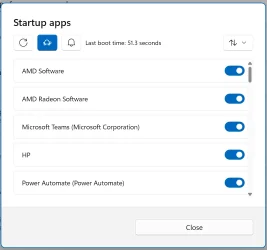
I used Wintoys to see my boot time, and it 51.3 seconds. Checking it ever since, the boot times are around the 8.1-8.5 seconds.
Screenshot 2025-11-01 102654.webp

I've checked the Event Viewer for Warnings and Errors, and this is what I get for the last three days (I didn't check further back), all the same. However, this is just Windows stuff, and the delay was prior to Windows starting, so is there any way to check the BIOS for debugging issues?

Level Date and Time Source Event ID Task Category
Warning 01/11/2025 10:09:48 Microsoft-Windows-Kernel-PnP 219 (212) "The driver \Driver\WUDFRd failed to load.
Device: ROOT\DISPLAY\0000
Status: 0xC0000365"
Warning 01/11/2025 10:09:51 Microsoft-Windows-Kernel-PnP 219 (212) "The driver \Driver\WUDFRd failed to load.
Device: ACPI\AMDI0080\1
Status: 0xC0000365"
Warning 01/11/2025 10:12:12 Microsoft-Windows-DistributedCOM 10016 None "The application-specific permission settings do not grant Local Launch permission for the COM Server application with CLSID
Windows.SecurityCenter.SecurityAppBroker
and APPID
Unavailable
to the user NT AUTHORITY\SYSTEM SID (S-1-5-18) from address LocalHost (Using LRPC) running in the application container Unavailable SID (Unavailable). This security permission can be modified using the Component Services administrative tool."
Warning 01/11/2025 10:12:12 Microsoft-Windows-DistributedCOM 10016 None "The application-specific permission settings do not grant Local Launch permission for the COM Server application with CLSID
Windows.SecurityCenter.WscDataProtection
and APPID
Unavailable
to the user NT AUTHORITY\SYSTEM SID (S-1-5-18) from address LocalHost (Using LRPC) running in the application container Unavailable SID (Unavailable). This security permission can be modified using the Component Services administrative tool."
Warning 01/11/2025 10:12:12 Microsoft-Windows-DistributedCOM 10016 None "The application-specific permission settings do not grant Local Launch permission for the COM Server application with CLSID
Windows.SecurityCenter.WscBrokerManager
and APPID
Unavailable
to the user NT AUTHORITY\SYSTEM SID (S-1-5-18) from address LocalHost (Using LRPC) running in the application container Unavailable SID (Unavailable). This security permission can be modified using the Component Services administrative tool."
Warning 01/11/2025 10:14:47 Microsoft-Windows-DistributedCOM 10016 None "The application-specific permission settings do not grant Local Activation permission for the COM Server application with CLSID
{2593F8B9-4EAF-457C-B68A-50F6B8EA6B54}
and APPID
{15C20B67-12E7-4BB6-92BB-7AFF07997402}
to the user Omen16\seans SID (S-1-5-21-885587194-2609459467-771910491-1001) from address LocalHost (Using LRPC) running in the application container Unavailable SID (Unavailable). This security permission can be modified using the Component Services administrative tool."
Error 01/11/2025 10:15:05 Microsoft-Windows-TPM-WMI 1796 None The Secure Boot update failed to update a Secure Boot variable with error Unknown HResult Error code: 0x800700c1. For more information, please see Secure Boot DB and DBX variable update events - Microsoft Support
Warning 01/11/2025 10:18:55 Microsoft-Windows-DistributedCOM 10016 None "The application-specific permission settings do not grant Local Activation permission for the COM Server application with CLSID
{6B3B8D23-FA8D-40B9-8DBD-B950333E2C52}
and APPID
{4839DDB7-58C2-48F5-8283-E1D1807D0D7D}
to the user NT AUTHORITY\LOCAL SERVICE SID (S-1-5-19) from address LocalHost (Using LRPC) running in the application container Unavailable SID (Unavailable). This security permission can be modified using the Component Services administrative tool."
Warning 01/11/2025 10:18:55 Microsoft-Windows-DistributedCOM 10016 None "The machine-default permission settings do not grant Local Activation permission for the COM Server application with CLSID
{C2F03A33-21F5-47FA-B4BB-156362A2F239}
and APPID
{316CDED5-E4AE-4B15-9113-7055D84DCC97}
to the user NT AUTHORITY\LOCAL SERVICE SID (S-1-5-19) from address LocalHost (Using LRPC) running in the application container Unavailable SID (Unavailable). This security permission can be modified using the Component Services administrative tool."
Warning 01/11/2025 10:18:55 Microsoft-Windows-DistributedCOM 10016 None "The application-specific permission settings do not grant Local Activation permission for the COM Server application with CLSID
{6B3B8D23-FA8D-40B9-8DBD-B950333E2C52}
and APPID
{4839DDB7-58C2-48F5-8283-E1D1807D0D7D}
to the user NT AUTHORITY\LOCAL SERVICE SID (S-1-5-19) from address LocalHost (Using LRPC) running in the application container Unavailable SID (Unavailable). This security permission can be modified using the Component Services administrative tool."
Warning 01/11/2025 10:18:55 Microsoft-Windows-DistributedCOM 10016 None "The machine-default permission settings do not grant Local Activation permission for the COM Server application with CLSID
{C2F03A33-21F5-47FA-B4BB-156362A2F239}
and APPID
{316CDED5-E4AE-4B15-9113-7055D84DCC97}
to the user NT AUTHORITY\LOCAL SERVICE SID (S-1-5-19) from address LocalHost (Using LRPC) running in the application container Unavailable SID (Unavailable). This security permission can be modified using the Component Services administrative tool."
 
Windows Build/Version
Windows 11 Pro 24H2 (26100.6899)

My Computer

System One

  • OS
    Windows 11 Pro 24H2 (26100.6899)
    Computer type
    Laptop
    Manufacturer/Model
    HP Omen 16
    CPU
    AMD Ryzen 7 5800H
    Memory
    2 x 32GB Kingston Fury 4800MHz
    Graphics Card(s)
    AMD Radeon RX 6600M
    Screen Resolution
    2560 x 1440
    Hard Drives
    WD Blue 2TB
    Samsung 1TB
    Browser
    Chrome
If this happened only once maybe windows update was applying an update in the background at boot.
If everything is normal now, I wouldn't worry about it.
 

My Computers

System One System Two

  • OS
    Windows 11 Pro 25H2
    Computer type
    PC/Desktop
    Manufacturer/Model
    Dell Optiplex 7080
    CPU
    i9-10900 10 core 20 threads
    Motherboard
    DELL 0J37VM
    Memory
    32 gb
    Graphics Card(s)
    none-Intel UHD Graphics 630
    Sound Card
    Integrated Realtek
    Monitor(s) Displays
    Benq 27
    Screen Resolution
    2560x1440
    Hard Drives
    2x1tb Solidigm m.2 nvme /External drives 512gb Samsung m.2 sata+2tb Kingston m2.nvme
    PSU
    500w
    Case
    MT
    Cooling
    Dell Premium
    Keyboard
    Logitech wired
    Mouse
    Logitech wireless
    Internet Speed
    so slow I'm too embarrassed to tell
    Browser
    #1 Edge #2 Firefox
    Antivirus
    Defender+MWB Premium
  • Operating System
    Windows 11 Pro 24H2 26200.8457
    Computer type
    PC/Desktop
    Manufacturer/Model
    Beelink Mini PC SER5
    CPU
    AMD Ryzen 7 6800U
    Memory
    32 gb
    Graphics card(s)
    integrated
    Sound Card
    integrated
    Monitor(s) Displays
    Benq 27
    Screen Resolution
    2560x1440
    Hard Drives
    1TB Crucial nvme
    Keyboard
    Logitech wired
    Mouse
    Logitech wireless
    Internet Speed
    still too embarrassed to tell
    Browser
    Firefox
    Antivirus
    Defender
    Other Info
    System 3 is non compliant Dell 9020 i7-4770/24gb ram Win11 PRO 26200.8457
If this happened only once maybe windows update was applying an update in the background at boot.
If everything is normal now, I wouldn't worry about it.
With Windows updates, I usually choose the option to Update and Restart. I then login in again and then choose Shut Down.

Bearing in mind that the laptop hasn't even gotten to the POST screen, how is it possible for Windows to perform updates?
 

My Computer

System One

  • OS
    Windows 11 Pro 24H2 (26100.6899)
    Computer type
    Laptop
    Manufacturer/Model
    HP Omen 16
    CPU
    AMD Ryzen 7 5800H
    Memory
    2 x 32GB Kingston Fury 4800MHz
    Graphics Card(s)
    AMD Radeon RX 6600M
    Screen Resolution
    2560 x 1440
    Hard Drives
    WD Blue 2TB
    Samsung 1TB
    Browser
    Chrome
Try the following in an elevated powershell, one after the other:-

DISM /online /Cleanup-Image /StartComponentCleanup /ResetBase

DISM /Online /Cleanup-Image /RestoreHealth

SFC /ScanNow
 

My Computers

System One System Two

  • OS
    Windows 11 Enterprise 25H2 26200 7462
    Computer type
    PC/Desktop
    Manufacturer/Model
    Custom Build
    CPU
    Intel XEON E5-2699 v3
    Motherboard
    ASUS X99-A
    Memory
    64GB Teamgroup UD4-3600
    Graphics Card(s)
    NVIDIA GeForce GTX 1080 Ti
    Sound Card
    Integrated
    Monitor(s) Displays
    ACER X34 Predator
    Screen Resolution
    3440 x 1440
    Hard Drives
    Crucial CT1000P 3P SSD8 1TB
    Crucial CT1000 BX500 SSD 1TB
    PSU
    GameMax Pro
    Case
    Fractal Design
    Cooling
    Corsair H110iGT + 6 140mm Fans
    Keyboard
    Corsair K4
    Mouse
    G-Skill G502
    Internet Speed
    300MBs
    Browser
    Chrome
    Antivirus
    OEM
    Other Info
    ASUS RT-AC87U Router
  • Operating System
    25H2 26200.5074
    Computer type
    Laptop
    Manufacturer/Model
    ASUS X555LA
    Memory
    8GB
    Browser
    Chrome
    Antivirus
    OEM
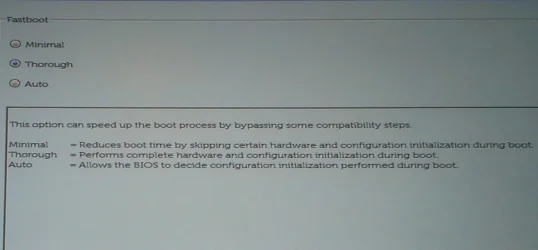
Check your Bios settings for something like my computer's POST behaviour, FastBoot setting:-
09.05 POST behaviour, FastBoot - closeup.webp


Denis
 

My Computer

System One

  • OS
    Windows 11 Home x64 Version 25H2 Build 26200.8037
Unlike my desktops, my miniPC (more similar to a laptop) doesn't beep when it posts successfully. Up to now no POST issues. What I'm asking here is if your laptop can do beeps. Nothing "Windows" (or DOS or Linux or whatever) is done in a computer until the POST succeeds.

A suspect is an intermittent hw difficulty that delays the POST. When I upgraded the RAM in one desktop, the "black screen" interval went from about 1-2 seconds to 9-10 seconds. I'm sure the actual interval is very exact in both cases, but I haven't measured it with precision. I attribute this difference to the "auto tune" (whatever the name) the BIOS does with the RAM, more difficult after the upgrade. There's even a setting in the BIOS about that (it's a year 2009 high-end motherboard with some low level settings). The 16 GB it has now is its maximum, previously it had 8 GB.

I think you should ascertain if the issue is pre-POST or post-POST, enabling the beep or connecting a "PC speaker" if possible (*), the HD LED if present (pre-POST it might be solid on or off but not blinking irregularly as if the HD was working) or whatever can help you, like noise patterns specially fans.

(*) The "PC speaker" doesn't have to do at all with the speakers connected to the sound card. In non pre-built desktops it's part of the case, it's either in the case itself and a cable goes to the motherboard, or in a small bag along with screws and similar stuff. The historically initial role of this device is just signaling a successful POST with one short beep, afterwards the BIOS makers invented sound codes (two short beeps, one long beep, several short,...) to signal different causes for not posting. Some motherboards have LEDs or even seven-segment (numbers) displays for this.
 

My Computer

System One

  • OS
    Windows 11
    Manufacturer/Model
    MeLE Quieter 2Q (fanless miniPC)
    CPU
    Celeron J4125 (10th gen)
    Memory
    8GB DDR4
    Monitor(s) Displays
    Samsung SyncMaster T260
    Screen Resolution
    1920x1200
    Hard Drives
    256GB eMMC (Windows)
    2TB USB3 HDD Toshiba (Data)

My Computers

System One System Two

  • OS
    Win 11 Pro 25H2 26200.8524
    Computer type
    PC/Desktop
    Manufacturer/Model
    Self Built
    CPU
    Intel® Core™ i7-14700K
    Motherboard
    ASUS TUF Z690-PLUS WIFI BIOS 4505 11/29/25
    Memory
    G.SKILL Ripjaws S5 Series 64GB (2 x 32GB) DDR5
    Graphics Card(s)
    ASUS GeForce RTX 4070 Super 12GB
    Sound Card
    Sound Blaster AE-5 Plus
    Monitor(s) Displays
    ASUS TUF Gaming 27" 2K HDR Gaming
    Screen Resolution
    2560 x 1440
    Hard Drives
    Samsung 990 Pro 1TB NVMe (Win 11 25H2)
    SK hynix P41 500GB NVMe 25H2 DEV/Games
    SK hynix P41 2TB NVMe (x3)
    Crucial P3 Plus 4TB
    PSU
    Corsair RM850x Shift
    Case
    Antec Dark Phantom DP502 FLUX
    Cooling
    Corsair Nautilus 360 RS AIO
    Keyboard
    Logitech MK 320
    Mouse
    Razer Basilisk V3
    Internet Speed
    350Mbs
    Browser
    Firefox
    Antivirus
    Winows Security
    Other Info
    MR 8.1 Home

    System 3 Specs
    Win 11 Pro 25H2 26200.8524
    ASUS PRIME Z370-P II BIOS 3004 7/12/21
    Intel Core i7-8700 CPU @ 3.20GHz
    32GB DDR4 RAM (4x8)
    iGPU Intel UHD Graphics 630
  • Operating System
    Win 11 Pro 25H2 26200.8524
    Computer type
    PC/Desktop
    Manufacturer/Model
    Self Built
    CPU
    Intel Core i7-11700F
    Motherboard
    Asus TUF Gaming Z590 Plus WiFi (BIOS 2803)
    Memory
    64 GB DDR4
    Graphics card(s)
    MSI GeForce RTX 3060 Ventus 2X 12GB
    Sound Card
    SoundBlaster Audigy Fx V2
    Monitor(s) Displays
    Samsung F27T350
    Screen Resolution
    1920x1080
    Hard Drives
    Samsung 980 Pro 1TB
    Samsung 970 EVO Plus 2TB
    Samsung 870 EVO 500GB SSD
    PSU
    Corsair HX750
    Case
    Cougar MX330-G Window
    Cooling
    Thermalright Frozen Edge 240 Black AIO
    Internet Speed
    350Mbps
    Browser
    Firefox
    Antivirus
    Windows Security
Try the following in an elevated powershell, one after the other:-

DISM /online /Cleanup-Image /StartComponentCleanup /ResetBase

DISM /Online /Cleanup-Image /RestoreHealth

SFC /ScanNow
The results from running these are as follows:

- DISM /online /Cleanup-Image /StartComponentCleanup /ResetBase

Deployment Image Servicing and Management tool
Version: 10.0.26100.5074

Image Version: 10.0.26100.6899

[==========================100.0%==========================]
The operation completed successfully.


- DISM /Online /Cleanup-Image /RestoreHealth

Deployment Image Servicing and Management tool
Version: 10.0.26100.5074

Image Version: 10.0.26100.6899

[==========================100.0%==========================] The restore operation completed successfully.
The operation completed successfully.


- SFC /ScanNow

Windows Resource Protection could not start the repair service

I had to run these commands to get 'SFC /ScanNow' to run:
sc config trustedinstaller start= auto
net start trustedinstaller

Beginning system scan. This process will take some time.

Beginning verification phase of system scan.
Verification 100% complete.

Windows Resource Protection found corrupt files and successfully repaired them.
For online repairs, details are included in the CBS log file located at
windir\Logs\CBS\CBS.log. For example C:\Windows\Logs\CBS\CBS.log. For offline
repairs, details are included in the log file provided by the /OFFLOGFILE flag.


These are the corrupt files found:

2025-11-05 18:58:05, Info DEPLOY [Pnp] Corrupt file: C:\WINDOWS\System32\drivers\BthA2dp.sys
2025-11-05 18:58:05, Info DEPLOY [Pnp] Repaired file: C:\WINDOWS\System32\drivers\BthA2dp.sys
2025-11-05 18:58:05, Info DEPLOY [Pnp] Corrupt file: C:\WINDOWS\System32\drivers\BthHfEnum.sys
2025-11-05 18:58:05, Info DEPLOY [Pnp] Repaired file: C:\WINDOWS\System32\drivers\BthHfEnum.sys
2025-11-05 18:58:05, Info DEPLOY [Pnp] Corrupt file: C:\WINDOWS\System32\drivers\bthmodem.sys
2025-11-05 18:58:05, Info DEPLOY [Pnp] Repaired file: C:\WINDOWS\System32\drivers\bthmodem.sys

Bluetooth drivers, which I don't even have enabled.
 

My Computer

System One

  • OS
    Windows 11 Pro 24H2 (26100.6899)
    Computer type
    Laptop
    Manufacturer/Model
    HP Omen 16
    CPU
    AMD Ryzen 7 5800H
    Memory
    2 x 32GB Kingston Fury 4800MHz
    Graphics Card(s)
    AMD Radeon RX 6600M
    Screen Resolution
    2560 x 1440
    Hard Drives
    WD Blue 2TB
    Samsung 1TB
    Browser
    Chrome

Latest Support Threads

Back
Top Bottom