Lose 2-3 gigabytes with every Windows update?


swerd

Well-known member
Member
VIP
Local time
5:21 PM
Posts
368
OS
Windows 11 Pro
Hi everyone,

I am asking for a friend. She has an older MS Surface laptop with 128GB SSD.

After every update, she loses around 2-3 gigabytes of storage.

I tried running the cleanup tool as an admin, but that only restored about 800 MB.

Any ideas why her machine is doing this?

I don't have much info about her machine, except that it's around 6 years old.

Thanks
 

My Computers My Computers

  • At a glance

    Windows 11 ProAMD Ryzen 7 9800X3D64GBAMD Radeon RX 9070XT
    OS
    Windows 11 Pro
    Computer type
    PC/Desktop
    Manufacturer/Model
    Custom
    CPU
    AMD Ryzen 7 9800X3D
    Motherboard
    Gigabyte X870 Aorus Elite WiFi7 Motherboard
    Memory
    64GB
    Graphics Card(s)
    AMD Radeon RX 9070XT
    Sound Card
    Realtek ALC1220 HD Audio
    Monitor(s) Displays
    Dell Alienware AW3425DW 34.2" Curved OLED Gaming Monitor
    Screen Resolution
    3440x1440
    Hard Drives
    Kingston KC3000 M.2 NVMe Gen4 SSD 2TB
    WD Black SN850X NVMe SSD 4TB
    Crucial T500 M.2 2280 NVMe PCIe 4.0 SSD 4TB
    Kingston KC3000 M.2 NVMe Gen4 SSD 4TB
    PSU
    1000W Gigabyte UD1000GM 80 PLUS Gold
    Case
    Phanteks Enthoo Pro 2 D-RGB Tempered Glass Full Tower Black
    Internet Speed
    750Mbps
    Browser
    Firefox / Chrome / Edge / Brave
    Antivirus
    Kaspersky Standard
  • At a glance

    Windows 11 ProQuadCore Intel Core i5-10210U, 3100 MHz16GB (2x8)Intel(R) UHD Graphics
    Operating System
    Windows 11 Pro
    Computer type
    Laptop
    Manufacturer/Model
    Lenovo
    CPU
    QuadCore Intel Core i5-10210U, 3100 MHz
    Motherboard
    Lenovo ThinkPad E15
    Memory
    16GB (2x8)
    Graphics card(s)
    Intel(R) UHD Graphics
    Sound Card
    Conexant CX8070 @ Intel Comet Point-LP PCH
    Monitor(s) Displays
    Lenovo N156HCA-EAB
    Screen Resolution
    1920 x 1080
    Hard Drives
    SAMSUNG MZVLB256HBHQ-000L7
    ST2000LM007-1R8174
    Internet Speed
    750 Mbps
    Browser
    Chrome / Edge / Firefox / Brave
    Antivirus
    Bitdefender Total Security

My Computers My Computers

  • At a glance

    Windows 10 Home x64INTEL Core i5-11400KINGSTON HyperX Fury Black DDR4 16GB (2 x 8GB...EVGA GeForce GTX 750 Superclocked 1GB 128-Bit...
    OS
    Windows 10 Home x64
    Computer type
    PC/Desktop
    Manufacturer/Model
    Custom
    CPU
    INTEL Core i5-11400
    Motherboard
    ASUS PRIME H570-PLUS
    Memory
    KINGSTON HyperX Fury Black DDR4 16GB (2 x 8GB) 3200MHz, CL16
    Graphics Card(s)
    EVGA GeForce GTX 750 Superclocked 1GB 128-Bit GDDR5
    Monitor(s) Displays
    LG 32MA68HY 32" IPS
    Screen Resolution
    1920 x 1080
    Hard Drives
    SAMSUNG 250GB 970 EVO Plus NVMe, M.2 SSD, Crucial 250GB MX500, SEAGATE 500GB Barracuda® 7200.12, SATA 3 Gb/s, 7200 RPM, 16MB cache
    PSU
    CORSAIR RM550x 80 PLUS Gold 550W
    Case
    ANTEC P10 FLUX
    Cooling
    be quiet! Pure Rock 2, 5 x 120 mm Case Fans
    Internet Speed
    480 + Mbps Up/ 12+ Mbps Down
    Browser
    Vivaldi Snapshot
    Antivirus
    Avast
  • At a glance

    Windows 10 Home x64Intel Core i5-750Kingston HyperX Fury Black 8GB (2x4GB) DDR3-1...MSI GeForce GT 240 N240GT-MD1G/D5 1 GB DDR5
    Operating System
    Windows 10 Home x64
    Computer type
    PC/Desktop
    Manufacturer/Model
    Custom
    CPU
    Intel Core i5-750
    Motherboard
    ASUS P7P55D
    Memory
    Kingston HyperX Fury Black 8GB (2x4GB) DDR3-1600MHz CL8
    Graphics card(s)
    MSI GeForce GT 240 N240GT-MD1G/D5 1 GB DDR5
    Monitor(s) Displays
    LG 32MA68HY 32" IPS
    Screen Resolution
    1980x1040
    Hard Drives
    Samsung Electronics 840 EVO 120GB, SEAGATE 500GB Barracuda® 7200.12, SATA 3 Gb/s, 7200 RPM, 16MB cache
    PSU
    Antec TruePower New TP-550 550W
    Case
    Antec 300
    Cooling
    Cooler Master Hyper 212+, 4 Noctua NF-P12 120mm, 1 Noctua NF-P14 FLX
    Internet Speed
    480+ Mbps Down/12+Mbps Up
    Browser
    Vivaldi Snapshot
    Antivirus
    Avast
It is possible that some app is creating files like logs or storing pictures, videos.


You can do a deeper cleanup. I perform upgrades each week and I keep it tight.

capture_05022026_093035.webp


My Computer My Computer

At a glance

Home2FH2CanAMD Ryzen 5 8600G (07/24)2x32GB Kingston FURY DDR5 5600 MHz CL36 @5200...ASROCK Radeon RX 6600 Challenger D 8G @48FPS ...
OS
Home2FH2Can
Computer type
PC/Desktop
CPU
AMD Ryzen 5 8600G (07/24)
Motherboard
ASROCK B650M-HDV/M.2 (07/24) BIOS 4.43 AGESA ComboAM5 1.3.0.1b Patch A (07/26)
Memory
2x32GB Kingston FURY DDR5 5600 MHz CL36 @5200 CL40 (07/24)
Graphics Card(s)
ASROCK Radeon RX 6600 Challenger D 8G @48FPS (08/24)
Sound Card
Creative Sound BlasterX AE-5 Plus (05/24)
Monitor(s) Displays
24" Philips 24M1N3200ZS/00 (05/24)
Screen Resolution
1920×1080@165Hz via DP1.4
Hard Drives
Kingston KC3000 NVMe 2TB (05/24)
ADATA XPG GAMMIX S11 Pro 512GB (07/19)
PSU
Seasonic Core GM 550 Gold (04/24)
Case
Fractal Design Define 7 Mini with 3x Noctua NF-P14s/12@555rpm (04/24)
Cooling
Noctua NH-U12S with Noctua NF-P12 (04/24)
Keyboard
HP Pavilion Wired Keyboard 300 (07/24) + Rabalux 76017 Parker (01/24)
Mouse
Logitech M330 Silent Plus (07/26)
Internet Speed
500/100 Mbps via RouterOS (05/21) & TCP Optimizer
Browser
Edge, Brave for YouTube, LibreWolf for FB
Antivirus
NextDNS blocking 50% Traffic
Other Info
Phone: Motorola Moto G86 (02/26)
Backup: Hasleo Backup Suite (PreOS)
Headphones: Sennheiser RS170 (09/10)
Chair: Huzaro Force 4.4 Grey Mesh (05/24)
Notifier: Xiaomi Mi Band 9 Milanese (10/24)
FlexCore USB-C 3.2 Gen 1 (M) to LAN (F) (08/25)
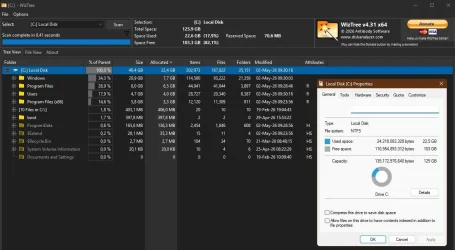
Also Wiztree. Run a scan and it shows a really useful cushion map so you can spot large items immediately. Remember to use rt click.

Also gives access to everything irrespective of permissions.
1.webp
 

My Computer My Computer

At a glance

Windows 11 Proi7-8650U16GBIntel UHD 620
OS
Windows 11 Pro
Computer type
Laptop
Manufacturer/Model
Lenovo t480s
CPU
i7-8650U
Memory
16GB
Graphics Card(s)
Intel UHD 620
Screen Resolution
1920x1080
Hard Drives
C SN810 SDCPNRY-512G-1006
Browser
Edge, Firefox
Antivirus
Defender
check c:\windows\softwaredistribution folder - sonetimes it can grow quite large. Windows is supposed to tidy this up but does not always do so. You can safeky delete files in this folder.

Also, check restore points - they sometimes accumulate -vafe to delete old ones if no longer needed.
 

My Computer My Computer

At a glance

Windows 11 Pro + Win11 Canary VM.I9 13th gen i9-13900H 2.60 GHZ16 GB solderedIntegrated Intel Iris XE
OS
Windows 11 Pro + Win11 Canary VM.
Computer type
Laptop
Manufacturer/Model
ASUS Zenbook 14
CPU
I9 13th gen i9-13900H 2.60 GHZ
Motherboard
Yep, Laptop has one.
Memory
16 GB soldered
Graphics Card(s)
Integrated Intel Iris XE
Sound Card
Realtek built in
Monitor(s) Displays
laptop OLED screen
Screen Resolution
2880x1800 touchscreen
Hard Drives
1 TB NVME SSD (only weakness is only one slot)
PSU
Internal + 65W thunderbolt USB4 charger
Case
Yep, got one
Cooling
Stella Artois (UK pint cans - 568 ml) - extra cost.
Keyboard
Built in UK keybd
Mouse
Bluetooth , wireless dongled, wired
Internet Speed
900 mbs (ethernet), wifi 6 typical 350-450 mb/s both up and down
Browser
Edge
Antivirus
Defender
Other Info
TPM 2.0, 2xUSB4 thunderbolt, 1xUsb3 (usb a), 1xUsb-c, hdmi out, 3.5 mm audio out/in combo, ASUS backlit trackpad (inc. switchable number pad)

Macrium Reflect Home V8
Office 365 Family (6 users each 1TB onedrive space)
Hyper-V (a vm runs almost as fast as my older laptop)
Thanks for all the help. Next time I see her, I will open this thread on my phone and follow through with what has been recommended.

Cheers
 

My Computers My Computers

  • At a glance

    Windows 11 ProAMD Ryzen 7 9800X3D64GBAMD Radeon RX 9070XT
    OS
    Windows 11 Pro
    Computer type
    PC/Desktop
    Manufacturer/Model
    Custom
    CPU
    AMD Ryzen 7 9800X3D
    Motherboard
    Gigabyte X870 Aorus Elite WiFi7 Motherboard
    Memory
    64GB
    Graphics Card(s)
    AMD Radeon RX 9070XT
    Sound Card
    Realtek ALC1220 HD Audio
    Monitor(s) Displays
    Dell Alienware AW3425DW 34.2" Curved OLED Gaming Monitor
    Screen Resolution
    3440x1440
    Hard Drives
    Kingston KC3000 M.2 NVMe Gen4 SSD 2TB
    WD Black SN850X NVMe SSD 4TB
    Crucial T500 M.2 2280 NVMe PCIe 4.0 SSD 4TB
    Kingston KC3000 M.2 NVMe Gen4 SSD 4TB
    PSU
    1000W Gigabyte UD1000GM 80 PLUS Gold
    Case
    Phanteks Enthoo Pro 2 D-RGB Tempered Glass Full Tower Black
    Internet Speed
    750Mbps
    Browser
    Firefox / Chrome / Edge / Brave
    Antivirus
    Kaspersky Standard
  • At a glance

    Windows 11 ProQuadCore Intel Core i5-10210U, 3100 MHz16GB (2x8)Intel(R) UHD Graphics
    Operating System
    Windows 11 Pro
    Computer type
    Laptop
    Manufacturer/Model
    Lenovo
    CPU
    QuadCore Intel Core i5-10210U, 3100 MHz
    Motherboard
    Lenovo ThinkPad E15
    Memory
    16GB (2x8)
    Graphics card(s)
    Intel(R) UHD Graphics
    Sound Card
    Conexant CX8070 @ Intel Comet Point-LP PCH
    Monitor(s) Displays
    Lenovo N156HCA-EAB
    Screen Resolution
    1920 x 1080
    Hard Drives
    SAMSUNG MZVLB256HBHQ-000L7
    ST2000LM007-1R8174
    Internet Speed
    750 Mbps
    Browser
    Chrome / Edge / Firefox / Brave
    Antivirus
    Bitdefender Total Security

Check the number of System Restore points that have been made.

They are typically a GB or larger in size, but you can control how much space you are willing to allocate to them.

I recently discovered that my allocation amount was about 25 GB...much more than I thought I had set it at. Within a few weeks, my C partition grew from the upper 50s to the upper 70s....without ever manually making any restore points.
 

My Computer My Computer

At a glance

Windows 11 ProIntel 265KG Skill DDR5 2 x 16 kit 6000/36none
OS
Windows 11 Pro
Computer type
PC/Desktop
Manufacturer/Model
Fishmill Special
CPU
Intel 265K
Motherboard
MSI Pro Z890-A
Memory
G Skill DDR5 2 x 16 kit 6000/36
Graphics Card(s)
none
Sound Card
none
Monitor(s) Displays
Dell SE2726HS
Screen Resolution
1920 x 1080
Hard Drives
WD SN770 NVME 500 GB boot; Intel 660p NVME 2 TB and WD Green 3 TB storage
PSU
Be Quiet 13M 750 ATX 3.1
Case
Lancool PC-K65
Cooling
Noctua U12S
Keyboard
Logitech K120 Wired
Mouse
Dell MS-116
Browser
Chrome
Antivirus
Microsoft Defender and Malwarebytes
Restore points shouldn't normally need any 'management' precisely because you allocate a sensible amount of space on your drive. I have one created daily on schedule, and never have to worry.

Now it might be that usage of that space is seen as a change in free space if the allocated space isn't already full. But if there is plenty of free space on the disk besides the maximum you've allocated- well, that's normal behaviour and nothing to worry about.

2.webp


1.webp
 

My Computer My Computer

At a glance

Windows 11 Proi7-8650U16GBIntel UHD 620
OS
Windows 11 Pro
Computer type
Laptop
Manufacturer/Model
Lenovo t480s
CPU
i7-8650U
Memory
16GB
Graphics Card(s)
Intel UHD 620
Screen Resolution
1920x1080
Hard Drives
C SN810 SDCPNRY-512G-1006
Browser
Edge, Firefox
Antivirus
Defender
It is possible that some app is creating files like logs or storing pictures, videos.


You can do a deeper cleanup. I perform upgrades each week and I keep it tight.

View attachment 170415

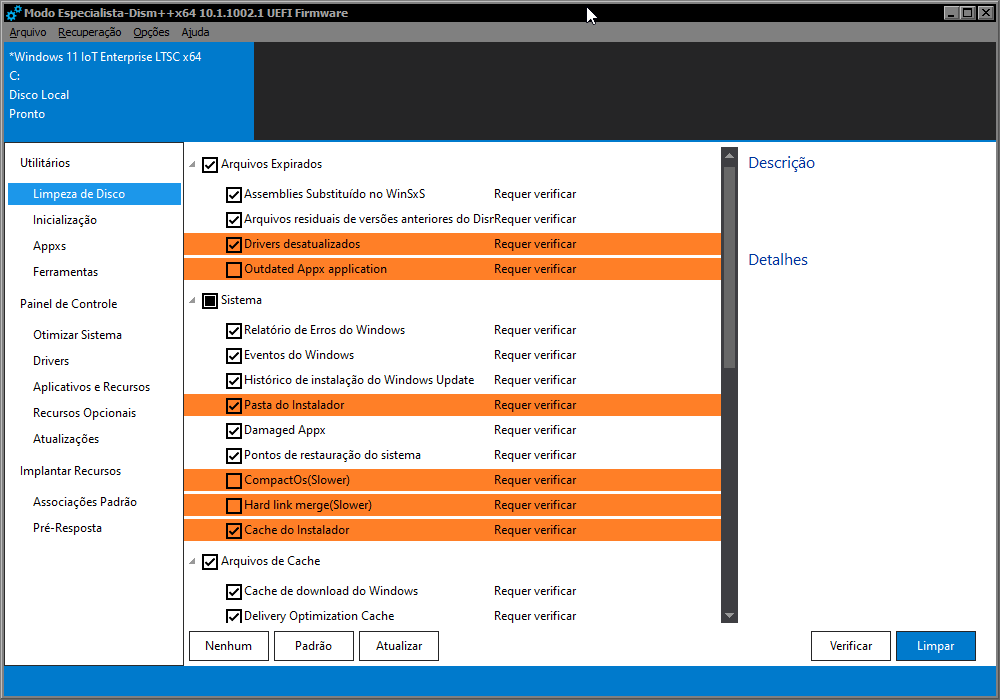
dism++ is also good for cleaning, have you used it?

kP6Bai.png
 

My Computer My Computer

At a glance

Windows 11 Iot Enterprise 21h2 22000.3260xeon E5-2697v232gb 8x4gb ddr3 1333 mhzgtx 570 poit of view
OS
Windows 11 Iot Enterprise 21h2 22000.3260
Computer type
PC/Desktop
Manufacturer/Model
Asus
CPU
xeon E5-2697v2
Motherboard
rampage iv extreme
Memory
32gb 8x4gb ddr3 1333 mhz
Graphics Card(s)
gtx 570 poit of view
Sound Card
realtek HD (ALC898)
Monitor(s) Displays
samsung b2030
Screen Resolution
1600x900
Hard Drives
2tb hd 5400 rpm
3tb hd 5400 rpm
1tb nvme pcie 3.0
PSU
hx850w
Keyboard
mtek
Internet Speed
500/250 gpon
Browser
r3dfox 146.0
Antivirus
none

My Computers My Computers

  • At a glance

    Windows 11 Pro 26H2 26300.9550AMD Ryzen 7 5825U with Radeon Graphics16GB
    OS
    Windows 11 Pro 26H2 26300.9550
    Computer type
    Laptop
    Manufacturer/Model
    Acemagic LX15PRO
    CPU
    AMD Ryzen 7 5825U with Radeon Graphics
    Motherboard
    BIOS CT_BI_AMI_LX15PRO_AB8139_A-004
    Memory
    16GB
    Screen Resolution
    1920 x 1080
    Hard Drives
    SSD 2TB
    Internet Speed
    30 Mbps
    Browser
    Brave
    Antivirus
    Webroot SecureAnywhere Complete beta
  • At a glance

    Windows 11 Pro 23H2 22631.2506Atom N450 1.66GHz2GB
    Operating System
    Windows 11 Pro 23H2 22631.2506
    Computer type
    Laptop
    Manufacturer/Model
    HP Mini 210-1090NR PC (bought in late 2009!)
    CPU
    Atom N450 1.66GHz
    Memory
    2GB
    Browser
    Brave
    Antivirus
    Webroot
  • Acer Swift SF114-34 laptop
    OS Windows 11 Pro 26200.8894
    CPU Pentium Silver N6000
    RAM 4GB
    BIOS v1.17
    SSD Samsung 970 EVO Plus SSD 2TB (an upgrade)
Just my opinion... as Windows 11 has gotten larger, if a user has even a nominal amount of personal files and installed applications, using a 128gb system drive these days is cutting it too close.
 

My Computers My Computers

  • At a glance

    Windows 11 Pro 26H2 26300.9457i9-10900 10 core 20 threads32 gbnone-Intel UHD Graphics 630
    OS
    Windows 11 Pro 26H2 26300.9457
    Computer type
    PC/Desktop
    Manufacturer/Model
    Dell Optiplex 7080
    CPU
    i9-10900 10 core 20 threads
    Motherboard
    DELL 0J37VM
    Memory
    32 gb
    Graphics Card(s)
    none-Intel UHD Graphics 630
    Sound Card
    Integrated Realtek
    Monitor(s) Displays
    Benq 27
    Screen Resolution
    2560x1440
    Hard Drives
    2x1tb Solidigm m.2 nvme /External drives 512gb Samsung m.2 sata+2tb Kingston m2.nvme
    PSU
    500w
    Case
    MT
    Cooling
    Dell Premium
    Keyboard
    Logitech wired
    Mouse
    Logitech wireless
    Internet Speed
    so slow I'm too embarrassed to tell
    Browser
    #1 Edge #2 Firefox
    Antivirus
    Defender+MWB Premium
  • At a glance

    Windows 11 Pro 24H2 26200.9457AMD Ryzen 7 6800U32 gbintegrated
    Operating System
    Windows 11 Pro 24H2 26200.9457
    Computer type
    PC/Desktop
    Manufacturer/Model
    Beelink Mini PC SER5
    CPU
    AMD Ryzen 7 6800U
    Memory
    32 gb
    Graphics card(s)
    integrated
    Sound Card
    integrated
    Monitor(s) Displays
    Benq 27
    Screen Resolution
    2560x1440
    Hard Drives
    1TB Crucial nvme
    Keyboard
    Logitech wired
    Mouse
    Logitech wireless
    Internet Speed
    still too embarrassed to tell
    Browser
    Firefox
    Antivirus
    Defender
  • System 3 is non compliant Dell 9020 i7-4770/24gb ram Win11 PRO 26200.9457
dism++ is also good for cleaning, have you used it?
DISM++ is just GUI, I use it's commands though.
using a 128gb system drive these days is cutting it too close.
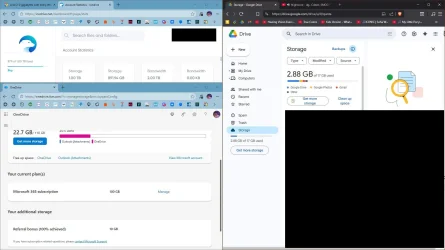
Unless the user installs huge apps or games, multiple cloud storages used as drives can take care of that.
 

Attachments

  • capture_05022026_161600.webp
    capture_05022026_161600.webp
    95.8 KB · Views: 5
Last edited:

My Computer My Computer

At a glance

Home2FH2CanAMD Ryzen 5 8600G (07/24)2x32GB Kingston FURY DDR5 5600 MHz CL36 @5200...ASROCK Radeon RX 6600 Challenger D 8G @48FPS ...
OS
Home2FH2Can
Computer type
PC/Desktop
CPU
AMD Ryzen 5 8600G (07/24)
Motherboard
ASROCK B650M-HDV/M.2 (07/24) BIOS 4.43 AGESA ComboAM5 1.3.0.1b Patch A (07/26)
Memory
2x32GB Kingston FURY DDR5 5600 MHz CL36 @5200 CL40 (07/24)
Graphics Card(s)
ASROCK Radeon RX 6600 Challenger D 8G @48FPS (08/24)
Sound Card
Creative Sound BlasterX AE-5 Plus (05/24)
Monitor(s) Displays
24" Philips 24M1N3200ZS/00 (05/24)
Screen Resolution
1920×1080@165Hz via DP1.4
Hard Drives
Kingston KC3000 NVMe 2TB (05/24)
ADATA XPG GAMMIX S11 Pro 512GB (07/19)
PSU
Seasonic Core GM 550 Gold (04/24)
Case
Fractal Design Define 7 Mini with 3x Noctua NF-P14s/12@555rpm (04/24)
Cooling
Noctua NH-U12S with Noctua NF-P12 (04/24)
Keyboard
HP Pavilion Wired Keyboard 300 (07/24) + Rabalux 76017 Parker (01/24)
Mouse
Logitech M330 Silent Plus (07/26)
Internet Speed
500/100 Mbps via RouterOS (05/21) & TCP Optimizer
Browser
Edge, Brave for YouTube, LibreWolf for FB
Antivirus
NextDNS blocking 50% Traffic
Other Info
Phone: Motorola Moto G86 (02/26)
Backup: Hasleo Backup Suite (PreOS)
Headphones: Sennheiser RS170 (09/10)
Chair: Huzaro Force 4.4 Grey Mesh (05/24)
Notifier: Xiaomi Mi Band 9 Milanese (10/24)
FlexCore USB-C 3.2 Gen 1 (M) to LAN (F) (08/25)
Just my opinion... as Windows 11 has gotten larger, if a user has even a nominal amount of personal files and installed applications, using a 128gb system drive these days is cutting it too close.
I have a 120GB system partition, of which 37,5GB is used, 82,5GB is free. Windows 11 Pro installed, taking about 26 GB space.
Amongst installed apps are an Office package, Firefox, em-Client, a Photoediting app, PDF editing apps, VirtualBox (but its data on another partition) and really many, many more useful apps.
In the two program folders I have about 25,000 files in 2000 Folders, that take about 9 Gbyte.
The remaining used space is for personal folders and ProgramData folder (and some other folders).

My user data are on a separate 120GB partition, of which 27,5 is used and 92,5 is free. I have about 40,000 datafiles in about 4000 folders.

I don't see any need for a bigger system or data drive. Would not know why it would be necessary. :LOL:
 

My Computer My Computer

At a glance

Windows 11 Pro 25H2AMD Ryzen 7 5700GKingston FURY Beast 2x16GB DIMM DDR4 2666 CL16MSI GeForce GT 730 2GB LP V1
OS
Windows 11 Pro 25H2
Computer type
PC/Desktop
Manufacturer/Model
Build by vendor to my specs
CPU
AMD Ryzen 7 5700G
Motherboard
MSI PRO B550M-P Gen3
Memory
Kingston FURY Beast 2x16GB DIMM DDR4 2666 CL16
Graphics Card(s)
MSI GeForce GT 730 2GB LP V1
Sound Card
Creative Sound Blaster Audigy FX
Monitor(s) Displays
Samsung S24E450F 24"
Screen Resolution
1920 x 1080
Hard Drives
1. SSD Crucial P5 Plus 500GB PCIe M.2
2. SSD-SATA Crucial MX500-2TB
PSU
Corsair CV650W
Case
Cooler Master Silencio S400
Cooling
Cooler Master Hyper H412R with Be Quiet Pure Wings 2 PWM BL038 fan
Keyboard
Cherry Stream (wired, scissor keys)
Mouse
Asus WT465 (wireless)
Internet Speed
70 Mbps down / 80 Mbps up
Browser
Firefox 130.0
Antivirus
F-Secure (Internetprovider version)
Other Info
Router: FRITZBox 7490
Oracle VirtualBox 7 for testing software on Win 10 or 11
To all those of you who disagree with my opinion about the drive being too small... I was speaking generally. I never said it applied in this specific case or in the case of any of you who use a drive that size. Of course it depends on how this user uses her storage. @swerd did not tell us anything about that. She may take a whole lot of high resolution photos and have 10 years of them stored. She may not use cloud storage or have a secondary drive. She may not maintain any sort of cleanup routine and have a lot of stuff cached in her browser. She may use hibernation and the size of her hiberfil.sys is over provisioned. She may have installed tons of software. Or all of the above may apply, plus so many more things that affect storage. Every user's case is unique.

Now that updates are cumulative (the most recent is over 5 gb)from one version release to another WinSxs folder increases expotentiously each month. I rather doubt that most people use dism to clean up the component store when they have never heard of dism.

So yeah, I stand by my belief that as a general rule, a 128gb system drive is usually just not big enough now. If a user has enough storage he doesn't have to worry about it or monitor it or get down to having an upgrade fail because he doesn't have enough of it.
 

My Computers My Computers

  • At a glance

    Windows 11 Pro 26H2 26300.9457i9-10900 10 core 20 threads32 gbnone-Intel UHD Graphics 630
    OS
    Windows 11 Pro 26H2 26300.9457
    Computer type
    PC/Desktop
    Manufacturer/Model
    Dell Optiplex 7080
    CPU
    i9-10900 10 core 20 threads
    Motherboard
    DELL 0J37VM
    Memory
    32 gb
    Graphics Card(s)
    none-Intel UHD Graphics 630
    Sound Card
    Integrated Realtek
    Monitor(s) Displays
    Benq 27
    Screen Resolution
    2560x1440
    Hard Drives
    2x1tb Solidigm m.2 nvme /External drives 512gb Samsung m.2 sata+2tb Kingston m2.nvme
    PSU
    500w
    Case
    MT
    Cooling
    Dell Premium
    Keyboard
    Logitech wired
    Mouse
    Logitech wireless
    Internet Speed
    so slow I'm too embarrassed to tell
    Browser
    #1 Edge #2 Firefox
    Antivirus
    Defender+MWB Premium
  • At a glance

    Windows 11 Pro 24H2 26200.9457AMD Ryzen 7 6800U32 gbintegrated
    Operating System
    Windows 11 Pro 24H2 26200.9457
    Computer type
    PC/Desktop
    Manufacturer/Model
    Beelink Mini PC SER5
    CPU
    AMD Ryzen 7 6800U
    Memory
    32 gb
    Graphics card(s)
    integrated
    Sound Card
    integrated
    Monitor(s) Displays
    Benq 27
    Screen Resolution
    2560x1440
    Hard Drives
    1TB Crucial nvme
    Keyboard
    Logitech wired
    Mouse
    Logitech wireless
    Internet Speed
    still too embarrassed to tell
    Browser
    Firefox
    Antivirus
    Defender
  • System 3 is non compliant Dell 9020 i7-4770/24gb ram Win11 PRO 26200.9457
So yeah, I stand by my belief that as a general rule, a 128gb system drive is usually just not big enough now. If a user has enough storage he doesn't have to worry about it or monitor it or get down to having an upgrade fail because he doesn't have enough of it.
FWIW, I totally agree with you. I run an average suite of applications, and of course they also default to loading on the Windows drive. My total space used on my Windows drive is well over 128GB, and I work to keep things reasonably cleaned up. Truthfully, without doing handstands, I don't see any way I could even run with a Windows drive of 128GB, that's pretty lean!

1777744349062.webp
 

My Computers My Computers

  • At a glance

    Win 11 Pro 26H2, Build 26300.9711Intel Core i5 14500, 14th Generation64GB DDR4GeForce RTX 4060
    OS
    Win 11 Pro 26H2, Build 26300.9711
    Computer type
    PC/Desktop
    Manufacturer/Model
    Home Brew
    CPU
    Intel Core i5 14500, 14th Generation
    Motherboard
    Gigabyte B760M G P WIFI
    Memory
    64GB DDR4
    Graphics Card(s)
    GeForce RTX 4060
    Sound Card
    Chipset Realtek
    Monitor(s) Displays
    LG 45" Ultragear & Acer 24" 1080p
    Screen Resolution
    5120x1440 & 1920x1080
    Hard Drives
    Crucial P310 2TB 2280 PCIe Gen4 3D NAND NVMe M.2 SSD (O/S)
    Silicon Power 2TB US75 NVMe PCIe Gen4 M.2 2280 SSD (backup)
    Crucial BX500 2TB 3D NAND (2nd backup)
    Seagate 4TB Ironwolf, rotating HDD secondary backup
    External off-line backup Drives: 2 NVMe 4TB drives in external enclosures
    PSU
    Thermaltake Toughpower GF3 750W
    Case
    LIAN LI LANCOOL 216 E-ATX PC Case
    Cooling
    Lots of fans!
    Keyboard
    Microsoft Comfort Curve 2000
    Mouse
    Logitech G305
    Internet Speed
    Verizon FiOS 1GB
    Browser
    Firefox
    Antivirus
    MalwareBytes & Windows Defender Security
  • At a glance

    Win 11 Pro 25H2, Build 26300.9550Intel Core i5 1440032GB DDR5Intel 700 Embedded GPU
    Operating System
    Win 11 Pro 25H2, Build 26300.9550
    Computer type
    PC/Desktop
    Manufacturer/Model
    Home Brew
    CPU
    Intel Core i5 14400
    Motherboard
    Gigabyte B760M DS3H AX
    Memory
    32GB DDR5
    Graphics card(s)
    Intel 700 Embedded GPU
    Sound Card
    Realtek Embedded
    Monitor(s) Displays
    27" HP 1080p
    Screen Resolution
    1920x1080
    Hard Drives
    Crucial P310 2TB NVMe Gen4 SSD
    Samsung EVO 990 2TB NVMe Gen4 SSD
    Samsung 2TB SATA SSD
    Seagate 4TB Ironwolf, rotating HDD secondary backup
    PSU
    Thermaltake Smart BM3 650W
    Case
    Okinos Micro ATX Case
    Cooling
    Fans
    Keyboard
    Microsoft Comfort Curve 2000
    Mouse
    Logitech G305
    Internet Speed
    Verizon FiOS 1GB
    Browser
    Firefox
    Antivirus
    Malware Bytes & Windows Defender Security
  • Nimo N171 17" Laptop, (Intel i3-1215U, 16GB RAM, 2TB NVMe, Win11 Pro)
    Acemagic Vista Mini PC V1 (Intel N150, 16GB RAM, 1TB NVMe, Win11 Pro)
    HP ENVY h8-1540t, (24GB RAM, 2TB SSD, 2TB HDD, Win11 Pro)

Latest Support Threads

Back
Top Bottom