Lose 2-3 gigabytes with every Windows update?


swerd

Well-known member
Member
VIP
Local time
6:08 AM
Posts
352
OS
Windows 11 Pro
Hi everyone,

I am asking for a friend. She has an older MS Surface laptop with 128GB SSD.

After every update, she loses around 2-3 gigabytes of storage.

I tried running the cleanup tool as an admin, but that only restored about 800 MB.

Any ideas why her machine is doing this?

I don't have much info about her machine, except that it's around 6 years old.

Thanks
 

My Computers

System One System Two

  • OS
    Windows 11 Pro
    Computer type
    PC/Desktop
    Manufacturer/Model
    Custom
    CPU
    AMD Ryzen 7 9800X3D
    Motherboard
    Gigabyte X870 Aorus Elite WiFi7 Motherboard
    Memory
    64GB
    Graphics Card(s)
    AMD Radeon RX 9070XT
    Sound Card
    Realtek ALC1220 HD Audio
    Monitor(s) Displays
    Dell Alienware AW3425DW 34.2" Curved OLED Gaming Monitor
    Screen Resolution
    3440x1440
    Hard Drives
    Kingston KC3000 M.2 NVMe Gen4 SSD 2TB
    WD Black SN850X NVMe SSD 4TB
    Crucial T500 M.2 2280 NVMe PCIe 4.0 SSD 4TB
    Kingston KC3000 M.2 NVMe Gen4 SSD 4TB
    PSU
    1000W Gigabyte UD1000GM 80 PLUS Gold
    Case
    Phanteks Enthoo Pro 2 D-RGB Tempered Glass Full Tower Black
    Internet Speed
    750Mbps
    Browser
    Firefox / Chrome / Edge / Brave
    Antivirus
    Kaspersky Standard
  • Operating System
    Windows 11 Pro
    Computer type
    Laptop
    Manufacturer/Model
    Lenovo
    CPU
    QuadCore Intel Core i5-10210U, 3100 MHz
    Motherboard
    Lenovo ThinkPad E15
    Memory
    16GB (2x8)
    Graphics card(s)
    Intel(R) UHD Graphics
    Sound Card
    Conexant CX8070 @ Intel Comet Point-LP PCH
    Monitor(s) Displays
    Lenovo N156HCA-EAB
    Screen Resolution
    1920 x 1080
    Hard Drives
    SAMSUNG MZVLB256HBHQ-000L7
    ST2000LM007-1R8174
    Internet Speed
    750 Mbps
    Browser
    Chrome / Edge / Firefox / Brave
    Antivirus
    Bitdefender Total Security

My Computers

System One System Two

  • OS
    Windows 10 Home x64
    Computer type
    PC/Desktop
    Manufacturer/Model
    Custom
    CPU
    INTEL Core i5-11400
    Motherboard
    ASUS PRIME H570-PLUS
    Memory
    KINGSTON HyperX Fury Black DDR4 16GB (2 x 8GB) 3200MHz, CL16
    Graphics Card(s)
    EVGA GeForce GTX 750 Superclocked 1GB 128-Bit GDDR5
    Monitor(s) Displays
    LG 32MA68HY 32" IPS
    Screen Resolution
    1920 x 1080
    Hard Drives
    SAMSUNG 250GB 970 EVO Plus NVMe, M.2 SSD, Crucial 250GB MX500, SEAGATE 500GB Barracuda® 7200.12, SATA 3 Gb/s, 7200 RPM, 16MB cache
    PSU
    CORSAIR RM550x 80 PLUS Gold 550W
    Case
    ANTEC P10 FLUX
    Cooling
    be quiet! Pure Rock 2, 5 x 120 mm Case Fans
    Internet Speed
    480 + Mbps Up/ 12+ Mbps Down
    Browser
    Vivaldi Snapshot
    Antivirus
    Avast
  • Operating System
    Windows 10 Home x64
    Computer type
    PC/Desktop
    Manufacturer/Model
    Custom
    CPU
    Intel Core i5-750
    Motherboard
    ASUS P7P55D
    Memory
    Kingston HyperX Fury Black 8GB (2x4GB) DDR3-1600MHz CL8
    Graphics card(s)
    MSI GeForce GT 240 N240GT-MD1G/D5 1 GB DDR5
    Monitor(s) Displays
    LG 32MA68HY 32" IPS
    Screen Resolution
    1980x1040
    Hard Drives
    Samsung Electronics 840 EVO 120GB, SEAGATE 500GB Barracuda® 7200.12, SATA 3 Gb/s, 7200 RPM, 16MB cache
    PSU
    Antec TruePower New TP-550 550W
    Case
    Antec 300
    Cooling
    Cooler Master Hyper 212+, 4 Noctua NF-P12 120mm, 1 Noctua NF-P14 FLX
    Internet Speed
    480+ Mbps Down/12+Mbps Up
    Browser
    Vivaldi Snapshot
    Antivirus
    Avast
It is possible that some app is creating files like logs or storing pictures, videos.


You can do a deeper cleanup. I perform upgrades each week and I keep it tight.

capture_05022026_093035.webp


My Computer

System One

  • OS
    Home26H2Can
    Computer type
    PC/Desktop
    CPU
    AMD Ryzen 5 8600G (07/24)
    Motherboard
    ASROCK B650M-HDV/M.2 (07/24) BIOS 4.21 AGESA ComboAM5 1.3.0.1 (04/26)
    Memory
    2x32GB Kingston FURY DDR5 5600 MHz CL36 @5200 CL36 (07/24)
    Graphics Card(s)
    ASROCK Radeon RX 6600 Challenger D 8G @48FPS (08/24)
    Sound Card
    Creative Sound BlasterX AE-5 Plus (05/24)
    Monitor(s) Displays
    24" Philips 24M1N3200ZS/00 (05/24)
    Screen Resolution
    1920×1080@165Hz via DP1.4
    Hard Drives
    Kingston KC3000 NVMe 2TB (05/24)
    ADATA XPG GAMMIX S11 Pro 512GB (07/19)
    PSU
    Seasonic Core GM 550 Gold (04/24)
    Case
    Fractal Design Define 7 Mini with 3x Noctua NF-P14s/12@555rpm (04/24)
    Cooling
    Noctua NH-U12S with Noctua NF-P12 (04/24)
    Keyboard
    HP Pavilion Wired Keyboard 300 (07/24) + Rabalux 76017 Parker (01/24)
    Mouse
    Logitech M330 Silent Plus (01/26)
    Internet Speed
    500/100 Mbps via RouterOS (05/21) & TCP Optimizer
    Browser
    Edge, Brave for YouTube, LibreWolf for FB
    Antivirus
    NextDNS blocking 1/3 Traffic
    Other Info
    Phone: Motorola Moto G86 (02/26)
    Backup: Hasleo Backup Suite (PreOS)
    Headphones: Sennheiser RS170 (09/10)
    Chair: Huzaro Force 4.4 Grey Mesh (05/24)
    Notifier: Xiaomi Mi Band 9 Milanese (10/24)
    FlexCore USB-C 3.2 Gen 1 (M) to LAN (F) (08/25)
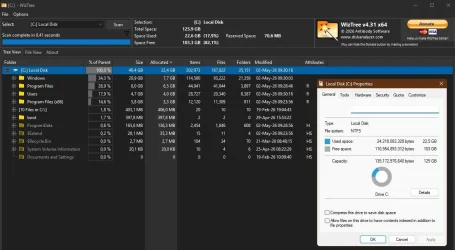
Also Wiztree. Run a scan and it shows a really useful cushion map so you can spot large items immediately. Remember to use rt click.

Also gives access to everything irrespective of permissions.
1.webp
 

My Computer

System One

  • OS
    Windows 11 Pro
    Computer type
    Laptop
    Manufacturer/Model
    Lenovo t480s
    CPU
    i7-8650U
    Memory
    16GB
    Graphics Card(s)
    Intel UHD 620
    Screen Resolution
    1920x1080
    Hard Drives
    C SN810 SDCPNRY-512G-1006
    Browser
    Edge, Firefox
    Antivirus
    Defender
check c:\windows\softwaredistribution folder - sonetimes it can grow quite large. Windows is supposed to tidy this up but does not always do so. You can safeky delete files in this folder.

Also, check restore points - they sometimes accumulate -vafe to delete old ones if no longer needed.
 

My Computer

System One

  • OS
    Windows 11 Pro + Win11 Canary VM.
    Computer type
    Laptop
    Manufacturer/Model
    ASUS Zenbook 14
    CPU
    I9 13th gen i9-13900H 2.60 GHZ
    Motherboard
    Yep, Laptop has one.
    Memory
    16 GB soldered
    Graphics Card(s)
    Integrated Intel Iris XE
    Sound Card
    Realtek built in
    Monitor(s) Displays
    laptop OLED screen
    Screen Resolution
    2880x1800 touchscreen
    Hard Drives
    1 TB NVME SSD (only weakness is only one slot)
    PSU
    Internal + 65W thunderbolt USB4 charger
    Case
    Yep, got one
    Cooling
    Stella Artois (UK pint cans - 568 ml) - extra cost.
    Keyboard
    Built in UK keybd
    Mouse
    Bluetooth , wireless dongled, wired
    Internet Speed
    900 mbs (ethernet), wifi 6 typical 350-450 mb/s both up and down
    Browser
    Edge
    Antivirus
    Defender
    Other Info
    TPM 2.0, 2xUSB4 thunderbolt, 1xUsb3 (usb a), 1xUsb-c, hdmi out, 3.5 mm audio out/in combo, ASUS backlit trackpad (inc. switchable number pad)

    Macrium Reflect Home V8
    Office 365 Family (6 users each 1TB onedrive space)
    Hyper-V (a vm runs almost as fast as my older laptop)
Thanks for all the help. Next time I see her, I will open this thread on my phone and follow through with what has been recommended.

Cheers
 

My Computers

System One System Two

  • OS
    Windows 11 Pro
    Computer type
    PC/Desktop
    Manufacturer/Model
    Custom
    CPU
    AMD Ryzen 7 9800X3D
    Motherboard
    Gigabyte X870 Aorus Elite WiFi7 Motherboard
    Memory
    64GB
    Graphics Card(s)
    AMD Radeon RX 9070XT
    Sound Card
    Realtek ALC1220 HD Audio
    Monitor(s) Displays
    Dell Alienware AW3425DW 34.2" Curved OLED Gaming Monitor
    Screen Resolution
    3440x1440
    Hard Drives
    Kingston KC3000 M.2 NVMe Gen4 SSD 2TB
    WD Black SN850X NVMe SSD 4TB
    Crucial T500 M.2 2280 NVMe PCIe 4.0 SSD 4TB
    Kingston KC3000 M.2 NVMe Gen4 SSD 4TB
    PSU
    1000W Gigabyte UD1000GM 80 PLUS Gold
    Case
    Phanteks Enthoo Pro 2 D-RGB Tempered Glass Full Tower Black
    Internet Speed
    750Mbps
    Browser
    Firefox / Chrome / Edge / Brave
    Antivirus
    Kaspersky Standard
  • Operating System
    Windows 11 Pro
    Computer type
    Laptop
    Manufacturer/Model
    Lenovo
    CPU
    QuadCore Intel Core i5-10210U, 3100 MHz
    Motherboard
    Lenovo ThinkPad E15
    Memory
    16GB (2x8)
    Graphics card(s)
    Intel(R) UHD Graphics
    Sound Card
    Conexant CX8070 @ Intel Comet Point-LP PCH
    Monitor(s) Displays
    Lenovo N156HCA-EAB
    Screen Resolution
    1920 x 1080
    Hard Drives
    SAMSUNG MZVLB256HBHQ-000L7
    ST2000LM007-1R8174
    Internet Speed
    750 Mbps
    Browser
    Chrome / Edge / Firefox / Brave
    Antivirus
    Bitdefender Total Security

Check the number of System Restore points that have been made.

They are typically a GB or larger in size, but you can control how much space you are willing to allocate to them.

I recently discovered that my allocation amount was about 25 GB...much more than I thought I had set it at. Within a few weeks, my C partition grew from the upper 50s to the upper 70s....without ever manually making any restore points.
 

My Computer

System One

  • OS
    Windows 11 Pro
    Computer type
    PC/Desktop
    Manufacturer/Model
    Fishmill Special
    CPU
    Intel 265K
    Motherboard
    MSI Pro Z890-A
    Memory
    G Skill DDR5 2 x 16 kit 6000/36
    Graphics Card(s)
    none
    Sound Card
    none
    Monitor(s) Displays
    Dell 2316H
    Screen Resolution
    1600 x 900
    Hard Drives
    WD SN770 NVME 500 GB boot; Intel 660p NVME 2 TB and WD Green 3 TB storage
    PSU
    Be Quiet 13M 750 ATX 3.1
    Case
    Lancool PC-K65
    Cooling
    Noctua U12S
    Keyboard
    Logitech K120 Wired
    Mouse
    Dell MS-116
    Browser
    Chrome
    Antivirus
    Microsoft Defender and Malwarebytes
Restore points shouldn't normally need any 'management' precisely because you allocate a sensible amount of space on your drive. I have one created daily on schedule, and never have to worry.

Now it might be that usage of that space is seen as a change in free space if the allocated space isn't already full. But if there is plenty of free space on the disk besides the maximum you've allocated- well, that's normal behaviour and nothing to worry about.

2.webp

1.webp
 

My Computer

System One

  • OS
    Windows 11 Pro
    Computer type
    Laptop
    Manufacturer/Model
    Lenovo t480s
    CPU
    i7-8650U
    Memory
    16GB
    Graphics Card(s)
    Intel UHD 620
    Screen Resolution
    1920x1080
    Hard Drives
    C SN810 SDCPNRY-512G-1006
    Browser
    Edge, Firefox
    Antivirus
    Defender
It is possible that some app is creating files like logs or storing pictures, videos.


You can do a deeper cleanup. I perform upgrades each week and I keep it tight.

View attachment 170415

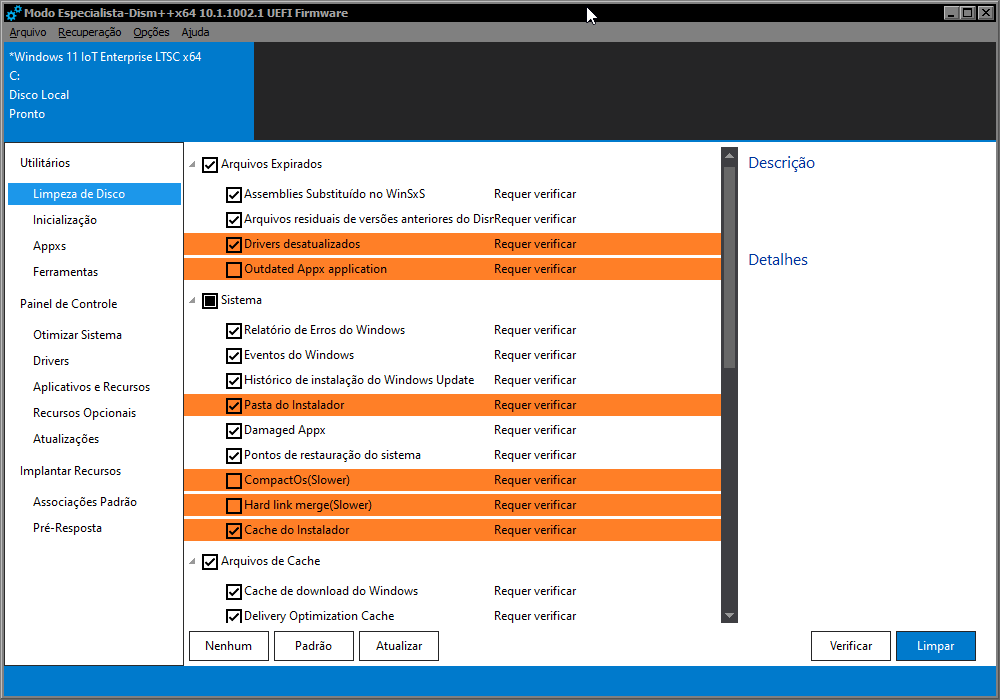
dism++ is also good for cleaning, have you used it?

kP6Bai.png
 

My Computer

System One

  • OS
    Windows 11 Iot Enterprise 21h2 22000.3260
    Computer type
    PC/Desktop
    Manufacturer/Model
    Asus
    CPU
    xeon E5-2697v2
    Motherboard
    rampage iv extreme
    Memory
    32gb 8x4gb ddr3 1333 mhz
    Graphics Card(s)
    gtx 570 poit of view
    Sound Card
    realtek HD (ALC898)
    Monitor(s) Displays
    samsung b2030
    Screen Resolution
    1600x900
    Hard Drives
    2tb hd 5400 rpm
    3tb hd 5400 rpm
    1tb nvme pcie 3.0
    PSU
    hx850w
    Keyboard
    mtek
    Internet Speed
    500/250 gpon
    Browser
    r3dfox 146.0
    Antivirus
    none

My Computers

System One System Two

  • OS
    Windows 11 Pro 25H2 26200.8524
    Computer type
    Laptop
    Manufacturer/Model
    Acemagic LX15PRO
    CPU
    AMD Ryzen 7 5825U with Radeon Graphics
    Memory
    16GB
    Screen Resolution
    1920 x 1080
    Hard Drives
    SSD 2TB
    Internet Speed
    30 Mbps
    Browser
    Brave
    Antivirus
    Webroot Secure Anywhere
    Other Info
    System 3

    Acer Swift SF114-34 laptop
    OS Windows 11 Pro 26200.8524
    CPU Pentium Silver N6000
    RAM 4GB
    SSD Samsung 970 EVO Plus SSD 2TB (an upgrade)
  • Operating System
    Windows 11 Pro 23H2 22631.2506
    Computer type
    Laptop
    Manufacturer/Model
    HP Mini 210-1090NR PC (bought in late 2009!)
    CPU
    Atom N450 1.66GHz
    Memory
    2GB
    Browser
    Brave
    Antivirus
    Webroot
Just my opinion... as Windows 11 has gotten larger, if a user has even a nominal amount of personal files and installed applications, using a 128gb system drive these days is cutting it too close.
 

My Computers

System One System Two

  • OS
    Windows 11 Pro 25H2
    Computer type
    PC/Desktop
    Manufacturer/Model
    Dell Optiplex 7080
    CPU
    i9-10900 10 core 20 threads
    Motherboard
    DELL 0J37VM
    Memory
    32 gb
    Graphics Card(s)
    none-Intel UHD Graphics 630
    Sound Card
    Integrated Realtek
    Monitor(s) Displays
    Benq 27
    Screen Resolution
    2560x1440
    Hard Drives
    2x1tb Solidigm m.2 nvme /External drives 512gb Samsung m.2 sata+2tb Kingston m2.nvme
    PSU
    500w
    Case
    MT
    Cooling
    Dell Premium
    Keyboard
    Logitech wired
    Mouse
    Logitech wireless
    Internet Speed
    so slow I'm too embarrassed to tell
    Browser
    #1 Edge #2 Firefox
    Antivirus
    Defender+MWB Premium
  • Operating System
    Windows 11 Pro 24H2 26200.8457
    Computer type
    PC/Desktop
    Manufacturer/Model
    Beelink Mini PC SER5
    CPU
    AMD Ryzen 7 6800U
    Memory
    32 gb
    Graphics card(s)
    integrated
    Sound Card
    integrated
    Monitor(s) Displays
    Benq 27
    Screen Resolution
    2560x1440
    Hard Drives
    1TB Crucial nvme
    Keyboard
    Logitech wired
    Mouse
    Logitech wireless
    Internet Speed
    still too embarrassed to tell
    Browser
    Firefox
    Antivirus
    Defender
    Other Info
    System 3 is non compliant Dell 9020 i7-4770/24gb ram Win11 PRO 26200.8457
dism++ is also good for cleaning, have you used it?
DISM++ is just GUI, I use it's commands though.
using a 128gb system drive these days is cutting it too close.
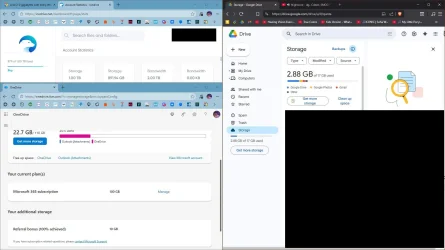
Unless the user installs huge apps or games, multiple cloud storages used as drives can take care of that.
 

Attachments

  • capture_05022026_161600.webp
    capture_05022026_161600.webp
    95.8 KB · Views: 1
Last edited:

My Computer

System One

  • OS
    Home26H2Can
    Computer type
    PC/Desktop
    CPU
    AMD Ryzen 5 8600G (07/24)
    Motherboard
    ASROCK B650M-HDV/M.2 (07/24) BIOS 4.21 AGESA ComboAM5 1.3.0.1 (04/26)
    Memory
    2x32GB Kingston FURY DDR5 5600 MHz CL36 @5200 CL36 (07/24)
    Graphics Card(s)
    ASROCK Radeon RX 6600 Challenger D 8G @48FPS (08/24)
    Sound Card
    Creative Sound BlasterX AE-5 Plus (05/24)
    Monitor(s) Displays
    24" Philips 24M1N3200ZS/00 (05/24)
    Screen Resolution
    1920×1080@165Hz via DP1.4
    Hard Drives
    Kingston KC3000 NVMe 2TB (05/24)
    ADATA XPG GAMMIX S11 Pro 512GB (07/19)
    PSU
    Seasonic Core GM 550 Gold (04/24)
    Case
    Fractal Design Define 7 Mini with 3x Noctua NF-P14s/12@555rpm (04/24)
    Cooling
    Noctua NH-U12S with Noctua NF-P12 (04/24)
    Keyboard
    HP Pavilion Wired Keyboard 300 (07/24) + Rabalux 76017 Parker (01/24)
    Mouse
    Logitech M330 Silent Plus (01/26)
    Internet Speed
    500/100 Mbps via RouterOS (05/21) & TCP Optimizer
    Browser
    Edge, Brave for YouTube, LibreWolf for FB
    Antivirus
    NextDNS blocking 1/3 Traffic
    Other Info
    Phone: Motorola Moto G86 (02/26)
    Backup: Hasleo Backup Suite (PreOS)
    Headphones: Sennheiser RS170 (09/10)
    Chair: Huzaro Force 4.4 Grey Mesh (05/24)
    Notifier: Xiaomi Mi Band 9 Milanese (10/24)
    FlexCore USB-C 3.2 Gen 1 (M) to LAN (F) (08/25)
Just my opinion... as Windows 11 has gotten larger, if a user has even a nominal amount of personal files and installed applications, using a 128gb system drive these days is cutting it too close.
I have a 120GB system partition, of which 37,5GB is used, 82,5GB is free. Windows 11 Pro installed, taking about 26 GB space.
Amongst installed apps are an Office package, Firefox, em-Client, a Photoediting app, PDF editing apps, VirtualBox (but its data on another partition) and really many, many more useful apps.
In the two program folders I have about 25,000 files in 2000 Folders, that take about 9 Gbyte.
The remaining used space is for personal folders and ProgramData folder (and some other folders).

My user data are on a separate 120GB partition, of which 27,5 is used and 92,5 is free. I have about 40,000 datafiles in about 4000 folders.

I don't see any need for a bigger system or data drive. Would not know why it would be necessary. :LOL:
 

My Computer

System One

  • OS
    Windows 11 Pro 25H2 26200.8457
    Computer type
    PC/Desktop
    Manufacturer/Model
    Build by vendor to my specs
    CPU
    AMD Ryzen 7 5700G
    Motherboard
    MSI PRO B550M-P Gen3
    Memory
    Kingston FURY Beast 2x16GB DIMM DDR4 2666 CL16
    Graphics Card(s)
    MSI GeForce GT 730 2GB LP V1
    Sound Card
    Creative Sound Blaster Audigy FX
    Monitor(s) Displays
    Samsung S24E450F 24"
    Screen Resolution
    1920 x 1080
    Hard Drives
    1. SSD Crucial P5 Plus 500GB PCIe M.2
    2. SSD-SATA Crucial MX500-2TB
    PSU
    Corsair CV650W
    Case
    Cooler Master Silencio S400
    Cooling
    Cooler Master Hyper H412R with Be Quiet Pure Wings 2 PWM BL038 fan
    Keyboard
    Cherry Stream (wired, scissor keys)
    Mouse
    Asus WT465 (wireless)
    Internet Speed
    70 Mbps down / 80 Mbps up
    Browser
    Firefox 130.0
    Antivirus
    F-Secure (Internetprovider version)
    Other Info
    Router: FRITZBox 7490
    Oracle VirtualBox 7 for testing software on Win 10 or 11
To all those of you who disagree with my opinion about the drive being too small... I was speaking generally. I never said it applied in this specific case or in the case of any of you who use a drive that size. Of course it depends on how this user uses her storage. @swerd did not tell us anything about that. She may take a whole lot of high resolution photos and have 10 years of them stored. She may not use cloud storage or have a secondary drive. She may not maintain any sort of cleanup routine and have a lot of stuff cached in her browser. She may use hibernation and the size of her hiberfil.sys is over provisioned. She may have installed tons of software. Or all of the above may apply, plus so many more things that affect storage. Every user's case is unique.

Now that updates are cumulative (the most recent is over 5 gb)from one version release to another WinSxs folder increases expotentiously each month. I rather doubt that most people use dism to clean up the component store when they have never heard of dism.

So yeah, I stand by my belief that as a general rule, a 128gb system drive is usually just not big enough now. If a user has enough storage he doesn't have to worry about it or monitor it or get down to having an upgrade fail because he doesn't have enough of it.
 

My Computers

System One System Two

  • OS
    Windows 11 Pro 25H2
    Computer type
    PC/Desktop
    Manufacturer/Model
    Dell Optiplex 7080
    CPU
    i9-10900 10 core 20 threads
    Motherboard
    DELL 0J37VM
    Memory
    32 gb
    Graphics Card(s)
    none-Intel UHD Graphics 630
    Sound Card
    Integrated Realtek
    Monitor(s) Displays
    Benq 27
    Screen Resolution
    2560x1440
    Hard Drives
    2x1tb Solidigm m.2 nvme /External drives 512gb Samsung m.2 sata+2tb Kingston m2.nvme
    PSU
    500w
    Case
    MT
    Cooling
    Dell Premium
    Keyboard
    Logitech wired
    Mouse
    Logitech wireless
    Internet Speed
    so slow I'm too embarrassed to tell
    Browser
    #1 Edge #2 Firefox
    Antivirus
    Defender+MWB Premium
  • Operating System
    Windows 11 Pro 24H2 26200.8457
    Computer type
    PC/Desktop
    Manufacturer/Model
    Beelink Mini PC SER5
    CPU
    AMD Ryzen 7 6800U
    Memory
    32 gb
    Graphics card(s)
    integrated
    Sound Card
    integrated
    Monitor(s) Displays
    Benq 27
    Screen Resolution
    2560x1440
    Hard Drives
    1TB Crucial nvme
    Keyboard
    Logitech wired
    Mouse
    Logitech wireless
    Internet Speed
    still too embarrassed to tell
    Browser
    Firefox
    Antivirus
    Defender
    Other Info
    System 3 is non compliant Dell 9020 i7-4770/24gb ram Win11 PRO 26200.8457
So yeah, I stand by my belief that as a general rule, a 128gb system drive is usually just not big enough now. If a user has enough storage he doesn't have to worry about it or monitor it or get down to having an upgrade fail because he doesn't have enough of it.
FWIW, I totally agree with you. I run an average suite of applications, and of course they also default to loading on the Windows drive. My total space used on my Windows drive is well over 128GB, and I work to keep things reasonably cleaned up. Truthfully, without doing handstands, I don't see any way I could even run with a Windows drive of 128GB, that's pretty lean!

1777744349062.webp
 

My Computers

System One System Two

  • OS
    Win 11 Pro 25H2, Build 26200.8524
    Computer type
    PC/Desktop
    Manufacturer/Model
    Home Brew
    CPU
    Intel Core i5 14500
    Motherboard
    Gigabyte B760M G P WIFI
    Memory
    64GB DDR4
    Graphics Card(s)
    GeForce RTX 4060
    Sound Card
    Chipset Realtek
    Monitor(s) Displays
    LG 45" Ultragear, Acer 24" 1080p
    Screen Resolution
    5120x1440, 1920x1080
    Hard Drives
    Crucial P310 2TB 2280 PCIe Gen4 3D NAND NVMe M.2 SSD (O/S)
    Silicon Power 2TB US75 NVMe PCIe Gen4 M.2 2280 SSD (backup)
    Crucial BX500 2TB 3D NAND (2nd backup)
    Seagate 4TB Ironwolf, rotating HDD archive files
    External off-line backup Drives: 2 NVMe 4TB drives in external enclosures
    PSU
    Thermaltake Toughpower GF3 750W
    Case
    LIAN LI LANCOOL 216 E-ATX PC Case
    Cooling
    Lots of fans!
    Keyboard
    Microsoft Comfort Curve 2000
    Mouse
    Logitech G305
    Internet Speed
    Verizon FiOS 1GB
    Browser
    Firefox
    Antivirus
    Malware Bytes & Windows Defender Security
  • Operating System
    Win 11 Pro 25H2, Build 26200.8524
    Computer type
    PC/Desktop
    Manufacturer/Model
    Home Brew
    CPU
    Intel Core i5 14400
    Motherboard
    Gigabyte B760M DS3H AX
    Memory
    32GB DDR5
    Graphics card(s)
    Intel 700 Embedded GPU
    Sound Card
    Realtek Embedded
    Monitor(s) Displays
    27" HP 1080p
    Screen Resolution
    1920x1080
    Hard Drives
    Crucial P310 2TB 2280 PCIe Gen4 eD NAND PCIe SSD
    Samsung EVO 990 2TB NVMe Gen4 SSD
    Samsung 2TB SATA SSD
    PSU
    Thermaltake Smart BM3 650W
    Case
    Okinos Micro ATX Case
    Cooling
    Fans
    Keyboard
    Microsoft Comfort Curve 2000
    Mouse
    Logitech G305
    Internet Speed
    Verizon FiOS 1GB
    Browser
    Firefox
    Antivirus
    Malware Bytes & Windows Defender Security

Latest Support Threads

Back
Top Bottom