Lost Access to Standard User Profile and Encrypted Files


TinkerTec

New member
Local time
3:13 PM
Posts
8
OS
Windows 11
Hi, I need guidance on how to recover from an apparent hacker attack on my PC, specifically, on my standard local user profile. After attempting to downloaded software online on my admin account from what I previously knew to be a “trusted site”, I have now been locked out of my standard user profile where I have lots of very personal encrypted data files and folders. I still have access to my admin user profile.

PLEASE NOTE: Both profiles mentioned above reside on the same machine

Here are the background and specifics:


Had just recently updated passwords on both my personal and admin account profiles (again, on the same machine)

Unfortunately, I neglected to back up my data files before/ after I changed the passwords. (I was able to login successfully to my personal account a couple times before I did that software download.) Right after this download I realized I'm no longer able to login using new password on my personal user account. I can view the files from my admin profile but can’t open them- even with personal user EFS certs listed CertMgr under Trusted People and Other People.

My standard user profile has many EFS encrypted folders and files for which I have the EFS certs and keys backed up in safe storage. Total profile size is approximately 15 GB.

Admin user profile appears to be functioning properly but I’m a bit suspicious since that’s where I initiated the download from.

I definitely remember the passwords I updated as I wrote them down when changing the password but Windows now throws an "invalid password" error when attempting to login to my standard user profile. I tried different variations of the password but with no success. Unfortunately again, I did not create a password reset disk when changing the password so I'm not able to login at all.

What I've tried so far:

Imported my standard user EFS certs/ keys to Certmgr and Group Policy Editor in Admin user profile. Enabled a DRA agent (my Admin user cert) in gpedit- not sure how to configure it properly or how to run it.

Added admin permissions to File/ Properties/ Security tabs (using test files –still unable to open them.

Tried copying test files to an external drive throws an "access denied -insufficient permissions" error.

Booted to Safe Mode to see if I can run my antivirus and anti-malware programs from there- both programs are disabled and I’m afraid if I uninstall them, I won’t be able to re-install them.

Tried to run AVG rescue CD on boot-up (boot from CD option appears in BIOS Options menu but not available for selection when pressing F9)

I've learned that using the robocopy command may possibly be able to retrieve EFS files and folders securely but I’ve never used it before and unsure of the proper syntax/ parameters to use. I created what I think may work but still experiencing some minor syntax errors. Here's an example of what I have so far:

ROBOCOPY “C:\Users\<MyStandUserProf>“ “C:\Users\<MyAdminUserProf>” D:\BackUps- Misc\UserProf-Recov” /DCOPY:DAT /Z /E /COPYALL /SECFIX /Z /EFSRAW /R:1000000 /W:30 /LOG /L

NOTE:
Replaced my actual user profile names above with generic ones between these characters <....>. Also, the eventual destination path of the data transfer is to the same admin PC connected to an external NTFS formatted storage drive labeled above as ”drive D.” /L= Test mode. Not sure about including the R and W switches.

I've considered restoring my PC to a previous restore point but the restore point wizard tells me I will lose my antivirus program and I'm concerned that any lingering malware on PC may prevent me from installing it again. I’ve really messed up here and don't know how to fix this. I got lazy and sloppy and now I’m paying the price :-( I hope there's some guidance you can offer me that might assist in rescuing my encrypted data files. Please let me know whether RoboCopy and Date Recovery Agent (DRA) may work here in a home user environment.

MY GOAL: EXTRACT MY DATA FILES UNENCRYPTED AND REINSTALL THE OS

PS: I am sending this from a clean, uninfected PC. Also, I have NOT connected to the internet at all on the infected machine since this incident occurred 4 days ago. Furthermore, I NEVER login to my user profiles with the internet connection on.

NOTE: If the scope of resolving this is not possible here, kindly point me to a more suitable forum platform. Thanks much!
 
Windows Build/Version
Build: 26100.8655/ Windows 11- 24H2
Last edited:

My Computer

System One

  • OS
    Windows 11
    Computer type
    PC/Desktop
    Manufacturer/Model
    HP 280 G1
    CPU
    i3-4160
    Memory
    16 GB
    Hard Drives
    500 GB
    Antivirus
    Malwarebytes, AVG
Q.
do you have the encryption key for the drive or the files

if so, you can use a live Linux USB to unlock and then transfer the files to another drive
the live Linux USB will NOT install anything to your computer, it runs entirely from the USB stick.

you can use Rufus, available from the MS software store to burn the live Linux distro to a USB stick
then boot to the live Ubuntu desktop. i can give further instructions if you decide to go down this route.

best of luck Steve ..
 

My Computers

System One System Two

  • OS
    Debian 13 KDE .. Windows 11 Home
    Computer type
    PC/Desktop
    Manufacturer/Model
    HP 24" AiO
    CPU
    Ryzen 7 5825u
    Motherboard
    HP
    Memory
    64GB DDR4 3200
    Graphics Card(s)
    Ryzen 7 5825u
    Sound Card
    RealTek
    Monitor(s) Displays
    24" HP AiO
    Screen Resolution
    1920 x 1080 @60 Hz
    Hard Drives
    1TB WD Blue SN580 M2 SSD Partitioned.
    2x 1TB USB HDD External Backup/Storage.
    PSU
    90W external power brick
    Case
    24" All in One
    Cooling
    Default Air Cooling
    Keyboard
    HP WiFi UK extended
    Mouse
    HP WiFi 3 Button
    Internet Speed
    1GB full fibre
    Browser
    Edge & Firefox
    Antivirus
    AVG Internet Security/Windows Defender
    Other Info
    Mainly Open Source Software
  • Operating System
    Ubuntu 22.04.5 LTS
    Computer type
    Laptop
    Manufacturer/Model
    Dell 13" Latitude 2017
    CPU
    i5 7200u
    Motherboard
    Dell
    Memory
    16GB DDR4
    Graphics card(s)
    Intel
    Sound Card
    Intel
    Monitor(s) Displays
    13" Dell Laptop
    Hard Drives
    250GB Crucial 2.5" SSD
    Mouse
    Generic WiFi 3 button
    Internet Speed
    WiFi only
    Browser
    Firefox
    Antivirus
    ClamAV TK
    Other Info
    Mainly Open Source Software
Thanks Steve, for your quick reply yesterday. Yes, I do have all the original certs/keys for both profiles. However, booting to Live Linux on my infected machine is not possible as hacker has disabled my ability to select CD and USB boot options from the BIOS F9 boot menu.

I've created VMs of Linux and Ubuntu distros and toyed around with them in the past- but have very little knowledge of their CLIs. I will certainly need assistance there. I'll still prep up the Live Linux option- in the event I can somehow get the USB boot issue resolved- and report back when I'm ready. Thanks!

TT
 

My Computer

System One

  • OS
    Windows 11
    Computer type
    PC/Desktop
    Manufacturer/Model
    HP 280 G1
    CPU
    i3-4160
    Memory
    16 GB
    Hard Drives
    500 GB
    Antivirus
    Malwarebytes, AVG

does F10 for the BIOS work ?
with the live Linux USB attached try and boot in to the BIOS (F10)
then you can change the boot order there to boot from the USB stick/pen drive.

or remove the internal/system drive and just boot with the live Linux USB attached to the system
which should enable the system to boot directly from the USB stick/pen drive.

best of luck Steve ..
 

My Computers

System One System Two

  • OS
    Debian 13 KDE .. Windows 11 Home
    Computer type
    PC/Desktop
    Manufacturer/Model
    HP 24" AiO
    CPU
    Ryzen 7 5825u
    Motherboard
    HP
    Memory
    64GB DDR4 3200
    Graphics Card(s)
    Ryzen 7 5825u
    Sound Card
    RealTek
    Monitor(s) Displays
    24" HP AiO
    Screen Resolution
    1920 x 1080 @60 Hz
    Hard Drives
    1TB WD Blue SN580 M2 SSD Partitioned.
    2x 1TB USB HDD External Backup/Storage.
    PSU
    90W external power brick
    Case
    24" All in One
    Cooling
    Default Air Cooling
    Keyboard
    HP WiFi UK extended
    Mouse
    HP WiFi 3 Button
    Internet Speed
    1GB full fibre
    Browser
    Edge & Firefox
    Antivirus
    AVG Internet Security/Windows Defender
    Other Info
    Mainly Open Source Software
  • Operating System
    Ubuntu 22.04.5 LTS
    Computer type
    Laptop
    Manufacturer/Model
    Dell 13" Latitude 2017
    CPU
    i5 7200u
    Motherboard
    Dell
    Memory
    16GB DDR4
    Graphics card(s)
    Intel
    Sound Card
    Intel
    Monitor(s) Displays
    13" Dell Laptop
    Hard Drives
    250GB Crucial 2.5" SSD
    Mouse
    Generic WiFi 3 button
    Internet Speed
    WiFi only
    Browser
    Firefox
    Antivirus
    ClamAV TK
    Other Info
    Mainly Open Source Software
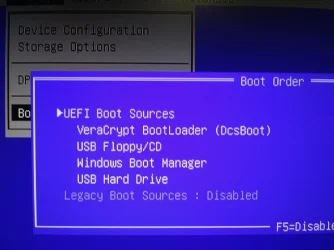
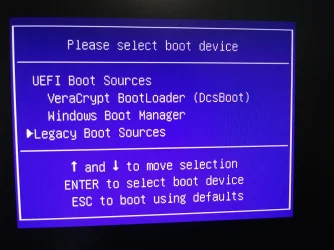
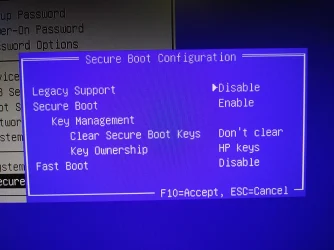
Wow Steve, forgot to mention..... my PC also has the latest version of VeraCrypt installed (ver. 1.26.24). Could VC have been corrupted/ modified in the hack? (see pics below.)

Willing to remove VC to see if I can regain access to the USB/ CD options again. Let me know what you think.
 

Attachments

  • From BIOS- F10 - Copy.webp
    From BIOS- F10 - Copy.webp
    341.4 KB · Views: 1
  • On F9 Boot - Copy.webp
    On F9 Boot - Copy.webp
    661.6 KB · Views: 1
  • SecureBoot- Config.webp
    SecureBoot- Config.webp
    795.4 KB · Views: 1

My Computer

System One

  • OS
    Windows 11
    Computer type
    PC/Desktop
    Manufacturer/Model
    HP 280 G1
    CPU
    i3-4160
    Memory
    16 GB
    Hard Drives
    500 GB
    Antivirus
    Malwarebytes, AVG

@TinkerTec

yes, but un-encrypt the drives first before removing VeraCrypt
and then the files can be easily transferred to another drive using the live Linux USB
have you tried, when booting the system, holding/pressing the F4 key
which should get into 'safe mode'

its step 4 on the above link.
best of luck Steve ..
 

My Computers

System One System Two

  • OS
    Debian 13 KDE .. Windows 11 Home
    Computer type
    PC/Desktop
    Manufacturer/Model
    HP 24" AiO
    CPU
    Ryzen 7 5825u
    Motherboard
    HP
    Memory
    64GB DDR4 3200
    Graphics Card(s)
    Ryzen 7 5825u
    Sound Card
    RealTek
    Monitor(s) Displays
    24" HP AiO
    Screen Resolution
    1920 x 1080 @60 Hz
    Hard Drives
    1TB WD Blue SN580 M2 SSD Partitioned.
    2x 1TB USB HDD External Backup/Storage.
    PSU
    90W external power brick
    Case
    24" All in One
    Cooling
    Default Air Cooling
    Keyboard
    HP WiFi UK extended
    Mouse
    HP WiFi 3 Button
    Internet Speed
    1GB full fibre
    Browser
    Edge & Firefox
    Antivirus
    AVG Internet Security/Windows Defender
    Other Info
    Mainly Open Source Software
  • Operating System
    Ubuntu 22.04.5 LTS
    Computer type
    Laptop
    Manufacturer/Model
    Dell 13" Latitude 2017
    CPU
    i5 7200u
    Motherboard
    Dell
    Memory
    16GB DDR4
    Graphics card(s)
    Intel
    Sound Card
    Intel
    Monitor(s) Displays
    13" Dell Laptop
    Hard Drives
    250GB Crucial 2.5" SSD
    Mouse
    Generic WiFi 3 button
    Internet Speed
    WiFi only
    Browser
    Firefox
    Antivirus
    ClamAV TK
    Other Info
    Mainly Open Source Software
Doesn’t sound like an infection… I remember long ago when I first started learning little tricks to figure stuff out - open notepad and type that password 10 times fast (obviously press enter after each so they’re on different lines). Then turn on caps lock and do it again. There will be typos and variations. See if it’s any of them. If you have a 10 key number pad and used it in your password, add 10 more with num lock off.
 

My Computer

System One

  • OS
    Windows 11 Pro
an apparent hacker attack
I agree with dacrone.
Doesn’t sound like an infection
Why do you think there was an attack?

disabled my ability to select CD and USB boot options from the BIOS F9 boot menu
What appears in your boot menu options list when you have a bootable USB plugged in if you disable Secure boot?

Since your last successful login to the problem account, had you had any abrupt turn offs such as computer crashes or removing power from the computer without having logged out of all accounts first?
Have there been any keyboard changes that might mean the keyboard is not sending the characters you think it is?

You haven't said if the problem account is a local or an MSAccount-linked user account.
You imply that it's local by referring to a password reset disk [which is just an expensive alternative to writing the password down, as you did, so I'm not suggesting you do so in the future].

Don't try to further change the problem account's password since using the Admin account to do so will prevent any future access to your encrypted files.


Denis
 
Last edited:

My Computer

System One

  • OS
    Windows 11 Home x64 Version 25H2 Build 26200.8037

Please clarify. Assuming you’re saying to un-encrypt the EFS files first? The system partition is encrypted with VeraCrypt –AND- I have EFS protected files. I tried un-encrypting the folders and files but still get “access denied” as I’m doing this from my local admin account which BTW has perms to my standard account. The permissions are correct- still no access. And yes, I have created the LiveLinux USB.

My Two Cents: Uninstall VeraCrypt first as I’ve always had issues with it when upgrading Windows OS’s. Always had to un-install/ re-install VC. Seems that VC doesn’t play nice with older, outdated BIOS firmware. Hopefully, doing this may help me access the BIOS easily?? Your thoughts, please.

Questions:

· Would I have to disable SecureBoot/ enable Legacy Boot? (hoping this older machine doesn't crap out doing this)

· So disconnect the hard drive/ connect Linux USB and boot machine/ plug hard drive back-in/ locate and navigate to user profile/ copy profile to a USB storage drive… I’ll need help with this guys. Not knowledgeable at all with Linux, though I now need to be.

· I have exported several EFS certs/keys copies of over the years- do I use the most recent one to un-encrypt or will the original ones be best?


PS: Thanks for Safe Mode link. Apologies for being so wordy. Trying to avoid many ping-pong conversations as my time, energy and patience is being drained trying to get back access to my files.


My Computer

System One

  • OS
    Windows 11
    Computer type
    PC/Desktop
    Manufacturer/Model
    HP 280 G1
    CPU
    i3-4160
    Memory
    16 GB
    Hard Drives
    500 GB
    Antivirus
    Malwarebytes, AVG

Guys,​

When I changed passwords recently, I typed them slowly and deliberately, wrote them down immediately and stored it away but I think it was changed remotely because the next day I could not login to my standard local profile.​

True, not necessarily an infection, but I believe it may have been some sort of keylogger/ InfoStealer attempt. I found tons of security entries in Event Viewer pointing to msedgewebview2.exe, user permissions and security token assigned/ re-assigned at the system level, ports bound/ new ports (“listening ports”) opened, strange SubjectUser SIDS, security tokens elevated (including built-in admin account) which mysteriously appeared this morning on my login screen with strange “sign in” login box and other weird stuff that wasn’t happening before this incident. As per Event Viewer, no similar activity occurred going back a couple months or so.​


My Computer

System One

  • OS
    Windows 11
    Computer type
    PC/Desktop
    Manufacturer/Model
    HP 280 G1
    CPU
    i3-4160
    Memory
    16 GB
    Hard Drives
    500 GB
    Antivirus
    Malwarebytes, AVG

Thanks Denis & Dacrone,

Now that you mention it, I've noticed at random times I had to hit my KB keys a couple times to see some character(s) to appear on screen. I'll inspect the KB. And no, I knew enough not to change the standard user PW via the admin account. Thanks!
 

My Computer

System One

  • OS
    Windows 11
    Computer type
    PC/Desktop
    Manufacturer/Model
    HP 280 G1
    CPU
    i3-4160
    Memory
    16 GB
    Hard Drives
    500 GB
    Antivirus
    Malwarebytes, AVG

after you have booted into the live Linux desktop
open the menu and then open 'disks'

this will show all attached drives, internal and external
click your main drive entry in the menu

then in the right window double click your encrypted drive
this will open a password window
enter your password encryption key for that drive

once you are able to read the drive you can now transfer your data to another drive.

but it would be better if you could de-crypt the whole drive
if this fails then you have most likely lost that data as VeraCrypt doesn't have backdoors.

best of luck Steve ..
 

My Computers

System One System Two

  • OS
    Debian 13 KDE .. Windows 11 Home
    Computer type
    PC/Desktop
    Manufacturer/Model
    HP 24" AiO
    CPU
    Ryzen 7 5825u
    Motherboard
    HP
    Memory
    64GB DDR4 3200
    Graphics Card(s)
    Ryzen 7 5825u
    Sound Card
    RealTek
    Monitor(s) Displays
    24" HP AiO
    Screen Resolution
    1920 x 1080 @60 Hz
    Hard Drives
    1TB WD Blue SN580 M2 SSD Partitioned.
    2x 1TB USB HDD External Backup/Storage.
    PSU
    90W external power brick
    Case
    24" All in One
    Cooling
    Default Air Cooling
    Keyboard
    HP WiFi UK extended
    Mouse
    HP WiFi 3 Button
    Internet Speed
    1GB full fibre
    Browser
    Edge & Firefox
    Antivirus
    AVG Internet Security/Windows Defender
    Other Info
    Mainly Open Source Software
  • Operating System
    Ubuntu 22.04.5 LTS
    Computer type
    Laptop
    Manufacturer/Model
    Dell 13" Latitude 2017
    CPU
    i5 7200u
    Motherboard
    Dell
    Memory
    16GB DDR4
    Graphics card(s)
    Intel
    Sound Card
    Intel
    Monitor(s) Displays
    13" Dell Laptop
    Hard Drives
    250GB Crucial 2.5" SSD
    Mouse
    Generic WiFi 3 button
    Internet Speed
    WiFi only
    Browser
    Firefox
    Antivirus
    ClamAV TK
    Other Info
    Mainly Open Source Software
Just a tip @TinkerTec

Before you start doing to much... Do a complete disk clone(sector by sector)... if you mess up, you can restore the disk and start over again.
if you dont have a disk clone and you mess up.... you will never be able to restore the destroyed encrypted files.
You can also create a virtual disk from the clone and experiment on that one..


If the new password dont work.. does the old password work.
and can it be you by mistake pressed shift on the first character as we all by automatic press shift when we start writing a sentence..

I only use Veracrypt for encrypted containers.. never complete disk encryption.

Edit:
if you have a backup of all the data so you dont worry about data loss..... consider how much time its worth trying to solve the problem before you just wipe and reinstall
 

My Computers

System One System Two

  • OS
    Linux: Debian, Kali-linux, Alma, Win: 7, 8.1,2012R
    Manufacturer/Model
    HP Elitebook 840, AsusX53, Aspire E1-572. AsusUX32A, HP Pro3130mt+3010mt, HP Proliant ML150, 3xCustom-PC, i3, i5, i7
    CPU
    i3, i5 and i7 From 2gen to 9th gen... Server dual Xenon
    Hard Drives
    Sata, M.2, SAS
  • Operating System
    Retro: 2003server.XPpro, Win2000, Win98SE, Win95, Win3.11, MS-DOS, IBM-DOS
    Manufacturer/Model
    Commodore, AST, Fujitsu, Compaq, etc etc. etc Around 15 desktops and 20 laptops in the collection
    CPU
    Oldest intel 8088 up to P4 dual core
    Hard Drives
    MFM, IDE, SCSI
Steve:

Thanks, my main concern after I do all this will be whether I can recover the files with their original keys...

However, I will need to put this issue on the back burner for a while as I may have bigger fish to fry. It appears, but I’m not sure, whether my other PCs and devices may be experiencing similar strange behaviors (though my logins files are fine) -OR- I’m just very paranoid at this point. I may have let the angry cow in the barn but I don’t need to allow the pack of vicious bulls to come knock it down!

Will be looking into what’s happening on my wifi router. This device is security-hardened and it receives updates automatically. Would you happen to have a super-user’s guide for router hardening in case there are any additional security settings I may have missed? Many thanks in advance!​

Denis: Non MSAccount….. keyboard checked out and working fine (cleaned dirt and crumbs under the keys)

Marie SWE: Thanks, haven’t done disk cloning or virtual disk before… I should be able to save cloned image on same subject machine and then move it to an external drive- right?

I’ll search how to do this. Would you have a useful guide on this (especially on virtual disk cloning?) Thanks also for tip on VC containers.

Thanks all,

TT
 

My Computer

System One

  • OS
    Windows 11
    Computer type
    PC/Desktop
    Manufacturer/Model
    HP 280 G1
    CPU
    i3-4160
    Memory
    16 GB
    Hard Drives
    500 GB
    Antivirus
    Malwarebytes, AVG
Marie SWE: Thanks, haven’t done disk cloning or virtual disk before… I should be able to save cloned image on same subject machine and then move it to an external drive- right?

I’ll search how to do this. Would you have a useful guide on this (especially on virtual disk cloning?) Thanks also for tip on VC containers.
I use Linux for it, but i know @Bree in here have the perfect answer for you, as he does this almost on daily bases... That was a bit overkill, but he does it a lot, as he runs windows beta channel OS's on virtual disks. :-)
Perhaps he has a thread/post in here about it and just can add some extra to it, so he dont have to write a complete howto post. :cool:

Sorry Bree for dragging you in to this, but i know you know how to do this in windows style, while I'm sadly only Linux on this one. 😇
 

My Computers

System One System Two

  • OS
    Linux: Debian, Kali-linux, Alma, Win: 7, 8.1,2012R
    Manufacturer/Model
    HP Elitebook 840, AsusX53, Aspire E1-572. AsusUX32A, HP Pro3130mt+3010mt, HP Proliant ML150, 3xCustom-PC, i3, i5, i7
    CPU
    i3, i5 and i7 From 2gen to 9th gen... Server dual Xenon
    Hard Drives
    Sata, M.2, SAS
  • Operating System
    Retro: 2003server.XPpro, Win2000, Win98SE, Win95, Win3.11, MS-DOS, IBM-DOS
    Manufacturer/Model
    Commodore, AST, Fujitsu, Compaq, etc etc. etc Around 15 desktops and 20 laptops in the collection
    CPU
    Oldest intel 8088 up to P4 dual core
    Hard Drives
    MFM, IDE, SCSI
Marie SWE: Thanks for the prompt reply.. I’m truly grateful for any assistance from the 11F community. :-)
 

My Computer

System One

  • OS
    Windows 11
    Computer type
    PC/Desktop
    Manufacturer/Model
    HP 280 G1
    CPU
    i3-4160
    Memory
    16 GB
    Hard Drives
    500 GB
    Antivirus
    Malwarebytes, AVG
Marie SWE: Thanks, haven’t done disk cloning or virtual disk before… I should be able to save cloned image on same subject machine and then move it to an external drive- right?
I use Linux for it, but i know @Bree in here have the perfect answer for you, as he does this almost on daily bases... That was a bit overkill, but he does it a lot, as he runs windows beta channel OS's on virtual disks. :-)

You've almost certainly used an ISO file, a single file that can be mounted by Explorer and seen as a virtual optical disk.

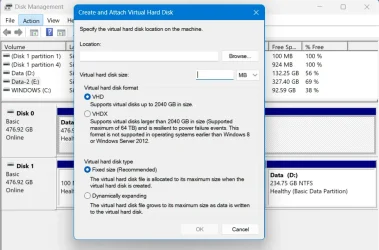
Well a .vhdx (virtual hard drive) file is similar. When mounted by Explorer is seen by the system as a hard drive that can be partitioned, formatted, and written to. Anything you can do with a physical hard drive you can do with a virtual one - including, if it holds an install of Windows, booting from it.

There are several ways to create a .vhdx. One of the simplest is to use Disk Management's Action > Create VHD. If you have Pro, and have installed Hyper-V, then you can use Action > New > Hard Disk... in the Hyper-V Manager. Hyper-V uses .vhdx files for the virtual drives for its VMs.

1781632765070.webp

As I understand it, you wish to make a backup copy of the existing drive from your affected machine so that you can work on it to recover your encrypted files without risking the original if it goes wrong.

There are two ways to make a backup of a hard drive, make a system image, or make a clone.

A system image is file that contains a copy of the partitions and files from the drive, and that can be restored to another drive to make a duplicate of the original. It's a two step process, first make an image, saving it to another drive (typically to an external drive) then restore the image to a new drive. A system image uses compression and is typically about 60% of the total size of used data in the partitions being backed up. You can put more than one image of the external drive.

A clone is a direct copy from the source drive to the destination drive. You can clone to an external drive, but you can only put one clone on a drive. If you want a second copy you'd need a second drive.

In your case I would make a system image of your affected machine, then you could restore that image to a .vhdx virtual drive on an external drive, preferably an SSD. You could then boot from this virtual drive and experiment, safe in the knowledge that should it go wrong you could restore the image and start over.


I've left the choice of imaging/cloning software to last. There are many good choices, but the one I am most familiar with is Macrium Reflect. The free version of Macrium Reflect v8 has been retired for a while now, but can still be downloaded from Macrium, and it still works with latest Windows 11 builds. It can do everything you'd need. There is a link for the Reflect Free v8 download agent at the bottom of post #1 here:

Latest Macrium Reflect 8 updates

...I am sending this from a clean, uninfected PC. Also, I have NOT connected to the internet at all on the infected machine since this incident occurred 4 days ago.
You want to do as little as possible to the affected machine, so the best course would be to install Reflect on another machine, then use it to make the Reflect rescue USB. You can boot the affected machine from the Reflect USB and use that to make a system image.

If you have Hyper-V on the other machine then you could skip making a virtual drive. You can boot the system image directly as a Hyper-V virtual machine using Macrium's viBoot, included in the Reflect install (even Reflect Free).

This tutorial is for an older version of Reflect, but viBoot has hardly change since then.


My Computers

System One System Two

  • OS
    Windows 11 Home
    Computer type
    Laptop
    Manufacturer/Model
    Acer Aspire 3 A315-23-R9VY
    CPU
    AMD Athlon Silver 3050U
    Memory
    8GB
    Graphics Card(s)
    Radeon Graphics
    Monitor(s) Displays
    laptop screen
    Screen Resolution
    1366x768 native resolution, up to 2560x1440 with Radeon Virtual Super Resolution
    Hard Drives
    1TB Samsung EVO 870 SSD (from April 2026: 250GB EVO 850)
    Internet Speed
    150 Mbps
    Browser
    Edge, Firefox
    Antivirus
    Defender
    Other Info
    fully 'Windows 11 ready' laptop. Windows 10 C: partition migrated from my old unsupported 'main machine' then upgraded to 11. A test migration ran Insider builds for 2 months. When 11 was released on 5th October 2021 it was re-imaged back to 10 and was offered the upgrade in Windows Update on 20th October. Windows Update offered the 22H2 Feature Update on 20th September 2022. It got the 23H2 Feature Update on 4th November 2023 through Windows Update, 24H2 on 3rd October 2024 through Windows Update by setting the Target Release Version for 24H2, and 25H2 on 30th September 2025 through Windows Update by setting the Target Release Version for 25H2.

    UPDATE - 11 April 2026: due to mechanical deterioration this PC has been retired from active duty. The OS with all software and files has been migrated to my System Seven below to carry on as my general purpose 'main machine'.

    My SYSTEM THREE is a Dell Latitude 5410, i7-10610U, 32GB RAM, 512GB NVMe ssd, supported device running Windows 11 Pro.

    My SYSTEM FOUR is a 2-in-1 convertible Lenovo Yoga 11e 20DA, Celeron N2930, 8GB RAM, 256GB ssd. Unsupported device: currently running Win10 Pro, plus Win11 Pro RTM and Insider Dev, Beta, and RP 24H2 as native boot vhdx.

    My SYSTEM FIVE is a Dell Latitude 3190 2-in-1, Pentium Silver N5030, 8GB RAM, 1TB NVMe ssd, supported device running Windows 11 Pro, plus Insider Beta, Dev, and Canary builds (and a few others) as a native boot .vhdx.

    My SYSTEM SIX is a Dell Latitude 5550, Core Ultra 7 165H, 64GB RAM, 1TB NVMe SSD, supported device, Windows 11 Pro 24H2, Hyper-V host machine. Updated to 25H2 on 30th September 2025.

    My SYSTEM SEVEN is a Lenovo Thinkpad T580, Intel Core i7-8650U, 16GB RAM, 512GB NVMe SSD + 2nd 512GB NVMe SSD, a supported device for Windows 11. This is my current general purpose 'main machine'. The installed Windows 11 Home from my System One has been migrated to this machine.
  • Operating System
    Windows 11 Pro
    Computer type
    Laptop
    Manufacturer/Model
    Dell Latitude E4310
    CPU
    Intel® Core™ i5-520M
    Motherboard
    0T6M8G
    Memory
    8GB
    Graphics card(s)
    (integrated graphics) Intel HD Graphics
    Screen Resolution
    1366x768
    Hard Drives
    500GB Crucial MX500 SSD
    Browser
    Firefox, Edge
    Antivirus
    Defender
    Other Info
    unsupported machine: Legacy bios, MBR, TPM 1.2, upgraded from W10 to W11 using W10/W11 hybrid install media workaround. In-place upgrade to 22H2 using ISO and a workaround. Feature Update to 23H2 by manually installing the Enablement Package. In-place upgrade to 24H2 using hybrid 23H2/24H2 install media. Upgraded to 25H2 by Enablement Package. Also running Insider Dev, and Canary builds and Windows 10 as native boot .vhdx.

    My SYSTEM THREE is a Dell Latitude 5410, i7-10610U, 32GB RAM, 512GB NVMe ssd, supported device running Windows 11 Pro.

    My SYSTEM FOUR is a 2-in-1 convertible Lenovo Yoga 11e 20DA, Celeron N2930, 8GB RAM, 256GB ssd. Unsupported device: currently running Win10 Pro, plus Win11 Pro RTM and Insider Dev, Beta, and RP 24H2 as native boot vhdx.

    My SYSTEM FIVE is a Dell Latitude 3190 2-in-1, Pentium Silver N5030, 8GB RAM, 1TB NVMe ssd, supported device running Windows 11 Pro, plus Insider Beta, Dev, and Canary builds (and a few others) as a native boot .vhdx.

    My SYSTEM SIX is a Dell Latitude 5550, Core Ultra 7 165H, 64GB RAM, 1TB NVMe SSD, supported device, Windows 11 Pro 24H2, Hyper-V host machine. Updated to 25H2 on 30th September 2025.

    My SYSTEM SEVEN is a Lenovo Thinkpad T580, Intel Core i7-8650U, 16GB RAM, 512GB NVMe SSD + 2nd 512GB NVMe SSD, a supported device for Windows 11. This is my current general purpose 'main machine'. The installed Windows 11 Home from my System One has been migrated to this machine.
Back
Top Bottom