Lost my network win 11 ver 24H2


RayBob

New member
Local time
6:21 PM
Posts
27
Location
Three Lakes, WI
OS
Windows 11
Hello
I lost my network connection.

Message: Windows did not detect any networking hardware.

I did a network reset to no avail.

Any help would be appreciated.
 
Windows Build/Version
24H2

My Computer

System One

  • OS
    Windows 11
    Computer type
    Laptop
    Manufacturer/Model
    Dell Inspiron 15
Try rebooting your router.
 

My Computers

System One System Two

  • OS
    Windows 11 Enterprise 25H2 26200 7462
    Computer type
    PC/Desktop
    Manufacturer/Model
    Custom Build
    CPU
    Intel XEON E5-2699 v3
    Motherboard
    ASUS X99-A
    Memory
    64GB Teamgroup UD4-3600
    Graphics Card(s)
    NVIDIA GeForce GTX 1080 Ti
    Sound Card
    Integrated
    Monitor(s) Displays
    ACER X34 Predator
    Screen Resolution
    3440 x 1440
    Hard Drives
    Crucial CT1000P 3P SSD8 1TB
    Crucial CT1000 BX500 SSD 1TB
    PSU
    GameMax Pro
    Case
    Fractal Design
    Cooling
    Corsair H110iGT + 6 140mm Fans
    Keyboard
    Corsair K4
    Mouse
    G-Skill G502
    Internet Speed
    300MBs
    Browser
    Chrome
    Antivirus
    OEM
    Other Info
    ASUS RT-AC87U Router
  • Operating System
    25H2 26200.5074
    Computer type
    Laptop
    Manufacturer/Model
    ASUS X555LA
    Memory
    8GB
    Browser
    Chrome
    Antivirus
    OEM
Thanks. I have already rebooted the router to no avail
 

My Computer

System One

  • OS
    Windows 11
    Computer type
    Laptop
    Manufacturer/Model
    Dell Inspiron 15
Thanks. I have already rebooted the router to no avail


Try it in this order...

1. Turn the computer OFF.
2. Reboot the router.
3. Turn the computer ON.

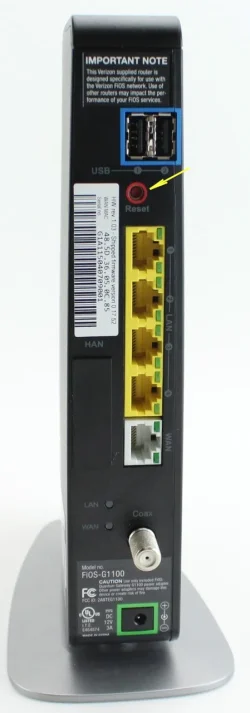
For some Internet companies, when the router is OFF, you need to press and hold the teeny button on the rear of the router to fully reboot it. It's very small. You'd need a BIC pen or a paper clip to press and hold the button, for about 10 seconds.


For example... this is the rear of a Verizon router.

Image1.webp
 

My Computers

System One System Two

  • OS
    Win 11 Home ♦♦♦26200.8457 ♦♦♦♦♦♦♦25H2
    Computer type
    PC/Desktop
    Manufacturer/Model
    Built by Ghot® [May 2020]
    CPU
    AMD Ryzen 7 3700X
    Motherboard
    Asus Pro WS X570-ACE (BIOS 5302)
    Memory
    G.Skill (F4-3200C14D-16GTZKW)
    Graphics Card(s)
    EVGA RTX 2070 (08G-P4-2171-KR)
    Sound Card
    Realtek ALC1220P / ALC S1220A
    Monitor(s) Displays
    Dell U3011 30"
    Screen Resolution
    2560 x 1600
    Hard Drives
    2x Samsung 860 EVO 500GB,
    WD 4TB Black FZBX - SATA III,
    WD 8TB Black FZBX - SATA III,
    DRW-24B1ST CD/DVD Burner
    PSU
    PC Power & Cooling 750W Quad EPS12V
    Case
    Cooler Master ATCS 840 Tower
    Cooling
    CM Hyper 212 EVO (push/pull)
    Keyboard
    Ducky DK9008 Shine II Blue LED
    Mouse
    Logitech Optical M-100
    Internet Speed
    300/300
    Browser
    Firefox (latest)
    Antivirus
    Bitdefender Total Security
    Other Info
    Speakers: Klipsch Pro Media 2.1
  • Operating System
    Windows XP Pro 32bit w/SP3
    Computer type
    PC/Desktop
    Manufacturer/Model
    Built by Ghot® (not in use)
    CPU
    AMD Athlon 64 X2 5000+ (OC'd @ 3.2Ghz)
    Motherboard
    ASUS M2N32-SLI Deluxe Wireless Edition
    Memory
    TWIN2X2048-6400C4DHX (2 x 1GB, DDR2 800)
    Graphics card(s)
    EVGA 256-P2-N758-TR GeForce 8600GT SSC
    Sound Card
    Onboard
    Monitor(s) Displays
    ViewSonic G90FB Black 19" Professional (CRT)
    Screen Resolution
    up to 2048 x 1536
    Hard Drives
    WD 36GB 10,000rpm Raptor SATA
    Seagate 80GB 7200rpm SATA
    Lite-On LTR-52246S CD/RW
    Lite-On LH-18A1P CD/DVD Burner
    PSU
    PC Power & Cooling Silencer 750 Quad EPS12V
    Case
    Generic Beige case, 80mm fans
    Cooling
    ZALMAN 9500A 92mm CPU Cooler
    Keyboard
    Logitech Classic Keybooard 200
    Mouse
    Logitech Optical M-BT96a
    Internet Speed
    300/300
    Browser
    Firefox 3.x ??
    Antivirus
    Symantec (Norton)
    Other Info
    Still assembled, still runs. Haven't turned it on for 15 years?
My gaming computer started doing this couple months ago .. anytime it sleeps, hibernates, it loses any detection. I have to do a hard power down, shut off, power on .. will not come back after soft restart .. NIC Power Mgmt has been unchkd since it began this behavior.

tomorrow I'm going to swap the NIC and see if that fixes it.

WIn 11 Pro DEV Insider 25H2 26100-240331-1435 but it was doing it with 24H2 also.
Realtek 8821CE PCI-e card. Power Mgmt (to sleep) turned off long ago.
And no, router reset does nothing.

Worst thing abt this, is that one is a remote machine in our VAC house and I moved stuff to/from often, until it started doing this, so hoping I/we can find a fix so this will remain online. Its across the house from the router so hardwire from it isnt an option.
 
Last edited:

My Computers

System One System Two

  • OS
    Win11Pro 2H2 Dev, Win11Pro Beta, Win10 22H2
    Computer type
    PC/Desktop
    Manufacturer/Model
    Custom
    CPU
    Intel i7 9700K @ 3.60GHz Coffee Lake 14nm Tech
    Motherboard
    Gigabyte Z370 HD3-CF (U3E1)
    Memory
    64.0GB (32x2) Dual-Channel DDR4 @ 1334MHz
    Graphics Card(s)
    Radeon 8GB 5700XT, 3DP, 1HDMI ports
    Sound Card
    Realtek HD Audio
    Monitor(s) Displays
    (2x) VX3276-FHD on AMD Radeon RX5700 XT GME, DP, DVI, HDMI ports
    Screen Resolution
    1920x1080, Work Resolution 1920x1032 pixels
    Hard Drives
    WD Green 2tb M.2, Sandisk Ultra 2TB SATAIII, Targent 4TB SATAIII SSD, Sandisk Ultra 2TB SATAIII (24H2 DEV drive), Crucial 1TB SATAIII SSD, WD 6TB SATAIII Backup HD. 17TB ttl
    PSU
    RaidMax 850w
    Case
    Full Height Mesh Gamer 12bay case
    Cooling
    Thermaltake UX100 RGB Cooler, several 92, 120,140mm RGB fans
    Keyboard
    Fiddio RGB Gamer board
    Mouse
    Kensington Ergo Mouse
    Internet Speed
    Cox, 10gb 67mb/s
    Browser
    Chrome 64-bit
    Antivirus
    What could happen? ;) MS Defender
    Other Info
    Qualcomm Atheros AR9462 802.11a|b|g|n WiFi BT Adapter
  • Operating System
    W11Pro.Dev 26220.5770
    Computer type
    PC/Desktop
    Manufacturer/Model
    Custom
    CPU
    Intel i7-12700kf, @ 3.6ghz
    Motherboard
    ASRock Z790-S
    Memory
    16GB (8gbx2) Dual-Channel DDR5
    Graphics card(s)
    Radeon 8gb RX5700 XT, DVI port
    Sound Card
    NVidia HD Audio
    Monitor(s) Displays
    Acer G206HQL 27"
    Screen Resolution
    1600x900, VGA, HDMI, DVI ports
    Hard Drives
    Sandisk 2tb nvme, Sandisk 2tb SSD, SP 1tb SSD,
    PSU
    Thermaltake 700w
    Case
    HP Pavillion case, dented, not pretty, much like me
    Cooling
    Thermaltake UX100 RGB Cooler, several 92, 120, 140mm rgb case fans
    Keyboard
    HP oem
    Mouse
    Belkin mouse
    Internet Speed
    Cox 10gbs
    Browser
    Chrome 64bit
    Antivirus
    MS Defender
    Other Info
    Intel Wi-Fi 6 AX200 @160mhz 802.11a|b|g|n WiFi BT Adapter
Try rebooting your router.
I tried. No Joy Thanks
Try it in this order...

1. Turn the computer OFF.
2. Reboot the router.
3. Turn the computer ON.

For some Internet companies, when the router is OFF, you need to press and hold the teeny button on the rear of the router to fully reboot it. It's very small. You'd need a BIC pen or a paper clip to press and hold the button, for about 10 seconds.


For example... this is the rear of a Verizon router.

View attachment 143448
Hi and thanks tried rebooting and no joy
 

My Computer

System One

  • OS
    Windows 11
    Computer type
    Laptop
    Manufacturer/Model
    Dell Inspiron 15
Does the network card show in Device Manager?
 

My Computers

System One System Two

  • OS
    Windows 11 Pro 25H2
    Computer type
    PC/Desktop
    Manufacturer/Model
    PowerSpec B746
    CPU
    Intel Core i7-10700K
    Motherboard
    ASRock Z490 Phantom Gaming 4/ax
    Memory
    16GB (8GB PC4-19200 DDR4 SDRAM x2)
    Graphics Card(s)
    NVIDIA GeForce GTX 1050 TI
    Sound Card
    Realtek Audio
    Monitor(s) Displays
    #1. LG ULTRAWIDE 34" #2. AOC Q32G2WG3 32"
    Screen Resolution
    #1. 3440 X 1440 #2. 1920 x 1080
    Hard Drives
    NVMe WDC WDS100T2B0C-00PXH0 1TB
    Samsung SSD 860 EVO 1TB
    PSU
    750 Watts (62.5A)
    Case
    PowerSpec/Lian Li ATX 205
    Keyboard
    Logitech K270
    Mouse
    Logitech M185
    Browser
    Microsoft Edge and Firefox
    Antivirus
    Webroot SecureAnywhere CE 26.1
  • Operating System
    Windows 11 Canary Channel
    Computer type
    PC/Desktop
    Manufacturer/Model
    PowerSpec G156
    CPU
    Intel Core i5-8400 CPU @ 2.80GHz
    Motherboard
    AsusTeK Prime B360M-A
    Memory
    16 MB DDR 4-2666
    Monitor(s) Displays
    23" Speptre HDMI 75Hz
    Screen Resolution
    1920x1080
    Hard Drives
    Samsung 970 EVO 500GB NVMe
    Keyboard
    Logitek K270
    Mouse
    Logitek M185
    Browser
    Firefox, Edge and Edge Canary
    Antivirus
    Windows Defender
Routers break ! We always keep a spare router in the house. Lots of internet providers will bring one out to you, depending on the plan you have with them. ( since a good majority of routers at least with my provider has refurbs) hope it's not that.
 

My Computer

System One

  • OS
    Windows 11 25H2 (OS Build 26200.8524)
    Computer type
    Laptop
    Manufacturer/Model
    Dell
    CPU
    Processor: 11th Gen Intel(R) Core(TM) i5-1135G7 @ 2.40G
    Motherboard
    64-bit operating system Dell 0XMF7W
    Memory
    12GB
    Graphics Card(s)
    Intel R Iris R XE Graphics family
    Sound Card
    Cirrus Speakers High Definition Audio
    Monitor(s) Displays
    Generic PnP monitor
    Screen Resolution
    1920 x 1080
    Hard Drives
    NVMe 670p SSDPEKNU512GZ NVMe I NTEL 512GB
    Case
    cheap
    Mouse
    Logitech wireless mouse
    Internet Speed
    16 Mps download
    Browser
    Google Chrome
    Antivirus
    Security: Microsoft Defender & Malwarebytes Premium (with browser guard)
    Other Info
    Dell model: Inspiron 15 3511
Routers break ! We always keep a spare router in the house. Lots of internet providers will bring one out to you, depending on the plan you have with them. ( since a good majority of routers at least with my provider has refurbs) hope it's not that.
No it was not the router. It was software issues. All fixed now. Thanks for your response
 

My Computer

System One

  • OS
    Windows 11
    Computer type
    Laptop
    Manufacturer/Model
    Dell Inspiron 15

Latest Support Threads

Back
Top Bottom