
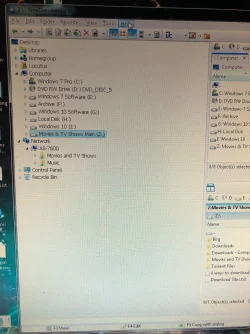
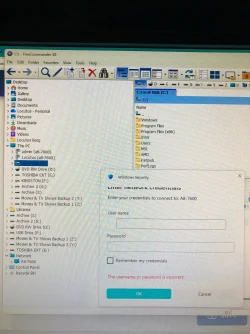
I have 2 PCs. My old PC uses Windows 7. My new PC uses Windows 11. Both have a connection to the Internet. There are no Internet problems. On my old PC, if I load Windows Explorer and go to Network in the bottom left corner, I see its computer name - A8-7600 - and under it, I see the shared folders. It does not show me my new PC. On my new PC, if I go to Network, I do not see its computer name. I do see my old PC. If I click it, I am prompted for a username and password. I assume this is the username and password to load Windows on the old PC. That’s a problem because on my old PC, I don’t use a password to get to Windows. So I entered the username and no password but it doesn’t work.
So my old PC sees itself but not the new PC. My new PC sees my old PC but will not show me the shared folders. Also, my new PC doesn’t see itself. I reset the modem and Google AI told me to go to services.msc and set 2 services to automatic instead of manual. That didn’t help.
Below are 2 pics, labelled as "New PC - Windows 11" and "Old PC - Windows 7", showing what I described above. Thanks for any help.
So my old PC sees itself but not the new PC. My new PC sees my old PC but will not show me the shared folders. Also, my new PC doesn’t see itself. I reset the modem and Google AI told me to go to services.msc and set 2 services to automatic instead of manual. That didn’t help.
Below are 2 pics, labelled as "New PC - Windows 11" and "Old PC - Windows 7", showing what I described above. Thanks for any help.
Attachments
My Computer
At a glance
Windows 11AMD 9600XT-FORCE Vulcan 32GB DDR5Asrock ARC B580 CHALLENGER OC 12GB
- OS
- Windows 11
- Computer type
- PC/Desktop
- Manufacturer/Model
- Custom build
- CPU
- AMD 9600X
- Motherboard
- MSI PRO B840M-B
- Memory
- T-FORCE Vulcan 32GB DDR5
- Graphics Card(s)
- Asrock ARC B580 CHALLENGER OC 12GB
- Sound Card
- (none)
- Monitor(s) Displays
- Acer
- Screen Resolution
- 1920 x 1080
- Hard Drives
- Lexar NM790 SSD
- PSU
- be quiet! PURE POWER 13 850W
- Case
- Cooler Master
- Cooling
- One Noctua front and one Noctua rear case fan
- Mouse
- G602
- Browser
- MS Edge
- Antivirus
- Norton 360






