Solved Lost network computers on network explorer


Madness10

Well-known member
Member
Local time
2:22 PM
Posts
32
Location
San Bernardino, Calif
OS
Windows 11
Hello all. I am running 25Hs, my wife and mom is running 24H2. Up until about a week ago, we all were able to see others computers. Now, my moms computer is able to see mine and I am able to see hers. But I cant see my wife's computer, she can't see mine. My moms can see mine, but can't see my wife's computer. I'm not sure what happened. I thought it was an update that went bad, so we did a system restore on her computer and mine back to before the last update, but still not working properly. Has anyone experience this with any of the new updates? Thanks.
 
Windows Build/Version
WIN25H2//26200.7623

My Computer

System One

  • OS
    Windows 11
    Computer type
    PC/Desktop
    CPU
    AMD Ryzen 5 5600X
    Motherboard
    MSI MAG B550 Tomahawk 2.0
    Memory
    16gb
    Graphics Card(s)
    GPU AMD Radeon RX 6700 XT
    Sound Card
    Sound Blaster Live

There are many comments on this very subject throughout this forum.
 

My Computers

System One System Two

  • OS
    Windows 11 Enterprise 25H2 26200 7462
    Computer type
    PC/Desktop
    Manufacturer/Model
    Custom Build
    CPU
    Intel XEON E5-2699 v3
    Motherboard
    ASUS X99-A
    Memory
    64GB Teamgroup UD4-3600
    Graphics Card(s)
    NVIDIA GeForce GTX 1080 Ti
    Sound Card
    Integrated
    Monitor(s) Displays
    ACER X34 Predator
    Screen Resolution
    3440 x 1440
    Hard Drives
    Crucial CT1000P 3P SSD8 1TB
    Crucial CT1000 BX500 SSD 1TB
    PSU
    GameMax Pro
    Case
    Fractal Design
    Cooling
    Corsair H110iGT + 6 140mm Fans
    Keyboard
    Corsair K4
    Mouse
    G-Skill G502
    Internet Speed
    300MBs
    Browser
    Chrome
    Antivirus
    OEM
    Other Info
    ASUS RT-AC87U Router
  • Operating System
    25H2 26200.5074
    Computer type
    Laptop
    Manufacturer/Model
    ASUS X555LA
    Memory
    8GB
    Browser
    Chrome
    Antivirus
    OEM
There are many comments on this very subject throughout this forum.
I have looked at a lot of pages, but nothing that talks about all of a sudden losing the computers.
 

My Computer

System One

  • OS
    Windows 11
    Computer type
    PC/Desktop
    CPU
    AMD Ryzen 5 5600X
    Motherboard
    MSI MAG B550 Tomahawk 2.0
    Memory
    16gb
    Graphics Card(s)
    GPU AMD Radeon RX 6700 XT
    Sound Card
    Sound Blaster Live

I did an update two days ago and just noticed my network was broken again . . . I just needed to select to not require passwords AGAIN. How that got changed I'll never know. I only just got everything working a week or so ago. But I was able to at least see the computer I could not access. Mine was between Win-7 and 11 but just thought I would mention it.

If you had not posted this I would not have checked . . .
 

My Computers

System One System Two

  • OS
    Windows 11 (up to date)
    Computer type
    PC/Desktop
    Manufacturer/Model
    Custom
    CPU
    Intel i5 12400
    Motherboard
    Gigabyte Z690 UA
    Memory
    Corsair Vengeance LPX 16GB
    Graphics Card(s)
    On Board the Z690
    Sound Card
    On Board
    Monitor(s) Displays
    43" Samsung tu7000
    Screen Resolution
    2560 x 1440
    Hard Drives
    SAMSUNG SSD 1TB NVMe M.2
    PSU
    Thermaltake smart 500w 80+
    Case
    LIAN LANCOOL_205M
    Cooling
    Bunch of fans . . . :o) (lights dont work)
    Keyboard
    Unicomp: Ultra Classic White Buckling Spring USB
    Mouse
    M510
    Internet Speed
    50mbps on Ethernet
    Browser
    Fire Fox
    Antivirus
    Windows
    Other Info
    Love this computer but I still prefer Win-7 like I love my old Lazy Boy Recliner . . . it just feels better.
  • Operating System
    WIN-7-64BIT and Win-11 pro for testing on unsupported hardware
    Computer type
    PC/Desktop
    Manufacturer/Model
    Home built
    CPU
    i5-3570K CPU @ 3.40GHz, 3801 Mhz, 4 Core(s), 4 Logical Processor(s)
    Motherboard
    GA-Z77-HD3
    Memory
    16 GB - Crucial Ballistick 4GB PC3-14900 DDR3-1333 MHz
    Graphics card(s)
    NVIDIA GeForce GTX 1050
    Sound Card
    On Board
    Monitor(s) Displays
    ASUS VP278
    Screen Resolution
    1920 x 1080
    Hard Drives
    4 - internal Samsung 2.5" SSD, 1 WD HDD 7200 and some external drives
    PSU
    EVGA 550w
    Case
    Old Gygabyte Tower
    Cooling
    Yes
    Keyboard
    Unicomp - UNIOP4A USB (like the old IBM Model H that I started with)
    Mouse
    M510
    Internet Speed
    50mbps
    Browser
    Firefox
    Antivirus
    Windows
    Other Info
    The only thing it lack is USB-3.2 on the front face but it has 3.0 on the back
I have looked at a lot of pages

It’s not a requirement, we can help you afresh.

Please read the following news:

EDIT: Link corrected


My Computers

System One System Two

  • OS
    Windows 11 Pro 25H2 Build 26200.8524
    Computer type
    PC/Desktop
    Manufacturer/Model
    Sin-built 2013
    CPU
    Intel(R) Core(TM) i7-4770K CPU @ 3.50GHz
    Motherboard
    ASUS ROG Maximus VI Formula
    Memory
    32.0 GB of I forget and the box is in storage.
    Graphics Card(s)
    Gigabyte nVidia GeForce GTX 1660 Super OC 6GB
    Sound Card
    Onboard thingy
    Monitor(s) Displays
    5 x LG 25MS500-B - 1 x 24MK430H-B - 1 x Wacom Pro 22" Touch Screen Tablet
    Screen Resolution
    All over the place
    Hard Drives
    Too many to list.
    OS on Samsung 1TB 870 QVO SATA
    PSU
    Silverstone 1500
    Case
    NZXT Phantom 820 Full-Tower Case
    Cooling
    Noctua NH-D15 Elite Class Dual Tower CPU Cooler / 6 x EziDIY 120mm / 2 x Corsair 140mm somethings / 1 x 140mm Thermaltake something / 2 x 200mm Corsair.
    Keyboard
    Corsair K95 / Logitech diNovo Edge Wireless
    Mouse
    Logitech: G402 / G502 / Mx Masters / Mx Air Cordless
    Internet Speed
    2000/500Mbps
    Browser
    All sorts
    Antivirus
    Kaspersky Premium
    Other Info
    ㅤㅤㅤㅤㅤㅤㅤㅤㅤㅤㅤㅤㅤㅤㅤㅤㅤㅤㅤㅤㅤㅤㅤㅤㅤㅤㅤㅤㅤㅤㅤㅤㅤㅤㅤㅤㅤㅤㅤㅤ⠀⠀⠀⠀⠀⠀⠀⠀⠀⠀
    TP-Link BE9300 WiFi 7 Bluetooth 5.4 (Archer TBE550E)
    TP-Link TX201 V1 2.5GB Lan

    Grandstream HT812 - VoIP
    ASUS DSL-AX82U - Mesh
    ASUS RT-AC68U - Mesh
    ASUS RT-BE88U Router

    Brother MFC-L2880DW Printer

    I’m on a horse.
  • Operating System
    Windows 11 Pro 25H2 Build 26200.8524
    Computer type
    Laptop
    Manufacturer/Model
    LENOVO Yoga 7 14IRL8 - 7i EVO OLED 14" Touchscreen i5 12 Core 16GB/512GB
    CPU
    Intel Core 12th Gen i5-1240P Processor (1.7 - 4.4GHz)
    Memory
    16GB LPDDR5 RAM
    Graphics card(s)
    Intel Iris Xe Graphics Processor
    Sound Card
    Optimized with Dolby Atmos®
    Screen Resolution
    QHD 2880 x 1800 OLED
    Hard Drives
    M.2 512GB
    Antivirus
    Defender / Malwarebytes
    Other Info
    …still on a horse.
It’s not a requirement, we can help you afresh.

Please read the following news:

EDIT: Link corrected

I looked over this thread and this has nothing to do with what I'm experiencing. What happened happened around Jan 16th.
 

My Computer

System One

  • OS
    Windows 11
    Computer type
    PC/Desktop
    CPU
    AMD Ryzen 5 5600X
    Motherboard
    MSI MAG B550 Tomahawk 2.0
    Memory
    16gb
    Graphics Card(s)
    GPU AMD Radeon RX 6700 XT
    Sound Card
    Sound Blaster Live

I cant see my wife's computer
The File explorer, Network section has been defective since Windows 10 Version 1803.
What it bothers to show at any given moment is unpredictable.
Don't even bother looking at it.

Make shortcuts between your shared computers and use them instead e.g.
\\WIFESCOMPUTER\
\\WIFESCOMPUTER\SomeSharedFolderOrOther


Denis
 

My Computer

System One

  • OS
    Windows 11 Home x64 Version 25H2 Build 26200.8037
The File explorer, Network section has been defective since Windows 10 Version 1803.
What it bothers to show at any given moment is unpredictable.
Don't even bother looking at it.

Make shortcuts between your shared computers and use them instead e.g.
\\WIFESCOMPUTER\
\\WIFESCOMPUTER\SomeSharedFolderOrOther


Denis
It has been working fine for the few years, until just recently. If I can't see her computer and she can't see mine, we can't make shortcuts.
 

My Computer

System One

  • OS
    Windows 11
    Computer type
    PC/Desktop
    CPU
    AMD Ryzen 5 5600X
    Motherboard
    MSI MAG B550 Tomahawk 2.0
    Memory
    16gb
    Graphics Card(s)
    GPU AMD Radeon RX 6700 XT
    Sound Card
    Sound Blaster Live

If I can't see her computer
You said that you could not see it in "network explorer" which I took to mean File explorer, Network section i.e. a File explorer problem not a network problem.
If you write \\HERCOMPUTERNAME\ into File explorer's address bar or the Start menu, Run dialog, does it connect?
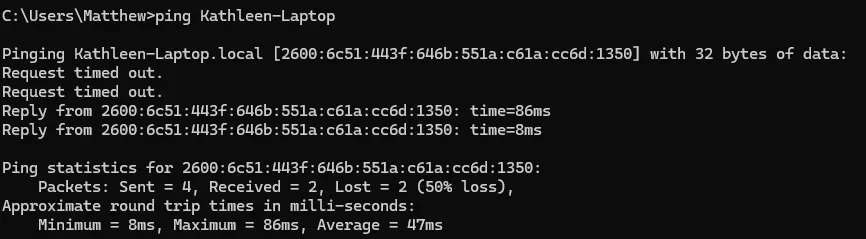
Alternatively, does Ping HERCOMPUTERNAME in Terminal [PS / Cmd prompt] show successful returns [Sent = 4, Received = 4]?


Denis
 

My Computer

System One

  • OS
    Windows 11 Home x64 Version 25H2 Build 26200.8037
You said that you could not see it in "network explorer" which I took to mean File explorer, Network section i.e. a File explorer problem not a network problem.
If you write \\HERCOMPUTERNAME\ into File explorer's address bar or the Start menu, Run dialog, does it connect?
Alternatively, does Ping HERCOMPUTERNAME in Terminal [PS / Cmd prompt] show successful returns [Sent = 4, Received = 4]?


Denis
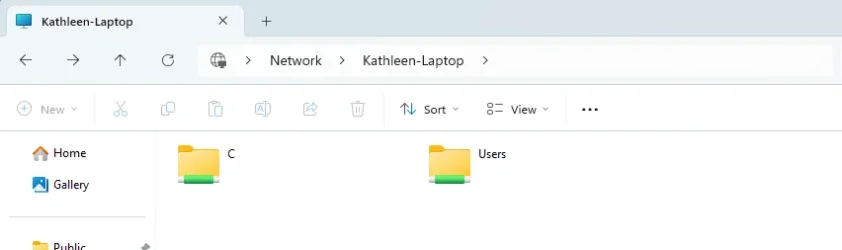
This is what I get.1769370588523.webp 1769370408508.webp
 

My Computer

System One

  • OS
    Windows 11
    Computer type
    PC/Desktop
    CPU
    AMD Ryzen 5 5600X
    Motherboard
    MSI MAG B550 Tomahawk 2.0
    Memory
    16gb
    Graphics Card(s)
    GPU AMD Radeon RX 6700 XT
    Sound Card
    Sound Blaster Live

You said that you could not see it in "network explorer" which I took to mean File explorer, Network section i.e. a File explorer problem not a network problem.
If you write \\HERCOMPUTERNAME\ into File explorer's address bar or the Start menu, Run dialog, does it connect?
Alternatively, does Ping HERCOMPUTERNAME in Terminal [PS / Cmd prompt] show successful returns [Sent = 4, Received = 4]?


Denis
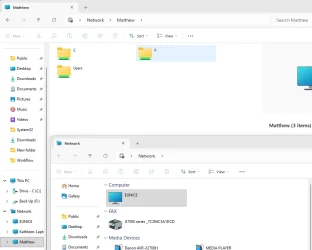
If I type the names of the computers into the file address bar, it shows up in file explorer, but not the network explorer. 1769370910379.webp
 

My Computer

System One

  • OS
    Windows 11
    Computer type
    PC/Desktop
    CPU
    AMD Ryzen 5 5600X
    Motherboard
    MSI MAG B550 Tomahawk 2.0
    Memory
    16gb
    Graphics Card(s)
    GPU AMD Radeon RX 6700 XT
    Sound Card
    Sound Blaster Live
Again, I assume that by "network explorer" you mean the File explorer, Network section.

So you do not have a network problem. Your network is operating.
You can create [write] shortcuts using the syntax I showed you and you'll be free of the File explorer, Network section's shortcomings.


Denis
 

My Computer

System One

  • OS
    Windows 11 Home x64 Version 25H2 Build 26200.8037
If I type the names of the computers into the file address bar, it shows up in file explorer, but not the network explorer.
But I can see your Kathleen-Laptop in your diagram.

I really think we must be talking at cross-purposes.
I suggest you make shortcuts to her computer.


Denis
 

My Computer

System One

  • OS
    Windows 11 Home x64 Version 25H2 Build 26200.8037
Again, I assume that by "network explorer" you mean the File explorer, Network section.

So you do not have a network problem. Your network is operating.
You can create [write] shortcuts using the syntax I showed you and you'll be free of the File explorer, Network section's shortcomings.


Denis
What would make it not show in the "network" all of the sudden? It was just recent. It has been find the last few years.
 

My Computer

System One

  • OS
    Windows 11
    Computer type
    PC/Desktop
    CPU
    AMD Ryzen 5 5600X
    Motherboard
    MSI MAG B550 Tomahawk 2.0
    Memory
    16gb
    Graphics Card(s)
    GPU AMD Radeon RX 6700 XT
    Sound Card
    Sound Blaster Live
What would make it not show in the "network" all of the sudden?
That question cannot be answered. Not even by MS given their evident inability to have fixed this problem at some stage in the last eight years.


Denis
 

My Computer

System One

  • OS
    Windows 11 Home x64 Version 25H2 Build 26200.8037
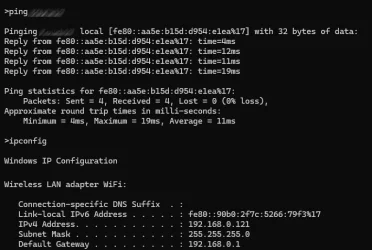
When you ping Kathleen-Laptop, you get a reply on IPv6. Unless you have everything set correctly and your network equipment supports it, you're likely to have discovery issues with IPv6. I would set all of the Windows devices to prefer IPv4 over IPv6. Don't disable IPv6 outright.

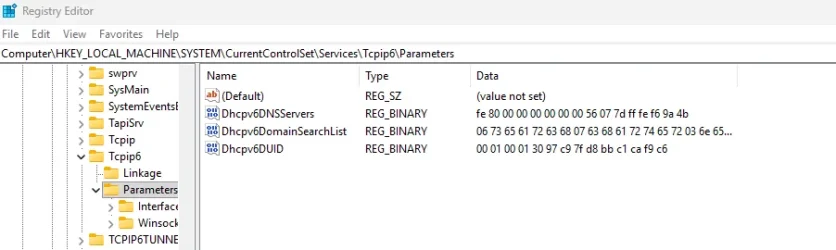
In the registry, at HKEY_LOCAL_MACHINE\SYSTEM\CurrentControlSet\Services\Tcpip6\Parameters, set the DisabledComponents value to 32 (hexadecimal 20). Restart and check the Network node in Explorer again.


My Computer

System One

  • OS
    Windows 11 Pro 25H2
    Computer type
    PC/Desktop
    Manufacturer/Model
    Intel NUC12WSHi7
    CPU
    12th Gen Core i7-1260P
    Motherboard
    NUC12WSBi7
    Memory
    64 GB Micron PC4-25600
    Graphics Card(s)
    Intel Iris Xe Graphics
    Sound Card
    on-board Realtek HD Audio
    Monitor(s) Displays
    Dell U3219Q
    Screen Resolution
    3840 x 2160
    Hard Drives
    Samsung SSD 990 PRO 1TB
    Crucial MX500 2 TB
    Antivirus
    Microsoft Defender
I thought IPv4 was still the default. I haven't attempted to change anything in this regard.
Ping NETWORKCOMPUTERNAME

Ping results.webp


All the best,
Denis
 

My Computer

System One

  • OS
    Windows 11 Home x64 Version 25H2 Build 26200.8037
When you ping Kathleen-Laptop, you get a reply on IPv6. Unless you have everything set correctly and your network equipment supports it, you're likely to have discovery issues with IPv6. I would set all of the Windows devices to prefer IPv4 over IPv6. Don't disable IPv6 outright.

In the registry, at HKEY_LOCAL_MACHINE\SYSTEM\CurrentControlSet\Services\Tcpip6\Parameters, set the DisabledComponents value to 32 (hexadecimal 20). Restart and check the Network node in Explorer again.

I don't have DisabledComponents in my registry. 1769373793454.webp
 

My Computer

System One

  • OS
    Windows 11
    Computer type
    PC/Desktop
    CPU
    AMD Ryzen 5 5600X
    Motherboard
    MSI MAG B550 Tomahawk 2.0
    Memory
    16gb
    Graphics Card(s)
    GPU AMD Radeon RX 6700 XT
    Sound Card
    Sound Blaster Live
If I can't see her computer and she can't see mine, we can't make shortcuts.
That's not true. As long as you can ping the computer you can make a shortcut to it. I have been doing that for at least ten years. It works fine with a mix of computers with Windows 7, 8, 10 and 11. The only time I couldn't make a shortcut is either when the computer was turned off or asleep.

BTW, the computers in my network come and go in File Explorer > Network. That is why I don't depend upon it. The shortcuts to the networked computers always work!
 

My Computers

System One System Two

  • OS
    Windows 11 Pro 25H2 (26200.6901)
    Computer type
    Laptop
    Manufacturer/Model
    ASUS TUF Gaming A15 (2022)
    CPU
    AMD Ryzen 7 6800H with Radeon 680M GPU (486MB RAM)
    Memory
    Crucial DDR5-4800 (2400MHz) 32GB (2 x 16GB)
    Graphics Card(s)
    NVIDIA RTX 3060 Laptop (6GB RAM)
    Sound Card
    n/a
    Monitor(s) Displays
    15.6-inch
    Screen Resolution
    1920x1080 300Hz
    Hard Drives
    2 x Samsung 990 Evo Plus (2TB M.2 NVME SSD)
    PSU
    n/a
    Mouse
    Wireless Mouse M510
    Internet Speed
    2100Mbps/300Mbps
    Browser
    Firefox
    Antivirus
    Malwarebytes
  • Operating System
    Windows 11 Pro 25H2 (26200.8246)
    Computer type
    PC/Desktop
    Manufacturer/Model
    Custom build
    CPU
    AMD Ryzen 7 5700X3D
    Motherboard
    ASUS ROG Strix B550-F Gaming WiFi II
    Memory
    G.SKILL Flare X 32GB (2x16GB) DDR4
    Graphics card(s)
    ASUS ROG-STRIX-RTX3060TI-08G-V2-GAMING (RTX 3060-Ti, 8GB RAM)
    Monitor(s) Displays
    Samsung G50D IPS 27"
    Screen Resolution
    1440p/180Hz
    Hard Drives
    SAMSUNG 990 EVO Plus (2TB] M.2 NVME SSD
    SAMSUNG 990 EVO Plus (4TB) M.2 NVME SSD
    PSU
    Corsair RM750x (750 watts)
    Case
    Cooler Master MasterCase 5
    Cooling
    Scythe Mugen 6
    Keyboard
    Logitech K520 (MK540 keyboard/mouse combo)
    Mouse
    Logitech M310 (MK540 keyboard/mouse combo)
    Internet Speed
    2100 Mbps down / 300 Mbps up
    Browser
    Firefox, Edge, Chrome
    Antivirus
    Malwarebytes (Premium)
    Other Info
    ASUS Blu-ray Burner BW-16D1HT (SATA) || Western Digital Easystore 20TB USB 3.0 external hard drive used with Acronis True Image 2025 backup software || HP OfficeJet Pro 6975 Printer/Scanner
I agree with @MisterEd. I gave up on the network map years ago and rely strictly on shortcuts. Networking issues of all kinds has been an issue Microsoft has never mastered and was made worse when folks started running mixed system versions of Windows on their network. To make matters even worse, was when MS made tighter security in networking. So when I say "all kinds" of problems, I mean just that.
 

My Computers

System One System Two

  • OS
    Windows 11 Pro 25H2
    Computer type
    PC/Desktop
    Manufacturer/Model
    Dell Optiplex 7080
    CPU
    i9-10900 10 core 20 threads
    Motherboard
    DELL 0J37VM
    Memory
    32 gb
    Graphics Card(s)
    none-Intel UHD Graphics 630
    Sound Card
    Integrated Realtek
    Monitor(s) Displays
    Benq 27
    Screen Resolution
    2560x1440
    Hard Drives
    2x1tb Solidigm m.2 nvme /External drives 512gb Samsung m.2 sata+2tb Kingston m2.nvme
    PSU
    500w
    Case
    MT
    Cooling
    Dell Premium
    Keyboard
    Logitech wired
    Mouse
    Logitech wireless
    Internet Speed
    so slow I'm too embarrassed to tell
    Browser
    #1 Edge #2 Firefox
    Antivirus
    Defender+MWB Premium
  • Operating System
    Windows 11 Pro 24H2 26200.8457
    Computer type
    PC/Desktop
    Manufacturer/Model
    Beelink Mini PC SER5
    CPU
    AMD Ryzen 7 6800U
    Memory
    32 gb
    Graphics card(s)
    integrated
    Sound Card
    integrated
    Monitor(s) Displays
    Benq 27
    Screen Resolution
    2560x1440
    Hard Drives
    1TB Crucial nvme
    Keyboard
    Logitech wired
    Mouse
    Logitech wireless
    Internet Speed
    still too embarrassed to tell
    Browser
    Firefox
    Antivirus
    Defender
    Other Info
    System 3 is non compliant Dell 9020 i7-4770/24gb ram Win11 PRO 26200.8457
Back
Top Bottom