Solved Macrium or AOMEI


I really appreciate everyone's input and suggestions. But some of the suggestions seem a little complicated for me. I am not into coding. I want something basic that does the job on a basic setup and with a few clicks it's done. And I don't want to pay for a subscription. From what I have seen in the responses in this thread, maybe AOMEI is the closest to what I am looking for?
As I said earlier - AOMEI is a simple enough and reliable tool, and the free version should meet your expectations.

You would not be making a bad decision - if you find it is too limited after you gain experience, you can consider more flexible tools later.
 

My Computer My Computer

At a glance

Windows 11 Pro + Win11 Canary VM.I9 13th gen i9-13900H 2.60 GHZ16 GB solderedIntegrated Intel Iris XE
OS
Windows 11 Pro + Win11 Canary VM.
Computer type
Laptop
Manufacturer/Model
ASUS Zenbook 14
CPU
I9 13th gen i9-13900H 2.60 GHZ
Motherboard
Yep, Laptop has one.
Memory
16 GB soldered
Graphics Card(s)
Integrated Intel Iris XE
Sound Card
Realtek built in
Monitor(s) Displays
laptop OLED screen
Screen Resolution
2880x1800 touchscreen
Hard Drives
1 TB NVME SSD (only weakness is only one slot)
PSU
Internal + 65W thunderbolt USB4 charger
Case
Yep, got one
Cooling
Stella Artois (UK pint cans - 568 ml) - extra cost.
Keyboard
Built in UK keybd
Mouse
Bluetooth , wireless dongled, wired
Internet Speed
900 mbs (ethernet), wifi 6 typical 350-450 mb/s both up and down
Browser
Edge
Antivirus
Defender
Other Info
TPM 2.0, 2xUSB4 thunderbolt, 1xUsb3 (usb a), 1xUsb-c, hdmi out, 3.5 mm audio out/in combo, ASUS backlit trackpad (inc. switchable number pad)

Macrium Reflect Home V8
Office 365 Family (6 users each 1TB onedrive space)
Hyper-V (a vm runs almost as fast as my older laptop)
As I said earlier - AOMEI is a simple enough and reliable tool, and the free version should meet your expectations.

You would not be making a bad decision - if you find it is too limited after you gain experience, you can consider more flexible tools later.
Thanks!
 

My Computer My Computer

At a glance

Windows 11 Pro (25H2)
OS
Windows 11 Pro (25H2)
Computer type
PC/Desktop
If you need to make pe you can borrow my little thing to do it.
 

My Computers My Computers

  • At a glance

    Win7,Win11i7-97002x16gb 3600mhz
    OS
    Win7,Win11
    Computer type
    PC/Desktop
    CPU
    i7-9700
    Motherboard
    gigabyte b365m ds3h
    Memory
    2x16gb 3600mhz
    Monitor(s) Displays
    benq gw2480
    PSU
    bequiet pure power 11 400CM
    Cooling
    cryorig m9i
  • At a glance

    win7,win11i5-84002x8gb 3200
    Operating System
    win7,win11
    Computer type
    PC/Desktop
    CPU
    i5-8400
    Motherboard
    gigabyte b365m ds3h
    Memory
    2x8gb 3200
    PSU
    xfx pro 450
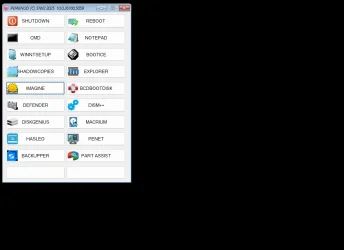
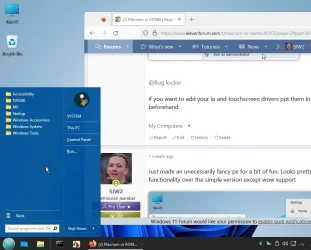
Menu as direct shell looks like this

Captured_000.webp


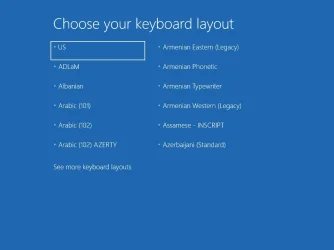
for prettier background press ctrl+alt+r to get to this

Captured_001.webp


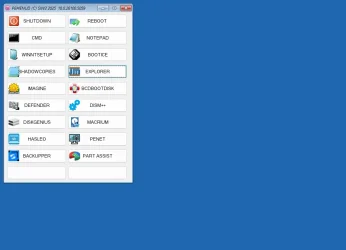
then press ctrl+alt+m to get back to the menu with pretty blue background now there


Captured_003.webp

it is easy to remember ctrl+alt+r for recenv and ctrl+alt+m for menu
 
Last edited:

My Computers My Computers

  • At a glance

    Win7,Win11i7-97002x16gb 3600mhz
    OS
    Win7,Win11
    Computer type
    PC/Desktop
    CPU
    i7-9700
    Motherboard
    gigabyte b365m ds3h
    Memory
    2x16gb 3600mhz
    Monitor(s) Displays
    benq gw2480
    PSU
    bequiet pure power 11 400CM
    Cooling
    cryorig m9i
  • At a glance

    win7,win11i5-84002x8gb 3200
    Operating System
    win7,win11
    Computer type
    PC/Desktop
    CPU
    i5-8400
    Motherboard
    gigabyte b365m ds3h
    Memory
    2x8gb 3200
    PSU
    xfx pro 450
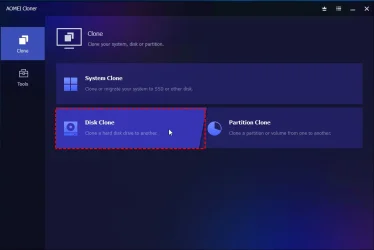
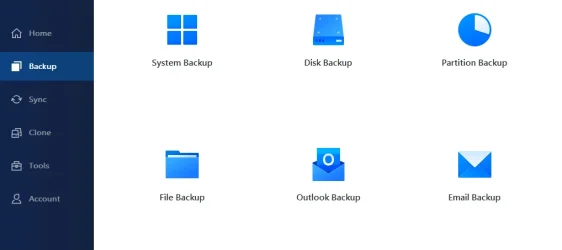
I vote for Macrium, The only thing I don't like is the interface.

The AOMEI interface is much beautiful.

disk-clone.webp
 

My Computer My Computer

At a glance

Windows 11 Pro 25H2Intel Core i5 12th generation16GB
OS
Windows 11 Pro 25H2
Computer type
PC/Desktop
CPU
Intel Core i5 12th generation
Motherboard
GIGABYTE
Memory
16GB
PSU
750W
mine looks different

backupper.webp
 

My Computers My Computers

  • At a glance

    Win7,Win11i7-97002x16gb 3600mhz
    OS
    Win7,Win11
    Computer type
    PC/Desktop
    CPU
    i7-9700
    Motherboard
    gigabyte b365m ds3h
    Memory
    2x16gb 3600mhz
    Monitor(s) Displays
    benq gw2480
    PSU
    bequiet pure power 11 400CM
    Cooling
    cryorig m9i
  • At a glance

    win7,win11i5-84002x8gb 3200
    Operating System
    win7,win11
    Computer type
    PC/Desktop
    CPU
    i5-8400
    Motherboard
    gigabyte b365m ds3h
    Memory
    2x8gb 3200
    PSU
    xfx pro 450
If you need to make pe you can borrow my little thing to do it.
I can make pe by drinking ber.

My bad - Oh I need two Es in above (pe, ber).
 

My Computer My Computer

At a glance

Windows 11 Pro + Win11 Canary VM.I9 13th gen i9-13900H 2.60 GHZ16 GB solderedIntegrated Intel Iris XE
OS
Windows 11 Pro + Win11 Canary VM.
Computer type
Laptop
Manufacturer/Model
ASUS Zenbook 14
CPU
I9 13th gen i9-13900H 2.60 GHZ
Motherboard
Yep, Laptop has one.
Memory
16 GB soldered
Graphics Card(s)
Integrated Intel Iris XE
Sound Card
Realtek built in
Monitor(s) Displays
laptop OLED screen
Screen Resolution
2880x1800 touchscreen
Hard Drives
1 TB NVME SSD (only weakness is only one slot)
PSU
Internal + 65W thunderbolt USB4 charger
Case
Yep, got one
Cooling
Stella Artois (UK pint cans - 568 ml) - extra cost.
Keyboard
Built in UK keybd
Mouse
Bluetooth , wireless dongled, wired
Internet Speed
900 mbs (ethernet), wifi 6 typical 350-450 mb/s both up and down
Browser
Edge
Antivirus
Defender
Other Info
TPM 2.0, 2xUSB4 thunderbolt, 1xUsb3 (usb a), 1xUsb-c, hdmi out, 3.5 mm audio out/in combo, ASUS backlit trackpad (inc. switchable number pad)

Macrium Reflect Home V8
Office 365 Family (6 users each 1TB onedrive space)
Hyper-V (a vm runs almost as fast as my older laptop)
MR (V8 Free) still seems to work - whether one really needs to worry about how fast the thing is or how much space your backup takes - only you know the importance to you of that -- with days of cheap large amounts of storage and decent hardware I really couldn't be bothered - especially if my typical Windows install is only around 80GB (at the most). If you use vhdx files (physical ones) even file explorer can be used to back up the system.

Note ARCHIVING and large data backup e.g multi-media files etc is a very different topic to system backup and requires a different strategy. I assume the OP here was specifically referring to system backup.

I also assume that for smallish amount of critical DATA - storing it on the cloud is well worthwhile too as an extra safeguard.

As for paying for these types of programs -- not me when there's plenty of free reliable alternatives that work -- there's no definite solution that is perfect for everybody.

Cħeers
jimbo
 

My Computer My Computer

At a glance

Windows XP,11 Linux Fedora Rawhide pre-releas...2 X Intel i7
OS
Windows XP,11 Linux Fedora Rawhide pre-release 45
Computer type
PC/Desktop
CPU
2 X Intel i7
Screen Resolution
4KUHD X 2
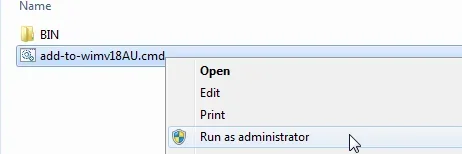
You can give it whirl if you like. Extract the zip somewhere that doesn't have a ridiculously long path . Then run the .cmd file as admin

add-to-wimv18AUD.zip

the package includes a file manager, dism++, imagine (for taking screenshots), the latest vmd drivers and a couple of other things

it looks in your current installation for :
aomei backupper
diskgenius
aomei fastrecovery
hasleo backup
macrium
aomei part assist


add-to-wim-run.webp


@Bug locker

if you want to add your io and touchscreen drivers put them in the BIN\Pedrivers folder beforehand
 
Last edited:

My Computers My Computers

  • At a glance

    Win7,Win11i7-97002x16gb 3600mhz
    OS
    Win7,Win11
    Computer type
    PC/Desktop
    CPU
    i7-9700
    Motherboard
    gigabyte b365m ds3h
    Memory
    2x16gb 3600mhz
    Monitor(s) Displays
    benq gw2480
    PSU
    bequiet pure power 11 400CM
    Cooling
    cryorig m9i
  • At a glance

    win7,win11i5-84002x8gb 3200
    Operating System
    win7,win11
    Computer type
    PC/Desktop
    CPU
    i5-8400
    Motherboard
    gigabyte b365m ds3h
    Memory
    2x8gb 3200
    PSU
    xfx pro 450
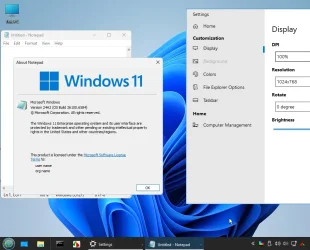
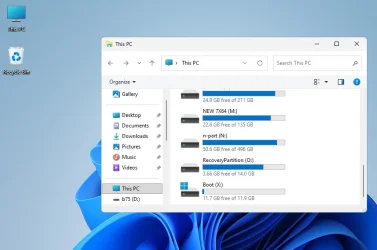
Just made an unecessarily fancy pe for a bit of fun. Looks pretty but doesn't add much functionality over the simple version except wow support for 32 bit programs

Used boot.wim image 2 as the base for this fancy pe because winre.wim is a lower build number

26100-6584-pe.webp


26100-6584-pe2.webp


26100-6584-pe3.webp
 
Last edited:

My Computers My Computers

  • At a glance

    Win7,Win11i7-97002x16gb 3600mhz
    OS
    Win7,Win11
    Computer type
    PC/Desktop
    CPU
    i7-9700
    Motherboard
    gigabyte b365m ds3h
    Memory
    2x16gb 3600mhz
    Monitor(s) Displays
    benq gw2480
    PSU
    bequiet pure power 11 400CM
    Cooling
    cryorig m9i
  • At a glance

    win7,win11i5-84002x8gb 3200
    Operating System
    win7,win11
    Computer type
    PC/Desktop
    CPU
    i5-8400
    Motherboard
    gigabyte b365m ds3h
    Memory
    2x8gb 3200
    PSU
    xfx pro 450

Latest Support Threads

Back
Top Bottom