Macrium Reflect 0, EaseUS backup 1.


You don't have to get a running OS up and going to restore an image. You boot from a recovery USB key with the software on it and you restore from that. Sure, you still need the software, but you need the software to perform the clone too.
So you're relying on a USB stick to boot. You don't need software for a clone. The clone is a bootable disk already, just put it in.
 

My Computer My Computer

At a glance

Windows 11 Professional (not the cut down rub...Ryzen 9 3900XT (on this one anyway, I have 8)72G and 72GB and 64GB and 32GB and 32GB and 8...Fury and 12 Tahitis
OS
Windows 11 Professional (not the cut down rubbish)
Computer type
PC/Desktop
Manufacturer/Model
Home built, of course
CPU
Ryzen 9 3900XT (on this one anyway, I have 8)
Motherboard
MSI X470 Gaming Plus Max
Memory
72G and 72GB and 64GB and 32GB and 32GB and 8GB and 8GB and 8GB
Graphics Card(s)
Fury and 12 Tahitis
Sound Card
People still use cards for those?
Monitor(s) Displays
7 of them.
Screen Resolution
All sorts.
Hard Drives
1TB NVME, 4TB rust spinner
PSU
Several kW
Case
Unimportant
Cooling
Big Zalman 6 inch thing
Keyboard
Really?
Mouse
Yes
Internet Speed
32Mbit/7Mbit
Browser
Opera
Antivirus
AVG
Other Info
[Crosses legs] Exactly what info are you looking for?
Why has always Macrium Reflect worked fine for me?. I'm not saying EaseUS is a bad product.
 

My Computers My Computers

  • At a glance

    Windows 11 ProIntel Core i9-14900HX32 GBIntel UHD Graphics, NVIDIA RTX 4070 Laptop
    OS
    Windows 11 Pro
    Computer type
    Laptop
    Manufacturer/Model
    Lenovo Legion 7i 16IRX9
    CPU
    Intel Core i9-14900HX
    Motherboard
    LENOVO LNVNB161216 Chipset HM 770
    Memory
    32 GB
    Graphics Card(s)
    Intel UHD Graphics, NVIDIA RTX 4070 Laptop
    Sound Card
    Realtek in-built
    Screen Resolution
    3200x2000 200% Scale
    Hard Drives
    C: HDD 1 TB SAMSUNG MZVL21T0HCLR-00BL2
    D: HDD 1 TB CRUCIAL CT1000P3PSSD8
    Antivirus
    BitDefender Free
  • At a glance

    Windows 11 ProI7 10750H32 GBIntel UHD - NVIDIA 1650 Ti Max-Q
    Operating System
    Windows 11 Pro
    Computer type
    Laptop
    Manufacturer/Model
    Lenovo ThinkPad X1 3Gen Extreme
    CPU
    I7 10750H
    Motherboard
    Intel MW-490
    Memory
    32 GB
    Graphics card(s)
    Intel UHD - NVIDIA 1650 Ti Max-Q
    Sound Card
    Realtek in-built
    Screen Resolution
    3840x2160 225% Scale
    Hard Drives
    C: WDC PC SN730 SDBQNTY-1T00-1001 (1 TB)
    D: KINGSTON SNV2S2000G (2 TB)
    Antivirus
    BitDefender
Why has always Macrium Reflect worked fine for me?. I'm not saying EaseUS is a bad product.
I think it must depend on the hardware. It works ok on the desktop I gave to my dad (i5 8600K), but it doesn't work on my (older) Dell server (R510). A google search shows many folk complaining Macrium doesn't work, but I can't find anyone having problems with EaseUS.
 

My Computer My Computer

At a glance

Windows 11 Professional (not the cut down rub...Ryzen 9 3900XT (on this one anyway, I have 8)72G and 72GB and 64GB and 32GB and 32GB and 8...Fury and 12 Tahitis
OS
Windows 11 Professional (not the cut down rubbish)
Computer type
PC/Desktop
Manufacturer/Model
Home built, of course
CPU
Ryzen 9 3900XT (on this one anyway, I have 8)
Motherboard
MSI X470 Gaming Plus Max
Memory
72G and 72GB and 64GB and 32GB and 32GB and 8GB and 8GB and 8GB
Graphics Card(s)
Fury and 12 Tahitis
Sound Card
People still use cards for those?
Monitor(s) Displays
7 of them.
Screen Resolution
All sorts.
Hard Drives
1TB NVME, 4TB rust spinner
PSU
Several kW
Case
Unimportant
Cooling
Big Zalman 6 inch thing
Keyboard
Really?
Mouse
Yes
Internet Speed
32Mbit/7Mbit
Browser
Opera
Antivirus
AVG
Other Info
[Crosses legs] Exactly what info are you looking for?
So you're relying on a USB stick to boot. You don't need software for a clone. The clone is a bootable disk already, just put it in.
But to make your clone, you had to have used software at some type. Be it Macrium, EaseUs, dd, ghost, etc.

I don't just keep a few extra drives sitting on my shelf ready to plop in when a problem arises.

There is nothing wrong with your method. There is nothing wrong with using EaseUs, or any other thing.

And I'm pretty sure that Macrium didn't build the free or home product to use with server hardware. You might get wacky results here.
 

My Computers My Computers

  • At a glance

    Windows 11 ProIntel Core i5-8279u32GB DDR4 2666MhzIntel Iris Plus 655
    OS
    Windows 11 Pro
    Computer type
    PC/Desktop
    Manufacturer/Model
    Beelink SEI8
    CPU
    Intel Core i5-8279u
    Motherboard
    AZW SEI
    Memory
    32GB DDR4 2666Mhz
    Graphics Card(s)
    Intel Iris Plus 655
    Sound Card
    Intel SST
    Monitor(s) Displays
    Asus ProArt PA278QV
    Screen Resolution
    2560x1440
    Hard Drives
    512GB NVMe
    PSU
    NA
    Case
    NA
    Cooling
    NA
    Keyboard
    NA
    Mouse
    NA
    Internet Speed
    500/50
    Browser
    Edge
    Antivirus
    Defender
    Other Info
    Mini PC used for testing Windows 11.
  • At a glance

    Windows 10 ProRyzen 9 5900x64GB DDR4-3600EVGA GeForce 3080 FT3 Ultra
    Operating System
    Windows 10 Pro
    Computer type
    PC/Desktop
    Manufacturer/Model
    Custom
    CPU
    Ryzen 9 5900x
    Motherboard
    Asus Rog Strix X570-E Gaming
    Memory
    64GB DDR4-3600
    Graphics card(s)
    EVGA GeForce 3080 FT3 Ultra
    Sound Card
    Onboard
    Monitor(s) Displays
    ASUS TUF Gaming VG27AQ. ASUS ProArt Display PA278QV 27” WQHD
    Screen Resolution
    2560x1440
    Hard Drives
    2TB WD SN850 PCI-E Gen 4 NVMe
    2TB Sandisk Ultra 2.5" SATA SSD
    PSU
    Seasonic Focus 850
    Case
    Fractal Meshify S2 in White
    Cooling
    Dark Rock Pro CPU cooler, 3 x 140mm case fans
    Keyboard
    Corsiar K65 RGB Lux
    Mouse
    Logitech G9 Laser Mouse
    Internet Speed
    500/50
    Browser
    Chrome
    Antivirus
    Defender.
A PC failed, wouldn't start. I cloned a similar machine to a brand new fresh SSD using Macrium Reflect, and - blue screen "unable to find winload.exe". I tried cloning again using EaseUS, and it worked!

Macrium Reflect is broken, very very broken, it can't perform a simple clone of a Windows 11 system disk.

Yes, Windows is stupidly not finding the boot details on the only disk on the system, but we all know Windows is stupid. But there's no excuse for Macrium doing it wrong when EaseUS does it right.

For anyone reading this, DO NOT USE MACRIUM REFLECT, it does not work. USE EASEUS.

Macrium has wasted hours and hours of my time.
This is ridiculous. Your warning is based on one undescribed usage case.

I and many here have never had a cloning or image restore issue.

99% certain this is a case of PEBCAK i.e. user misunderstanding.
 

My Computer My Computer

At a glance

Windows 11 Pro + Win11 Canary VM.I9 13th gen i9-13900H 2.60 GHZ16 GB solderedIntegrated Intel Iris XE
OS
Windows 11 Pro + Win11 Canary VM.
Computer type
Laptop
Manufacturer/Model
ASUS Zenbook 14
CPU
I9 13th gen i9-13900H 2.60 GHZ
Motherboard
Yep, Laptop has one.
Memory
16 GB soldered
Graphics Card(s)
Integrated Intel Iris XE
Sound Card
Realtek built in
Monitor(s) Displays
laptop OLED screen
Screen Resolution
2880x1800 touchscreen
Hard Drives
1 TB NVME SSD (only weakness is only one slot)
PSU
Internal + 65W thunderbolt USB4 charger
Case
Yep, got one
Cooling
Stella Artois (UK pint cans - 568 ml) - extra cost.
Keyboard
Built in UK keybd
Mouse
Bluetooth , wireless dongled, wired
Internet Speed
900 mbs (ethernet), wifi 6 typical 350-450 mb/s both up and down
Browser
Edge
Antivirus
Defender
Other Info
TPM 2.0, 2xUSB4 thunderbolt, 1xUsb3 (usb a), 1xUsb-c, hdmi out, 3.5 mm audio out/in combo, ASUS backlit trackpad (inc. switchable number pad)

Macrium Reflect Home V8
Office 365 Family (6 users each 1TB onedrive space)
Hyper-V (a vm runs almost as fast as my older laptop)
Weird, I've even deployed a drive image from my HP laptop just now into a VM, no boot problems at all.
Cloning has many risks TBH, it's better to make a drive image and then deploy into the new SSD. I did that with my mom's PC to replace an HDD with a NVME, and that worked flawlessly (needed 3 failed boots and one into safe mode to get into windows tho, I missed using the fix boot problems option)
 

My Computers My Computers

  • At a glance

    Windows 11 Pro 25H2AMD Ryzen 5 5600G @ 3.9/4.4Ghz2 x 16 GB DDR4 Kingston Fury Beast 3200 MhzAMD Radeon RX 6600 XT MSI Mech 2X OC Edition ...
    OS
    Windows 11 Pro 25H2
    Computer type
    PC/Desktop
    Manufacturer/Model
    Built PC
    CPU
    AMD Ryzen 5 5600G @ 3.9/4.4Ghz
    Motherboard
    MSI B550M-PRO-WiFi Ver. 1.4
    Memory
    2 x 16 GB DDR4 Kingston Fury Beast 3200 Mhz
    Graphics Card(s)
    AMD Radeon RX 6600 XT MSI Mech 2X OC Edition 8 GB
    Sound Card
    Realtek High Definition Audio (Integrated)
    Monitor(s) Displays
    Samsung C50Rx 27" LED / HP S2031 20" LCD
    Screen Resolution
    1920 x 1080 px / 1600 x 900 px
    Hard Drives
    WD Blue SN570 NVME M.2 SSD [1 TB] -- External Drives: - WD Scorpion Blue 250 GB 5400 RPM (Data Backup) - Hitachi 500 GB 5400 RPM (Software / ISOs Backup) - Toshiba MQ01ABD100 1 TB 5400 RPM (OS Images) - HGST TravelStar 7K1000 1 TB, 7200 RPM USB 3.0 - ADATA SU800 2TB SSD USB 3.0
    PSU
    Corsair RM750e 750W Fully Modular
    Case
    Naceb Hydra NA-1602
    Cooling
    Naceb Orpheus x 3 (Front) + Naceb Cepheus 1200 RPM Max (Rear) + ThemalRight Assasin X 90 SE (CPU)
    Keyboard
    Logitech MK470 Wireless
    Mouse
    Logitech MK470 Wireless
    Internet Speed
    120 MB Symetrical
    Browser
    Firefox / Brave / Edge
    Antivirus
    Windows Defender
    Other Info
    - VMs: WMware Player - Windows 8.1 Pro x64 / Windows 11 Pro
    - Wacom Intuos Pro Small Tablet PTH-460
  • At a glance

    Windows 11 Pro 25H2AMD Ryzen 7 7730U @ 2.0/4.5 Ghz2 x 16 GB Kingston Fury Impact DDR4 3200 MhzRadeon (tm) Graphics Vega 8 (512 MB)
    Operating System
    Windows 11 Pro 25H2
    Computer type
    Laptop
    Manufacturer/Model
    HP Pavilion 15-eh3000la (80M53LA)
    CPU
    AMD Ryzen 7 7730U @ 2.0/4.5 Ghz
    Motherboard
    HP 8BC7
    Memory
    2 x 16 GB Kingston Fury Impact DDR4 3200 Mhz
    Graphics card(s)
    Radeon (tm) Graphics Vega 8 (512 MB)
    Sound Card
    Realtek High Definition Audio (Integrated)
    Monitor(s) Displays
    AU Optronics
    Screen Resolution
    1920 x 1080 px (125% size)
    Hard Drives
    WD Blue SN570 1TB NVME M.2 Drive
    PSU
    45 Watt Charger
    Cooling
    Laptop Cooling Pad
    Keyboard
    Free Wolf Foldable Portable Keyboard
    Mouse
    Free Wolf Wireless Mouse
    Internet Speed
    120 MB Symetrical
    Browser
    Firefox / Brave / Edge
    Antivirus
    Windows Defender
    Other Info
    - 41mWh battery.
    - Wacom Intuos Pro Small Tablet PTH-460
It’s horses for courses, if cloning works then use that; if imaging works then that’s fine. My opinion fwiw is that imaging is better as I’ve read many horror stories of clones not booting even after running repair boot.
Breaking this down:
You’d still have to open the pc to swap the drives where as with imaging all that’s required is to boot from the recovery USB/software’s boot options then restore the image. During the swap you could damage the drive resulting in complete loss of data unless you also have an image of the drive. If an image fails to restore then I can use another image. If a clone fails to work & you don’t have an image backup then a user is stuck.
 

My Computers My Computers

  • At a glance

    Windows 11 Pro 64bit6th Gen Intel Core i7-6700HQ Quad Core proces...16GB HyperX IMPACT 1600MHz SODIMM DDR3 (2 x 8GB)NVIDIA® GeForce® GTX 960M - 2.0GB DDR5 Video ...
    OS
    Windows 11 Pro 64bit
    Computer type
    Laptop
    Manufacturer/Model
    PC Specialist Optimus VII V17-960 Gaming Laptop.
    CPU
    6th Gen Intel Core i7-6700HQ Quad Core processor.
    Memory
    16GB HyperX IMPACT 1600MHz SODIMM DDR3 (2 x 8GB)
    Graphics Card(s)
    NVIDIA® GeForce® GTX 960M - 2.0GB DDR5 Video RAM - DirectX® 12
    Sound Card
    Intel 2 Channel High Def. Audio + SoundBlaster™ Cinema 2 & Realtek
    Monitor(s) Displays
    Optimus Series: 17.3" Matte Full HD IPS LED Widescreen (1920x1080)
    Screen Resolution
    Full HD IPS display (1920 x 1080).
    Hard Drives
    4TB SSD (internal).
    1x 1TB & 1x 5TB external HDDs.
    Cooling
    STANDARD THERMAL PASTE FOR SUFFICIENT COOLING
    Keyboard
    Logitech K800 wireless keyboard
    Mouse
    Logitech M705 wireless mouse
    Internet Speed
    Upto 100Mbps
    Browser
    Edge.
    Antivirus
    Windows Defender & MalwareBytes pro.
  • At a glance

    IOS 14.6
    Operating System
    IOS 14.6
    Computer type
    Tablet
    Manufacturer/Model
    Apple
A PC failed, wouldn't start. I cloned a similar machine to a brand new fresh SSD using Macrium Reflect, and - blue screen "unable to find winload.exe". I tried cloning again using EaseUS, and it worked!

Macrium Reflect is broken, very very broken, it can't perform a simple clone of a Windows 11 system disk.

Yes, Windows is stupidly not finding the boot details on the only disk on the system, but we all know Windows is stupid. But there's no excuse for Macrium doing it wrong when EaseUS does it right.

For anyone reading this, DO NOT USE MACRIUM REFLECT, it does not work. USE EASEUS.

Macrium has wasted hours and hours of my time.

my frend my macrium works, the only issue is the pc and the mind....
 

My Computer My Computer

At a glance

Windows 11 22H2Intel 10900K64GB CORSAIR VENGEANCE PRO RGBEVGA 3080 FTW3 ULTRA GAMING
OS
Windows 11 22H2
Computer type
PC/Desktop
Manufacturer/Model
IM A PC TECHNICIAN SO... YEAH...
CPU
Intel 10900K
Motherboard
ASUS Z490 MAXIMUS XI HERO
Memory
64GB CORSAIR VENGEANCE PRO RGB
Graphics Card(s)
EVGA 3080 FTW3 ULTRA GAMING
Sound Card
TOPPING D90SE - TOPPING A90
Monitor(s) Displays
HP OMEN X 27 - LG 55CX
Screen Resolution
2K - 4K
Hard Drives
NVME CORSAIR MP600 Pro XT 1TB
PSU
CORSAIR HX 850W
Case
CORSAIR Crystal Series Black 680X RGB
Cooling
CORSAIR iCUE H100i Elite Capellix
Keyboard
STEELSERIES APEX 7 TKL
Mouse
STEELSERIES RIVAL 710
Internet Speed
200 MBPS
Browser
MS EDGE
Antivirus
NONE -NEVER NEEDED-
“cloning a machine that wont boot” will fix the boot issue..?

there are several questionable details to this, including the bios boot order after cloning

It sounds like the original drive was failing which could have random results when attempting backups with any software.. even using the same software twice could yield different results on a dying drive

everyone is overlooking the part about the original system not booting
 

My Computer My Computer

At a glance

PE
OS
PE
everyone is overlooking the part about the original system not booting
The clone was from a similar computer that worked. I can see cloning the old drive to a new drive if you are replacing it. I cant see it as being an advantage if using the cloned drive as a backup. For some reason I see swapping the drives every time a file gets corrupted or a update fails for example as a pain. I'll stick with my images.
 

My Computers My Computers

  • At a glance

    Windows 11 Pro 25H2Intel Core i7-10700K16GB (8GB PC4-19200 DDR4 SDRAM x2)NVIDIA GeForce GTX 1050 TI
    OS
    Windows 11 Pro 25H2
    Computer type
    PC/Desktop
    Manufacturer/Model
    PowerSpec B746
    CPU
    Intel Core i7-10700K
    Motherboard
    ASRock Z490 Phantom Gaming 4/ax
    Memory
    16GB (8GB PC4-19200 DDR4 SDRAM x2)
    Graphics Card(s)
    NVIDIA GeForce GTX 1050 TI
    Sound Card
    Realtek Audio
    Monitor(s) Displays
    #1. LG ULTRAWIDE 34" #2. AOC Q32G2WG3 32"
    Screen Resolution
    #1. 3440 X 1440 #2. 1920 x 1080
    Hard Drives
    NVMe WDC WDS100T2B0C-00PXH0 1TB
    Samsung SSD 860 EVO 1TB
    PSU
    750 Watts (62.5A)
    Case
    PowerSpec/Lian Li ATX 205
    Keyboard
    Logitech K270
    Mouse
    Logitech M185
    Browser
    Microsoft Edge and Firefox
    Antivirus
    Webroot SecureAnywhere CE 26.1
  • At a glance

    Windows 11 Canary ChannelIntel Core i5-8400 CPU @ 2.80GHz16 MB DDR 4-2666
    Operating System
    Windows 11 Canary Channel
    Computer type
    PC/Desktop
    Manufacturer/Model
    PowerSpec G156
    CPU
    Intel Core i5-8400 CPU @ 2.80GHz
    Motherboard
    AsusTeK Prime B360M-A
    Memory
    16 MB DDR 4-2666
    Monitor(s) Displays
    23" Speptre HDMI 75Hz
    Screen Resolution
    1920x1080
    Hard Drives
    Samsung 970 EVO 500GB NVMe
    Keyboard
    Logitek K270
    Mouse
    Logitek M185
    Browser
    Firefox, Edge and Edge Canary
    Antivirus
    Windows Defender
A google search shows many folk complaining Macrium doesn't work
Macrium has too many dependencies, like untrusted fonts, that is not good for a backup app, it does not work on my PC either.
 

My Computer My Computer

At a glance

Home26H2CanAMD Ryzen 5 8600G (07/24)2x32GB Kingston FURY DDR5 5600 MHz CL36 @5200...ASROCK Radeon RX 6600 Challenger D 8G @48FPS ...
OS
Home26H2Can
Computer type
PC/Desktop
CPU
AMD Ryzen 5 8600G (07/24)
Motherboard
ASROCK B650M-HDV/M.2 (07/24) BIOS 4.21 AGESA ComboAM5 1.3.0.1 (04/26)
Memory
2x32GB Kingston FURY DDR5 5600 MHz CL36 @5200 CL36 (07/24)
Graphics Card(s)
ASROCK Radeon RX 6600 Challenger D 8G @48FPS (08/24)
Sound Card
Creative Sound BlasterX AE-5 Plus (05/24)
Monitor(s) Displays
24" Philips 24M1N3200ZS/00 (05/24)
Screen Resolution
1920×1080@165Hz via DP1.4
Hard Drives
Kingston KC3000 NVMe 2TB (05/24)
ADATA XPG GAMMIX S11 Pro 512GB (07/19)
PSU
Seasonic Core GM 550 Gold (04/24)
Case
Fractal Design Define 7 Mini with 3x Noctua NF-P14s/12@555rpm (04/24)
Cooling
Noctua NH-U12S with Noctua NF-P12 (04/24)
Keyboard
HP Pavilion Wired Keyboard 300 (07/24) + Rabalux 76017 Parker (01/24)
Mouse
Logitech M330 Silent Plus (01/26)
Internet Speed
500/100 Mbps via RouterOS (05/21) & TCP Optimizer
Browser
Edge, Brave for YouTube, LibreWolf for FB
Antivirus
NextDNS blocking 1/3 Traffic
Other Info
Phone: Motorola Moto G86 (02/26)
Backup: Hasleo Backup Suite (PreOS)
Headphones: Sennheiser RS170 (09/10)
Chair: Huzaro Force 4.4 Grey Mesh (05/24)
Notifier: Xiaomi Mi Band 9 Milanese (10/24)
FlexCore USB-C 3.2 Gen 1 (M) to LAN (F) (08/25)
Macrium Reflect Free works fine. I just made an image of my drive the other day and had to do a restore yesterday and it worked perfect. Not sure what kind of updates the Free version needs since it appears to work great anyway. Last year I did a clone of the same PC drive and I use it for a backup for everything but Windows itself. I have been tempted to use the cloud backup MS provides but not sure someone will not take a peek in it' like Uncle Sam.
 

My Computers My Computers

  • At a glance

    Windows 1113th Gen Intel(R) Core(TM) i5-1334U 1.30 GHz16GBNVIDIA GeForce MX570A
    OS
    Windows 11
    Computer type
    Laptop
    Manufacturer/Model
    Dell Inspiron 16 - 5640
    CPU
    13th Gen Intel(R) Core(TM) i5-1334U 1.30 GHz
    Memory
    16GB
    Graphics Card(s)
    NVIDIA GeForce MX570A
    Screen Resolution
    1920x1200
    Hard Drives
    M.2 2230 PCIe NVMe Class 35 solidstate
    drive 500 GB M.2, PCLe, NVMe, SSD
  • At a glance

    Windows 11Intel Pentium N50304 GB
    Operating System
    Windows 11
    Computer type
    Laptop
    Manufacturer/Model
    Dell Inspiron 15 3510
    CPU
    Intel Pentium N5030
    Memory
    4 GB
Macrium is the very best............. (y) :-)
 

My Computers My Computers

  • At a glance

    Windows11 Pro 25H2i732GBnVidia
    OS
    Windows11 Pro 25H2
    Computer type
    PC/Desktop
    Manufacturer/Model
    Asus
    CPU
    i7
    Motherboard
    z97k
    Memory
    32GB
    Graphics Card(s)
    nVidia
    Sound Card
    Realtek
    Hard Drives
    3
    Cooling
    air
    Browser
    Edge
    Antivirus
    ESET
  • At a glance

    Windows11 ProIntel i516GBIntel
    Operating System
    Windows11 Pro
    Computer type
    PC/Desktop
    Manufacturer/Model
    ASUS
    CPU
    Intel i5
    Motherboard
    ASUS Basic
    Memory
    16GB
    Graphics card(s)
    Intel
    Sound Card
    Realtek
    Monitor(s) Displays
    Samsung
    Hard Drives
    one intern , 0ne extern, OS on SSD
    Cooling
    air
    Keyboard
    wireless Logitech
    Mouse
    wireless Logitech
    Internet Speed
    1GB
    Browser
    Edge
    Antivirus
    ESET
Maybe in the Netherlands, but here in Florida, USA, I've been using GHOST since 1997, and it's never failed me.
It's not that, as a computer tech, I've not evaluated just about every backup program that's come down the pike since 1997, but I've just never found one that is as simple to use and dependable as GHOST. And it runs 100% separate from the OS (or data disk) being copied.
And even today, you can still download an ISO for a GHOST boot disk, for FREE.
KISS Mates!
TM :cool:
 
Maybe in the Netherlands, but here in Florida, USA, I've been using GHOST since 1997, and it's never failed me.
It's not that, as a computer tech, I've not evaluated just about every backup program that's come down the pike since 1997, but I've just never found one that is as simple to use and dependable as GHOST. And it runs 100% separate from the OS (or data disk) being copied.
And even today, you can still download an ISO for a GHOST boot disk, for FREE.
KISS Mates!
TM :cool:
287
 

My Computer My Computer

At a glance

Windows 11 Pro + Win11 Canary VM.I9 13th gen i9-13900H 2.60 GHZ16 GB solderedIntegrated Intel Iris XE
OS
Windows 11 Pro + Win11 Canary VM.
Computer type
Laptop
Manufacturer/Model
ASUS Zenbook 14
CPU
I9 13th gen i9-13900H 2.60 GHZ
Motherboard
Yep, Laptop has one.
Memory
16 GB soldered
Graphics Card(s)
Integrated Intel Iris XE
Sound Card
Realtek built in
Monitor(s) Displays
laptop OLED screen
Screen Resolution
2880x1800 touchscreen
Hard Drives
1 TB NVME SSD (only weakness is only one slot)
PSU
Internal + 65W thunderbolt USB4 charger
Case
Yep, got one
Cooling
Stella Artois (UK pint cans - 568 ml) - extra cost.
Keyboard
Built in UK keybd
Mouse
Bluetooth , wireless dongled, wired
Internet Speed
900 mbs (ethernet), wifi 6 typical 350-450 mb/s both up and down
Browser
Edge
Antivirus
Defender
Other Info
TPM 2.0, 2xUSB4 thunderbolt, 1xUsb3 (usb a), 1xUsb-c, hdmi out, 3.5 mm audio out/in combo, ASUS backlit trackpad (inc. switchable number pad)

Macrium Reflect Home V8
Office 365 Family (6 users each 1TB onedrive space)
Hyper-V (a vm runs almost as fast as my older laptop)
Don't know about cloning, never tried it - But MR has never failed me - just last week after a snag in the MS updates and I was back up and running.
 

My Computer My Computer

At a glance

Win 11 Pro 23H3 Oct 31 202312th Gen Intel(R) Core(TM) i9-12900K32GBRTX 3060 12GB
OS
Win 11 Pro 23H3 Oct 31 2023
Computer type
PC/Desktop
Manufacturer/Model
HP Omen 45L
CPU
12th Gen Intel(R) Core(TM) i9-12900K
Motherboard
HP U3E1 8917
Memory
32GB
Graphics Card(s)
RTX 3060 12GB
Monitor(s) Displays
HP V28 4K (3840x2160@60Hz) HP 2511 (1920x1080@60Hz)
Screen Resolution
3840x2160 1920x1080
Hard Drives
2 SSD
PSU
800
Cooling
Liquid Cryo Chamber
Keyboard
LogiTech
Mouse
LogiTech
Internet Speed
1GB 45
Browser
Firefox
Antivirus
Widows Defender
Other Info
Malewarebytes
Bonkers and Bonkosity

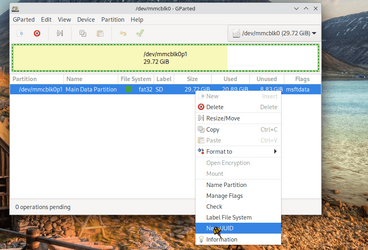
Macrium Free even works cloning a Linux drive. What though you need to do in that case is just run a partition manager e.g Gparted to change the UUID of the partitions (doesn't destroy or change the data) and re-run genfstab to reflect new partition UUID's and reinstall grub so on boot the NEW disk / partition(s) is / are used as boot rather than the old one.

e.g

Screenshot_20231001_221935.png

For Windows if any problem just re-install the bootloader -- bcdboot.exe

not sure why people have problems cloning disks with Macrium Free -- so far no probs whenever I've used it on any sort of system.

Cheers
jimbo
 

My Computer My Computer

At a glance

Windows XP,11 Linux Fedora Rawhide pre-releas...2 X Intel i7
OS
Windows XP,11 Linux Fedora Rawhide pre-release 45
Computer type
PC/Desktop
CPU
2 X Intel i7
Screen Resolution
4KUHD X 2
Maybe in the Netherlands, but here in Florida, USA, I've been using GHOST since 1997, and it's never failed me.
It's not that, as a computer tech, I've not evaluated just about every backup program that's come down the pike since 1997, but I've just never found one that is as simple to use and dependable as GHOST. And it runs 100% separate from the OS (or data disk) being copied.
And even today, you can still download an ISO for a GHOST boot disk, for FREE.
KISS Mates!
TM :cool:
Maybe I can find it searching "Ghost Backup"?
 

My Computers My Computers

  • At a glance

    Windows 1113th Gen Intel(R) Core(TM) i5-1334U 1.30 GHz16GBNVIDIA GeForce MX570A
    OS
    Windows 11
    Computer type
    Laptop
    Manufacturer/Model
    Dell Inspiron 16 - 5640
    CPU
    13th Gen Intel(R) Core(TM) i5-1334U 1.30 GHz
    Memory
    16GB
    Graphics Card(s)
    NVIDIA GeForce MX570A
    Screen Resolution
    1920x1200
    Hard Drives
    M.2 2230 PCIe NVMe Class 35 solidstate
    drive 500 GB M.2, PCLe, NVMe, SSD
  • At a glance

    Windows 11Intel Pentium N50304 GB
    Operating System
    Windows 11
    Computer type
    Laptop
    Manufacturer/Model
    Dell Inspiron 15 3510
    CPU
    Intel Pentium N5030
    Memory
    4 GB
I restored Win 11 many times and Win 10 more than a hundred times with another laptop using Macrium V7 and V8, and I have never ever had an issue. A Google search will show failing rate for any software given the fact that there are more than 1.5 billion Windows users in the world. Human error should be taken into account as well.
 

My Computers My Computers

  • At a glance

    Windows 11 PRO 25H2i7 12700H 4.7 GHz16 GB, DDR5, 4800NVIDIA GeFORCE RTX 3050 Ti 4 GB GDDR6 45W - I...
    OS
    Windows 11 PRO 25H2
    Computer type
    Laptop
    Manufacturer/Model
    Dell XPS 15 9520
    CPU
    i7 12700H 4.7 GHz
    Motherboard
    Dell 0YD3W1
    Memory
    16 GB, DDR5, 4800
    Graphics Card(s)
    NVIDIA GeFORCE RTX 3050 Ti 4 GB GDDR6 45W - INTEL IRIS Xe Graphics
    Sound Card
    Realtek and NVIDIA WDM
    Monitor(s) Displays
    15.6"
    Screen Resolution
    3840X2400 @ 60 Hz ANTIREFLECT 500 nit infinity edge
    Hard Drives
    1 TB M.2 PCle NVMe SSD
    PSU
    Dell
    Case
    Standard case
    Cooling
    Laptop cooling pad
    Keyboard
    Standard
    Mouse
    LOGITECH G304
    Internet Speed
    DOWN 94.75 Mbps up 94.83 Mbps
    Browser
    CHROME
    Antivirus
    MICROSOFT DEFENDER
    Other Info
    Imaging program: Macrium Reflect X Home , and Hasleo Backup Suite
    Google Chrome
    Browser content filter: uBlock Origin and SpywareBlaster
    Heavy programs in use: Photoshop 2025 Beta
  • At a glance

    Windows 11 Home 24H2i7 3630QM @ 2.40 GHz8 GB dual DDR3Intel HD graphics 4000 and ATI AMD Radeon HD ...
    Operating System
    Windows 11 Home 24H2
    Computer type
    Laptop
    Manufacturer/Model
    Samsung series 7 CHRONOS 15" NT770Z5E-S78
    CPU
    i7 3630QM @ 2.40 GHz
    Motherboard
    Samsung NT770Z5E-S78
    Memory
    8 GB dual DDR3
    Graphics card(s)
    Intel HD graphics 4000 and ATI AMD Radeon HD 8800
    Sound Card
    Realtek HD
    Monitor(s) Displays
    Generic PnP monitor
    Screen Resolution
    1920 X 1080 @ 60 Hz
    Hard Drives
    Samsung SSD 860 EVO 500 GB
    PSU
    Samsung
    Case
    standard
    Cooling
    Fans
    Keyboard
    Standard
    Mouse
    Logitech M221
    Internet Speed
    96 down 97 up
    Browser
    Chrome
    Antivirus
    MS Defender
    Other Info
    Imaging program: Macrium Reflect free edition
    Browser content filter: uBlock Origin
A PC failed, wouldn't start. I cloned a similar machine to a brand new fresh SSD...
I always understood that Windows took note of the hardware installed.
At one time I seem to remember, if you replaced too many components in quick succession, Windows would deactivate and you had to ring Microsoft to explain what you were doing to activate it again.

Is this no longer the case?

I would have thought making a clone on a similar PC and installing the disk into another PC, no matter how similar is a recipe for disaster. At best, surely many of the drivers would be incorrect. Or have I totally misunderstood what you posted?
 

My Computer My Computer

At a glance

Windows 11 Pro 25H2 26200.7922Intel Core i9 13900F2 x Kingston Fury 32gb DDR5 5600 BeastGigabyte Eagle (Nvidia) RTX 3060
OS
Windows 11 Pro 25H2 26200.7922
Computer type
PC/Desktop
Manufacturer/Model
Local shop built (KC Computers Ltd)
CPU
Intel Core i9 13900F
Motherboard
Gigabyte Z690 Gaming X (rev. 1.0/1.1) - (BIOS: F32 09 18 2025)
Memory
2 x Kingston Fury 32gb DDR5 5600 Beast
Graphics Card(s)
Gigabyte Eagle (Nvidia) RTX 3060
Sound Card
Chord Async USB 44.1kHz - 384kHz 2Qute DAC
Monitor(s) Displays
Gigabyte AORUS FO32U2 32” OLED Flat Gaming Monitor, 0.03ms, KVM, 250 cd/m2, FreeSync Premium Pro, HDR True Black 400
Screen Resolution
3840 x 2160 (UHD), 240Hz
Hard Drives
1 x KINGSTON NVMe M.2 SSDSKC3000D2048G 2TB
1 x Samsung SSD 870 EVO 250GB
2 x Crucial CT4000MX500SSD1 4TB
2 x Crucial CT2000MX500SSD1 2TB
1 x Crucial CT250MX500SSD1 250.0 GB
PSU
Gigabyte 750w
Case
Fractal Torrent
Cooling
Stock Intel CPU, 2 x Fractal 180mm PWM (front), 3 x Fractal 140mm PWM (bottom)
Keyboard
Logitech MX Mechanical Wireless Illuminated Performance Keyboard
Mouse
Logitech MX Master 3S Wireless Performance Mouse
Internet Speed
900 Mbps/900 Mbps Trooli FTTP
Browser
Firefox
Antivirus
Eset Nod32

Latest Support Threads

Back
Top Bottom