Macrium Reflect Free v8.0.7783
I create new Differential images weekly and, for the first time today I saw that the created Diff image is smaller than the previous Diff image of 1-week ago? I have been using my computer every day and I understood that Differential images always increased in size as time went on due to more changes happening relative to the original 'Full' backup. There have been app updates as well as new user files created.
To be sure it was not a one-off anomaly I created a second Diff image and it was the same? I checked the MR logs in case I had made a mistake but I hadn't. See photo of my image records.
I did not think this was possible since there have been more changes in the 7-day period in-between compared with the Full image.
Has anyone else had this happen? Can anyone explain how this might have happened?
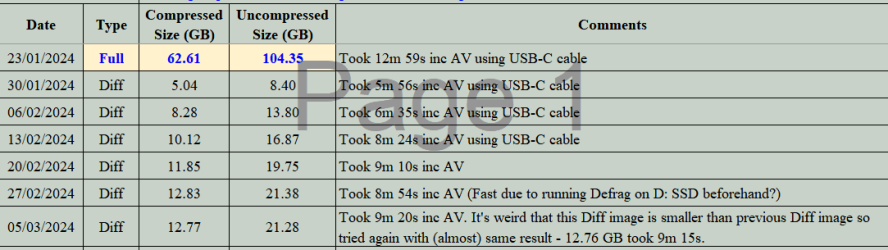
I create new Differential images weekly and, for the first time today I saw that the created Diff image is smaller than the previous Diff image of 1-week ago? I have been using my computer every day and I understood that Differential images always increased in size as time went on due to more changes happening relative to the original 'Full' backup. There have been app updates as well as new user files created.
To be sure it was not a one-off anomaly I created a second Diff image and it was the same? I checked the MR logs in case I had made a mistake but I hadn't. See photo of my image records.
I did not think this was possible since there have been more changes in the 7-day period in-between compared with the Full image.
Has anyone else had this happen? Can anyone explain how this might have happened?
Last edited:
My Computers
-
At a glance
Windows 11 ProAMD Ryzen 9 8945HS32GB DDR5 SO-DIMMIntegrated AMD Radeon 780M (4.00 GHz)- OS
- Windows 11 Pro
- Computer type
- PC/Desktop
- Manufacturer/Model
- GMKtec K11
- CPU
- AMD Ryzen 9 8945HS
- Memory
- 32GB DDR5 SO-DIMM
- Graphics Card(s)
- Integrated AMD Radeon 780M (4.00 GHz)
- Monitor(s) Displays
- Benq 2250HM
- Screen Resolution
- 1920 x 1080
- Hard Drives
- 1 TB PCIe 4.0 NVMe M.2 SSD
- Antivirus
- Bit Defender Total Security
-
At a glance
Windows 11 HomeIntel® Core™ Ultra 7 - 255H processor16 GB LPDDR5 SDRAMIntel Arc 140T onboard graphics- Operating System
- Windows 11 Home
- Computer type
- Laptop
- Manufacturer/Model
- ASUS Zenbook 14 OLED 14" Laptop - UX3405CA-QL192W
- CPU
- Intel® Core™ Ultra 7 - 255H processor
- Memory
- 16 GB LPDDR5 SDRAM
- Graphics card(s)
- Intel Arc 140T onboard graphics
- Screen Resolution
- 1920 x 1200 (16:10 WUXGA resolution) OLED Touchscreen
- Hard Drives
- 1TB SSD
- Antivirus
- Bit Defender Total Security


 but what made me ask the question is that this is the first time this has happened in the 5-years I have been using MR. In the past Diff images have always increased in size.