Solved Macrium Reflect Free - Odd image size?


wiganken

Well-known member
Power User
VIP
Local time
6:32 PM
Posts
1,325
Location
UK
OS
Windows 11 Pro
Macrium Reflect Free v8.0.7783

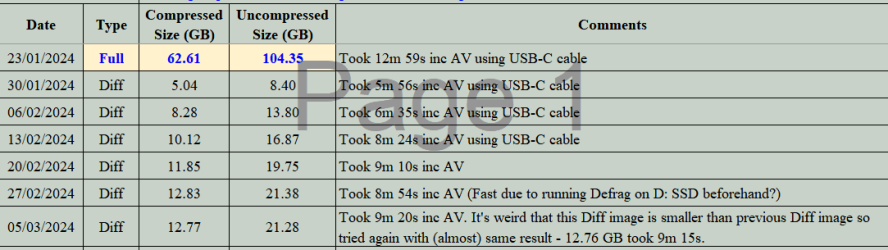
I create new Differential images weekly and, for the first time today I saw that the created Diff image is smaller than the previous Diff image of 1-week ago? I have been using my computer every day and I understood that Differential images always increased in size as time went on due to more changes happening relative to the original 'Full' backup. There have been app updates as well as new user files created.

To be sure it was not a one-off anomaly I created a second Diff image and it was the same? I checked the MR logs in case I had made a mistake but I hadn't. See photo of my image records.
I did not think this was possible since there have been more changes in the 7-day period in-between compared with the Full image.

Has anyone else had this happen? Can anyone explain how this might have happened?
Smaller Diff image.png
 
Last edited:

My Computers My Computers

  • At a glance

    Windows 11 ProAMD Ryzen 9 8945HS32GB DDR5 SO-DIMMIntegrated AMD Radeon 780M (4.00 GHz)
    OS
    Windows 11 Pro
    Computer type
    PC/Desktop
    Manufacturer/Model
    GMKtec K11
    CPU
    AMD Ryzen 9 8945HS
    Memory
    32GB DDR5 SO-DIMM
    Graphics Card(s)
    Integrated AMD Radeon 780M (4.00 GHz)
    Monitor(s) Displays
    Benq 2250HM
    Screen Resolution
    1920 x 1080
    Hard Drives
    1 TB PCIe 4.0 NVMe M.2 SSD
    Antivirus
    Bit Defender Total Security
  • At a glance

    Windows 11 HomeIntel® Core™ Ultra 7 - 255H processor16 GB LPDDR5 SDRAMIntel Arc 140T onboard graphics
    Operating System
    Windows 11 Home
    Computer type
    Laptop
    Manufacturer/Model
    ASUS Zenbook 14 OLED 14" Laptop - UX3405CA-QL192W
    CPU
    Intel® Core™ Ultra 7 - 255H processor
    Memory
    16 GB LPDDR5 SDRAM
    Graphics card(s)
    Intel Arc 140T onboard graphics
    Screen Resolution
    1920 x 1200 (16:10 WUXGA resolution) OLED Touchscreen
    Hard Drives
    1TB SSD
    Antivirus
    Bit Defender Total Security
The differential is a reflectiion of data that has changed since the last FULL backup. If you continue to add new data, then each differential will grow in size. However, if you delete data that was present in previous differential backups, there may be less to backup now, thus, a smaller differential.
 

My Computers My Computers

  • At a glance

    Win11 Pro 26H2 (Release Preview)Intel i7-14650HX32 GBNo GPU - Built-in Intel Graphics
    OS
    Win11 Pro 26H2 (Release Preview)
    Computer type
    PC/Desktop
    Manufacturer/Model
    Acemagic Matrix M5
    CPU
    Intel i7-14650HX
    Memory
    32 GB
    Graphics Card(s)
    No GPU - Built-in Intel Graphics
    Sound Card
    Integrated
    Monitor(s) Displays
    Varies as machine will often be moved to locations with different monitors
    Screen Resolution
    Varies
    Hard Drives
    1 x 1TB Gen 4 NVMe SSD
    PSU
    120W Power Brick
    Keyboard
    Corsair K70 Max RGB Magnetic Keyboard
    Mouse
    Logitech MX Master 3
    Internet Speed
    1Gb Up / 1 Gb Down
    Browser
    Edge
    Antivirus
    Windows Defender
  • At a glance

    Win11 Pro 26H2 (Release Preview)Intel i7-1255U16 GBIntel Iris Xe Graphics
    Operating System
    Win11 Pro 26H2 (Release Preview)
    Computer type
    Laptop
    Manufacturer/Model
    Lenovo ThinkBook 13x Gen 2
    CPU
    Intel i7-1255U
    Memory
    16 GB
    Graphics card(s)
    Intel Iris Xe Graphics
    Sound Card
    Realtek® ALC3306-CG codec
    Monitor(s) Displays
    13.3-inch IPS Display
    Screen Resolution
    WQXGA (2560 x 1600)
    Hard Drives
    4 TB 4 x 4 NVMe SSD
    PSU
    USB-C / Thunderbolt 4 Power / Charging Using an Anker 160W Charger
    Keyboard
    Backlit, spill resistant keyboard
    Mouse
    Buttonless Glass Precision Touchpad
    Internet Speed
    1Gb Up / 1Gb Down
    Browser
    Edge
    Antivirus
    Windows Defender
    Other Info
    WiFi 6e / Bluetooth 5.1 / Facial Recognition / Fingerprint Sensor / ToF (Time of Flight) Human Presence Sensor
Also, newer DATA may have been much more compressible.
 

My Computer My Computer

At a glance

Windows 10, Linux MINT (V-guests 7, 11, ZorinOS)Intel Core i7-1070032gB (DDR4)Intel UHD Graphics 630
OS
Windows 10, Linux MINT (V-guests 7, 11, ZorinOS)
Computer type
PC/Desktop
Manufacturer/Model
HP Z2 G5 Workstation
CPU
Intel Core i7-10700
Motherboard
HP Model# 8751
Memory
32gB (DDR4)
Graphics Card(s)
Intel UHD Graphics 630
Sound Card
Realtek basic audio
Monitor(s) Displays
32" (Viewsonic) UHD
Screen Resolution
3840 x 2160
Hard Drives
2-NvME (mainboard), 1-NvME (PCIe), 1-SATA3 SSD
Also, newer DATA may have been much more compressible.
But bear in mind that newer data won't make previous data any more compressible, so it would still be growing in size. The only way a differential would ever shrink in size is if there was actually less data to backup as a result of blocks being removed.
 

My Computers My Computers

  • At a glance

    Win11 Pro 26H2 (Release Preview)Intel i7-14650HX32 GBNo GPU - Built-in Intel Graphics
    OS
    Win11 Pro 26H2 (Release Preview)
    Computer type
    PC/Desktop
    Manufacturer/Model
    Acemagic Matrix M5
    CPU
    Intel i7-14650HX
    Memory
    32 GB
    Graphics Card(s)
    No GPU - Built-in Intel Graphics
    Sound Card
    Integrated
    Monitor(s) Displays
    Varies as machine will often be moved to locations with different monitors
    Screen Resolution
    Varies
    Hard Drives
    1 x 1TB Gen 4 NVMe SSD
    PSU
    120W Power Brick
    Keyboard
    Corsair K70 Max RGB Magnetic Keyboard
    Mouse
    Logitech MX Master 3
    Internet Speed
    1Gb Up / 1 Gb Down
    Browser
    Edge
    Antivirus
    Windows Defender
  • At a glance

    Win11 Pro 26H2 (Release Preview)Intel i7-1255U16 GBIntel Iris Xe Graphics
    Operating System
    Win11 Pro 26H2 (Release Preview)
    Computer type
    Laptop
    Manufacturer/Model
    Lenovo ThinkBook 13x Gen 2
    CPU
    Intel i7-1255U
    Memory
    16 GB
    Graphics card(s)
    Intel Iris Xe Graphics
    Sound Card
    Realtek® ALC3306-CG codec
    Monitor(s) Displays
    13.3-inch IPS Display
    Screen Resolution
    WQXGA (2560 x 1600)
    Hard Drives
    4 TB 4 x 4 NVMe SSD
    PSU
    USB-C / Thunderbolt 4 Power / Charging Using an Anker 160W Charger
    Keyboard
    Backlit, spill resistant keyboard
    Mouse
    Buttonless Glass Precision Touchpad
    Internet Speed
    1Gb Up / 1Gb Down
    Browser
    Edge
    Antivirus
    Windows Defender
    Other Info
    WiFi 6e / Bluetooth 5.1 / Facial Recognition / Fingerprint Sensor / ToF (Time of Flight) Human Presence Sensor
I just created a new Restore Point which made it the 8th one.
In between clicking the create and successful , the two last ones were
deleted. The folder was 17 GB and now it's 12.5 GB. Could this account
for the difference?
 

My Computers My Computers

  • At a glance

    windows 11 22631.5039Core i9 12th gen 12900HK 2.9 MHz (overcloked:...32 Gigs DDR5-4800nVidia RTX 3070 Ti / 8 Gigs DDR6
    OS
    windows 11 22631.5039
    Computer type
    Laptop
    Manufacturer/Model
    MSI Raider GE76
    CPU
    Core i9 12th gen 12900HK 2.9 MHz (overcloked: 3890.48)
    Motherboard
    MSI
    Memory
    32 Gigs DDR5-4800
    Graphics Card(s)
    nVidia RTX 3070 Ti / 8 Gigs DDR6
    Sound Card
    DYNAUDIO - Steelsries Arena 7- Sound Effects by Nahimic 3
    Monitor(s) Displays
    17.3" 1920 x 1080 360 Hz 3 ms, IPS / Connected to MSI 32 inch curved @ 165 Hz
    Screen Resolution
    1920 x 1080 / Both
    Hard Drives
    Samsung 990 Pro 2TB (OS) - Solidigm P41 2TB (Storage)
    PSU
    280 watts
    Case
    MSI GE series
    Cooling
    internal
    Keyboard
    Steelseries
    Mouse
    G903 Lightspeed
    Internet Speed
    1000 Mbps
    Browser
    Firefox / Opera GX- Do not like Edge
    Antivirus
    Malwarebytes'
    Other Info
    just ask.
  • At a glance

    Windows 10 22H2Intel Core i7 7820HK 2.9 Ghz16 Gigs DDR4 2400 MhznVidia 1070 8GB RAM
    Operating System
    Windows 10 22H2
    Computer type
    Laptop
    Manufacturer/Model
    MSI GT73 7RE VR Titan
    CPU
    Intel Core i7 7820HK 2.9 Ghz
    Motherboard
    MSI
    Memory
    16 Gigs DDR4 2400 Mhz
    Graphics card(s)
    nVidia 1070 8GB RAM
    Sound Card
    DYNAUDIO / Nahimic 2
    Monitor(s) Displays
    IPS / 120HZ
    Screen Resolution
    1920x1080P
    Hard Drives
    Samsung NVME EVO 970 1TB / Samsung SSD (SATA) 1TB
    PSU
    240 watts
    Case
    MSI
    Cooling
    Internal
    Keyboard
    Steelseries
    Mouse
    Logitech G903 Lightspeed
    Internet Speed
    1 Gb/s
    Browser
    Firefox / Vivaldi
    Antivirus
    MalwareBytes'
    Other Info
    none.
I just created a new Restore Point which made it the 8th one.
In between clicking the create and successful , the two last ones were
deleted. The folder was 17 GB and now it's 12.5 GB. Could this account
for the difference?
Sure. While you provide no details on what type of backups you have and your retention policies, it is certainly possible.
 

My Computers My Computers

  • At a glance

    Win11 Pro 26H2 (Release Preview)Intel i7-14650HX32 GBNo GPU - Built-in Intel Graphics
    OS
    Win11 Pro 26H2 (Release Preview)
    Computer type
    PC/Desktop
    Manufacturer/Model
    Acemagic Matrix M5
    CPU
    Intel i7-14650HX
    Memory
    32 GB
    Graphics Card(s)
    No GPU - Built-in Intel Graphics
    Sound Card
    Integrated
    Monitor(s) Displays
    Varies as machine will often be moved to locations with different monitors
    Screen Resolution
    Varies
    Hard Drives
    1 x 1TB Gen 4 NVMe SSD
    PSU
    120W Power Brick
    Keyboard
    Corsair K70 Max RGB Magnetic Keyboard
    Mouse
    Logitech MX Master 3
    Internet Speed
    1Gb Up / 1 Gb Down
    Browser
    Edge
    Antivirus
    Windows Defender
  • At a glance

    Win11 Pro 26H2 (Release Preview)Intel i7-1255U16 GBIntel Iris Xe Graphics
    Operating System
    Win11 Pro 26H2 (Release Preview)
    Computer type
    Laptop
    Manufacturer/Model
    Lenovo ThinkBook 13x Gen 2
    CPU
    Intel i7-1255U
    Memory
    16 GB
    Graphics card(s)
    Intel Iris Xe Graphics
    Sound Card
    Realtek® ALC3306-CG codec
    Monitor(s) Displays
    13.3-inch IPS Display
    Screen Resolution
    WQXGA (2560 x 1600)
    Hard Drives
    4 TB 4 x 4 NVMe SSD
    PSU
    USB-C / Thunderbolt 4 Power / Charging Using an Anker 160W Charger
    Keyboard
    Backlit, spill resistant keyboard
    Mouse
    Buttonless Glass Precision Touchpad
    Internet Speed
    1Gb Up / 1Gb Down
    Browser
    Edge
    Antivirus
    Windows Defender
    Other Info
    WiFi 6e / Bluetooth 5.1 / Facial Recognition / Fingerprint Sensor / ToF (Time of Flight) Human Presence Sensor
Sure. While you provide no details on what type of backups you have and your retention policies, it is certainly possible.
Not for me but for @wiganken . Could this account for his discrepancies?
 

My Computers My Computers

  • At a glance

    windows 11 22631.5039Core i9 12th gen 12900HK 2.9 MHz (overcloked:...32 Gigs DDR5-4800nVidia RTX 3070 Ti / 8 Gigs DDR6
    OS
    windows 11 22631.5039
    Computer type
    Laptop
    Manufacturer/Model
    MSI Raider GE76
    CPU
    Core i9 12th gen 12900HK 2.9 MHz (overcloked: 3890.48)
    Motherboard
    MSI
    Memory
    32 Gigs DDR5-4800
    Graphics Card(s)
    nVidia RTX 3070 Ti / 8 Gigs DDR6
    Sound Card
    DYNAUDIO - Steelsries Arena 7- Sound Effects by Nahimic 3
    Monitor(s) Displays
    17.3" 1920 x 1080 360 Hz 3 ms, IPS / Connected to MSI 32 inch curved @ 165 Hz
    Screen Resolution
    1920 x 1080 / Both
    Hard Drives
    Samsung 990 Pro 2TB (OS) - Solidigm P41 2TB (Storage)
    PSU
    280 watts
    Case
    MSI GE series
    Cooling
    internal
    Keyboard
    Steelseries
    Mouse
    G903 Lightspeed
    Internet Speed
    1000 Mbps
    Browser
    Firefox / Opera GX- Do not like Edge
    Antivirus
    Malwarebytes'
    Other Info
    just ask.
  • At a glance

    Windows 10 22H2Intel Core i7 7820HK 2.9 Ghz16 Gigs DDR4 2400 MhznVidia 1070 8GB RAM
    Operating System
    Windows 10 22H2
    Computer type
    Laptop
    Manufacturer/Model
    MSI GT73 7RE VR Titan
    CPU
    Intel Core i7 7820HK 2.9 Ghz
    Motherboard
    MSI
    Memory
    16 Gigs DDR4 2400 Mhz
    Graphics card(s)
    nVidia 1070 8GB RAM
    Sound Card
    DYNAUDIO / Nahimic 2
    Monitor(s) Displays
    IPS / 120HZ
    Screen Resolution
    1920x1080P
    Hard Drives
    Samsung NVME EVO 970 1TB / Samsung SSD (SATA) 1TB
    PSU
    240 watts
    Case
    MSI
    Cooling
    Internal
    Keyboard
    Steelseries
    Mouse
    Logitech G903 Lightspeed
    Internet Speed
    1 Gb/s
    Browser
    Firefox / Vivaldi
    Antivirus
    MalwareBytes'
    Other Info
    none.
Not for me but for @wiganken . Could this account for his discrepancies?
Once again, the only way a newer differential will be smaller is if blocks that were previously occupied have been deleted. Let's use an example to make this clear...

You create a full image backup of your drive.

You now add a bunch of files to the drive totaling 20 GB. If you now take a differential backup, you would be backing up 20GB of data. The actual backup may be smaller due to compression.

Now you delete 10GB of that 20GB of data that you added previously. You take a differential backup. SINCE THE FULL BACKUP you now only have 10GB of changed data (the 20GB you added minus the 10GB you deleted). This means that the differential backup only needs to backup 10GB of data rather than the 20GB it had to backup the last time.

Note that this is true only of data added to the drive AFTER the full backup was taken because the differential is only concerned with changes made AFTER that full backup was created.

Does this help?
 

My Computers My Computers

  • At a glance

    Win11 Pro 26H2 (Release Preview)Intel i7-14650HX32 GBNo GPU - Built-in Intel Graphics
    OS
    Win11 Pro 26H2 (Release Preview)
    Computer type
    PC/Desktop
    Manufacturer/Model
    Acemagic Matrix M5
    CPU
    Intel i7-14650HX
    Memory
    32 GB
    Graphics Card(s)
    No GPU - Built-in Intel Graphics
    Sound Card
    Integrated
    Monitor(s) Displays
    Varies as machine will often be moved to locations with different monitors
    Screen Resolution
    Varies
    Hard Drives
    1 x 1TB Gen 4 NVMe SSD
    PSU
    120W Power Brick
    Keyboard
    Corsair K70 Max RGB Magnetic Keyboard
    Mouse
    Logitech MX Master 3
    Internet Speed
    1Gb Up / 1 Gb Down
    Browser
    Edge
    Antivirus
    Windows Defender
  • At a glance

    Win11 Pro 26H2 (Release Preview)Intel i7-1255U16 GBIntel Iris Xe Graphics
    Operating System
    Win11 Pro 26H2 (Release Preview)
    Computer type
    Laptop
    Manufacturer/Model
    Lenovo ThinkBook 13x Gen 2
    CPU
    Intel i7-1255U
    Memory
    16 GB
    Graphics card(s)
    Intel Iris Xe Graphics
    Sound Card
    Realtek® ALC3306-CG codec
    Monitor(s) Displays
    13.3-inch IPS Display
    Screen Resolution
    WQXGA (2560 x 1600)
    Hard Drives
    4 TB 4 x 4 NVMe SSD
    PSU
    USB-C / Thunderbolt 4 Power / Charging Using an Anker 160W Charger
    Keyboard
    Backlit, spill resistant keyboard
    Mouse
    Buttonless Glass Precision Touchpad
    Internet Speed
    1Gb Up / 1Gb Down
    Browser
    Edge
    Antivirus
    Windows Defender
    Other Info
    WiFi 6e / Bluetooth 5.1 / Facial Recognition / Fingerprint Sensor / ToF (Time of Flight) Human Presence Sensor
@hsehestedt - Yes that helps me to understand how it may have happened. The only thing is that I can't remember deleting anything in the last 7-days (since previous image) to explain it. What is even more odd is that the amount of data I would have had to delete to offset the 'usual' increase would have to be around 2 to 3 GB and I certainly can't remember deleting that amount of data. I thought I would remember deleting that large an amount. I may have defragmented the SSD but I don't see that as accounting for 2 to 3GB of data.

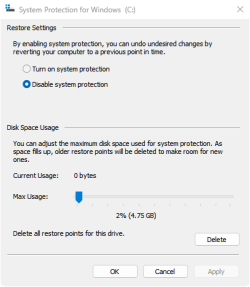
@Flashorn - I have system restore disabled (since I use Macrium Reflect) and have no Restore Points. See photo.

I'll just have to accept that I must have deleted a block of data that was present in previous image but can't remember doing so. I'm getting old :-) but what made me ask the question is that this is the first time this has happened in the 5-years I have been using MR. In the past Diff images have always increased in size.
No RPs.png
 
Last edited:

My Computers My Computers

  • At a glance

    Windows 11 ProAMD Ryzen 9 8945HS32GB DDR5 SO-DIMMIntegrated AMD Radeon 780M (4.00 GHz)
    OS
    Windows 11 Pro
    Computer type
    PC/Desktop
    Manufacturer/Model
    GMKtec K11
    CPU
    AMD Ryzen 9 8945HS
    Memory
    32GB DDR5 SO-DIMM
    Graphics Card(s)
    Integrated AMD Radeon 780M (4.00 GHz)
    Monitor(s) Displays
    Benq 2250HM
    Screen Resolution
    1920 x 1080
    Hard Drives
    1 TB PCIe 4.0 NVMe M.2 SSD
    Antivirus
    Bit Defender Total Security
  • At a glance

    Windows 11 HomeIntel® Core™ Ultra 7 - 255H processor16 GB LPDDR5 SDRAMIntel Arc 140T onboard graphics
    Operating System
    Windows 11 Home
    Computer type
    Laptop
    Manufacturer/Model
    ASUS Zenbook 14 OLED 14" Laptop - UX3405CA-QL192W
    CPU
    Intel® Core™ Ultra 7 - 255H processor
    Memory
    16 GB LPDDR5 SDRAM
    Graphics card(s)
    Intel Arc 140T onboard graphics
    Screen Resolution
    1920 x 1200 (16:10 WUXGA resolution) OLED Touchscreen
    Hard Drives
    1TB SSD
    Antivirus
    Bit Defender Total Security
I have looked into this some more and it seems that differential images should always be larger than the previous image so it seems like a glitch to me. I hope the next differential image is larger or else I will be wondering if MR has become unreliable.
In fact, I think I will start again with a new 'Full' image since I am not sure I can trust this last 'Diff' image.
See @Bree post: -
 
Last edited:

My Computers My Computers

  • At a glance

    Windows 11 ProAMD Ryzen 9 8945HS32GB DDR5 SO-DIMMIntegrated AMD Radeon 780M (4.00 GHz)
    OS
    Windows 11 Pro
    Computer type
    PC/Desktop
    Manufacturer/Model
    GMKtec K11
    CPU
    AMD Ryzen 9 8945HS
    Memory
    32GB DDR5 SO-DIMM
    Graphics Card(s)
    Integrated AMD Radeon 780M (4.00 GHz)
    Monitor(s) Displays
    Benq 2250HM
    Screen Resolution
    1920 x 1080
    Hard Drives
    1 TB PCIe 4.0 NVMe M.2 SSD
    Antivirus
    Bit Defender Total Security
  • At a glance

    Windows 11 HomeIntel® Core™ Ultra 7 - 255H processor16 GB LPDDR5 SDRAMIntel Arc 140T onboard graphics
    Operating System
    Windows 11 Home
    Computer type
    Laptop
    Manufacturer/Model
    ASUS Zenbook 14 OLED 14" Laptop - UX3405CA-QL192W
    CPU
    Intel® Core™ Ultra 7 - 255H processor
    Memory
    16 GB LPDDR5 SDRAM
    Graphics card(s)
    Intel Arc 140T onboard graphics
    Screen Resolution
    1920 x 1200 (16:10 WUXGA resolution) OLED Touchscreen
    Hard Drives
    1TB SSD
    Antivirus
    Bit Defender Total Security
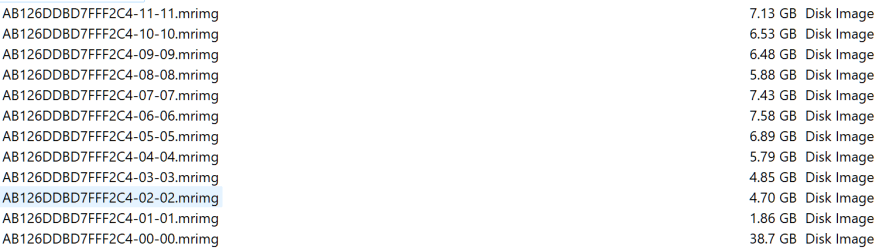
See my differential backups below, mine aren't always bigger....


1709832204336.png
 

My Computer My Computer

At a glance

Win 11 ProAMD Ryzen 7 9700XG.Skill Trident Z5 Neo RGB 64GB Kit (2x32GB) ...PowerColor Radeon RX 9060 XT Reaper GDDR6 16GB
OS
Win 11 Pro
Computer type
PC/Desktop
Manufacturer/Model
N/A
CPU
AMD Ryzen 7 9700X
Motherboard
Asrock 870E Nova WiFi
Memory
G.Skill Trident Z5 Neo RGB 64GB Kit (2x32GB) DDR5-6000 C30
Graphics Card(s)
PowerColor Radeon RX 9060 XT Reaper GDDR6 16GB
Sound Card
USB Out NAD M51 DAC with Adams A8 powered speakers
Monitor(s) Displays
Dell 3219Q
Screen Resolution
3840 x 2160
Hard Drives
5 x WD_BLACK SN850x PCIe Gen4 NVMe M.2 SSD - 4TB
PSU
be quiet! DARK POWER 13 1000W Titanium PCIe 5.0 ATX Modular PSU
Case
Fractal Design Define 7 Full Tower Case (Black)
Cooling
Noctua NH-D15 G2 LBC - High Performance Multi-Socket PWM CPU Cooler
Keyboard
Razer Huntsman V2
Mouse
Razer Viper Ultimate
Internet Speed
Starlink 94Mbps down 20Mbps up
Browser
Brave
Antivirus
ESET
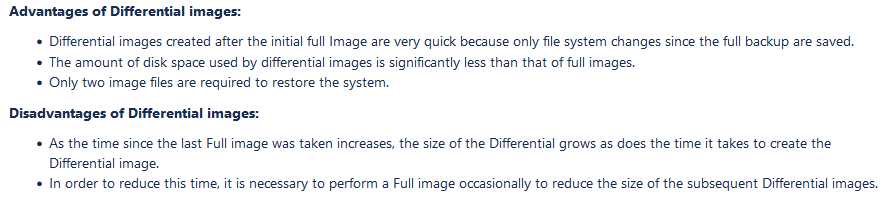
@OldNavy - It's interesting to see someone else has the same issue but even Macrium Knowledgebase states that Differential image sizes should always grow in size. I have started again with a new 'Full' image: -


Diff Image disadvantages.png
 

My Computers My Computers

  • At a glance

    Windows 11 ProAMD Ryzen 9 8945HS32GB DDR5 SO-DIMMIntegrated AMD Radeon 780M (4.00 GHz)
    OS
    Windows 11 Pro
    Computer type
    PC/Desktop
    Manufacturer/Model
    GMKtec K11
    CPU
    AMD Ryzen 9 8945HS
    Memory
    32GB DDR5 SO-DIMM
    Graphics Card(s)
    Integrated AMD Radeon 780M (4.00 GHz)
    Monitor(s) Displays
    Benq 2250HM
    Screen Resolution
    1920 x 1080
    Hard Drives
    1 TB PCIe 4.0 NVMe M.2 SSD
    Antivirus
    Bit Defender Total Security
  • At a glance

    Windows 11 HomeIntel® Core™ Ultra 7 - 255H processor16 GB LPDDR5 SDRAMIntel Arc 140T onboard graphics
    Operating System
    Windows 11 Home
    Computer type
    Laptop
    Manufacturer/Model
    ASUS Zenbook 14 OLED 14" Laptop - UX3405CA-QL192W
    CPU
    Intel® Core™ Ultra 7 - 255H processor
    Memory
    16 GB LPDDR5 SDRAM
    Graphics card(s)
    Intel Arc 140T onboard graphics
    Screen Resolution
    1920 x 1200 (16:10 WUXGA resolution) OLED Touchscreen
    Hard Drives
    1TB SSD
    Antivirus
    Bit Defender Total Security
@OldNavy - Regarding your photo showing image list: - Is that from your MR log file or are you actually storing that many 'Diff' images? If you are storing them I suggest you create a new 'Full' image and delete all previous images. You will regain 65 GB of disk space.

To keep things simple I set retention rules to store 1-'Full' image and only 2-'Diff' images
 
Last edited:

My Computers My Computers

  • At a glance

    Windows 11 ProAMD Ryzen 9 8945HS32GB DDR5 SO-DIMMIntegrated AMD Radeon 780M (4.00 GHz)
    OS
    Windows 11 Pro
    Computer type
    PC/Desktop
    Manufacturer/Model
    GMKtec K11
    CPU
    AMD Ryzen 9 8945HS
    Memory
    32GB DDR5 SO-DIMM
    Graphics Card(s)
    Integrated AMD Radeon 780M (4.00 GHz)
    Monitor(s) Displays
    Benq 2250HM
    Screen Resolution
    1920 x 1080
    Hard Drives
    1 TB PCIe 4.0 NVMe M.2 SSD
    Antivirus
    Bit Defender Total Security
  • At a glance

    Windows 11 HomeIntel® Core™ Ultra 7 - 255H processor16 GB LPDDR5 SDRAMIntel Arc 140T onboard graphics
    Operating System
    Windows 11 Home
    Computer type
    Laptop
    Manufacturer/Model
    ASUS Zenbook 14 OLED 14" Laptop - UX3405CA-QL192W
    CPU
    Intel® Core™ Ultra 7 - 255H processor
    Memory
    16 GB LPDDR5 SDRAM
    Graphics card(s)
    Intel Arc 140T onboard graphics
    Screen Resolution
    1920 x 1200 (16:10 WUXGA resolution) OLED Touchscreen
    Hard Drives
    1TB SSD
    Antivirus
    Bit Defender Total Security
wiganken,
I'm not sure it is an issue. It could be something as simple as clearing my browser cache which could be 1 or 2 GB's.
My backup regime is to make a full image every second Sunday and differentials in between. I keep 3 sets as an archive as disk space is not a problem.
I've never had a restore failure.
 

My Computer My Computer

At a glance

Win 11 ProAMD Ryzen 7 9700XG.Skill Trident Z5 Neo RGB 64GB Kit (2x32GB) ...PowerColor Radeon RX 9060 XT Reaper GDDR6 16GB
OS
Win 11 Pro
Computer type
PC/Desktop
Manufacturer/Model
N/A
CPU
AMD Ryzen 7 9700X
Motherboard
Asrock 870E Nova WiFi
Memory
G.Skill Trident Z5 Neo RGB 64GB Kit (2x32GB) DDR5-6000 C30
Graphics Card(s)
PowerColor Radeon RX 9060 XT Reaper GDDR6 16GB
Sound Card
USB Out NAD M51 DAC with Adams A8 powered speakers
Monitor(s) Displays
Dell 3219Q
Screen Resolution
3840 x 2160
Hard Drives
5 x WD_BLACK SN850x PCIe Gen4 NVMe M.2 SSD - 4TB
PSU
be quiet! DARK POWER 13 1000W Titanium PCIe 5.0 ATX Modular PSU
Case
Fractal Design Define 7 Full Tower Case (Black)
Cooling
Noctua NH-D15 G2 LBC - High Performance Multi-Socket PWM CPU Cooler
Keyboard
Razer Huntsman V2
Mouse
Razer Viper Ultimate
Internet Speed
Starlink 94Mbps down 20Mbps up
Browser
Brave
Antivirus
ESET
Back
Top Bottom