LuchaEnErrrores
New member
- Local time
- 2:14 PM
- Posts
- 6
- OS
- Windows 10/Windows 11
Hello.
I'm trying to install Windows 11 on an unsupported computer without formatting the system. In the past, I was able to perform this procedure several times using known methods to bypass the hardware requirements, but recently I'm encountering problems I didn't have before.
I tried installing Windows 11 in Spanish (Mexico), and after the installation process finished and I restarted the computer, I received a message similar to: "Windows Server installation failed."
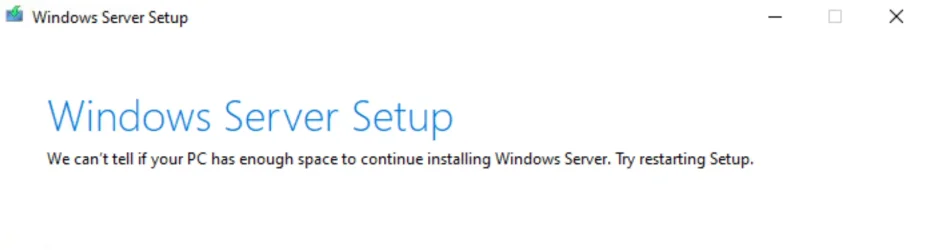
I also tried using a Windows 11 ISO in Spanish (Spain). In this case, when I selected the options "Keep files, settings, and apps" or "Keep only personal files," the installer displayed the message: "Cannot determine if your computer has enough space to continue installing Windows Server. Try restarting your setup."
I've used methods like AllowUpgradesWithUnsupportedTPMOrCPU and the setup.exe or setupprep.exe /product server parameter, which previously worked on other computers, but in this case, they haven't worked.
Does anyone know if there have been any recent changes to the Windows 11 installer or if there's an alternative method for upgrading on unsupported computers? I know this type of installation isn't officially supported and may involve risks or limitations, but I promised the person I'd do everything I could to try and install Windows 11, and I'd like to exhaust all available options before giving up.
I'm trying to install Windows 11 on an unsupported computer without formatting the system. In the past, I was able to perform this procedure several times using known methods to bypass the hardware requirements, but recently I'm encountering problems I didn't have before.
I tried installing Windows 11 in Spanish (Mexico), and after the installation process finished and I restarted the computer, I received a message similar to: "Windows Server installation failed."
I also tried using a Windows 11 ISO in Spanish (Spain). In this case, when I selected the options "Keep files, settings, and apps" or "Keep only personal files," the installer displayed the message: "Cannot determine if your computer has enough space to continue installing Windows Server. Try restarting your setup."
I've used methods like AllowUpgradesWithUnsupportedTPMOrCPU and the setup.exe or setupprep.exe /product server parameter, which previously worked on other computers, but in this case, they haven't worked.
Does anyone know if there have been any recent changes to the Windows 11 installer or if there's an alternative method for upgrading on unsupported computers? I know this type of installation isn't officially supported and may involve risks or limitations, but I promised the person I'd do everything I could to try and install Windows 11, and I'd like to exhaust all available options before giving up.
My Computer
System One
-
- OS
- Windows 10/Windows 11
- Computer type
- PC/Desktop