Install Windows 11 on an unsupported computer


LuchaEnErrrores

New member
Local time
3:06 PM
Posts
8
OS
Windows 10/Windows 11
Hello.

I'm trying to install Windows 11 on an unsupported computer without formatting the system. In the past, I was able to perform this procedure several times using known methods to bypass the hardware requirements, but recently I'm encountering problems I didn't have before.

I tried installing Windows 11 in Spanish (Mexico), and after the installation process finished and I restarted the computer, I received a message similar to: "Windows Server installation failed."

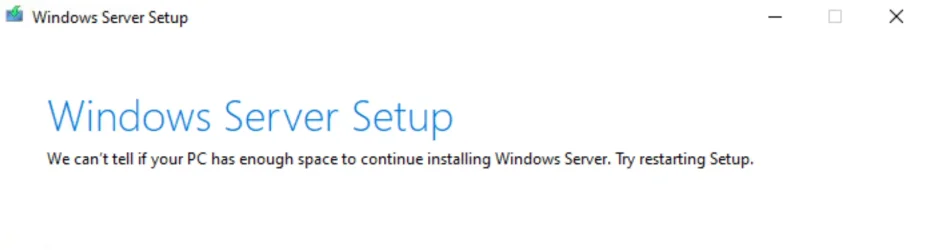
I also tried using a Windows 11 ISO in Spanish (Spain). In this case, when I selected the options "Keep files, settings, and apps" or "Keep only personal files," the installer displayed the message: "Cannot determine if your computer has enough space to continue installing Windows Server. Try restarting your setup."

I've used methods like AllowUpgradesWithUnsupportedTPMOrCPU and the setup.exe or setupprep.exe /product server parameter, which previously worked on other computers, but in this case, they haven't worked.

Does anyone know if there have been any recent changes to the Windows 11 installer or if there's an alternative method for upgrading on unsupported computers? I know this type of installation isn't officially supported and may involve risks or limitations, but I promised the person I'd do everything I could to try and install Windows 11, and I'd like to exhaust all available options before giving up.
 

My Computer

System One

  • OS
    Windows 10/Windows 11
    Computer type
    PC/Desktop
Hello,
Welcome to the forum.
It would be very helpful for potential helpers that you provide:

-Information about the target system, Motherboard, CPU , RAM etc.
-The version and build of the Windows installation.
-The method of installation ISO,USB etc.

Thanks.
 

My Computers

System One System Two

  • OS
    All Branches but Release
    Computer type
    Laptop
    Manufacturer/Model
    Acer Nitro ANV15-51
    CPU
    AMD Ryzen 7 7735HS 3200-4500 Mhz 8 cores x 2
    Motherboard
    Sportage_RBH
    Memory
    32 GB DDR5
    Graphics Card(s)
    Radeon Graphic / NVIDIA GeForce RTX 4060 8 GB GDDR6
    Sound Card
    AMD/Realtek(R) Audio
    Monitor(s) Displays
    Integrated Monitor (15.3"vis)
    Screen Resolution
    FHD 1920X1080 16:9 144Hz
    Hard Drives
    KINGSTON OM8SEP4512Q-AA 1TB
    Western Digital 256GB
    PSU
    19V DC 6.32 A 120 W
    Cooling
    Dual Fans
    Mouse
    MS Bluetooth
    Internet Speed
    Fiber 1GB Cox -us & 1GB Orange-fr
    Browser
    Edge Canary- Firefox Nightly-Chrome Dev-Chrome Dev
    Antivirus
    Windows Defender
  • Operating System
    Windows 11 Beta
    Computer type
    Laptop
    Manufacturer/Model
    Asus X751BP
    CPU
    AMD A9-9420
    Memory
    8 GB of DDR4
    Graphics card(s)
    AMD Radeon R5
    Screen Resolution
    1600x900
    Hard Drives
    Seagate 1 TB
"We can't tell if your PC has enough space to continue installing Windows 11. Try restarting Setup."

"We can't tell if your PC has enough space to continue installing Windows Server. Try restarting Setup."

We can't tell if your PC has enough space to continue installing Windows Server.webp
 

My Computers

System One System Two

  • OS
    Windows 11 Pro
    Computer type
    PC/Desktop
    CPU
    AMD Ryzen 9 9950X3D
    Motherboard
    ASRock B650E Taichi Lite
    Memory
    Kingston FURY Beast 64GB (2x32GB) DDR5 6000MT/s
    Graphics Card(s)
    ASUS TUF Gaming Radeon RX 9070 OC Edition 16GB GDDR6
    Hard Drives
    Solidigm P44 Pro 2TB M.2 NVMe SSD
  • Operating System
    Windows 11 Home
    Computer type
    Laptop
    Manufacturer/Model
    Lenovo Legion Pro 7i Gen 10 16"
    CPU
    Intel Core Ultra 9 275HX
    Memory
    64GB (2x 32GB) DDR5-6400
    Graphics card(s)
    NVIDIA GeForce RTX 5080 16GB GDDR7 Laptop GPU
    Hard Drives
    2x 1TB M.2 NVMe SSD (SK Hynix)
Does anyone know if there have been any recent changes to the Windows 11 installer or if there's an alternative method for upgrading on unsupported computers?
Welcome to Eleven Forum.

A couple of days ago I tested a clean install of 25H2 on an unsupported device. It worked, after a bit of fiddling....

My first attempt failed with "Installation failed" after the install and all the reboots. But it's not what you think, it's not rejecting the MBR disk as unsuitable.

With 24H2 MS reworked Setup.exe to give it a new modern look. This introduced an obscure bug which made the install fail if the target drive was a native boot .vhdx. Well, you can now add MBR disks to that list. ... My second attempt succeeded, simply by switching to the previous version of Setup, a fix I had already discovered for a .vhdx install.
1780452678699-webp.173269


An in-place upgrade should work with the steps in Option Three here:
 

My Computers

System One System Two

  • OS
    Windows 11 Home
    Computer type
    Laptop
    Manufacturer/Model
    Acer Aspire 3 A315-23-R9VY
    CPU
    AMD Athlon Silver 3050U
    Memory
    8GB
    Graphics Card(s)
    Radeon Graphics
    Monitor(s) Displays
    laptop screen
    Screen Resolution
    1366x768 native resolution, up to 2560x1440 with Radeon Virtual Super Resolution
    Hard Drives
    1TB Samsung EVO 870 SSD (from April 2026: 250GB EVO 850)
    Internet Speed
    150 Mbps
    Browser
    Edge, Firefox
    Antivirus
    Defender
    Other Info
    fully 'Windows 11 ready' laptop. Windows 10 C: partition migrated from my old unsupported 'main machine' then upgraded to 11. A test migration ran Insider builds for 2 months. When 11 was released on 5th October 2021 it was re-imaged back to 10 and was offered the upgrade in Windows Update on 20th October. Windows Update offered the 22H2 Feature Update on 20th September 2022. It got the 23H2 Feature Update on 4th November 2023 through Windows Update, 24H2 on 3rd October 2024 through Windows Update by setting the Target Release Version for 24H2, and 25H2 on 30th September 2025 through Windows Update by setting the Target Release Version for 25H2.

    UPDATE - 11 April 2026: due to mechanical deterioration this PC has been retired from active duty. The OS with all software and files has been migrated to my System Seven below to carry on as my general purpose 'main machine'.

    My SYSTEM THREE is a Dell Latitude 5410, i7-10610U, 32GB RAM, 512GB NVMe ssd, supported device running Windows 11 Pro.

    My SYSTEM FOUR is a 2-in-1 convertible Lenovo Yoga 11e 20DA, Celeron N2930, 8GB RAM, 256GB ssd. Unsupported device: currently running Win10 Pro, plus Win11 Pro RTM and Insider Dev, Beta, and RP 24H2 as native boot vhdx.

    My SYSTEM FIVE is a Dell Latitude 3190 2-in-1, Pentium Silver N5030, 8GB RAM, 1TB NVMe ssd, supported device running Windows 11 Pro, plus Insider Beta, Dev, and Canary builds (and a few others) as a native boot .vhdx.

    My SYSTEM SIX is a Dell Latitude 5550, Core Ultra 7 165H, 64GB RAM, 1TB NVMe SSD, supported device, Windows 11 Pro 24H2, Hyper-V host machine. Updated to 25H2 on 30th September 2025.

    My SYSTEM SEVEN is a Lenovo Thinkpad T580, Intel Core i7-8650U, 16GB RAM, 512GB NVMe SSD + 2nd 512GB NVMe SSD, a supported device for Windows 11. This is my current general purpose 'main machine'. The installed Windows 11 Home from my System One has been migrated to this machine.
  • Operating System
    Windows 11 Pro
    Computer type
    Laptop
    Manufacturer/Model
    Dell Latitude E4310
    CPU
    Intel® Core™ i5-520M
    Motherboard
    0T6M8G
    Memory
    8GB
    Graphics card(s)
    (integrated graphics) Intel HD Graphics
    Screen Resolution
    1366x768
    Hard Drives
    500GB Crucial MX500 SSD
    Browser
    Firefox, Edge
    Antivirus
    Defender
    Other Info
    unsupported machine: Legacy bios, MBR, TPM 1.2, upgraded from W10 to W11 using W10/W11 hybrid install media workaround. In-place upgrade to 22H2 using ISO and a workaround. Feature Update to 23H2 by manually installing the Enablement Package. In-place upgrade to 24H2 using hybrid 23H2/24H2 install media. Upgraded to 25H2 by Enablement Package. Also running Insider Dev, and Canary builds and Windows 10 as native boot .vhdx.

    My SYSTEM THREE is a Dell Latitude 5410, i7-10610U, 32GB RAM, 512GB NVMe ssd, supported device running Windows 11 Pro.

    My SYSTEM FOUR is a 2-in-1 convertible Lenovo Yoga 11e 20DA, Celeron N2930, 8GB RAM, 256GB ssd. Unsupported device: currently running Win10 Pro, plus Win11 Pro RTM and Insider Dev, Beta, and RP 24H2 as native boot vhdx.

    My SYSTEM FIVE is a Dell Latitude 3190 2-in-1, Pentium Silver N5030, 8GB RAM, 1TB NVMe ssd, supported device running Windows 11 Pro, plus Insider Beta, Dev, and Canary builds (and a few others) as a native boot .vhdx.

    My SYSTEM SIX is a Dell Latitude 5550, Core Ultra 7 165H, 64GB RAM, 1TB NVMe SSD, supported device, Windows 11 Pro 24H2, Hyper-V host machine. Updated to 25H2 on 30th September 2025.

    My SYSTEM SEVEN is a Lenovo Thinkpad T580, Intel Core i7-8650U, 16GB RAM, 512GB NVMe SSD + 2nd 512GB NVMe SSD, a supported device for Windows 11. This is my current general purpose 'main machine'. The installed Windows 11 Home from my System One has been migrated to this machine.
Welcome to Eleven Forum.

A couple of days ago I tested a clean install of 25H2 on an unsupported device. It worked, after a bit of fiddling....


1780452678699-webp.173269


An in-place upgrade should work with the steps in Option Three here:
not working
 

My Computer

System One

  • OS
    Windows 10/Windows 11
    Computer type
    PC/Desktop
Please edit your profile with ALL your hardware specs. It will help us to help you

Is your system a Legacy - MBR or UEFI-GPT?
Please download and run whynotwin11
Post the results here as an attachment
 

My Computers

System One System Two

  • OS
    Windows 11 Pro - Windows 7 HP 64 - Lubuntu
    Computer type
    PC/Desktop
    Manufacturer/Model
    custom build
    CPU
    i5 6600K - 800MHz to 4400MHz
    Motherboard
    GA-Z170-HD3P
    Memory
    4+4G GSkill DDR4 3000
    Graphics Card(s)
    IG - Intel 530
    Monitor(s) Displays
    Samsung 226BW
    Screen Resolution
    1680x1050
    Hard Drives
    (1) -1 SM951 – 128GB M.2 AHCI PCIe SSD drive for Win 11
    (2) -1 WD SATA 3 - 1T for Data
    (3) -1 WD SATA 3 - 1T for backup
    (4) -1 BX500 SSD - 256G for Windows 7 and Lubuntu
    PSU
    Thermaltake 450W TR2 gold
    Keyboard
    Old and good Chicony mechanical keyboard
    Mouse
    Logitech mX performance - 9 buttons (had to disable some)
    Internet Speed
    500 Mb/s
    Browser
    Firefox 64
  • Operating System
    Windows 11 Pro
    Computer type
    Laptop
    Manufacturer/Model
    Asus Q550LF
    CPU
    i7-4500U 800- 3000MHz
    Motherboard
    Asus Q550LF
    Memory
    (4+4)G DDR3 1600
    Graphics card(s)
    IG intel 4400 + NVIDIA GeForce GT 745M
    Sound Card
    Realtek
    Monitor(s) Displays
    LG Display LP156WF4-SPH1
    Screen Resolution
    1920 x 1080
    Hard Drives
    BX500 120G SSD for Windows and programs
    & 1T HDD for data
    Internet Speed
    500 Mb/s
    Browser
    Firefox 64
Hello,
Welcome to the forum.
It would be very helpful for potential helpers that you provide:

-Information about the target system, Motherboard, CPU , RAM etc.
-The version and build of the Windows installation.
-The method of installation ISO,USB etc.

Thanks.
"We can't tell if your PC has enough space to continue installing Windows 11. Try restarting Setup."

"We can't tell if your PC has enough space to continue installing Windows Server. Try restarting Setup."

View attachment 173465
It's a laptop. It has 4GB of RAM, an Intel(R) Pentium(R) CPU B950 @ 2.10GHz, 2100MHz, and the processor is the same. Motherboard manufacturer: Positivo BGH.
Motherboard model: C500. It runs Windows 10 Home Single Language, version 10.0.19045. It has 123GB of available storage space—too much space—and a 256GB solid-state drive.
 

My Computer

System One

  • OS
    Windows 10/Windows 11
    Computer type
    PC/Desktop
Please edit your profile with ALL your hardware specs. It will help us to help you

Is your system a Legacy - MBR or UEFI-GPT?
Please download and run whynotwin11
Post the results here as an attachment
Friend, if this isn't related to the problem of not being able to install Windows 11 on an incompatible computer, delete your post and create your own post with your title instead of posting here. Posting here is pointless and makes no sense.
 

My Computer

System One

  • OS
    Windows 10/Windows 11
    Computer type
    PC/Desktop
Friend, if this isn't related to the problem of not being able to install Windows 11 on an incompatible computer, delete your post and create your own post with your title instead of posting here. Posting here is pointless and makes no sense.
Of course it is related
Your computer isn't on the Microsoft list so it's not supported.
Normal installation requires UEFI - GPT
And answers like "not working" doesn't help much. You're the one in front of your computer so explain in details what you're seeing.

I have Win 11 on my unsupported computers. You're the one that can't install.
 

My Computers

System One System Two

  • OS
    Windows 11 Pro - Windows 7 HP 64 - Lubuntu
    Computer type
    PC/Desktop
    Manufacturer/Model
    custom build
    CPU
    i5 6600K - 800MHz to 4400MHz
    Motherboard
    GA-Z170-HD3P
    Memory
    4+4G GSkill DDR4 3000
    Graphics Card(s)
    IG - Intel 530
    Monitor(s) Displays
    Samsung 226BW
    Screen Resolution
    1680x1050
    Hard Drives
    (1) -1 SM951 – 128GB M.2 AHCI PCIe SSD drive for Win 11
    (2) -1 WD SATA 3 - 1T for Data
    (3) -1 WD SATA 3 - 1T for backup
    (4) -1 BX500 SSD - 256G for Windows 7 and Lubuntu
    PSU
    Thermaltake 450W TR2 gold
    Keyboard
    Old and good Chicony mechanical keyboard
    Mouse
    Logitech mX performance - 9 buttons (had to disable some)
    Internet Speed
    500 Mb/s
    Browser
    Firefox 64
  • Operating System
    Windows 11 Pro
    Computer type
    Laptop
    Manufacturer/Model
    Asus Q550LF
    CPU
    i7-4500U 800- 3000MHz
    Motherboard
    Asus Q550LF
    Memory
    (4+4)G DDR3 1600
    Graphics card(s)
    IG intel 4400 + NVIDIA GeForce GT 745M
    Sound Card
    Realtek
    Monitor(s) Displays
    LG Display LP156WF4-SPH1
    Screen Resolution
    1920 x 1080
    Hard Drives
    BX500 120G SSD for Windows and programs
    & 1T HDD for data
    Internet Speed
    500 Mb/s
    Browser
    Firefox 64
Use Rufus
 

My Computers

System One System Two

  • OS
    Windows 11 Pro - Windows 7 HP 64 - Lubuntu
    Computer type
    PC/Desktop
    Manufacturer/Model
    custom build
    CPU
    i5 6600K - 800MHz to 4400MHz
    Motherboard
    GA-Z170-HD3P
    Memory
    4+4G GSkill DDR4 3000
    Graphics Card(s)
    IG - Intel 530
    Monitor(s) Displays
    Samsung 226BW
    Screen Resolution
    1680x1050
    Hard Drives
    (1) -1 SM951 – 128GB M.2 AHCI PCIe SSD drive for Win 11
    (2) -1 WD SATA 3 - 1T for Data
    (3) -1 WD SATA 3 - 1T for backup
    (4) -1 BX500 SSD - 256G for Windows 7 and Lubuntu
    PSU
    Thermaltake 450W TR2 gold
    Keyboard
    Old and good Chicony mechanical keyboard
    Mouse
    Logitech mX performance - 9 buttons (had to disable some)
    Internet Speed
    500 Mb/s
    Browser
    Firefox 64
  • Operating System
    Windows 11 Pro
    Computer type
    Laptop
    Manufacturer/Model
    Asus Q550LF
    CPU
    i7-4500U 800- 3000MHz
    Motherboard
    Asus Q550LF
    Memory
    (4+4)G DDR3 1600
    Graphics card(s)
    IG intel 4400 + NVIDIA GeForce GT 745M
    Sound Card
    Realtek
    Monitor(s) Displays
    LG Display LP156WF4-SPH1
    Screen Resolution
    1920 x 1080
    Hard Drives
    BX500 120G SSD for Windows and programs
    & 1T HDD for data
    Internet Speed
    500 Mb/s
    Browser
    Firefox 64
I also tried using a Windows 11 ISO in Spanish (Spain). In this case, when I selected the options "Keep files, settings, and apps" or "Keep only personal files," the installer displayed the message: "Cannot determine if your computer has enough space to continue installing Windows Server. Try restarting your setup."

Google Gemini:

The EFI System Partition (ESP) is the most likely culprit behind this specific error message when your C: drive clearly has plenty of free space (123 GB).

Why the EFI System Partition causes this error​

The error message "We can't tell if your PC has enough space to continue installing Windows 11" is notoriously misleading. It triggers not because your main C: drive is full, but because the Windows installer is blocked from reading or writing to one of the critical hidden system partitions.

The EFI System Partition typically formats as FAT32 and is usually only 100 MB to 260 MB in size. During a Windows 10 to Windows 11 upgrade, the installer must write new bootloader files to this partition. This process will fail if the EFI partition is crowded out by:
  • Leftover boot files from previous operating systems or dual-boots.
  • Over-logged data or language packs.
  • OEM/BIOS update logs written to the partition.
If the installer detects that the EFI partition doesn't have enough free overhead space (usually requiring at least 15 MB to 50 MB depending on the specific setup architecture), it throws the generic "can't tell if your PC has enough space" error.

What about the Recovery Partition?​

While the Recovery Partition (WinRE) can sometimes cause Windows Update failures (often throwing error codes like 0x80070643), it is less likely to cause this specific block during an ISO in-place upgrade. If the Recovery Partition is too small, the Windows 11 ISO installer is usually capable of automatically shrinking the C: drive to create a new, appropriately sized Recovery Partition. However, it cannot easily resize or modify a congested EFI partition on the fly.
 

My Computers

System One System Two

  • OS
    Windows 11 Pro
    Computer type
    PC/Desktop
    CPU
    AMD Ryzen 9 9950X3D
    Motherboard
    ASRock B650E Taichi Lite
    Memory
    Kingston FURY Beast 64GB (2x32GB) DDR5 6000MT/s
    Graphics Card(s)
    ASUS TUF Gaming Radeon RX 9070 OC Edition 16GB GDDR6
    Hard Drives
    Solidigm P44 Pro 2TB M.2 NVMe SSD
  • Operating System
    Windows 11 Home
    Computer type
    Laptop
    Manufacturer/Model
    Lenovo Legion Pro 7i Gen 10 16"
    CPU
    Intel Core Ultra 9 275HX
    Memory
    64GB (2x 32GB) DDR5-6400
    Graphics card(s)
    NVIDIA GeForce RTX 5080 16GB GDDR7 Laptop GPU
    Hard Drives
    2x 1TB M.2 NVMe SSD (SK Hynix)
I installed Windows 11 Pro on an eleven year old HP desktop with no TPM and an unsupported processor. The install went seamlessly simply using Rufus to configure the image before the install.
 

My Computers

System One System Two

  • OS
    Win 11 Pro 25H2, Build 26200.8524
    Computer type
    PC/Desktop
    Manufacturer/Model
    Home Brew
    CPU
    Intel Core i5 14500
    Motherboard
    Gigabyte B760M G P WIFI
    Memory
    64GB DDR4
    Graphics Card(s)
    GeForce RTX 4060
    Sound Card
    Chipset Realtek
    Monitor(s) Displays
    LG 45" Ultragear, Acer 24" 1080p
    Screen Resolution
    5120x1440, 1920x1080
    Hard Drives
    Crucial P310 2TB 2280 PCIe Gen4 3D NAND NVMe M.2 SSD (O/S)
    Silicon Power 2TB US75 NVMe PCIe Gen4 M.2 2280 SSD (backup)
    Crucial BX500 2TB 3D NAND (2nd backup)
    Seagate 4TB Ironwolf, rotating HDD archive files
    External off-line backup Drives: 2 NVMe 4TB drives in external enclosures
    PSU
    Thermaltake Toughpower GF3 750W
    Case
    LIAN LI LANCOOL 216 E-ATX PC Case
    Cooling
    Lots of fans!
    Keyboard
    Microsoft Comfort Curve 2000
    Mouse
    Logitech G305
    Internet Speed
    Verizon FiOS 1GB
    Browser
    Firefox
    Antivirus
    Malware Bytes & Windows Defender Security
  • Operating System
    Win 11 Pro 25H2, Build 26200.8524
    Computer type
    PC/Desktop
    Manufacturer/Model
    Home Brew
    CPU
    Intel Core i5 14400
    Motherboard
    Gigabyte B760M DS3H AX
    Memory
    32GB DDR5
    Graphics card(s)
    Intel 700 Embedded GPU
    Sound Card
    Realtek Embedded
    Monitor(s) Displays
    27" HP 1080p
    Screen Resolution
    1920x1080
    Hard Drives
    Crucial P310 2TB 2280 PCIe Gen4 eD NAND PCIe SSD
    Samsung EVO 990 2TB NVMe Gen4 SSD
    Samsung 2TB SATA SSD
    PSU
    Thermaltake Smart BM3 650W
    Case
    Okinos Micro ATX Case
    Cooling
    Fans
    Keyboard
    Microsoft Comfort Curve 2000
    Mouse
    Logitech G305
    Internet Speed
    Verizon FiOS 1GB
    Browser
    Firefox
    Antivirus
    Malware Bytes & Windows Defender Security
I installed Windows 11 Pro on an eleven year old HP desktop with no TPM and an unsupported processor. The install went seamlessly simply using Rufus to configure the image before the install.

Use Rufus
Oh yes. I did use Rufus, but it didn't work.
 

My Computer

System One

  • OS
    Windows 10/Windows 11
    Computer type
    PC/Desktop
Of course it is related
Your computer isn't on the Microsoft list so it's not supported.
Normal installation requires UEFI - GPT
And answers like "not working" doesn't help much. You're the one in front of your computer so explain in details what you're seeing.

I have Win 11 on my unsupported computers. You're the one that can't install.
I don't know what else to tell you. It's UEFI GPT. Can you spherify me? Sorry if it looks weird. I use Google Translate to translate from English.
 

My Computer

System One

  • OS
    Windows 10/Windows 11
    Computer type
    PC/Desktop
Oh yes. I did use Rufus, but it didn't work.
Didn't work? What didn't work? You need to be specific as to what you are doing and what you are seeing.
 

My Computers

System One System Two

  • OS
    Win 11 Pro 25H2, Build 26200.8524
    Computer type
    PC/Desktop
    Manufacturer/Model
    Home Brew
    CPU
    Intel Core i5 14500
    Motherboard
    Gigabyte B760M G P WIFI
    Memory
    64GB DDR4
    Graphics Card(s)
    GeForce RTX 4060
    Sound Card
    Chipset Realtek
    Monitor(s) Displays
    LG 45" Ultragear, Acer 24" 1080p
    Screen Resolution
    5120x1440, 1920x1080
    Hard Drives
    Crucial P310 2TB 2280 PCIe Gen4 3D NAND NVMe M.2 SSD (O/S)
    Silicon Power 2TB US75 NVMe PCIe Gen4 M.2 2280 SSD (backup)
    Crucial BX500 2TB 3D NAND (2nd backup)
    Seagate 4TB Ironwolf, rotating HDD archive files
    External off-line backup Drives: 2 NVMe 4TB drives in external enclosures
    PSU
    Thermaltake Toughpower GF3 750W
    Case
    LIAN LI LANCOOL 216 E-ATX PC Case
    Cooling
    Lots of fans!
    Keyboard
    Microsoft Comfort Curve 2000
    Mouse
    Logitech G305
    Internet Speed
    Verizon FiOS 1GB
    Browser
    Firefox
    Antivirus
    Malware Bytes & Windows Defender Security
  • Operating System
    Win 11 Pro 25H2, Build 26200.8524
    Computer type
    PC/Desktop
    Manufacturer/Model
    Home Brew
    CPU
    Intel Core i5 14400
    Motherboard
    Gigabyte B760M DS3H AX
    Memory
    32GB DDR5
    Graphics card(s)
    Intel 700 Embedded GPU
    Sound Card
    Realtek Embedded
    Monitor(s) Displays
    27" HP 1080p
    Screen Resolution
    1920x1080
    Hard Drives
    Crucial P310 2TB 2280 PCIe Gen4 eD NAND PCIe SSD
    Samsung EVO 990 2TB NVMe Gen4 SSD
    Samsung 2TB SATA SSD
    PSU
    Thermaltake Smart BM3 650W
    Case
    Okinos Micro ATX Case
    Cooling
    Fans
    Keyboard
    Microsoft Comfort Curve 2000
    Mouse
    Logitech G305
    Internet Speed
    Verizon FiOS 1GB
    Browser
    Firefox
    Antivirus
    Malware Bytes & Windows Defender Security
Didn't work? What didn't work? You need to be specific as to what you are doing and what you are seeing.
I inserted an empty 16GB USB drive. I removed the 4GB RAM requirement, disabled Secure Boot, TPM 2.0, and the Microsoft account, and even enabled and disabled data collection (skip privacy questions) and BitLocker automatic device encryption. After reinstalling, Setup.exe or Setupprep.exe still says it's not compatible and requires TPM 2.0 and a compatible processor. Nothing changed.
 

My Computer

System One

  • OS
    Windows 10/Windows 11
    Computer type
    PC/Desktop
I presume you're trying a live upgrade, and not a clean install? Try running this reg file before you execute Setup.exe or Setupprep.exe.
I think I just used that somewhere else, but it still doesn't work.
 

My Computer

System One

  • OS
    Windows 10/Windows 11
    Computer type
    PC/Desktop

Latest Support Threads

Back
Top Bottom