
Macrium Reflect X question


Almighty1

Well-known member
Pro User
VIP
Local time
12:12 PM
Posts
3,637
Location
San Francisco, California USA
OS
WindowsXP/7/8/8.1/10/11,Linux,Android,FreeBSD Unix
Greetings all, I have a question. How exactly do I enable Reflect's image encryption and is the data on unlocked BitLocker partitions still encrypted? Thanks!

1755312755499.webp
 

My Computer

System One

  • OS
    WindowsXP/7/8/8.1/10/11,Linux,Android,FreeBSD Unix
    Computer type
    Laptop
    Manufacturer/Model
    Dell XPS 15 9570
    CPU
    Intel® Core™ i7-8750H 8th Gen 2.2Ghz up to 4.1Ghz
    Motherboard
    Dell XPS 15 9570
    Memory
    64GB using 2x32GB CL16 Mushkin redLine modules
    Graphics Card(s)
    Intel UHD 630 & NVIDIA GeForce GTX 1050 Ti with 4GB DDR5
    Sound Card
    Realtek ALC3266-CG
    Monitor(s) Displays
    15.6" 4K Touch UltraHD 3840x2160 made by Sharp
    Screen Resolution
    3840x2160 4K UltraHD
    Hard Drives
    Samsung MZ-V9P4T0B/AM 990 PRO 4TB PCIe®4.0 NVMe™ M.2 SSD was Toshiba KXG60ZNV1T02 NVMe 1TB SSD
    PSU
    Dell XPS 15 9570
    Case
    Dell XPS 15 9570
    Cooling
    Stock
    Keyboard
    Stock
    Mouse
    SwitftPoint ProPoint
    Internet Speed
    Comcast/XFinity 1.44Gbps/42.5Mbps
    Browser
    Microsoft EDGE (Chromium based) & Google Chrome
    Antivirus
    Windows Defender that came with Windows
Image encryption: follow the instructions when you create the image
Bitlocker: I believe MR is warning you that your bitlocked partitions (which are, of course, visible and decrypted while you are logged on) will be imaged in that decrypted (readable by all) state.
 

My Computers

System One System Two

  • OS
    W10
    Computer type
    PC/Desktop
    Manufacturer/Model
    Home brew
    CPU
    Ryzen3-2200G
    Motherboard
    GA-A320M-S2H
    Memory
    16 GB Kingston HyperX DDR4
    Graphics Card(s)
    Integrated
    Sound Card
    Integrated
    Monitor(s) Displays
    LG W2246
    Screen Resolution
    1920x1080
    Hard Drives
    Intel 760p 256GB NVMe M.2
    Seagate Barracuda 7200 1TB
    Gash Seagate ST31608
    PSU
    2006-vintage no-name
    Case
    Acer Aspire 2006
    Cooling
    Air (fan-assist)
    Keyboard
    HP SK-2885
    Mouse
    wireless
    Internet Speed
    32 mbps
    Browser
    FF latest
    Antivirus
    MS Defender
  • Operating System
    W10
    Computer type
    Laptop
    Manufacturer/Model
    HP 255 G8
    CPU
    Ryzen 5 3500U
    Memory
    8 GB
    Graphics card(s)
    on-board
    Monitor(s) Displays
    16"
    Screen Resolution
    1920x1080
    Hard Drives
    Samsung SSD 512GB Nvme
    Browser
    FF + Edge
    Antivirus
    MS Defender
@mngerhold - What I mean is the last line that says consider enabling Reflect's image encryption except I don't see anywhere in the program to enable encryption. When I looked online, it says that even if bitlocker is unlocked, the data is supposed to still be encrypted.
 

My Computer

System One

  • OS
    WindowsXP/7/8/8.1/10/11,Linux,Android,FreeBSD Unix
    Computer type
    Laptop
    Manufacturer/Model
    Dell XPS 15 9570
    CPU
    Intel® Core™ i7-8750H 8th Gen 2.2Ghz up to 4.1Ghz
    Motherboard
    Dell XPS 15 9570
    Memory
    64GB using 2x32GB CL16 Mushkin redLine modules
    Graphics Card(s)
    Intel UHD 630 & NVIDIA GeForce GTX 1050 Ti with 4GB DDR5
    Sound Card
    Realtek ALC3266-CG
    Monitor(s) Displays
    15.6" 4K Touch UltraHD 3840x2160 made by Sharp
    Screen Resolution
    3840x2160 4K UltraHD
    Hard Drives
    Samsung MZ-V9P4T0B/AM 990 PRO 4TB PCIe®4.0 NVMe™ M.2 SSD was Toshiba KXG60ZNV1T02 NVMe 1TB SSD
    PSU
    Dell XPS 15 9570
    Case
    Dell XPS 15 9570
    Cooling
    Stock
    Keyboard
    Stock
    Mouse
    SwitftPoint ProPoint
    Internet Speed
    Comcast/XFinity 1.44Gbps/42.5Mbps
    Browser
    Microsoft EDGE (Chromium based) & Google Chrome
    Antivirus
    Windows Defender that came with Windows
Greetings all, I have a question. How exactly do I enable Reflect's image encryption and is the data on unlocked BitLocker partitions still encrypted? Thanks!

View attachment 142438
As you get full support with Reflect X, why not ask on the Macrium Reflect Forum as their guys are the experts?
 

My Computer

System One

  • OS
    Windows 11 Pro + Win11 Canary VM.
    Computer type
    Laptop
    Manufacturer/Model
    ASUS Zenbook 14
    CPU
    I9 13th gen i9-13900H 2.60 GHZ
    Motherboard
    Yep, Laptop has one.
    Memory
    16 GB soldered
    Graphics Card(s)
    Integrated Intel Iris XE
    Sound Card
    Realtek built in
    Monitor(s) Displays
    laptop OLED screen
    Screen Resolution
    2880x1800 touchscreen
    Hard Drives
    1 TB NVME SSD (only weakness is only one slot)
    PSU
    Internal + 65W thunderbolt USB4 charger
    Case
    Yep, got one
    Cooling
    Stella Artois (UK pint cans - 568 ml) - extra cost.
    Keyboard
    Built in UK keybd
    Mouse
    Bluetooth , wireless dongled, wired
    Internet Speed
    900 mbs (ethernet), wifi 6 typical 350-450 mb/s both up and down
    Browser
    Edge
    Antivirus
    Defender
    Other Info
    TPM 2.0, 2xUSB4 thunderbolt, 1xUsb3 (usb a), 1xUsb-c, hdmi out, 3.5 mm audio out/in combo, ASUS backlit trackpad (inc. switchable number pad)

    Macrium Reflect Home V8
    Office 365 Family (6 users each 1TB onedrive space)
    Hyper-V (a vm runs almost as fast as my older laptop)
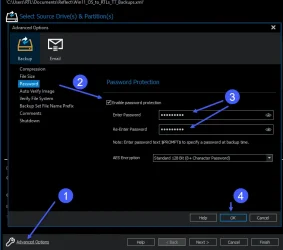
@Almighty1 When you create the definition file, you have to enable a password for it to enable encryption. ENSURE you make a note of it as you will need it if you have to restore it!!!
 

Attachments

  • Enable MR Encrryption.webp
    Enable MR Encrryption.webp
    33.1 KB · Views: 1

My Computers

System One System Two

  • OS
    Win 11 Pro
    Computer type
    PC/Desktop
    Manufacturer/Model
    Home built.
    CPU
    3.6 GHz. AMD Ryzen 5 3600 6-core
    Motherboard
    ASUS PRIME X570-PRO (BIOS 5013 Installed 26/10/2024)
    Memory
    16GB
    Graphics Card(s)
    NVidia GeForce GT710
    Sound Card
    Onboard Realtek
    Monitor(s) Displays
    Samsung S24F350
    Screen Resolution
    1920 x 1080
    Hard Drives
    Samsung 980 PRO 250GB
    Samsung 970 EVO Plus 250GB
    Seagate ST500DM002-1BD142 500GB
    2 x .Samsung 1TB T7 Portables--only one fitted at a time. Swapped weekly on a Thursday for backups using Macrium Reflect X.
    PSU
    Corsair TX650W
    Case
    Novatech
    Cooling
    Wraith
    Keyboard
    Novatech Combo
    Mouse
    Novatech Combo
    Internet Speed
    Currently 513.88 Mbps Down 69.48 Mbps Up
    Browser
    Firefox
    Antivirus
    Windows Defender: Malwarebytes Premium.
    Other Info
    Synology DS218J NAS.
    Networked CanonPixie MG5750.
    All Disks are running Bitlocker.
  • Operating System
    Windows 11 Pro
    Computer type
    PC/Desktop
    Manufacturer/Model
    Home built
    CPU
    3.6 GHz AMD Ryzen 5 3600 6-core
    Motherboard
    ASUS PRIME X570-P (BIOS 5013 Installed 26/10/2024)
    Memory
    16GB
    Graphics card(s)
    NVidia GT710
    Sound Card
    Onboard Realtek
    Monitor(s) Displays
    Viewsonic VX2260WM
    Screen Resolution
    1920 x 1080
    Hard Drives
    Samsung 980 PRO 250GB, Kingston SA400S37120G 120GB, Kingston SA400S37240G 240GB,Seagate ST500DM009. External USB 3.1 Docking Station with Seagate ST1000DM0 for Macrium Reflect backups. All Disks running Bitlocker.
    PSU
    Corsair TX550M
    Case
    Corsair 110Q
    Cooling
    Wraith
    Keyboard
    As above.
    Mouse
    Logitech MK270 Combo
    Internet Speed
    Same as System 1.
    Browser
    Firefox
    Antivirus
    Windows Defender; Malwarebytes Premium
    Other Info
    Same as System #1 except this one is using a T4U Wi-Fi Adapter to connect to Router.
    Also have an ASUS Vivobook M513UA Laptop running Windows 11 Pro.
@Almighty1 When you create the definition file, you have to enable a password for it to enable encryption. ENSURE you make a note of it as you will need it if you have to restore it!!!
Yes. you are right. All they are really saying is to use the built-in AES protection, at least according to this:

I still wonder though, is there anything in Dell's Support partition that needs to be encrypted since I thought all the DELLSUPPORT Recovery partition was is it will factory restore the system but it does not have personal data in it.

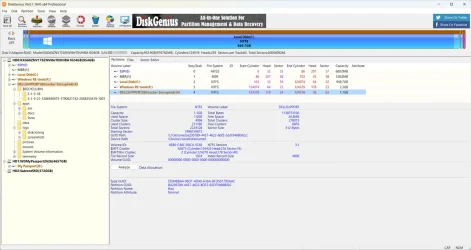
Since what is strange is that we all know that Windows BitLocker is only supposedly on Windows Professional Edition and not Windows Home Edition as this system originally shipped with Windows 10 Home but BitLocker was enabled on both the C: and the Dell Recovery partition. I turned Bitlocker off on the C: drive when I still was on the Home Edition and since the Dell Recovery partition does not have a drive letter assigned to it, Windows does not even show that drive directly. I did upgrade to Windows Professional after I was using Windows 11 Home Edition many years ago and as Macrium Reflect shows, the Dell Recovery partition while BitLocker is already unlocked. Whether or not I assign a letter to the Dell Recovery partition, I am able to browse and see the contents using DiskGenius when I tried it a few days ago.

1755337028381.webp
 
Last edited:

My Computer

System One

  • OS
    WindowsXP/7/8/8.1/10/11,Linux,Android,FreeBSD Unix
    Computer type
    Laptop
    Manufacturer/Model
    Dell XPS 15 9570
    CPU
    Intel® Core™ i7-8750H 8th Gen 2.2Ghz up to 4.1Ghz
    Motherboard
    Dell XPS 15 9570
    Memory
    64GB using 2x32GB CL16 Mushkin redLine modules
    Graphics Card(s)
    Intel UHD 630 & NVIDIA GeForce GTX 1050 Ti with 4GB DDR5
    Sound Card
    Realtek ALC3266-CG
    Monitor(s) Displays
    15.6" 4K Touch UltraHD 3840x2160 made by Sharp
    Screen Resolution
    3840x2160 4K UltraHD
    Hard Drives
    Samsung MZ-V9P4T0B/AM 990 PRO 4TB PCIe®4.0 NVMe™ M.2 SSD was Toshiba KXG60ZNV1T02 NVMe 1TB SSD
    PSU
    Dell XPS 15 9570
    Case
    Dell XPS 15 9570
    Cooling
    Stock
    Keyboard
    Stock
    Mouse
    SwitftPoint ProPoint
    Internet Speed
    Comcast/XFinity 1.44Gbps/42.5Mbps
    Browser
    Microsoft EDGE (Chromium based) & Google Chrome
    Antivirus
    Windows Defender that came with Windows
As you get full support with Reflect X, why not ask on the Macrium Reflect Forum as their guys are the experts?
Well, as a NASA Astrophysicist, my copy of Reflect X is part of a enterprise license so I will have to go through NASA's IT which can be weeks or longer as they are the ones who has to be in contact with Macrium Support for the answer as I cannot contact Macrium directly since I don't have that authority. The other reason is from all the Macrium threads here on elevenforums, I am sure there has to be people who uses Macrium Reflect that own Dell's which has that unlocked bitlocker partition on the original storage device that shipped with the system and they have upgraded to a newer larger storage device so they have the experience of cloning it. And the other reason is someone else may find the thread helpful for reference in the future as your answer is similar to saying that the forums here should not exist either since every software has their own support somewhere else. But regardless, it seems that Macrium Reflect itself will only copy the data unencrypted like the article I mentioned in the last comment says.
 
Last edited:

My Computer

System One

  • OS
    WindowsXP/7/8/8.1/10/11,Linux,Android,FreeBSD Unix
    Computer type
    Laptop
    Manufacturer/Model
    Dell XPS 15 9570
    CPU
    Intel® Core™ i7-8750H 8th Gen 2.2Ghz up to 4.1Ghz
    Motherboard
    Dell XPS 15 9570
    Memory
    64GB using 2x32GB CL16 Mushkin redLine modules
    Graphics Card(s)
    Intel UHD 630 & NVIDIA GeForce GTX 1050 Ti with 4GB DDR5
    Sound Card
    Realtek ALC3266-CG
    Monitor(s) Displays
    15.6" 4K Touch UltraHD 3840x2160 made by Sharp
    Screen Resolution
    3840x2160 4K UltraHD
    Hard Drives
    Samsung MZ-V9P4T0B/AM 990 PRO 4TB PCIe®4.0 NVMe™ M.2 SSD was Toshiba KXG60ZNV1T02 NVMe 1TB SSD
    PSU
    Dell XPS 15 9570
    Case
    Dell XPS 15 9570
    Cooling
    Stock
    Keyboard
    Stock
    Mouse
    SwitftPoint ProPoint
    Internet Speed
    Comcast/XFinity 1.44Gbps/42.5Mbps
    Browser
    Microsoft EDGE (Chromium based) & Google Chrome
    Antivirus
    Windows Defender that came with Windows
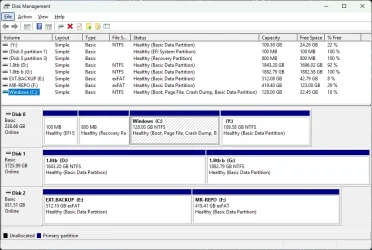
Can someone please give me a rundown of this?
I have always been so sceptcal of bitlocker in Windows. Never confident to setup for clients as they may lose their encryption keys, what limitations there are during boot / backup / restore etc.

Plus, if you were able to answer all that, why would you leave volumes Bitlocker encrypted but unlocked??? Why or when would you encrypt those volumes?
I guess a little similar to Secure Boot? Having to disable it to boot Ventoy etc... Still never mastered or played around with secure boot much either! 😄

Cheers!

Client system drive setup.
1755370883991.webp
 

My Computers

System One System Two

  • OS
    w11
    Computer type
    Laptop
    Manufacturer/Model
    Gigabyte Aero 17
    CPU
    i7-12700H
    Memory
    64GB DDR4
    Graphics Card(s)
    Something big I will never take advantage of!
    Monitor(s) Displays
    17.3" 4K UHD
    Browser
    Yandex Browser (10x better than Chrome!) or Brave
    Antivirus
    MBAM + ESET + WFC + KTS
  • Operating System
    W7
Search the MR X Knowledge Base here
 

My Computer

System One

  • OS
    Windows 11 Pro 25H2 (Build 26200.8524)
    Computer type
    PC/Desktop
    Manufacturer/Model
    Dell Pro Max Tower T2 FCT2250
    CPU
    Intel Core Ultra 9 285 5.6 GHz
    Motherboard
    64-bit operating system, x64-based processor
    Memory
    32.00 GB
    Graphics Card(s)
    Intel Integrated Graphics (128 MB)
    Sound Card
    Realtek Audio
    Monitor(s) Displays
    Dell P2714H Monitor
    Screen Resolution
    1920 x 1080
    Hard Drives
    1 x 512GB M.2 XG10d SED KIOXIA PCIe solid state drive (Internal)
    1 x 2TB Seagate ST2000DM008-2UB102 HDD (Internal)
    1 x 1TB Seagate STGX4000400 External HDD
    1 x 4TB Seagate STGX4000400 External HDD
    1 x 6TB WD Elements AE 2689 External HDD
    PSU
    500 Watts
    Cooling
    Air
    Keyboard
    Microsoft Wired Keyboard 600
    Mouse
    Microsoft USB Basic Optical Mouse v2.0
    Browser
    Firefox
    Antivirus
    Windows Defender + Malwarebytes Premium
    Other Info
    BaseBoard Manufacturer Dell Inc.
    BaseBoard Product 022RY57
    BaseBoard Version A01
Search the MR X Knowledge Base here
Did you bother to even read the thread?
Answer is already provided in comment #5 and the knowledge base direct link to the answer is in comment #6.
 

My Computer

System One

  • OS
    WindowsXP/7/8/8.1/10/11,Linux,Android,FreeBSD Unix
    Computer type
    Laptop
    Manufacturer/Model
    Dell XPS 15 9570
    CPU
    Intel® Core™ i7-8750H 8th Gen 2.2Ghz up to 4.1Ghz
    Motherboard
    Dell XPS 15 9570
    Memory
    64GB using 2x32GB CL16 Mushkin redLine modules
    Graphics Card(s)
    Intel UHD 630 & NVIDIA GeForce GTX 1050 Ti with 4GB DDR5
    Sound Card
    Realtek ALC3266-CG
    Monitor(s) Displays
    15.6" 4K Touch UltraHD 3840x2160 made by Sharp
    Screen Resolution
    3840x2160 4K UltraHD
    Hard Drives
    Samsung MZ-V9P4T0B/AM 990 PRO 4TB PCIe®4.0 NVMe™ M.2 SSD was Toshiba KXG60ZNV1T02 NVMe 1TB SSD
    PSU
    Dell XPS 15 9570
    Case
    Dell XPS 15 9570
    Cooling
    Stock
    Keyboard
    Stock
    Mouse
    SwitftPoint ProPoint
    Internet Speed
    Comcast/XFinity 1.44Gbps/42.5Mbps
    Browser
    Microsoft EDGE (Chromium based) & Google Chrome
    Antivirus
    Windows Defender that came with Windows
what is strange is that we all know that Windows BitLocker is only supposedly on Windows Professional Edition and not Windows Home Edition as this system originally shipped with Windows 10 Home but BitLocker was enabled on both the C: and the Dell Recovery partition....
Device Encryption is the poor cousin of Bitlocker. It uses the same encryption as Bitlocker, but is left unlocked at all times. It offers limited protection. If an intruder can log into Windows they can read everything. Only if they try to boot from another OS on a USB, or remove the drive to read it on another machine, is the data protected.

Device Encryption is available for all editions including Home. It is on by default for installs of Windows 10 on suitable devices, and on most devices for Windows 11, even if you install Home. Only in Pro can you then lock the encrypted drive and turn Device Encryption into full Bitlocker.

Unlike BitLocker Drive Encryption, which is available on Windows Pro, Enterprise, or Education editions, Device Encryption is available on a wider range of devices, including those running Windows Home....
 

My Computers

System One System Two

  • OS
    Windows 11 Home
    Computer type
    Laptop
    Manufacturer/Model
    Acer Aspire 3 A315-23-R9VY
    CPU
    AMD Athlon Silver 3050U
    Memory
    8GB
    Graphics Card(s)
    Radeon Graphics
    Monitor(s) Displays
    laptop screen
    Screen Resolution
    1366x768 native resolution, up to 2560x1440 with Radeon Virtual Super Resolution
    Hard Drives
    1TB Samsung EVO 870 SSD (from April 2026: 250GB EVO 850)
    Internet Speed
    150 Mbps
    Browser
    Edge, Firefox
    Antivirus
    Defender
    Other Info
    fully 'Windows 11 ready' laptop. Windows 10 C: partition migrated from my old unsupported 'main machine' then upgraded to 11. A test migration ran Insider builds for 2 months. When 11 was released on 5th October 2021 it was re-imaged back to 10 and was offered the upgrade in Windows Update on 20th October. Windows Update offered the 22H2 Feature Update on 20th September 2022. It got the 23H2 Feature Update on 4th November 2023 through Windows Update, 24H2 on 3rd October 2024 through Windows Update by setting the Target Release Version for 24H2, and 25H2 on 30th September 2025 through Windows Update by setting the Target Release Version for 25H2.

    UPDATE - 11 April 2026: due to mechanical deterioration this PC has been retired from active duty. The OS with all software and files has been migrated to my System Seven below to carry on as my general purpose 'main machine'.

    My SYSTEM THREE is a Dell Latitude 5410, i7-10610U, 32GB RAM, 512GB NVMe ssd, supported device running Windows 11 Pro.

    My SYSTEM FOUR is a 2-in-1 convertible Lenovo Yoga 11e 20DA, Celeron N2930, 8GB RAM, 256GB ssd. Unsupported device: currently running Win10 Pro, plus Win11 Pro RTM and Insider Dev, Beta, and RP 24H2 as native boot vhdx.

    My SYSTEM FIVE is a Dell Latitude 3190 2-in-1, Pentium Silver N5030, 8GB RAM, 1TB NVMe ssd, supported device running Windows 11 Pro, plus Insider Beta, Dev, and Canary builds (and a few others) as a native boot .vhdx.

    My SYSTEM SIX is a Dell Latitude 5550, Core Ultra 7 165H, 64GB RAM, 1TB NVMe SSD, supported device, Windows 11 Pro 24H2, Hyper-V host machine. Updated to 25H2 on 30th September 2025.

    My SYSTEM SEVEN is a Lenovo Thinkpad T580, Intel Core i7-8650U, 16GB RAM, 512GB NVMe SSD + 2nd 512GB NVMe SSD, a supported device for Windows 11. This is my current general purpose 'main machine'. The installed Windows 11 Home from my System One has been migrated to this machine.
  • Operating System
    Windows 11 Pro
    Computer type
    Laptop
    Manufacturer/Model
    Dell Latitude E4310
    CPU
    Intel® Core™ i5-520M
    Motherboard
    0T6M8G
    Memory
    8GB
    Graphics card(s)
    (integrated graphics) Intel HD Graphics
    Screen Resolution
    1366x768
    Hard Drives
    500GB Crucial MX500 SSD
    Browser
    Firefox, Edge
    Antivirus
    Defender
    Other Info
    unsupported machine: Legacy bios, MBR, TPM 1.2, upgraded from W10 to W11 using W10/W11 hybrid install media workaround. In-place upgrade to 22H2 using ISO and a workaround. Feature Update to 23H2 by manually installing the Enablement Package. In-place upgrade to 24H2 using hybrid 23H2/24H2 install media. Upgraded to 25H2 by Enablement Package. Also running Insider Dev, and Canary builds and Windows 10 as native boot .vhdx.

    My SYSTEM THREE is a Dell Latitude 5410, i7-10610U, 32GB RAM, 512GB NVMe ssd, supported device running Windows 11 Pro.

    My SYSTEM FOUR is a 2-in-1 convertible Lenovo Yoga 11e 20DA, Celeron N2930, 8GB RAM, 256GB ssd. Unsupported device: currently running Win10 Pro, plus Win11 Pro RTM and Insider Dev, Beta, and RP 24H2 as native boot vhdx.

    My SYSTEM FIVE is a Dell Latitude 3190 2-in-1, Pentium Silver N5030, 8GB RAM, 1TB NVMe ssd, supported device running Windows 11 Pro, plus Insider Beta, Dev, and Canary builds (and a few others) as a native boot .vhdx.

    My SYSTEM SIX is a Dell Latitude 5550, Core Ultra 7 165H, 64GB RAM, 1TB NVMe SSD, supported device, Windows 11 Pro 24H2, Hyper-V host machine. Updated to 25H2 on 30th September 2025.

    My SYSTEM SEVEN is a Lenovo Thinkpad T580, Intel Core i7-8650U, 16GB RAM, 512GB NVMe SSD + 2nd 512GB NVMe SSD, a supported device for Windows 11. This is my current general purpose 'main machine'. The installed Windows 11 Home from my System One has been migrated to this machine.
Device Encryption is the poor cousin of Bitlocker. It uses the same encryption as Bitlocker, but is left unlocked at all times. It offers limited protection. If an intruder can log into Windows they can read everything. Only if they try to boot from another OS on a USB, or remove the drive to read it on another machine, is the data protected.

Device Encryption is available for all editions including Home. It is on by default for installs of Windows 10 on suitable devices, and on most devices for Windows 11, even if you install Home. Only in Pro can you then lock the encrypted drive and turn Device Encryption into full Bitlocker.


Many thanks, @Bree! That makes sense and I do remember reading about that one here. Are things like Minitools Partition Wizard, Disk Genius, Macrium Reflect, Hasleo Backup Suite supposed to show Device Encryption as a Bitlocker Partition though? I noticed that for the DELLSUPPORT hidden Recovery partition, the only thing that actually mentioned it being unlocked is Macrium Reflect, everything else just will show it as a Bitlocker protection which everyone will assume is locked.

Dell apparently added the word Bitlocker to Device Encryption so one would think it's the actual Bitlocker product


My Computer

System One

  • OS
    WindowsXP/7/8/8.1/10/11,Linux,Android,FreeBSD Unix
    Computer type
    Laptop
    Manufacturer/Model
    Dell XPS 15 9570
    CPU
    Intel® Core™ i7-8750H 8th Gen 2.2Ghz up to 4.1Ghz
    Motherboard
    Dell XPS 15 9570
    Memory
    64GB using 2x32GB CL16 Mushkin redLine modules
    Graphics Card(s)
    Intel UHD 630 & NVIDIA GeForce GTX 1050 Ti with 4GB DDR5
    Sound Card
    Realtek ALC3266-CG
    Monitor(s) Displays
    15.6" 4K Touch UltraHD 3840x2160 made by Sharp
    Screen Resolution
    3840x2160 4K UltraHD
    Hard Drives
    Samsung MZ-V9P4T0B/AM 990 PRO 4TB PCIe®4.0 NVMe™ M.2 SSD was Toshiba KXG60ZNV1T02 NVMe 1TB SSD
    PSU
    Dell XPS 15 9570
    Case
    Dell XPS 15 9570
    Cooling
    Stock
    Keyboard
    Stock
    Mouse
    SwitftPoint ProPoint
    Internet Speed
    Comcast/XFinity 1.44Gbps/42.5Mbps
    Browser
    Microsoft EDGE (Chromium based) & Google Chrome
    Antivirus
    Windows Defender that came with Windows
Back
Top Bottom




