- Local time
- 8:55 AM
- Posts
- 3,637
- Location
- San Francisco, California USA
- OS
- WindowsXP/7/8/8.1/10/11,Linux,Android,FreeBSD Unix
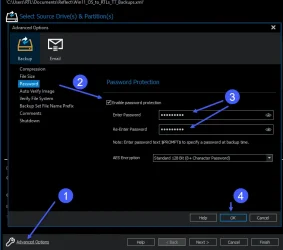
Greetings all, I have a question. How exactly do I enable Reflect's image encryption and is the data on unlocked BitLocker partitions still encrypted? Thanks!

My Computer
At a glance
WindowsXP/7/8/8.1/10/11,Linux,Android,FreeBSD...Intel® Core™ i7-8750H 8th Gen 2.2Ghz up to 4....64GB using 2x32GB CL16 Mushkin redLine modulesIntel UHD 630 & NVIDIA GeForce GTX 1050 Ti wi...
- OS
- WindowsXP/7/8/8.1/10/11,Linux,Android,FreeBSD Unix
- Computer type
- Laptop
- Manufacturer/Model
- Dell XPS 15 9570
- CPU
- Intel® Core™ i7-8750H 8th Gen 2.2Ghz up to 4.1Ghz
- Motherboard
- Dell XPS 15 9570
- Memory
- 64GB using 2x32GB CL16 Mushkin redLine modules
- Graphics Card(s)
- Intel UHD 630 & NVIDIA GeForce GTX 1050 Ti with 4GB DDR5
- Sound Card
- Realtek ALC3266-CG
- Monitor(s) Displays
- 15.6" 4K Touch UltraHD 3840x2160 made by Sharp
- Screen Resolution
- 3840x2160 4K UltraHD
- Hard Drives
- Samsung MZ-V9P4T0B/AM 990 PRO 4TB PCIe®4.0 NVMe™ M.2 SSD was Toshiba KXG60ZNV1T02 NVMe 1TB SSD
- PSU
- Dell XPS 15 9570
- Case
- Dell XPS 15 9570
- Cooling
- Stock
- Keyboard
- Stock
- Mouse
- SwitftPoint ProPoint
- Internet Speed
- Comcast/XFinity 1.44Gbps/42.5Mbps
- Browser
- Microsoft EDGE (Chromium based) & Google Chrome
- Antivirus
- Windows Defender that came with Windows