
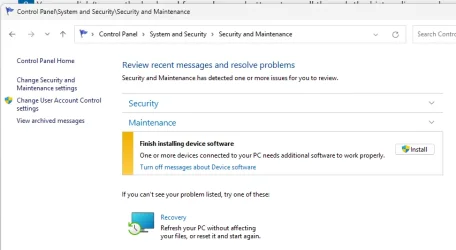
Maintenance issue in question.


sydh

Well-known member
Member
Local time
11:17 PM
Posts
147
Location
Eastleigh, Hampshire, UK
OS
W11
While checking Maintenance I found this issue. Being highly suspicious, is there any way I can see what device this is referring to before I click INSTALL?


Screenshot 2025-03-29 223356.webp
 

Attachments

  • Screenshot 2025-03-29 223356.webp
    Screenshot 2025-03-29 223356.webp
    31.7 KB · Views: 1

My Computer My Computer

At a glance

W113.80 gigahertz AMD Ryzen 9 3900XT 12-Core32684 MegabytesNVIDIA GeForce RTX 3060 Ti
OS
W11
Computer type
PC/Desktop
Manufacturer/Model
PC Specialist
CPU
3.80 gigahertz AMD Ryzen 9 3900XT 12-Core
Motherboard
ASUSTeK COMPUTER INC. TUF GAMING X570-PLUS Rev X.0x
Memory
32684 Megabytes
Graphics Card(s)
NVIDIA GeForce RTX 3060 Ti
Monitor(s) Displays
ViewSonic VX3276-QHD (x2)
Hard Drives
1TB PCS PCIe M.2 SSD
ST8000DM004-2CX188 (8001.56 GB)
WDC WD30EZRX-00DC0B0 (3000.59 GB)
WDC WD30EZRX-00SPEB0 (3000.59 GB)
Cooling
Water cooled
Keyboard
Logitech
Mouse
Logitech
Internet Speed
56
The only thing I can offer is checking in Device Manager [right-click Windows Start key] to see if all devices are working properly. If all is okay there will be no drop-down items showing.
 

My Computers My Computers

  • At a glance

    Win11 Pro RTM Version 24H2 Build 26100.4202Intel Core i5 11th Gen. 2.40GHz12GB
    OS
    Win11 Pro RTM Version 24H2 Build 26100.4202
    Computer type
    Laptop
    Manufacturer/Model
    Dell Vostro 3400
    CPU
    Intel Core i5 11th Gen. 2.40GHz
    Memory
    12GB
    Hard Drives
    256GB SSD NVMe M.2
  • At a glance

    Win11 Pro RTM Version 24H2 Build 26100.4202Intel Core i5 10th Gen. 2.90GHz16GBOnboard, no VGA, using a DisplayPort-to-VGA a...
    Operating System
    Win11 Pro RTM Version 24H2 Build 26100.4202
    Computer type
    PC/Desktop
    Manufacturer/Model
    Dell Vostro 5890
    CPU
    Intel Core i5 10th Gen. 2.90GHz
    Memory
    16GB
    Graphics card(s)
    Onboard, no VGA, using a DisplayPort-to-VGA adapter
    Monitor(s) Displays
    24" Dell
    Hard Drives
    512GB SSD NVMe, 4TB Seagate HDD
    Browser
    Firefox, Edge
    Antivirus
    Windows Defender/Microsoft Security
Click on the down arrow V to the right of "Maintenance" > View reliability history.

Look at what has been happening. Source in the bottom box.

Also go to Settings > Windows update > Update History >
Look through all the sections.

That may give you slightly more detail.
 

My Computer My Computer

At a glance

Windows 11
OS
Windows 11
Back
Top Bottom




