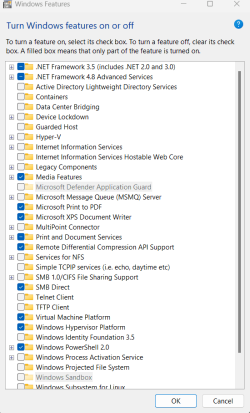
Many hypervisor errors BSOD, after turning it on in windows features. so I turned it off. On AMD PC


sdowney717

Well-known member
Member
VIP
Local time
8:59 PM
Posts
1,335
OS
windows 11
Attached v2 log file

that PC will randomly BSOD sometimes in a few seconds after booting, sometimes several minute but always does BSOD with hypervisor and virtual machine on
Turning those off unchecking boxes, it is perfect.
I read one of the minidump files
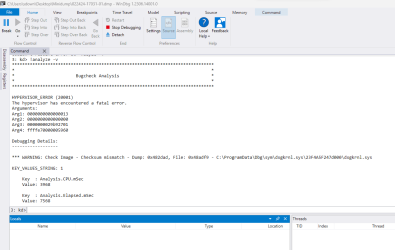
1708780425766.png

I did the DISM SFC commands, found nothing

1708780536468.png
 

Attachments

My Computer My Computer

At a glance

windows 11old AMD B958gb
OS
windows 11
Computer type
PC/Desktop
Manufacturer/Model
some kind of old ASUS MB
CPU
old AMD B95
Motherboard
ASUS
Memory
8gb
Hard Drives
ssd WD 500 gb
Machine needed more ram, 8gb was not enough. I have 12gb in it and it is perfect, no crashes

Oops. SVM was off in the bios. Turned it on and it crashed
1709338480166.png
 
Last edited:

My Computer My Computer

At a glance

windows 11old AMD B958gb
OS
windows 11
Computer type
PC/Desktop
Manufacturer/Model
some kind of old ASUS MB
CPU
old AMD B95
Motherboard
ASUS
Memory
8gb
Hard Drives
ssd WD 500 gb
Two of many google results for that error you showed.


My Computers My Computers

  • At a glance

    Windows 11 Enterprise 25H2 26200 7462Intel XEON E5-2699 v364GB Teamgroup UD4-3600NVIDIA GeForce GTX 1080 Ti
    OS
    Windows 11 Enterprise 25H2 26200 7462
    Computer type
    PC/Desktop
    Manufacturer/Model
    Custom Build
    CPU
    Intel XEON E5-2699 v3
    Motherboard
    ASUS X99-A
    Memory
    64GB Teamgroup UD4-3600
    Graphics Card(s)
    NVIDIA GeForce GTX 1080 Ti
    Sound Card
    Integrated
    Monitor(s) Displays
    ACER X34 Predator
    Screen Resolution
    3440 x 1440
    Hard Drives
    Crucial CT1000P 3P SSD8 1TB
    Crucial CT1000 BX500 SSD 1TB
    PSU
    GameMax Pro
    Case
    Fractal Design
    Cooling
    Corsair H110iGT + 6 140mm Fans
    Keyboard
    Corsair K4
    Mouse
    G-Skill G502
    Internet Speed
    300MBs
    Browser
    Chrome
    Antivirus
    OEM
    Other Info
    ASUS RT-AC87U Router
  • At a glance

    25H2 26200.50748GB
    Operating System
    25H2 26200.5074
    Computer type
    Laptop
    Manufacturer/Model
    ASUS X555LA
    Memory
    8GB
    Browser
    Chrome
    Antivirus
    OEM
Two of many google results for that error you showed.


dxdiag did not show any problems?
 

Attachments

My Computer My Computer

At a glance

windows 11old AMD B958gb
OS
windows 11
Computer type
PC/Desktop
Manufacturer/Model
some kind of old ASUS MB
CPU
old AMD B95
Motherboard
ASUS
Memory
8gb
Hard Drives
ssd WD 500 gb
I did get 'component store is repairable' so maybe something got repaired


C:\Windows\System32>sfc /scannow

Beginning system scan. This process will take some time.

Beginning verification phase of system scan.
Verification 100% complete.

Windows Resource Protection did not find any integrity violations.

C:\Windows\System32>DISM /Online /Cleanup-Image /CheckHealth

Deployment Image Servicing and Management tool
Version: 10.0.22621.2792

Image Version: 10.0.22631.3235

No component store corruption detected.
The operation completed successfully.

C:\Windows\System32>DISM /Online /Cleanup-Image /ScanHealth

Deployment Image Servicing and Management tool
Version: 10.0.22621.2792

Image Version: 10.0.22631.3235

[==========================100.0%==========================] The component store is repairable.
The operation completed successfully.

C:\Windows\System32>DISM /Online /Cleanup-Image /RestoreHealth

Deployment Image Servicing and Management tool
Version: 10.0.22621.2792

Image Version: 10.0.22631.3235

[==========================100.0%==========================] The restore operation completed successfully.
The operation completed successfully.

C:\Windows\System32>sfc /scannow

Beginning system scan. This process will take some time.

Beginning verification phase of system scan.
Verification 100% complete.

Windows Resource Protection did not find any integrity violations.

C:\Windows\System32>
 

My Computer My Computer

At a glance

windows 11old AMD B958gb
OS
windows 11
Computer type
PC/Desktop
Manufacturer/Model
some kind of old ASUS MB
CPU
old AMD B95
Motherboard
ASUS
Memory
8gb
Hard Drives
ssd WD 500 gb
Hmmm. testing it. I went into bios and turned on SVM.
it always used to crash quick, but so far no crash. The crash did not always produce a BSOD, sometimes PC would simply halt, lockup
 

My Computer My Computer

At a glance

windows 11old AMD B958gb
OS
windows 11
Computer type
PC/Desktop
Manufacturer/Model
some kind of old ASUS MB
CPU
old AMD B95
Motherboard
ASUS
Memory
8gb
Hard Drives
ssd WD 500 gb
It crashed, just rebooted with SVM off in the bios.
When it crashed, speaker made a loud hum and mouse and keyboard locked up.
 

My Computer My Computer

At a glance

windows 11old AMD B958gb
OS
windows 11
Computer type
PC/Desktop
Manufacturer/Model
some kind of old ASUS MB
CPU
old AMD B95
Motherboard
ASUS
Memory
8gb
Hard Drives
ssd WD 500 gb

Latest Support Threads

Back
Top Bottom