NexusFred
Well-known member
- Local time
- 7:31 PM
- Posts
- 24
- OS
- Windows 11 Pro 25H2 build 26200.8655
Hello after the last Windows Update KB5028185 I lost a lot of my settings
I tried to remove this installation but it does not restore my previous settings.
Anyway this update keeps reinstalling itself on every boot.
Here is the list of settings I lost and don't know how to restore
I use a Wacom Tablet and I have previously disable all pointer effect like the circles on pressure and the white circle on left or right click.
Now the white circle is back on left or right click.
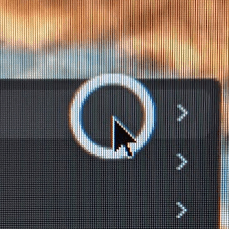
I tried to disable all Pen & Windows option but without any result
Another problem, now when I click on the text input, one of these two windows appears.


I had previously disabled that, but now I can't find any solution to remove it.
I also can't select any text on a webpage...
Even worse now when I select a window a very ugly effect is triggered, the windows shrink and reveal a huge border
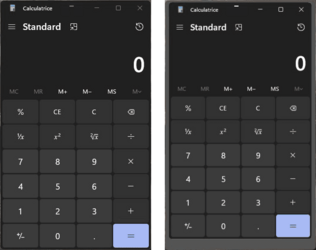
Anyone can help me to restore my previous settingq or do I need to install Windows 10 ?
I tried to remove this installation but it does not restore my previous settings.
Anyway this update keeps reinstalling itself on every boot.
Here is the list of settings I lost and don't know how to restore
I use a Wacom Tablet and I have previously disable all pointer effect like the circles on pressure and the white circle on left or right click.
Now the white circle is back on left or right click.
I tried to disable all Pen & Windows option but without any result
Another problem, now when I click on the text input, one of these two windows appears.
I had previously disabled that, but now I can't find any solution to remove it.
I also can't select any text on a webpage...
Even worse now when I select a window a very ugly effect is triggered, the windows shrink and reveal a huge border
Anyone can help me to restore my previous settingq or do I need to install Windows 10 ?
My Computer
At a glance
Windows 11 Pro 25H2 build 26200.8655Intel Core Ultra 9 285KSkill RipjawsV F5-6000J3238G32GX2-RS5KASUS RTX 5080 OC Noctua
- OS
- Windows 11 Pro 25H2 build 26200.8655
- Computer type
- PC/Desktop
- Manufacturer/Model
- Custom
- CPU
- Intel Core Ultra 9 285K
- Motherboard
- ASUS ProArt Z890-Creator WiFi
- Memory
- Skill RipjawsV F5-6000J3238G32GX2-RS5K
- Graphics Card(s)
- ASUS RTX 5080 OC Noctua
- Sound Card
- None
- Monitor(s) Displays
- Eizo CG2420 & Moniteur & Eizo Nanao FlexScan EV2456
- Screen Resolution
- 1920x1200
- Hard Drives
- Samsung SSD 990 PRO 1TB
Samsung SSD 980 PRO 1TB
Samsung SSD 970 EVO Plus 2TB
+ 10 HDD
- PSU
- Seasonic Prime TX-1600 Noctua Edition
- Case
- Antec Flux PRO Noctua
- Cooling
- Noctua NH-D15 G2
- Keyboard
- Keytronic Ergoforce PS2
- Mouse
- Wacom Intuos3 PTZ-930
- Internet Speed
- 600 Megabits per second
- Browser
- All (Chrome, Chrome Dev, Firefox, Opera, Chromium)
- Antivirus
- Avast