Solved Many of my settings disappeared after the last Windows update


NexusFred

Well-known member
Local time
7:31 PM
Posts
24
OS
Windows 11 Pro 25H2 build 26200.8655
Hello after the last Windows Update KB5028185 I lost a lot of my settings

I tried to remove this installation but it does not restore my previous settings.
Anyway this update keeps reinstalling itself on every boot.

Here is the list of settings I lost and don't know how to restore

I use a Wacom Tablet and I have previously disable all pointer effect like the circles on pressure and the white circle on left or right click.
Now the white circle is back on left or right click.
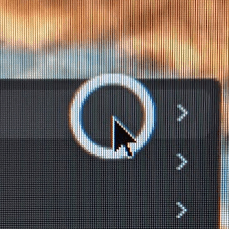
Untitled-1.png
I tried to disable all Pen & Windows option but without any result

Another problem, now when I click on the text input, one of these two windows appears.

Untitled-3.png

Untitled-4.png

I had previously disabled that, but now I can't find any solution to remove it.

I also can't select any text on a webpage...

Even worse now when I select a window a very ugly effect is triggered, the windows shrink and reveal a huge border
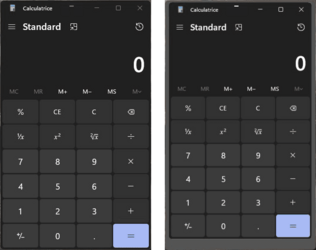
schrink windows.png

Anyone can help me to restore my previous settingq or do I need to install Windows 10 ? :cool:
 

My Computer My Computer

At a glance

Windows 11 Pro 25H2 build 26200.8655Intel Core Ultra 9 285KSkill RipjawsV F5-6000J3238G32GX2-RS5KASUS RTX 5080 OC Noctua
OS
Windows 11 Pro 25H2 build 26200.8655
Computer type
PC/Desktop
Manufacturer/Model
Custom
CPU
Intel Core Ultra 9 285K
Motherboard
ASUS ProArt Z890-Creator WiFi
Memory
Skill RipjawsV F5-6000J3238G32GX2-RS5K
Graphics Card(s)
ASUS RTX 5080 OC Noctua
Sound Card
None
Monitor(s) Displays
Eizo CG2420 & Moniteur & Eizo Nanao FlexScan EV2456
Screen Resolution
1920x1200
Hard Drives
Samsung SSD 990 PRO 1TB
Samsung SSD 980 PRO 1TB
Samsung SSD 970 EVO Plus 2TB
+ 10 HDD
PSU
Seasonic Prime TX-1600 Noctua Edition
Case
Antec Flux PRO Noctua
Cooling
Noctua NH-D15 G2
Keyboard
Keytronic Ergoforce PS2
Mouse
Wacom Intuos3 PTZ-930
Internet Speed
600 Megabits per second
Browser
All (Chrome, Chrome Dev, Firefox, Opera, Chromium)
Antivirus
Avast
Solved !!
  • Turn off all settings (regdit) about Typing, Pen & Windows, Inking & Typing ...
  • Re install Wacom Drivers
  • Reboot
  • Disable "Windows Ink" in the Wacom Mapping Setting Panel.
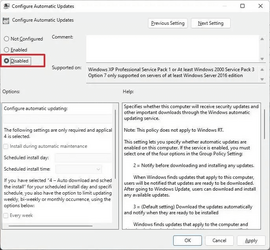
  • Disable Automatic Update
1689159511714.png
  • Reboot
  • Tada (until next update :cool: )
 

My Computer My Computer

At a glance

Windows 11 Pro 25H2 build 26200.8655Intel Core Ultra 9 285KSkill RipjawsV F5-6000J3238G32GX2-RS5KASUS RTX 5080 OC Noctua
OS
Windows 11 Pro 25H2 build 26200.8655
Computer type
PC/Desktop
Manufacturer/Model
Custom
CPU
Intel Core Ultra 9 285K
Motherboard
ASUS ProArt Z890-Creator WiFi
Memory
Skill RipjawsV F5-6000J3238G32GX2-RS5K
Graphics Card(s)
ASUS RTX 5080 OC Noctua
Sound Card
None
Monitor(s) Displays
Eizo CG2420 & Moniteur & Eizo Nanao FlexScan EV2456
Screen Resolution
1920x1200
Hard Drives
Samsung SSD 990 PRO 1TB
Samsung SSD 980 PRO 1TB
Samsung SSD 970 EVO Plus 2TB
+ 10 HDD
PSU
Seasonic Prime TX-1600 Noctua Edition
Case
Antec Flux PRO Noctua
Cooling
Noctua NH-D15 G2
Keyboard
Keytronic Ergoforce PS2
Mouse
Wacom Intuos3 PTZ-930
Internet Speed
600 Megabits per second
Browser
All (Chrome, Chrome Dev, Firefox, Opera, Chromium)
Antivirus
Avast
Solved !!
  • Turn off all settings (regdit) about Typing, Pen & Windows, Inking & Typing ...
  • Re install Wacom Drivers
  • Reboot
  • Disable "Windows Ink" in the Wacom Mapping Setting Panel.
  • Disable Automatic Update
View attachment 64572
  • Reboot
  • Tada (until next update :cool: )


I always disable driver updates that are included with Windows Updates...

In the Taskbar search box, type: regedit ...and open the registry editor.
Go here:
HKEY_LOCAL_MACHINE\SOFTWARE\Policies\Microsoft\Windows\WindowsUpdate

On the right side, create a new 32-bit DWORD value named ExcludeWUDriversInQualityUpdate. Set its value data to 1.
Reboot the computer to apply the changes.
 

My Computers My Computers

  • At a glance

    Win 11 Home ♦♦♦26200.9278 ♦♦♦♦♦♦♦25H2AMD Ryzen 7 3700XG.Skill (F4-3200C14D-16GTZKW)EVGA RTX 2070 (08G-P4-2171-KR)
    OS
    Win 11 Home ♦♦♦26200.9278 ♦♦♦♦♦♦♦25H2
    Computer type
    PC/Desktop
    Manufacturer/Model
    Built by Ghot® [May 2020]
    CPU
    AMD Ryzen 7 3700X
    Motherboard
    Asus Pro WS X570-ACE (BIOS 5302)
    Memory
    G.Skill (F4-3200C14D-16GTZKW)
    Graphics Card(s)
    EVGA RTX 2070 (08G-P4-2171-KR)
    Sound Card
    Realtek ALC1220P / ALC S1220A
    Monitor(s) Displays
    Dell U3011 30"
    Screen Resolution
    2560 x 1600
    Hard Drives
    2x Samsung 860 EVO 500GB,
    WD 4TB Black FZBX - SATA III,
    WD 8TB Black FZBX - SATA III,
    DRW-24B1ST CD/DVD Burner
    PSU
    PC Power & Cooling 750W Quad EPS12V
    Case
    Cooler Master ATCS 840 Tower
    Cooling
    CM Hyper 212 EVO (push/pull)
    Keyboard
    Ducky DK9008 Shine II Blue LED
    Mouse
    Logitech Optical M-100
    Internet Speed
    300/300
    Browser
    Firefox (latest)
    Antivirus
    Bitdefender Total Security
    Other Info
    Speakers: Klipsch Pro Media 2.1
  • At a glance

    Windows XP Pro 32bit w/SP3AMD Athlon 64 X2 5000+ (OC'd @ 3.2Ghz)TWIN2X2048-6400C4DHX (2 x 1GB, DDR2 800)EVGA 256-P2-N758-TR GeForce 8600GT SSC
    Operating System
    Windows XP Pro 32bit w/SP3
    Computer type
    PC/Desktop
    Manufacturer/Model
    Built by Ghot® (not in use)
    CPU
    AMD Athlon 64 X2 5000+ (OC'd @ 3.2Ghz)
    Motherboard
    ASUS M2N32-SLI Deluxe Wireless Edition
    Memory
    TWIN2X2048-6400C4DHX (2 x 1GB, DDR2 800)
    Graphics card(s)
    EVGA 256-P2-N758-TR GeForce 8600GT SSC
    Sound Card
    Onboard
    Monitor(s) Displays
    ViewSonic G90FB Black 19" Professional (CRT)
    Screen Resolution
    up to 2048 x 1536
    Hard Drives
    WD 36GB 10,000rpm Raptor SATA
    Seagate 80GB 7200rpm SATA
    Lite-On LTR-52246S CD/RW
    Lite-On LH-18A1P CD/DVD Burner
    PSU
    PC Power & Cooling Silencer 750 Quad EPS12V
    Case
    Generic Beige case, 80mm fans
    Cooling
    ZALMAN 9500A 92mm CPU Cooler
    Keyboard
    Logitech Classic Keybooard 200
    Mouse
    Logitech Optical M-BT96a
    Internet Speed
    300/300
    Browser
    Firefox 3.x ??
    Antivirus
    Symantec (Norton)
    Other Info
    Still assembled, still runs. Haven't turned it on for 15 years?
Hello,

Nice information. Done it :-)
 

My Computer My Computer

At a glance

Windows 11 Pro 25H2 build 26200.8655Intel Core Ultra 9 285KSkill RipjawsV F5-6000J3238G32GX2-RS5KASUS RTX 5080 OC Noctua
OS
Windows 11 Pro 25H2 build 26200.8655
Computer type
PC/Desktop
Manufacturer/Model
Custom
CPU
Intel Core Ultra 9 285K
Motherboard
ASUS ProArt Z890-Creator WiFi
Memory
Skill RipjawsV F5-6000J3238G32GX2-RS5K
Graphics Card(s)
ASUS RTX 5080 OC Noctua
Sound Card
None
Monitor(s) Displays
Eizo CG2420 & Moniteur & Eizo Nanao FlexScan EV2456
Screen Resolution
1920x1200
Hard Drives
Samsung SSD 990 PRO 1TB
Samsung SSD 980 PRO 1TB
Samsung SSD 970 EVO Plus 2TB
+ 10 HDD
PSU
Seasonic Prime TX-1600 Noctua Edition
Case
Antec Flux PRO Noctua
Cooling
Noctua NH-D15 G2
Keyboard
Keytronic Ergoforce PS2
Mouse
Wacom Intuos3 PTZ-930
Internet Speed
600 Megabits per second
Browser
All (Chrome, Chrome Dev, Firefox, Opera, Chromium)
Antivirus
Avast

Latest Support Threads

Back
Top Bottom