
MCT-created installer doesn't boot on my desktop, but does boot on my laptop


x509

Well-known member
Member
VIP
Local time
11:54 PM
Posts
676
Location
Western USA
OS
Windows 11 2H25
The gist of this issue is that I have been trying to do a clean install of Windows 11 (2H25) on my custom desktop built around an MSI x870E Carbon WiFi motherboard. After some false starts, I got the MCT to build a USB installer, using the option to build the installer for a different system (I don't remember if I checked or unchecked the box). Everything proceeded as expected.

Using the MSI's F11 key, I pulled up the "select boot device" menu, which is a one-time procedure that overrides normal boot order settings. The USB stick is detected as a UEFI device. However, when I highlight that device and press ENTER to select it, the only thing that happens is a return to the same "select boot device" menu. There is no sign at all of a Windows install starting.

I'm not sure what I should do now.

If it matters, I'm trying to do the install onto an NVMe drive that has had all partitions wiped.
 

My Computer

System One

  • OS
    Windows 11 2H25
    Computer type
    PC/Desktop
    Manufacturer/Model
    DIY
    CPU
    AMD 9900X
    Motherboard
    MSI X870E Carbon
    Memory
    64 GB
    Graphics Card(s)
    AMD 9070 XT
    Sound Card
    built-in
    Monitor(s) Displays
    Dell 24"
    Hard Drives
    Sabrent 1 TB NVMe, 4 x SSD (need to check models), 4 x 3.5" HDD, 8-16 TB, all WD
    PSU
    Seasonic 850
    Case
    Fractal Design North XL (which I likw)
    Cooling
    Corsair AIO for CPU, fans for case
    Keyboard
    Das Keyboard 4
    Mouse
    Corsair M65 (white)
    Internet Speed
    1 TB download
    Browser
    Firefox
    Antivirus
    Bitdefender
    Other Info
    Also have Lenovo T14S laptop (me) and Lenovo Slim 71 (wife)
Try temporarily disabling Secure Boot. Sounds like a mismatch with the USB's boot file version.
 

My Computer

System One

  • OS
    Windows 7
If disabling secure boot doesn't work, you might try downloading the ISO from Microsoft. Scroll down to "download Windows 11 Disk image (ISO)
You can then use Rufus to create the installation usb drive. Scroll down here and download the portable version of Rufus. Rufus - Create bootable USB drives the easy way
I strongly suggest that you disconnect all other drives while installing windows.


My Computers

System One System Two

  • OS
    Windows 11 Pro 25H2
    Computer type
    PC/Desktop
    Manufacturer/Model
    Dell Optiplex 7080
    CPU
    i9-10900 10 core 20 threads
    Motherboard
    DELL 0J37VM
    Memory
    32 gb
    Graphics Card(s)
    none-Intel UHD Graphics 630
    Sound Card
    Integrated Realtek
    Monitor(s) Displays
    Benq 27
    Screen Resolution
    2560x1440
    Hard Drives
    2x1tb Solidigm m.2 nvme /External drives 512gb Samsung m.2 sata+2tb Kingston m2.nvme
    PSU
    500w
    Case
    MT
    Cooling
    Dell Premium
    Keyboard
    Logitech wired
    Mouse
    Logitech wireless
    Internet Speed
    so slow I'm too embarrassed to tell
    Browser
    #1 Edge #2 Firefox
    Antivirus
    Defender+MWB Premium
  • Operating System
    Windows 11 Pro 24H2 26200.8457
    Computer type
    PC/Desktop
    Manufacturer/Model
    Beelink Mini PC SER5
    CPU
    AMD Ryzen 7 6800U
    Memory
    32 gb
    Graphics card(s)
    integrated
    Sound Card
    integrated
    Monitor(s) Displays
    Benq 27
    Screen Resolution
    2560x1440
    Hard Drives
    1TB Crucial nvme
    Keyboard
    Logitech wired
    Mouse
    Logitech wireless
    Internet Speed
    still too embarrassed to tell
    Browser
    Firefox
    Antivirus
    Defender
    Other Info
    System 3 is non compliant Dell 9020 i7-4770/24gb ram Win11 PRO 26200.8457
You don't need Rufus
Check your BIOS. You must enable to boot from USB devices.
 

My Computers

System One System Two

  • OS
    Windows 11 Pro - Windows 7 HP 64 - Lubuntu
    Computer type
    PC/Desktop
    Manufacturer/Model
    custom build
    CPU
    i5 6600K - 800MHz to 4400MHz
    Motherboard
    GA-Z170-HD3P
    Memory
    4+4G GSkill DDR4 3000
    Graphics Card(s)
    IG - Intel 530
    Monitor(s) Displays
    Samsung 226BW
    Screen Resolution
    1680x1050
    Hard Drives
    (1) -1 SM951 – 128GB M.2 AHCI PCIe SSD drive for Win 11
    (2) -1 WD SATA 3 - 1T for Data
    (3) -1 WD SATA 3 - 1T for backup
    (4) -1 BX500 SSD - 256G for Windows 7 and Lubuntu
    PSU
    Thermaltake 450W TR2 gold
    Keyboard
    Old and good Chicony mechanical keyboard
    Mouse
    Logitech mX performance - 9 buttons (had to disable some)
    Internet Speed
    500 Mb/s
    Browser
    Firefox 64
  • Operating System
    Windows 11 Pro
    Computer type
    Laptop
    Manufacturer/Model
    Asus Q550LF
    CPU
    i7-4500U 800- 3000MHz
    Motherboard
    Asus Q550LF
    Memory
    (4+4)G DDR3 1600
    Graphics card(s)
    IG intel 4400 + NVIDIA GeForce GT 745M
    Sound Card
    Realtek
    Monitor(s) Displays
    LG Display LP156WF4-SPH1
    Screen Resolution
    1920 x 1080
    Hard Drives
    BX500 120G SSD for Windows and programs
    & 1T HDD for data
    Internet Speed
    500 Mb/s
    Browser
    Firefox 64
You don't need Rufus

I have used only the MCT, and not Rufus for this windows new install.
Check your BIOS. You must enable to boot from USB devices.

Yes I have multiple times. I am even going to start from scratch after RTFM'ing MSI docs. I'm going to start with flashing a new BIOS.
 

My Computer

System One

  • OS
    Windows 11 2H25
    Computer type
    PC/Desktop
    Manufacturer/Model
    DIY
    CPU
    AMD 9900X
    Motherboard
    MSI X870E Carbon
    Memory
    64 GB
    Graphics Card(s)
    AMD 9070 XT
    Sound Card
    built-in
    Monitor(s) Displays
    Dell 24"
    Hard Drives
    Sabrent 1 TB NVMe, 4 x SSD (need to check models), 4 x 3.5" HDD, 8-16 TB, all WD
    PSU
    Seasonic 850
    Case
    Fractal Design North XL (which I likw)
    Cooling
    Corsair AIO for CPU, fans for case
    Keyboard
    Das Keyboard 4
    Mouse
    Corsair M65 (white)
    Internet Speed
    1 TB download
    Browser
    Firefox
    Antivirus
    Bitdefender
    Other Info
    Also have Lenovo T14S laptop (me) and Lenovo Slim 71 (wife)
A clean installation of Windows 11 using the motherboard's default settings should complete successfully on the new motherboard. At least, I'm not aware of any motherboard settings that would normally need to be changed before installing Windows 11.

ChatGPT:

From a technical standpoint, the statement is sound. Modern motherboards such as the MSI MPG X870E CARBON WIFI are generally configured with UEFI, TPM, and Secure Boot support enabled or available by default, so a standard Windows 11 installation should not require changing firmware settings beforehand. The more likely causes of installation issues are the installation media, BIOS version, storage configuration, or a hardware problem rather than a required BIOS setting change.

First, update the motherboard to the latest BIOS version.

Then, from the one-time boot menu (ASRock F11, ASUS F8, Gigabyte F12, MSI F11), select the Windows 11 installation USB flash drive. This should start Windows Setup.

However, when I highlight that device and press ENTER to select it, the only thing that happens is a return to the same "select boot device" menu. There is no sign at all of a Windows install starting.

Even if the MCT-created USB works on another computer, it may not be booting correctly on the MSI motherboard. Therefore, you should also try creating the Windows 11 installation USB with Rufus.

Rufus will automatically create a UEFI-bootable Windows 11 installation USB flash drive, but it is worth verifying the following setting:

Partition scheme: GPT

You do not need to worry about the "Target system" or "File system" settings, as Rufus will configure them automatically.

In addition to the NTFS partition, Rufus creates a small FAT partition labeled UEFI_NTFS, which contains the UEFI:NTFS bootloader.

Edit:

I have an ASRock B650E Taichi Lite, and I have changed the following settings in the BIOS setup (although a clean installation of Windows 11 does not require any of these changes):

- OC Tweaker > DRAM Profile Configuration > DRAM Profile Settings > EXPO...
- Tool > Auto Driver Installer > Disabled
- Security > Secure Boot > Install default Secure Boot keys > Yes > Discard changes and exit setup? > No > Secure Boot > Enabled
 
Last edited:

My Computers

System One System Two

  • OS
    Windows 11 Pro
    Computer type
    PC/Desktop
    CPU
    AMD Ryzen 9 9950X3D
    Motherboard
    ASRock B650E Taichi Lite
    Memory
    Kingston FURY Beast 64GB (2x32GB) DDR5 6000MT/s
    Graphics Card(s)
    ASUS TUF Gaming Radeon RX 9070 OC Edition 16GB GDDR6
    Hard Drives
    Solidigm P44 Pro 2TB M.2 NVMe SSD
  • Operating System
    Windows 11 Home
    Computer type
    Laptop
    Manufacturer/Model
    Lenovo Legion Pro 7i Gen 10 16"
    CPU
    Intel Core Ultra 9 275HX
    Memory
    64GB (2x 32GB) DDR5-6400
    Graphics card(s)
    NVIDIA GeForce RTX 5080 16GB GDDR7 Laptop GPU
    Hard Drives
    2x 1TB M.2 NVMe SSD (SK Hynix)
A clean installation of Windows 11 using the motherboard's default settings should complete successfully on the new motherboard. At least, I'm not aware of any motherboard settings that would normally need to be changed before installing Windows 11.

ChatGPT:


First, update the motherboard to the latest BIOS version.

Then, from the one-time boot menu (ASRock F11, ASUS F8, Gigabyte F12, MSI F11), select the Windows 11 installation USB flash drive. This should start Windows Setup.


Even if the MCT-created USB works on another computer, it may not be booting correctly on the MSI motherboard
That's a crazy situation. I think that Microsoft is the only one who can lay down some ground rules that "everyone" has to follow. if nothing else, it might reduce their support workload


. Therefore, you should also try creating the Windows 11 installation USB with Rufus.
Yet in post #4, it says I don't need Rufus

Rufus will automatically create a UEFI-bootable Windows 11 installation USB flash drive, but it is worth verifying the following setting:

I guess I'll try that. First I am going to start from scratch, clear CMOS, and then proceed with the latest BIOS version, then try the MCT-based installer with things like Secure Boot turned off. If that doesn't work, then I'll do the Rufus installer. If THAT doesn't work, maybe I should switch to a Mac?
Partition scheme: GPT

You do not need to worry about the "Target system" or "File system" settings, as Rufus will configure them automatically.

In addition to the NTFS partition, Rufus creates a small FAT partition labeled UEFI_NTFS, which contains the UEFI:NTFS bootloader.

OK./
Edit:

I have an ASRock B650E Taichi Lite, and I have changed the following settings in the BIOS setup (although a clean installation of Windows 11 does not require any of these changes):

- OC Tweaker > DRAM Profile Configuration > DRAM Profile Settings > EXPO...
- Tool > Auto Driver Installer > Disabled
- Security > Secure Boot > Install default Secure Boot keys > Yes > Discard changes and exit setup? > No > Secure Boot > Enabled
 

My Computer

System One

  • OS
    Windows 11 2H25
    Computer type
    PC/Desktop
    Manufacturer/Model
    DIY
    CPU
    AMD 9900X
    Motherboard
    MSI X870E Carbon
    Memory
    64 GB
    Graphics Card(s)
    AMD 9070 XT
    Sound Card
    built-in
    Monitor(s) Displays
    Dell 24"
    Hard Drives
    Sabrent 1 TB NVMe, 4 x SSD (need to check models), 4 x 3.5" HDD, 8-16 TB, all WD
    PSU
    Seasonic 850
    Case
    Fractal Design North XL (which I likw)
    Cooling
    Corsair AIO for CPU, fans for case
    Keyboard
    Das Keyboard 4
    Mouse
    Corsair M65 (white)
    Internet Speed
    1 TB download
    Browser
    Firefox
    Antivirus
    Bitdefender
    Other Info
    Also have Lenovo T14S laptop (me) and Lenovo Slim 71 (wife)
Just to be clear:
- You let MCT create a Win 11 USB installation drive. The drive is Fat32 and is less than 32G in size.
Is that correct?
 

My Computers

System One System Two

  • OS
    Windows 11 Pro - Windows 7 HP 64 - Lubuntu
    Computer type
    PC/Desktop
    Manufacturer/Model
    custom build
    CPU
    i5 6600K - 800MHz to 4400MHz
    Motherboard
    GA-Z170-HD3P
    Memory
    4+4G GSkill DDR4 3000
    Graphics Card(s)
    IG - Intel 530
    Monitor(s) Displays
    Samsung 226BW
    Screen Resolution
    1680x1050
    Hard Drives
    (1) -1 SM951 – 128GB M.2 AHCI PCIe SSD drive for Win 11
    (2) -1 WD SATA 3 - 1T for Data
    (3) -1 WD SATA 3 - 1T for backup
    (4) -1 BX500 SSD - 256G for Windows 7 and Lubuntu
    PSU
    Thermaltake 450W TR2 gold
    Keyboard
    Old and good Chicony mechanical keyboard
    Mouse
    Logitech mX performance - 9 buttons (had to disable some)
    Internet Speed
    500 Mb/s
    Browser
    Firefox 64
  • Operating System
    Windows 11 Pro
    Computer type
    Laptop
    Manufacturer/Model
    Asus Q550LF
    CPU
    i7-4500U 800- 3000MHz
    Motherboard
    Asus Q550LF
    Memory
    (4+4)G DDR3 1600
    Graphics card(s)
    IG intel 4400 + NVIDIA GeForce GT 745M
    Sound Card
    Realtek
    Monitor(s) Displays
    LG Display LP156WF4-SPH1
    Screen Resolution
    1920 x 1080
    Hard Drives
    BX500 120G SSD for Windows and programs
    & 1T HDD for data
    Internet Speed
    500 Mb/s
    Browser
    Firefox 64
Just to be clear:
- You let MCT create a Win 11 USB installation drive. The drive is Fat32 and is less than 32G in size.
Is that correct?
Yes. The USB is 32 GB, which formats down to 31+GB

Should I use a 16 GB USB instead?
 

My Computer

System One

  • OS
    Windows 11 2H25
    Computer type
    PC/Desktop
    Manufacturer/Model
    DIY
    CPU
    AMD 9900X
    Motherboard
    MSI X870E Carbon
    Memory
    64 GB
    Graphics Card(s)
    AMD 9070 XT
    Sound Card
    built-in
    Monitor(s) Displays
    Dell 24"
    Hard Drives
    Sabrent 1 TB NVMe, 4 x SSD (need to check models), 4 x 3.5" HDD, 8-16 TB, all WD
    PSU
    Seasonic 850
    Case
    Fractal Design North XL (which I likw)
    Cooling
    Corsair AIO for CPU, fans for case
    Keyboard
    Das Keyboard 4
    Mouse
    Corsair M65 (white)
    Internet Speed
    1 TB download
    Browser
    Firefox
    Antivirus
    Bitdefender
    Other Info
    Also have Lenovo T14S laptop (me) and Lenovo Slim 71 (wife)
Yes. The USB is 32 GB, which formats down to 31+GB

Should I use a 16 GB USB instead?
If just putting the windows installation files on the usb only, a 16 GB usb should be fine. Even an 8 GB usb would work fine for now, but with the size of the install.esd ever increasing with each release, a 16 GB usb is a safe choice.
 

My Computers

System One System Two

  • OS
    Windows 11 Pro 25H2
    Computer type
    PC/Desktop
    Manufacturer/Model
    Geekom AX7 Pro
    CPU
    AMD Ryzen 9 7940HS
    Memory
    32 GB
    Graphics Card(s)
    Radeon 780M Graphics
    Monitor(s) Displays
    Dell S2425H 24"
    Screen Resolution
    1920 x 1080
    Hard Drives
    2 TB NVMe SSD
    Internet Speed
    100 Mbs
    Browser
    Microsoft Edge / Firefox
    Antivirus
    F-Secure Security Suite
  • Operating System
    Windows 11 Pro 25H2
    Computer type
    PC/Desktop
    Manufacturer/Model
    Dell Inspiron 3910
    CPU
    12th Gen Intel Core i7-12700 processor (12-Core, 25M Cache, 2.1GHz to 4.8GHz)
    Motherboard
    Dell 0KHP4K
    Memory
    16 GB
    Graphics card(s)
    Intel(R) UHD Graphics 770 with shared graphics memory
    Monitor(s) Displays
    Dell 27" Monitor S2721DS,
    Screen Resolution
    QHD 2560 x 1440 @ 75 Hz
    Hard Drives
    1TB M.2, PCIe NVMe, SSD
    Internet Speed
    100 Mbps
    Browser
    Edge
    Antivirus
    F-Secure Security Suite
Should I use a 16 GB USB instead?

I have a "SanDisk Ultra 32 GB USB Flash Drive USB 3.0" and the MCT-created Windows 11 installation USB works without any problems.

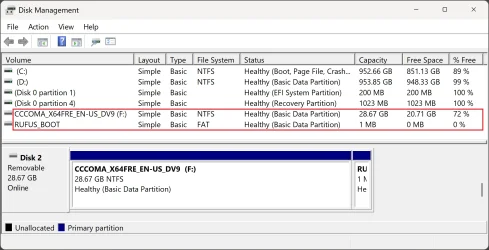
In addition to the NTFS partition, Rufus creates a small FAT partition labeled UEFI_NTFS, which contains the UEFI:NTFS bootloader.

CORRECTION:

The latest version of Rufus changes the name of the UEFI:NTFS partition to RUFUS_BOOT.

In addition to the NTFS partition, Rufus creates a small FAT partition labeled RUFUS_BOOT, which contains the UEFI:NTFS bootloader.

Disk Management.webp

The Media Creation Tool automatically splits the large install.wim (or install.esd) into install.swm and install2.swm when creating a USB. This ensures the installer stays under the 4GB file size limit required by FAT32-formatted drives.
 

My Computers

System One System Two

  • OS
    Windows 11 Pro
    Computer type
    PC/Desktop
    CPU
    AMD Ryzen 9 9950X3D
    Motherboard
    ASRock B650E Taichi Lite
    Memory
    Kingston FURY Beast 64GB (2x32GB) DDR5 6000MT/s
    Graphics Card(s)
    ASUS TUF Gaming Radeon RX 9070 OC Edition 16GB GDDR6
    Hard Drives
    Solidigm P44 Pro 2TB M.2 NVMe SSD
  • Operating System
    Windows 11 Home
    Computer type
    Laptop
    Manufacturer/Model
    Lenovo Legion Pro 7i Gen 10 16"
    CPU
    Intel Core Ultra 9 275HX
    Memory
    64GB (2x 32GB) DDR5-6400
    Graphics card(s)
    NVIDIA GeForce RTX 5080 16GB GDDR7 Laptop GPU
    Hard Drives
    2x 1TB M.2 NVMe SSD (SK Hynix)
Back
Top Bottom




