MCT Created Media with 26200.8457 no longer boots after clearing and reinstall secure boot keys on ASUS Z390 motherboard


Keith Weisshar

Well-known member
VIP
Local time
12:22 AM
Posts
113
Location
Hazlet, NJ
OS
Windows 11 Pro
Why won't the May 2026 MCT media boot after clearing and reinstalling default secure boot keys on the Z390 motherboard? When I try to boot from this USB it goes back to the UEFI BIOS screen and won't boot. I had to switch Secure Boot mode to Other OS instead of Windows UEFI before I can clean install Windows. Also if I clear and reinstall the default Secure Boot keys from the BIOS I can no longer boot into Windows due to red Secure Boot Violation error unless I switch Secure Boot mode to Other OS and by doing this it also asks for the Bitlocker Recovery Key which is only stored in the Microsoft Account which is protected by two step verification which requires another device. The motherboard was made in 2018 and doesn't include the CA 2023 keys and ASUS still has not receive a BIOS update with the CA 2023 keys preinstalled.
 
Windows Build/Version
26200.8457

My Computer My Computer

At a glance

Windows 11 ProIntel Core i9 9900K 3.8GHz16GB DDR4 2666MHzNVIDIA RTX 2060
OS
Windows 11 Pro
Computer type
PC/Desktop
Manufacturer/Model
Custom Built
CPU
Intel Core i9 9900K 3.8GHz
Motherboard
ASUS Z390 Maximus XI Hero Wi-Fi
Memory
16GB DDR4 2666MHz
Graphics Card(s)
NVIDIA RTX 2060
Sound Card
Realtek Onboard
Monitor(s) Displays
Acer XF243Y M3
Screen Resolution
1920x1080
Hard Drives
Samsung 970 EVO Plus 2TB
PSU
850W
Case
Cooler Master HAF-932
Cooling
Air
Keyboard
Razer DeathStalker V2 Pro
Mouse
Razer Cobra Pro
Internet Speed
Gigabit
Browser
Microsoft Edge
Antivirus
Windows Security
Can you download the scripts from this thread?

Mount the USB drive, and run this script:
Code:
Check-UEFI.bat -Verbose -BootMedia

From your details, it sounds like MCT is picking the CA 2023 version of the boot files. There are two versions of the boot files, one using the legacy CA 2011 cert and another with CA 2023. Depending on your current list of Secure Boot certs, and the boot file's version, it will fail the Secure Boot security check.

And nothing works until you disable Secure Boot mode or pick "Other OS".

PS - It may be possible to update the certs for this ASUS Z390.
 

My Computer My Computer

At a glance

Windows 7
OS
Windows 7
The motherboard was made in 2018 and doesn't include the CA 2023 keys and ASUS still has not receive a BIOS update with the CA 2023 keys preinstalled.

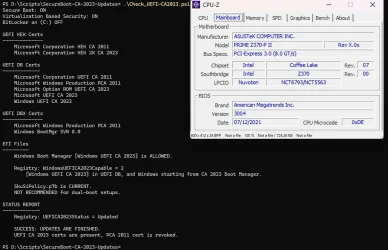
ASUS will not be providing new BIOS firmware for your Z390. I'm in the same boat with my Z370,
but I was able to update Secure Boot with the new certs.

1779061653552.webp
 

My Computers My Computers

  • At a glance

    Win 11 Pro 25H2 26200.8894Intel® Core™ i7-14700KG.SKILL Ripjaws S5 Series 64GB (2 x 32GB) DDR5ASUS GeForce RTX 4070 Super 12GB
    OS
    Win 11 Pro 25H2 26200.8894
    Computer type
    PC/Desktop
    Manufacturer/Model
    Self Built
    CPU
    Intel® Core™ i7-14700K
    Motherboard
    ASUS TUF Z690-PLUS WIFI (BIOS 4505)
    Memory
    G.SKILL Ripjaws S5 Series 64GB (2 x 32GB) DDR5
    Graphics Card(s)
    ASUS GeForce RTX 4070 Super 12GB
    Sound Card
    Sound Blaster AE-5 Plus
    Monitor(s) Displays
    ASUS TUF Gaming 27" 2K HDR Gaming
    Screen Resolution
    2560 x 1440
    Hard Drives
    Samsung 990 Pro 1TB NVMe (Win 11 25H2)
    SK hynix P41 500GB NVMe
    SK hynix P41 2TB NVMe (x3)
    Crucial P3 Plus 4TB
    PSU
    Corsair RM850x Shift
    Case
    Antec Dark Phantom DP502 FLUX
    Cooling
    Corsair Nautilus 360 RS AIO
    Keyboard
    Logitech MK 320
    Mouse
    Razer Basilisk V3
    Internet Speed
    750Mbs
    Browser
    Firefox
    Antivirus
    Winows Security
    Other Info
    MR 8.1 Home
  • At a glance

    Win 11 Pro 25H2 26200.8894Intel Core i5-1140064 GB DDR4MSI GeForce RTX 3060 Ventus 2X 12GB
    Operating System
    Win 11 Pro 25H2 26200.8894
    Computer type
    PC/Desktop
    Manufacturer/Model
    Self Built
    CPU
    Intel Core i5-11400
    Motherboard
    Asus TUF Gaming Z590 Plus WiFi (BIOS 2803)
    Memory
    64 GB DDR4
    Graphics card(s)
    MSI GeForce RTX 3060 Ventus 2X 12GB
    Sound Card
    SoundBlaster Audigy Fx V2
    Monitor(s) Displays
    Samsung F27T350
    Screen Resolution
    1920x1080
    Hard Drives
    Samsung 980 Pro 1TB
    Samsung 970 EVO Plus 2TB
    Samsung 870 EVO 500GB SSD
    PSU
    Corsair HX750
    Case
    Cougar MX330-G Window
    Cooling
    Thermalright Frozen Edge 240 Black AIO
    Internet Speed
    350Mbps
    Browser
    Firefox
    Antivirus
    Windows Security
  • System Three
    Win 11 Pro 25H2 26200.8894
    ASUS PRIME Z370-P II BIOS 3004 7/12/21
    Intel Core i7-8700 CPU @ 3.20GHz
    32GB DDR4 RAM (4x8)
    iGPU Intel UHD Graphics 630
    Mid-Tower Desktop

My Computer My Computer

At a glance

Windows 11 Pro 25H2Intel I9-9900K64GBNVIDIA RTX 2060
OS
Windows 11 Pro 25H2
Computer type
PC/Desktop
Manufacturer/Model
Dell XPS 8930
CPU
Intel I9-9900K
Memory
64GB
Graphics Card(s)
NVIDIA RTX 2060
Sound Card
NVIDIA High Definition Audio
Monitor(s) Displays
4k Samsung
Screen Resolution
3840 x 2160
Hard Drives
512GB NVMe, ADATA SU 800, 2TB HDD

Latest Support Threads

Back
Top Bottom